
Plugin Markets & Managers
dsh-plugin-butler
imtanhui/dsh-plugin-butler · ★ 2
 imtanhui
dsh-plugin-butler is a graphical plugin manager for DeepSeek Harness (DSH). It lives in the Web settings page and lets you manage every plugin in a profile — organize, toggle,…
Manifest details
安装
dsh plugin --profile web add github:imtanhui/dsh-plugin-butlerGitHub 源码安装:首次需按提示配置 allowBuilds 构建授权后重试
For install and environment setup, plus plugin development tutorials, see DSH community docs ↗
README
Table of contents


dsh-plugin-butler (插件管家) is a graphical plugin manager for DeepSeek Harness (DSH). It lives in the Web settings page and manages every plugin in a profile — a Chinese catalog, one-click toggle (hot-reload), official/external split, custom groups, update check + one-click update (auto-rollback), a plugin market (search / install / uninstall), detail modal (Markdown README), health status, and a full-screen dependency graph. Zero build, zero runtime dependencies — only Node builtins plus services the deployment already provides.
Install the butler first, then install other plugins: afterwards every toggle, update, install and uninstall goes through one UI — toggling is hot-applied, failed updates auto-roll back — which sharply cuts down "installed-and-broke, won't-start" incidents.
If a plugin breaks profile startup: manually clean its
disabledblock incordis.patch.ymlor uninstall the dependency, then restart.
Install
# Option 1 (recommended): install from GitHub
dsh plugin --profile <name> add github:imtanhui/dsh-plugin-butler

# Option 2: local source (development)
cd /path/to/dsh-plugin-butler
dsh plugin --profile <name> add .
After restarting the profile, the Web UI's Settings → Plugins shows a "插件管理" (Plugin manager) tab.
Update
Open Settings → Plugins → 插件管理 and click 检查更新 (Check updates): it compares each installed npm dependency against the registry latest and badges rows with current → latest. Click 更新 on a row to upgrade in one click — on failure it automatically rolls back to the previous version. link / file / git sources are marked not auto-updatable.
Features
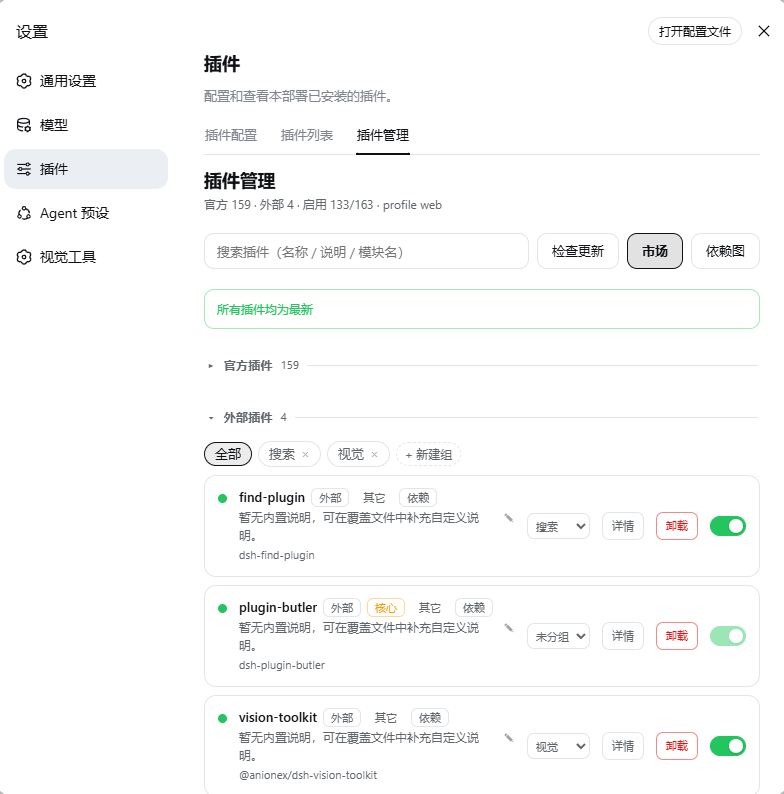
| Capability | Description |
|---|---|
| View | Official / external sections (collapsible); a built-in Chinese catalog (name + one-line description + category) for 130+ official modules; click a description to edit in place (Save / Ctrl+Enter / Esc), custom overrides saved to ~/.dsh/plugin-manager/catalog.json with a "自定义" (custom) badge |
| Live toggle | Each row has a switch that surgically edits the profile's cordis.patch.yml (add/remove a disabled: true block) and lets DSH's HMR observer hot-apply it — no restart. Core rows (app / transport / services the manager itself needs) are protected; !!js-controlled rows are left untouched; other hand-added patch entries are preserved verbatim |
| Custom groups | Organize external plugins into groups (create / rename / delete / move), persisted to ~/.dsh/plugin-manager/groups.json, one-click filter |
| Update check + one-click update | 检查更新 compares the registry latest and marks current → latest; 更新 re-runs pnpm add <name>@latest, auto-rolling back on failure |
| Uninstall | Removes from dsh.profile.bundles + pnpm remove, rolls back on failure |
| Detail | Detail modal with a hand-written Markdown README renderer (zero deps) |
| Health | Failed rows highlighted red + a "只看失败" (show only failed) filter; each row expands to reveal injected services / provider dependencies |
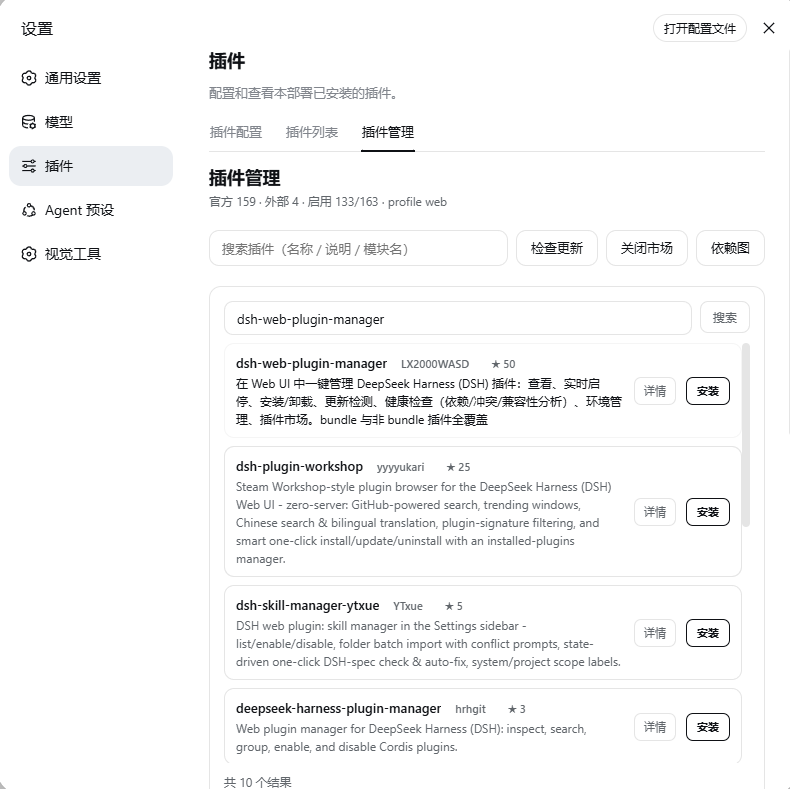
| Capability | Description |
|---|---|
| Plugin market | Searches GitHub topic:dsh-plugin repos (star-ranked, paginated); each item shows author / stars / description, with 详情 (details) + 安装 (one-click install) |
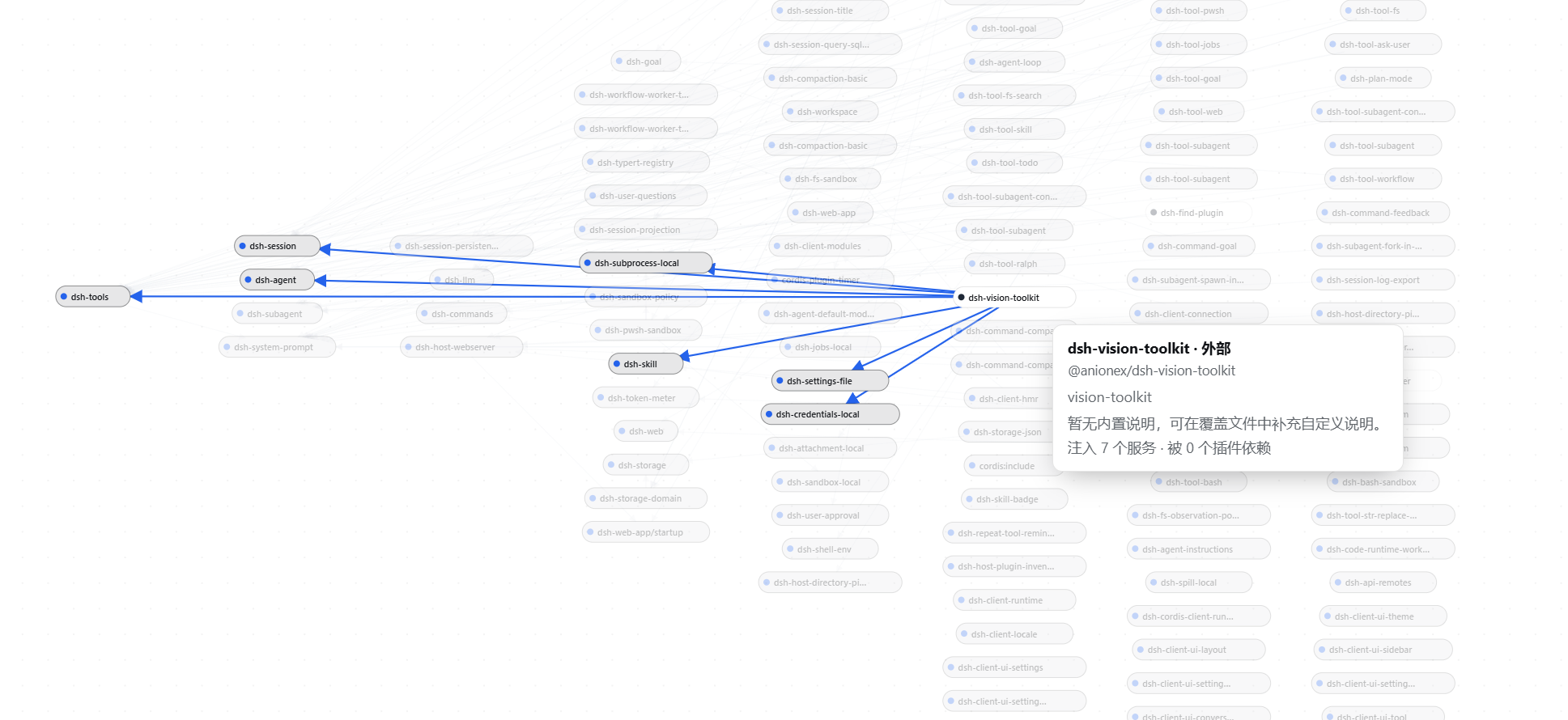
| Capability | Description |
|---|---|
| Dependency graph | Full-screen graph: left-to-right mind-map layout, nodes show the project name with details on hover; official = blue dot, external = black dot; draggable nodes, hover highlight of the dependency chain, dot-grid canvas, low-opacity thin edges |
Architecture
- Host:
lib/index.js— thePluginManagerGateway+/plugin-manager/*REST routes (GET carries a same-origin guard against CSRF / DNS-rebinding); update / install / uninstall are serialized under a mutex - Patch editing:
lib/patch.js— pure helpers (setRowDisabled/parsePatchBlocks/githubUrl/moduleShortName…) for adding/removingdisabledblocks, row-level ops, atomic writes - Dependency resolution: the Host
list()resolves injection edges from the Cordisfiber._store({service: impl}, whereimpl.fiber.entry.options.nameis the provider module) and returns anedgesarray - Client:
lib/client.js— hand-writtenwindow.__ModuleLoader__.load+React.createElement(no JSX), registerssettings.plugins.tab(idmanager); hand-written Markdown renderer and dependency graph (Sugiyama-style mind-map layout, SVG edges) - Transport: the official webServer route + same-origin fetch (zero build, zero runtime deps, no Typert Remote)
- State files: Chinese catalog / groups / description overrides live at
~/.dsh/plugin-manager/{catalog.json,groups.json}
Known limitations
- Disabling a depended-on entry can fail profile startup (official fail-loud design); recover by removing its
disabledblock fromcordis.patch.yml - Core rows are protected and can't be disabled from the UI (edit the config file manually)
!!js-controlled rows are never touched by the UI- link / file / git dependencies can't be auto-updated (marked as such)
- The market uses the GitHub Search API (60 req/h unauthenticated), which only affects frequent searching
- The dependency graph is a best-effort runtime resolution from
fiber._store; semantic conflicts are out of scope
Develop
pnpm run check   # node --check on the three source files
pnpm test        # node --test (16 pure-function unit tests)
There is no build step:
lib/index.js/lib/client.js/lib/patch.jsship as-is (after changing client code, refresh the page / restart the profile).
Related
- Source & issues: github.com/imtanhui/dsh-plugin-butler
- Similar project: dsh-web-plugin-manager
- License: MIT
Related plugins
dsh-market
 dsh-market
/dsh-market
装在 DSH 里的插件市场:设置页内逛/搜全部社区插件,按分类筛选,确认后一键安装,已装插件一目了然。
dsh plugin --profile web add dshmarketdsh-web
 zhu1090093659
/dsh-web
DeepSeek Harness Web GUI 插件全家桶。皮肤、宠物与社区插件索引已拆分为独立仓库(dsh-skins / dsh-pet / dsh-community-plugins),本仓通过 npm 包内置它们。
dsh plugin --profile web add 'github:zhu1090093659/dsh-web#bb85e53c311eea95c14a261dd1689a6a1dd0ce6a'awesome-dsh-plugins
 AdamPlatin123
/awesome-dsh-plugins
前部索引仓库(Radar):自动扫描发现的所有 dsh 插件候选;经测试合格的将移入后序精选目录仓库
dsh plugin --profile web add github:AdamPlatin123/awesome-dsh-pluginsdsh-plugin-shop
 LivXue
/dsh-plugin-shop/packages/dsh-plugin-shop
Browse, install, enable, and update plugins for DeepSeek Harness.
dsh plugin --profile web add 'dsh-plugin-shop@0.9.0'dsh-plugin-hub
 dshplugin
/dsh-plugin-hub
DeepSeek Harness 社区插件市场:收录 4,603 个 DSH plugin,人工精选验证 4,300
dsh plugin --profile web add github:dshplugin/dsh-plugin-hubmarketingdashboard
 theBigGavin
/marketingdashboard
面向金融与产业研究的一屏式实时行情大屏:A股/港股/美股指数、大宗商品、美债收益率、板块热点、主力资金流、7×24 快讯、产业链自选股、AI 大模型 Token 追踪。A real-time market research cockpit on a single screen: CN/HK/US indices, commodities, treasury yields…
dsh plugin --profile web add 'github:theBigGavin/marketingdashboard#2d71054d76bb78b82ddb7818af4bdff49a6179a7'