
Notifications & Integrations
dsh-work-rest-timer
kol-mm/dsh-work-rest-timer · ★ 1
 kol-mm
A floating pomodoro-style reminder that runs in the DeepSeek Harness (DSH) browser client and speaks a Chinese voice reminder to rest or get back to work when time is up.
Manifest details
安装
dsh plugin --profile web add github:kol-mm/dsh-work-rest-timerGitHub 源码安装:首次需按提示配置 allowBuilds 构建授权后重试
For install and environment setup, plus plugin development tutorials, see DSH community docs ↗
README
Table of contents
A floating Pomodoro-style reminder that runs in the DeepSeek Harness (DSH) browser client and speaks a Chinese voice reminder when it's time to rest or get back to work.


Screenshots
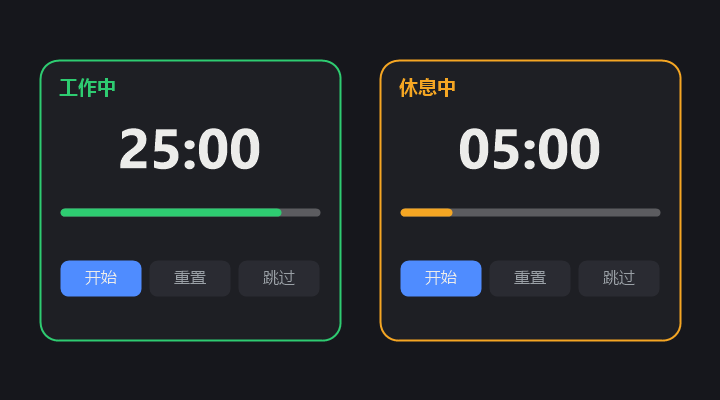
Overview
It's easy to lose track of time when you're focused on work. This plugin is a Pomodoro-style work/rest cycle reminder:
- After N minutes of focused work, it reminds you to take a break;
- After M minutes of rest, it reminds you to get back to work;
- Work and rest alternate automatically (auto-loop can be disabled).
It lives as a small floating card pinned to the bottom-right corner, always showing the current phase and time remaining without interrupting your workflow.
Features
- ⏱️ Countdown: large
MM:SScountdown with a colored progress bar (work = green, rest = orange). - 🔊 Voice reminders: speaks Chinese aloud when a phase ends, accompanied by a short chime.
- 🎵 Voice preview: a one-click preview in settings to test the reminder voice.
- ⚙️ Configurable durations: work and rest lengths are both adjustable (1–600 minutes).
- 🔁 Auto-loop: automatically switches between work and rest (can be disabled).
- ▶️ Controls: start / pause, reset, skip.
- 📌 Floating card: pinned to the bottom-right; collapse it into a small pill.
UI reference
| Area | Description |
|---|---|
| Header label | Current phase ("Working" green / "Resting" orange) |
| Countdown | Large MM:SS, refreshed every second |
| Progress bar | Elapsed / remaining ratio of the current phase |
| Controls | Start / pause, reset, skip |
| Settings (⚙) | Work duration, rest duration, voice reminder (with preview), auto-loop |
| Collapse (–) | Shrink into a bottom-right pill; click to expand again |
Quick start
This plugin is a DSH dynamic Cordis plugin (Client-only):
- Open DSH and enter a session.
- Copy the whole
return { ... }block fromwork-rest-timer.client.js. - Pass it as
code.clienttocordis_define. - Run
cordis_run; once approved, the card appears in the bottom-right corner.
The plugin is a temporary, process-local extension: stopping / updating / removing it dismisses the card. The source is fully preserved in this repo and can be re-run at any time.
Configuration
| Option | Default | Range | Description |
|---|---|---|---|
| Work duration | 25 min | 1–600 min | Length of the focus (work) phase |
| Rest duration | 5 min | 1–600 min | Length of the rest phase |
| Voice reminder | On | On / Off | Speak aloud + chime when a phase ends |
| Auto-loop | On | On / Off | Automatically switch to the next phase |
How it works
- Runtime: DSH browser client; the plugin injects into the
shell.overlayslot without replacing any existing UI. - Timing: uses the DSH
timerservice (ctx.interval) to tick down once per second and switch phases at zero. - Voice: uses the browser's native
speechSynthesiswithlang = 'zh-CN'. - Chime: uses the Web Audio
AudioContextfor a short attention beep. - Lifecycle: every side effect (styles, slot registration, timers) is scoped to the plugin fiber and cleaned up on stop.
Requirements
- DeepSeek Harness (DSH) browser client.
- A browser supporting
speechSynthesis(voice) andAudioContext(chime, optional). - Chinese voice pack for Chinese speech (Windows: Settings → Time & language → Speech → Add voices).
Project structure
work-rest-timer/
├── .github/
│   └── workflows/
│       ├── ci.yml              # GitHub Actions CI
│       └── release.yml         # release on tag
├── docs/
│   └── screenshots/
│       └── screenshot.png      # UI screenshot
├── scripts/
│   └── validate.js             # syntax / structure validation script
├── README.md                   # Chinese README
├── README.en.md                # English README
├── LICENSE                     # MIT license
├── .gitignore
└── work-rest-timer.client.js   # plugin Client source
FAQ
Q: No sound when a phase ends? A: Make sure "Settings → Voice reminder" is on, and that the browser allows audio. Usually, once you've clicked "Start", the browser allows speech and chime playback.
Q: The voice isn't Chinese / sounds off? A: The system falls back to a default voice when no Chinese voice pack is installed. Install a Chinese voice (e.g., Microsoft Huihui / Xiaoxiao).
Q: Can it remind me only once instead of looping? A: Yes — turn off "Settings → Auto-loop"; the timer pauses at the end of a phase.
Q: The card covers content? A: Click the "–" button to collapse it into a small bottom-right pill.
License
MIT © kol-mm
Related plugins
dsh-im
 xmanrui
/dsh-im
通过扫码把IM机器人接入DeepSeek Harness(支持飞书、微信、钉钉等)。
dsh plugin --profile web add github:xmanrui/dsh-imdsh-pocket
 shaobeichen
/dsh-pocket
手机远程访问 DSH Web 界面:扫码即用局域网或公网(cloudflared 隧道)访问,实时同屏、移动端适配布局,带设置页管理。
dsh plugin --profile web add github:shaobeichen/dsh-pocketDSH Startup Screen
 6shenhonghong9
/dsh-startup-screen
DeepSeek Harness 启动界面与启动动画:黑幕 DeepSeek 标识 → 过曝洗白 → 暖白档案底板 → 交互式访问授权序列(需要访问许可 / 身份资料确认 / 接收访问需求 / 开始读取权限 / 读取完毕·核验通过 / 欢迎访问)。中文主字 + 英文等宽副标题,真声素材 + 界面音效,身份名称等参数在 DSH 设置页可改。web profile 与 DeepSeek Harness Desktop 桌面端通用。桌面端(Windows)播放启动动画期间把标题栏整层透明化:最小化/最大化/关闭按钮与其底色一并不可见,播放结束自动还原。
dsh plugin --profile web add 'github:6shenhonghong9/dsh-startup-screen#1f35ea33810e02a900b31df01f9c806f92f398df'dsh-qqbot
 tencent-connect
/dsh-qqbot
让 QQ Bot 接入 DeepSeek Harness(dsh)的官方插件
dsh plugin --profile web add github:tencent-connect/dsh-qqbotdeepseek-harness-mobile
 sorsama
/deepseek-harness-mobile
DeepSeek Harness 的 Android 伴侣应用:经局域网用手机聊天、看目标、审批与收通知;Kotlin + Jetpack Compose
dsh plugin --profile web add github:sorsama/deepseek-harness-mobiledsh-bridge
 wenbin-wb
/dsh-bridge
DeepSeek Harness 多通道远程访问与全域安全门禁插件 手机扫个码,人不在电脑前也能继续用 DeepSeek Harness。躺在沙发上、出差在外、跨网访问——都不用守着电脑,也不用自己搭公网服务器,扫码就能在手机/平板或任意设备上接着干。 把你本地的 DeepSeek Harness 无缝延伸到手机、平板、公网、甚至微信 / QQ /…
dsh plugin --profile web add github:wenbin-wb/dsh-bridge