
UI Enhancements
dsh-writing-pad
linhx1999/dsh-writing-pad · ★ 2
 linhx1999Curated
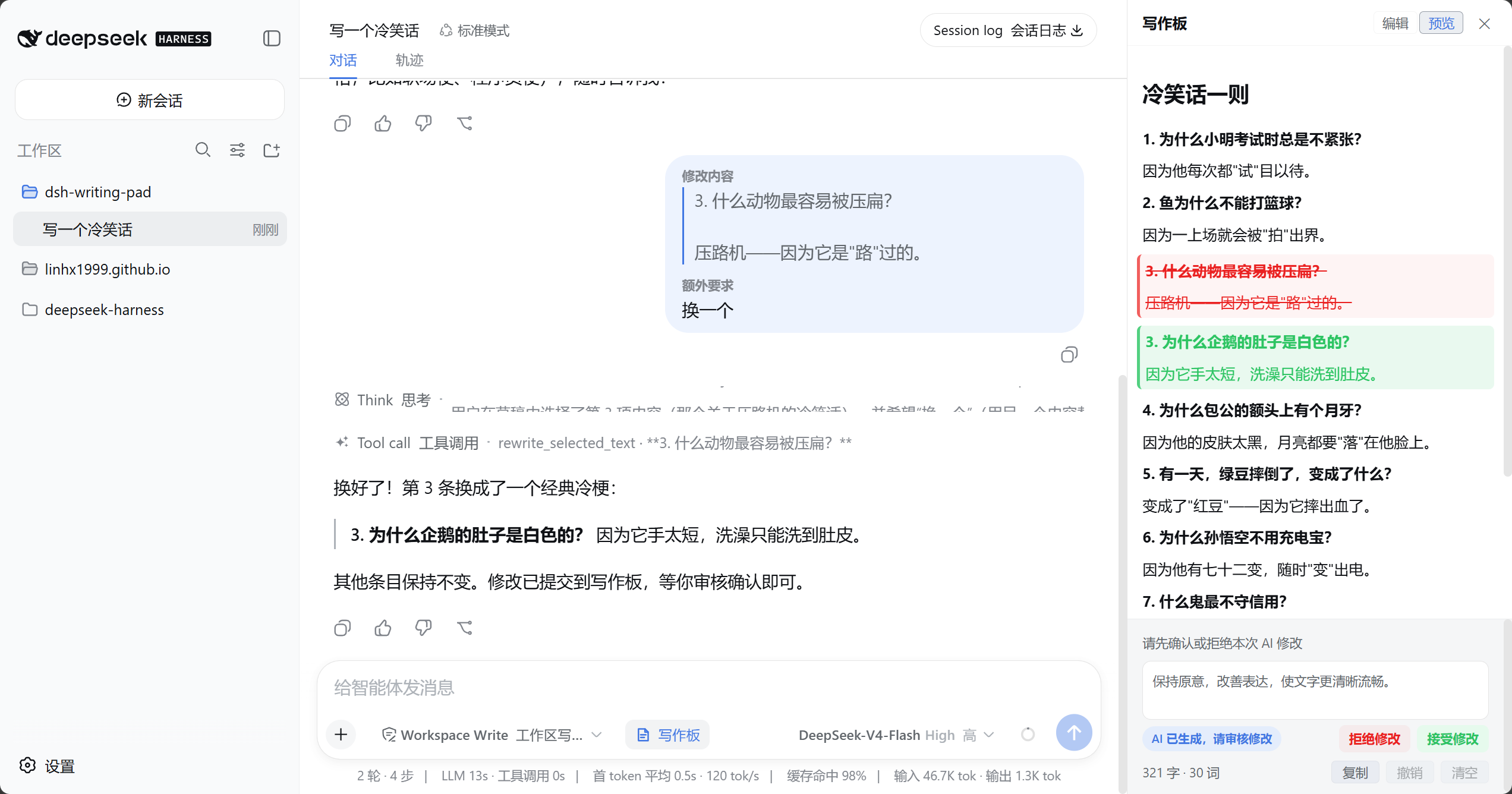
Session-scoped Markdown writing pad docked beside the conversation, with edit/preview modes, selection-based AI rewrites, diff review, undo, and draft recovery.
Manifest details
安装
dsh plugin --profile web add github:linhx1999/dsh-writing-padGitHub 源码安装:首次需按提示配置 allowBuilds 构建授权后重试
For install and environment setup, plus plugin development tutorials, see DSH community docs ↗
README




A session-scoped Markdown writing pad for the DeepSeek Harness web GUI. It docks beside the conversation, keeping drafting, preview, and focused AI rewrites in one workflow.
Highlights
- Open it anytime: open or close the writing pad from the composer toolbar and keep it open while switching sessions or sending a new session's first message.
- Focused rewrites: select text, enter multi-line instructions, save reusable defaults, and resize the instruction area.
- Proactive writing-pad delivery: when users ask to draft, write, continue, or generate usable text, the model prioritizes
write_full_draftfor a complete candidate; selection edits userewrite_selected_text. A tool call opens the writing pad automatically, then the candidate reveals its Diff at the first change. - Visible state: the UI reports saving, copying, generation, pending review, and failure states.
- Host-synchronized language: client UI copy switches immediately with dsh's 中文/English setting.
- Clean conversations: while the writing pad is non-empty, the complete draft travels as separate context beside the main-composer message; the message remains the user's original text and is never labelled as an additional instruction.
- Session-scoped state: drafts remain isolated by session, with edit/preview modes, full-draft copy, clear, and up to 50 undo steps.
- No workspace writes: drafts are staged in Host memory and never create or overwrite project files automatically.
Install
Install the dsh CLI first, then add the latest stable release to the web profile:
dsh plugin --profile web add dsh-writing-pad
Start the web GUI:
dsh web
For local development, package the current plugin, run the latest dsh release from npm's latest tag, reinstall the plugin, and start the web GUI with:
pnpm dev
Release
Update and commit the version in package.json, make sure npm login is complete and the working tree is clean, then run:
pnpm publish
The prepublish hook runs type checks, tests, and package verification before publishing directly to npm without an extra confirmation prompt. The postpublish hook verifies the version and creates the local v<version> tag. It does not push the tag; review the release and follow the printed command to push it manually.
Usage
- Click “Writing Pad” in the composer tool row.
- Enter or paste Markdown and switch between edit and preview as needed.
- Select the passage to change; focus moves to the additional-instruction editor.
- Enter instructions. Press Enter to send or Shift+Enter for a new line, and optionally save the text as your default.
- Review the highlighted Diff and accept or reject it. Leaving review without choosing accepts the candidate by default.
Language
The writing pad's client controls, status feedback, and writing-request summaries follow the dsh Host language setting (中文/English). When additional instructions are empty, the plugin chooses the default rewrite instruction in the active UI language at send time and includes it in the request. User-saved default instructions always retain their original text. Host tool descriptions, tool-result markers, the XML wire format, and replay parsing retain their existing Chinese conventions and do not change with the UI language.
Data and recovery
- Edits are debounced into the current Host process's memory.
- While the writing pad is non-empty, every real user message from the main composer carries a separate complete-draft context, with the user's original text outside that context. Selection rewrites retain their own additional-instruction field and also carry the full draft. Both paths produce one user message whose full draft stays hidden in the UI.
- Draft, additional-instruction, and selection elements use a multiline XML layout for readable transcript inspection without changing the original CDATA text.
- After a restart, the plugin recovers the latest accepted draft and pending writing-tool candidate; legacy
writing_draftevents remain recoverable, and this browser replays stored review decisions. - Manual edits that have not travelled with any user message do not survive a Host-process restart.
Uninstall
dsh plugin --profile web remove dsh-writing-pad
License
MIT
Related plugins
dsh-web(原 dsh-web-ui)
 zhu1090093659
/dsh-web-ui
dsh-web(原 dsh-web-ui):任务看板、git 图、右侧面板、远程移动端 UI、桌宠、实时 token 统计与皮肤中心的全家桶。仓库已更名 zhu1090093659/dsh-web,根目录声明 dsh.bundle.patch,支持根 Git 入口安装。
dsh plugin --profile web add github:zhu1090093659/dsh-webdsh-web-all 聚合包(原 dsh-web-ui-all)
zhu1090093659zhu1090093659/dsh-web-ui/packages/dsh-web-ui-all
旧整包路径 packages/dsh-web-ui-all 已随仓库更名 dsh-web 迁移:现聚合目录为 packages/dsh-web-all,npm 聚合包 @linxin666/dsh-web-all。与总仓根 Git 入口是同一产品的两种整包方式,不重复计数。
dsh plugin --profile web add @linxin666/dsh-web-all@latestdsh-TUI
 ccch1mneyyy
/dsh-TUI
Claude Code 风格全屏终端 UI:像素鲸鱼顶栏、实时工作状态行、思考流式展开。
dsh plugin --profile web add github:ccch1mneyyy/dsh-TUIdsh-cc-tui
ccch1mneyyyccch1mneyyy/dsh-cc-tui
一个美观且实用的 Claude Code 风格 TUI 插件:像素鲸鱼顶栏、双流光大字、实时工作状态行、思考流式展开、双击 Esc 时间回溯、蓝白上下文进度条 + TPS 仪表。 零核心改动,纯插件挂载。安装插件即可启用,卸载后不会留下核心补丁。 献给钟爱tui的各位极客们 A beautiful, practical Claude…
dsh plugin --profile web add github:ccch1mneyyy/dsh-cc-tuideepseek-balance-whale-widget
 meteornox
/deepseek-balance-whale-widget
DSH 小鲸鱼余额挂件(DeepSeek Balance Whale Widget)
dsh plugin --profile web add github:meteornox/deepseek-balance-whale-widgetDSH-better-sidebar
 omdsh-dev
/DSH-better-sidebar
侧边栏完整工作台:内置文件渲染编辑、终端、Git 与子代理,支持三方插件注册新 Tab。
dsh plugin --profile web add github:omdsh-dev/DSH-better-sidebar