
Sessions & Messages
dsh-tui
little-greenbean/dsh-tui · ★ 1
 little-greenbean
Claude-CLI-style terminal chat for DeepSeek Harness (dsh) — a thin Ink plugin installed via `dsh plugin`
安装
dsh plugin --profile web add github:little-greenbean/dsh-tuiGitHub 源码安装:首次需按提示配置 allowBuilds 构建授权后重试
For install and environment setup, plus plugin development tutorials, see DSH community docs ↗
README
Claude-CLI-style terminal chat for DeepSeek Harness (dsh) — a thin Ink plugin installed via dsh plugin.
dsh-tui is a publishable bundle-patch plugin. It disables the headless one-shot runner and inserts a tui-runner that renders an interactive, bottom-anchored streaming transcript over the dsh agent kernel. The kernel is untouched — tools, skills, subagents, todos, goal, plan, and workflow all run through the harness; the TUI only renders.
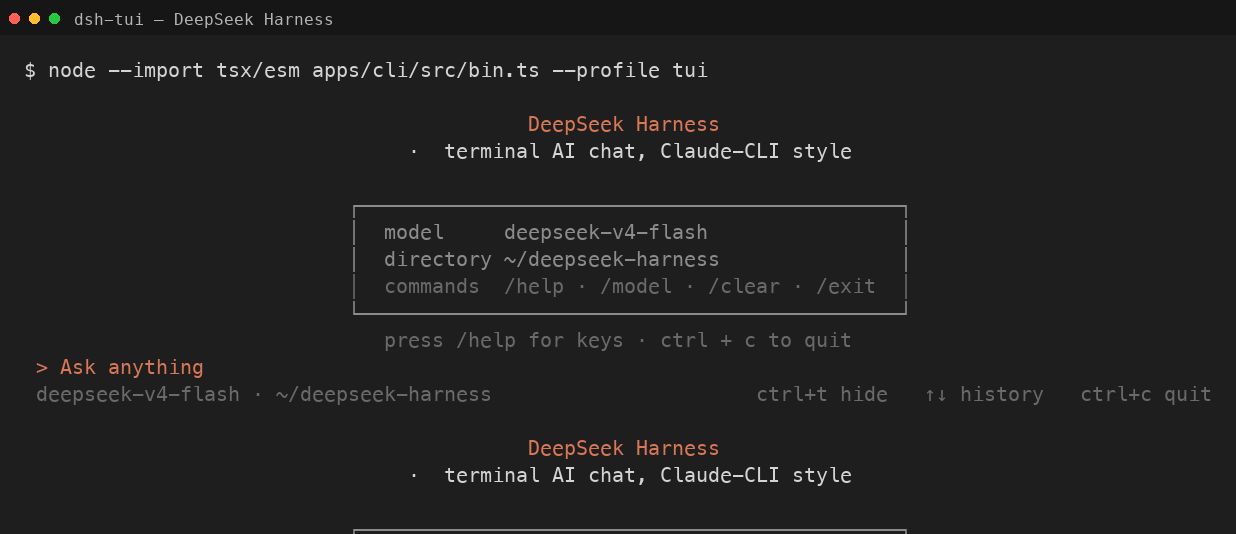
Features
- Claude-CLI-style UI: bottom-anchored streaming transcript,
>composer, folded tool-call cells. - Collapsible thinking (
ctrl+t), interruptible turns (esc), history recall (↑/↓), inline permission prompts. - Terminal-theme-adaptive colors (light/dark, probed via OSC 11).
- Slash commands and CLI flags:
/help,/clear,/model,/status,/cost,/exit— plus--resume,--continue,--model,--list-sessions. - Everything else (
/compact,/goal,/plan,/permission,/feedback, …) delegates to the harness's native command registry.
Install
Requires Node.js ≥ 20 and the harness CLI on PATH (npm install -g @deepseek-ai/dsh).
Path 1 — npm i -g (recommended):
npm install -g @deepseek-ai/dsh    # the harness (skip if already installed)
npm install -g dsh-tui-cli           # this plugin; provides the `dsh-tui` command
dsh-tui                            # auto-bootstraps the `tui` profile, then runs
Path 2 — curl installer:
curl -fsSL https://raw.githubusercontent.com/little-greenbean/dsh-tui/main/scripts/install.sh | sh
dsh --profile tui
Both are idempotent and safe to re-run. The profile composes @deepseek-ai/dsh-base + @deepseek-ai/dsh-headless + dsh-tui; the launcher/installer wire the in-box headless bundle for you.
The dsh-tui launcher
The package ships a dependency-free dsh-tui bin that:
- ensures the
tuiprofile exists, bootstrapping it on first run; - then runs
dsh --profile tui, passing through any extra arguments; - exits 127 with an install hint if
dshis not on PATH.
dsh-tui                       # equivalent to: dsh --profile tui
dsh-tui --resume <id>         # resume a prior session
dsh-tui --continue            # resume the most recent session
dsh-tui --list-sessions       # list resumable sessions
Usage
| Key | Action |
|---|---|
esc |
interrupt the current turn |
ctrl+t |
toggle thinking display |
↑ / ↓ |
recall previous input history |
ctrl+c |
quit |
Slash commands typed in the composer: /help, /clear, /model [name], /status, /cost, /exit (or /quit). Any other slash command is forwarded to the harness's native command registry and rendered in the transcript.
CLI flags (after --profile tui or passed through dsh-tui): --resume <id>, --continue/-c, --model <name>/-m, --list-sessions/--ls, --help/-h.
Model & credentials
The TUI uses whatever model/provider the harness's agent-default-model resolves to — by default the DeepSeek official provider (deepseek-official) with model deepseek-v4-flash, overridable through the harness settings (e.g. ~/.dsh/settings.yaml, or the Web UI). The API key is resolved through the harness's credential store: the DEEPSEEK_API_KEY environment variable, or ~/.dsh/.credentials.yaml (mode 0600).
export DEEPSEEK_API_KEY=sk-...
dsh --profile tui
Contributing
See docs/ARCHITECTURE.md for the plugin/patch model and module graph, and docs/PLAN.md for the development plan. Run the unit tests with npm test.
License
Integration reference: gxinxing/deepseek-harness-tui (MIT).
Related plugins
archify
 tt-a1i
/archify
架构图生成 Skill 总仓(多宿主):可校验的自包含架构图、工作流图、时序图、数据流图与生命周期图。DSH 安装不走本仓根——根目录不是 DSH bundle,请用适配包 @tt-a1i/archify-dsh(见 DSH 集成条目)。
dsh plugin --profile web add @tt-a1i/archify-dsh@1.0.0DeepSeek-Bot
 Fei2411
/DS-Bot/ds-bot
DS Bot: a team of long-lived Bots for DeepSeek Harness, with Main Bots, Bot-to-Bot messages and group chats
dsh plugin --profile web add 'ds-bot@0.2.4'Study-Mate
 Miaotofu01
/Study-Mate
StudyMate learning skills and lesson engine for DeepSeek Harness, Google Antigravity, Codex and ChatGPT Work.
dsh plugin --profile web add 'github:Miaotofu01/Study-Mate#d8114f38363272852b339d6788b2f8f007243b43'dsh-plugin-subscriptions
 V1ki
V1ki/dsh-plugin-subscriptions
把 ChatGPT(Codex)、Claude 与 Grok(X Premium)订阅用作 DeepSeek Harness 的 LLM provider——Web UI OAuth 登录,无需 API key
dsh plugin --profile web add github:V1ki/dsh-plugin-subscriptionsRabiRoute
 vb2250158
/RabiRoute/plugins/rabi-dsh-context
Connect DSH lifecycle events and conversation context to Rabi Manager.
dsh plugin --profile web add 'github:vb2250158/RabiRoute#e483f87e68cef2c8f5112b101e333b1a9577a9f7&path:/plugins/rabi-dsh-context'dsh-deepseek-web-login
 cv-superding
/dsh-deepseek-web-login
Unofficial DSH plugin: use chat.deepseek.com web models as a DSH LLM provider (browser login capture + PoW solving + SSE streaming + prompting-based tool calls), provider route deepseek-web
dsh plugin --profile web add 'dsh-deepseek-web-login@1.0.3'