
Usage & Billing
dsh-usage-stats
lixingxing126/dsh-usage-stats · ★ 0
 lixingxing126
A minimal DSH usage plugin that records per-call input, output, cache-read, and cache-write tokens in SQLite, exposes a read usage tool, and provides cost conversion and a Web dashboard.
README body is shown in Chinese.
安装
dsh plugin --profile web add github:lixingxing126/dsh-usage-statsGitHub 源码安装:首次需按提示配置 allowBuilds 构建授权后重试
For install and environment setup, plus plugin development tutorials, see DSH community docs ↗
README
最小可跑的 DeepSeek Harness(DSH)用量统计插件:通过 llm/stream waterfall 包一层,把每次模型调用的 token 用量(输入 / 输出 / 缓存读 / 缓存写)落进本地 SQLite,并注册一个 read_usage 工具供 agent 查询,同时提供费用折算和网页仪表盘。
- 只观察、不改流:记账失败不会影响模型调用本身
- 仅依赖 Node 内置模块(
node:sqlite、node:fs等),零运行时依赖 - 数据存
~/.dsh/usage-stats.db(可用config.dbPath覆盖) - 费用按默认 DeepSeek 官方单价折算(人民币 ¥,可用
config.prices覆盖) - 网页面板:
http://127.0.0.1:3080/usage-stats/panel
截图
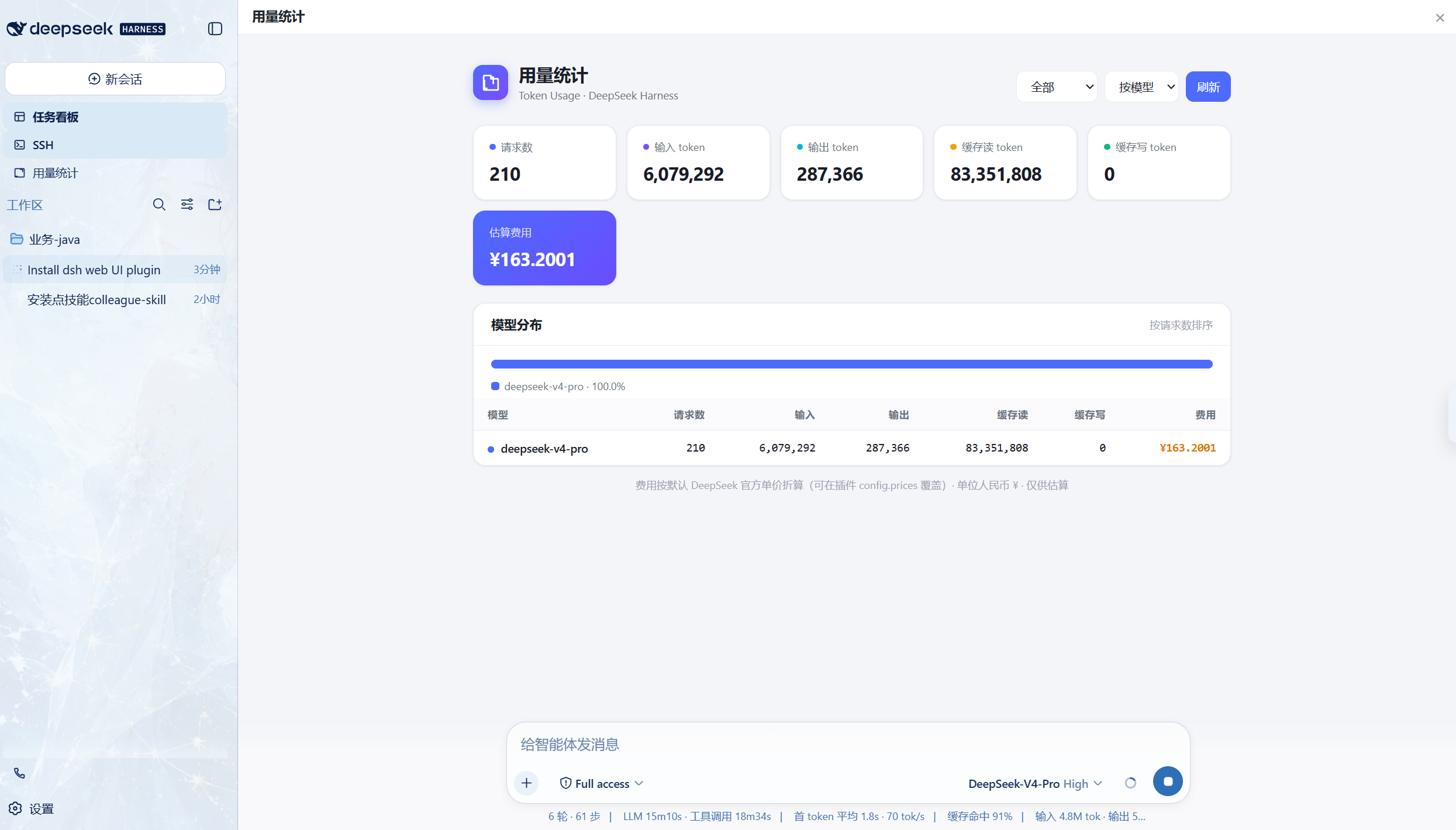
在 Web UI 左侧栏点「用量统计」,即可在会话区内嵌打开仪表盘(保留左侧栏)。面板包含:
- 概览卡片:请求数、输入 / 输出 token、缓存读 / 写 token、估算费用(¥)
- 分布图:按费用(或请求数)占比的堆叠条形图与图例
- 明细表:按模型(或按天)的 token 用量与费用明细
- 时间窗口:全部 / 近 1 天 / 近 7 天 / 近 30 天
统计口径与 read_usage 工具一致,均来自本地 SQLite。
安装
# 方式 1:从 GitHub 安装
npx -y @deepseek-ai/dsh plugin --profile web add github:<your-user>/dsh-usage-stats

# 方式 2:本地目录安装
npx -y @deepseek-ai/dsh plugin --profile web add link:D:\path\to\dsh-usage-stats
装完重启 DSH(dsh web)。需要 Node ≥ 22.13(node:sqlite 依赖)。
使用
插件自动记录所有经 DSH 发起的模型调用。要查看统计,在会话里让 agent 调用 read_usage 工具,或直接:
node -e "import('node:sqlite').then(({DatabaseSync})=>{const db=new DatabaseSync(process.env.DSH_HOME||require('os').homedir()+'/.dsh' + '/usage-stats.db');console.log(db.prepare('SELECT COUNT(*) n, SUM(input_tokens) i, SUM(output_tokens) o FROM requests').get())})"
read_usage 参数:
| 参数 | 取值 | 说明 |
|---|---|---|
since |
1d / 7d / 30d / all |
时间窗口,默认 all |
group |
model / day |
分组维度,默认 model |
返回结构:
{
  "since": "all",
  "group": "model",
  "totals": { "requests": 1, "input_tokens": 120, "output_tokens": 60, "cache_read_tokens": 30, "cache_write_tokens": 10 },
  "breakdown": [ { "bucket": "deepseek-v4-pro", "requests": 1, "input_tokens": 120, "output_tokens": 60, ... } ]
}
开发 / 冒烟测试
node smoke.mjs
结构
dsh-usage-stats/
├── package.json        # dsh.bundle.patch -> cordis.patch.yml
├── cordis.patch.yml    # 挂载插件
├── dsh/
│   ├── index.js        # 插件本体(llm/stream 包装 + SQLite + read_usage + HTTP 路由)
│   ├── client.js       # Web UI 侧边栏「用量统计」入口,会话区内嵌打开面板
│   └── panel.html      # 仪表盘页面(/usage-stats/panel)
├── docs/panel.png      # 界面截图
├── smoke.mjs           # 冒烟测试
└── README.md
License
MIT
Related plugins
dsh-our-free-model
 Ebony-Vinyl
/dsh-our-free-model
Our Free Model(作者声明):装上即用、无需自备 API Key,可调用其聚合渠道的模型。渠道条件、账号要求与数据去向见「本站速览」;本站未实测。
dsh plugin --profile web add 'github:Ebony-Vinyl/dsh-our-free-model#5fcb5faf4da7843cb0d0e638ce665dd6cd4aafc1'dsh-ops
 T-Auto
/dsh-ops
Native file and PTC tools for DSH on Windows x64, Linux x64 and macOS arm64/x64; Windows-only optional Bash payload and host PowerShell integration
dsh plugin --profile web add 'dsh-ops@0.4.4'Deepscient
 yzlin286-wq
/Deepscient/deepscient
DeepScient:科研版 Harness 的品牌、工作台界面、token 计费与文献 API 接入
dsh plugin --profile web add 'github:yzlin286-wq/Deepscient#088b0228df4fbb613d00d70823a325677f4970c2&path:/deepscient'dsh-redteam-model
 SeaOf0
/dsh-redteam-model/plugins/dsh-hunter
DSH hunter plugin: FOFA / Hunter(qianxin) / Quake(360) aggregated asset search with unified DSL → per-platform syntax conversion, quota-aware pagination/export, API-key settings panel, and the code-audit live-verification pipeline (L0 fingerprint check on internet assets, L1 minimal-impact EXP only on user-authorized assets).
dsh plugin --profile web add 'github:SeaOf0/dsh-redteam-model#ce24bb25e35df8c8514e00e0d98f1a36d2e2a562&path:/plugins/dsh-hunter'dsh-cost-meter
 Han-1413141
/dsh-cost-meter
会话与当日 API 费用统计、预算图框(已用%)、官方余额、历史看板,支持峰谷计价与官方价格一键同步。
dsh plugin --profile web add github:Han-1413141/dsh-cost-meterDSH WorkBuddy Account Pool
 XDTrees
/dsh-workbuddy-xdpool
One DSH model pool for every free quota you have: merge all locally signed-in WorkBuddy accounts with auto-failover, sign in to 13 vendors by QR/web, aggregate 76 vendors' free tiers, plus a usage dashboard, model routing, a local OpenAI-compatible gateway and a points-automation suite.
dsh plugin --profile web add 'github:XDTrees/dsh-xdpool#8cfe4c330cccfb6acb8ddf898b62860f4de42d89'