
UI Enhancements
dsh-ark-quota
lordqyxz/dsh-ark-quota · ★ 2
 lordqyxz
A DSH web plugin that shows your Volcano Ark Coding Plan subscription quota as a fixed widget in the sidebar footer — without leaving the DSH GUI.
安装
dsh plugin --profile web add github:lordqyxz/dsh-ark-quotaGitHub 源码安装:首次需按提示配置 allowBuilds 构建授权后重试
For install and environment setup, plus plugin development tutorials, see DSH community docs ↗
README
Table of contents
English · 简体中文
A DeepSeek Harness (DSH) plugin: a permanent sidebar widget for your Volcano Ark Coding Plan subscription quota — per-tier usage, burn pace and exhaustion forecast, following the current session's model across Volcengine accounts.
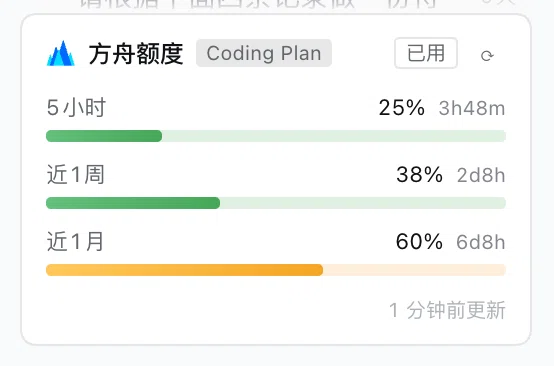
Features
- Sidebar card / collapsed pill: 5-hour / weekly / monthly usage bars with reset countdowns; the most urgent tier stays visible on the collapsed pill, hover for all tiers
- Burn pace & exhaustion forecast: the 5-hour tier uses sliding-window water-level dynamics (net rise); weekly/monthly use average pace (quota progress ÷ time progress); recent burn comes from an exponentially weighted least-squares fit; the forecast is drawn onto the bar; snapshots persist via
storageDomainacross restarts - Follows the session model: the card's identity is DSH's llm provider route — switching models in a session switches the Volcengine account shown; a route can be pinned
- Multi-account: saving keys for a route auto-creates its credential group; the same AK/SK entered for multiple routes merges into one account; falls back to Agent Plan (
GetAFPUsage) when Coding Plan is not subscribed - Settings → 方舟额度 section: pick a route, paste AK/SK, save — hot-applied, no restart
Requirements
- DeepSeek Harness
dsh web(DSH 0.2.0-rc.1 / rc.2; see compatibility notes — in Chinese) - A Volcano Ark subscription and one AK/SK pair (Console → Access Control → API Access Keys)
Install
Option 1 (recommended): DSH Settings → 插件 (Plugins) → install, entering:
https://github.com/lordqyxz/dsh-ark-quota
Option 2 (CLI):
dsh plugin --profile <profile> add https://github.com/lordqyxz/dsh-ark-quota
Then: Settings → 方舟额度 → pick a model route → paste AK/SK → save. The card appears at the bottom of the sidebar.
⚠️ AK/SK are real credentials for your Volcengine account. Only enter them in the settings UI or your local profile config; never commit or share them. They are declared
role('secret')— write-only in the UI, never echoed in any response. See docs/architecture.md (Chinese) for the security model.
Documentation
Detailed docs are maintained in Chinese under docs/:
| Doc | Contents |
|---|---|
| docs/install.md | Install / upgrade / uninstall; DSH version compatibility; common install errors |
| docs/settings.md | Configuration & the multi-account model (credential groups, route binding/merge/unbind, legacy migration) |
| docs/widget.md | Widget interaction & forecast semantics (sliding window, average pace, forecast segment, status colors) |
| docs/api.md | Same-origin HTTP route reference (/ark-quota and subroutes) |
| docs/architecture.md | Architecture & security model (host/browser halves, signing, CSRF, key handling) |
Verify keys without a browser: ARK_AK=… ARK_SK=… node tools/check.mjs
Contributing
See CONTRIBUTING.md (简体中文:CONTRIBUTING.zh-CN.md); AI agents and deep-dive developers: read AGENTS.md first.
License
Related plugins
dsh-web(原 dsh-web-ui)
 zhu1090093659
/dsh-web-ui
dsh-web(原 dsh-web-ui):任务看板、git 图、右侧面板、远程移动端 UI、桌宠、实时 token 统计与皮肤中心的全家桶。仓库已更名 zhu1090093659/dsh-web,根目录声明 dsh.bundle.patch,支持根 Git 入口安装。
dsh plugin --profile web add github:zhu1090093659/dsh-webdsh-web-all 聚合包(原 dsh-web-ui-all)
zhu1090093659zhu1090093659/dsh-web-ui/packages/dsh-web-ui-all
旧整包路径 packages/dsh-web-ui-all 已随仓库更名 dsh-web 迁移:现聚合目录为 packages/dsh-web-all,npm 聚合包 @linxin666/dsh-web-all。与总仓根 Git 入口是同一产品的两种整包方式,不重复计数。
dsh plugin --profile web add @linxin666/dsh-web-all@latestdsh-TUI
 ccch1mneyyy
/dsh-TUI
Claude Code 风格全屏终端 UI:像素鲸鱼顶栏、实时工作状态行、思考流式展开。
dsh plugin --profile web add github:ccch1mneyyy/dsh-TUIdsh-cc-tui
ccch1mneyyyccch1mneyyy/dsh-cc-tui
一个美观且实用的 Claude Code 风格 TUI 插件:像素鲸鱼顶栏、双流光大字、实时工作状态行、思考流式展开、双击 Esc 时间回溯、蓝白上下文进度条 + TPS 仪表。 零核心改动,纯插件挂载。安装插件即可启用,卸载后不会留下核心补丁。 献给钟爱tui的各位极客们 A beautiful, practical Claude…
dsh plugin --profile web add github:ccch1mneyyy/dsh-cc-tuideepseek-balance-whale-widget
 meteornox
/deepseek-balance-whale-widget
DSH 小鲸鱼余额挂件(DeepSeek Balance Whale Widget)
dsh plugin --profile web add github:meteornox/deepseek-balance-whale-widgetDSH-better-sidebar
 omdsh-dev
/DSH-better-sidebar
侧边栏完整工作台:内置文件渲染编辑、终端、Git 与子代理,支持三方插件注册新 Tab。
dsh plugin --profile web add github:omdsh-dev/DSH-better-sidebar