
Workflow & Automation
dsh-taskboard-plugin
maochiy/dsh-taskboard-plugin · ★ 1
 maochiy
A DeepSeek Harness task board with local JSON storage, six columns, drag-and-drop ordering, task-session links, model-facing tools, floating sortOrder values, and optimistic locking.
安装
dsh plugin --profile web add github:maochiy/dsh-taskboard-pluginGitHub 源码安装:首次需按提示配置 allowBuilds 构建授权后重试
For install and environment setup, plus plugin development tutorials, see DSH community docs ↗
README
Table of contents
A task board plugin for DeepSeek Harness
English · 中文



A task board plugin for DeepSeek Harness: local JSON storage, a six-column board, drag-and-drop ordering, task ↔ session linking, and model-facing board tools. The logic is distilled from Proma's task board (taskboard-store.ts and renderer/components/taskboard/) — local file storage, floating sortOrder, optimistic locking (version), identifier numbering, and localized status/priority color tones.
Features
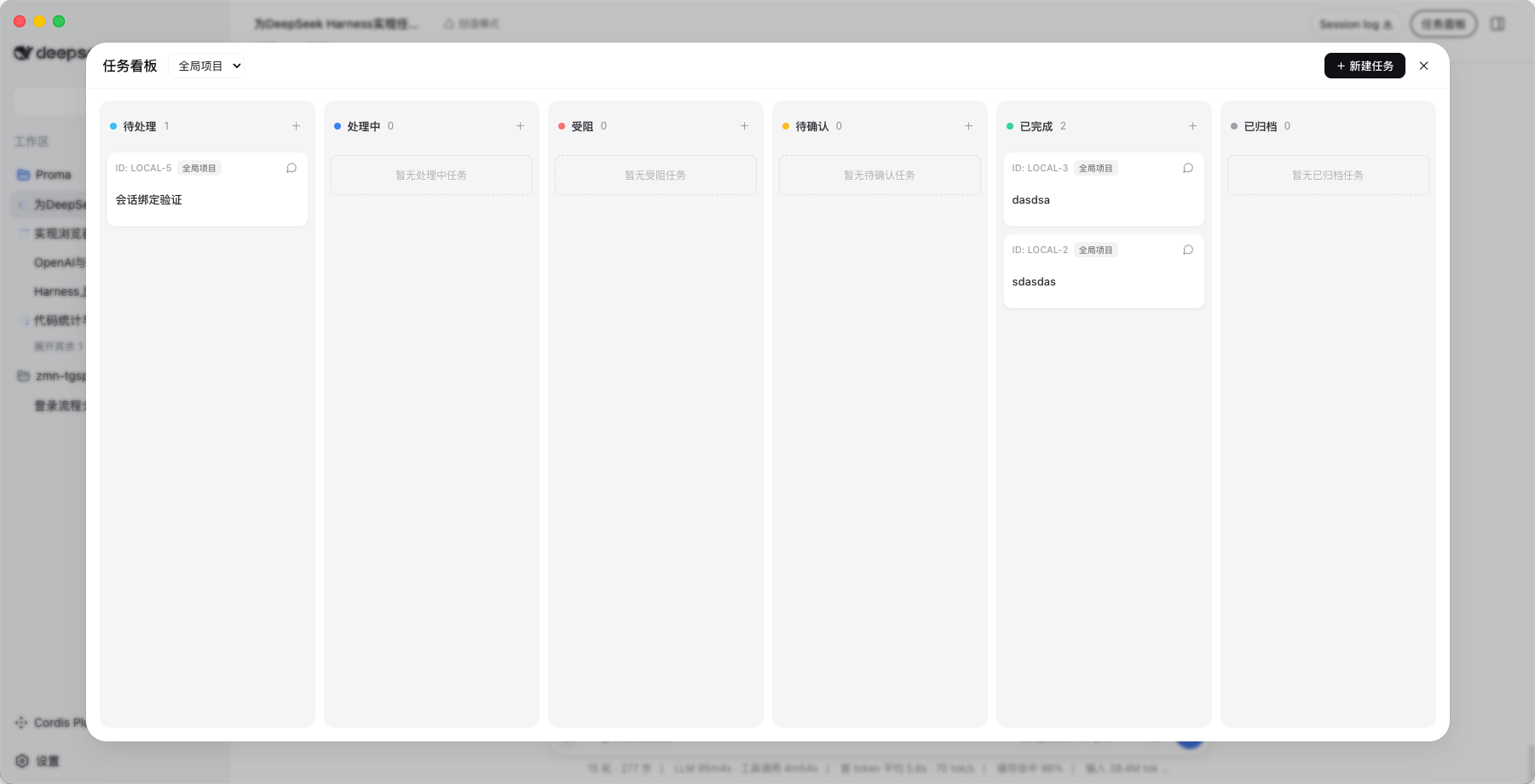
- Six-column board: Todo / In Progress / Blocked / In Review / Done / Archived (each column scrolls independently when it has many cards)
- Multiple projects: built-in global project (
local), create new projects, and an aggregate global view - Drag & drop: drop onto column whitespace (move across columns / append), or before a card (reorder within a column via floating
sortOrder) - Task editor: title, description, status, priority, labels, assignee (user / Agent), start/end dates; archive / restore / delete
- Task ↔ session linking: a "Start conversation / View conversation" button on each card that links to and opens a DSH session
- Model-facing tools:
taskboard_list/taskboard_create/taskboard_update/taskboard_archive, so an Agent can manage the board directly - Local storage:
~/.dsh/taskboard/{projects.json, tasks.json}with atomic writes (tmp + rename), no database
Screenshot
Installation
Prerequisites
- DeepSeek Harness installed (Electron desktop app)
- A target profile exists (default
web)
Option 1: npm install (recommended after publishing)
Install this package inside the target profile directory (adds it to that profile's package.json dependencies):
cd ~/.dsh/profiles/web
npm install @xiuda-ai/dsh-taskboard-plugin
Then append to ~/.dsh/profiles/web/cordis.patch.yml:
- insert:
    - id: taskboard
      name: "@xiuda-ai/dsh-taskboard-plugin"
Restart the harness to load the host half; refresh the page to load the browser half.
Option 2: local path (development / not yet published)
Link the source directory into the profile's flat node_modules:
ln -sfn /path/to/dsh-taskboard-plugin ~/.dsh/profiles/node_modules/@xiuda-ai/dsh-taskboard-plugin
Then append the same cordis.patch.yml insert block as in Option 1.
Build from source
npm install
npm run build      # produces lib/index.js + lib/client.js
npm run dev        # watch src/ and rebuild (refresh the page after changes)
Runtime dependencies
@deepseek-ai/cordis/@deepseek-ai/dsh-tools/@deepseek-ai/dsh-home-pathsmust resolve from this package. For local development, link them to the profile's installed copies to match the running harness version.
Usage
After restarting, open any session — a "任务面板" (Task Board) pill button appears on the right side of the session header, next to the "Session log" button. Click it to open the board:
- "+ 新建任务" creates a task
- Drag cards across columns / to reorder
- The conversation button on each card: "开始对话" when no session is linked, "查看对话" when one is
Note: the entry button is session-scoped and only appears once you are inside a session; it is not shown on the blank no-session screen.
Uninstall
- Remove this block from
~/.dsh/profiles/web/cordis.patch.yml:
- insert:
    - id: taskboard
      name: "@xiuda-ai/dsh-taskboard-plugin"
- Remove the symlink:
rm ~/.dsh/profiles/node_modules/@xiuda-ai/dsh-taskboard-plugin
The data directory ~/.dsh/taskboard/ is kept by default; delete it to wipe the data.
Directory structure
dsh-taskboard-plugin/
├── package.json           # dsh.bundle (composition layer) + dsh.client (browser half)
├── cordis.patch.yml       # patch that inserts the host row into the composition
├── tsconfig.json
├── scripts/build.mjs      # esbuild build for host + client
├── src/
│   ├── index.ts           # Host plugin: storage + /taskboard API + model tools
│   ├── taskboard-store.ts # storage core (JSON atomic write / sortOrder / optimistic lock)
│   ├── types.ts           # shared domain types
│   └── client/            # browser half (React board)
│       ├── index.ts           # client plugin: slot registration (entry button + board overlay)
│       ├── BoardOverlay.tsx   # board body (settings-panel-style modal)
│       ├── Column.tsx         # board column
│       ├── TaskCard.tsx       # task card
│       ├── TaskEditor.tsx     # task editor
│       ├── SidebarButton.tsx  # "Task Board" entry in the session header
│       ├── labels.ts          # status / priority / color tones
│       ├── api.ts / store.ts  # data access
│       └── board.css          # styles
└── lib/                   # build artifacts (index.js + client.js)
Data storage
~/.dsh/taskboard/
├── projects.json   # project list
└── tasks.json      # task list (with sessionId link, sortOrder, optimistic-lock version)
HTTP API (browser-half internal use)
POST /taskboard/api with body { "op": string, "args": object }:
| op | Description |
|---|---|
state |
Return the full { projects, tasks } |
listProjects / createProject |
List / create projects |
listTasks / createTask / updateTask |
Read / create / update tasks |
moveTask |
Move / reorder (status + optional sortOrder) |
archiveTask / restoreTask / deleteTask |
Archive / restore / delete |
Business errors return { ok:false, error:{ code, message } }; code may be VERSION_CONFLICT (optimistic-lock conflict), PROJECT_NOT_FOUND, TASK_NOT_FOUND, INVALID_*, etc.
Correspondence with Proma
| Proma | This plugin |
|---|---|
~/.proma/ multiple JSON/JSONL files |
~/.dsh/taskboard/ two JSON files |
taskboard-store.ts (floating sortOrder, optimistic lock, numbering) |
src/taskboard-store.ts |
taskboard-constants.ts (status / priority / tones) |
src/client/labels.ts |
TaskboardView / TaskCard / TaskEditor (Tailwind) |
src/client/BoardOverlay.tsx etc. (CSS-variable theme) |
main/ipc.ts TASKBOARD channel |
/taskboard/api JSON endpoint |
| Agent task integration | model tools taskboard_* |
Limitations
- v1 drops Proma's comments, activity timeline, task relations, attachments, recurring tasks, and the undo stack (⌘Z).
- Same-column drag uses a floating
sortOrder("insert before a card"); no reflow animation. - Client styles reuse DSH theme CSS variables; no independent theme.
- The
backlogandcanceledstatuses remain in the data layer, but the current UI does not render those two columns.
Related plugins
rea
 morluto
/rea
逆向工程 CLI/MCP 工具(rea-agents):用 agent 逆向应用行为到原生二进制。独立工具而非 DSH 插件——仓库根 package.json 无 dsh 字段,本条目仅作外部工具参考。
npx rea-agents@latest setupArchify DSH 集成
 tt-a1i
/archify/integrations/deepseek-harness
Archify 的 DeepSeek Harness 集成:经 @tt-a1i/archify-dsh 适配包安装,在 dsh 中生成经校验的自包含交互式架构图、流程图、时序图、数据流图与生命周期图。安装信息基于已发布的 1.0.0;候选 1.1.0 与未发布的源码修复不计入。
dsh plugin --profile web add @tt-a1i/archify-dsh@1.0.0dsh-plugin
 Q00
Q00/ouroboros/integrations/dsh-plugin
通过 DSH MCP 客户端挂载 Ouroboros 的纯配置包,在 DSH 中提供 36 个涵盖需求访谈、Seed、执行、评估与演化流程的工具。
dsh plugin --profile web add github:Q00/ouroboros#path:/integrations/dsh-pluginanswer-me-with-html
 QingYunA
/answer-me-with-html
Answer hard questions with a one-page HTML: the model writes a short Markdown draft; the bundled CLI handles templates, SVG auto-layout and an STE controlled-writing check.
dsh plugin --profile web add 'github:QingYunA/answer-me-with-html#aab9ea19f50f038054eeb60475bbb7ea26f149e3'dashi-taskboard
 chuspeeism
/dashi-taskboard/integrations/deepseek-harness
现代化可灵活嵌入的任务面板,支持 Codex、DeepSeek Harness
dsh plugin --profile web add 'github:chuspeeism/dashi-taskboard#9aa1f4e7936d841748ed4e0fc7781b57ae6ae6cc&path:/integrations/deepseek-harness'dsh-agent-teams
 NanmiCoder
/dsh-agent-teams
AgentTeams 多智能体团队。
dsh plugin --profile web add github:NanmiCoder/dsh-agent-teams