
Notifications & Integrations
dsh-notion
mingzeng21/dsh-notion · ★ 7
 mingzeng21Curated
Connect dsh to Notion via the official Notion MCP (OAuth + PKCE): search, read, and write pages, databases, and comments through `mcp__notion__*` tools.
Manifest details
安装
dsh plugin --profile web add github:mingzeng21/dsh-notionGitHub 源码安装:首次需按提示配置 allowBuilds 构建授权后重试
For install and environment setup, plus plugin development tutorials, see DSH community docs ↗
README
Table of contents
Connect DeepSeek Harness (dsh) to Notion through the official Notion MCP server, using OAuth 2.0 (authorization code + PKCE). After a one-time browser authorization, your dsh agent can search, read, and write Notion pages, databases, and comments through the standard mcp__notion__* tools.


中文 | English
What it does for you
Once installed, your dsh agent can read and write Notion directly. You authorize once in your browser, and the plugin takes care of everything after that: it runs the full OAuth 2.0 (authorization code + PKCE) flow, stores the tokens securely in dsh's credential seam, refreshes them silently in the background, and mounts Notion's search, page, database, and comment tools under mcp__notion__*.
Features
- Zero-config OAuth — dynamic client registration (RFC 7591) registers a client at runtime; no
client_idor secret to copy. - One-time browser login —
dsh notion loginprints an authorization URL and waits for the callback on127.0.0.1:53007. - Silent token refresh — access tokens (~8 h) refresh automatically before expiry; the rotated refresh token is persisted atomically.
- Terminal
invalid_granthandling — an expired or rotated-away refresh token is never retried; the plugin clears it and asks you to re-authorize. - No secrets in the repo — tokens live in dsh's credential store, not in this repository.
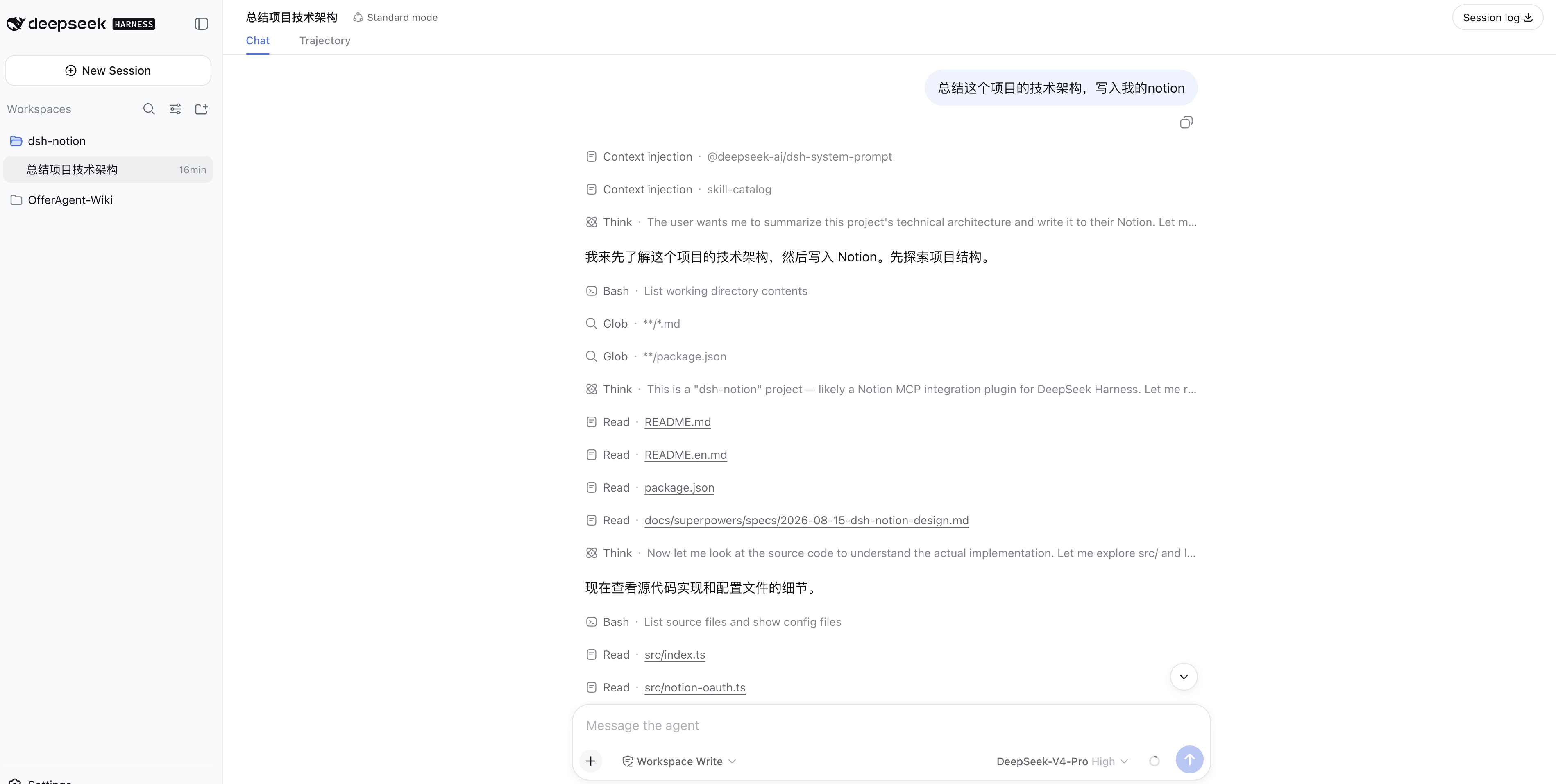
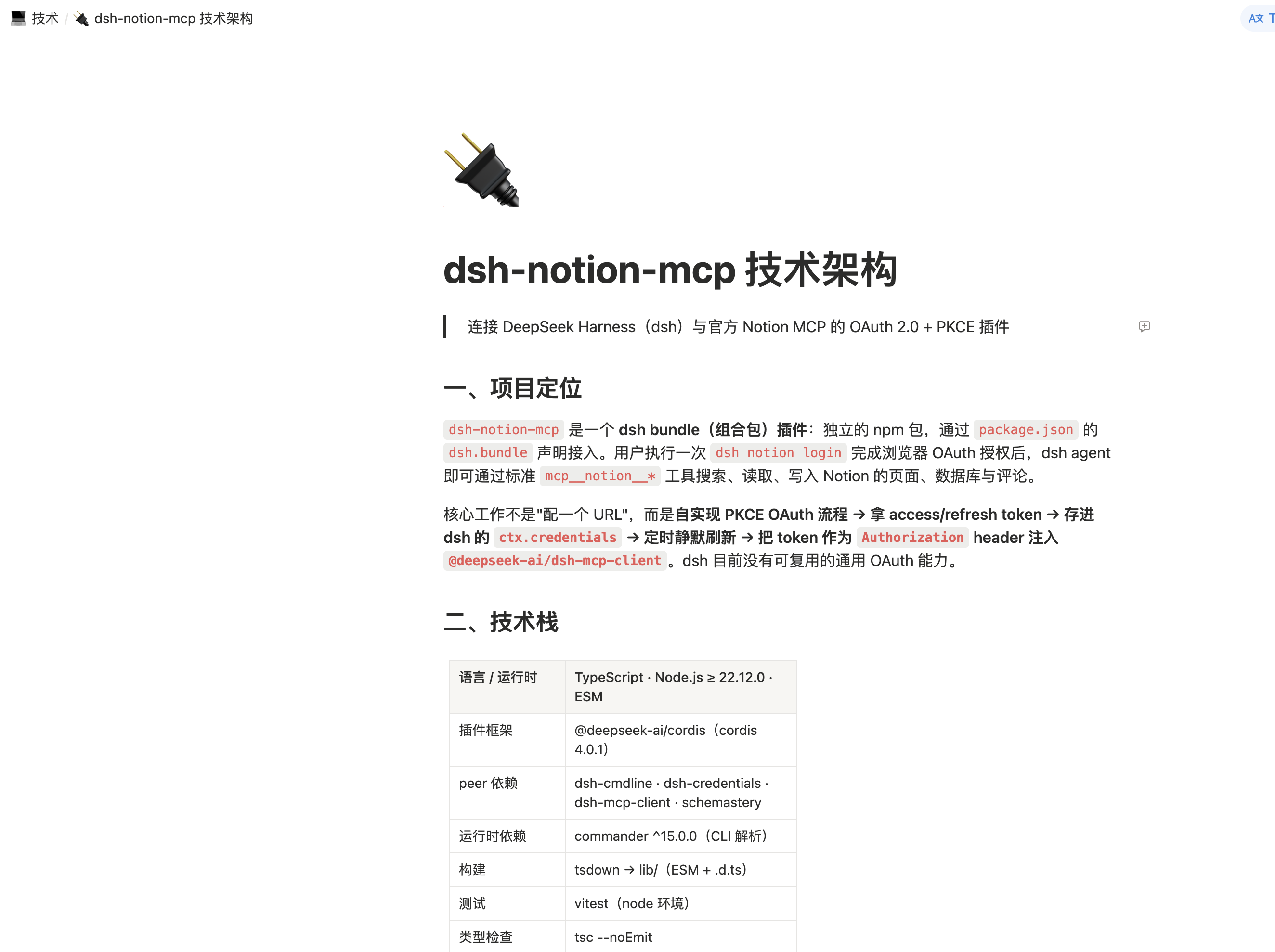
Screenshots
Ask the dsh agent to summarize a technical architecture and write it into Notion:
The resulting Notion page:
How it works
dsh notion login
   │  1. OAuth discovery (RFC 9470 / RFC 8414)
   │  2. Dynamic client registration (RFC 7591)
   │  3. PKCE S256 + state → authorization URL
   ▼
browser approves → callback on 127.0.0.1:53007
   │  4. Exchange code (plus PKCE verifier) for tokens
   ▼
tokens persisted → Notion MCP mounted as mcp__notion__*
On startup the plugin loads the stored tokens and mounts the MCP client; as they near expiry it refreshes them in the background (serialized, so a rotated refresh token is never replayed concurrently).
Install
dsh plugin --profile web add dsh-notion-mcp
Replace web with whichever profile you run the agent in (web, headless, tui, …).
Authorize
The notion command runs in a minimal profile — a UI app such as web owns its own command line and does not forward notion to the plugin. Tokens are stored globally, so authorize once from a minimal profile and every profile that has the plugin installed picks it up:
dsh plugin --profile notion add dsh-notion-mcp
dsh --profile notion notion login
The command registers a dynamic OAuth client, starts a temporary local HTTP server on 127.0.0.1:53007, and prints an authorization URL. Open it in your browser and approve the request; Notion redirects to http://127.0.0.1:53007/callback, and the plugin validates the state, exchanges the code (plus the PKCE verifier) for tokens, stores them, and mounts the client.
After authorization, Notion tools are available under mcp__notion__*.
Uninstall
dsh plugin --profile web remove dsh-notion-mcp
Configuration
| Key | Default | Description |
|---|---|---|
mcpUrl |
https://mcp.notion.com/mcp |
Notion MCP server URL |
port |
53007 |
Local OAuth callback port (127.0.0.1) |
Security
- Tokens are stored through dsh's credential seam (
ctx.credentials) as a single atomic entry and are never committed to this repository. Noclient_idor secret is embedded — the client is registered at runtime via dynamic client registration. - Notion rotates the refresh token on every refresh; the new token is persisted atomically together with the access token.
- If Notion returns
invalid_grant(refresh token expired or rotated away), the plugin clears the stored tokens and stops retrying — re-authorize withdsh notion login.
Requirements
- DeepSeek Harness (
dsh) — verified compatible withv0.1.0-rc.8,v0.1.1-rc.1,v0.1.1-rc.2, andv0.1.2-alpha.1; Notion MCP tool discovery and registration were verified in a local Web profile launched fromv0.1.7-rc.2source - Node.js
^22.19.0or>=24.0.0(matching dshv0.1.7-rc.2; Node 23 is outside the supported range)
Development
npm install
npm run build      # tsdown → lib/
npm run typecheck  # tsc --noEmit
npm test           # vitest
License
MIT © 2026 mingzeng
Related plugins
dsh-im
 xmanrui
/dsh-im
通过扫码把IM机器人接入DeepSeek Harness(支持飞书、微信、钉钉等)。
dsh plugin --profile web add github:xmanrui/dsh-imdsh-pocket
 shaobeichen
/dsh-pocket
手机远程访问 DSH Web 界面:扫码即用局域网或公网(cloudflared 隧道)访问,实时同屏、移动端适配布局,带设置页管理。
dsh plugin --profile web add github:shaobeichen/dsh-pocketDSH Startup Screen
 6shenhonghong9
/dsh-startup-screen
DeepSeek Harness 启动界面与启动动画:黑幕 DeepSeek 标识 → 过曝洗白 → 暖白档案底板 → 交互式访问授权序列(需要访问许可 / 身份资料确认 / 接收访问需求 / 开始读取权限 / 读取完毕·核验通过 / 欢迎访问)。中文主字 + 英文等宽副标题,真声素材 + 界面音效,身份名称等参数在 DSH 设置页可改。web profile 与 DeepSeek Harness Desktop 桌面端通用。桌面端(Windows)播放启动动画期间把标题栏整层透明化:最小化/最大化/关闭按钮与其底色一并不可见,播放结束自动还原。
dsh plugin --profile web add 'github:6shenhonghong9/dsh-startup-screen#1f35ea33810e02a900b31df01f9c806f92f398df'dsh-qqbot
 tencent-connect
/dsh-qqbot
让 QQ Bot 接入 DeepSeek Harness(dsh)的官方插件
dsh plugin --profile web add github:tencent-connect/dsh-qqbotdeepseek-harness-mobile
 sorsama
/deepseek-harness-mobile
DeepSeek Harness 的 Android 伴侣应用:经局域网用手机聊天、看目标、审批与收通知;Kotlin + Jetpack Compose
dsh plugin --profile web add github:sorsama/deepseek-harness-mobiledsh-bridge
 wenbin-wb
/dsh-bridge
DeepSeek Harness 多通道远程访问与全域安全门禁插件 手机扫个码,人不在电脑前也能继续用 DeepSeek Harness。躺在沙发上、出差在外、跨网访问——都不用守着电脑,也不用自己搭公网服务器,扫码就能在手机/平板或任意设备上接着干。 把你本地的 DeepSeek Harness 无缝延伸到手机、平板、公网、甚至微信 / QQ /…
dsh plugin --profile web add github:wenbin-wb/dsh-bridge