
Notifications & Integrations
dsh-lark-bridge
moyu-good/dsh-lark-bridge · ★ 6
 moyu-good
Feishu/Lark IM channel for DeepSeek Harness agents with native thinking-process messages, approval cards, live goal and todo cards, workflow fan-out lines, session text search, and background job and subagent settlement notices. Access is bounded by the Feishu app''s own visibility scope by design — anyone the app admits can drive the agent and answer its approvals unless the optional sender, group and approver allowlists are filled in.
安装
dsh plugin --profile web add github:moyu-good/dsh-lark-bridgeGitHub 源码安装:首次需按提示配置 allowBuilds 构建授权后重试
For install and environment setup, plus plugin development tutorials, see DSH community docs ↗
README
Table of contents
🤔 What it does
Who it's for — someone with one laptop, who works over Feishu, and wants an AI agent to touch their real files. No server, no ops, no public URL.
What it replaces — the loop of open the IDE → describe the task → watch it edit → switch back to chat to report. That loop becomes one sentence in Feishu.
Why not another bridge — most Feishu-agent bridges hand you a bot that answers messages. This hands you an agent with a terminal, approval gates and session memory — and it shares the same session library as your DSH Desktop, so work begun in the chat is still there when you open the desktop app.
🧭 How it works
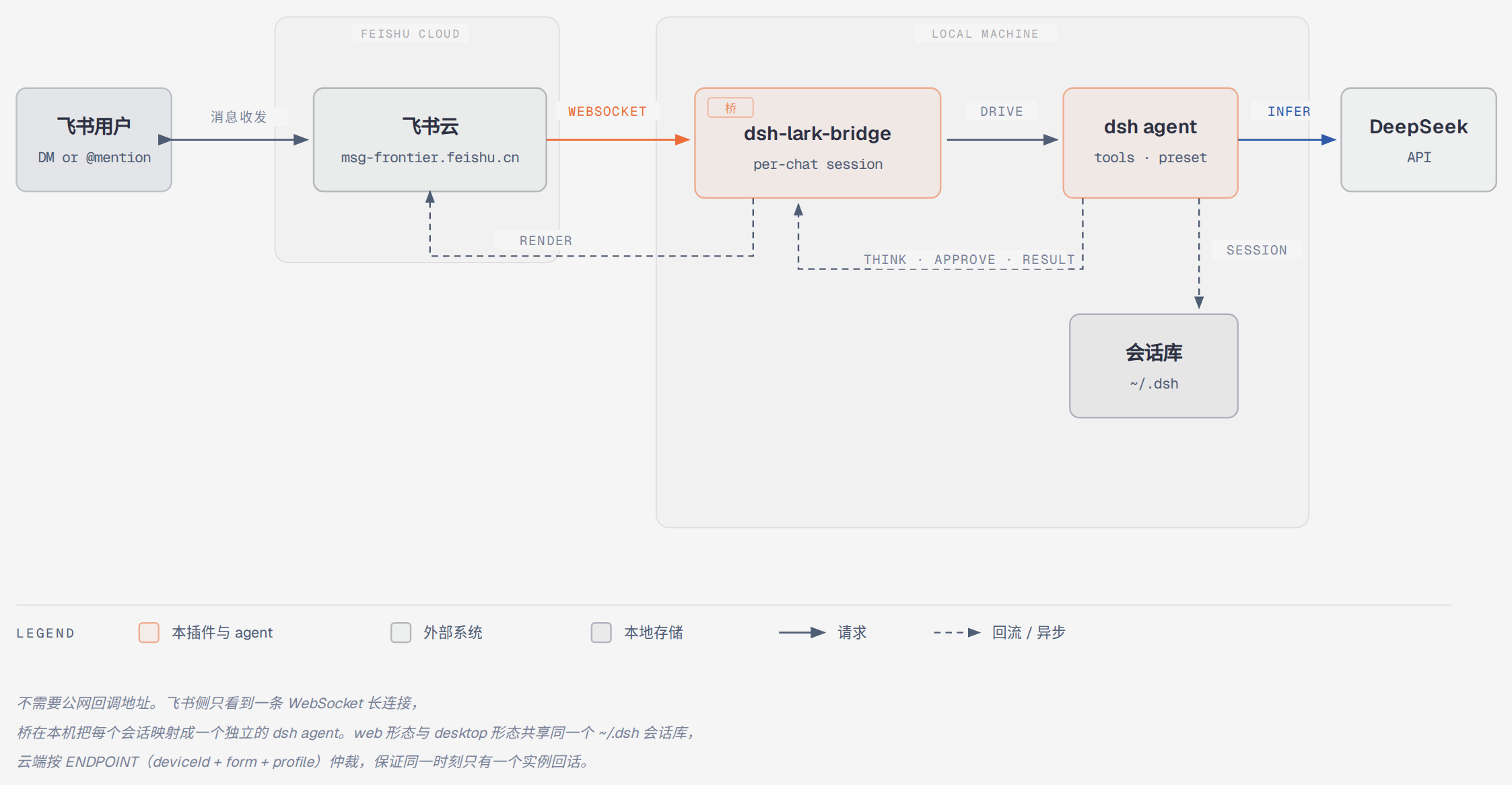
- In — the message arrives over a WebSocket long connection. No callback URL, no reverse proxy, no public IP.
- Through — the bridge maps each chat (DM or group) to its own
dshagent, which reads and writes your real working directory. - Back — thinking, approval requests and results return to the chat as native Feishu messages.
- Shared — the
webanddesktopruntime forms share one~/.dshsession library.
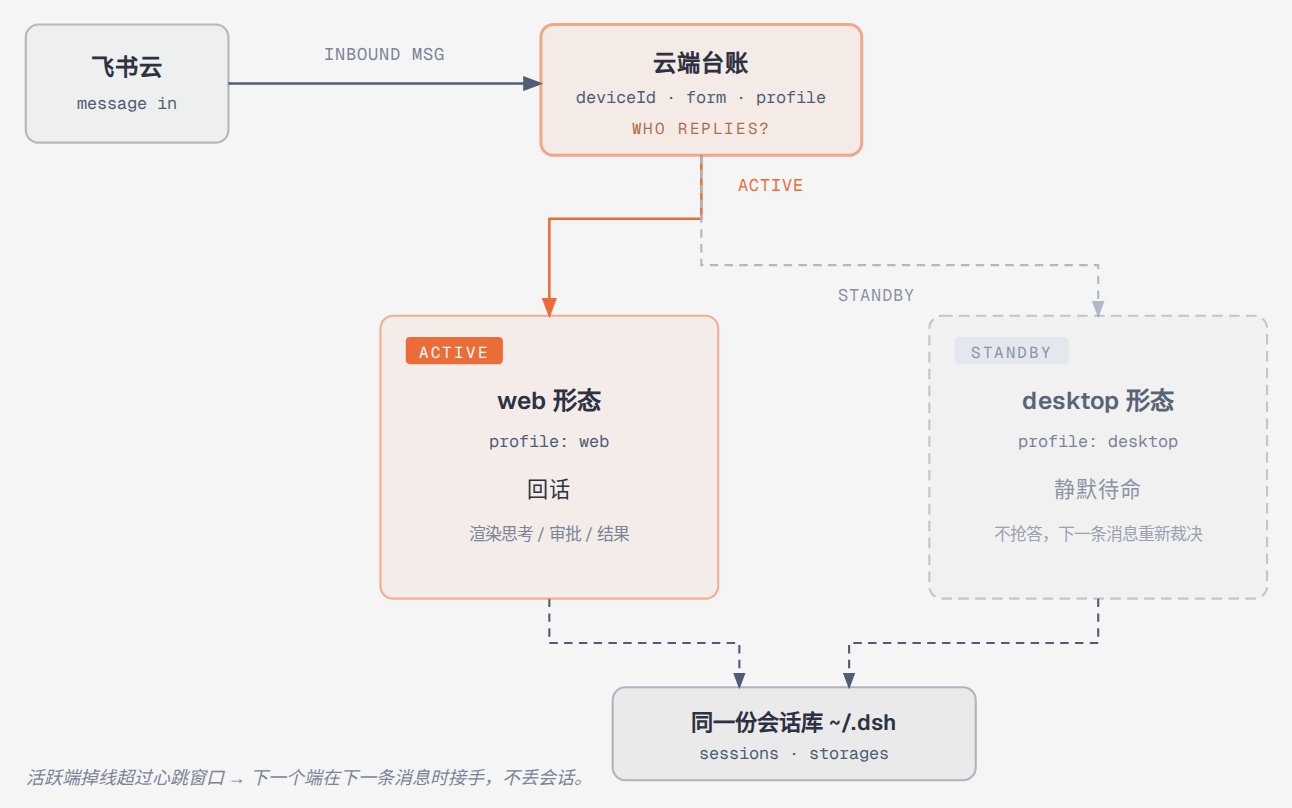
A cloud ledger keyed per endpoint (deviceId + form + profile) keeps one instance per endpoint answering and elects a successor when the active one goes quiet. Both forms read and write the same sessions, so failing over never loses the conversation.
✨ Three things most bridges don't do
Runs on your machine, in minutes, with no public address
One pnpm dlx command installs the plugin and boots the host; a QR code is the whole credential flow. The transport is an outbound WebSocket long connection — nothing has to reach you from the internet.
You can see what it's thinking
Reasoning renders as Feishu's own thinking message. Tool calls arrive with their icon and the first lines of their result; the full output stays in the session log. Every turn closes with one plain line — how many tool calls it made, how long it took. Nothing has to be taken on faith.
A long task is not "fire and forget"
Send a message while a turn is running and it follows busyPolicy: queue waits its turn, steer takes over at the next step boundary without discarding work already done, inject adds context without waking the driver. Risky operations become approval cards. Turn on autoResumeGoals and a goal picks itself back up after a restart.
🚀 Quick Start
Prerequisites: Node 22.19+ or 24+, pnpm, a DeepSeek API key, Feishu on your phone.
Harness: dsh >= 0.2.1-rc.1 < 0.3.0 (declared as engines.dsh in package.json).
# 1. install the plugin into a dsh profile and boot
pnpm dlx @deepseek-ai/dsh plugin --profile web add @moyu-good/dsh-lark-bridge \
  && pnpm dlx @deepseek-ai/dsh web

# 2. a QR code prints → scan it with Feishu
#    (this creates the app and its event subscription for you)

# 3. open the dsh console → Settings → Models → paste your DeepSeek API key

# 4. DM the bot, or @ it in a group. That's it.
Two traps, both real:
- Use
pnpm, notnpx. On one machine this was recorded at about 20 seconds versus about 25 minutes (npm's serial reify), and on a ≤4 GB machine the npm process died with "JavaScript heap out of memory" mid-install. Those are the author's numbers, not a benchmark this repository reproduces — treat the gap as large, not as exactly 20 vs 25. - Do not
npm i -g dsh-lark-bridge. That name on npm belongs to an unrelated project. This one is@moyu-good/dsh-lark-bridge.
pnpm 10 blocks dependency build scripts by default and exits non-zero with ERR_PNPM_IGNORED_BUILDS. The blocked script belongs to protobufjs (a Feishu SDK dependency); it only prints a version-scheme warning — no file written, no network.
Open <your-home>/.dsh/profiles/web/pnpm-workspace.yaml and set protobufjs: false under allowBuilds. After the failed install pnpm writes the literal text set this to true or false there — replace it with false. Then re-run the same command: a failed install leaves the profile half-configured (bundles are not merged when the install exits non-zero), so editing the file alone does not finish the job.
allowBuilds (pnpm 10.26+) is the only key pnpm reads for this; onlyBuiltDependencies and the other legacy keys were removed in pnpm 11.
🎯 Three commands to try first
| Command | What you get |
|---|---|
/manual |
The full eight-section user guide, delivered in the chat |
/balance |
Live DeepSeek balance, per currency and timestamped, with the current peak/off-peak phase |
/bot devices |
Which endpoints are in the fleet, and which one is currently answering |
Daily ops: run pnpm dlx @deepseek-ai/dsh web again (subsequent runs hit the pnpm store), or host it under systemd / supervisor. The package ships prebuilt — nothing compiles on install.
| 🗂️ One agent per conversation | sessionScope: whole chat / topic thread / single sender; sessions persist across restarts |
| 🧠 Native Feishu CoT | Reasoning renders as the platform's own thinking message (cot), typewriter card fallback (stream) |
| ✅ Live reactions | OK → THINKING → DONE/ERROR, states replace each other, configurable |
| 📋 Approval cards + decider trail | Click to decide; who decided is written back |
| 🎯 Live goal / todo cards + auto-resume | Phase changes stream into chat; autoResumeGoals (opt-in) re-arms after restarts |
| ✋ Mid-turn steering | busyPolicy: queue (default) waits its turn, steer takes over at the next step boundary without discarding the work, inject adds context without waking the driver |
| 📦 Compaction transparency | "Compacting…" → summary + released tokens; prunes report trimmed count |
| 🧑💻 Subagent fan-out | Workflow runs stream as text lines: run start, child open/end, run end |
| 👥 Team panel | When the host runs a team, one card shows the members, shared tasks and messages between them, updated in place |
| 🔍 Session history search | /sessions <keyword> full-text search over this chat's stored history |
| 🌐 Multi-surface fleet sync | web and desktop forms share one session library; per-endpoint cloud arbitration (deviceId:form:profile) — no double replies, automatic failover election |
| 🔄 Interactive account switcher | /bot account stores/switches/forgets Feishu-app credentials from a card; shared settings push it to every surface |
| 💰 Balance & peak/off-peak awareness | /balance live DeepSeek balance (per currency, timestamped); the prompt embeds the tariff table so batch work lands in half-price windows |
| 🛠️ Native Feishu agent tools | feishu_notify proactive messages, feishu_drive_* cloud-drive scratchpad reachable from any device |
| 🖥️ Self-healing slash panel | The panel has a single writer (the arbitration-active endpoint), bilingual, kept in step with what actually runs |
| 🧰 Capability inventory | /tools lists what this deployment can actually do — the visible tools and the MCP servers it talks to |
| 🎙️ Media delivered in kind | An ogg/opus recording arrives as a voice note, an mp4/m4v clip as a video — playable in the chat, not a download link |
| 🖼️ Image input (opt-in) | attachImages passes chat images to the model |
| 📎 File delivery | Agent send_file delivers artifacts with caption (default-deny local dirs) |
| 🔒 Authorization narrowing | senderAllowlist / groupAllowlist / approvers |
| ⏰ Scheduled reminders | /schedules view (compose @deepseek-ai/dsh-schedule for the model-side tools) |
| ⚙️ Background job notifications | run_in_background jobs announce their terminal outcome |
| 🧩 Skill ecosystem surface | /skills lists workspace skills, /skills <name> peeks at one |
| 🤖 Model switching | /model <provider>/<model> through the host saveSelection seam (persistent) |
| 🖥️ PC-parity tooling | Compose dsh-terminal* / code-runtime-worker-thread / dsh-mcp-client → persistent PTY, Code Mode, external MCP servers |
| 🗺️ Workspace visibility | /ws lists workspaces and marks where new sessions land |
| 🔑 QR onboarding | First boot prints a QR; scanning creates the app with event subscription |
| 🧩 Chronicle hook | chronicleEndpoint: fire-and-forget POST per accepted inbound user message (source/text/chatId); the bridge's replies never go to the ledger |
Type /help in the chat for the live list.
| Command | Description |
|---|---|
/stop |
Cancel the running turn |
/new |
Start a new session (/clear is an alias) |
/manual |
The full user guide (start here if you're new) |
/sessions |
Search this chat's session history |
/balance |
DeepSeek API balance, with the live peak/off-peak phase |
/tools |
View / deny / allow tools at runtime |
/skills |
List skills, or peek at one |
/model |
View / switch the default model |
/config |
The bridge's live configuration |
/plugins |
List deployed plugins and status |
/ws |
List registered workspaces |
/jobs |
This chat's background jobs |
/schedules |
This chat's scheduled reminders |
/context |
Current context token pressure |
/audit |
Operation audit summary |
/feedback |
Rate the last answer |
/preset |
View / switch agent preset (standard / code / minimal / cordis) |
/permission |
View / switch permission mode (host) |
/goal |
View / set the goal (host) |
/plan |
Enter / leave plan mode (host) |
/compact |
Compact older history (host) |
/bot |
Bridge admin: status, settings, accounts, plugin sync, devices |
/restart |
Restart the host process (only when the deployment wires it) |
/help |
Show the listing |
Set locale: zh|en to pin the slash-panel and help wording; otherwise it follows the platform domain. It does not translate what the agent says.
/bot subcommands: set / unset / peers / sync-plugins / account (save·use·forget, interactive card) / export / import / devices / retire / activate / name.
| Field | Default | Meaning |
|---|---|---|
appId, appSecret |
first-boot QR registration | Feishu/Lark app credentials |
cwd |
host process cwd | Absolute workspace directory for chat agents |
provider, model |
host default | Model routing for chat agents |
output |
cot |
Native thinking message vs typewriter card |
requireMention |
true |
In groups, respond only when @-mentioned |
outbound.allowedFileDirs |
unset → disabled | Local dirs send_file may read from |
chronicleEndpoint |
'' |
Optional external ledger: one POST per accepted inbound user message |
announceSubagents |
true |
Announce a delegation in the chat when it is made |
autoResumeGoals |
false |
Re-arm an active goal after a restart — off unless you turn it on |
Credentials resolve in three layers: bundle patch config → settings document plugin section → first-boot QR registration.
| Scope | Needed for |
|---|---|
application:app_slash_command (read + write) |
Slash panel — without it sync fails with 99991672 |
im:message / im:message:readonly |
Send / read messages |
im:message.receive_v1 event |
Receive messages (Events → long connection) |
im:resource |
Upload images and files |
im:chat:read |
Group info |
im:message.reactions:read / write_only |
Reaction feedback |
drive:drive |
/bot export --to-feishu, feishu_drive_*, cloud arbitration |
QR onboarding grants these automatically; manually created apps must publish a new version after adding scopes. Panel sync runs on session create/resume — send the bot one message after granting.
The bridge carries its own migration path. On the old machine:
/bot export include-secrets --to-feishu   # uploads to the app's own Feishu drive
/bot export include-secrets               # or a local file, credentials masked
The Feishu route needs no copying: the file lands in the app's own cloud space, and the new machine pulls it with /bot import --from-feishu. For the local route, copy the printed file to the same path on the new machine, install the plugin there, then:
/bot import                       # preview: settings + plugin plan + warnings
/bot import apply                 # execute (add --from-feishu for the cloud slot)
What travels: shared settings and per-profile plugin lists. What never travels: peer heartbeats, control tokens, node_modules, session history.
Session history lives under ~/.dsh. To carry it across, copy the session directories only:
~/.dsh/sessions/     # the conversations themselves
~/.dsh/storages/     # session projection cache and workspace index
Do not copy the whole of ~/.dsh. ~/.dsh/dsh-lark-bridge/device-state.json holds this machine's deviceId and its retired flag — a copy would give the new machine the old machine's identity (both would answer the same chat) and could carry the retired flag along.
Device lifecycle — every machine mints a stable deviceId on first boot; /bot devices shows the roster. Instead of stopping the old service by hand, retire it: /bot retire puts it out of the reply path (messages get a one-line notice, not an agent turn); /bot activate brings it back. Every live machine renews its presence each minute, and if the active one goes silent, the freshest endpoint with the lowest endpoint key wins the election on the next inbound message. /bot name <readable-name> names a device for the roster.
No. The transport is a WebSocket long connection; the app must use long-connection event subscription (self-built app).
No. Both share one ~/.dsh session library, and cloud arbitration is keyed per endpoint (deviceId:form:profile): exactly one instance replies per endpoint at any moment, and if the active one goes silent the freshest endpoints elect a successor on the next message. /bot devices shows who.
Any model routable by your dsh deployment — the bridge is model-agnostic, and /model switches at runtime.
File delivery is default-deny: configure outbound.allowedFileDirs. URLs and raw buffers always work.
Each launch mints a new token, so a browser without the cookie gets 401. Open the full http://127.0.0.1:18787/?token=… URL the launcher prints once — that sets a long-lived cookie, after which the plain address works.
Boot registers constant commands; the full panel sync runs on the first message of a session. Send the bot anything. If it stays empty, check the application:app_slash_command scope and publish an app version.
/bot account save <name> archives the current credentials; later /bot account and tap Use on the card, then /restart (web) or restart Desktop. Multiple credential sets can live side by side.
Sessions resume from their logs; permission and preset choices ride with the session state. Active goals re-arm only if you set autoResumeGoals: true (it defaults to false).
- The desktop form lacks question cards.
hostQuestionsis not available in thedesktopruntime form; thewebform is unaffected. - Transport-level config is read once at startup. Credentials,
requireMentionand allowlists need a restart; other config edits hot-reload via dsh's Config-only HMR (/configshows live values). - Events during a long-connection outage are not replayed (no cursor); outbound sends are queued by the replay port.
schedule_*model tools need@deepseek-ai/dsh-schedulecomposed in your profile.- File sending is deny-by-default — directories must be listed in
outbound.allowedFileDirsfirst. - Two processes sharing one endpoint key will both answer. Arbitration compares the endpoint key (
deviceId+form+profile); adsh webprocess and a bare CLI process on the same machine and profile produce the same key, so neither sees the other as a rival. Run one host process per profile.
🧩 Extend it
Three invariants keep the bridge maintainable:
- Grafted channel, not re-integration — the bridge only normalizes messages; every capability comes from official opt-in dsh plugin families composed in your profile. Zero bridge code = zero upgrade cost when upstream ships features.
- Everything through host service contracts —
agents,agentPresets,approval,goals,settings… self-contained against published packages only. - Every change archives a design card first — see
docs/design/.
Repo map, the branch/MR flow and the version policy live in CONTRIBUTING.md. The gates CI runs on every push:
pnpm hygiene                    # repo hygiene (deployment terms stay local)
pnpm test                       # 593 tests in 59 spec files
pnpm contract-test              # 43 host-contract checks
pnpm contract-drift             # drift check against upstream dsh master
node scripts/check-readme-parity.mjs   # the two READMEs stay in step
The suite lives in tests/ — vitest suites (59), including harness-based fakes. Upgrading the harness: run pnpm contract-drift before and after — it fails when a host seam the bridge mirrors has moved.
🤝 Contributing
- CONTRIBUTING.md — how to get a change in.
- SECURITY.md — how to report a vulnerability. Please do not open a public issue for it.
- CODE_OF_CONDUCT.md — how people are expected to treat each other here.
- Issue templates — under .github/ISSUE_TEMPLATE. A report that fills in the environment section is answered faster.
Listed in 9 plugin directories, including dshbase (verified). Most directories read the version from npm; the repository tag is the truth — install from npm (@moyu-good/dsh-lark-bridge) or straight from a tag.
📄 License
BSD-3-Clause. Architecture inspired by dsh-lark (also BSD-3-Clause).
Related plugins
dsh-im
 xmanrui
/dsh-im
通过扫码把IM机器人接入DeepSeek Harness(支持飞书、微信、钉钉等)。
dsh plugin --profile web add github:xmanrui/dsh-imdsh-pocket
 shaobeichen
/dsh-pocket
手机远程访问 DSH Web 界面:扫码即用局域网或公网(cloudflared 隧道)访问,实时同屏、移动端适配布局,带设置页管理。
dsh plugin --profile web add github:shaobeichen/dsh-pocketDSH Startup Screen
 6shenhonghong9
/dsh-startup-screen
DeepSeek Harness 启动界面与启动动画:黑幕 DeepSeek 标识 → 过曝洗白 → 暖白档案底板 → 交互式访问授权序列(需要访问许可 / 身份资料确认 / 接收访问需求 / 开始读取权限 / 读取完毕·核验通过 / 欢迎访问)。中文主字 + 英文等宽副标题,真声素材 + 界面音效,身份名称等参数在 DSH 设置页可改。web profile 与 DeepSeek Harness Desktop 桌面端通用。桌面端(Windows)播放启动动画期间把标题栏整层透明化:最小化/最大化/关闭按钮与其底色一并不可见,播放结束自动还原。
dsh plugin --profile web add 'github:6shenhonghong9/dsh-startup-screen#1f35ea33810e02a900b31df01f9c806f92f398df'dsh-qqbot
 tencent-connect
/dsh-qqbot
让 QQ Bot 接入 DeepSeek Harness(dsh)的官方插件
dsh plugin --profile web add github:tencent-connect/dsh-qqbotdeepseek-harness-mobile
 sorsama
/deepseek-harness-mobile
DeepSeek Harness 的 Android 伴侣应用:经局域网用手机聊天、看目标、审批与收通知;Kotlin + Jetpack Compose
dsh plugin --profile web add github:sorsama/deepseek-harness-mobiledsh-bridge
 wenbin-wb
/dsh-bridge
DeepSeek Harness 多通道远程访问与全域安全门禁插件 手机扫个码,人不在电脑前也能继续用 DeepSeek Harness。躺在沙发上、出差在外、跨网访问——都不用守着电脑,也不用自己搭公网服务器,扫码就能在手机/平板或任意设备上接着干。 把你本地的 DeepSeek Harness 无缝延伸到手机、平板、公网、甚至微信 / QQ /…
dsh plugin --profile web add github:wenbin-wb/dsh-bridge