Development & Runtime
dsh_desktop
myYangyunfan/dsh_desktop · ★ 739
 myYangyunfan
An out-of-the-box client that puts DeepSeek Harness on the Windows desktop: bundles the full dsh runtime and all official plugins — no Node.js needed, double-click to run.
安装
dsh plugin --profile web add github:myYangyunfan/dsh_desktopGitHub 源码安装:首次需按提示配置 allowBuilds 构建授权后重试
For install and environment setup, plus plugin development tutorials, see DSH community docs ↗
README
Table of contents
The best of the DSH plugin ecosystem, packaged into one ready-to-use desktop client.
Not just another DSH shell: we pick the plugins, fix compatibility, integrate them, and ship them in one installer. Install and go — no Node.js setup, no plugin hunting, no version-conflict archaeology.
[!IMPORTANT] v1.0.8 — the bundled kernel moves to 0.2.1-rc.4. The official dsh runtime ships with 34 selected companion plugins: DeepSeek-Bot (main bot + long-lived bots + group chats), the Better Sidebar file workbench, Free Search, the plugin shop, Prompt Optimizer, the conversation map, desktop notifications, the MCP toolbox, and more — all working out of the box, with one place to inspect, toggle and update them under Settings → Plugins → Built-in plugins. The shell is still Tauri 2 + a bundled Node runtime: smaller installers, faster startup, and no blank screen even with broken plugins or configs.





Gitee mirror · 
[!TIP] 🧩 Recommended: dsh-hotplug-hub — our recommended dsh launcher manager.
✨ Why a curated plugin bundle
DSH has a great plugin ecosystem, but "great" and "ready to use" are separated by four walls: selection, compatibility, versions and configuration. DSH Desktop does that work for you: curated, integrated, shipped in the box.
Curated, not collected
- 34 companion plugins, each one chosen — we optimise for quality, not count. Every bundled plugin gets a host-compatibility check, a licence review and a real boot test; the roster and evidence live in the inventory.
- One installer, one complete experience — Bot team and group chats (DeepSeek-Bot), the Better Sidebar file workbench, free multi-engine search (Free Search), the plugin shop, prompt optimisation, the conversation map, desktop notifications, the MCP / skills toolbox, balance and cost, session archiving, peak/off-peak price guard — all there after install.
- One place to manage them — Settings → Plugins → Built-in plugins lists every bundled plugin with its version, an on/off switch and an update check. Update sources and exclusions come from one table, so the same plugin cannot show different states in different entry points.
- Traceable upstreams — every bundled plugin records its source repository, version and licence. Third-party licences are in THIRD_PARTY_NOTICES.md; compatibility verdicts and test evidence are in §5 of the inventory.
Ready out of the box
- Zero environment setup — a standalone Node runtime and npm CLI are bundled; the target machine needs no Node.js or pnpm.
- Complete dsh, offline — ships the official
@deepseek-ai/dshpackage and the full official plugin set; it starts without a network. - Double-click to run — reuses the last port, then loads a native window once the kernel is ready; installer and portable builds are both available.
- Client-level updates — check and install from the ⋯ menu, with GitHub / Gitee failover and sha256 fail-closed verification; the kernel ships with the client, so there is no second update chain.
Desktop experience
- Tauri 2 native shell — frameless dark glass, custom title bar, Win11 rounded corners; closing hides to the tray by default.
- File workbench — Better Sidebar brings the explorer, editor, diff view and "open locally" into the right pane, with desktop-native collapse/expand and shortcuts.
- Bot team — DeepSeek-Bot puts a main bot, long-lived bots and group chats in the same client: @ handoffs, shared group memory, a capability library and usage pages. It turns DSH into a long-running collaboration workspace.
- Notifications and balance — dsh-notify handles turn-complete / approval / error notifications and click-to-session; the composer footer shows real-time "this turn cost · balance".
Engineering resilience
- Guardian waterfall — the kernel boot chain self-heals level by level: broken plugins auto-repair, corrupt configs rebuild, crash loops restart in place. No incompatible state ever exits the app.
- Crash self-healing — renderer freezes are detected by heartbeat and reloaded; the supervisor probes the kernel and relaunches with backoff.
- History compatibility — the session event vocabulary is patched automatically, so third-party plugin events never break history.
- Your data stays — over-the-top upgrades keep the profile and sessions; plugin toggles only edit the patch, never user data.
📸 App Preview
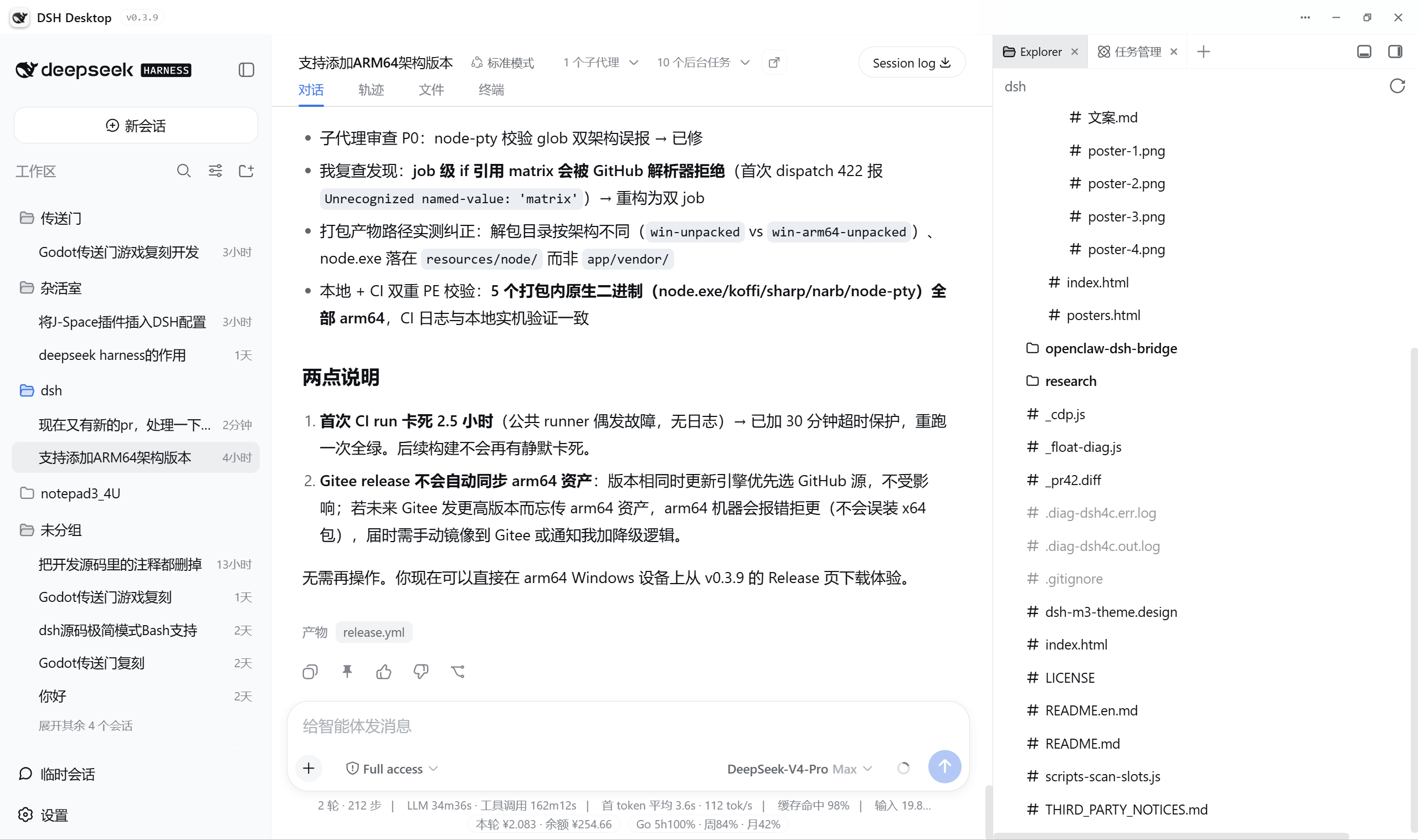
Vanilla dsh web vs DSH Desktop:
| Capability | Vanilla dsh web |
DSH Desktop |
|---|---|---|
| Startup | Manual Node.js install & CLI | Double-click, bundled runtime |
| Surface | Browser tab | Native window · frameless dark glass |
| Plugins | Find, install and reconcile each one yourself | 34 curated plugins in the box, with one place to inspect / toggle / update |
| Sessions | Archive only | Archive / restore / delete + conversation map |
| Balance | None | Live "this turn cost · balance" + OpenCode Go |
| Desktop | None | Tray / native notifications / file workbench / Bot group chats |
| Updates | Manual | Built-in dual-source client update chain (GitHub/Gitee + sha256 fail-closed) |
🚀 Get Started
Requirements: Windows 10 / 11 (x64); macOS 12+ (Apple Silicon / Intel). No Node.js needed.
Download and install
Get the latest 1.0.8 build from GitHub Releases:
| Platform | Installer |
|---|---|
| 💻 Windows x64 | DSH-Desktop-Setup-1.0.8-win-x64.exe (NSIS, ~187 MB, per-user install, WebView2 bootstrapper included) |
| 🍎 macOS 12+ | 1.0.8-macos-arm64.dmg (see the Releases page) |
| 🐧 Linux x64 | 1.0.8-linux-x64.AppImage / dsh-desktop_1.0.8_amd64.deb (see the Releases page) |
- Upgrade in place: the installer finds the old directory, keeps your data and reinstalls to the same location; profiles, sessions and plugin settings are preserved.
- Portable build: Windows also ships
DSH-Desktop-Portable-1.0.8-win-x64.zip; unzip and run, with data stored in adata\folder next to the executable. - First launch: the 34 curated plugins are synced from the bundled
assets/pluginsinto the profile. Afterwards, inspect, toggle and update them under Settings → Plugins → Built-in plugins. - Data locations: Windows installer
%APPDATA%\DSH Desktop\, portable builddata\next to the executable; macOS~/Library/Application Support/DSH Desktop/. SetDSH_HOMEto override the dsh config directory.
Since v1.0.0 the project no longer mirrors code or release assets to Gitee; older Gitee releases remain as an archive only.
💬 Community
Questions, feedback, or just want to chat with other users? Join our QQ group (926561802):

🛠 Build from Source
Prerequisites: Rust toolchain and npm install in dsh-desktop/ (the kernel payload source).
# Tests (current baseline: Rust 607 / sidecar 21 / Node 2253)
cd dsh-tauri
cargo test --workspace
node --test sidecar/cli.test.js
cd ../dsh-desktop && npm test

# Dev run
cd dsh-tauri/src-tauri/src/app && cargo run

# Package the win-x64 NSIS installer + installed-layout smoke test
bash dsh-tauri/scripts/stage-payload.sh
cd dsh-tauri && npx --yes @tauri-apps/cli build \
  --config src-tauri/src/app/tauri.conf.json --target x86_64-pc-windows-msvc
bash dsh-tauri/scripts/smoke-installed.sh
The full flow (including DSH_TAURI_DIAG / DSH_TAURI_DEVTOOLS) is in the development guide.
🤖 Releases
The only release entry point is pushing a v* tag → tauri-release.yml:
three-platform builds (Windows NSIS / portable, Linux AppImage / deb, macOS dmg) → version / test / path gates →
seven verified assets → GitHub Release. The version is kept in sync in three places
(dsh-desktop/package.json, Cargo.toml workspace.package.version, tauri.conf.json); a mismatch fails fast.
Prereleases do not enter GitHub releases/latest, which is what the shell updater polls — so prereleases are
never auto-pushed to stable users by design. See the release runbook for promotion and rollback.
📦 Installer formats
| Platform | Artifact | Status |
|---|---|---|
| Windows x64 | NSIS installer DSH-Desktop-Setup-<version>-win-x64.exe (LZMA, ~187 MB measured on 1.0.7; per-user install, no admin; WebView2 bootstrapper embedded for offline machines) |
✅ Primary platform; 1.0.7 built and passed the installed-layout smoke test |
| Windows x64 portable | DSH-Desktop-Portable-<version>-win-x64.zip (unzip and run; data lives in data\ next to the executable) |
✅ Built by CI |
| Windows arm64 | NSIS installer (experimental) | 🧪 Experimental CI lane |
| Linux x64 | .AppImage / .deb |
✅ Built by CI |
| macOS (Apple Silicon) | .dmg disk image |
✅ Built by CI (unsigned; first launch needs right-click → Open) |
🧩 Bundled Plugin Ecosystem
34 companion plugins are registered in total. Under the v1.0.0 bundled line (user decision, 2026-10-08) their sources ship inside the installer: the delivery gate mirrors assets/plugins as a whole, and the first boot syncs it into the profile, so everything below works out of the box (on 2026-10-22 the side session side-session was removed and DeepSeek-Bot (bot) was added, keeping the roster at 34; see §4 of THIRD_PARTY_NOTICES.md for the delivery gates and the full third-party list). The table below follows the registration order of scripts/lib/companion-plugins.js; package names and versions are read from each plugin's package.json. The "Source / license" column only reports what each package says about itself — per-plugin upstream reachability and licence text are audited in the inventory §3, and the 0.2.1-rc.4 host compatibility verdicts in §5.
[!NOTE] Trimmed in v1.0.0: bundled plugins went from 39 down to 28 (the 11 were named for removal by a user on 2026-10-07). No longer bundled: the visual plugin marketplace (
dsh-community-market) and its desktop service bridge (dsh-market-desktop-bridge), the plugin hub (dsh-hub), knowledge-graph memory (graph-memory), the knowledge centre (dsh-cardian), the desktop pet (harness-pet), built-in image understanding via a VLM restatement (dsh-vision), drag-in files (dsh-file-drop), paste-image-to-send (dsh-image-paste), the in-session terminal tab (@deepseek-ai/dsh-terminal-tab) and one-click file-change revert (@deepseek-ai/dsh-client-file-changes). The last two overlap the kernel's own official packages of the same/similar name, and their mirrored copies underprofiles/web/node_modulesshadow the official ones — hence the recall. Similar capabilities still ship: phone mirroring =dsh-pocket, file-change tracking =dsh-file-changes(only its revert half depended on the shell-sidefile_revert, which is also gone).
| Plugin (package) | Version | Description | Source / license |
|---|---|---|---|
@deepseek-ai/dsh-balance |
0.2.0 | Account balance plus per-turn cost estimate, docked to the conversation stats bar | In-house · MIT |
@deepseek-ai/dsh-file-changes |
0.1.0 | Session file-change projection (collapses tool/result meta.diffs) | In-house · MIT |
dsh-better-sidebar |
0.24.2 | VSCode-style right pane: five built-in tabs (editor / git / subagent / sidechat / diff) plus a tab-registration service for other plugins | omdsh-dev/DSH-better-sidebar · MIT |
dsh-session-manager |
0.1.0 | Session-row delete button plus an "Archived conversations" panel in Settings (restore / delete) | In-house · MIT (name collides with a published community package) |
@deepseek-ai/dsh-conversation-tweaks |
0.1.1 | Collapse long assistant outputs, plus a right-side navigation rail | In-house · MIT |
@deepseek-ai/dsh-quest-ui |
0.6.1 | One-toggle Quest-mode UI (grouped session rail + card composer + pill metadata bar), off by default | In-house · MIT |
@dsh-external/dsh-super-injector |
0.3.1 | Inject any local plugin package at runtime without restarting, hot reload, and a plugin-manager UI in Settings | Community (@dsh-external) · BSD-3-Clause (manifest label only, no licence text to cite) |
@deepseek-ai/dsh-prompt-custom |
0.5.0 | Override or append the official system prompt from the Settings page, with one-click prompt-card switching and save-back to the active card | In-house · MIT |
@deepseek-ai/dsh-workspace-anchor |
0.1.1 | Anchor the current working directory into the stable system prompt to stop workspace drift (from kernel 0.2.1 the {{cwd}} prompt variable is no longer registered, so the plugin fills the real path itself) |
In-house · MIT |
@deepseek-ai/dsh-wsl-settings |
0.1.0 | A "WSL backend" section in Settings: local/WSL switching, distro and install dir, liveness probe | In-house · MIT |
ds-bot |
0.2.0 | Bot team: a main bot plus long-lived bots and group chats, with @ handoffs and shared memory — a ready-to-use collaboration workspace (loader id bot) |
Fei2411/DeepSeek-Bot · Apache-2.0 |
billion-context-dsh |
0.2.26 | Active Context Pruning: model-driven context management, plus four model tools and the /acp-prune command | Tyan66666/billion-context-dsh · MIT |
dsh-pocket |
2.10.7 | Control the desktop web session from your phone by scanning a QR code (WebSocket passthrough + public tunnel) | shaobeichen/dsh-pocket · GPL-2.0 |
@deepseek-ai/dsh-openclaw-bridge |
0.8.1 | Bridges WeChat / Feishu official channels into DSH agent sessions (chunked write-back, dedup, rate limit) | hzhz314159/openclaw-dsh-bridge · MIT |
dsh-input-history |
0.1.1 | Terminal-style ↑/↓ history of sent messages in the composer, scoped per session | In-house · MIT |
dsh-easyrewrite |
2.6.0 | Message recall and re-edit, a version pager, and its own settings centre | Renzic-Stone/DSH-EasyRewrite · MIT |
dsh-change-review |
0.1.2 | AI change review: the model re-checks its own just-made edits for correctness, safety and intent | In-house · MIT |
dsh-auto-compact |
0.1.2 | Auto-sends /compact once contextPressure crosses a threshold (80% by default, configurable) | In-house · MIT |
dsh-offpeak |
1.0.1 | Tidal-price guard: warns before sending at peak, and can defer work to off-peak windows | christophersmith2737-commits/OffPeak · MIT |
dsh-settings-nav-custom |
0.1.1 | Show / hide and reorder the left-hand Settings nav items (persisted in localStorage) | Ported from EAC DSH-EAC/EAC-Desktop · MIT |
dsh-settings-groups |
0.1.1 | Folds low-frequency General-settings rows into a collapsible "Advanced" group | In-house · MIT |
dsh-synapse |
0.3.1 | Non-linear conversation canvas: drag-spread sessions, follow-ups and branches of one workspace | liangmianya/dsh-synapse · MIT (local fork line, upstream 0.4.2 deliberately not taken) |
@dsh-external/dsh-subagent-lens |
0.1.1 | Expandable Task/subagent activity view plus a header bar aggregating commands and files (no extra backend calls) | In-house · MIT (borrows the @dsh-external scope, which has no repository) |
dsh-basics-panel |
0.4.2 | Visual management of MCP servers, skills, rules and archived sessions inside Settings | yxsj245/dsh-Basics-Panel · MIT |
dsh-input-fold |
0.1.1 | Collapses very long user prompts to a few lines with an "expand" overlay | In-house · MIT |
dsh-prompt-optimizer |
3.0.0 | One-click draft analysis and polishing next to the composer (SSE streaming; reuses the current session model in real time; template-based rewrite without context, intent-first polish with context; fidelity self-check and slash-command prefix protection; replace/undo/copy results; model, call-parameter and context settings in Settings) | Y1X1n/dsh-prompt-optimizer · MIT |
dsh-zcode-migrate |
0.1.2 | Migrates zcode CLI session history into native dsh session logs (inspect / migrate / verify, /zcode) | In-house · MIT |
dsh-builtin-manager |
0.2.0 | Built-in plugin page under Settings → Plugins: search and state filters with a single-card list to view and toggle every bundled plugin (inline feedback; takes effect on next launch) | In-house · MIT |
@deepseek-ai/dsh-goal-completion |
0.1.0 | "Goal wrap-up" tab in the kernel right bar: the current session's goal state machine plus the complete verb the official GoalBar never exposes (two-click confirm) |
In-house · MIT |
dsh-free-search |
0.9.11 | Free multi-engine web search: registers a ctx.web search provider that the built-in web_search picks up (loader id is web-search-free, not the package name) |
DDDMUC/dsh-free-search · MIT |
dsh-plugin-shop |
0.9.0 | Plugin shop: browse, install, enable/disable and update dsh plugins (loader id is shop; the client bundle id is the package name) |
LivXue/dsh-plugin-shop · Apache-2.0 |
@local/dsh-network-proxy |
1.0.0 | HTTP proxy row under Settings → General: reads the system proxy and hot-swaps the fetch dispatcher (keeps the upstream @local/* name so GitHub updates still line up) |
baizhizzl/dsh-network-proxy · MIT |
dsh-toolbox-ui |
1.8.2 | MCP / skills toolbox: bottom-right floating panel with an MCP marketplace and skill management (loader id is mcp-manager-ui; its host half statically imports smol-toml) |
Imzl-zl/dsh-toolbox-ui · MIT |
@bittersmilezzz/dsh-notify |
0.4.5 | Desktop notifications: six renderer-side Web Notification events plus click-to-session, replacing the shell's "turn complete" toast from v1.0.7 | bitterSmilezzz/dsh-notify · MIT |
Earlier removals, also outside the 34 registered plugins:
dsh-navbar(navbar replacement, dropped from the list and its sources deleted inv0.6.3-beta.3, commitff421ac2),zat-dsh-engine(the previous built-in marketplace, retired even earlier) anddsh-reasoning-effort(reasoning-effort selector, retired 2026-10-17 with the 0.2.1 kernel generation — the official Settings page can now declare a custom model's effort levels itself).
🏗 Architecture
From v0.5.0 the app runs on the Tauri 2 (Rust) architecture — the Electron shell has been retired; its full set of responsibilities (windows / IPC / updates / packaging) is re-implemented crate by crate on the Rust side, contract-first (dsh-tauri/contracts/ — five hard contracts are the single source of truth for interfaces):
┌──────────────────────────────────────────────────────────┐
│  Tauri 2 shell (Rust · 7 one-way-dependency crates)      │
│  · supervisor: boot guardian waterfall → spawn kernel    │
│    → readiness swap → liveness probe → crash-loop        │
│      in-place restart (never a blank window)             │
│  · shell-core        paths / settings (self-heal) /      │
│                     single instance                      │
│  · kernel-process    spawn spec / ready line / Job       │
│                     Object tree-kill                     │
│  · bridge            Electron IPC 43 channels → Tauri    │
│                     commands, full mapping + shim JS     │
│                     (window.dshDesktop)                  │
│  · fence / preview-server / session-watcher /            │
│    sidecar-orchestrator (boot sequencing + Node sidecar  │
│    reusing dsh-desktop/scripts kernel logic, zero        │
│    rewrite)                                              │
└──────────────────────┬───────────────────────────────────┘
                       │  dsh web --host 127.0.0.1 --port <reused port>
                       ▼
            Bundled node + @deepseek-ai/dsh
            Path resolution: user overlay > bundled package
                       │  ready-line detection
                       ▼
            Native window loads Web UI (localhost only)
Layering rules: crates never depend on the tauri runtime and are independently unit-tested (177 Rust tests green; plus 16 sidecar Node tests across 71 shared-script unit files); the assembly root only wires things up; kernel-side Node logic lives in dsh-desktop/scripts/. See the development manual.
📄 License
MIT. Based on @deepseek-ai/dsh (MIT).
⭐ If DSH Desktop is helpful to you, consider starring the repo; for any issues or feedback, please open an issue.
Related plugins
DSH-better-sidebar
 dsh-external
/DSH-better-sidebar
右侧侧边栏增强:文件预览/终端/Git,可拖拽自定义位置
Added:
dsh plugin --profile web add github:dsh-external/DSH-better-sidebarmirage#dsh
 strukto-ai
/mirage/typescript/packages/dsh
把文件系统与 bash 提供者换成 mirage 虚拟工作区:文件工具与 shell 命令作用于挂载的资源(RAM、S3、Redis、Slack、Gmail、Notion、Postgres)而非宿主磁盘,支持按挂载点设置读/写/执行模式、按命令选择沙箱(进程内 monty、pyodide、quickjs;远程 docker、e2b、daytona),并可在虚拟终端中安装 CLI(git、gh、slack、linear、ntn、gws,或自行注册的程序树)作为命令头词。
Added:
dsh plugin --profile web add github:strukto-ai/mirage#path:/typescript/packages/dshdeepseek-harness-desktop
 hairyf
/deepseek-harness-desktop
DeepSeek Harness Tauri 桌面版 | Only 5mb installer, zero environment setup. Windows / macOS / Linux.
Added:
dsh plugin --profile web add github:hairyf/deepseek-harness-desktopcc-safety-net
 kenryu42
/cc-safety-net
A coding agent CLI hook - block destructive commands and secret file access
Added:
dsh plugin --profile web add 'github:kenryu42/cc-safety-net#ae8af0330308ad0bc24b5389709060c7a07a6b8d'hol-guard
 hashgraph-online
/hol-guard
开源AI代理防病毒:运行时拦截风险工具、秘密访问、提示注入、恶意软件包、MCP服务器、插件和技能。
Added:
dsh plugin --profile web add github:hashgraph-online/hol-guarddeepseek-harness-studio
 fufankeji
/deepseek-harness-studio
DeepSeek Harness 零代码桌面端|一键启动,支持 Windows 与 macOS;内置插件发现、热点插件推送、一键安装与管理、AI 智能推荐和视觉增强。
Added:
dsh plugin --profile web add github:fufankeji/deepseek-harness-studio