
Sessions & Messages
dsh-reply-nav
nicolas-zhao-4/dsh-reply-nav · ★ 2
 nicolas-zhao-4
a history navigator for deepseek-harness
Manifest details
安装
dsh plugin --profile web add github:nicolas-zhao-4/dsh-reply-navGitHub 源码安装:首次需按提示配置 allowBuilds 构建授权后重试
For install and environment setup, plus plugin development tutorials, see DSH community docs ↗
README
Table of contents
Turn long DeepSeek Harness chats into a navigable timeline.
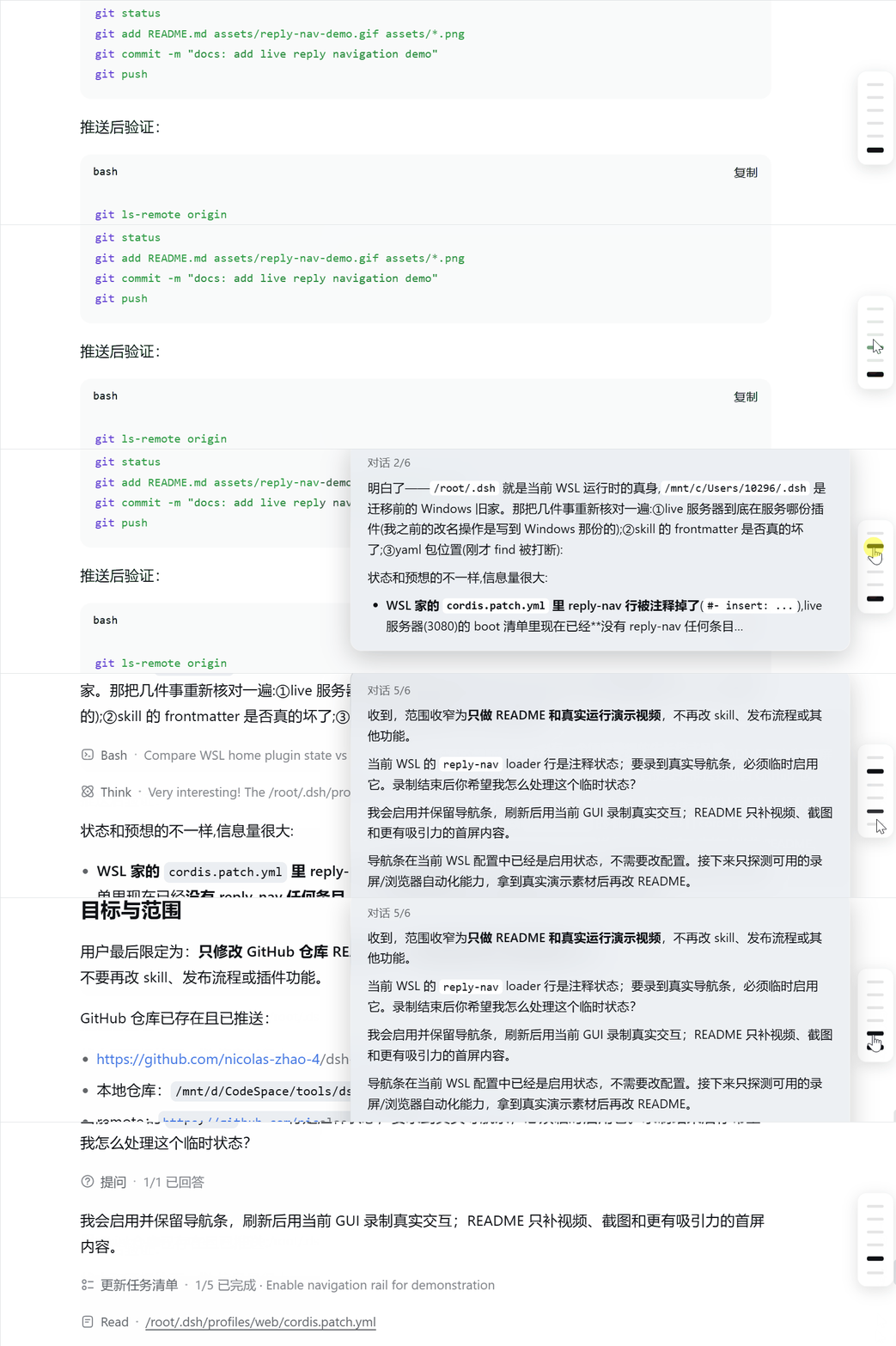
Add a slim round-level navigation rail to DeepSeek Harness. Hover a bar to preview the explicit Markdown reply. Click it to jump straight to that user round—even when tool calls split the answer into many internal steps.
Why it feels better
- One bar per user round — not per tool-split assistant step
- Hover to preview — scan rendered Markdown before opening the full exchange
- Click to jump — the matching round scrolls into view and stays highlighted
- Small and native — client-only, no backend, no build step, theme-aware
Install in 30 seconds
git clone https://github.com/nicolas-zhao-4/dsh-reply-nav.git
cd dsh-reply-nav
powershell -ExecutionPolicy Bypass -File ./install.ps1
Refresh the DSH Web page. On Linux/macOS, run ./install.sh instead.
Other install options
The installer copies the plugin into <profile>/node_modules/ and idempotently adds the loader entry to cordis.patch.yml. The default profile is web.
For a manual install, copy package.json and lib/ into ~/.dsh/profiles/<profile>/node_modules/dsh-reply-nav/, then add:
- insert:
    - id: reply-nav
      name: dsh-reply-nav
Or install from GitHub:
cd ~/.dsh/profiles/<profile>
npm i --no-save --package-lock=false github:nicolas-zhao-4/dsh-reply-nav
Add the patch above and refresh the page.
Included / excluded
- Included: explicit reply text, rendered Markdown preview, round-level navigation
- Excluded: thinking/reasoning blocks and tool calls
Verify and troubleshoot
- Refresh the page; the rail should appear on the right side of a long conversation
- Confirm
http://127.0.0.1:3080/plugins/dsh-reply-nav/client.jsreturns200 - “Activated” in settings only confirms the Node side; check the browser console if the UI is missing
How it works
The plugin registers a shell.overlay client UI and aggregates assistant text from each user round in the DSH session snapshot. The preview and jump behavior live entirely in lib/client.js; edit it and refresh.
License
MIT
Related plugins
archify
 tt-a1i
/archify
架构图生成 Skill 总仓(多宿主):可校验的自包含架构图、工作流图、时序图、数据流图与生命周期图。DSH 安装不走本仓根——根目录不是 DSH bundle,请用适配包 @tt-a1i/archify-dsh(见 DSH 集成条目)。
dsh plugin --profile web add @tt-a1i/archify-dsh@1.0.0DeepSeek-Bot
 Fei2411
/DS-Bot/ds-bot
DS Bot: a team of long-lived Bots for DeepSeek Harness, with Main Bots, Bot-to-Bot messages and group chats
dsh plugin --profile web add 'ds-bot@0.2.4'Study-Mate
 Miaotofu01
/Study-Mate
StudyMate learning skills and lesson engine for DeepSeek Harness, Google Antigravity, Codex and ChatGPT Work.
dsh plugin --profile web add 'github:Miaotofu01/Study-Mate#d8114f38363272852b339d6788b2f8f007243b43'dsh-plugin-subscriptions
 V1ki
V1ki/dsh-plugin-subscriptions
把 ChatGPT(Codex)、Claude 与 Grok(X Premium)订阅用作 DeepSeek Harness 的 LLM provider——Web UI OAuth 登录,无需 API key
dsh plugin --profile web add github:V1ki/dsh-plugin-subscriptionsRabiRoute
 vb2250158
/RabiRoute/plugins/rabi-dsh-context
Connect DSH lifecycle events and conversation context to Rabi Manager.
dsh plugin --profile web add 'github:vb2250158/RabiRoute#e483f87e68cef2c8f5112b101e333b1a9577a9f7&path:/plugins/rabi-dsh-context'dsh-deepseek-web-login
 cv-superding
/dsh-deepseek-web-login
Unofficial DSH plugin: use chat.deepseek.com web models as a DSH LLM provider (browser login capture + PoW solving + SSE streaming + prompting-based tool calls), provider route deepseek-web
dsh plugin --profile web add 'dsh-deepseek-web-login@1.0.3'