
Models & Providers
DSH-Plugin-API-Usage-Monitor
ninedaywoo-web/DSH-Plugin-API-Usage-Monitor · ★ 1
 ninedaywoo-web
DeepSeek Harness plugin for API balance monitoring, daily cost and token tracking, peak/off-peak pricing indicators, recharge refresh, and one-click restart.
Manifest details
安装
dsh plugin --profile web add github:ninedaywoo-web/DSH-Plugin-API-Usage-MonitorGitHub 源码安装:首次需按提示配置 allowBuilds 构建授权后重试
For install and environment setup, plus plugin development tutorials, see DSH community docs ↗
README
Table of contents
A DeepSeek Harness plugin for API balance monitoring, daily cost and token tracking, peak/off-peak pricing indicators, recharge refresh, and one-click restart. Its game-style interface turns your API balance into an HP bar and today's spend into a posture bar.
This is an unofficial community plugin and is not affiliated with or endorsed by DeepSeek. Amounts shown in screenshots are demo data.
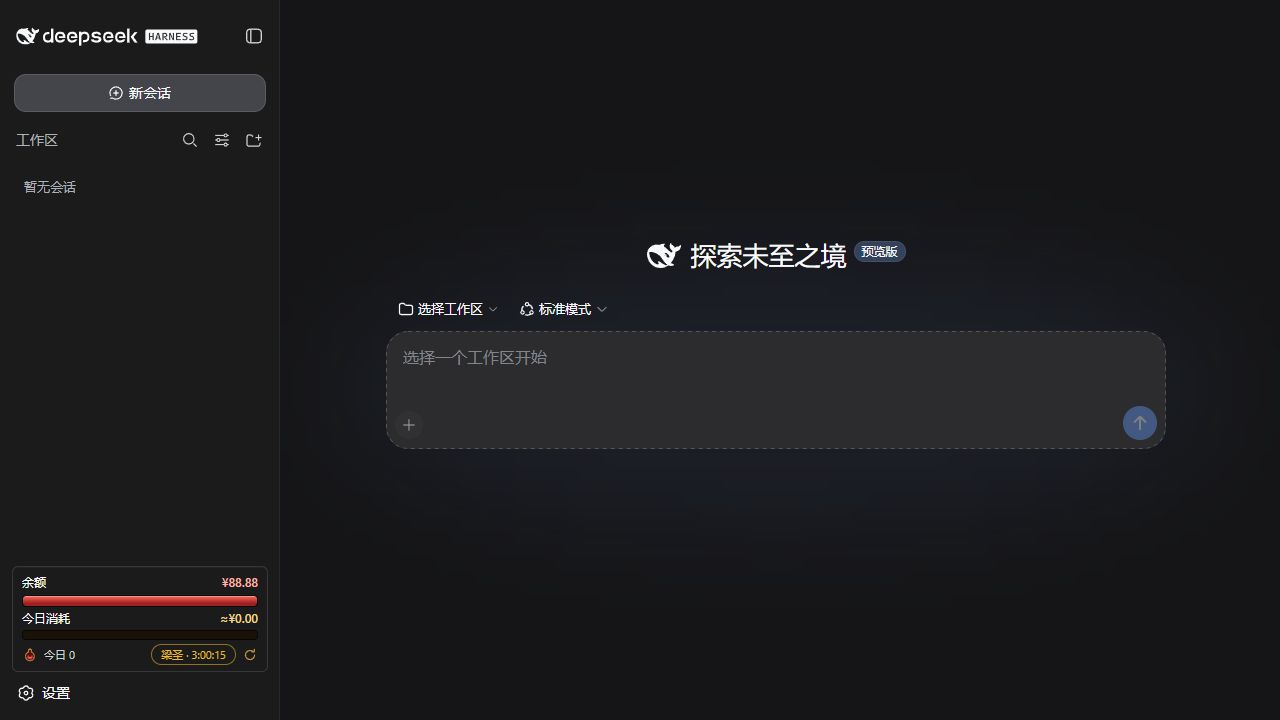
Features
| Feature | What it does |
|---|---|
| Balance HP bar | Shows the current balance relative to the confirmed full-HP baseline. Normal spending lowers HP without unexpectedly resetting it. |
| Daily posture bar | Shows today's spend relative to the daily budget. Recharging or refreshing HP does not clear it. |
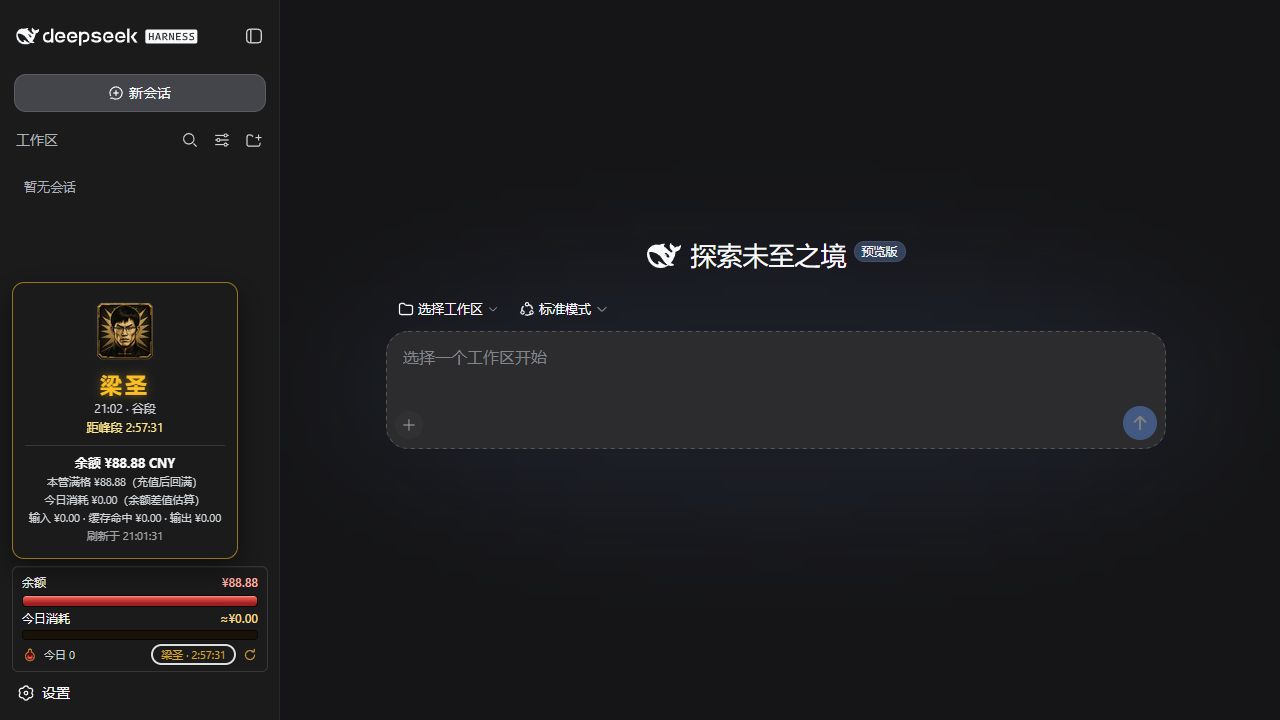
| Peak/off-peak status | Displays “Liangzi” during peak pricing and “Liangsheng” off peak. Click it for timing, balance, spend, and pricing-bucket details. |
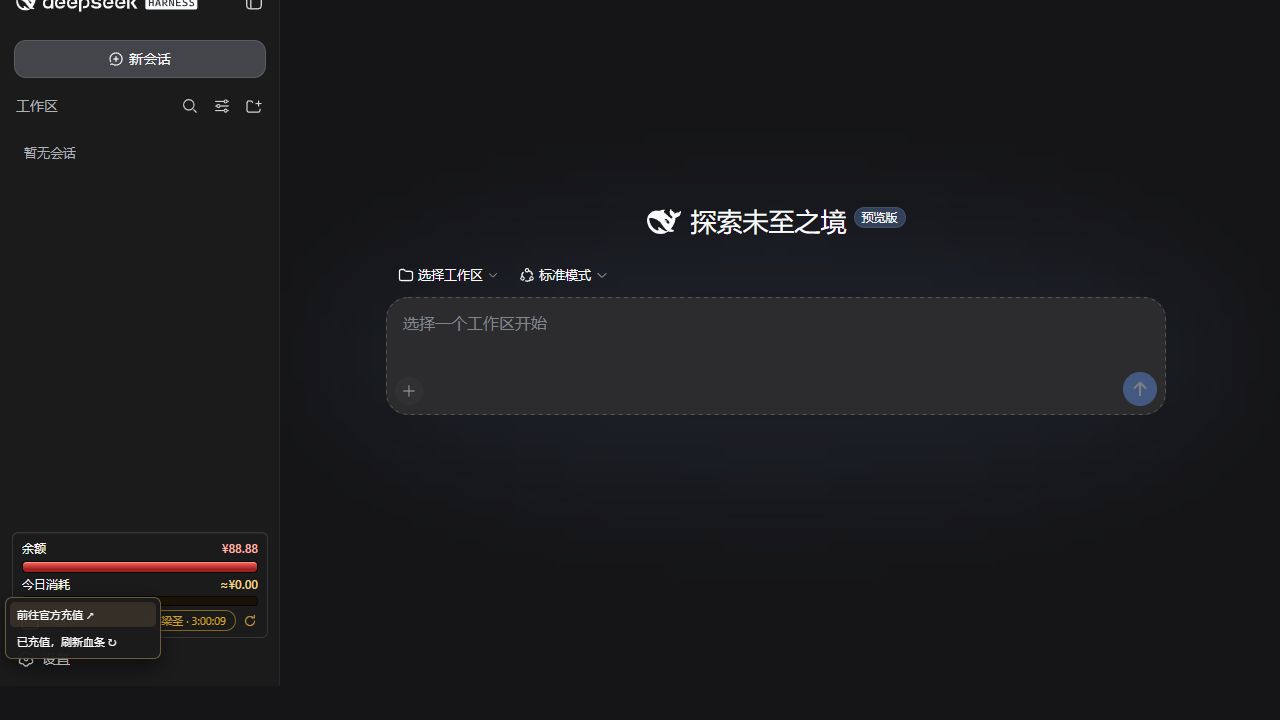
| Recharge and refresh | The flask opens DeepSeek's official top-up page or manually refreshes the full-HP baseline after a recharge. |
| One-click restart | Restarts the current Harness from the sidebar, using a minimized supervisor on Windows and a background supervisor on macOS. |
| Persistent state | Preserves the HP baseline and today's usage state across Harness restarts. |
Requirements
- A working DeepSeek Harness installation with
DEEPSEEK_API_KEYalready configured - DeepSeek Harness
0.1.0-rc.6or a compatible release - Node.js
^22.19.0or>=24.0.0 - Windows 10/11 has passed an isolated install test; macOS support is a release candidate pending real-device verification
This plugin does not install Harness or configure your API key.
Install from GitHub
- Download the latest
dsh-plugin-api-usage-monitor-*.tgzfrom GitHub Releases. - Run the following command and replace the example with the downloaded file path:
dsh plugin --profile web add "/absolute/path/to/dsh-plugin-api-usage-monitor-1.9.0-rc.4.tgz"
- Start or restart the web profile:
dsh web
- Refresh the Harness page. The plugin remains installed in the
webprofile across future launches.
Everyday use
- Click the flask to reveal Official top-up and Refresh HP.
- After recharging, click Refresh HP. The current balance becomes the new full-HP baseline, while the daily posture bar remains intact.
- Click Liangzi / Liangsheng to open the peak/off-peak card with timing, balance, spend, and pricing-bucket details.
- Click the circular arrow to restart the current Harness. The page waits for a genuinely new Harness instance before reconnecting.
- Drag the widget to detach it temporarily; double-click it to restore its default position.
Windows and macOS
On Windows, the restart supervisor uses one minimized persistent console to prevent recurring PowerShell pop-ups. On macOS, it runs in the background and writes logs to:
$DSH_HOME/logs/dsh-balance-bar-supervisor.log
For real-device macOS acceptance, verify installation, live balance loading, one-click restart, state persistence, and the absence of orphan processes.
Privacy and security
- The API key is resolved by Harness on the host and is never sent to the browser.
- The plugin reads the balance directly from DeepSeek's official endpoint and sends no telemetry.
- The restart endpoint accepts only same-origin requests from the local loopback interface.
- The package contains no install scripts, API keys, conversations, or author-specific balance state.
Uninstall
dsh plugin --profile web remove dsh-plugin-api-usage-monitor
Uninstalling does not remove Harness conversations. The plugin's own meter state is stored at:
$DSH_HOME/storages/balance-bar-day.json
Stop Harness and delete that file manually only if you want a complete state reset.
Development and verification
npm test
npm run preflight
npm pack --dry-run
The automated suite covers spending, manual recharge refresh, day rollover, pricing policies, duplicate restarts, crash recovery, ephemeral ports, and Windows/macOS launch behavior.
License and artwork
Source code is released under the MIT License. Character artwork is not covered by the MIT license; see ASSET-NOTICE.md.
Related plugins
dsh-plugin-reasonix
 esengine
/DeepSeek-Reasonix/integrations/dsh-plugin
把 Reasonix 作为 dsh 子智能体接入:一层配置补丁让 subagent-acp 提供方启动 reasonix acp,并以 reasonix 工具暴露给模型。纯配置、无代码、不在 npm;接入的是子智能体,不是模型服务商。
dsh plugin --profile web add 'github:esengine/DeepSeek-Reasonix#af0e954f5629492980718fc0e36030fec0abc682&path:/integrations/dsh-plugin'dsh-purge
 YuJunZhiXue
/dsh-purge
DeepSeek Harness 破甲:让所有模型都能破甲,不同模型可换不同提示词;默认提示词面向国模「小码酱」。Jailbreak for every model — swap prompts per model. 求 Star 收藏 ⭐ 如要二开,请查看署名要求部分
dsh-purge-mmparko
 mmparko
/dsh-purge
DeepSeek Harness 破甲:让所有模型都能破甲,不同模型可换不同提示词;默认提示词面向国模「小码酱」。Jailbreak for every model — swap prompts per model. 求 Star 收藏 ⭐ 如要二开,请查看署名要求部分
dsh plugin --profile web add 'github:mmparko/dsh-purge#033e6bd1e0f101352b39075ecd0d758ffef26b76'dsh-connect-workbuddy
 dingminhua
/dsh-connect-workbuddy
把本机登录的 WorkBuddy 模型(国内版与国际版)接入 DeepSeek Harness:每次刷新按上游目录自动读取每个模型的积分倍率,支持逐模型图片输入开关、多账号切换与账号池自动换号,并提供每日签到、卡片与输入框里的胶囊积分读数等只读积分概览。
dsh plugin --profile web add 'dsh-connect-workbuddy@5.15.0'dsh-image-gen
 shanliuling
/dsh-image-gen
让 DeepSeek Harness 像 ChatGPT 一样,在对话里直接生成图片。
dsh plugin --profile web add github:shanliuling/dsh-image-genagent-vision-toolkit
 Anionex
/agent-vision-toolkit
为纯文本模型"看图“设计更好的视觉工具箱和技能,支持多图理解,图片问答,前端UI还原、GUI 自动化等,并可选无缝接入多个主流agent,直接识别粘贴图片| A vision toolkit and skill designed for text-only llms — image Q&A, long-screenshot OCR, frontend UI restoration, and GUI automation, with optional seamless integration for Codex, Claude Code, Pi, Oh My Pi, and OpenCode
dsh plugin --profile web add github:Anionex/agent-vision-toolkit