Models & Providers
Qwen-MM-Plugins
omdsh-dev/Qwen-MM-Plugins · ★ 0
 omdsh-devCurated
Qwen multi-modal plugin support.
安装
dsh plugin --profile web add github:omdsh-dev/Qwen-MM-PluginsGitHub 源码安装:首次需按提示配置 allowBuilds 构建授权后重试
For install and environment setup, plus plugin development tutorials, see DSH community docs ↗
README
Table of contents
English · 中文
Native multimodal plugins for Qwen models. Make any agent harness multimodal-native.
Architecture
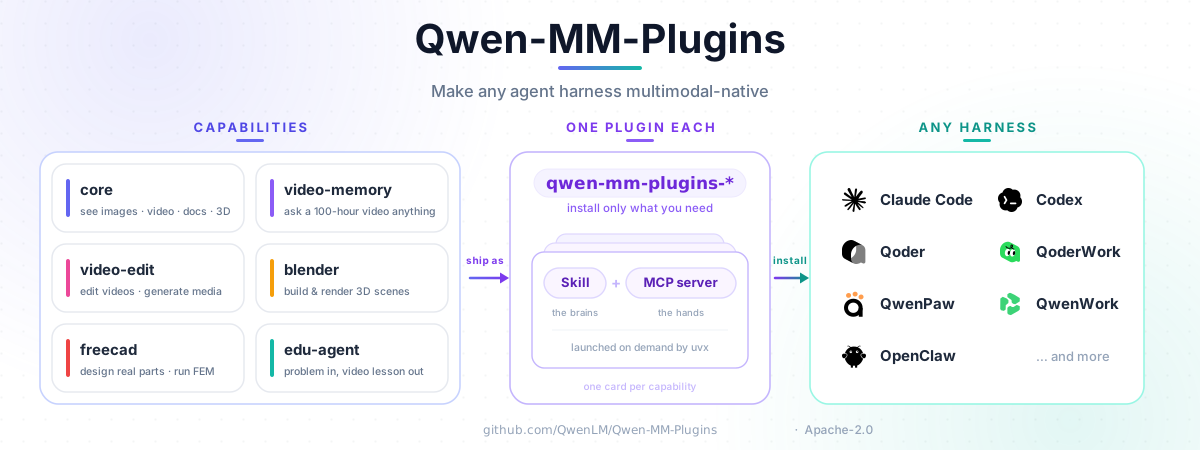
Install
The guided installer supports Claude Code, CodeBuddy, Codex, Qoder, OpenClaw, Qwen Code, and Gemini
CLI. Shared configuration lives in ~/.qwen-mm-plugins/config.
In-app setup for WorkBuddy, QoderWork, and QwenWork, plus manual setup for DeepSeek Harness, Hermes Agent, opencode, pi, and QwenPaw, is documented in the other harness guide.
curl -fsSL https://raw.githubusercontent.com/QwenLM/Qwen-MM-Plugins/main/install.sh | bash
Update the capabilities already installed in one harness:
curl -fsSL https://raw.githubusercontent.com/QwenLM/Qwen-MM-Plugins/main/install.sh | bash -s -- update
Released capabilities use independent, immutable tags. For local checkout installs, rollback, manual skill + MCP setup, dependencies, and Windows/WSL2, see the installation guide.
DeepSeek Harness (DSH)
The source repository includes a DSH carrier at packages/dsh. It mounts selected
Qwen capabilities through the official @deepseek-ai/dsh-mcp-client; the Python MCP servers still
come from this repository's uvx package source. Install the carrier in the target profile:
dsh plugin --profile web add @omdsh-dev/qwen-mm-plugins-dsh
The carrier requires the native-media DSH client line and relies on its built-in attachment admission
and finalizeContent support; it does not carry a compatibility layer for older MCP clients. See
the DSH setup guide for profile configuration and
source-checkout mode.
Capabilities
Each capability is installed independently as a Skill plus an optional MCP server. Its
install name is qwen-mm-plugins-<capability>.
| Capability | Use case | Main requirements | Cookbook |
|---|---|---|---|
core |
Read images and video; visualize documents, code, data, 3D files, and more | No API key; ffmpeg for audio/video; format-specific apps as needed | Cookbook |
api |
Qwen VL/Omni vision, OCR, grounding, ASR, segmentation, and audio-video understanding | DashScope; ffmpeg for local audio/video | Cookbook |
search |
Web search, page extraction, and reverse-image search | Serper, Exa, or Tavily key; image search requires Serper | Cookbook |
video-memory |
Build hierarchical memory for long-video QA | DashScope; ffmpeg/ffprobe for builds | Cookbook |
video-edit |
Image, video, and audio generation with editing workflows | DashScope; ffmpeg + Node/Chromium for full edits | Cookbook |
blender |
Model, texture, light, and render in Blender | Blender; Xvfb on headless Linux | Cookbook |
freecad |
Parametric CAD, STEP/STL, and FEM workflows | FreeCAD; CalculiX for FEM; Xvfb on headless Linux | Cookbook |
edu-agent |
Create Chinese math/science explainer videos and interactive pages | Skill-only; Node/Chromium + ffmpeg; DashScope for narrated video | Cookbook |
Try it
After installing a capability, reference a file and ask naturally; the Skill selects the relevant MCP tool.
@report.pdf          Summarize page 3 and extract its table.
@meeting.mp4         Transcribe this with speaker labels and timestamps.
@place.jpg           Identify where this photo was taken and verify it on the web.
@lecture-2h.mp4      List the main points with timestamps.
core reads media at dynamic resolution, so manual resizing is normally unnecessary.
Requirements and configuration
uvprovidesuvx, which installs Python dependencies on demand.- Local
coretools need no API key in the default native-image mode. Text-only caption fallback, cloud, and search capabilities need their provider credentials. - Video, document, browser, Blender, and FreeCAD workflows may need system applications.
Run the installer's Configure and Verify actions to set credentials and check dependencies. See Installation for prerequisites and the configuration reference for every setting.
Documentation
License
Apache-2.0 — see LICENSE. Third-party attribution for the Blender and FreeCAD integrations is recorded in their respective Blender and FreeCAD notices.
Related plugins
dsh-plugin-reasonix
 esengine
/DeepSeek-Reasonix/integrations/dsh-plugin
把 Reasonix 作为 dsh 子智能体接入:一层配置补丁让 subagent-acp 提供方启动 reasonix acp,并以 reasonix 工具暴露给模型。纯配置、无代码、不在 npm;接入的是子智能体,不是模型服务商。
Added:
dsh plugin --profile web add 'github:esengine/DeepSeek-Reasonix#af0e954f5629492980718fc0e36030fec0abc682&path:/integrations/dsh-plugin'dsh-purge
 YuJunZhiXue
/dsh-purge
DeepSeek Harness 破甲:让所有模型都能破甲,不同模型可换不同提示词;默认提示词面向国模「小码酱」。Jailbreak for every model — swap prompts per model. 求 Star 收藏 ⭐ 如要二开,请查看署名要求部分
Added:
dsh plugin --profile web add 'github:YuJunZhiXue/dsh-purge#6f9c500bb591f29af2bf32719cc59d7e94e44b74'dsh-purge-mmparko
 mmparko
/dsh-purge
DeepSeek Harness 破甲:让所有模型都能破甲,不同模型可换不同提示词;默认提示词面向国模「小码酱」。Jailbreak for every model — swap prompts per model. 求 Star 收藏 ⭐ 如要二开,请查看署名要求部分
Added:
dsh plugin --profile web add 'github:mmparko/dsh-purge#033e6bd1e0f101352b39075ecd0d758ffef26b76'agent-vision-toolkit
 Anionex
/agent-vision-toolkit
为纯文本模型"看图“设计更好的视觉工具箱和技能,支持多图理解,图片问答,前端UI还原、GUI 自动化等,并可选无缝接入多个主流agent,直接识别粘贴图片| A vision toolkit and skill designed for text-only llms — image Q&A, long-screenshot OCR, frontend UI restoration, and GUI automation, with optional seamless integration for Codex, Claude Code, Pi, Oh My Pi, and OpenCode
Added:
dsh plugin --profile web add github:Anionex/agent-vision-toolkitdsh-image-gen
 shanliuling
/dsh-image-gen
让 DeepSeek Harness 像 ChatGPT 一样,在对话里直接生成图片。
Added:
dsh plugin --profile web add github:shanliuling/dsh-image-gendsh-connect-workbuddy
 dingminhua
/dsh-connect-workbuddy
把本机登录的 WorkBuddy 模型(国内版与国际版)接入 DeepSeek Harness:每次刷新按上游目录自动读取每个模型的积分倍率,支持逐模型图片输入开关、多账号切换与账号池自动换号,并提供每日签到、卡片与输入框里的胶囊积分读数等只读积分概览。
Added:
dsh plugin --profile web add 'dsh-connect-workbuddy@5.15.0'