
UI Enhancements
martty
openma-ai/martty · ★ 82
 openma-ai
A DSH-first agent TUI using the same Cordis plugin capabilities as DSH, with support for other ACP-compatible agents.
安装
dsh plugin --profile web add github:openma-ai/marttyGitHub 源码安装:首次需按提示配置 allowBuilds 构建授权后重试
For install and environment setup, plus plugin development tutorials, see DSH community docs ↗
README
Table of contents
- Martty: Agent TUI
- Quick start
- Recommended: dsh TUI surface plugin
- Migrating from DeepSeek Harness TUI / the legacy package name
- Global: an Agent TUI out of the box
- Harness CLI quick start
- Registry and TUI setup
- Harness TUI workflow
- dsh runtime resolution and supported versions
- Try the demo first
- Highlights
- Fully pluggable and self-evolving
- Current boundary
- Compared with the Web plugin platform
- Runtime architecture
- Essential interactions
- Session modes and Shift+Tab
- Composer text editing
- UI Preset vs Agent Preset
- Build from source
- Troubleshooting
- Repository map
- License
Martty: Agent TUI
- A high-performance interface written in Rust/ratatui.
- DSH-first: built on the same Cordis composition and plugin model as DeepSeek Harness, while also supporting other compatible ACP agents.
martty is the primary command. It is a terminal-native ACP client and an extensible terminal on a
Cordis client tree. It presents streamed reasoning, tool calls, subagents,
token usage, durable sessions, and other Agent UI elements in a Rust/ratatui interface. The recommended
profile path mounts the ACP plugin on the dsh Base Host tree and starts an
independent TUI Client process; standalone may spawn or attach any ACP agent.
Its long-term direction is not to
hard-wire more features into the TUI, but to compose themes, views, commands,
and interactions as plugins until Creator can inspect, create, run, diagnose,
and iterate on its own terminal capabilities.
Rename note: the project and recommended npm package have moved from DeepSeek Harness TUI /
@openma/deepseek-harness-tuito Martty /martty. This is a brand and package-name migration, not a runtime rewrite: configuration and session data remain compatible. The production profile is now namedmartty; the legacytuiprofile remains compatible. Thedsh-tuicommand is no longer installed by themarttypackage — see Migrating from DeepSeek Harness TUI / the legacy package name.
Quick start
When installing via
npm install, Node.js must be installed on your machine, and pnpm may be required.Agent-oriented installation steps: agent install guide.
Recommended: dsh TUI surface plugin
Requires Node.js 22.19+. Install the official
DeepSeek Harness, then add the TUI
directly to the martty profile:
npm install -g @deepseek-ai/dsh
dsh plugin --profile martty add martty@latest
dsh --profile martty
dsh plugin ... add is the recommended installation and upgrade entry point.
It creates the profile and installs the TUI plus its ACP dependency; no global
martty or separate pnpm installation is required.
dsh installs plugins with pnpm. Martty declares no install lifecycle scripts
(preinstall/install/postinstall), so it installs under pnpm's strict
build-script policy (ERR_PNPM_IGNORED_BUILDS) without --ignore-scripts or
approving builds. A profile where an install of 0.3.2 or earlier failed —
martty is a dependency but missing from dsh.profile.bundles, and re-running
add does not fix it — needs dsh plugin --profile martty remove martty
followed by add again.
With such a profile in place, the npm entry point can attach to it too:
npx martty --dsh martty # same as dsh --profile martty, after a version check
The legacy @openma/deepseek-harness-tui name continues to receive the same
versions, so existing installs do not need to migrate immediately.
Migrating from DeepSeek Harness TUI / the legacy package name
The project is now named Martty, and martty is the recommended package
name. Starting with 0.2.13, martty
and @openma/deepseek-harness-tui are published by the same CI run with the
same version and artifacts; the scoped name is deprecated.
With a global npm install, just install martty — no removal needed
first, whatever state the legacy package is in (0.2.18-era dsh-tui/dsb
bins, a martty-owning 0.2.14/0.2.20 release, or an npm linked checkout):
npm install --global martty
The published martty package declares only martty-cli — a name nothing
else owns — so npm can never refuse the install over a bin collision. It ships
no install scripts; the first launch converges the install instead: running
martty-cli once (or npx martty) retires the stale martty/dsh-tui/dsb links that
verifiably belonged to the legacy package (a third-party dsh-tui is left
untouched), creates the martty command itself, and detaches the legacy
package's bin declarations so npm rm -g @openma/deepseek-harness-tui
afterwards leaves martty working. Removing the old package afterwards is
optional cleanup; martty warns at launch while it remains — on an
interactive terminal the notice is deferred to process exit so the TUI
cannot paint over it. The source
package in this repository is itself named martty, so an npm linked
checkout and the published package are the same package to npm — each
replaces the other cleanly in either order.
Caveats:
- Until that first launch a fresh install has only
martty-cli; upgrading from 0.3.1 (whosemarttywas npm-declared) also needs onemartty-clirun. Upgrading from 0.3.2 keeps the existingmarttyworking.martty-cliis also the command to use when an unrelated tool owns amarttybin. npm rm -g marttyremoves only the declaredmartty-clilink. Themarttycommand left behind is a small shim, not a dead symlink: the nextmarttyinvocation prints the reinstall hint and removes itself, so an uninstall converges to a clean state on first touch.
Inside a dsh profile, migrate the package name and profile together:
dsh plugin --profile tui remove @openma/deepseek-harness-tui
dsh plugin --profile martty add martty@latest
Migration changes the recommended profile from tui to martty, but requires
no config or session-data migration, and the legacy profile continues to
work. The martty package no longer installs a dsh-tui command: the name
collided with both the legacy package and an unrelated dsh-tui package on
npm. alias dsh-tui=martty restores it.
An install guide for AI agents: docs/agent-setup.md
TUI declares ACP as its own runtime dependency. If the target profile already contains another version through the standard ACP bundle, the package manager may retain both dependency copies, but the TUI bundle disables that surface's old provider/transport rows and mounts only the ACP plugin resolved from TUI's dependency graph. Supported profile compositions therefore do not start two ACP surfaces, and users do not have to normalize an existing ACP profile first.
Global: an Agent TUI out of the box
One global install provides the Martty Agent TUI and its built-in ACP connection layer:
npm install --global martty
martty-cli   # the first launch creates `martty`; use `martty` afterwards
Martty directly depends on our @openma/deepseek-harness-acp implementation.
The default launch resolves this built-in ACP from Martty's dependency graph,
connects DSH, and mounts the Creator overlay; no separate ACP installation is
required. martty is therefore the complete DSH-first Agent TUI entry.
Run the same entry point ephemerally when you do not want a global install:
npx --yes martty
npx --yes martty --demo
The built-in ACP can also connect another ACP server. This changes its
connection configuration; it does not replace Martty's ACP client. For a
standalone launch, configure DSH_TUI_AGENT:
DSH_TUI_AGENT="<acp-command> [args...]" martty
Harness CLI quick start
Run these commands in your system terminal. Browse first, then replace <id> with the
target ID printed by find, not its display name; do not type the angle brackets literally.
martty harness find         # Browse Registry and local candidates
martty harness add <id>     # Install/save configuration
martty harness use <id>     # Set the next-launch default
martty                     # Start the TUI in the current directory
Neither add nor use switches an already running TUI. Use /harness inside that TUI instead.
To inspect, refresh, or remove configuration:
martty harness list
martty harness find --refresh
martty harness remove <id> --cleanup --dry-run  # Preview only
martty harness remove <id>                     # Confirm configuration-only removal
martty harness remove <id> --cleanup           # Also delete exclusive private binaries
If martty is not on PATH, run node npm/bin/martty.js harness --help from the repository
root, replacing martty with node npm/bin/martty.js in the other commands too.
See the Harness CLI guide (Chinese) for a temporary shell entrypoint,
manual configuration, and removal boundaries.
Registry and TUI setup
All three entry points share the official ACP Registry: edit settings.json, use the
martty harness CLI above, or enter /harness in the running TUI for the
native single-select form. harness find reads a cached/bundled snapshot of
https://cdn.agentclientprotocol.com/registry/v1/latest/registry.json and supplements it with
local PATH discovery; it is not an npm package search or an immediate switch. Pi uses
@openma/pi-acp@latest while the bundled raw catalog remains unchanged. npx and uvx
distributions are launch recipes without implicit --yes or --prefer-offline flags. Selecting
a binary distribution confirms and installs it under
$MARTTY_HOME/bin/<id>/<version>/<platform>, verifies its SHA-256 when provided, and never
writes the system PATH. /harness find offers the same flow in TUI and /harness <id> saves
directly. TUI selection replaces the standalone ACP child immediately. If the current session has
already received a prompt or was restored through /session, Martty confirms
first and keeps that session available for navigation.
Unregistered local binaries named *-acp or *_acp are still discovered.
On Windows, managed binaries live under
%MARTTY_HOME%\bin\<id>\<version>\<platform> (windows-x86_64 or windows-aarch64), and PATHEXT
resolves launchers such as npx.cmd and uvx.exe. If a record also provides a binary for the
current platform, a missing npx/uvx runner falls back to the managed binary installer. A
package-only record instead explains how to install Node.js/npm or uv and is not saved unusably.
Running harness find without a query browses the full catalog, so users do not need to know
the name of Codex or any other Harness in advance. Extra words are only optional filters for a
known target. Each unconfigured CLI result prints its copyable martty harness add <id> command.
Use harness find --refresh to fetch the latest catalog; offline refresh keeps the local
snapshot. CLI add only installs/saves configuration and reuses saved recipes; use <id>
sets the next-launch default without starting/authenticating an agent.
martty harness remove <id> previews its scope and asks for confirmation. It keeps installed
files unless --cleanup is specified; --dry-run previews only and non-interactive removal
requires --yes. Cleanup is limited to exclusive private binary installations, preserving
global programs, shared npx/uvx caches, history and credentials. Stop other Martty instances
using the target before cleanup. Downloads report progress on stderr; Ctrl-C cancels,
cleans staging files and leaves settings unchanged.
Harness TUI workflow
Enter /harness in Martty. The (current) item is pinned first and cannot be selected again.
Select another configured item and press Enter to use the normal switch flow, or choose + Add Harness….
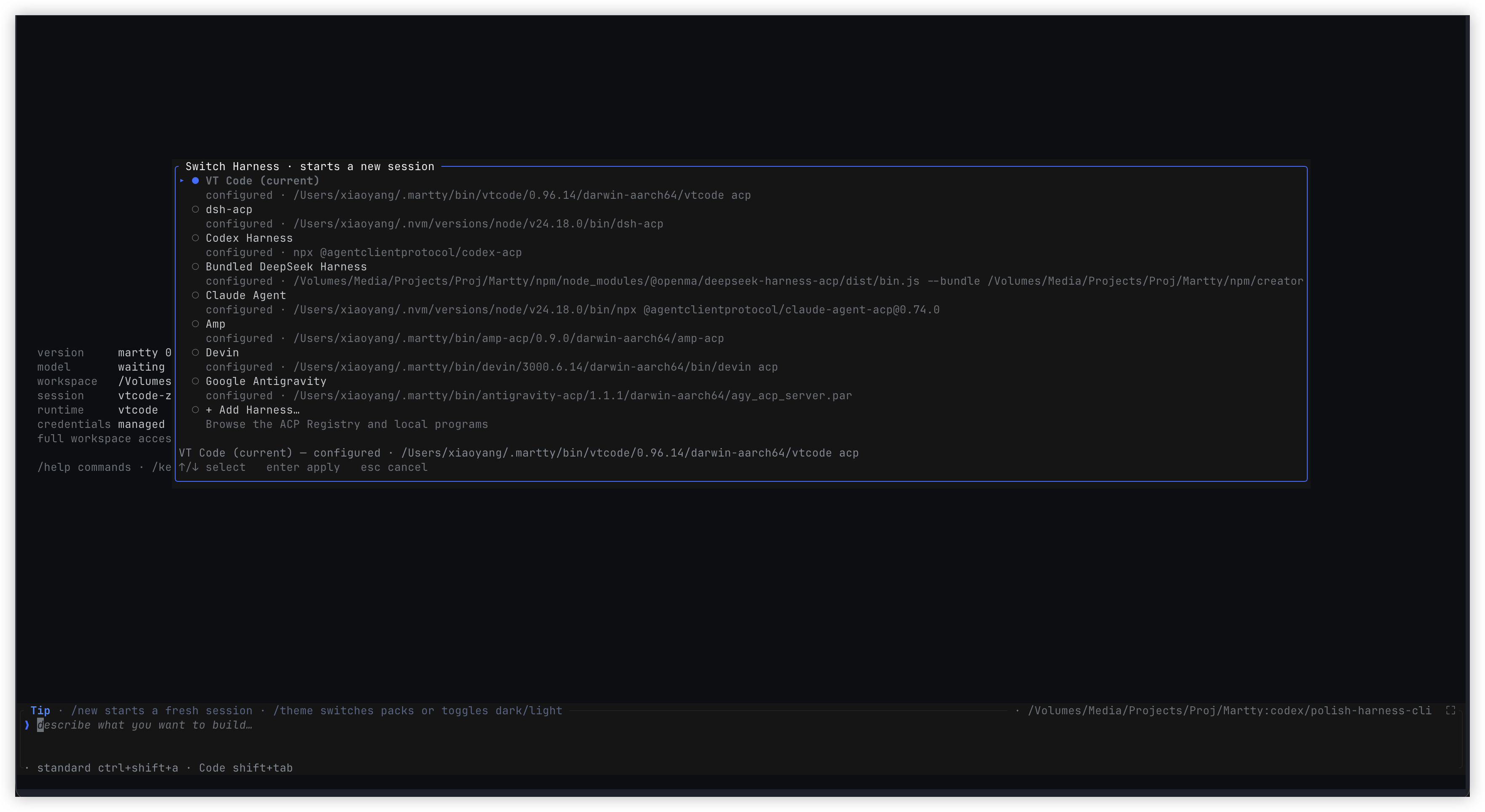
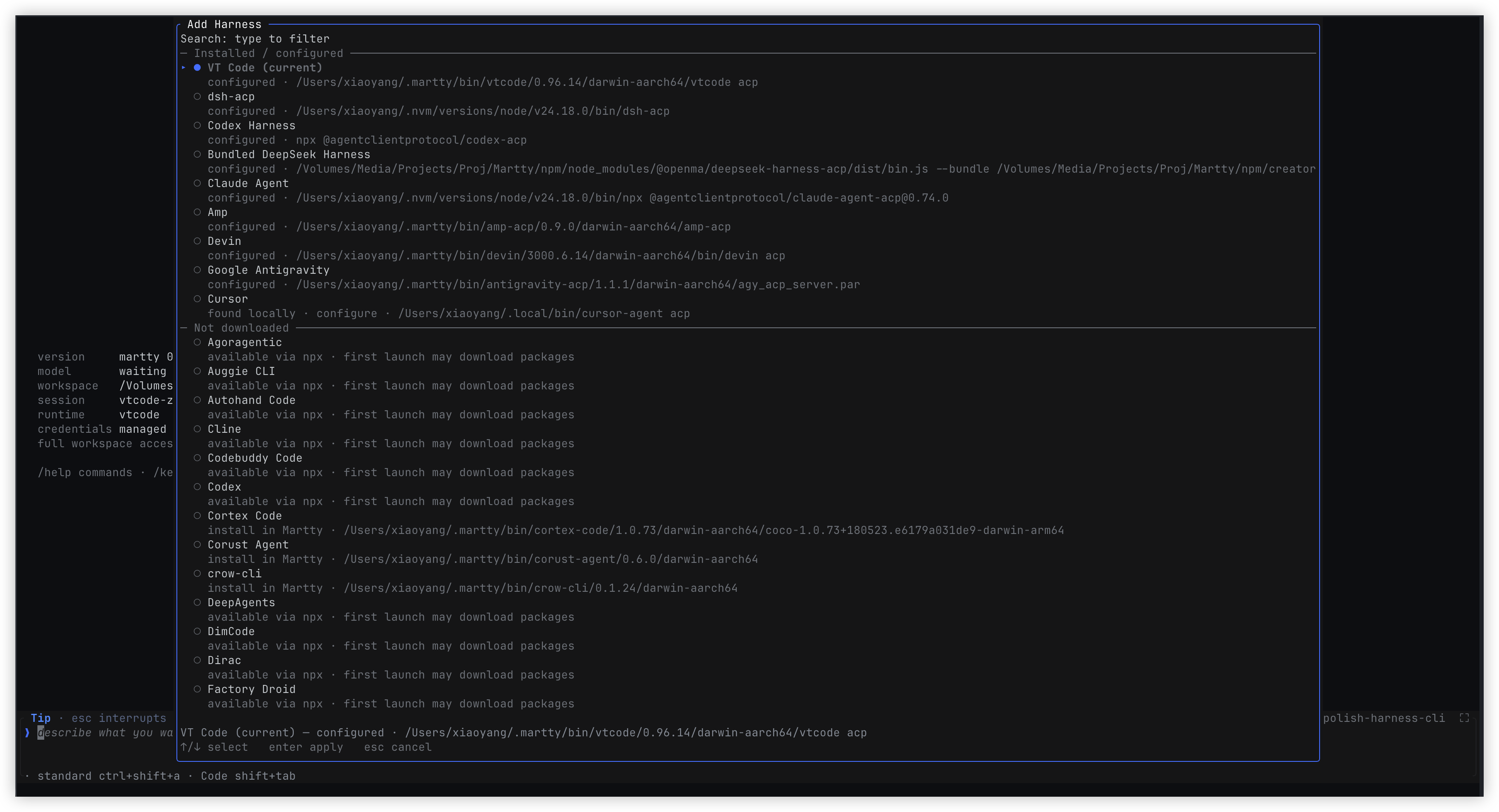
The Add panel supports search and separates installed/configured entries from those not downloaded.
Press Delete on a saved item in the switch menu to remove its configuration, optionally including
exclusive private binaries; the current item is protected. Escape returns from removal confirmation
to removal mode, then to the list, preserving selection. Use /auth to sign in and /status to
inspect state. Error panels show details directly; Enter retries. See the
TUI guide (Chinese) for the full flow.
Choose + Add Harness from /harness, or run /harness add, to browse and search without
knowing a Registry ID. Verified local npm/uv entrypoints take priority over package runners.
Available via npx/uvx describes an available recipe, not a verified ACP connection. Missing
dependencies offer installation guidance and recheck; an offline Registry keeps local choices.
npx/uvx preparation and binary download/extract/verify run in a progress panel. Enter keeps an
unfinished download open; Escape hides the panel while the job continues as long as Martty
is running. Completion and failure appear in the composer. Installation automatically saves
configuration; Enter on completion uses the normal /harness switch flow, while Escape only
closes the panel and Enter retries failures. Add/Install/Connect do not automatically switch or
authenticate. Switch explicitly with Enter on completion or by selecting the configured Harness in /harness. Quitting
Martty stops unfinished jobs. Installer output is captured rather than written over the terminal,
with deadlines covering preparation and extraction. A TUI switch updates defaultHarness
only after the real initialize and session/new succeed; failures retain the previous default
and offer retry.
Local filesystem discovery runs in a background worker alongside the Registry request.
Results fill progressively without resetting search or selection. Non-selectable dividers
separate Installed / configured from Not downloaded; saved recipes are not proof of
downloaded packages. Binary transfers have connection and idle limits, not a total deadline.
In a source checkout, run node scripts/harness-discovery-scenario.mjs --check for six
isolated probe states, or use --tui and /harness add for manual testing with fake ACP
replies, no real downloads, and no changes to your Harness settings.
harness list includes saved entries, the bundled DSH runtime, and executable
*-acp / *_acp entrypoints found on PATH; * marks
the default entry.
add and use preserve the other fields in $MARTTY_HOME/settings.json while
writing harnesses and defaultHarness. Selection applies to the next
standalone launch, which initializes the selected Harness and binds an empty
session. This makes the Agent's model and effort config available before the
first prompt without starting a model turn. Sessions are never carried across Harnesses, and
dsh --profile martty continues to use its Host-owned runtime.
Inside a running standalone TUI, /harness add <id> --command <cmd> [--arg <arg>]
saves the recipe and switches to it immediately (with confirmation after a
prompt has started).
Standalone precedence is explicit --agent, DSH_TUI_AGENT, the product's
internal initialization forcedHarness (empty by default), the persisted
defaultHarness, then the bundled fallback. forcedHarness is not a CLI or
user startup argument. /harness updates only the persisted defaultHarness;
it never changes the product forced value.
A one-run --agent override never changes the saved choice.
Cordis embedding uses config.agent: { command, args } to spawn a server, or
config.stream to attach caller-owned standard pipes. martty --agent <cmd>
plus repeated --agent-arg flags are standalone command-line overrides for
the same configuration.
For an existing DSH environment with a durable martty profile and standard
plugin management, the recommended path remains
dsh plugin --profile martty add martty@latest.
dsh runtime resolution and supported versions
The harness resolves in this order:
- Default (
martty/npx martty): the bundled@openma/deepseek-harness-acpwith its bundled dsh runtime. Ambient installs (PATH, the working directory, global npm) never override it. --dsh <profile>: the globaldshonPATHwith~/.dsh/profiles/<profile>. A profile carryingmarttygets the terminal (dsh --profile <profile>); a profile carrying only@openma/deepseek-harness-acpbecomes this Client's ACP agent. The global dsh version is checked first: below the floor, Martty falls back to (1) and shows a short notice explaining why (/dismisshides it). A missingdshor profile fails with the command to fix it.- As a dsh plugin (
dsh --profile martty): the hosting dsh. - An explicit dsh path in a harness recipe (
--dsh-path/DSH_PATH).
Supported dsh: >=0.1.7-rc.2 — a floor, not an exact-version list,
declared as engines.dsh in npm/package.json (the field dsh's own plugin
compatibility check reads) and matching @openma/deepseek-harness-acp's floor.
Newer dsh releases are always attempted: API differences are feature-detected,
and a dsh newer than the newest tested one (currently 0.2.1-rc.2) only logs a
warning. Only below the floor, or when the Host lacks a required capability,
is the ACP plugin not mounted — dsh --profile martty still opens the TUI and
the conversation explains the installed dsh version, the floor or the missing
capability, and the options (npx martty bundled mode, or install a supported
dsh) instead of leaving pending entries. CI verifies the plugin install path and
--dsh against a global dsh from both the latest and next dist-tags.
This release bundles @openma/deepseek-harness-acp 0.4.39.
From this checkout (need cargo build --release or scripts/build-npm.sh, binary in npm/vendor/<platform>/, or MARTTY_BIN):
MARTTY_BIN=$(pwd)/target/release/martty martty --agent dsh-acp
For local iterating, scripts/devlocalinstall.sh builds the shipped
release Cargo profile (fat LTO, stripped — same binary the npm bundles
carry), then swaps it into the bundle installed under the running
dsh --profile <name> setup;
DSH_TUI_CARGO_PROFILE=devlocal opts back into the fast debug build loop.
Third-party capabilities are ordinary Cordis plugins on the client tree: they
declare the services they need, register contributions in apply, and retract
them with the owning fiber. Themes, the root right rail, local commands,
slider/single-select/view overlays, UI Presets, current ACP Session config
transactions, and package-private
Host/Client RPC are open today. See the plugin API and
Fully pluggable and self-evolving for the
complete direction. --demo-skin merely mounts the gallery pack ember; it
does not put theme-specific behavior in core.
Try the demo first
The demo needs neither a runtime nor an API key:
npm install --global martty
martty --demo
You can also run npx --yes martty --demo. martty is the primary command;
the legacy dsh-tui command is no longer installed (alias dsh-tui=martty
restores it).
Highlights
- A complete agent timeline: stream reasoning, replies, tool arguments and results, plugin context, subagent lifecycles, and token/cache metrics. A live status line keeps the current phase, elapsed time, and queue depth visible.
- Native ACP capabilities: read the agent's models, compositions, permissions, authentication methods, and available commands. Skills join built-in commands in one searchable, scrolling slash menu.
- Multi-image prompts: stage up to eight images from files, the clipboard,
or paste. Editable
[image n]chips live inline with the draft and expose a preview with name, dimensions, size, and media type. - Terminal-aware Markdown: render headings, lists, quotes, fenced and inline code, emphasis, strikethrough, links, and image markers while preserving styling across CJK/Latin text and soft wraps.
- Dense tool views: tool calls expose running, success, and failure states; results collapse to the last four lines and expand inline while the wheel always scrolls the conversation.
- Long-turn control: queue follow-ups or steer the active turn immediately;
manage durable JSONL sessions with
/new,/resume, and--session-id, with workspace mode facts cached across launches. - Cross-platform editing: readline commands, contextual shortcuts, physical ⌘/⌥ modifier rescue on macOS, and ctrl conventions on Linux and Windows keep movement and deletion consistent across terminals.
- A terminal-native surface: dark/light themes, narrow layouts, mouse
selection and tool interaction, native/tmux/OSC 52 clipboard routing, kitty
image previews, and the optional
/liangpixel companion.
Fully pluggable and self-evolving
The goal is a small TUI kernel plus composable plugins, not a terminal app that accumulates product-specific branches. Core owns ACP sessions, the TTY, input dispatch, layout constraints, and semantic-node rendering. Product capabilities enter the client tree through Cordis services, slots, and plugin lifecycles.
- One lifecycle: static packages and Creator-generated dynamic packages use
the same Cordis Loader, fibers,
inject, and disposers. Mounting takes effect immediately, while stopping or switching retracts every contribution; there is no second "dynamic plugin" runtime. - One plugin, several surfaces: a package may contribute a theme, slots, commands, and overlays together, sharing state or coordinating through package-private Host/Client RPC. Core adds no Liang-, effort-, or plugin-specific branches.
- Semantic capabilities only: plugins submit
TuiNodetrees and general interaction semantics such as sliders and forms; the Rust renderer adapts them to the terminal. Plugins never receive the TTY, raw mode, Ratatui, kitty escape sequences, or absolute coordinates. Replacing the renderer must not change the plugin ABI. - Dynamic preview and durable composition stay separate:
define/rundrives immediate preview, whilestop/update/rollbackowns the live lifecycle; an approved Package can then be persisted.AgentPresetcontinues to compose agent-side capabilities; an independentUI Presetcomposes Client/UI contributions such as themes, welcome slots, and pets. They are stored and switched separately. - The Creator loop: Creator inspects the real Host/Client services, slots,
tokens, and schemas before generating
code.host,code.client, or both. It then observes activation and render failures and can repair, update, roll back, or save the Package. That loop is "self-evolution"; it is not direct model access to terminal internals.
Current boundary
The ACP client split is in place, together with these primitives on one dynamic Package lifecycle:
tuiThemeand the single-select/themePlugin seat;tuiSlots,welcome.hero,welcome.info, the input, navigation, and telemetry docks,chrome.right, and schema-validatedTuiNodetrees;- lifecycle-owned local slash commands with refreshable argument candidates, plus native slider, single-select, and view overlays;
- persistent UI Presets, including the built-in Martty and DeepSeek welcomes;
- a current-Session config directory and transactions projected from standard
ACP
configOptions; - Client inspect/run, Package stop/start/retract, and package-private Host/Client RPC;
- a TUI development skill visible only in the Creator preset and registered independently of ACP.
Static plugins and dynamic code.client packages use the same primitives;
none is a demo-specific side channel. More shell and conversation slots,
additional form field types, and complete runtime diagnostics are still being
migrated. "Fully pluggable" remains the target architecture.
See the migration plan for phase-by-phase status.
Compared with the Web plugin platform
| Dimension | Web today | TUI foundation and direction |
|---|---|---|
| Client runtime | Mature React Cordis tree | Node Cordis client tree is in place; Rust remains a semantic renderer, not a third tree |
| UI extension | Typed slot tree across conversations, settings, tool cards, and many other surfaces | chrome.right is open today; tuiSlots will cover shell and conversation surfaces without exposing terminal coordinates |
| Theme | ThemeRuntime registers themes, stacks token overrides, switches at runtime, and persists built-in preferences |
/theme is a single-select Plugin switch that loads/replaces a Theme Plugin and all of its contributions together |
| Interaction components | Plugins contribute React components | Schema-validated TuiNode, slash argument candidates, and slider/single-select/view overlays are open; more form fields continue as general terminal semantics |
| Dynamic plugins | Two-half code.host + code.client Packages share Loader/fiber and support run, stop, update, and rollback |
Inspect/run, themes, right rail, commands, overlays, config transactions, and package-private RPC share one DSH Cordis ACP extension; diagnostics and durable composition continue |
| Diagnosis and repair | Client activation and React render failures return to Creator for another revision | The target is the same loop for activation, schema, and paint failures, with update and rollback |
| Presets | AgentPreset composes agents; Client plugins persist separately |
Keep the AgentPreset boundary; an independent UI Preset now composes and persistently switches terminal UI contributions |
The Web plugin surface is broader and more mature today. TUI aligns with its Cordis composition, lifecycle, and Creator loop; it does not move React or the browser DOM into the terminal.
Runtime architecture
The primary dsh --profile martty path mounts the ACP plugin on the Host Base
Cordis tree, then starts a Node Cordis Client tree in a separate process:
tui-theme provides the palette
registry, tui-cordis-client-runner serves Client inspect/run requests from
dsh-tool-cordis, acp-client attaches the Host's standard stdin/stdout, and
dsh-tui-shell starts the Rust painter and multiplexes messages. The agent (default
Harness) stays on the Host tree; the two Cordis trees only speak ACP. Standalone
martty instead spawns or attaches the configured ACP agent. The Rust painter
is not a third Cordis tree: it owns the TTY, input, and rendering only.
The two Cordis trees do not synchronize plugin ids, inject, or fibers.
Standard ACP continues to carry sessions, prompts, authentication,
configuration, and session/update. Client capability discovery, dynamic
Package execution, and package-private RPC for self-evolution use a negotiated
ACP extension instead. The target extension is unified under _dsh/cordis/*
and advertised through initialize _meta.dsh.cordis; an ACP agent without
that extension remains fully usable as a regular agent.
Creator guidance remains a separate Host overlay exported by the TUI package;
ACP is its runtime dependency. Users install only the TUI; its bundle mounts
the ACP plugin and Creator overlay on the Base Host tree, while the runner
only starts the TUI Client process. Creator adds tui-plugin-development to
the upstream cordis preset's standing
scope. It neither copies the preset nor edits upstream files, and skill
discovery and registration do not depend on ACP. Web and TUI therefore use the
same Creator preset.
ACP and the Creator overlay never enter the Client tree, so the full Harness boots only once
in the Host process.
Host↔TUI Client ACP uses the Client child's standard stdin/stdout. Client fd 3/4 only inherits the user TTY and becomes the Rust painter's stdin/stdout; the Rust child's own fd 3/4 is the Node↔painter compositor channel.
Node and Rust use fds 3/4 on Unix and a token-authenticated loopback TCP socket
on Windows. This private compositor channel only projects semantic paint state,
including themes and TuiNode trees. It is neither a plugin API nor an agent
business channel. Generic Cordis inspect/run/lifecycle uses _dsh/cordis/*;
painter capabilities such as themes, slots, commands, and overlays use the
_dsh/cordis/tui/* child domain. These are underscore-prefixed ACP Extension
Requests/Notifications and never enter prompts or conversation history.
Interaction details, the complete keymap, and developer integration notes live in the composer input docs. Agent-oriented, fully verifiable installation steps live in the agent install guide.
Essential interactions
| Key / command | Behavior |
|---|---|
enter |
Send; with an empty composer and a non-empty Queue, send its head immediately |
ctrl+enter |
Steer the active turn immediately without cancelling it (macOS ⌘⏎) |
alt+↑ |
Select any Queue item; ↑/↓ moves, Enter edits, and ctrl+d deletes |
↓ · ←/→ · Enter |
From an empty prompt, expand Agent navigation, move, and open; Escape collapses it |
esc |
Interrupt the current turn (draft survives); clears the draft when idle |
ctrl+c |
Clear the draft first; press twice when idle, five times while a turn runs, to quit; never interrupts the current turn |
/ |
Open the upward command menu and filter by prefix; after /command the same menu shows argument candidates. Enter selects and runs; Tab only completes. Agent-advertised skills still ship as /name prompts |
/ui · /ui |
Enter directly for the ordinary UI Preset single-select form; add a trailing space for upward Martty / DeepSeek candidates |
/model · /agent |
Pick an agent-advertised model or agent preset; ctrl+shift+a cycles agents directly without a picker |
/harness [id] |
Switch the standalone Harness and start a fresh empty session |
/auth |
ACP sign-in (method picker when several methods; otherwise Terminal Auth or authenticate _meta); mid-session auth_required opens the same surface; the agent's /login stays a prompt |
/permission · shift+tab |
Pick or cycle agent-advertised permission modes |
/vim |
Toggle vim modal editing (off by default; normal mode h/j/k/l move, dd kill line, i insert) |
/effort · /plan |
Set reasoning effort or pass plan mode to the host |
/image <path> [text] |
Send a local image (png/jpeg/webp/gif); ACP Image blocks when the agent advertises promptCapabilities.image, otherwise resource_link |
/clip [text] · ctrl+v |
Stage the clipboard image (repeatable; up to 8 ride one prompt); macOS/Linux |
| Image chips | Live inline in the draft as [image n] tokens (no icon); backspace cuts the whole chip, hover (or park the cursor on) one for a preview popup — kitty thumbnail + dimensions/size/type |
ctrl+o · ctrl+t |
Expand output · toggle the theme |
/keys |
Open the complete keyboard-shortcut modal |
pgup/pgdn · ctrl+u/d (empty prompt) |
Scroll; end follows the live tail |
| Draft editing | ←/→ move by char · ↑/↓ move by screen line · home/end visual line start/end · shift+enter newline · ctrl+d delete forward |
| Readline editing | home/ctrl+e line ends · while typing, ctrl+k/u kill to end/start · ctrl+shift+k kill the line · ctrl+w word back · ctrl+z undo · ctrl+shift+z redo (macOS ⌘z / ⌘⇧z) · ctrl+y paste the last kill |
| macOS | ⌘←/→ line ends · ⌥←/→ word hops · ⌘⌫ kill to start · ⌥⌫ word back (physical key state read natively — works in every terminal) |
| Linux/Windows | ctrl+←/→ word hops · ctrl+⌫ word back |
| Click tool · wheel | Click a tool to expand/collapse it; wheel always scrolls the conversation |
| Mouse drag | Copy on release; double-click a word; shift+drag uses native selection |
!cmd |
Run a command in the client's session-local shell, outside the agent; the shell starts in the workspace and keeps cd, environment variables, and other state for later ! commands until the TUI exits |
Session modes and Shift+Tab
Use /permission to see the current agent's session modes, or press
Shift+Tab to cycle through them. Martty updates the selected mode after the
agent accepts the request, including agents that return only a response and
send no separate notification. If the agent rejects the change, Martty shows
an error and keeps the previous selection.
Mode names and their effects belong to the agent. For example, OpenCode may
advertise build and plan; these are not equivalent to DSH's read-only,
workspace-write, and danger-full-access permission presets. Switching modes
does not grant permissions beyond those enforced by the agent.
To select a mode directly, use /permission <id> with an ID from the picker.
If a shortcut does not reach Martty, try the picker and check your terminal's
key bindings.
Composer text editing
| Key | Behavior |
|---|---|
← / → |
Move by char (ctrl+b / ctrl+f) |
↑ / ↓ |
Move by screen line (multiline drafts) |
home / end |
Line start / end (ctrl+a / ctrl+e; macOS ⌘←/→) |
alt+← / alt+→ |
Move by word (Linux/Win ctrl+←/→) |
⌫ / delete |
Delete before / after the cursor |
ctrl+w |
Delete the word before the cursor |
ctrl+k / ctrl+u |
Kill to line end / start (macOS ⌘⌫ kills to start) |
ctrl+shift+k |
Kill the whole line |
ctrl+z / ctrl+shift+z |
Undo / redo (macOS ⌘z / ⌘⇧z) |
ctrl+y |
Paste the last killed text (yank) |
shift+←/→/↑/↓ · shift+home/end |
Extend the selection |
ctrl+shift+c / ctrl+x |
Copy / cut the selection (keyboard and mouse drags) |
shift+enter / ctrl+j |
Newline in the draft |
Use /help for commands and /keys for the complete shortcut list.
The full editing reference — keys, mouse click/drag behavior, and developer
integration notes — lives in the composer input docs.
The welcome surface is a composable UI Preset. Built-in default (Martty) and
deepseek each mount a centered welcome.hero (logo + hint) and a separate
dynamic welcome.info slot. /ui opens the native select form, /ui reuses
the upward slash menu for candidates, and the choice persists in
$MARTTY_HOME/settings.json.
UI Preset vs Agent Preset
Both apply the same idea—turn several plugin contributions into one selectable composition—but they live on different Cordis trees and remain separate:
| Agent Preset | UI Preset | |
|---|---|---|
| Composes | Host/Agent system prompt, tools, skills, and runtime capabilities | Client UI slots, pets, chrome, and other structural contributions |
| Switch with | /agent |
/ui |
| Built-ins | Agent compositions such as standard, code, minimal, and cordis | default (Martty) and deepseek |
| Persistence | Session/Agent selection | UI selection in $MARTTY_HOME/settings.json |
Creator mode can inspect the real UiPresets, Theme, Slots, Commands,
and Overlay contracts, generate a dynamic Package with code.client, and
call tuiPresets.register({ id, label }, mount) to create a new UI Preset.
The mount callback composes that Preset's welcome slots, pet, or other structural
UI contributions. Once the Package is saved and mounted, the new Preset appears in
both the /ui form and /ui candidates and shares the same switching,
persistence, and unload lifecycle. Creator produces an ordinary Client Plugin
composition; it does not receive the TTY, absolute coordinates, or a way around
the slot/overlay protocols.
Return to the classic DeepSeek view
After dsh --profile martty starts, run /ui deepseek directly, or enter /ui
and choose DeepSeek in the ordinary single-select form. Typing one trailing
space after /ui (that is, /ui ) opens the same candidates above the
composer.
The classic view restores the responsive whale, DEEPSEEK HARNESS wordmark,
and hint text while keeping Martty's pluggable shell, ACP session, and dynamic
info slot. The choice persists across launches. Run /ui default (or choose
Martty in the /ui form) to return to the blue-white MARTTY view. The old
experimental /deepseeklogo command has been replaced by this UI Preset.
/liang places a small pixel-art companion beside the composer: quiet while
idle, typing at a tiny terminal during a turn. Terminals with kitty graphics
protocol support, including Ghostty, Kitty, and WezTerm, get RGBA sprites;
others fall back to a half-block whale. The pet hides below 60 columns.
Use /liang on or /liang off to control it explicitly. He is off by
default; run /liang on to summon him.
Build from source
Requires Rust stable and Node.js 22.19+. The JavaScript test suite also uses
Python 3 and pexpect for its local PTY fixture. If needed, create and activate
a Python virtual environment, then run python -m pip install pexpect before
testing; the fixture does not call a model.
npm ci --prefix npm --ignore-scripts --no-audit --no-fund
cargo test --locked
cargo check --locked --tests
npm test --prefix npm
bash scripts/build-npm.sh
make rust-build / make rust-test / bash scripts/build-npm.sh go through
scripts/cargo-guard.sh. It runs a scoped cargo clean first when this
repository's target exceeds 20 GiB or free disk falls below 10 GiB.
make rust-cache-status is read-only and make rust-cache-prune cleans
explicitly; override the thresholds with RUST_CACHE_MAX_GIB /
RUST_DISK_MIN_GIB.
The profile installation matrix also needs pnpm on PATH (CI uses 10.2.0)
and a built ACP package. To use the package installed by npm ci, run from
the repository root:
DSH_TUI_ACP_ROOT="$PWD/npm/node_modules/@openma/deepseek-harness-acp" \
  DSH_TUI_LOCAL_DEPS=1 npm run test:profile-install-matrix --prefix npm
Run the build and test commands from the repository root. JavaScript
dependencies and test scripts belong to npm/; there is no root package.json. For a focused test,
run node --test scripts/<name>.test.mjs. To inspect a rendered demo without
an interactive terminal or a model request, run:
cargo run --locked -- --dump-frame 100x34
Use make tui-test for the real development profile. It rebuilds
target/debug/martty first, then launches tui-test with MARTTY_BIN, so
Node HMR cannot leave the Rust painter on an older process image.
The local script builds only the current platform and writes a tarball to
dist/. The Package and publish npm GitHub Actions workflow builds and
publishes one npm package per native platform. The thin martty package lists
them as optional dependencies, so npm installs only the matching platform:
@openma/martty-darwin-arm64
@openma/martty-darwin-x64
@openma/martty-linux-arm64
@openma/martty-linux-x64
@openma/martty-win32-x64
Pushing a tag that matches both npm/package.json and Cargo.toml (for example,
v0.1.0) publishes to latest through npm Trusted Publishing (OIDC), then
creates a GitHub Release with all six tarballs. A version mismatch fails before
publishing.
For the first split release, an npm organization owner must publish each new
@openma/martty-* package once and configure its Trusted Publisher for
openma-ai/Martty / package-npm.yml (environment npm, with npm publish
allowed) before pushing the release tag.
Troubleshooting
- Missing native package: reinstall
marttywith optional dependencies enabled (npm install --include=optional martty) and check the support matrix. - Built-in ACP cannot start: reinstall the latest
martty; a source checkout must have itsnpm/dependencies installed. ConfigureDSH_TUI_AGENT,config.agent, orconfig.streamfor another ACP server. - No pixel pet: the terminal may not support kitty graphics protocol; the rest of the UI is unaffected.
Repository map
src/: TUI state, rendering, protocol, runtime lifecycle, and session catalog.npm/: Cordis client boot, ACP/compositor mux, CLI shim, and native binaries.scripts/: local builds, cross-platform package checks, protocol integration tests, and asset generation.assets/: screenshots, visual assets, and optional pet sprites.docs/: architecture, plugin API,TuiNodeschema, the migration plan, and the AI-agent install guide (index).
Agent communication is ACP over stdio; Node and Rust use a separate private
compositor channel. Start with src/acp.rs,
npm/lib/boot.js, and npm/lib/mux.js.
Plugins must not depend on those transports; extension points are in
docs/plugins.en.md.
License
MIT. Not affiliated with DeepSeek or xAI; grok-build is an interaction design reference, and DeepSeek Harness is the runtime substrate.
Related plugins
dsh-web(原 dsh-web-ui)
 zhu1090093659
/dsh-web-ui
dsh-web(原 dsh-web-ui):任务看板、git 图、右侧面板、远程移动端 UI、桌宠、实时 token 统计与皮肤中心的全家桶。仓库已更名 zhu1090093659/dsh-web,根目录声明 dsh.bundle.patch,支持根 Git 入口安装。
dsh plugin --profile web add github:zhu1090093659/dsh-webdsh-web-all 聚合包(原 dsh-web-ui-all)
zhu1090093659zhu1090093659/dsh-web-ui/packages/dsh-web-ui-all
旧整包路径 packages/dsh-web-ui-all 已随仓库更名 dsh-web 迁移:现聚合目录为 packages/dsh-web-all,npm 聚合包 @linxin666/dsh-web-all。与总仓根 Git 入口是同一产品的两种整包方式,不重复计数。
dsh plugin --profile web add @linxin666/dsh-web-all@latestdsh-TUI
 ccch1mneyyy
/dsh-TUI
Claude Code 风格全屏终端 UI:像素鲸鱼顶栏、实时工作状态行、思考流式展开。
dsh plugin --profile web add github:ccch1mneyyy/dsh-TUIdsh-cc-tui
ccch1mneyyyccch1mneyyy/dsh-cc-tui
一个美观且实用的 Claude Code 风格 TUI 插件:像素鲸鱼顶栏、双流光大字、实时工作状态行、思考流式展开、双击 Esc 时间回溯、蓝白上下文进度条 + TPS 仪表。 零核心改动,纯插件挂载。安装插件即可启用,卸载后不会留下核心补丁。 献给钟爱tui的各位极客们 A beautiful, practical Claude…
dsh plugin --profile web add github:ccch1mneyyy/dsh-cc-tuideepseek-balance-whale-widget
 meteornox
/deepseek-balance-whale-widget
DSH 小鲸鱼余额挂件(DeepSeek Balance Whale Widget)
dsh plugin --profile web add github:meteornox/deepseek-balance-whale-widgetDSH-better-sidebar
 omdsh-dev
/DSH-better-sidebar
侧边栏完整工作台:内置文件渲染编辑、终端、Git 与子代理,支持三方插件注册新 Tab。
dsh plugin --profile web add github:omdsh-dev/DSH-better-sidebar