
UI Enhancements
deepseek-harness-docker-runzhliu
runzhliu/deepseek-harness-docker/plugins/dsh-browser-desktop · ★ 173
 runzhliu
Movable, resizable Chromium desktop embedded in the DeepSeek Harness Web UI through noVNC.
Manifest details
安装
dsh plugin --profile web add 'github:runzhliu/deepseek-harness-docker#e6be3d62780730580ea9a11620fb07e8eadca39f&path:/plugins/dsh-browser-desktop'GitHub 源码安装:首次需按提示配置 allowBuilds 构建授权后重试
For install and environment setup, plus plugin development tutorials, see DSH community docs ↗
README
Table of contents
- Project status
- Deep dive: understanding DeepSeek Harness
- What it is—and what it is not
- Runtime layers
- State and persistence
- Why this is more than FROM node plus npx
- Container isolation versus the Harness sandbox
- Why the Helm chart uses a StatefulSet
- Why not just use npx in a container?
- Quick start with Docker Compose
- Rootless Podman
- Optional HTTPS access from a trusted LAN
- Browser desktop, official Browser Use, and human takeover
- Install the browser plugin separately
- Optional community plugin market
- Plain Docker
- Headless mode
- Kubernetes with Helm
- Upgrade the DSH version
- Security boundary
- Smoke test
- Troubleshooting
- Repository layout
- Contributing and attribution
English | 简体中文







One of the earliest unofficial Docker image projects for DeepSeek Harness, maintained since August 13, 2026. It provides AMD64/ARM64 images on Docker Hub and GHCR, Docker Compose, rootless Podman, and Helm deployments, with ongoing upstream release tracking.
The default image runs the official @deepseek-ai/dsh Web UI in a non-root Node.js 24 runtime, with a visible Chromium/noVNC desktop, an optional community plugin market, and a protected LAN gateway. It packages official npm artifacts without modifying DeepSeek Harness source.
Current baseline:
@deepseek-ai/dsh@0.2.2-alpha.2. DeepSeek Harness is still a pre-release. Re-run the build and smoke tests before every version upgrade.
0.2.2-alpha.2 maps directly to the official dsh-v0.2.2-alpha.2 Release and @deepseek-ai/dsh@0.2.2-alpha.2 in the npm Registry; it is not a project-defined version. This project packages the installable npm distribution instead of building source, and intentionally does not publish a drifting Docker latest tag.
0.2.2-alpha.2 adds plugin updates, message quotes, full-conversation Markdown copying and more interface languages, with improvements to mobile interaction, caching and Session recovery.
0.2.2 migration: Node.js
24.9is the minimum. Review custom plugins against the Session-projection, tool-execution and PTC APIs. Web Fetch allows private addresses, so deployments must restrict egress themselves. Set explicit capacities for custom models. Back up the data volume before upgrading and restore that backup when downgrading. See the upstream notes.
alpha.4 plugin compatibility: A third-party plugin's
engines.dshdeclaration takes precedence when checking DSH compatibility. Plugins without it retain the previous rules. Check supported version ranges when upgrading third-party plugins.
alpha.3 migration warning: Web and Desktop prioritize saved credentials. Headless defaults to environment variables and
.envwithout reading saved keys. Rename the old Azure providerazure-openai-responsestoazure. Recreating an existing custom profile with--from-default-profilereplaces its plugins and settings; preserve the existing profile when upgrading. See the upstream release notes.
Upgrade warning: Session logs use V4 starting with
0.1.7-alpha.1. Back updsh-homebefore upgrading from an earlier release. Tools coupled to the previous log shape must migrate to V4, and a downgrade should restore the pre-upgrade volume backup instead of asking an older DSH release to read migrated data.
Compatibility warning: Custom
spill-policyconfiguration must replacemaxInlineByteswith the estimated-token budgetmaxInlineTokens. The built-in E2B execution backend was removed, and the PTC and workflow services were renamed. Upgrades from before0.1.7-alpha.1must also account for the Messages-only adapter, Profile-owned settings, Bundle Agent Presets, and RemotereadBytesmigration; see the upstream Release.
0.2.1 compatibility warning: Automation tasks return to the built-in Web bundle; retired experimental-bundle selections are cleaned up while existing tasks remain. Runtime invariant plugins and package
./invariantexports were removed, subpath plugins no longer read a separatepackage.json, and the former composerstatsentry was split intoactivityandusage. Custom plugins using these extension points must be updated first.
Upgrades from 0.2.1-alpha.2 or earlier: Follow the migration notes for tool modes, Python PTC, Agent instructions and subagent APIs. This image retains loopback ports and the optional Caddy LAN gateway.
Upstream tracking: the daily Upstream DSH version watch checks both GitHub Releases and npm. When a new Release exists but its npm artifact is unavailable, the workflow creates or refreshes a waiting issue while retaining the current installable baseline. Once the matching package becomes installable, the issue automatically becomes an upgrade alert and closes after the pin catches up.
📖 Further reading: DeepSeek Harness GitHub repository deep dive · Docker, Compose, and Helm deployment guide (Chinese)
🤖 Agent Skill: The root SKILL.md is published on Tencent Cloud SkillHub as deepseek-harness-docker for installation in clients that support Agent Skills. It guides an Agent through secure Docker Compose/Helm deployment, verification, upgrades, and troubleshooting; it is a deployment-assistance Skill, not a DSH runtime plugin.

Light-theme capture (2026-10-28, DSH 0.2.2-alpha.2) from an isolated, empty demo workspace. No personal sessions or credentials are shown. No model was configured and no model call was made.
Project status
| Capability | Status | Evidence |
|---|---|---|
| Dockerfile | Ready | linux/arm64 and linux/amd64 builds and real native PTY spawning tested |
| Docker Compose | Ready | Web token/cookie authentication, healthy state, loopback publication, and persistence across restart tested |
| Rootless Podman | Ready | CI covers keep-id, bind-mount writes, named-volume persistence, and loopback publication |
| Helm | Ready | StatefulSet, PVC, headless Service, and NetworkPolicy; helm lint --strict passes |
| Web UI | Local by default; protected LAN opt-in | Loopback by default; LAN overlay adds HTTPS, Basic Auth, DSH token/cookie, and same-origin noVNC |
| Headless | Ready | Inject provider secrets at runtime; validate model calls and sandboxing in the target environment |
| Chromium | Default plus privacy variant | Debian Chromium by default; a separate native multi-platform ungoogled-chromium image checks for no GCM :5228 activity |
Deep dive: understanding DeepSeek Harness
This section is a condensed companion to the GitHub repository deep dive for Cordis architecture, Agent turns, and event-sourced persistence, plus the Docker, Compose, and Helm guide for image design, the security model, and the container verification matrix.
What it is—and what it is not
DeepSeek Harness is not a model checkpoint or inference server. It is a TypeScript AI Agent runtime that composes model adapters, sessions, tools, permissions, workspaces, plugins, a Web UI, and a Headless entry point. Its end-user distribution is the @deepseek-ai/dsh CLI. The right topic for this project is “cloud-native packaging for an AI Agent runtime,” not “LLM inference deployment.”
As of 2026-08-13, the upstream repository has no Dockerfile, Compose file, or Kubernetes manifests. Its CONTRIBUTING.md also says that external pull requests are not currently accepted and explicitly encourages ecosystem projects and how-to guides. This repository is therefore an independent community implementation, not an official image.
Runtime layers
flowchart TB
  CLI["dsh CLI"] --> PROFILE["Profile + Bundle + --patch layers"]
  PROFILE --> CORDIS["Cordis plugin graph"]
  CORDIS --> CORE["Agent / Session / Model / Tool / Sandbox"]
  CORDIS --> WEB["Web surface :3080"]
  CORDIS --> HEADLESS["Headless surface"]
  CORE --> WORKSPACE["/workspace"]
  CORE --> HOME["DSH_HOME: profiles / settings / credentials / sessions / storage"]
- CLI and profiles.
dsh webis an alias for the Web profile, whiledsh --profile headlessserves automation and one-shot tasks. A profile is a layered composition: base bundles, surface bundles, the user's patch, and command-line--patchoverlays. - Cordis composition. Harness models capabilities such as the Web server, model adapters, sessions, tools, and the directory picker as a Cordis plugin graph. Dependency injection controls activation, while stable entry IDs allow later patch layers to replace configuration. This project uses that supported seam to provide container-only bind configuration instead of patching upstream code.
- Agent core. Model routing, system prompts, session persistence, tool execution, goals, subagents, and workspaces are Host-side services. The browser is a client of this runtime, not a second Agent implementation.
- Surfaces. The Web surface provides interactive browser access. The Headless surface supports terminals, CI, and batch automation. Both reuse the same core plugin graph and
$DSH_HOMEdata model.
State and persistence
DSH_HOME is the central container boundary. This image fixes it at /home/node/.dsh, which stores:
profiles/: package metadata, Cordis configuration, and user patches;settings.yamland credential files: model settings and managed credentials or Secret references;sessions/: session logs;storages/: Workspace and other domain state.
User code lives separately at /workspace. Compose combines a named dsh-home volume with a workspace bind mount. Helm uses a dsh-home PVC and optionally mounts another existing PVC through workspace.existingClaim. The image can therefore be rebuilt without deleting configuration and sessions.
Why this is more than FROM node plus npx
| Problem | Upstream behavior | Project decision |
|---|---|---|
| Node / glibc | Requires Node 24.9+; some user binaries require a newer glibc | Pin the official non-slim node:24-trixie, Debian 13 with glibc 2.41 |
| Native dependencies and Agent tools | node-pty or third-party plugins may need native builds; the Agent needs common development commands |
Install DSH in a separate stage; intentionally retain the buildpack-deps toolchain at runtime and add jq, less, ripgrep, rsync, zip, and related tools |
| Web bind | Both CLI and configuration reject wildcard addresses from 0.2.1-alpha.2 |
Keep DSH on loopback; relay one concrete container IP; host ports 3080/6080 remain on 127.0.0.1 |
| Web security | Launch-token authentication, Host/Origin checks, and optional native TLS; noVNC is unauthenticated and tools can execute code | HTTP with loopback publication by default; optional Caddy HTTPS + Basic Auth; no public Ingress/LoadBalancer |
| HMR | A config watcher needs Node internals after boot | Pass --expose-internals only to the DSH process, never through inherited NODE_OPTIONS |
| Directory browser | Starts at os.homedir() |
Point HOME at writable /workspace instead of read-only /home/node |
| Child processes | Agents can create shell and PTY subprocesses | Use tini for signal forwarding and orphan reaping |
| Least privilege | The workspace must be writable without exposing the host | UID 1000, read-only root, drop ALL, no-new-privileges, and minimal mounts |
Choosing the non-slim base is an explicit coding-agent trade-off rather than a smallest-image goal. Debian 13 Trixie raises glibc from Bookworm's 2.36 to 2.41, allowing more binaries built on recent systems to run. The official non-slim Node variant is based on buildpack-deps and already includes the compiler, make, git, curl, file, unzip, wget, and xz; this project explicitly adds jq, less, ripgrep, rsync, and zip. The trade-off is roughly 330 MB more compressed base-image data than slim. The smoke test asserts Trixie, glibc 2.41, and the complete command contract so a later upgrade cannot silently regress them.
From 0.2.1-alpha.2, both the Harness CLI and configuration reject wildcard listeners. This image keeps DSH on 127.0.0.1:3080 and starts a raw TCP relay on one concrete container IP. It does not modify DSH source or rewrite tokens, cookies, Host/Origin headers, or WebSocket traffic. This supports Docker/Podman port publication while preserving Kubernetes port-forward and in-container health checks. The relay selects a unique non-loopback IPv4 address, or a unique non-link-local IPv6 address on IPv6-only networks. Ambiguous multi-interface setups fail closed and require an explicit DSH_WEB_RELAY_INTERFACE. Host networking and --port 0 are unsupported.
Default Compose still publishes only on host 127.0.0.1. The opt-in compose.lan.yaml gateway terminates HTTPS on one selected LAN address, adds Basic Auth, and carries noVNC through the same authenticated origin while DSH continues to enforce its launch token, signed cookie, and Host/Origin checks. Changing the native ports to -p 3080:3080, NodePort, LoadBalancer, or a public Ingress still breaks the security model.
Container isolation versus the Harness sandbox
These are complementary layers:
- Docker or Kubernetes decides which host paths, Linux capabilities, and resources the process can see.
- Harness decides what Agent tools may do inside that already constrained filesystem.
Linux Landlock, user namespaces, and native helpers depend on the host kernel and container runtime. This project will not hide sandbox failures with --privileged, a Docker socket, or extra capabilities. A release check must include a real filesystem and shell tool call in the target environment; a successfully authenticated page proves only that the UI started.
Optional bubblewrap backend for kernels without Landlock
When Landlock is compiled into the kernel but omitted from the active LSM list, prefer enabling it through the host distribution's boot configuration and rebooting. Do not copy another distribution's GRUB command without first checking /proc/cmdline, the kernel configuration, and the host boot tooling. When the kernel has no Landlock support at all, explicitly select the bubblewrap variant on Docker Compose:
DSH_WORKSPACE=/absolute/path/to/project \
  docker compose -f compose.yaml -f compose.bwrap.yaml pull
DSH_WORKSPACE=/absolute/path/to/project \
  docker compose -f compose.yaml -f compose.bwrap.yaml up -d --no-build
The overlay selects immutable image runzhliu/deepseek-harness:0.2.2-alpha.2-r1-bwrap.1 and adds seccomp=unconfined plus systempaths=unconfined, allowing non-root bwrap to create its inner user/mount/PID namespace and mount a fresh /proc. UID 1000, a read-only root filesystem, cap_drop: ALL, no-new-privileges, and minimal mounts remain in force. The two options still widen the outer container's syscall and /proc surface, so this variant never becomes the default. The host must also permit unprivileged user namespaces.
This path is supported only for Docker Compose, not rootless Podman or Kubernetes. On Podman hosts where Landlock exists in the kernel, enable that LSM instead. Reproduce the confinement boundary on the target Docker host with:
make bwrap-build
make bwrap-smoke
The test proves that /workspace is writable inside bubblewrap while another writable outer mount remains denied to the model command. See Issue #35 for the host analysis and reports.
Why the Helm chart uses a StatefulSet
Profiles, model settings, credentials, sessions, and Workspace indexes are stateful. The current single-user Web surface is also not designed for uncoordinated horizontal replicas writing the same state. The chart therefore fixes one StatefulSet replica, mounts a stable dsh-home PVC, retains that PVC across uninstall, and deliberately avoids pretending that a higher replica count would provide high availability. Multi-replica service deployment should wait for external identity, tenant isolation, and concurrency-safe shared storage.
Why not just use npx in a container?
This image handles the container boundaries that a one-line image misses:
- pins and verifies the exact DSH version during build;
- pins pnpm so
dsh plugin addcan manage community plugins at runtime; - runs as a non-root user behind
tini; - persists configuration, credentials, sessions, and storage under
/home/node/.dsh; - makes
/workspacethe writable interactive home used by the Web directory browser; - compiles native modules in a disposable builder stage;
- uses a container-only Cordis bind overlay while keeping host publication on loopback.
DeepSeek Harness Web exchanges a launch token for a signed browser cookie and checks Host/Origin, but this image uses HTTP by default, its API can initiate code execution, and its noVNC port is unauthenticated. The default is therefore a trusted, local, single-user development environment. LAN access must use the explicit protected gateway below; public exposure is unsupported.
Quick start with Docker Compose
From this directory:
docker compose pull
DSH_WORKSPACE=/absolute/path/to/your/project docker compose up -d --no-build
docker compose ps
docker compose logs --no-color deepseek-harness | grep 'dsh web:'
Open the complete http://127.0.0.1:3080 URL carrying ?token=... after dsh web: in the logs. Harness exchanges that process-scoped launch token for a signed cookie and redirects to the clean root path; opening the root without a token returns 401. Configure a model and credentials in Settings. The Browser desktop action in the sidebar opens an interactive container Chromium directly inside the Harness Web UI. The named dsh-home volume preserves both Harness state and the browser profile across container recreation.
When DSH_WORKSPACE is unset, Compose uses a separate dsh-workspace named volume so the Agent cannot accidentally modify this repository. Set DSH_WORKSPACE=/absolute/path/to/project only after choosing the intended host project.
The default immutable image revision is runzhliu/deepseek-harness:0.2.2-alpha.2-r1. The same multi-platform artifact is also published to GitHub Container Registry as ghcr.io/runzhliu/deepseek-harness:0.2.2-alpha.2-r1. r1 attaches the matching official Playwright MCP Browser Use provider to the visible Chromium and retains versioned noVNC asset paths so an upgrade cannot mix incompatible cached ES modules. Compose keeps the build definition for reproducibility and review; run docker compose build --pull before startup when you explicitly want a local build.
Rootless Podman
Podman 4.5 and podman-compose 1.6.0 or newer can use the dedicated compose.podman.yaml overlay. Older podman-compose 1.0.x releases do not replace mounts with the same container target correctly when merging Compose files; run pipx install 'podman-compose>=1.6.0' when the distribution package is too old. The overlay maps the invoking rootless user to the image's node UID/GID 1000 and applies a private SELinux label to the workspace. DSH remains non-root without recursively changing ownership of the host project:
podman version
podman-compose version
podman info --format '{{.Host.Security.Rootless}}'  # must be true

DSH_WORKSPACE=/absolute/path/to/your/project \
  podman-compose -f compose.yaml -f compose.podman.yaml pull
DSH_WORKSPACE=/absolute/path/to/your/project \
  podman-compose -f compose.yaml -f compose.podman.yaml up -d --no-build
podman-compose -f compose.yaml -f compose.podman.yaml ps
The commands deliberately use podman-compose so an installed Docker Compose cannot be selected as the wrong external provider by podman compose. The overlay sets x-podman.in_pod: false because this single-service deployment does not need a Pod and the keep-id user namespace cannot be combined with --pod. Mount only a project directory dedicated to this instance. On SELinux hosts, :Z makes that directory private to this container; do not apply it to a shared home, repository cache, or system directory. make podman-down stops the stack without deleting named volumes. Maintainers can run make podman-smoke to verify rootless identity, host file ownership, restart persistence, and loopback-only ports.
To keep using the Docker Compose client, expose the rootless Podman API socket and point the Docker CLI at it. The Podman overlay is still required:
systemctl --user enable --now podman.socket
export DOCKER_HOST="unix://${XDG_RUNTIME_DIR}/podman/podman.sock"
DSH_WORKSPACE=/absolute/path/to/your/project \
  docker compose -f compose.yaml -f compose.podman.yaml up -d --no-build
To pull from GHCR without changing the rest of the Compose deployment:
DSH_IMAGE_REPOSITORY=ghcr.io/runzhliu/deepseek-harness docker compose pull
DSH_IMAGE_REPOSITORY=ghcr.io/runzhliu/deepseek-harness \
  DSH_WORKSPACE=/absolute/path/to/your/project docker compose up -d --no-build
Optional HTTPS access from a trusted LAN
Never publish ports 3080 or 6080 directly to a LAN. compose.lan.yaml is an explicit security overlay: it exposes one HTTPS endpoint on one selected server LAN address, places Caddy Basic Auth in front, preserves DSH's own launch-token, signed-cookie, and Host/Origin checks, and proxies embedded noVNC through the same HTTPS origin and authentication chain. Default compose.yaml behavior remains unchanged.
Create the private environment file and a password hash:
cp .env.lan.example .env.lan
docker run --rm -it caddy:2.11.4-alpine caddy hash-password
Edit .env.lan. Set DSH_LAN_BIND_ADDRESS to the server's exact LAN IP, set DSH_LAN_HOST to a client-resolvable internal DNS name (preferred) or that IP, paste the bcrypt hash between the single quotes, and set DSH_WORKSPACE when required. Do not use 0.0.0.0. Start the stack with:
make lan-up
make lan-logs
Caddy uses its internal CA by default. Copy the root and install it in each trusted client's system trust store; do not bypass browser certificate verification:
docker compose --env-file .env.lan -f compose.yaml -f compose.lan.yaml \
  cp lan-gateway:/data/caddy/pki/authorities/local/root.crt ./dsh-lan-root.crt
Find the local startup URL after dsh web: in make lan-logs, take only its ?token=... query, and first open https://DSH_LAN_HOST:8443/?token=... (use the configured port). The browser authenticates to Caddy first, then DSH exchanges the launch token for a session cookie marked Secure. Later visits use the clean HTTPS URL. make lan-down stops this mode without deleting data volumes. Port 8443 works for ordinary rootless Docker/Podman users; choose 443 only when the host may bind privileged ports.
This mode is for a small number of users in the same trust domain, not DSH multi-tenancy. Every authenticated user shares the sessions, settings, credentials, and Agent code-execution authority. Deploy separate instances and volumes for mutually untrusted users. Restrict source networks with the host firewall and never forward this endpoint to the public Internet. Run make lan-smoke to verify TLS, both authentication layers, Origin rejection, same-origin noVNC, and loopback-only native ports.
Browser desktop, official Browser Use, and human takeover
The image includes Debian Chromium, CJK fonts, an Xvfb/Openbox desktop, and noVNC. It mounts the official @deepseek-ai/dsh-experimental-browser-use-playwright-mcp provider with mode: attach against http://127.0.0.1:9222. Model automation and the visible desktop therefore use the same Chromium tabs, cookies, login state, and profile persisted at /home/node/.dsh/chrome-profile.
| Layer | Responsibility |
|---|---|
| Official DSH Sidebar Browser | Lightweight iframe tabs for embeddable HTTP(S) pages; it does not expose model tools and is disabled by default on Web as of 0.1.7. |
| Official DSH Browser Use | Page inspection, clicking, typing, screenshots, and extraction through Playwright MCP. |
@runzhliu/dsh-browser-desktop |
Real-browser lifecycle, persistent profile, visible desktop, and human takeover. |
The plugin therefore does not grow a second click or extraction API. Models should use official Browser Use tools for page operation; browser_open only creates and activates a tab and reveals the desktop when the user asks to see or take over a page. The desktop remains useful for CSP/X-Frame-Options pages that reject iframe embedding, authenticated flows, CAPTCHAs, downloads, internal sites, and interactive debugging. Browser Use remains experimental: one provider instance gives one live Session exclusive attachment ownership. Other Sessions still have browser_open and manual desktop access, and a newly created or resumed Session can claim automation after the owner releases it. A Session disconnected by a Chromium restart must also be created or resumed again.
Playwright MCP is the default. To select the official Chrome DevTools MCP or Stagehand provider yourself, set DSH_BROWSER_USE_ENABLED=0 before startup and configure exactly one provider through the DSH Profile/plugin system; one composition cannot register two Browser Use providers. Setting DSH_DESKTOP_ENABLED=0 disables both the built-in Browser Use attachment and the browser desktop.
The public plugin uses Harness's sidebar.footer.action and shell.overlay extension points to add an always-visible Browser desktop action. It embeds the interactive desktop in the Web UI and also offers a separate-window fallback at http://127.0.0.1:6080/novnc-debian-1.6.0-2/vnc.html?autoconnect=1. The panel starts at roughly 68% of the page, moves by dragging its title bar, resizes from its bottom-right corner, and supports maximize/restore. Chromium restarts automatically after an unexpected exit or window close.

Light-theme capture (2026-10-28, DSH 0.2.2-alpha.2, browser-desktop plugin 0.1.6): the browser panel is inside Harness and displays the official 0.2.2-alpha.2 GitHub Release page.
This follows the visible-desktop idea from docker-antigravity without adopting its amd64 base or Selkies. Debian's native packages keep the image usable on both Apple Silicon and x86 Linux. The official Browser Use architecture and Sidebar Browser limitations describe the boundary between these layers. Port 6080 is loopback-only like 3080; the native noVNC endpoint has no authentication and must never be exposed directly. The optional LAN overlay carries the versioned /novnc-* route through the same HTTPS and authentication boundary as the Web UI.
docker compose exec deepseek-harness chromium-docker --version
docker compose exec deepseek-harness \
  chromium-docker --headless=new --dump-dom https://example.com
Compose gives Chromium a 1GB /dev/shm. The launcher adds --no-sandbox only to the browser process so it can run under the existing cap_drop: ALL and no-new-privileges policy without weakening the whole container. Agents and scripts can still use chromium-docker --headless=new for non-interactive rendering.
Optional ungoogled-chromium image
The default image keeps Debian Chromium for Debian's security-update and distribution supply chain. Select the separate runzhliu/deepseek-harness:0.2.2-alpha.2-r1-ungoogled.1 variant only when idle browser egress must be minimized:
export DSH_IMAGE_VERSION=0.2.2-alpha.2-r1-ungoogled.1
docker compose pull
DSH_WORKSPACE=/absolute/path/to/your/project docker compose up -d --no-build
This image pins ungoogled-chromium@152.0.7977.82-1 and verifies distinct SHA256 values for the amd64 and arm64 downloads. Its smoke test starts the complete Harness/noVNC desktop, verifies the official Browser Use attachment configuration, invokes browser_open, and then rejects any GCM port 5228 connection or google_apis/gcm log. It automatically uses /home/node/.dsh/chrome-profile-ungoogled, separate from the default Debian Chromium profile. GHCR uses the same tag; Helm users can explicitly set --set image.tag=0.2.2-alpha.2-r1-ungoogled.1.
The variant uses the community ungoogled-chromium-portablelinux build, not a Debian package. The upstream binary index warns that contributor binaries may not be reproducible and their authenticity cannot be guaranteed; Google Safe Browsing, sync, push, Widevine, and Chrome Web Store integration may also be absent or require manual setup. It therefore never replaces the default image or receives a moving latest tag. Reproduce and test it locally with:
make ungoogled-build
make ungoogled-smoke
Install the browser plugin separately
The plugin is a standalone DSH bundle under plugins/dsh-browser-desktop. Test its package locally with:
npm pack ./plugins/dsh-browser-desktop --pack-destination /tmp
dsh plugin --profile web add /tmp/runzhliu-dsh-browser-desktop-0.1.6.tgz
Plugin 0.1.6 adds compatibility with the DSH 0.2.2 client-module runtime while retaining 0.1.2, 0.2.0 and 0.2.1 compatibility; older DSH 0.1.0/0.1.1 release candidates should keep using plugin 0.1.1. After npm publication, install it with dsh plugin --profile web add @runzhliu/dsh-browser-desktop. The npm package supplies only the Harness host/Web integration; it does not install Chromium, Xvfb, noVNC, or an official Browser Use provider. This repository's image is the complete reference runtime. Official DSH discovers community plugins through npm/GitHub and the dsh-plugin GitHub topic.
Optional community plugin market
The default image, Compose stack, and Helm chart do not contain or load a plugin market; they follow only the official @deepseek-ai/dsh distribution. Explicitly select the separate dshmarket variant when you want a visual community-plugin browser and installer:
docker compose -f compose.yaml -f compose.market.yaml pull
DSH_WORKSPACE=/absolute/path/to/your/project \
  docker compose -f compose.yaml -f compose.market.yaml up -d --no-build
The variant has the unambiguous runzhliu/deepseek-harness:0.2.2-alpha.2-r1-market.1 tag and pins dshmarket@1.66.9; it does not replace the default DSH tag or latest. It is an optional community integration, not a DeepSeek component, and neither DeepSeek nor this project audits or endorses catalog entries.
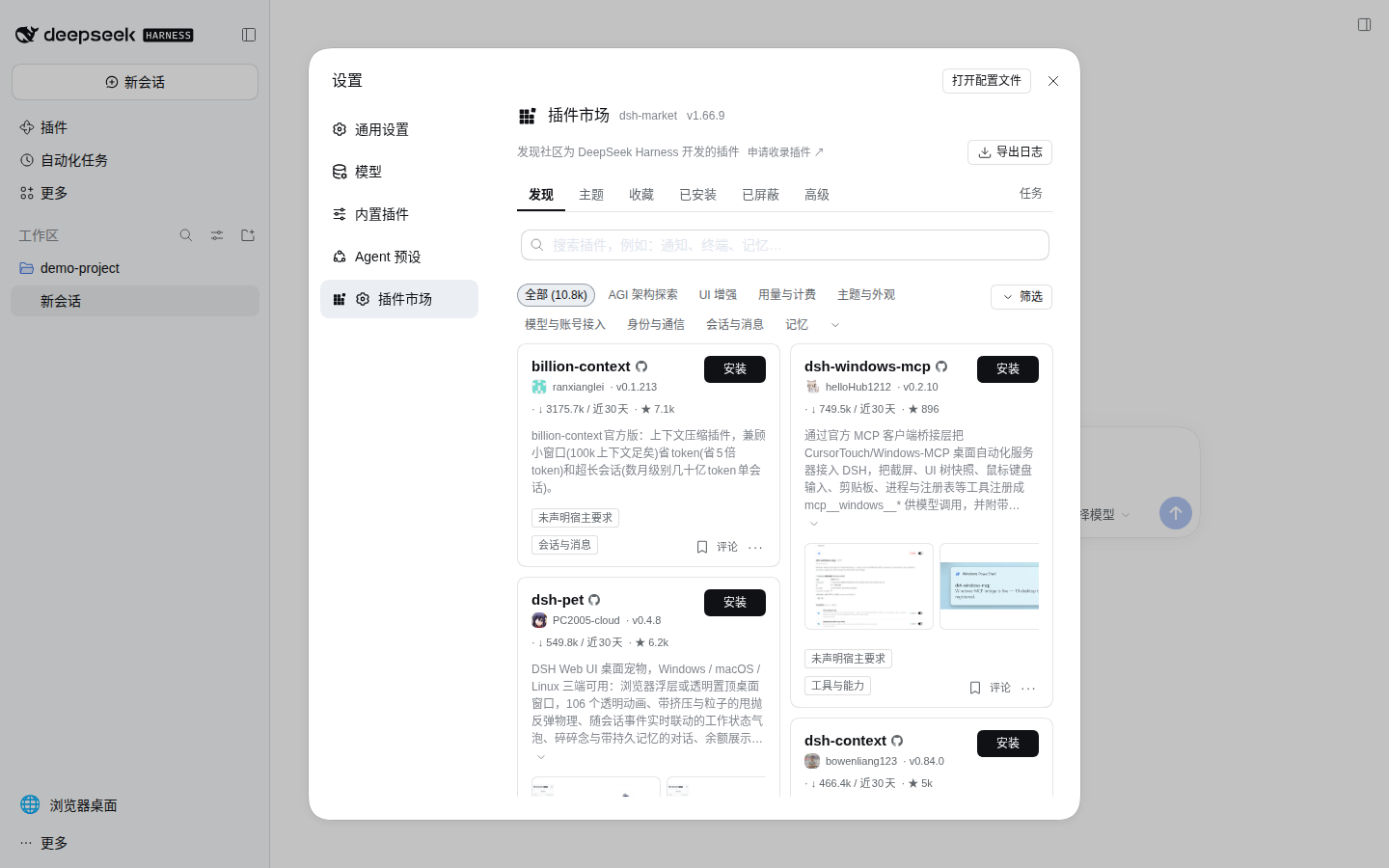
Captured from the optional market image (2026-10-28, DSH 0.2.2-alpha.2, dshmarket@1.66.9); this page is absent from the default image. Catalog entries and compatibility indicators change over time. This screenshot shows browsing only; none of the displayed plugins were installed.
The market package itself is pinned and copied at build time. Plugins installed through it and the pnpm store persist in the dsh-home volume. Installation needs container egress to npm/GitHub, and third-party build scripts should remain blocked until separately reviewed and approved. One-click market restart is disabled; apply lifecycle changes with docker compose restart or a Kubernetes rollout.
Build and test the optional variant locally with:
make market-build
make market-smoke
Helm continues to default to the official-DSH image; it uses the market variant only when you explicitly pass --set image.tag=0.2.2-alpha.2-r1-market.1.
A reused dsh-home previously managed by another pnpm major can fail installation with ERR_PNPM_UNEXPECTED_STORE. Stop DSH and run the explicit one-time migration:
docker compose -f compose.yaml -f compose.market.yaml stop deepseek-harness
docker compose -f compose.yaml -f compose.market.yaml run --rm --no-deps \
  --entrypoint dsh-market-repair-store deepseek-harness
docker compose -f compose.yaml -f compose.market.yaml up -d --no-build
The migration relinks only dependencies declared by the existing package.json, pins the store under /home/node/.dsh/pnpm-store, and passes --ignore-scripts. It retains the previous node_modules under /home/node/.dsh/backups/pnpm-store-*; remove that backup yourself only after verifying the plugins.
On startup, the optional entrypoint also repairs an existing non-writable regular profiles/web/cordis.patch.yml by replacing it with a byte-equivalent copy owned by the runtime user. This handles volumes previously written under another UID without recursively changing ownership; symbolic links and non-regular files are left untouched with a warning.
This public branch packages no company-internal models, credentials, skills, or personal workspace mounts. Configure models in Harness Settings and keep extra credentials or private extensions in runtime Secrets, the ignored .env, or a machine-local compose.local.yaml.
Inspect logs or stop the service:
docker compose logs -f deepseek-harness
docker compose down
docker compose down preserves named volumes. docker compose down --volumes deletes stored configuration, credentials, sessions, and every workspace file in the default dsh-workspace volume; back up anything that must survive before using it.
Plain Docker
Build:
docker build -t runzhliu/deepseek-harness:0.2.2-alpha.2-r1 .
Run the Web UI:
docker volume create dsh-home
docker run --rm \
  --name deepseek-harness \
  --publish 127.0.0.1:3080:3080 \
  --publish 127.0.0.1:6080:6080 \
  --shm-size 1g \
  --mount type=volume,src=dsh-home,dst=/home/node/.dsh \
  --mount type=bind,src="$PWD",dst=/workspace \
  runzhliu/deepseek-harness:0.2.2-alpha.2-r1
The foreground command prints the tokenized startup URL; open that exact URL. Do not shorten the publication to -p 3080:3080, and do not place this service behind a public Ingress: this configuration does not enable Web TLS, and noVNC on 6080 has no authentication.
Headless mode
Arguments replace the default Web command because the image entry point behaves like dsh:
docker run --rm \
  --env DEEPSEEK_API_KEY \
  --mount type=volume,src=dsh-home,dst=/home/node/.dsh \
  --mount type=bind,src="$PWD",dst=/workspace \
  runzhliu/deepseek-harness:0.2.2-alpha.2-r1 \
  --profile headless "summarize this repository"
From 0.2.1-alpha.3, Headless reads keys from environment variables and .env by default, rather than keys saved through Web settings. Supply the selected provider's key through a runtime environment variable or Secret. Never place it in a Dockerfile, image layer, or build argument.
Kubernetes with Helm
charts/deepseek-harness deploys one StatefulSet replica. /home/node/.dsh is backed by a PVC; the workspace can use another existing PVC. The chart creates no Ingress or LoadBalancer and enables a deny-ingress NetworkPolicy by default.
The chart defaults to the published Docker Hub image, so it can be installed directly:
helm upgrade --install deepseek-harness charts/deepseek-harness \
  --namespace deepseek-harness \
  --create-namespace \
  --set image.repository=runzhliu/deepseek-harness \
  --set image.tag=0.2.2-alpha.2-r1
Kind or Minikube can pull the default runzhliu/deepseek-harness image directly, or you can load a local image under the same name first.
Access it through the Kubernetes API server:
kubectl -n deepseek-harness rollout status statefulset/deepseek-harness
kubectl -n deepseek-harness port-forward service/deepseek-harness 3080:3080 6080:6080
In another terminal, run kubectl -n deepseek-harness logs statefulset/deepseek-harness | grep 'dsh web:', then open the complete tokenized http://127.0.0.1:3080 URL from the log line. The same command forwards the embedded desktop to http://127.0.0.1:6080. Do not convert the non-TLS Web surface or unauthenticated noVNC endpoint into a NodePort, LoadBalancer, or direct Ingress.
Create a provider Secret without putting its value in values.yaml:
kubectl -n deepseek-harness create secret generic dsh-provider-credentials \
  --from-literal=DEEPSEEK_API_KEY='replace-me'

helm upgrade deepseek-harness charts/deepseek-harness \
  --namespace deepseek-harness \
  --reuse-values \
  --set credentials.existingSecret=dsh-provider-credentials
Set workspace.existingClaim to mount a persistent workspace PVC. Without it, /workspace is an emptyDir. The StatefulSet-created dsh-home PVC is retained after Helm uninstall; delete it manually only when you intend to erase configuration, credentials, and sessions.
Upgrade the DSH version
The build argument pins the package:
docker build \
  --build-arg DSH_VERSION=0.2.2-alpha.2 \
  --build-arg IMAGE_VERSION=0.2.2-alpha.2-r1 \
  -t runzhliu/deepseek-harness:0.2.2-alpha.2-r1 .
Compose keeps the upstream version and immutable container revision separate:
DSH_VERSION=0.2.2-alpha.2 DSH_IMAGE_VERSION=0.2.2-alpha.2-r1 docker compose build --pull
Maintainers can run make push to build and publish the linux/amd64 and linux/arm64 manifests under the same immutable revision. The target refuses to overwrite an existing tag and does not create a latest tag.
The optional market variant has a separate make market-push target. It publishes only the dual-architecture tag carrying the -market.1 suffix and never changes the default image.
The Mirror Docker Hub images to GHCR workflow creates a carbon copy of an existing Docker Hub manifest in GHCR without rebuilding the image. Publishing a GitHub Release whose tag starts with image-v mirrors the base tag; maintainers can also dispatch it with an explicit version and include the -market.1 variant. It compares every source and target platform-manifest digest after the copy and never creates latest.
Do not install an unbounded latest tag. Release-candidate behavior changes quickly, and exact versions make bugs reproducible.
Security boundary
- The image runs as
node(UID/GID 1000). Fix bind-mount ownership or build a derived image with a matching UID when the host workspace is not writable. - The Web directory browser's Home is
/workspace; it is intentionally separate from internal state under/home/node/.dsh. - The DSH service drops every Linux capability. The LAN gateway retains only
NET_BIND_SERVICEbecause the official Caddy binary carries that file capability. Both useno-new-privileges, a read-only root filesystem, and a dedicated/tmptmpfs. - Mount only the workspace the Agent needs. Never mount the host root,
~/.ssh, cloud credential directories, or the Docker socket. - A container is not a multi-tenant sandbox. Do not share this instance with untrusted users or install unreviewed plugins into the persistent profile.
- The LAN overlay adds transport encryption and an outer authentication gate for a trusted network; it does not add per-user authorization or session isolation. Bind one exact LAN IP, restrict firewall sources, and deploy separate instances for users who do not trust each other.
- Keep Harness's default permission mode and validate real tool execution. Do not use privilege flags to mask an unsupported sandbox environment.
See SECURITY.md before changing any network or privilege setting.
Smoke test
Run at least these checks for every DSH upgrade:
docker run --rm runzhliu/deepseek-harness:0.2.2-alpha.2-r1 --version

docker run --rm --entrypoint dsh runzhliu/deepseek-harness:0.2.2-alpha.2-r1 \
  web --patch /opt/deepseek-harness/web.cordis.patch.yml --dump-config

docker compose up -d
test "$(curl --silent --output /dev/null --write-out '%{http_code}' http://127.0.0.1:3080/)" = 401
make smoke
make lan-smoke
docker compose ps
docker compose logs --no-color deepseek-harness

helm lint --strict charts/deepseek-harness
helm template deepseek-harness charts/deepseek-harness >/dev/null
Acceptance criteria: the CLI reports the pinned version; the dumped webserver.config.host is 127.0.0.1, with a TCP relay on one concrete container IP; the unauthenticated root returns 401, while the launch token exchanges for a cookie and loads the page; Compose reaches healthy; logs contain no plugin/config errors; the container does not try to hand off to a host browser; and Helm renders both persistent and ephemeral-storage variants. Build both linux/amd64 and linux/arm64 and actually spawn a PTY before publishing because terminal and sandbox dependencies include native code. The default entry points are make verify, make build, and make smoke; the optional market uses make market-build and make market-smoke, which also prove that the market package is absent from the default image.
Troubleshooting
If the Web directory browser reports EROFS: read-only file system, mkdir '/home/node/...', an old image or container is still running. The current image makes /workspace the interactive home:
docker compose build
docker compose up -d --force-recreate
docker compose exec deepseek-harness node -e "console.log(require('node:os').homedir())"
The last command must print /workspace. An EACCES under /workspace instead indicates a UID mismatch on the bind mount. Correct the host permissions or use a UID-matched derived image; do not run the service as root.
Repository layout
| Path | Purpose |
|---|---|
Dockerfile |
Pinned, non-root DSH runtime with Web as the default command |
Dockerfile.market |
Optional derivative that pins a third-party market version on top of the default image |
Dockerfile.bwrap |
Optional bubblewrap derivative for Docker hosts that cannot enforce Landlock |
web.cordis.patch.yml |
Loopback Web listener and official Browser Use / browser-desktop integration |
scripts/dsh-web-relay.cjs |
Raw TCP relay from one concrete container IP to DSH loopback |
compose.yaml |
Persistent, loopback-only, hardened local deployment |
compose.market.yaml |
Optional Compose overlay that explicitly selects the third-party community market image |
compose.bwrap.yaml |
Optional overlay that selects the bubblewrap image and permits its required namespace operations |
compose.podman.yaml |
Rootless Podman keep-id and SELinux workspace overlay |
compose.lan.yaml |
Optional LAN overlay for HTTPS, Basic Auth, trusted-host, and same-origin noVNC |
config/Caddyfile.lan |
Caddy configuration for the protected LAN endpoint |
.env.lan.example |
Secret-free LAN configuration template |
web.market.cordis.patch.yml |
Profile configuration used only by the optional market derivative |
plugins/dsh-browser-desktop/ |
Independently publishable DSH browser desktop bundle |
charts/deepseek-harness/ |
StatefulSet, PVC, headless Service, and NetworkPolicy |
scripts/smoke.sh |
CLI, config, native PTY, and HTTP startup checks |
scripts/bwrap-smoke.sh |
Bubblewrap workspace-write and outside-boundary denial checks |
scripts/lan-smoke.sh |
LAN gateway TLS, authentication, Origin, noVNC, and port-boundary checks |
scripts/podman-smoke.sh |
Rootless user mapping, persistence, Web/noVNC, and port-boundary checks |
.github/workflows/ci.yml |
Compose/Helm validation and two-platform image smoke tests |
assets/ |
Sanitized screenshots captured from the tested container |
.dockerignore |
Minimal build context |
Contributing and attribution
See CONTRIBUTING.md and SECURITY.md. This project packages the official MIT-licensed @deepseek-ai/dsh distribution but is maintained independently. “DeepSeek” and related project names belong to their respective owners. This project is not an official DeepSeek container image.
Related plugins
dsh-web(原 dsh-web-ui)
 zhu1090093659
/dsh-web-ui
dsh-web(原 dsh-web-ui):任务看板、git 图、右侧面板、远程移动端 UI、桌宠、实时 token 统计与皮肤中心的全家桶。仓库已更名 zhu1090093659/dsh-web,根目录声明 dsh.bundle.patch,支持根 Git 入口安装。
dsh plugin --profile web add github:zhu1090093659/dsh-webdsh-web-all 聚合包(原 dsh-web-ui-all)
zhu1090093659zhu1090093659/dsh-web-ui/packages/dsh-web-ui-all
旧整包路径 packages/dsh-web-ui-all 已随仓库更名 dsh-web 迁移:现聚合目录为 packages/dsh-web-all,npm 聚合包 @linxin666/dsh-web-all。与总仓根 Git 入口是同一产品的两种整包方式,不重复计数。
dsh plugin --profile web add @linxin666/dsh-web-all@latestdsh-TUI
 ccch1mneyyy
/dsh-TUI
Claude Code 风格全屏终端 UI:像素鲸鱼顶栏、实时工作状态行、思考流式展开。
dsh plugin --profile web add github:ccch1mneyyy/dsh-TUIdsh-cc-tui
ccch1mneyyyccch1mneyyy/dsh-cc-tui
一个美观且实用的 Claude Code 风格 TUI 插件:像素鲸鱼顶栏、双流光大字、实时工作状态行、思考流式展开、双击 Esc 时间回溯、蓝白上下文进度条 + TPS 仪表。 零核心改动,纯插件挂载。安装插件即可启用,卸载后不会留下核心补丁。 献给钟爱tui的各位极客们 A beautiful, practical Claude…
dsh plugin --profile web add github:ccch1mneyyy/dsh-cc-tuideepseek-balance-whale-widget
 meteornox
/deepseek-balance-whale-widget
DSH 小鲸鱼余额挂件(DeepSeek Balance Whale Widget)
dsh plugin --profile web add github:meteornox/deepseek-balance-whale-widgetDSH-better-sidebar
 omdsh-dev
/DSH-better-sidebar
侧边栏完整工作台:内置文件渲染编辑、终端、Git 与子代理,支持三方插件注册新 Tab。
dsh plugin --profile web add github:omdsh-dev/DSH-better-sidebar