
UI Enhancements
dsh-client-ui-quote
skyhancloud/dsh-client-ui-quote · ★ 1
 skyhancloud
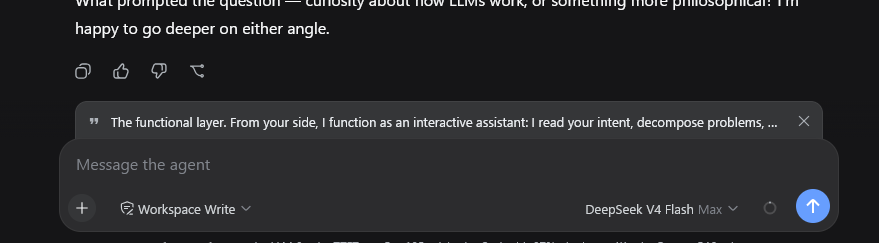
Adds a removable quote banner above the web chat composer for text selected from an AI reply, included in the next message.
安装
dsh plugin --profile web add github:skyhancloud/dsh-client-ui-quoteGitHub 源码安装:首次需按提示配置 allowBuilds 构建授权后重试
For install and environment setup, plus plugin development tutorials, see DSH community docs ↗
Screenshots
README
Table of contents
dsh-client-ui-quote
English | 中文
A selection-quoting plugin for the DeepSeek Harness web GUI: select text inside an AI reply and attach it to your next message as a quote banner.
Table of Contents
Features
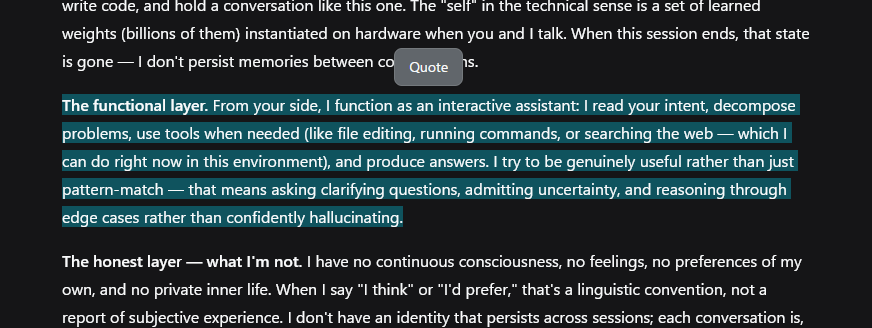
- Selection toolbar — one 引用 (Quote) button appears above the selection after a 50ms debounce, so it never flashes mid-drag. It hides on Escape, scroll-away, or when the selection collapses.
- Quote banner — a removable strip above the composer with a quote glyph, the quoted text, and a × button. The quote is consumed by the next send: the banner clears when the message goes out. Escape while the composer is focused clears it too.
- Clean draft — the quote is a pending-send attachment, not text in your input. Focus returns to the composer so typing follows.
- Localized — toolbar labels and the quote attribution follow the UI language (中文 / English).
- Fallback for older harnesses — on versions without the input-machine quote attachment, the button inserts the quote block at the end of the draft instead.
Preview
Installation
Prerequisites
- DeepSeek Harness with the web GUI (
dsh web) - Full banner behavior needs
@deepseek-ai/dsh-client-ui-conversationwith the input-machine quote attachment (InputActions.setQuote). Older versions fall back to inserting the quote into the draft.
Install
dsh plugin --profile web add https://github.com/skyhancloud/dsh-client-ui-quote
Then restart dsh web and refresh the browser.
Usage
- Select any text inside an AI reply.
- Click 引用 (Quote) above the selection — the quote appears as a banner above the composer.
- Type your message and send — the quote is prepended to the outgoing message:
> 引用 AI 回复:
> <selected lines>

<your message>
- Click × on the banner when you no longer need the quote.
Development
pnpm install
pnpm run bundle   # emits lib/index.js and lib/client.js
Pull requests are welcome.
License
MIT — see LICENSE.
Related plugins
dsh-web(原 dsh-web-ui)
 zhu1090093659
/dsh-web-ui
dsh-web(原 dsh-web-ui):任务看板、git 图、右侧面板、远程移动端 UI、桌宠、实时 token 统计与皮肤中心的全家桶。仓库已更名 zhu1090093659/dsh-web,根目录声明 dsh.bundle.patch,支持根 Git 入口安装。
dsh plugin --profile web add github:zhu1090093659/dsh-webdsh-web-all 聚合包(原 dsh-web-ui-all)
zhu1090093659zhu1090093659/dsh-web-ui/packages/dsh-web-ui-all
旧整包路径 packages/dsh-web-ui-all 已随仓库更名 dsh-web 迁移:现聚合目录为 packages/dsh-web-all,npm 聚合包 @linxin666/dsh-web-all。与总仓根 Git 入口是同一产品的两种整包方式,不重复计数。
dsh plugin --profile web add @linxin666/dsh-web-all@latestdsh-TUI
 ccch1mneyyy
/dsh-TUI
Claude Code 风格全屏终端 UI:像素鲸鱼顶栏、实时工作状态行、思考流式展开。
dsh plugin --profile web add github:ccch1mneyyy/dsh-TUIdsh-cc-tui
ccch1mneyyyccch1mneyyy/dsh-cc-tui
一个美观且实用的 Claude Code 风格 TUI 插件:像素鲸鱼顶栏、双流光大字、实时工作状态行、思考流式展开、双击 Esc 时间回溯、蓝白上下文进度条 + TPS 仪表。 零核心改动,纯插件挂载。安装插件即可启用,卸载后不会留下核心补丁。 献给钟爱tui的各位极客们 A beautiful, practical Claude…
dsh plugin --profile web add github:ccch1mneyyy/dsh-cc-tuideepseek-balance-whale-widget
 meteornox
/deepseek-balance-whale-widget
DSH 小鲸鱼余额挂件(DeepSeek Balance Whale Widget)
dsh plugin --profile web add github:meteornox/deepseek-balance-whale-widgetDSH-better-sidebar
 omdsh-dev
/DSH-better-sidebar
侧边栏完整工作台:内置文件渲染编辑、终端、Git 与子代理,支持三方插件注册新 Tab。
dsh plugin --profile web add github:omdsh-dev/DSH-better-sidebar