
Skills
dsh-skill-manager
sulfide2085/dsh-skill-manager · ★ 13
 sulfide2085
Manages DSH, Codex, and Claude AI skills from DSH settings with hot toggles, GitHub marketplace discovery and installation, local ZIP installation, and immediate skill availability.
安装
dsh plugin --profile web add github:sulfide2085/dsh-skill-managerGitHub 源码安装:首次需按提示配置 allowBuilds 构建授权后重试
For install and environment setup, plus plugin development tutorials, see DSH community docs ↗
README
Table of contents
One panel to manage every skill across DSH, Codex and Claude — hot-toggle, discover & install from GitHub skill marketplaces, or import from a local ZIP, all live without restart.
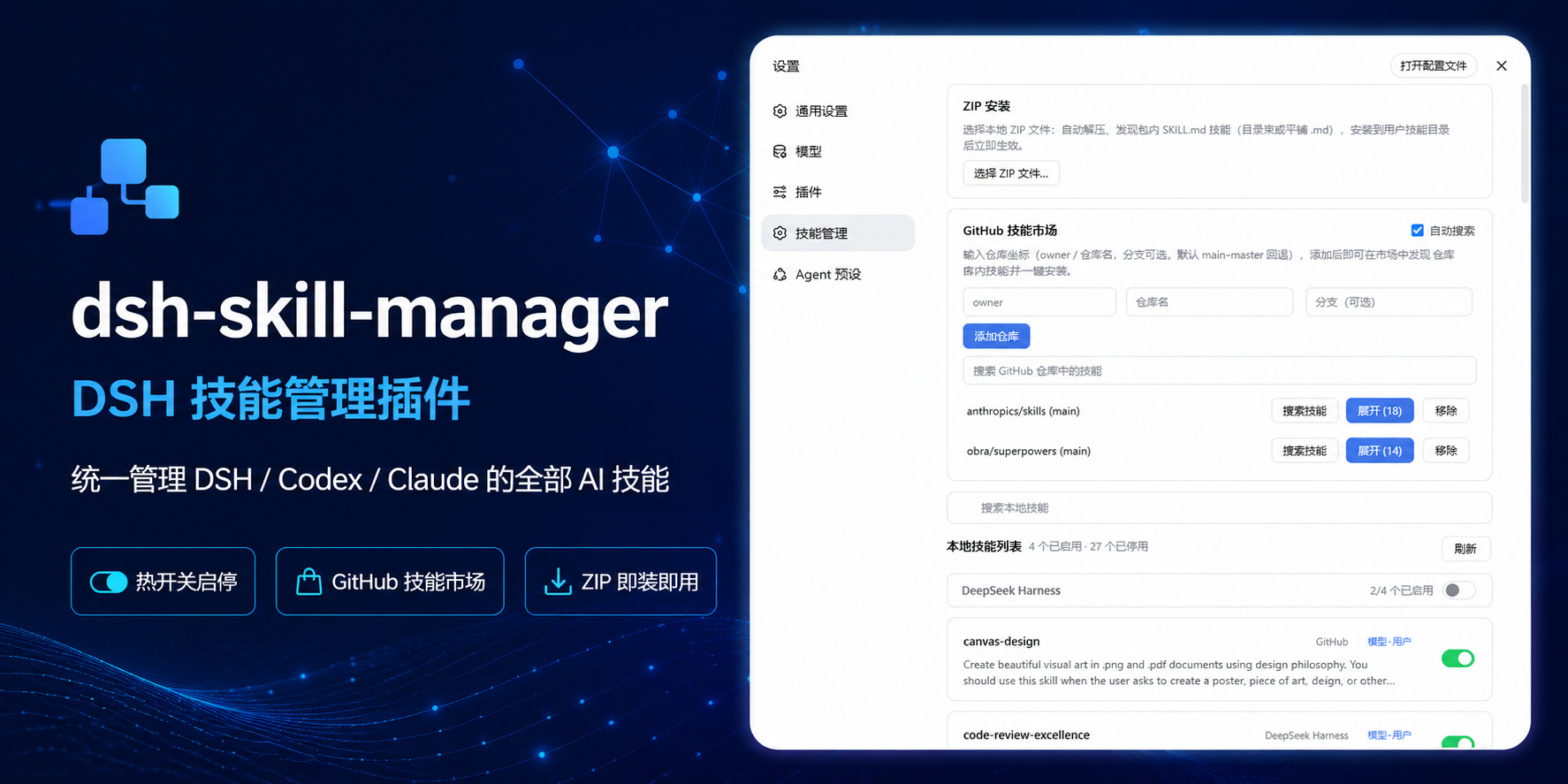
What is this
A skill management plugin for DSH (DeepSeek Harness). Skill files live in many places: DSH's own skill directory, Codex's ~/.codex/skills, Claude's ~/.claude/skills, and skill repositories on GitHub. This plugin adds a "Skill Manager" section to the Settings page, bringing all these sources into one panel for unified viewing and management.
Featured in the GitHub dsh-plugin topic.
Features
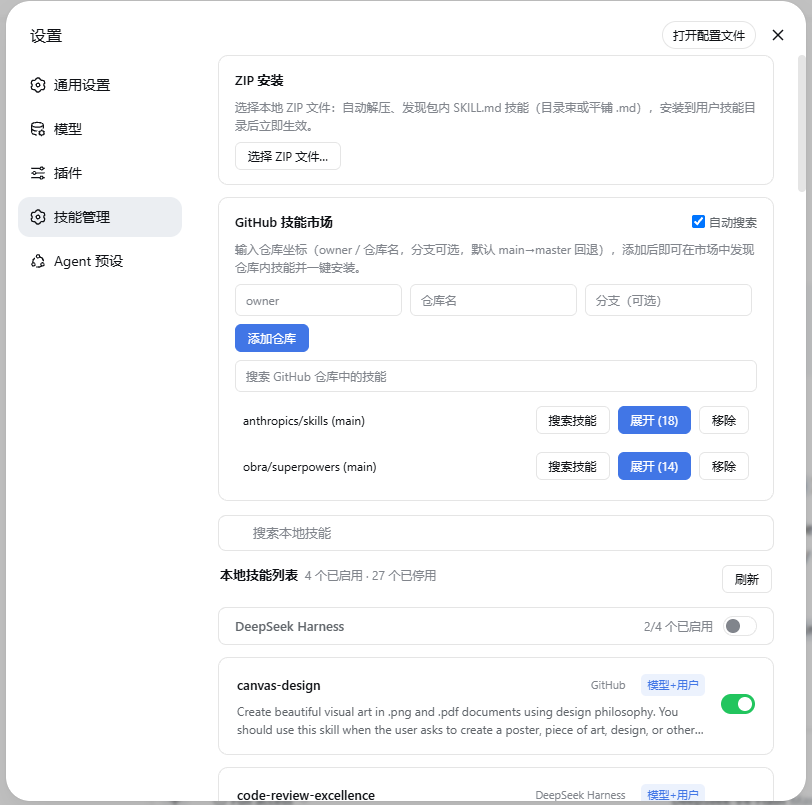
- Skill list: merges registry (enabled) and disk (disabled) entries, grouped by source (DeepSeek Harness / Agents / Project / Codex / Claude), showing name, description, source, invocation policy and enabled state; skills installed from GitHub carry a source label.
- Toggle: toggling DSH / Agents skills renames
SKILL.md↔SKILL.md.disabled; the filesystem watcher picks it up in ~200ms, and DSH, Codex and Claude all follow this convention. Skills in codex / claude directories are disabled by default and only enter the official/skillsregistry after explicit enablement. - Directory-level toggle: the switch on a group header toggles the whole source directory at once.
- ZIP install: pick a local
.zip(≤64 MiB); it is extracted, skills inside are discovered automatically (SKILL.md bundles or flat.md), deduplicated, installed into~/.dsh/skillsand enabled; an archive without skills is rejected with an error. - GitHub skill search: add a repository (owner / name / branch; branch is optional and falls back to main→master), then search skills across all added repositories by keyword and install them individually; a separate search box filters locally installed skills.
- Refresh after install: the list refreshes automatically after ZIP / repo installs, with a manual refresh button next to the title; click a card to expand the full skill content.
File layout
| File | Role |
|---|---|
lib/index.js |
host side: skillManager remote service (list / content / setEnabled / installZip / repo APIs) |
lib/skill-files.js |
disk conventions: root scanning, frontmatter parsing, .disabled toggling |
lib/skill-zip.js |
ZIP parsing/extraction (store+deflate), CRC32 checks, entry-name safety checks, in-archive skill discovery and install |
lib/skill-repo.js |
GitHub archive downloads (size cap / timeout / retry / cache / mirror base), repo skill scanning, per-directory install |
lib/client.js |
browser side: hand-written bundle registering the settings.section slot (id: skill-manager, order: 17) |
Install
dsh plugin --profile web add . # run inside the plugin directory
Restart DSH Web after code changes (the host manifest is registered at gateway startup; new endpoints 404 until then).
On Windows the plugin depends on zod and @deepseek-ai/dsh-typert-protocol, which ship with the DSH install tree. The plugin's node_modules is a junction pointing at <dsh install dir>/node_modules. Recreate it if removed:
New-Item -ItemType Junction -Path "node_modules" -Target "C:\Users\<you>\AppData\Roaming\npm\node_modules\@deepseek-ai\dsh\node_modules"
Tests
Built on Node's node:test with no extra dependencies — 100 test cases:
npm test
Coverage: skill-zip (parsing/extraction/safety checks/discovery/conflicts/corrupt archives), skill-repo (ref validation/branch fallback/cache/retry/install), index (host remote methods + state persistence), client (bundle loading/descriptors/face round-trips).
Limitations
- Skills from bundled / runtime sources have no disk files and cannot be edited; their toggles are disabled.
- Disabling only renames files; content is never deleted and can always be restored.
- Without an open session only user-level and global skills are shown (project-level skills depend on the session cwd).
- Not yet implemented: zip-bomb budgets, symlink materialization, ZIP64, download proxy support.
Related plugins
Distilly(原 colleague-skill)
 titanwings
/colleague-skill
Distilly(原 Colleague Skill):把同事、亲友或名人的经验、判断与表达蒸馏成可复用的人物 Profile Skill。DSH 经 skills 目录原生发现(/distilly 调用),非插件加载。
mkdir -p ~/.dsh/skills && git clone https://github.com/titanwings/distilly ~/.dsh/skills/distillyskillhub-iflytek
 iflytek
/skillhub/plugins/dsh
Native SkillHub browsing and local skill management for DeepSeek Harness
dsh plugin --profile web add '@astron-team/skillhub-dsh@0.6.1'vibe-skills
 foryourhealth111-pixel
/vibe-skills
vibe 编码技能合集(含快速开始、CI 证明、发布说明与文档)
dsh plugin --profile web add github:foryourhealth111-pixel/vibe-skillsJ-Space-Cognition-Suite-V3.6
 Tiger3807861189
/J-Space-Cognition-Suite-V3.6
A model-agnostic inference-time control suite for deep reasoning, long-horizon work, tool use, verification, and recovery. 面向深度推理、长程任务、工具调用、验证与恢复的模型不可知推理时控制套件。
dsh plugin --profile web add github:Tiger3807861189/J-Space-Cognition-Suite-V3.6Aegis
 GanyuanRan
/Aegis
面向编码 Agent 的软件工程方法包,提供基线优先规划、系统化调试、提示词卫生、完成前验证,以及修复/退役双轨跟踪技能。
dsh plugin --profile web add github:GanyuanRan/Aegisex-skill
titanwingstitanwings/ex-skill
「分手了,可对方的打字方式还刻在你脑子里。每个语气、每次停顿都记得——只是再也收不到下一条了。」
dsh plugin --profile web add github:titanwings/ex-skill