
Sessions & Messages
dsh-chat-focus
supergameboy/dsh-chat-focus · ★ 1
 supergameboy
dsh web conversation plugin: fold runtime activity into expandable boxes, chat bubbles, deep customization (fork of dsh-client-ui-conversation)
Manifest details
安装
dsh plugin --profile web add github:supergameboy/dsh-chat-focusGitHub 源码安装:首次需按提示配置 allowBuilds 构建授权后重试
For install and environment setup, plus plugin development tutorials, see DSH community docs ↗
README
Table of contents
A dsh web conversation plugin: it folds the runtime activity preceding each reply (tool calls, thinking, retries, compaction, …) into expandable boxes, renders text replies as chat bubbles, and puts bubble looks and skins in the settings page.
Distributed as an independent repository with zero host source changes: a bundle patch layer disables the host ui-chat bubble row, and the chat layer registers into the host ui-conversation engine and session shell. Current version 0.4.0, paired with host 0.1.2-alpha.5.

Highlights
- Folded runtime activity — tool calls, thinking, retries, context, commands and compaction before a reply collapse into one box whose summary reads "N activities · M tools · K thinking · …" with a deduplicated tool list; expand it in place.
- Chat bubbles — assistant replies get a left bubble (DeepSeek fish logo + time), user messages keep the host bubble. Font size, font family, radius, backdrop, gradient, backdrop opacity, frosted glass and padding are all editable, per side.
- Translucent bubbles — whole-layer backdrop opacity from 0 to 100% while text stays opaque, plus frosted-glass presets (weak / medium / strong) that blur what sits behind the bubble.
- Bubble skin maker — use your own artwork as a bubble backdrop: static images get nine-slice geometry, GIF / APNG keep their native animation, PNG sequences and video can be baked into a sprite sheet, and video can also play directly. Five-step wizard with a live three-length preview.
- Reworked settings page — a left tab rail (Basics / Folding / Bubble look / Skins / Advanced) with the form and a live preview beside it; both sides share one editor, with one-click copy to the other side.
Features
Folded runtime activity
Every run of consecutive runtime nodes before a text reply collapses into a <details> box, and thinking is folded in too instead of taking its own row.
- Three folding strategies (settings → Folding): keep the last N replies open / threshold (fold only when a group exceeds N items) / always fold.
- Recent N replies stay open:
focusKeepVisibleis the number of most recent replies whose runtime rows stay expanded; everything older folds away, and an in-flight stream with no reply yet stays visible. - Summary row: category counts plus up to five deduplicated tool names. The summary row does not jump when toggling, and a pinned-to-bottom view returns to the newest row automatically.
- Expanded state persists per group (localStorage; changing the strategy invalidates stale state). Long groups scroll inside their own box instead of stretching the conversation column.
Chat bubbles and bubble looks
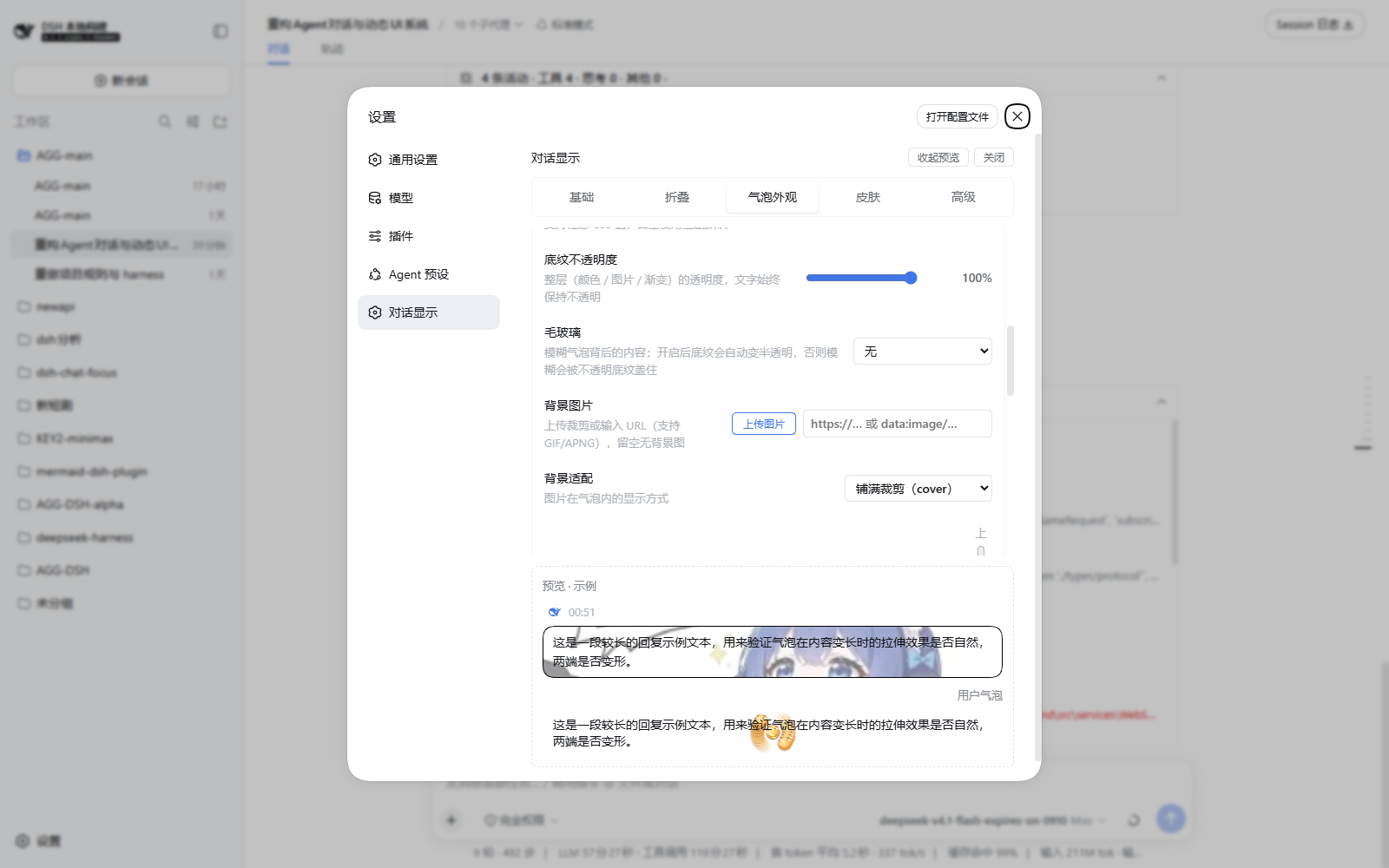
The "Bubble look" tab edits one side at a time through an Assistant / User segmented switch, each side with the same set of options:
- Backdrop: background color, backdrop opacity (0–100%, applied to color / image / gradient as one layer), frosted glass, background image (local upload with a crop overlay, or a URL), background fit (cover / contain / stretch), focus position, text-readability overlay, gradient (from / to / angle, mutually exclusive with a background image).
- Text: color, font family (theme / KaiTi / SimSun / SimHei / Microsoft YaHei / Georgia / Consolas), size (12–24px), padding (any CSS value).
- Geometry: corner radius, max width, border color, plus six one-click palettes (Default / Sky / Mint / Gradient / Dark / Texture).
- Copy to the other side writes every setting of this side (skin included) to the other one atomically; each side also has Reset.
- With a skin applied, the backdrop/radius/border controls grey out with an explanation — the artwork owns the shape while text styling stays editable.
Bubble skin maker
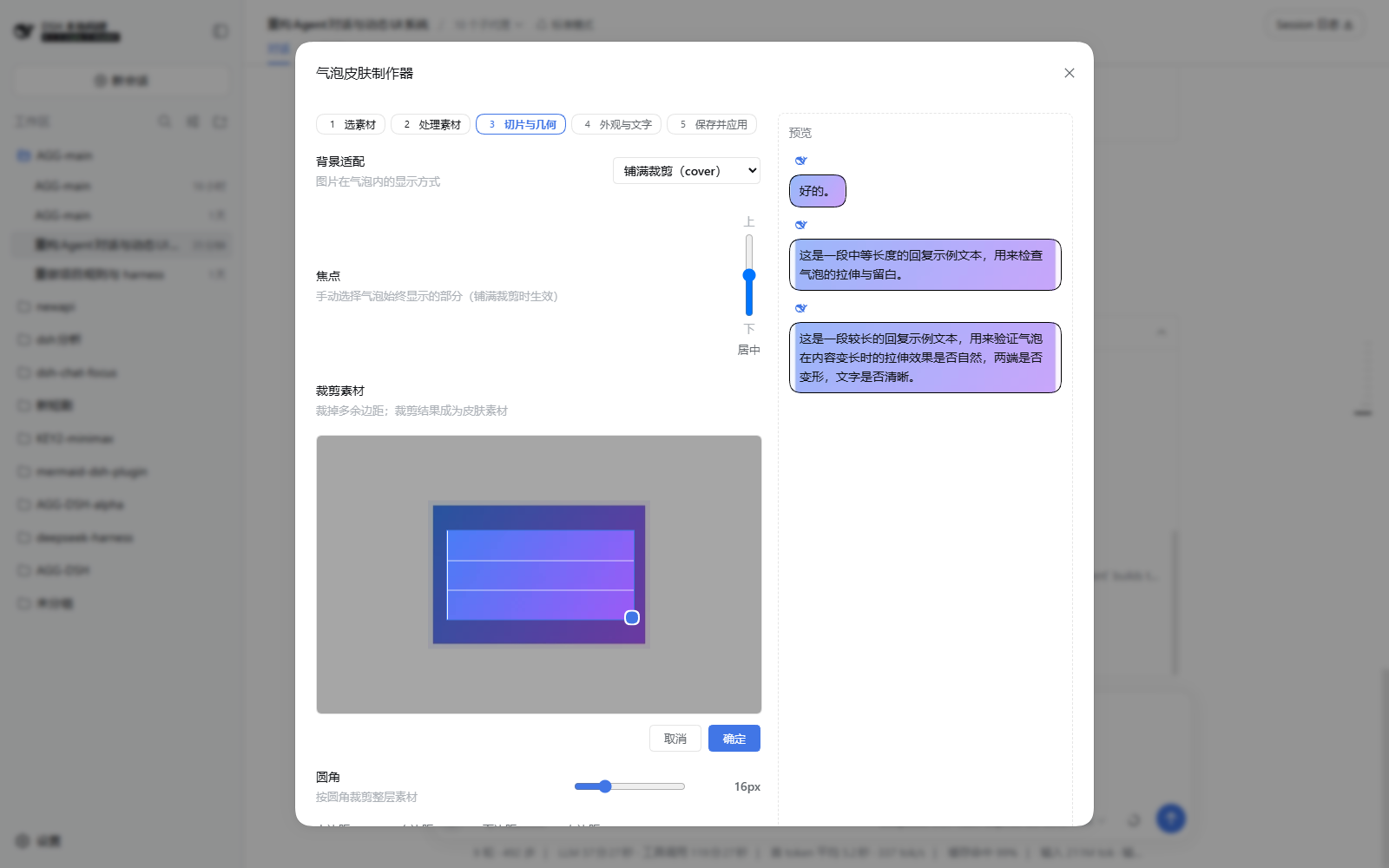
A five-step wizard — Source → Prepare → Slice & geometry → Look & text → Save and apply — with a live short/medium/long preview pinned on the right.
| Source | Processing route |
|---|---|
| PNG / JPG / WebP / SVG | Nine-slice editing (draggable guides, numeric fields, auto-estimate from content); art is normalized to ≤256px so slice ratios hold |
| GIF / APNG | Native animation kept, painted as one layer (rounded crop + cover/stretch) |
| Multiple PNGs | PNG sequence → horizontal sprite sheet (frame width / fps / frame count, with progress and cancel) |
| MP4 / WebM | Bake frames into a sprite sheet (default: small, no decode cost) or play the video directly (muted looping <video> layer that decodes only while in view and pauses when it leaves) |
- Geometry step: background fit, focus (drag the crop box to pin the part that must always stay visible), corner radius and content padding.
- A skin packages the editor you already have: the look step styles the packaged look with the same bubble controls (backdrop color, gradient, border, opacity, frosted glass, overlay, text color, font, size). Applying a skin writes those values together with the skin id into that side's settings, and you can keep tweaking them afterwards under "Bubble look".
- Parameter-only skins: choose "no artwork" in the source step to package styling alone with no asset file.
Skin library
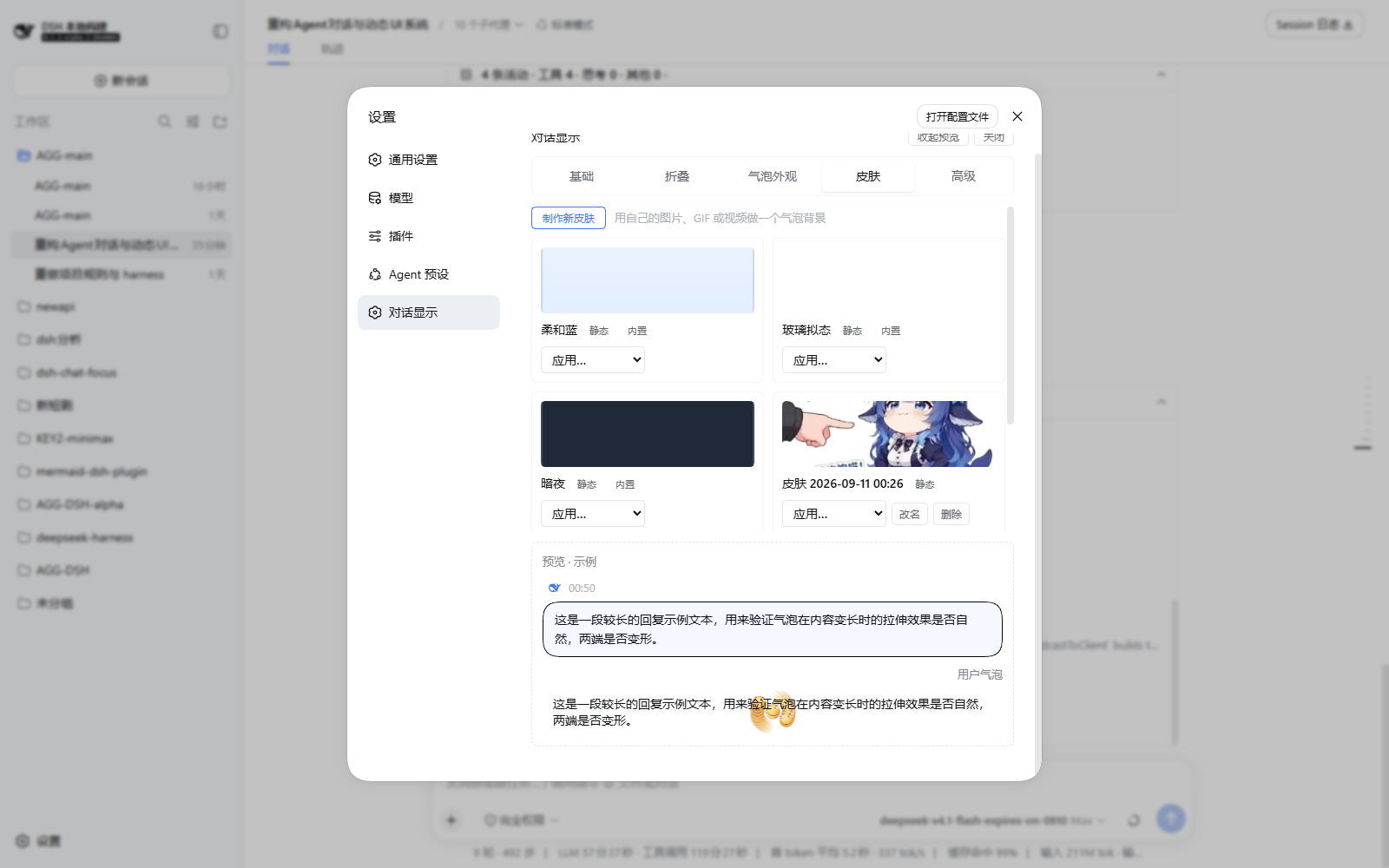
- Three built-ins: Soft blue / Glassmorphism / Midnight (read-only).
- Your own skins can be applied (assistant / user / both), renamed and deleted; deleting one that is in use clears the reference as well.
- Assets and metadata live in
~/.dsh/chat-focus/skins/(index.jsonplus<id>.bin) and are served through the host's authenticated/api/chat-focus/skin-assetroute (withRangesupport so video can seek), cached long with a version stamp. They are shared across browsers on the same machine but do not travel with the settings file.
Settings page and robustness
- Settings live under Settings → 对话显示 (Conversation display), with five tabs: Basics / Folding / Bubble look / Skins / Advanced. On wide layouts the rail and preview stay put while the form scrolls; below 860px of available width the rail turns horizontal and the preview collapses.
- Basics: plugin switch, chat-bubble switch, bubble density (default / compact).
- Advanced: skin-library connection status and asset directory, plus reset all settings (one atomic write, with confirmation).
- Render error boundary: a row that fails to render shows an error card instead of blanking the panel; a refresh recovers.
Install
Always through the host's official plugin command, dsh plugin --profile <name> <pnpm args...> (a pnpm pass-through that also adds packages declaring dsh.bundle to the dsh.profile.bundles layer list). This project ships no wrapper scripts and needs none.
From npm (recommended):
dsh plugin --profile web add dsh-chat-focus
Local development:
pnpm run bundle                                          # build lib/client.js first
dsh plugin --profile web add "link:E:\dsh-chat-focus"    # official command, adds the bundle layer
The bundle's patch layer (cordis.patch.yml) is applied by the loader: the host ui-chat bubble row is disabled and a chat-focus row mounts this plugin into the host ui-conversation engine's chat view target. Other host plugins (ui-tool, ui-plan, ui-commands, …) keep registering into the same slots and behave as before.
Note: restart dsh after installing.
Uninstall
Use the official command only:
dsh plugin --profile web remove dsh-chat-focus # removes the dependency + bundle layer; the host ui-chat row returns after a restart
Two optional manual cleanups afterwards (both are inert leftovers that do not affect running the app):
# 1) node_modules directory link left behind by a link: install (the loader never reads it):
Remove-Item C:\Users\super\.dsh\profiles\web\node_modules\dsh-chat-focus -Force -Recurse

# 2) the focus* custom fields in the ui-chat: namespace of settings.yaml
#    (the fork's schema provides them; keep them and your bubble customisations come back on reinstall)
Your own skin assets (~/.dsh/chat-focus/) are independent of the plugin and survive uninstalling; delete the directory when you no longer want them. For the browser-side localStorage keys dsh.chat-focus.fold.* (unreachable from server-side tooling), run
Object.keys(localStorage).filter(k=>k.startsWith('dsh.chat-focus.')).forEach(k=>localStorage.removeItem(k))
in the dsh page console, or clear site data. Session logs stay untouched — the plugin is UI-only and writes nothing to them.
Living with dsh-web-ui-all (skins)
Known conflict: after switching skins the host fails to boot with failed to parse overlay .../cordis.patch.yml: YAMLException: end of the stream or a document separator is expected.
Cause: the profile's boot patch template ships an [] placeholder, and the skin manager (dsh-client-ui-skin-center) appends its skin rows after that placeholder — a YAML flow sequence cannot be followed by top-level rows, so parsing fails. The skin manager itself is fine with a patch file that has no placeholder (this is unrelated to dsh-chat-focus; any profile hits it).
Fix (one-off, idempotent, no third-party package is modified, so upgrading web-ui-all is unaffected):
node scripts/patch-skin-center.mjs          # web profile by default
node scripts/patch-skin-center.mjs --profile web
The script removes the [] placeholder from the profile patch file (backing it up as .bak). Restart dsh web afterwards — skin switches then write valid YAML and skins keep working.
Settings reference
Open Settings → 对话显示 (Conversation display).
| Tab | Contents |
|---|---|
| Basics | Plugin switch (off = original chronological view), chat-bubble switch, bubble density (default / compact) |
| Folding | Folding strategy (keep last N / threshold / always), number of recent replies kept open, default-open fold boxes, summary row, fold thinking in |
| Bubble look | Assistant / User segments: style source (skin or palette), backdrop, text, geometry, copy to the other side, reset |
| Skins | Make a new skin (five-step wizard), skin library (apply / rename / delete) |
| Advanced | Skin-library status and asset directory, reset all settings |
Settings fields (namespace ui-chat, an extended schema that the host's api-proxy allowlist already passes through):
| Field | Type | Default | Meaning |
|---|---|---|---|
| focusEnabled | boolean | true | Master switch; off renders the original chronological view |
| focusBubbles | boolean | true | Chat bubbles |
| focusKeepVisible | number(0-10) | 1 | Number of recent replies kept expanded |
| focusDefaultOpen | boolean | false | Fold boxes start expanded |
| focusSummary | boolean | true | Fold-box summary (counts + tool names) |
| focusStrategy | keep-recent / threshold / always | keep-recent | Folding strategy |
| focusBubbleStyle | default / compact | default | Bubble density |
| focusReasoning | boolean | true | Fold thinking-only steps into the runtime group |
| focusBubbleBg / Border / Radius / MaxWidth / BgImage / BgSize / BgPosition | string | '' / cover / center | Assistant bubble backdrop and geometry |
| focusBubbleTextColor / Font / FontSize / Padding | string | '' | Assistant bubble text |
| focusBubbleGradientFrom / GradientTo / GradientAngle | string | '' / '' / '135' | Assistant bubble gradient |
| focusBubbleBackdropOpacity | number(0-100) | 100 | Whole-layer backdrop opacity |
| focusBubbleBackdropBlur | '' / 4px / 10px / 18px | '' | Frosted glass preset |
| focusBubbleOverlay | number(-100-100) | '0' | Text-readability overlay |
| focusBubbleSkin / focusBubblePreset | string | '' | Applied skin id / palette id |
| focusUserBubble* (same shape as the assistant side) | string / number | as above | User bubble customisation |
The skin library never goes through the settings file: assets and metadata live in ~/.dsh/chat-focus/skins/, and only the skin id is stored in settings.
Build
pnpm install        # the host repo (0.1.2-alpha.5 baseline) is a cross-repo workspace member providing @deepseek-ai/*
pnpm run typecheck  # tsc --noEmit (type contracts come from the host's built lib/types)
pnpm run bundle     # tsdown: lib/index.js (node half) + lib/client.js (browser bundle)
pnpm test           # grouping engine + skin geometry/sniffing/validation + host asset store (tsx, no vitest)
Development notes:
pnpm-workspace.yamllists../deepseek-harness/packages/*/*and../deepseek-harness/vendor/*as workspace members (the exact 0.1.2-alpha.5 contract). If pnpm does not materialise node_modules for the cross-directory workspace, link the build dependencies by hand withnode scripts/setup-junctions.mjs. Do not run pnpm commands in this repository that would rewrite the host's node_modules.After touching the node half (
src/index.ts/src/skins/host.ts/src/chat-settings.ts) you must restart dsh: the browser half is read from disk per request (a page refresh picks it up), while the node half is loaded once at boot.
Version pairing (upstream adaptation)
| Host version | Fork version | Notes |
|---|---|---|
| 0.1.2-alpha.5 | 0.4.0 | Translucent bubbles + bubble skin maker + left-rail settings (host contract unchanged, purely additive) |
| 0.1.2-alpha.5 (2026-09-02) | 0.3.0 | Route-B migration: the host dropped dsh-client-runtime, so the fork became a chat-layer plugin riding the ui-conversation engine row and replacing the ui-chat bubble row |
| 0.1.1-rc.2 | 0.2.5 | Adapted to the attachment plugin split: user bubbles went through the same ChatBubble pipeline as the assistant; reference chips and image slots ported |
| rc.5 (2026-08-16 baseline) | 0.2.0 | The v0.2 baseline (all folding strategies, background-image upload/crop/fit, fold-box virtualisation) |
When the host moves, adapt in this order:
- Walk the slot-contract table in
docs/design/ui-design-20260816-dsh-chat-focus-模块1-基底复制域.md§2.3 (21 slots + theconversationservice + the node data model); - Update the paths in
tsconfig.json(lib/types entry points may have moved); pnpm run typecheck && pnpm run bundle, then smoke-test in a real host (the test:gui equivalent);- Update this table.
The host is pre-release (the contract can drift at any time). If adaptation ever costs more than it is worth, the fallback is the view-attachment variant — a pure plugin row with no surgery — described in docs/design/solution-design-20260816-dsh-chat-focus-备选方案-视图附加型.md.
Known limitations (v0.4)
- Known defect: the skin library occasionally lists fewer entries than it has — the host's
skins.listreturns every record, yet one is missing from the Skins grid and from the "Bubble look" skin dropdown, which then reads "skin not found (fell back to custom)". Refreshing the page restores it; the miss looks timing-related and is still to be fixed. - The settings preview uses built-in sample data (settings.section is a root scope with no session data channel; a real-session preview is on hold pending feedback).
- Font presets depend on system fonts: KaiTi / SimSun / SimHei ship with Windows and macOS and may be missing on Linux (where they fall back to the system default).
- Nine-slice applies to static images only: GIF/APNG, sprite sheets and video paint as one layer (rounded crop + cover/stretch), because browsers will not animate
border-image. - The sprite route bakes frames at authoring time and never decodes video at runtime; the sprite stretches with the bubble, so art whose aspect ratio is close to a typical bubble looks best.
- The "play the video directly" route costs one video decoder per visible bubble (paused off-screen); many video bubbles in a long session will tax GPU and memory, so use it sparingly.
- Below 860px of available width the settings page falls back to its narrow layout (horizontal rail, collapsible preview). The host settings panel is 800px wide on this machine, so the narrow form is what you normally see.
- Skin assets are shared across browsers on one machine but do not sync with the settings file; to move machines, copy
~/.dsh/chat-focus/by hand.
License
MIT. Forked from @deepseek-ai/dsh-client-ui-conversation (MIT); upstream notices are retained.
Related plugins
archify
 tt-a1i
/archify
架构图生成 Skill 总仓(多宿主):可校验的自包含架构图、工作流图、时序图、数据流图与生命周期图。DSH 安装不走本仓根——根目录不是 DSH bundle,请用适配包 @tt-a1i/archify-dsh(见 DSH 集成条目)。
dsh plugin --profile web add @tt-a1i/archify-dsh@1.0.0DeepSeek-Bot
 Fei2411
/DS-Bot/ds-bot
DS Bot: a team of long-lived Bots for DeepSeek Harness, with Main Bots, Bot-to-Bot messages and group chats
dsh plugin --profile web add 'ds-bot@0.2.4'Study-Mate
 Miaotofu01
/Study-Mate
StudyMate learning skills and lesson engine for DeepSeek Harness, Google Antigravity, Codex and ChatGPT Work.
dsh plugin --profile web add 'github:Miaotofu01/Study-Mate#d8114f38363272852b339d6788b2f8f007243b43'dsh-plugin-subscriptions
 V1ki
V1ki/dsh-plugin-subscriptions
把 ChatGPT(Codex)、Claude 与 Grok(X Premium)订阅用作 DeepSeek Harness 的 LLM provider——Web UI OAuth 登录,无需 API key
dsh plugin --profile web add github:V1ki/dsh-plugin-subscriptionsRabiRoute
 vb2250158
/RabiRoute/plugins/rabi-dsh-context
Connect DSH lifecycle events and conversation context to Rabi Manager.
dsh plugin --profile web add 'github:vb2250158/RabiRoute#e483f87e68cef2c8f5112b101e333b1a9577a9f7&path:/plugins/rabi-dsh-context'dsh-deepseek-web-login
 cv-superding
/dsh-deepseek-web-login
Unofficial DSH plugin: use chat.deepseek.com web models as a DSH LLM provider (browser login capture + PoW solving + SSE streaming + prompting-based tool calls), provider route deepseek-web
dsh plugin --profile web add 'dsh-deepseek-web-login@1.0.3'