
Models & Providers
dsh-kimi-tide
tafcear/kimi-tide/packages/dsh-kimi-tide · ★ 7
 tafcear
Kimi Code subscription as a native DeepSeek Harness LLM provider with built-in OAuth token management.
Manifest details
安装
dsh plugin --profile web add 'dsh-kimi-tide@2.2.4'从 npm 安装预构建包
For install and environment setup, plus plugin development tutorials, see DSH community docs ↗
README
Table of contents
- What problem it solves
- Routing logic in 30 seconds
- How to read the Settings page (Route tab)
- What it looks like
- Quick Start
- 1. Prerequisites
- 2. Connect candidate models (DSH "Settings → Models" page)
- 3. Install the plugin
- 4. Use it
- Presets & Rules
- Usage & balance (follows the model that actually got picked)
- Help tab & semantic hit confirmation
- Two ways to write an explicit @
- Multi-model collaborative review (a strong model signs off)
- Team dispatch (hand focused work to specialist models)
- FAQ
- Version & Roadmap
- Documentation Index
- Development & Testing
- Contributors
- License & Compliance
kimi-tide (MoonTide) is a small plugin you install into DSH — the tool you use to work and write code together with an AI (open-sourced by DeepSeek).
It does one job: it turns "which model runs this step" into something you can orchestrate. You usually have several AIs connected, each good at something — one has a great frontend feel, one writes solid code, one can read screenshots, one is fast and cheap. Until now "which one" was a session-level switch, and delegated work was never yours to choose; with kimi-tide you write those strengths down once — as presets + ordered rules + a role table — and every step afterwards (delegated ones included) follows your call.
Three things you get:
- Every model does only what it is best at — frontend goes to
kimi-coding/k3, backend logic tozai-coding-cn/glm-5.3, reasoning-heavy work to a stronger model, while the fastest, cheapest one drives the session (reading files, running commands, dispatching). You used to switch by hand three times; now you write the routing once. - Delegated work follows roles too — create roles for your teammates (
frontend/backend/qa/writer…) and the role table wires each role to a model: the role is the route. It lives in a scope separate from main-session keyword rules; a bare subagent dispatch that hits a role's domain can be refused by the guard, which tells you who it should go to instead. - No more switching back — after a screenshot, only that turn moves to a vision AI; the next turn returns to the one you were using. The pricey AI is billed by the slice, not by the whole session.
And as a side effect: output that matters can be checked by a strong model first (issues by severity + advice + a pass/fail verdict); chat, translation and copy edits keep using your cheapest AI; the quota chip and the decision panel make "which model ran this, and why" answerable; and when the host language is English, the whole UI (settings card, dock and decision panel, review and send-back cards, help tab) renders in English, with the Chinese UI byte-identical.
(In the rest of this document, "AI" and "model" mean the same thing — DSH calls them models.)
For you if: you use DSH with more than one model connected. Not for you if: you use a single model, or haven't set up DSH yet (set up DSH first, then come back).
Hit a problem or have a suggestion? Three entry points:
- Report a defect: Issues (a form is provided). Please include five items: the kimi-tide version, the DSH version, desktop or web, reproduction steps, and the output of
/kimi-tide show. - Experience and suggestions: the pinned Feedback discussion.
- Usage questions: Q&A.
Both 中文 and English are welcome.
What problem it solves
Scenario 1: one task should really be split across three models
- Before: switch for the page, switch again for the API, switch a third time for the review — and forget to switch back.
- After: write those three into rules or the role table — "component / style / UI" goes to
kimi-coding/k3, "API / database / logic" tozai-coding-cn/glm-5.3, review to another tier. The rules are yours: ordered, specificity-sorted, first match wins; nothing matched → the preset's default target.
Scenario 2: let the fastest model drive while the strongest works
- Before: either the whole session runs on the most expensive model (slow, pricey) or everything runs on the fast one (quality by luck).
- After: the session's routine motions — reading files, running commands, tidying context, dispatching subagents — go to the fast, cheap model; the step that actually produces something re-routes to the strongest model for that field. You get both the feel and the quality.
Scenario 3: delegating to teammates, and picking models for them
- Before: you had to think "who gets this, and which model will it use" — and once delegated, the model was not yours to choose.
- After: the role is the route. The role table says "frontend → K3, backend → GLM-5.3, qa → a reasoning-strong model, writer → a cheap one"; you delegate by role name. A bare subagent dispatch that hits a role's domain is refused by the guard, which tells you who it should go to.
A side effect: it saves money. Chat, translation and copy edits go to the cheapest model; an image-bearing turn routes to a vision model and the next turn returns; the panel and the quota chip make "who ran this, and why" answerable (Kimi/GLM plans show balances; models without a plan stay greyed out).
Routing logic in 30 seconds
When a message arrives, kimi-tide decides in this order (five tiers, aligned tier by tier with the decision chain in the settings page):
- Explicit pick: the message says
@kimi(provider level: the model you configured in the preset) or@kimi/k3(pins that exact model) → highest priority. - The caller's pick: a subagent's caller already named a model (different from the default target) → it is kept, not overridden.
- Roster role (teammates only): the request comes from a teammate claimed by the roster → rerouted to that role's target model (see "Team dispatch" below).
- Keyword rules (main session only): score the preset's rules — has an image? how many keyword-group words matched? → rules are sorted by specificity (more matched words first, image always first, ties keep list order) and the first rule whose target is available and whose context window fits this session wins (an unavailable target, or a window that cannot hold the session's current occupancy plus the reserved output, falls through to the next rule). Child agents skip keyword rules by default (switchable in Settings).
- Default target: nothing fires → the main session uses the "pinned driver" target (or the preset default when that is off); a child agent keeps the model it inherited. When the default target itself cannot hold the current session, the decision reason says the turn may be rejected by the gateway — it is still routed there; the plugin never reroutes on your behalf.
- Image guard: even if a text-only model was picked, an image-bearing message is rerouted to a model that can see — no crashes.
- Compact dock containment: in a narrow composer row the kimi-tide chip shrinks a long target into an ellipsis (hover shows the full value) instead of overflowing and covering the host's model selector — this is the alignment fix for the mis-render caught on a real machine on 2026-10-10.
- Failures are attributable: if a window-related failure still happens (say even the default target cannot fit), the plugin writes one attributable conclusion to the host log — which target ran, how big its window is, how full the session was, and what to change — while the empty-message error itself is left exactly as the host recorded it.
flowchart LR
    A["💬 Your message<br>(new this turn)"] --> B{"Explicit @model?"}
    B -- "@kimi etc." --> H["🎯 Explicit directive<br>highest priority"]
    B -- no --> R{"Dispatched to a roster role?"}
    R -- "yes (teammate)" --> S["🧑🔧 Roster role<br>reroute to that role's target"]
    R -- no --> C["📏 Preset rule chain (main session)<br>image / keyword groups<br>sorted by specificity · first available wins"]
    C -- hit --> D["🌙 Rule target: model | flow<br>(skipped if unavailable)"]
    C -- miss --> E["💰 Default target: pinned driver / preset default"]
    H --> J
    S --> J
    D -- "target = flow" --> T["🌊 Transcribe flow<br>vision model turns images into text"]
    D -- "target = model" --> F
    E --> F{"Image on a<br>text-only target?"}
    T --> K["✍️ Transcribed text<br>text model takes over"]
    F -- yes --> G["🖼️ Image guard<br>reroute to a vision model"]
    F -- no --> J["📋 dock trail<br>who + why"]
    G --> J
    K --> J
A "flow" is a small automation pipeline (e.g.: images are turned into text first, then a cheap text model takes over); "vision" means a model that can read images; the "dock panel" is the "🌙 MoonTide" panel below the input box.
How to read the Settings page (Route tab)
Open "Settings → 月汐 → Route": from top to bottom it is a five-tier decision chain — who gets to decide which model runs this step, the higher the stronger:
At the very top of the card sits an interface-language row: it lists every language registered with the host (current one selected); switching applies to the whole interface (including the Kimi Tide card itself) immediately and is remembered by the host. On older hosts that provide no language list, the row is not rendered.
Summary line: one plain-language sentence about the current state, like this — main session uses flash as the default target, a 「code」 hit switches to k3 | dispatch: frontend→k3, backend→glm-5.3 | images: latch to the vision model. With no rules configured at all it still says so: the main session has no rule that can match, everything uses the default target (…); several more keyword groups are not wired into any rule, so none takes effect for now — an empty table is not broken, it is not wired yet.
The five tiers: explicit @ > caller's pick > roster role > keyword rules > default target. Each tier shows three lines — trigger / current value / when disabled. The roster is inlined in tier 3 and the rule editor in tier 4. Every tier carries a state badge — ready (it really participates now) / on demand (only when you type
@or a caller names a model; not dimmed) / not enabled (nothing configured; dimmed) — so you can tell at a glance who decides this turn.Scope badges: rule rows read "main session", roster rows read "on dispatch" — two configurations, two halves, and the badges are the dividing line. In the config file they are two kinds of rows in one routing table,
routes(scope: session/scope: dispatch):routes: - { id: code-kfc, scope: session, preset: capability, when: { kind: keywords, group: code }, target: { provider: kimi-coding, model: kimi-for-coding } } - { id: backend, scope: dispatch, when: { kind: role }, label: 后端, target: { provider: zai-coding-cn, model: glm-5.3 } }sessionrows serve the main session only,dispatchrows serve teammates only; onceroutesexists it is the single source of truth, and the legacy fields (presets[*].rules/roles) stay as a mirror — delete theroutesblock and the old-field reading applies again, nothing breaks.Overlap notes: when one word (say "code") is both the subject of a keyword rule and a role's identity word, both sides show a note: "by design: saying 'code' in the main session goes to A; delegating 'code' work to 'backend' goes to B" — not a conflict, a division of labour. Two one-click actions sit next to it: make the rule follow that role / merge the word into that role's aliases. (Rules claimed by a collaboration flow are left out of these notes — they are suppressed, so explaining them would be a lie.)
The playground's "dispatch to" box: type a role or teammate name and see which model it will be rerouted to and on what basis (
role/unclaimed). It is a different scope from "try a sentence": "try a sentence" predicts the main session's keyword rules, "dispatch to" predicts the roster reroute at delegation time.
For the config shape, ordering and migration rules (
scopesemantics and conflict validation included), see the router architecture "2.1.0 unified routing table (v7)" section.
What it looks like
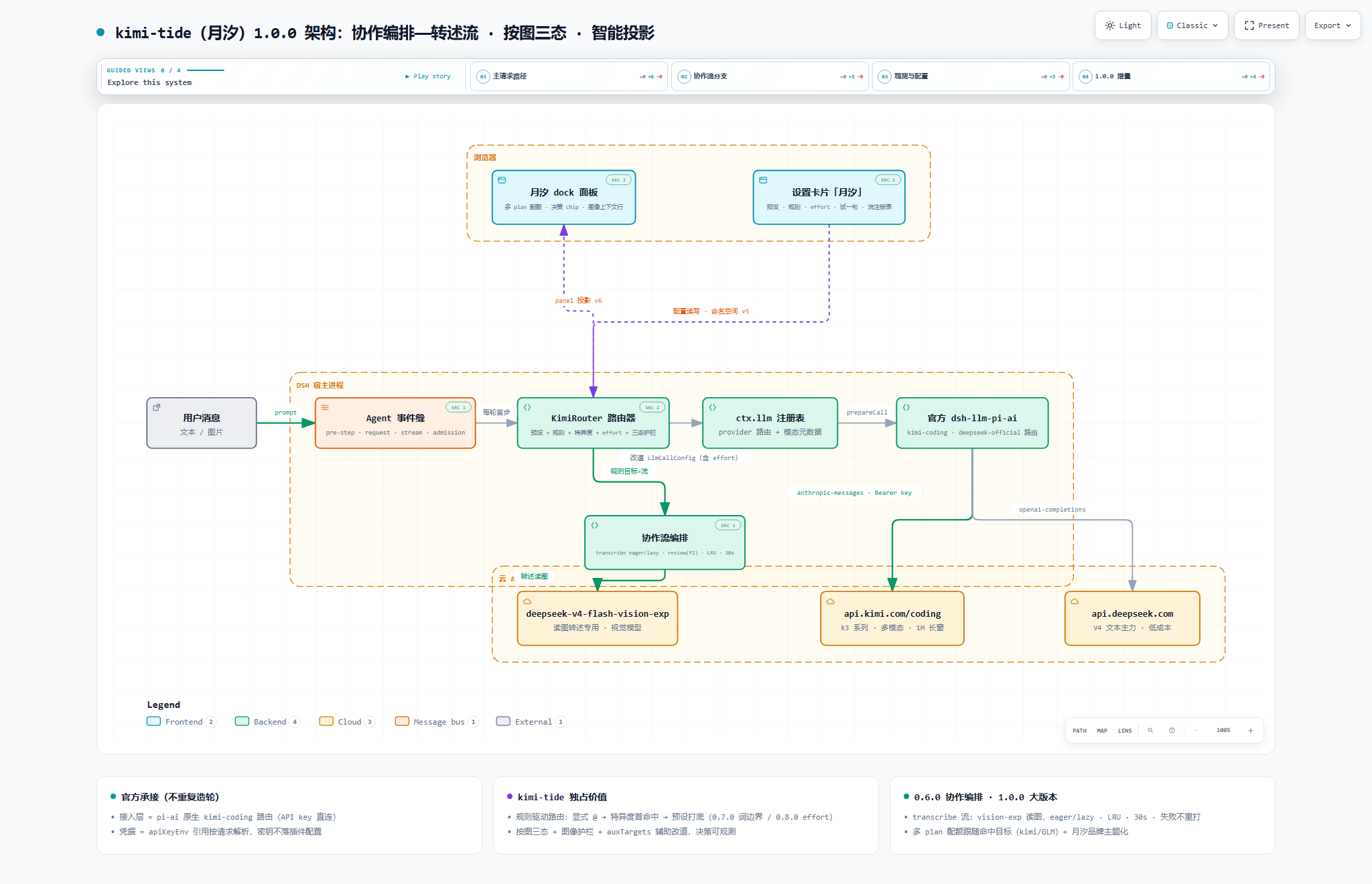
Click for full size; download the linked HTML and open it in a browser for the interactive diagram (pan/zoom/search, light & dark themes).
Quick Start
1. Prerequisites
- Node.js ≥ 22
- DSH
@deepseek-ai/dsh@0.1.2-rc.1or newer (this release is verified on0.1.5-rc.1) - The models you want to route among are connected in DSH — any provider works. To use Kimi, grab a Kimi Code Console API key (the quota panel rides the same key)
2. Connect candidate models (DSH "Settings → Models" page)
Add a model source (example: kimi-coding with apiKeyEnv set to KIMI_API_KEY, then paste your key in the credential area — the 4 Kimi models appear in the catalog automatically). Mount as many providers as you like: kimi-tide's candidate pool is the full Models-page catalog. Keys live in DSH's managed credential store, never in any plugin config file.
3. Install the plugin
# Option 1 (recommended): install straight from npm
dsh plugin --profile web add dsh-kimi-tide

# Option 2: build the tarball from source (when you want to change the code)
cd packages/dsh-kimi-tide
npm install && npm run build && npm pack
dsh plugin --profile web add ./dsh-kimi-tide-<version>.tgz
4. Use it
Restart dsh web:
- Settings → 月汐: pick the "saving" or "capability" preset — the router is on duty;
- Type
@kimifor an explicit pick, or let the built-in keyword groups reroute automatically (a message mentioning "code" goes to the coding model); - The "🌙 MoonTide" dock panel below the input box shows who was picked and why, for every step;
- ✅ 30-second smoke check: send "write a function for me" — the panel should show the code rule firing and rerouting to the coding model. No reason chip = the router isn't on duty; go back to "Settings → 月汐" and confirm a preset is selected.
Presets & Rules
A preset is a bundle of "default model + rules" you can switch globally in one click. Two ship built in:
| Preset | Default model (used when no rule fires) | Rules | Best for |
|---|---|---|---|
| Off | — | — | full manual control |
| Saving (省钱) | deepseek-v4-flash |
image → k3; code keywords → kimi-for-coding; translate keywords → deepseek-v4-flash |
quota-sensitive daily work |
| Capability (能力) | k3 |
image → k3; review → k3; code → kimi-for-coding; math → deepseek-v4-pro; longdoc → k3; writing → deepseek-v4-pro; translate → deepseek-v4-flash; chitchat → deepseek-v4-flash |
best output quality |
Seven built-in keyword groups (word lists editable, custom groups allowed):
| Group | Direction | Built-in word list (editable) |
|---|---|---|
code |
coding | 代码, code, bug, 重构, refactor, 实现, 函数, 测试, 接口, 联调, 部署, 性能, 报错, 日志, 编译, 命令, 脚本 |
review |
review | 审查, review, 评审, 挑毛病, 复检, 检查, audit, 意见, 打分 |
writing |
writing | 写作, 文案, 润色, 改写, 扩写, 标题, 推文, 周报, 演讲稿, 总结 |
translate |
translation | 翻译, 译成, 中译英, 英译中, translate, 本地化 |
longdoc |
long documents | 长文档, 通读, 逐段, 全文, 上万字, 大文档 |
math |
math | 数学, 证明, 推导, 求解, 公式, 数论, 概率, 逻辑题 |
chitchat |
small talk | 你好, 谢谢, 怎么样, 随便, 聊聊, 天气 |
The
reviewgroup serves the collaborative review flow by default (a strong model reviews this turn's output) — see "Multi-model collaborative review" below for the mechanism, the four switches and today's limits.
Two common tweaks (a few clicks in "Settings → 月汐"):
- Minimum keyword hits: set a threshold (e.g. 2) so a rule fires only when at least 2 distinct words from the group appear — "make a plan" no longer trips the plan-related words by accident.
- Reasoning effort: give a rule target or the default model a "thinking depth" tier (deeper is slower and pricier); the transcription flow's vision model and the review flow's reviewer take one too (Settings → 月汐 → Collaboration flows). The dropdown lists only the tiers that model declares, and the two disabled states read apart: "Follow default (model declares no tier)" means this model declares none, while "Follow default (no effort table)" means this run reported no tiers for any model (the settings page shows a matching notice at the top, the plugin retries automatically, and restarting the app fetches the table again). Unsupported tiers are dropped automatically — no errors.
Usage & balance (follows the model that actually got picked)
The quota slots on the panel's second row follow the current routed target and adapt their shape: subscription plans (code plans) show usage windows (weekly / 5h — the bar draws the remaining share), while API-billed providers show a balance (with an explicit "insufficient balance" note when that is what the endpoint reports). Next to them a Overview button lists every registered source in one screen, including why a source has no data: "no public API for this plan" / "key not configured" / "fetch failed" — three distinct states, spelled out per row.
Credentials are resolved by the
apiKeyEnvname configured for that provider insettings.yaml(built-in aliases as fallback), so the panel still gets data when your key name differs from the plugin's default.
Help tab & semantic hit confirmation
- "Settings → 月汐 → Help" explains every panel element and every settings field across its sections (with a "what's new" section on top covering this release's five-tier chain, scopes and unified routing table), with key entries carrying the current value (e.g. "trigger: manual ⇒ keyword hits will not fire a review"), plus a symptom → cause table.
- Semantic hit confirmation (off by default, needs config): with it enabled a keyword hit no longer reroutes immediately — the preset's own default model first confirms "is this really this turn's intent?", and an "omit" verdict skips that rule and keeps matching the rest. Timeout / unavailable judge / unparseable output all fall back to the plain keyword result; explicit
@turns and turns where an image rule already leads make no judge call at all. Config knob:preset.hitConfirm. - The verdict lands in the decision reason: omit / hit / no-verdict is prepended to the panel's decision reason (e.g. "semantic gate: no verdict 1200ms (code-kfc)"). Because an omit drops the rule from the chain and therefore lands on the default route, default-route decisions carrying a verdict note are now surfaced too — otherwise the omit itself, the one outcome you most need to see, would stay invisible.
- The judge's thinking is turned off when the target allows it: the judge is a reasoning model but this gate gives it a 64-token budget — left thinking, it spends the whole budget on reasoning, returns not a single character of output, and the verdict becomes unparseable (the gate then fails open and changes nothing). So when the judge target declares an "off" effort level, the plugin disables thinking explicitly; targets that do not (k3, for instance) get no effort sent at all — never an enum they would reject.
Two ways to write an explicit @
@kimi(provider level): the model is the one you configured in the preset, not whatever happens to be first in the catalog — and the decision reason says which basis was used.@kimi/k3(exact model): pins that model directly, regardless of pool order; if it is unavailable you are told what it fell back to instead of being silently switched.- Only a real provider counts as a directive: if the token after
@is not a provider this plugin knows — a workspace path reference like@README.md, a scoped package name likenode_modules/@deepseek-ai/..., or an@xxxinside a path — it is not treated as an explicit directive; the turn goes through the keyword rules as usual and the decision reason says "@xis not a known provider (ignored)".
Matching details (word boundaries, specificity ranking, degradation), image behavior, and the full config reference: router architecture. The candidate pool is the full Models-page catalog — any model can be a default or a rule target.
Multi-model collaborative review (a strong model signs off)
Routing decides who runs this step; review decides whether this step is good enough. They work separately or together.
What it does: when a turn closes, kimi-tide sends "your request for this turn + the main model's output" to the reviewer you configured (usually the stronger, pricier one) and gets back a structured review — issues graded by severity (blocking / suggested / optional) → improvement advice → a verdict (pass / conditional pass / fail) — rendered as a review card under that turn.
Four switches (Settings → 月汐 → collaboration flows):
| Switch | What it actually does today |
|---|---|
| Trigger | keywords: review only when the message hits the chosen keyword group; manual: run /kimi-tide review on the last turn at any time |
| Rounds | 1–3, bounding how many review passes happen — and the per-session cap on "send it back" |
| Auto-revise | When the verdict is "fail / conditional pass", the review is sent back to the main model to rework (off by default) |
| Re-check after revise | Review the rework once more (on by default) — to confirm the issues were really fixed |
How sending it back works: it does not edit your code for you; it injects one "revise per this feedback" message into that turn, so the main model fixes only what was flagged (no rewriting of unrelated parts), and the next turn starts normally. The original output stays in the session log, always reviewable.
- Automatic: with auto-revise on, a "fail / conditional pass" verdict triggers it; a "pass" verdict — or a verdict that cannot be parsed — never does (no guessing).
- Manual: every review card carries a "let it redo" button (or type
/kimi-tide revise), and it works without auto-revise — you can ask for a rework even when the verdict was "pass". - It cannot run away: at most
rounds(1–3) sends per session; after that the card reads "stopped (cap reached)" and nothing is sent again. A failed review (timeout / empty output) never triggers a send-back.
What it does not do today: it does not edit your code, and it never bypasses the main model to write anything itself — the rework is still the main model's job.
Cost: review only runs on matching turns, and only this turn's output slice is sent to the reviewer (12,000 characters per section, 60-second timeout, failures never interrupt the turn). With send-back enabled, each send costs one extra main-model turn, and re-check adds one extra review call on top. In the industry data the research repo cites, adversarial review loops commonly cost 2–3× a single model's tokens — this plugin has not measured its own numbers yet.
Evidence grade: the mechanism and the three rounds of practice are documented in kimi-tide-research. Whether review actually improves a weaker model's output is not measured yet (no acceptance rate, no baseline against the strong model working alone, no regression rate), so this section quotes no effect numbers; the transfer-efficiency experiment was originally slated for v1.4.0 — v1.4.0 ships the mechanism itself (send-back for rework) only, and the experiment moves to the next version, whose testbed (the product running its own review loop) is exactly what v1.4.0 puts in place.
Team dispatch (hand focused work to specialist models)
Routing decides "who runs this step" and the review flow decides "was this step good enough"; the roster decides "who owns this kind of work from now on". Kimi Tide ships the roster as a skill card the model reads — the main model follows it when delegating, so you never hand-copy model names into a prompt.
- Write a roster (Settings → Kimi Tide → Roster): one row per role — id (also the teammate-name claim key), label and target model, e.g. "frontend →
kimi-coding/k3", "backend →zai-coding-cn/glm-5.3". Two roles claiming the same teammate name are rejected at save time. Two buttons fill in example roles in bulk — "Fill in engineering examples" (Frontend / Backend / DevOps / QA / Data / Security) and "Fill in business examples" (Writing / Marketing / Sales / Support / Finance / Legal), six each; targets start at the active preset's default model (change them in the dropdowns), and an existing role with the same id is never overwritten. - The teammate name is the claim: create a teammate named after the role id (or its alias) and every request from it is re-routed to the target model; unknown names are left untouched (they keep the model they were created with), and child-agent turns are never re-routed by keywords in the task text.
- The model can read the roster: while routing is on and the roster is non-empty, the plugin registers a runtime skill (
kimi-tide-team) — read before delegating, then follow one of two recipes: a one-shot task (workflow, naming the model) or a persistent teammate (spawn_teammate, name taken from the claim column). Edit the roster and the card in live sessions is replaced on the next turn; empty the roster and the card disappears. - Pinned driver: if you want the main session's default target to always be one model instead of the preset default, turn on "pin the driver" and name the target — keyword rules and explicit
@kimistill win. Leave it empty to follow the host's default model. - Every dispatch leaves a trace: the decision panel's "recent dispatches" lists the basis (
role/unclaimed/explicit/keep), the teammate, the role label and the effective model (latest 20 per parent session); when a role target is unavailable the plugin never swaps anyone silently — the panel states, word for word, "「」target unavailable → keeping the inherited model ()". - Dispatch guard (off by default): once "dispatch guard" is on, a dispatch is rejected when the task matches a role's domain but goes to a bare subagent (
subagent/subagent_fork) — the denial reason names the teammate to use and how to create it, because a bare subagent never takes part in assignment-table rerouting and runs on the default model. Domains are matched by each role's keywords; an empty list falls back to the label, the aliases and the id (id matches on word boundaries, soqanever fires insideqatar). The guard can only reject; it never reroutes (rerouting still takes onespawn_teammatecall); aworkflowscript whoseagent()calls never name a target is rejected too (dispatches that name a model, and dispatches made by teammates themselves, are not blocked). Once on, whether the guard is actually on duty is readable in three places: the dock's "guard" slot (shows "inactive" with the reason in warning color when the switch is on but the environment cannot provide the guard), the panel projection, and theguardfield of/kimi-tide panel --json— you will never again mistake an "on" switch for a guard that is actually rejecting dispatches.
Config fields (roles / driver / driverSticky / rulesApplyToChildren / dispatchGuard, plus keywords per role row), the five-step decision priority and the migration rules live in the router architecture "2.0.0 team dispatch" and "2.1.0 unified routing table (v7)" sections; the guard's design and self-checks are in dispatch-guard.md; the live acceptance criteria and results are in team-dispatch-acceptance.md.
FAQ
Q: Where did the old OAuth access go?
A: Retired. The official DSH ecosystem natively supports Kimi now, so the self-built layer was removed wholesale. Archive: docs/legacy-setup.md.
Q: Do I still need the Kimi CLI and kimi login?
A: No. One Console API key + the official Models page.
Q: Any limitations with image sessions? A: With the default "latch" behavior, a session that has seen an image stays locked to the vision-capable model — if its quota fails, that session can't fall back to text; open a new one. To avoid this: set the preset's image fallback to "lazy transcribe" (images become text, the text model takes over) or "blind" (treat images as absent). Transcriptions are cached and never retried.
Q: I heard about a "capability scoring engine"? A: Retired. Scoring by machine was a black box; routing now follows rules you can read and edit — a hit routes, a miss falls to the default target. Old scoring configs migrate into presets automatically on upgrade.
Q: Where is the router config stored? Will upgrades lose it? A: In DSH settings (edited via "Settings → 月汐", restart-safe). Upgrades migrate automatically and archive the old config; details in the "migration chain" section of the router architecture.
Version & Roadmap
Current version: v2.2.5 (2026-10-19)
- What every version gives you: CHANGELOG.md
- Maintainer evidence chain (commit anchors / acceptance records): docs/release-evidence.md
- Planned: live acceptance of the dispatch guard (the guard is a host-side hook, so its refusal path has to be read in a real session after the host restarts — see dispatch-guard.md); live re-verification of the v2.0.0 "role × image" combination (once the host GUI allows image attachments in teammate sessions), subagent transcription, the 0.8.5 "hardening & packaging" release — tracked in the evidence doc.
Documentation Index
Three principles of this project: official first · transparent rules · observable decisions — routing follows rules you can write, and every automatic pick has a reason and a trail.
I just want to use it
- Quick Start (this page)
- FAQ (this page)
- Changelog
I want to dig deeper
- Router architecture: presets / rules / degradation / migration chain / full config reference
- Interactive architecture diagram (open in a browser after download; static version above)
- DSH host-platform contract research
- Project positioning & maintenance strategy
- The dual-model collaboration loop (how this project itself is built; independent study: kimi-tide-research)
I want to contribute
- Report issues, send fixes, or say hi in Discussions
Development & Testing
cd packages/dsh-kimi-tide
npm install
npm run typecheck   # tsc --noEmit
npm test            # vitest
npm run build       # tsc host build + esbuild browser bundle
Quality bar: full test suite green + zero typecheck errors + successful build before committing. This repository practices an "implement → independent review → fix → re-check" dual-model loop (see docs/agent-collaboration-loop.md).
Doc gates: npm run check runs six machine gates — CHANGELOG / README / package README / package version consistency (the package README status line's version and date included — that file ships inside the packed plugin tarball), no broken doc links, README pair parity (version line / section skeleton / badges / local doc-link set; rules: docs/agents/readme-pair.md), the secrets gate (no secrets in cordis configs or the publish surface; scripts/check-secrets.mjs), terminology banned-word scan (docs/agents/terminology.md), and client hardcoded-copy plus locale-table structure validation (scripts/check-client-i18n.mjs). Any user-visible change must update both READMEs (Chinese and English) in the same commit. Copy register follows the gold-standard samples in docs/agents/style-samples.md (samples outrank prose descriptions).
Bilingual four-section release page: every new version's Release body (= the annotated tag message) must be bilingual — a 简体中文 block first, an English block below — with four sections inside each language: ① one-line positioning ② 本次更新 / What's new ③ 安装与升级 / Install & upgrade ④ 验证与验收 / Verification & acceptance. Self-check with node scripts/check-release-notes.mjs --file <draft> before tagging; Actions enforces it again before gh release create (template and rules: docs/agents/release-notes.md).
Release gate: before any release (tagging / triggering the Actions release), that version's live-acceptance checklist must pass in full on the real host, and the maintainer approves the tag — "unit tests green" is not "runs in the host". Per-version acceptance records: docs/release-evidence.md.
Release rule (maintainers): a DSH plugin must declare
dsh.bundle.patch(pointing atcordis.patch.yml) to load as a profile layer. This plugin follows the official spec — do not remove the field when bumping versions.
Contributors
- Thanks to @dracpet for live-verified diagnosis and community contributions: PR #1 (OAuth expiry refresh), PR #2 (
commands/executeacross host contract versions), PR #3 (YAML-null config normalization), and Issue #4 (rc.2 projection wire-contract diagnosis). - Thanks to @pandashere for dsh-kimi-bridge (MIT): it bootstrapped the early Kimi CLI bridging and validated the panel path kimi-tide later took; retired and archived (history preserved in git) as the official integration matured — thank you.
- Contributions of any form are welcome: report issues, send fixes, or share how you use it in Discussions.
License & Compliance
- kimi-tide itself: MIT (Copyright 2026 kimi-tide contributors)
- Third-party components:
@earendil-works/pi-ai(MIT),@deepseek-ai/dsh-llm-pi-ai(MIT, DeepSeek),schemastery(MIT),zod(MIT),yaml(MIT),dsh-kimi-bridge(MIT, historical credit — archived) - Compliance: the default path is the official Console API key, safe for personal use; Kimi Code subscription terms still apply as officially stated — no high-frequency batch calls or key sharing.
- This repository contains no credentials; never commit
~/.dsh/.credentials.yamlor any key from your environment.
Related plugins
dsh-plugin-reasonix
 esengine
/DeepSeek-Reasonix/integrations/dsh-plugin
把 Reasonix 作为 dsh 子智能体接入:一层配置补丁让 subagent-acp 提供方启动 reasonix acp,并以 reasonix 工具暴露给模型。纯配置、无代码、不在 npm;接入的是子智能体,不是模型服务商。
dsh plugin --profile web add 'github:esengine/DeepSeek-Reasonix#af0e954f5629492980718fc0e36030fec0abc682&path:/integrations/dsh-plugin'dsh-purge
 YuJunZhiXue
/dsh-purge
DeepSeek Harness 破甲:让所有模型都能破甲,不同模型可换不同提示词;默认提示词面向国模「小码酱」。Jailbreak for every model — swap prompts per model. 求 Star 收藏 ⭐ 如要二开,请查看署名要求部分
dsh-purge-mmparko
 mmparko
/dsh-purge
DeepSeek Harness 破甲:让所有模型都能破甲,不同模型可换不同提示词;默认提示词面向国模「小码酱」。Jailbreak for every model — swap prompts per model. 求 Star 收藏 ⭐ 如要二开,请查看署名要求部分
dsh plugin --profile web add 'github:mmparko/dsh-purge#033e6bd1e0f101352b39075ecd0d758ffef26b76'dsh-connect-workbuddy
 dingminhua
/dsh-connect-workbuddy
把本机登录的 WorkBuddy 模型(国内版与国际版)接入 DeepSeek Harness:每次刷新按上游目录自动读取每个模型的积分倍率,支持逐模型图片输入开关、多账号切换与账号池自动换号,并提供每日签到、卡片与输入框里的胶囊积分读数等只读积分概览。
dsh plugin --profile web add 'dsh-connect-workbuddy@5.15.0'dsh-image-gen
 shanliuling
/dsh-image-gen
让 DeepSeek Harness 像 ChatGPT 一样,在对话里直接生成图片。
dsh plugin --profile web add github:shanliuling/dsh-image-genagent-vision-toolkit
 Anionex
/agent-vision-toolkit
为纯文本模型"看图“设计更好的视觉工具箱和技能,支持多图理解,图片问答,前端UI还原、GUI 自动化等,并可选无缝接入多个主流agent,直接识别粘贴图片| A vision toolkit and skill designed for text-only llms — image Q&A, long-screenshot OCR, frontend UI restoration, and GUI automation, with optional seamless integration for Codex, Claude Code, Pi, Oh My Pi, and OpenCode
dsh plugin --profile web add github:Anionex/agent-vision-toolkit