
Memory
dsh-engramory
tinqiao-oss/engramory/adapters/dsh/plugin · ★ 206
 tinqiao-oss
The Engramory curated-memory discipline as an installable plugin ([npm: dsh-engramory](https://www.npmjs.com/package/dsh-engramory)): a deterministic 200-line / 25 KB cap on the `MEMORY.md` index via `ctx.tools.guard()` — growth denied, a shrinking rewrite always passes — plus the protocol registered as a runtime skill. The store is plain markdown, one file per fact, shared with Claude Code, Codex, Kiro, and OpenClaw.
Manifest details
安装
dsh plugin --profile web add github:tinqiao-oss/engramory#path:/adapters/dsh/pluginGitHub 源码安装:首次需按提示配置 allowBuilds 构建授权后重试
For install and environment setup, plus plugin development tutorials, see DSH community docs ↗
README
Table of contents
简体中文 | English
dsh-engramory

Long-term memory for DeepSeek Harness (dsh). What the AI remembers is kept as plain markdown files you can open and edit at any time. It is the dsh build of Engramory, which is general-purpose agent memory: Claude Code, Codex and others can use the same store.
What it does
- The memory index rides along on every step. The index,
MEMORY.md, lists the notes by name. The plugin puts it into dsh's context on every step, so the AI knows what it has saved without reading a file first, and opens a note when it needs the detail. A write shows up on the next request; whatever is past the cap is left out, and the AI is told to compact. - The index has a hard cap. 200 lines / 25 KB by default. When the AI writes the index with dsh's file tools and the plugin can work out the result, a write that would grow it past the cap is refused before it happens, and the AI is told to compact; compaction still passes. Details in How the cap decides.
- The rules come with it. What to save, how, and when to clean up: the rules (a skill) are registered by the plugin, with no files to install.
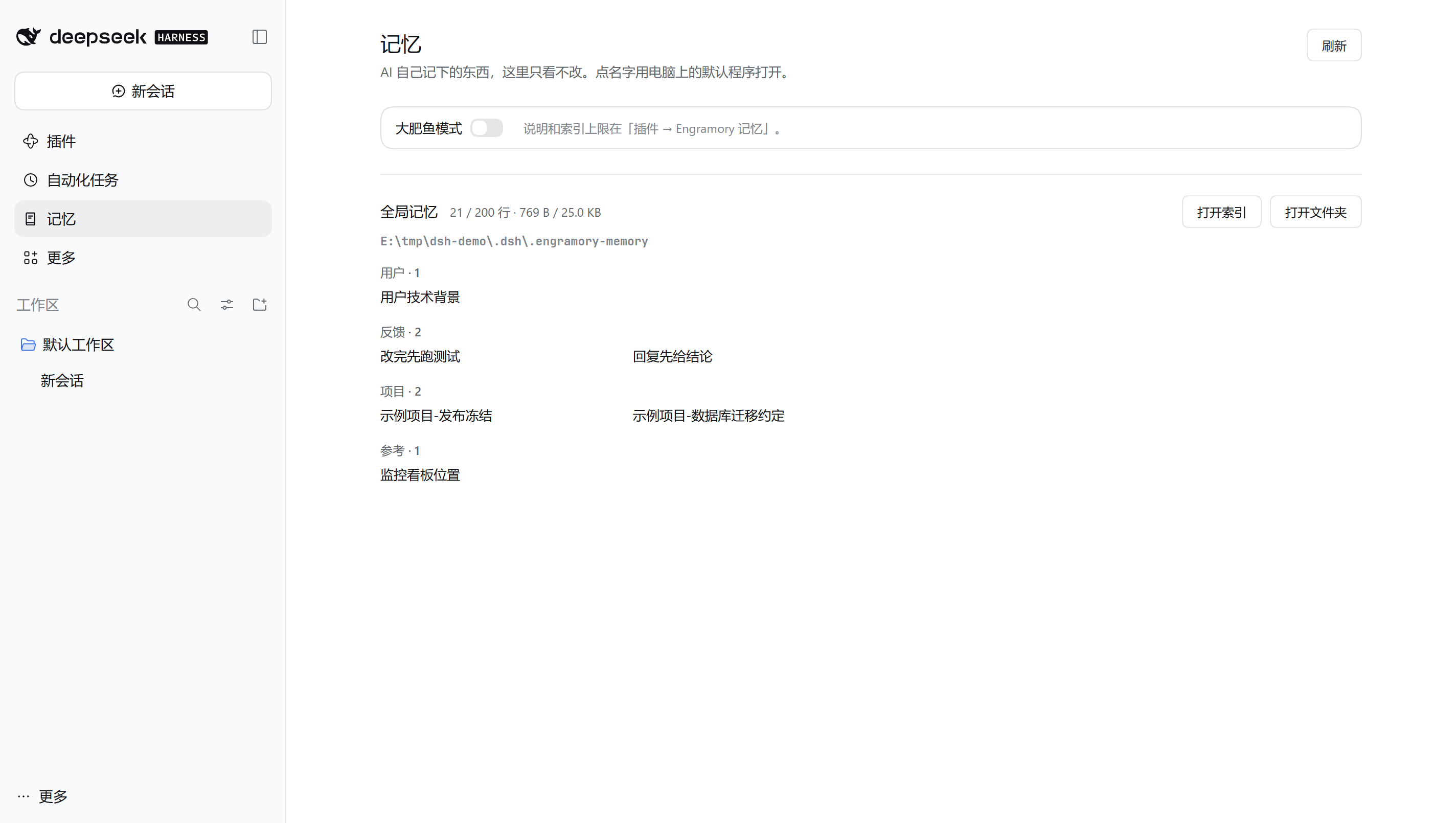
- A Memory page in the sidebar. Read-only; it lists the notes by name and opens one in your computer's default app.
Install
Needs Node.js 18+ and pnpm on PATH (dsh's plugin command uses it). In dsh's desktop
app you can also search for dsh-engramory on the Plugins page.
dsh plugin --profile <name> add dsh-engramory
To uninstall, use remove instead of add. Compatible dsh releases are listed in
dsh.compatibility.dshReleases in package.json; an unlisted release
is unverified.
Where the memory lives:
- The global store,
~/.dsh/.engramory-memory/(under$DSH_HOMEwhen it is set). With the plugin alone this is the only store; the AI creates it on its first save. - A project store (optional),
.engramory-memory/in a project's root, is created by you only: runpython tools/engramory_init.py dsh --project-root <project>from the Engramory repo, which also git-ignores it. Where one exists, what holds only in that project goes there; everything else stays in the global store.
Only one AI may write a store; two writers overwrite each other. To share it, let the others read it only: see one writer, many readers. Memories are plain text and carry machine-local detail. Inside a project's git repo the store must be git-ignored; a dedicated private repo for the store is fine.
Without the plugin: python tools/engramory_init.py dsh --install-skill writes the
rules into $DSH_HOME/AGENTS.md, installs the skill in $DSH_HOME/skills/engramory/
($DSH_HOME defaults to ~/.dsh) and creates the global store. The AI still keeps memory, but reads the index itself, and
the cap holds only if it runs engramory_check.py after each write.
Companion mode (大肥鱼模式)
For a character you chat with: the community's 大肥鱼, or any persona. Turn on the
companion switch on the settings page, or set companion: true.
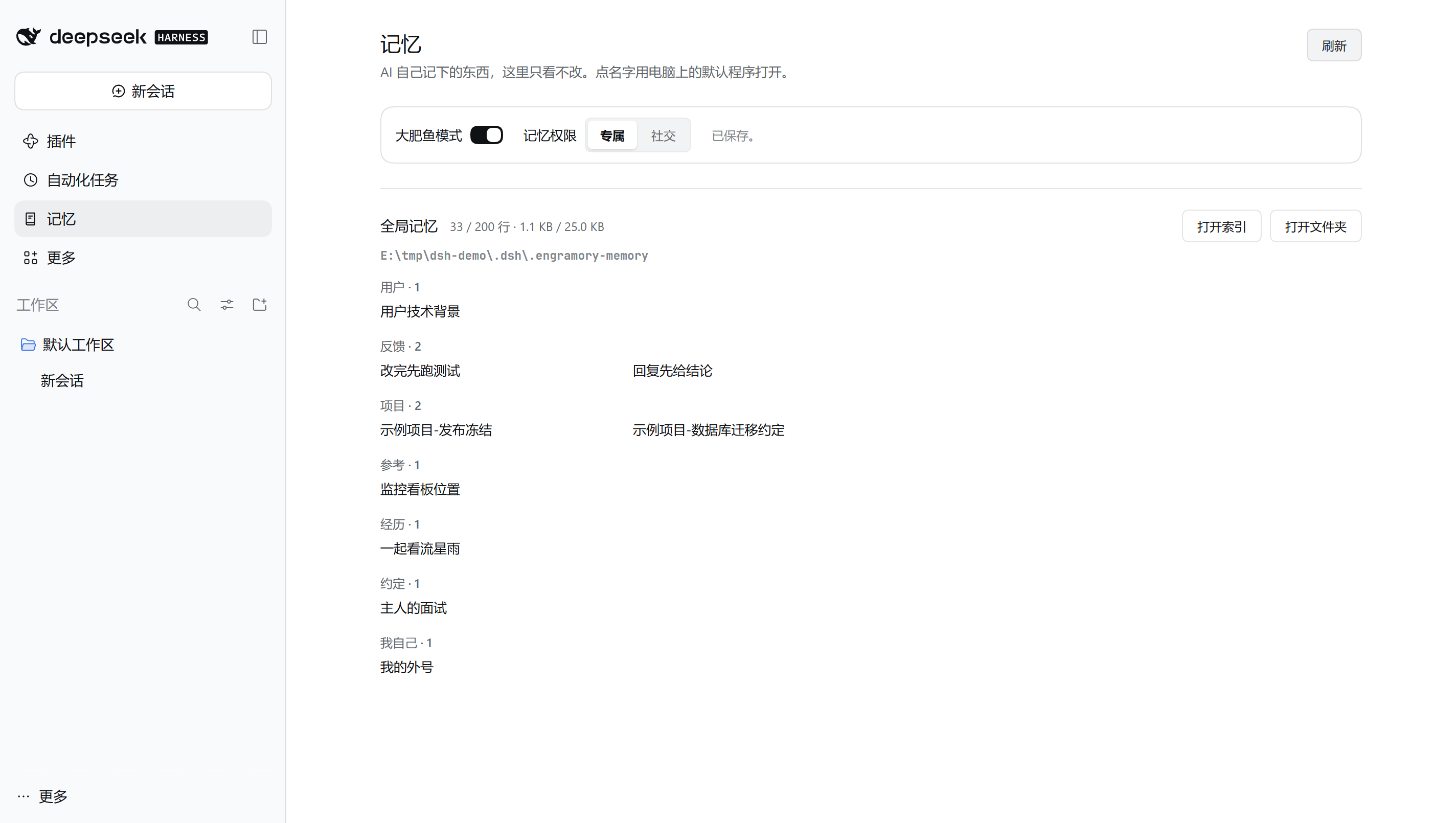
- Three more types for the character's own life (SKILL.md §2.2):
moment, something you shared, with its date, folded into a monthly archive when the index fills;upcoming, something coming up in your life, asked about once its date passes and rewritten as a moment once you say how it went;self, a change in the character itself, such as a nickname. A moment or self note is deleted only when you ask it to forget. - Recall in character. Even a greeting may call for recall, and what it remembered, or failed to save, is told in the character's voice, without naming files or tools.
- The persona preset needs the file tools. The memory arrives even under a preset
that turns optional context off (dsh's
minimal, for one). To save notes, though, the preset needs dsh's file tools and the skill tool; a preset with only a shell reads the memory, and its writes go past the cap.
Social mode
A choice inside companion mode, for a character other people can talk to as well, such
as one wired to QQ, WeChat, Douyin or Bilibili through a bridge plugin. Choose Social
under Memory access on the settings page, or set audience: social. If only you talk
to this dsh, keep the default, Private.
With it on, only your own conversations get the memory: one is yours when you have
typed in it in dsh's own window (the desktop app or dsh web) and nobody else has.
A subagent goes with its parent. Messages from a bridge plugin (unless it marks them as
the owner's, below), dsh headless, other programs, and terminal or editor clients
count as someone else's. Once anyone else has written in a conversation it stays
theirs, and the memory already put into it stays in its history.
Someone else's conversation gets no index and is not told where the store is; dsh's
file tools there may name files only (every directory is refused), and any path into
a store is refused however it is spelled. This is not a security boundary: a shell
tool reads any file, and another profile on the same account can read the store too.
Real isolation needs filesystem permissions or a sandbox. A custom skill (see
Configuration) reaches every conversation as written, someone else's
included, so if it says where the store is, they are told too.
For bridge authors
With social mode on, every message a bridge submits counts as someone else's. For a
message from the owner's own account (their private QQ chat with the character, say),
put a speaker on its source:
agent.followup(createUserMessage({
  content: [{ type: 'text', text }],
  source: { kind: 'plugin:your-bridge', speaker: { role: 'owner' } },
}))
speaker.role |
Meaning |
|---|---|
owner |
The owner wrote it: it comes from the account the user set as theirs in your bridge. |
guest |
Someone else wrote it, the same as no speaker at all. |
none |
Nobody wrote it: your plugin's own report, reminder or notice. It does not make the owner's conversation someone else's. |
In a group chat, add chat: 'group' ({ role: 'owner', chat: 'group' }): the whole
group reads the reply, so the conversation counts as someone else's even while only the
owner has spoken in it. A private chat may say chat: 'private' or leave it out; any
other value counts as a group. A group conversation stays someone else's once anyone else in it
speaks. A program that talks to dsh only through dsh web's API cannot set a source, so its messages count
as someone else's; if it sends clientTimeZone with a prompt it is taken for the
owner, so a program forwarding other people's messages must leave it out.
Settings page and memory page
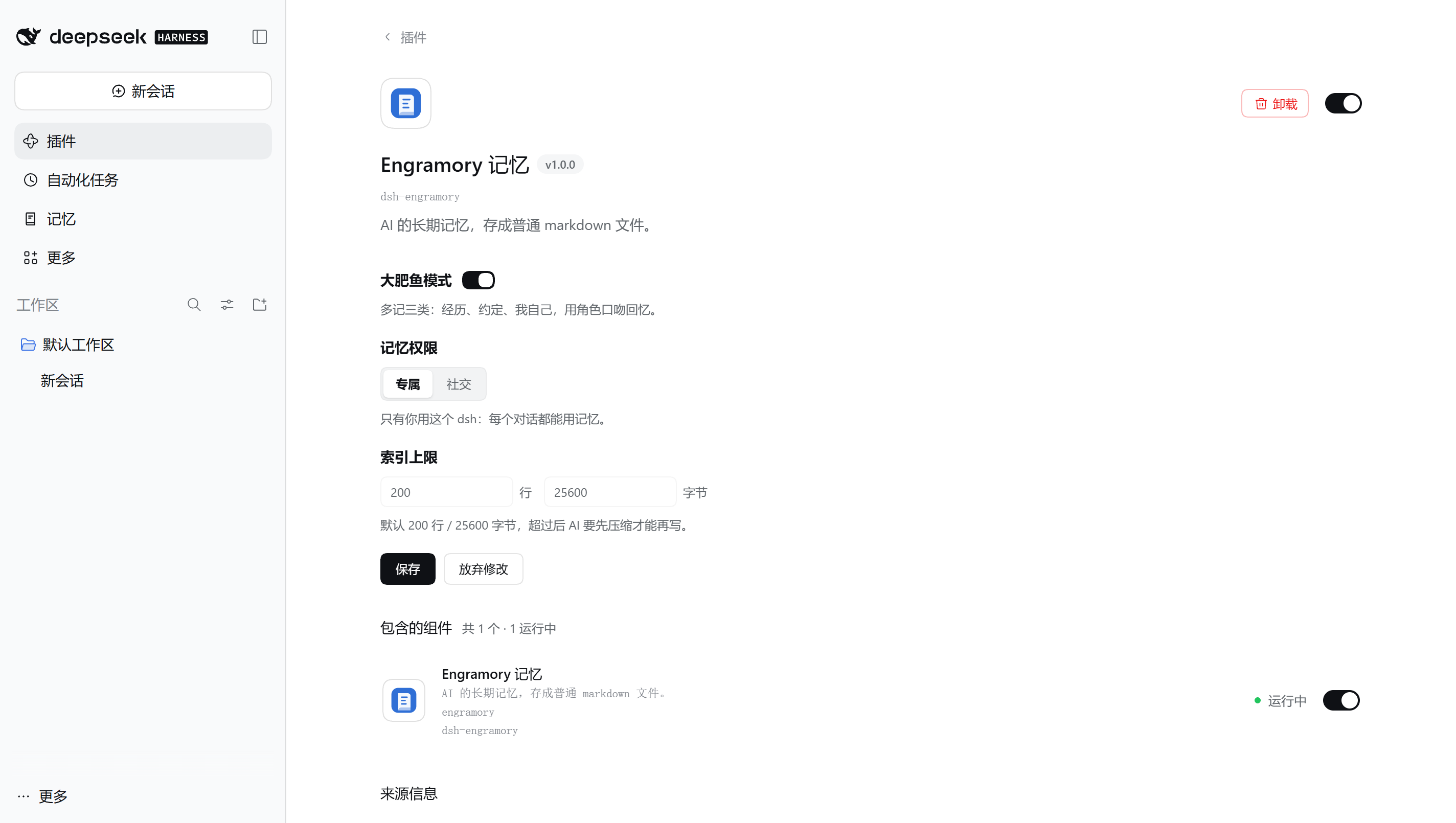
- Settings page: on dsh's Plugins page, open Engramory memory to set companion
mode, memory access and the index cap. Saving goes through dsh's own profile editor,
which writes your profile's
cordis.patch.ymland reloads the plugin. Only you, signed in, can call it, so an agent cannot use it to switch social mode off. - Memory page: Memory in the sidebar. It lists the global store and each
workspace's project store (with an absolute
indexPath, that store alone; with a relative one, none), with each index's size against the cap, its notes' names by type, and its archive. Read-only, never a note's text; a name, Open the index and Open the folder open on the machine dsh runs on; a machine with no desktop (a headless server, a session over SSH) shows none of them. The switches at the top (companion mode, and memory access once it is on) save as you flip them.
Configuration
Settings the page does not cover go in your profile's cordis.patch.yml. Patch the
EXISTING row by id; a second - insert: adds another engramory row and leaves the old
caps in force. A patch replaces the row's whole config, so list every key you keep:
- id: engramory
  config:
    indexName: MEMORY.md
    maxLines: 200
    maxBytes: 25600
| Field | Default | Meaning |
|---|---|---|
indexName |
MEMORY.md |
The file name treated as the index. The cap matches it case-insensitively; putting the index into context needs the exact name on a case-sensitive filesystem (Linux, say). |
maxLines |
200 |
Line cap for the index. |
maxBytes |
25600 |
UTF-8 byte cap for the index (25 KB). |
indexPath |
unset | The one index to use: absolute, or relative to the session's directory. Unset, a MEMORY.md in any project is capped as an index; a store outside the default places also needs it to be found. |
registerSkill |
true |
false skips the built-in rules; the cap and the index in context stay. |
injectIndex |
true |
false stops putting the index into context; the AI reads it instead. |
language |
dsh's | zh (or zh-CN and other regional forms) writes the store in Chinese: note names, headings such as ## 用户, the Why/How labels. Any other string is English; a value that is not a string, or is empty, counts as unset. Unset, it follows dsh's language; a change applies once dsh restarts. Frontmatter keys and type: values stay English, so every host reads the store. |
companion |
false |
true turns companion mode on. |
audience |
private |
With companion mode on, social turns social mode on. |
skill |
built-in | Your own markdown in place of the built-in rules; it must then say where the store is. In social mode, others' conversations see it too. |
How the cap decides
| Case | Decision |
|---|---|
| The index ends within the caps | allow |
| The write grows the index past a cap | deny, with the numbers and what to compact |
| The index is over a cap and the write shrinks it or keeps its size | allow, so compaction can go step by step (210 → 205 → 198) |
A partial edit whose result can be worked out: edit (old_string/new_string), str_replace_editor's replace (old_str/new_str) and insert |
its result is worked out first, then judged as above; each tool from the arguments it uses and the way it matches |
| A partial edit whose result cannot be worked out (arguments missing or not recognised) | deny on an over-cap index, else allow |
| The index is missing, unreadable, or not a regular file | a whole-file write is judged as if it were empty; a partial edit passes |
The index is past the read limit (min(16 MiB, max(1 MiB, 4 × maxBytes))) |
not read whole: a whole-file write is judged on bytes alone; a partial edit passes |
| Reads, writes to other files, unknown tools or arguments | allow; reads are never blocked, even over the cap |
Lines and bytes are judged apart: only a dimension that is over its cap AND grew is
refused, so a write with fewer bytes but lines grown past the cap is still refused.
The line count ignores a trailing newline, so an index exactly at the cap stays
writable. This table is pinned by node --test in CI.
Known limits
- Only dsh's file tools are capped:
write,edit, and thestr_replace_editorsome versions and presets carry; a tool of the same name from another plugin is judged the same way. Shell tools, MCP file tools and external editors go past it: runengramory_check.pyafter editing the index andengramory_doctor.pynow and then. - Stores are found only where the installer puts them. Elsewhere, or for a project
store that links out of the project, set
indexPath. A project's root is found by its.gitonly, and a project store created mid-session can take ten seconds to appear. - Social mode knows you by what dsh's window sends. Apart from a bridge's owner messages, only what you type in dsh's own window is yours, and not when the browser's time zone cannot be read. A kind of message a later dsh adds counts as someone else's until this plugin knows it: your conversation may lose the memory, never the other way round.
- What the memory page opens is checked by path. dsh's opener resolves the path once more before the desktop opens it, so a process changing the store's files at that moment could redirect what opens (as with dsh's own opener for any workspace file).
- Experimental: companion mode, social mode, and the settings and memory pages may change in a minor version.
Versions
This package carries Engramory's version: dsh-engramory@X.Y.Z is the repo's
vX.Y.Z. The cap's decisions (the table above) and the settings outside the
experimental features change incompatibly only in a major version. See Engramory's
Versioning; history is in the
CHANGELOG.
License
MIT — see the Engramory repository.
Related plugins
hindsight#coding-agents
 vectorize-io
/hindsight/hindsight-integrations/coding-agents
Hindsight:会学习的 Agent 长期记忆系统,自动召回/保存、知识页、深度反思与按仓库隔离的记忆银行。
dsh plugin --profile web add github:vectorize-io/hindsight#path:/hindsight-integrations/coding-agentsdsh-memory-plugin
 volcengine
/OpenViking/examples/dsh-memory-plugin
面向 DeepSeek Harness 的 OpenViking 记忆与上下文插件:pre-step 自动召回与画像注入、会话捕获、`viking://` URI 防护,以及对接 OpenViking 服务端的 recall/write 记忆工具。
dsh plugin --profile web add @openviking/dsh-memory-pluginmemos
 memtensor
/memos
给你的 Agent 持久记忆与成长能力
dsh plugin --profile web add @memtensor/memos-cloud-dsh-plugin@latestdsh-purge-kingchar
 kingcharleslzy-ai
/dsh-purge
让 AI 更专注地辅助学习与动手实验:DSH 附加组件,提供状态自检、提示词与规则管理、本机备份与回滚。
dsh plugin --profile web add 'github:kingcharleslzy-ai/dsh-purge#27919a326b6615b1968661a3e749760cec3a2e07'dsh-context
 bowenliang123
/dsh-context
上下文洞察面板:一眼看清模型上下文窗口的组成与变化——构成对照窗口大小、按请求历史趋势、压缩/注入事件、消息级 token 统计。
dsh plugin --profile web add dsh-contextmemsearch
 zilliztech
/memsearch/plugins/dsh
MemSearch plugin for DeepSeek Harness: shared markdown memory across agents, with capture, on-demand recall, memory-recall skill, and a skill-candidate review panel.
dsh plugin --profile web add '@zilliz/memsearch-dsh@0.1.8'