
Models & Providers
dsh-advanced-model-editor
u9521/dsh-advanced-model-editor · ★ 0
 u9521
DSH WebUI plugin for managing custom LLM providers, model parameters, thinking budgets, and request settings.
Manifest details
安装
dsh plugin --profile web add github:u9521/dsh-advanced-model-editorGitHub 源码安装:首次需按提示配置 allowBuilds 构建授权后重试
For install and environment setup, plus plugin development tutorials, see DSH community docs ↗
README
Table of contents
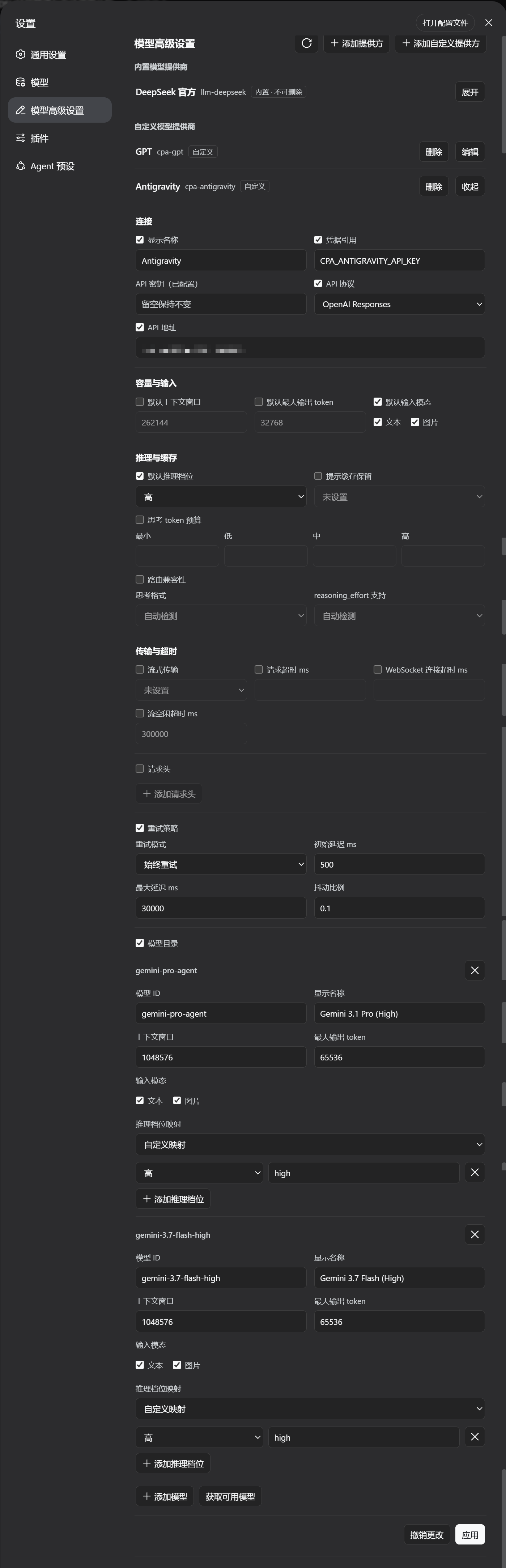
A DeepSeek Harness WebUI plugin that adds an Advanced Model Configuration section to the
Settings page. It manages LLM provider profiles across the settings namespaces — the
custom provider namespace (llm-pi-ai) and the official provider namespace
(llm-deepseek) — including built-in and custom providers, model lists,
reasoning/thinking options, headers, retry policy and more, with the same validation
and conflict rules as the official settings UI.
Reads and writes ride DSH's shared settings services (ctx.configForms /
ctx.settingsSchema), so this page and the official Models page share one document
mirror and one revision queue instead of racing each other. The section appears only
while one of its namespaces is actually served, and it shows the provider facts DSH
0.2.1 reports — the endpoint a profile inherits (defaultBaseURL / baseURLEnv), the
route's own authentication (nativeAuth, including OAuth) and any catalog diagnostic —
so a keyless route no longer reads as a missing credential.
Requirements
- DSH
>= 0.2.1-rc.2— only the current release is supported. There is no backward-compatibility layer for older DSH versions. - Node.js
^22.19 || >=24.
Quick Install (Recommended / One-Line)
Install directly from the GitHub dist branch (pre-built by CI, no manual clone or compilation required):
dsh plugin --profile web add github:u9521/dsh-advanced-model-editor#dist
Then restart web (dsh web) and hard-refresh your browser (Cmd+Shift+R). The plugin appears as Advanced Model Configuration in Settings.
Upgrade (Remote Install)
Use the dsh plugin update command to pull the latest dist release:
# upgrade to the latest dist release
dsh plugin --profile web update @local/dsh-advanced-model-editor

# or re-add the dist branch
dsh plugin --profile web add github:u9521/dsh-advanced-model-editor#dist
Then restart web and hard-refresh your browser.
Local Development & Manual Build
Prerequisites
- pnpm installed —
npx get-pnpm(see https://pnpm.io/installation; alternatives:corepack enableornpm install -g pnpm). Required both for building and becausedsh plugin --profile web addforwards to pnpm internally. - Node.js
^22.19 || >=24.
1. Clone
Clone the repository into the recommended location:
git clone https://github.com/u9521/dsh-advanced-model-editor.git ~/.dsh/plugins/dsh-advanced-model-editor
cd ~/.dsh/plugins/dsh-advanced-model-editor
2. Build
The build output (lib/) is not committed to the source branch — build it yourself for local development:
pnpm install
pnpm run build
pnpm run build runs tsc (type check + emit lib/types/) and tsdown (bundle
lib/index.js + lib/client.js) with the project's own dependencies — no DSH source
checkout is needed. The browser half is a self-contained closure factory for the DSH
client module table; the whole platform-module contract lives in tsdown.config.mjs.
Verify the build with:
pnpm test
3. Local Install
dsh plugin --profile web add ~/.dsh/plugins/dsh-advanced-model-editor
Then restart web (dsh web) and hard-refresh the browser (Cmd+Shift+R).
Development & Maintenance Commands
| Command | Description |
|---|---|
pnpm run build |
Full build (runs tsc type check + generates lib/ bundles) |
pnpm run check |
Type check only (tsc --noEmit) without emitting files |
pnpm test |
Full build, then run the test suite (node --test) |
pnpm run lint |
ESLint, type check, test suite, and Prettier check in one pass (CI gate) |
pnpm run lint:fix |
Apply ESLint fixes, then rewrite the files with Prettier |
pnpm run fmt |
Format source and config files with Prettier |
pnpm run fmt:check |
Check code formatting compliance |
Local Source Upgrade
When installed locally, the plugin is linked via link: into the profile. Upgrading local sources only requires pulling the latest commit and rebuilding — no need to re-run dsh plugin add:
cd ~/.dsh/plugins/dsh-advanced-model-editor
git pull
pnpm run build
(If dependencies changed, run pnpm install before building)
Then restart web (dsh web) and hard-refresh the browser (Cmd+Shift+R).
Uninstall
Whether installed from GitHub or linked from local sources, uninstall with:
dsh plugin --profile web remove @local/dsh-advanced-model-editor
Restart web and hard-refresh the browser afterwards. If local sources are no longer needed, you can delete the cloned directory:
rm -rf ~/.dsh/plugins/dsh-advanced-model-editor
License
Related plugins
dsh-plugin-reasonix
 esengine
/DeepSeek-Reasonix/integrations/dsh-plugin
把 Reasonix 作为 dsh 子智能体接入:一层配置补丁让 subagent-acp 提供方启动 reasonix acp,并以 reasonix 工具暴露给模型。纯配置、无代码、不在 npm;接入的是子智能体,不是模型服务商。
dsh plugin --profile web add 'github:esengine/DeepSeek-Reasonix#af0e954f5629492980718fc0e36030fec0abc682&path:/integrations/dsh-plugin'dsh-purge
 YuJunZhiXue
/dsh-purge
DeepSeek Harness 破甲:让所有模型都能破甲,不同模型可换不同提示词;默认提示词面向国模「小码酱」。Jailbreak for every model — swap prompts per model. 求 Star 收藏 ⭐ 如要二开,请查看署名要求部分
dsh-purge-mmparko
 mmparko
/dsh-purge
DeepSeek Harness 破甲:让所有模型都能破甲,不同模型可换不同提示词;默认提示词面向国模「小码酱」。Jailbreak for every model — swap prompts per model. 求 Star 收藏 ⭐ 如要二开,请查看署名要求部分
dsh plugin --profile web add 'github:mmparko/dsh-purge#033e6bd1e0f101352b39075ecd0d758ffef26b76'dsh-connect-workbuddy
 dingminhua
/dsh-connect-workbuddy
把本机登录的 WorkBuddy 模型(国内版与国际版)接入 DeepSeek Harness:每次刷新按上游目录自动读取每个模型的积分倍率,支持逐模型图片输入开关、多账号切换与账号池自动换号,并提供每日签到、卡片与输入框里的胶囊积分读数等只读积分概览。
dsh plugin --profile web add 'dsh-connect-workbuddy@5.15.0'dsh-image-gen
 shanliuling
/dsh-image-gen
让 DeepSeek Harness 像 ChatGPT 一样,在对话里直接生成图片。
dsh plugin --profile web add github:shanliuling/dsh-image-genagent-vision-toolkit
 Anionex
/agent-vision-toolkit
为纯文本模型"看图“设计更好的视觉工具箱和技能,支持多图理解,图片问答,前端UI还原、GUI 自动化等,并可选无缝接入多个主流agent,直接识别粘贴图片| A vision toolkit and skill designed for text-only llms — image Q&A, long-screenshot OCR, frontend UI restoration, and GUI automation, with optional seamless integration for Codex, Claude Code, Pi, Oh My Pi, and OpenCode
dsh plugin --profile web add github:Anionex/agent-vision-toolkit