Workflow & Automation
dsh-loop
vlln/dsh-loop · ★ 7
 vllnCurated
Recurring loops: `/loop` command + loop tool + activity status bar.
安装
dsh plugin --profile web add github:vlln/dsh-loopGitHub 源码安装:首次需按提示配置 allowBuilds 构建授权后重试
For install and environment setup, plus plugin development tutorials, see DSH community docs ↗
README
Delivers a prompt to the current agent at a fixed interval — ideal for polling, PR babysitting, and build-fix-test cycles. Aligned with Claude Code's /loop semantics, multiple loops can run concurrently in a single session. Delivered as an official bundle plugin (dsh.bundle + dshClient channel), 0 patch.
Preview
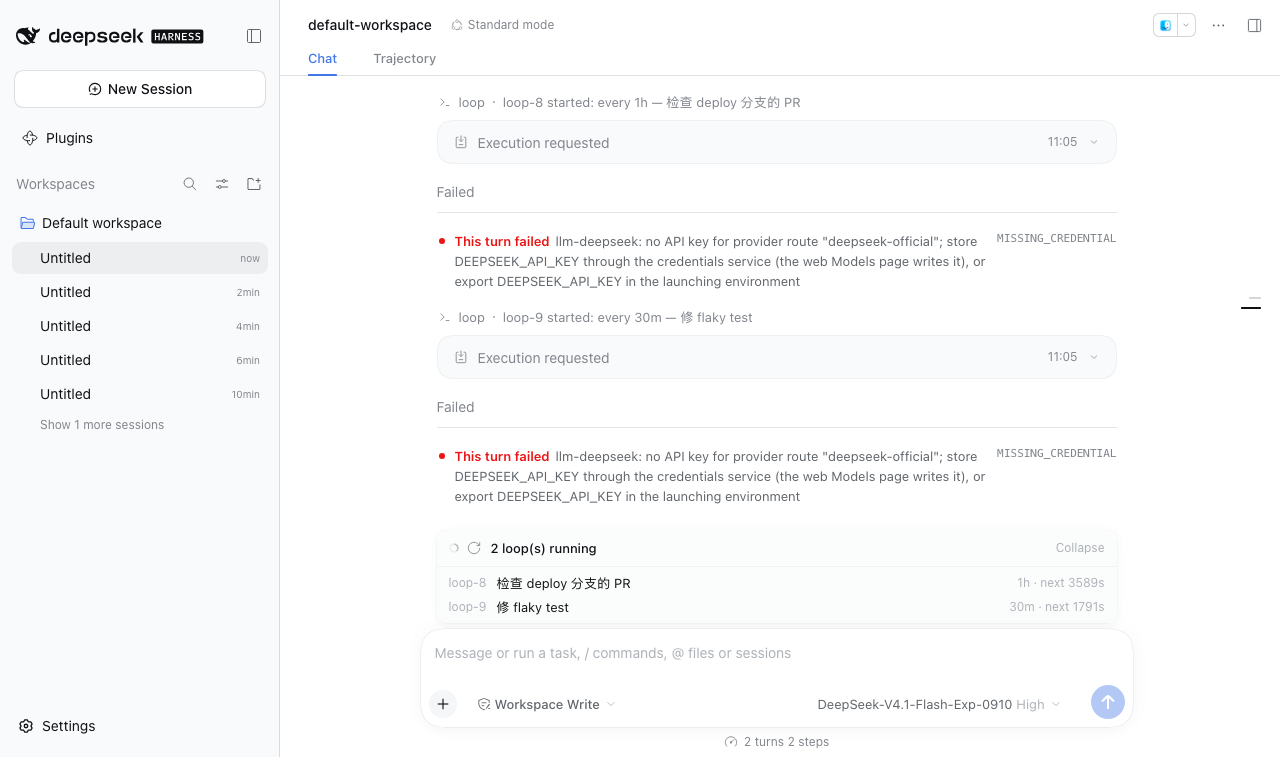
Features
Tool (registered via defineTool, the model can self-adjust on every turn):
| Tool | Description |
|---|---|
loop |
start (start a new loop) / stop (stop a specific one or all) / status / list (list loops in the current session) |
Commands (user side):
| Command | Description |
|---|---|
/loop [interval] <prompt> |
Start a new loop (interval 5m/30s/1h/2d or a bare number = minutes; bare /loop uses the built-in maintenance prompt) |
/loop list |
List all loops in the current session (with ids) |
/loop stop <id> / /loop stop |
Stop a specific loop / stop all |
/loop replies (the command-palette title/description, list / usage / stop output) follow the UI language: the client half relays its active locale to the plugin, so they render in Chinese or English to match the interface. Headless runs with no client in sight keep English.
UI (dock slot above the input box on the chat page):
| Feature | Description |
|---|---|
| Active status bar | Single loop: ● ⟳ looping · <prompt> · 5m · next in 23s; multiple loops collapse into a count bar "N loops running · expand", click to expand the list |
/ menu row |
Typing / in the composer shows the ⟳ icon at the left of the /loop row (same position and size as every other command row), with a localized title ("Loop" / "循环") |
Settings
The plugin ships a settings card on Settings → Plugins → this bundle's page (official plugins.bundle.config slot, keyed by the bundle package name @vlln/dsh-loop; the settings namespace is dsh-loop, the id of the entry that exports the Config schema). Each tool gets its own row with an official-looking Switch:
| Setting | Default | Effect |
|---|---|---|
Whether to inject the loop tool into the model |
on | When off, the loop tool is not registered for agents: the model can no longer see or call it (tools.schemas has no loop). The /loop command (user side) and the status bar are unaffected. |
The card fields are driven by the client LOOP_TOOL_FIELDS table, mirrored one-to-one by the Node-side tool definition table — adding a tool means adding one entry on each side, and the settings card grows a new switch row automatically.
Changes apply as soon as you save (the schema's leaves are marked .volatile(): the host commits in place without remounting the entry and emits loader/volatile-update) — the plugin re-reads the snapshot and registers/unregisters the affected tools on the fly, so new sessions pick it up without a restart. Tool schemas are resolved live at every session/prompt assembly (there is no per-session snapshot): in-flight sessions also see the change from their next turn, and turning a tool off drops it from tools.schemas immediately, so a model that called it earlier can no longer reach it (they can only reconcile that through the turn record). The /loop command (user side) and the status bar are unaffected.
Installation
Recommended: one-line install from npm (build artifacts ship in the package, no build triggered):
dsh plugin --profile web add @vlln/dsh-loop
# to track the latest commit instead: dsh plugin --profile web add "github:vlln/dsh-loop#main"
Or from a local directory (when you have the source): git clone, then cd dsh-loop && dsh plugin --profile web add ..
Compatibility
| dsh version | Status |
|---|---|
0.2.0-rc.2 |
✅ Verified (migrated against 0.2.0 on 2026-10-03; command surface re-checked 2026-10-15) |
| Other versions | ⚠️ Unverified — if the /loop menu row loses its icon and localized title after a dsh upgrade (the command itself still works), upstream renamed an internal client command-surface method and the plugin silently falls back to the official fallback look |
After installing, restart web for it to take effect (bundles are composed at startup); afterwards you can disable/enable it from the "Plugins" panel on the settings page (takes effect at runtime + persisted).
Usage
# User side
/loop 5m check PRs on the deploy branch   # delivered every 5 minutes
/loop list                                # loop-1: every 5m — check PRs on the deploy branch
/loop stop loop-1                         # stop a specific one
/loop stop                                # stop all

# Model side (loop tool)
loop action=start prompt="fix flaky test" interval="2m"
loop action=status
loop action=stop loop_id="loop-2"
Loops live in the current harness process and disappear when the process exits (not persisted across restarts, consistent with Claude Code /loop).
Development
pnpm install
pnpm run build      # tsdown: Node half (lib/index.mjs) + client bundle (lib/client.js)
- Node half:
src/index.mjs(commands/tool/loops status route/plugins/dsh-loop/loops) - client:
src/client/index.tsx(dock slot status bar)
License
MIT License (example plugin of the DSH ecosystem).
Related plugins
rea
 morluto
/rea
逆向工程 CLI/MCP 工具(rea-agents):用 agent 逆向应用行为到原生二进制。独立工具而非 DSH 插件——仓库根 package.json 无 dsh 字段,本条目仅作外部工具参考。
Added:
npx rea-agents@latest setupArchify DSH 集成
 tt-a1i
/archify/integrations/deepseek-harness
Archify 的 DeepSeek Harness 集成:经 @tt-a1i/archify-dsh 适配包安装,在 dsh 中生成经校验的自包含交互式架构图、流程图、时序图、数据流图与生命周期图。安装信息基于已发布的 1.0.0;候选 1.1.0 与未发布的源码修复不计入。
Added:
dsh plugin --profile web add @tt-a1i/archify-dsh@1.0.0dsh-plugin
 Q00
Q00/ouroboros/integrations/dsh-plugin
通过 DSH MCP 客户端挂载 Ouroboros 的纯配置包,在 DSH 中提供 36 个涵盖需求访谈、Seed、执行、评估与演化流程的工具。
Added:
dsh plugin --profile web add github:Q00/ouroboros#path:/integrations/dsh-pluginanswer-me-with-html
 QingYunA
/answer-me-with-html
Answer hard questions with a one-page HTML: the model writes a short Markdown draft; the bundled CLI handles templates, SVG auto-layout and an STE controlled-writing check.
Added:
dsh plugin --profile web add 'github:QingYunA/answer-me-with-html#aab9ea19f50f038054eeb60475bbb7ea26f149e3'dashi-taskboard
 chuspeeism
/dashi-taskboard/integrations/deepseek-harness
现代化可灵活嵌入的任务面板,支持 Codex、DeepSeek Harness
Added:
dsh plugin --profile web add 'github:chuspeeism/dashi-taskboard#9aa1f4e7936d841748ed4e0fc7781b57ae6ae6cc&path:/integrations/deepseek-harness'dsh-agent-teams
 NanmiCoder
/dsh-agent-teams
AgentTeams 多智能体团队。
Added:
dsh plugin --profile web add github:NanmiCoder/dsh-agent-teams