
UI Enhancements
dsh-conversation-density-map
weien666/dsh-conversation-density-map · ★ 3
 weien666
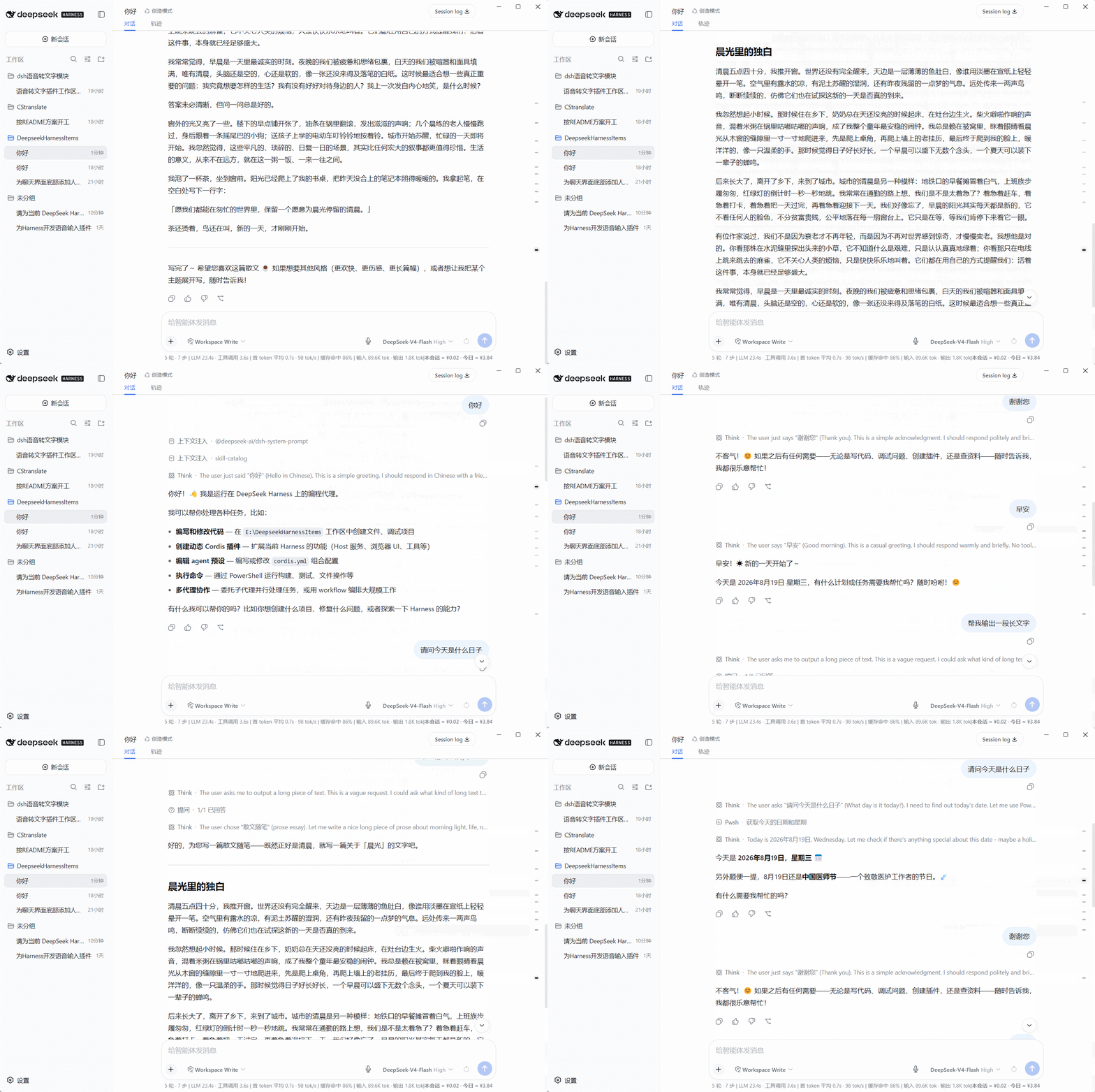
Adds a non-uniform conversation density map(chat history markers) to the right of the DSH chat area: one tick per turn, with tick length and spacing reflecting message size, clickable to jump to a turn and expanding on hover when crowded.
安装
dsh plugin --profile web add github:weien666/dsh-conversation-density-mapGitHub 源码安装:首次需按提示配置 allowBuilds 构建授权后重试
For install and environment setup, plus plugin development tutorials, see DSH community docs ↗
README
Table of contents
- Special Announcement: The latest version of Deepseek Harness already includes a built-in sidebar, therefore this plugin will no longer be updated. Thank you for your support!
- Features
- Demo
- Project Structure
- Download & Installation
- Method A (recommended): one-line install (bundle mode, requires pnpm)
- Method B: download the plugin ZIP from Releases
- Method C: download the entire repository via Code
- Uninstallation
- Compatibility
- Usage Tips
- License


Special Announcement: The latest version of Deepseek Harness already includes a built-in sidebar, therefore this plugin will no longer be updated. Thank you for your support!
安装:dsh plugin --profile web add github:weien666/dsh-conversation-density-map
Pure frontend, zero dependencies, no build step — the actual plugin consists of only 3 source files.
Features
- One tick per turn: each conversation turn occupies exactly one tick; AI replies (including tool calls and multi-part text) are never fragmented, forming a clean
user → AI → user → AIalternation; - Density at a glance: longer replies map to longer ticks, while short messages form dense clusters of short ticks, letting you quickly tell which parts of the conversation carry more content and which are fragmented;
- Window-adaptive layout:
- Regular window: ticks keep a uniform horizontal length to stay clean;
- Maximized window: tick horizontal length visually reflects message size and length;
- Smart hover spreading: when the conversation is long and ticks are dense, moving the mouse toward the right edge automatically spreads the ticks vertically so they are easier to click; with only a few turns, hovering does not move anything;
- Hover preview: hover over any tick to see a preview (turn number / approximate character count / beginning of the content);
- Current-position tracking: the turn you are currently reading is automatically highlighted as you scroll;
- Theme-aware: colors are taken from the Harness theme variables, automatically adapting to light and dark modes.
Demo
Project Structure
dsh-conversation-density-map/
│
├── client.js          ← Plugin core: browser half (conversation density map implementation)
├── index.js           ← Plugin core: host half (empty implementation)
├── package.json       ← Plugin core: declares dsh.client / dsh.bundle
├── cordis.patch.yml   ← bundle patch (applied automatically by `dsh plugin` on install; no manual insert needed)
│
├── docs/              ← demo GIFs (for repository display only; not downloaded during installation)
│
├── README.md
├── LICENSE
└── .gitignore
Download & Installation
Static DSH plugins are installed in two steps: "place the plugin files into the DSH profile" + "register it so it takes effect" — no
npm installrequired. The steps below use Windows as an example. The plugin core consists of the 3 source files at the repository root (client.js / index.js / package.json) plus cordis.patch.yml.
Method A (recommended): one-line install (bundle mode, requires pnpm)
dsh plugin --profile web add github:weien666/dsh-conversation-density-map
The install automatically appends the plugin to dsh.profile.bundles and applies the built-in patch (cordis.patch.yml) — no manual insert needed. Only the source files are installed; the GIFs in docs/ are not downloaded. After installing, restart DSH (dsh web restart) and hard-refresh the browser (Ctrl+Shift+R) to activate.
Method B: download the plugin ZIP from Releases
Open the Releases page of this repository and download the latest
dsh-conversation-density-map-vX.Y.Z.zip— it contains only the 3 source files, no GIF clutter;Extract it to any directory, e.g.
D:\plugins\dsh-conversation-density-map(the folder containing the 3 source files after extraction is the "plugin directory");Create a junction under the
node_modulesdirectory of the DSH config directory, pointing to it:mklink /J "C:\Users\<YourUsername>\.dsh\profiles\web\node_modules\dsh-conversation-density-map" "D:\plugins\dsh-conversation-density-map"Edit
C:\Users\<YourUsername>\.dsh\profiles\web\cordis.patch.ymland append at the end:- insert: - id: conversation-density-map name: dsh-conversation-density-mapRestart DSH (or refresh the web page with
Ctrl+F5) → done.
Method C: download the entire repository via Code
- On the repository page → Code → Download ZIP (downloads the full repository, including source, docs, and GIFs);
- After extracting, use the 3 source files at the repository root (client.js / index.js / package.json);
- Follow steps 3–5 of Method B: point the junction at that directory (or copy the 3 files directly into
node_modules\dsh-conversation-density-map\), then add the registration lines.
Uninstallation
If installed via Method A (one-line command):
dsh plugin --profile web remove dsh-conversation-density-map
Automatically removes the dependency and removes it from dsh.profile.bundles (the insert comes from the in-package patch, so no manual deletion is needed).
If installed via Method B / C (manual): reverse the steps:
- Delete the two
insertlines in the profile'scordis.patch.yml; - Delete the junction (or delete the folder inside
node_modules); - Delete the extracted plugin directory.
All plugin effects are managed through the DSH lifecycle; no styles or listeners are left behind after uninstallation.
Compatibility
- Built for the DeepSeek Harness Web client (currently based on the
0.1.xDOM structure:data-chat-flow/data-chat-anchor-key/data-conversation-scroll); - No third-party libraries; uses only native browser APIs (IntersectionObserver / ResizeObserver / MutationObserver / DOM);
- If a DSH upgrade changes the chat-area DOM structure, minor adaptation may be required.
Usage Tips
- Click any tick: smoothly scroll to the start of that turn;
- Move the mouse near the right edge: ticks spread out (hover spreading);
- Hover over a tick: shows a content preview.
License
Related plugins
dsh-web(原 dsh-web-ui)
 zhu1090093659
/dsh-web-ui
dsh-web(原 dsh-web-ui):任务看板、git 图、右侧面板、远程移动端 UI、桌宠、实时 token 统计与皮肤中心的全家桶。仓库已更名 zhu1090093659/dsh-web,根目录声明 dsh.bundle.patch,支持根 Git 入口安装。
dsh plugin --profile web add github:zhu1090093659/dsh-webdsh-web-all 聚合包(原 dsh-web-ui-all)
zhu1090093659zhu1090093659/dsh-web-ui/packages/dsh-web-ui-all
旧整包路径 packages/dsh-web-ui-all 已随仓库更名 dsh-web 迁移:现聚合目录为 packages/dsh-web-all,npm 聚合包 @linxin666/dsh-web-all。与总仓根 Git 入口是同一产品的两种整包方式,不重复计数。
dsh plugin --profile web add @linxin666/dsh-web-all@latestdsh-TUI
 ccch1mneyyy
/dsh-TUI
Claude Code 风格全屏终端 UI:像素鲸鱼顶栏、实时工作状态行、思考流式展开。
dsh plugin --profile web add github:ccch1mneyyy/dsh-TUIdsh-cc-tui
ccch1mneyyyccch1mneyyy/dsh-cc-tui
一个美观且实用的 Claude Code 风格 TUI 插件:像素鲸鱼顶栏、双流光大字、实时工作状态行、思考流式展开、双击 Esc 时间回溯、蓝白上下文进度条 + TPS 仪表。 零核心改动,纯插件挂载。安装插件即可启用,卸载后不会留下核心补丁。 献给钟爱tui的各位极客们 A beautiful, practical Claude…
dsh plugin --profile web add github:ccch1mneyyy/dsh-cc-tuideepseek-balance-whale-widget
 meteornox
/deepseek-balance-whale-widget
DSH 小鲸鱼余额挂件(DeepSeek Balance Whale Widget)
dsh plugin --profile web add github:meteornox/deepseek-balance-whale-widgetDSH-better-sidebar
 omdsh-dev
/DSH-better-sidebar
侧边栏完整工作台:内置文件渲染编辑、终端、Git 与子代理,支持三方插件注册新 Tab。
dsh plugin --profile web add github:omdsh-dev/DSH-better-sidebar