
Skills
oh-story-dsh
worldwonderer/oh-story-dsh · ★ 748
 worldwonderer
DeepSeek Harness · Oh Story · Drama Skills · MIT
安装
dsh plugin --profile web add github:worldwonderer/oh-story-dshGitHub 源码安装:首次需按提示配置 allowBuilds 构建授权后重试
For install and environment setup, plus plugin development tutorials, see DSH community docs ↗
README
Table of contents
- What it is
- The four workbenches
- Novel
- Short drama
- Game
- Video recap
- Rules shared by all four
- Installation
- Start creating
- See what it produces
- Use tracking files to locate the continuation
- One shot owns one layer in each of the five short-drama documents
- Mistakes are pointed out
- The bundled game's QA record
- FAQ
- Do I need a plugin to write fiction with DeepSeek?
- I use Claude Code or Codex. Should I install this?
- Do I need an API key to browse existing work?
- How much does it cost in tokens?
- Does DeepSeek generate images and video itself? What can I do without a video key?
- The storyboard or game design is written — where do the film and the playable build come from?
- After installing, did my ordinary coding sessions also turn into three panes?
- A long reply in the right-hand Chat is hidden behind the input box?
- The workbench is blank after installing — no panel and no "创作工作台" button?
- I also installed Oh Story for Codex or OpenCode — which copy does DSH use?
- Install reports pnpm not found on PATH?
- The browser did not open, or asks for authentication?
- I do not see the four tabs "小说 / 短剧 / 游戏 / 视频"?
- Does it work on Windows?
- What do I do after upgrading?
- Further reading
- Contributing and support
- Acknowledgements
- Part of ZenStory AI
What it is
oh-story-dsh is a community plugin for DeepSeek Harness (DSH), independent of DeepSeek. Install it and DSH Web gains four creation workbenches: novel, short drama, game and video recap. Agents, sessions, models, permission approvals and Chat stay entirely native DSH; the plugin adds only creation Skills, professional Roles, project file contracts and the workbench UI, with no second agent runtime or project database.
The table describes the current source. Published packages pin their upstream commits in their versioned manifests; pending changes are listed under Unreleased.
| Workbench | Upstream capability (pinned, bundled with the plugin) | Main entry points |
|---|---|---|
| Novel | Oh Story 0.9.2 · 14 Skills · 7 Roles | /story, /story-long-write, /story-review, /story-publish |
| Short drama | Drama Skills 0.10.0 · 11 Skills | /short-drama, /short-drama-write, /short-drama-storyboard, /short-drama-edit |
| Game | NovelToGame 0.6.1 · 7 Skills · playable 《金瓶梅》 ADV sample (18+) | /novel-to-game quick, /game-build, /game-qa |
| Video | video-recap-skills 0.6.2 · 7 Skills (3 user entry points) | /video-recap, /video-script, /video-reference |
Latest release v0.1.21 (2026-10-30). The default install pins DeepSeek Harness
0.2.1-rc.5(the npmlatestandnext); the earlier0.2.0-rc.2and0.2.2-alpha.2(the npmalpha) are also supported. See CHANGELOG.md and Releases; upgrade steps are in the FAQ entry “What do I do after upgrading?”.
The four workbenches
All four animations below are the packaged plugin running inside the official DSH Web, captured during a native integration-test run; the Chat on the right, the model, token usage and timing are DSH's own.
Novel
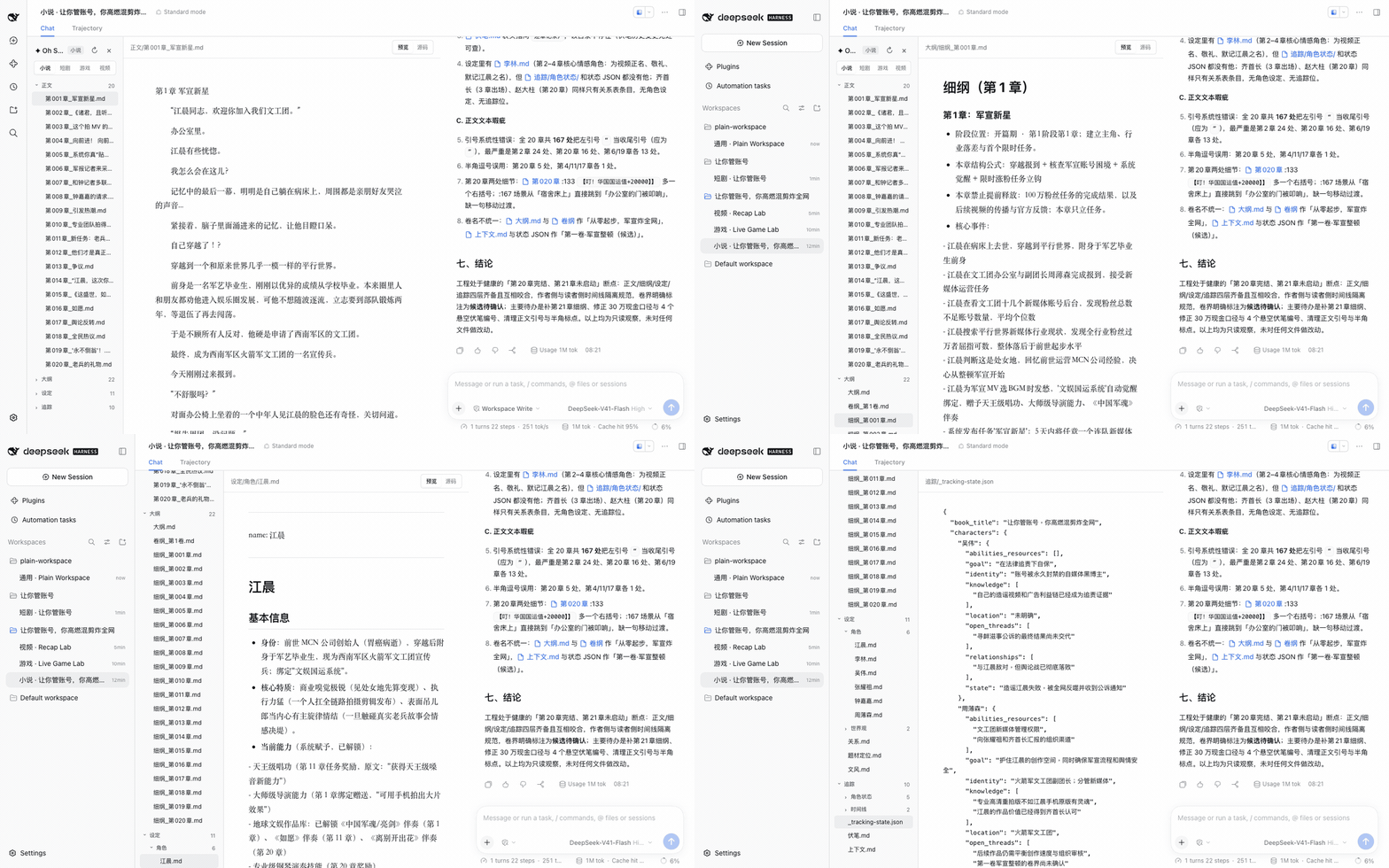
File tree, editor and Chat in three panes. The editor follows the agent as it writes, and clicking a file name in Chat opens it in the editor. Covers long-form and short-form writing, topic selection, chart scanning (扫榜), deconstruction (拆文), import, review, de-AI editing (去AI味) and covers.
Short drama
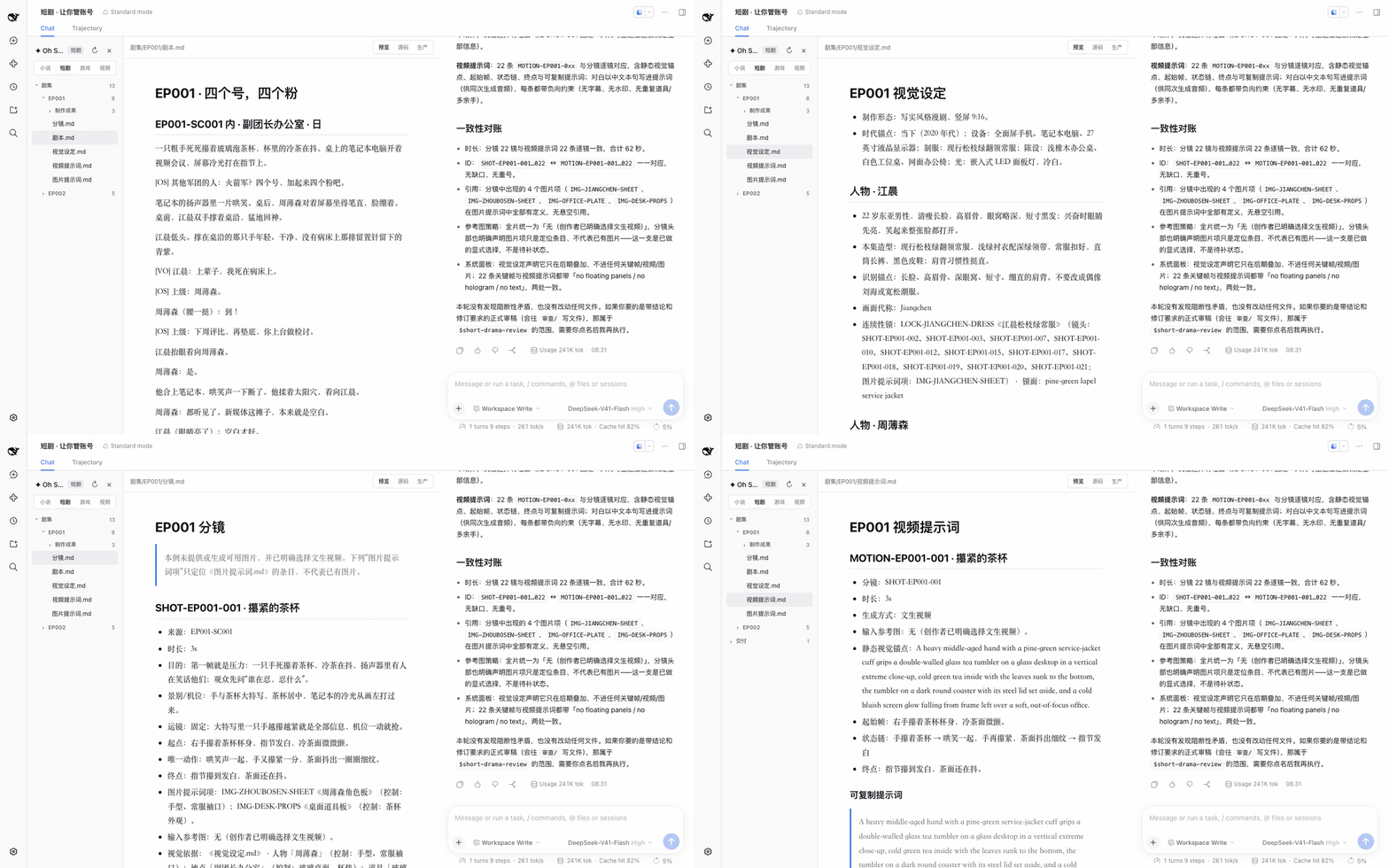
Each episode maintains up to five core creative Markdown files as needed: 剧本.md (screenplay), 视觉设定.md (visual bible), 分镜.md (storyboard), 图片提示词.md (image prompts) and 视频提示词.md (video prompts). The Production view projects them into a shot board, an asset board, jobs/versions, final-cut order and an infinite, pannable and zoomable relationship canvas, and flags duplicate IDs, dangling references and format errors in place. Image, video, speech and music jobs are previewed and confirmed by you before any vendor API is called; the final cut is rendered by /short-drama-edit from 剪辑单.md (the edit decision list) into 剧集/<EP>/制作成果/成片/.
Game
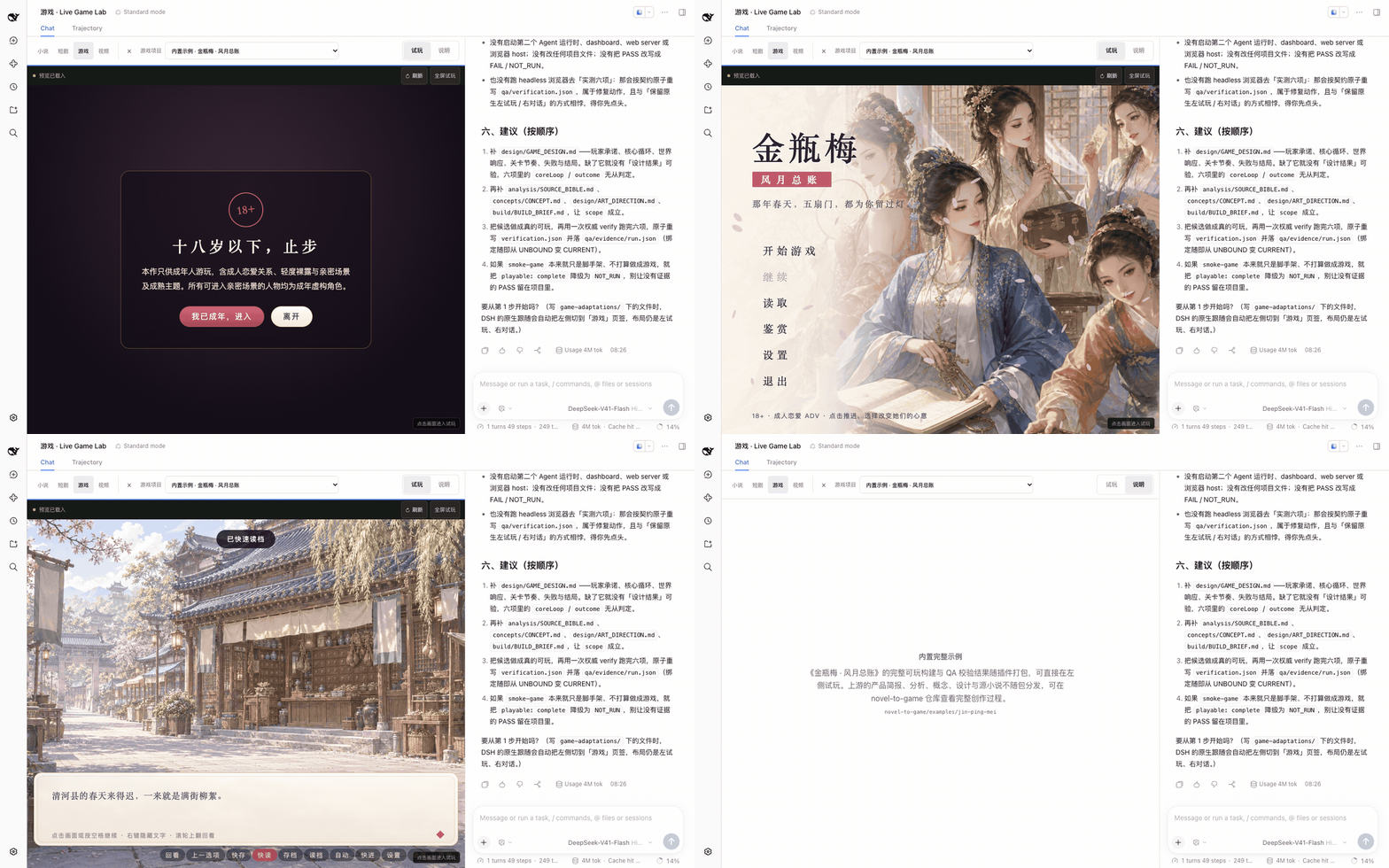
Live playtest on the left, Chat on the right. Output from /novel-to-game quick goes to game-adaptations/<project>/; once build/app/index.html is ready the project appears in the list and can be refreshed, made full-screen or switched. Games run on a separate origin inside an iframe sandbox. The bundled Jin Ping Mei ADV sample plays without an API key: before you have any work, click 「先玩内置示例」 (play the bundled sample) on the welcome card; afterwards pick it under 「内置示例」 in the 「游戏项目」 (game project) list. Adapted from the classical novel, it contains adult content (18+) and asks you to confirm your age before it starts.
Video recap
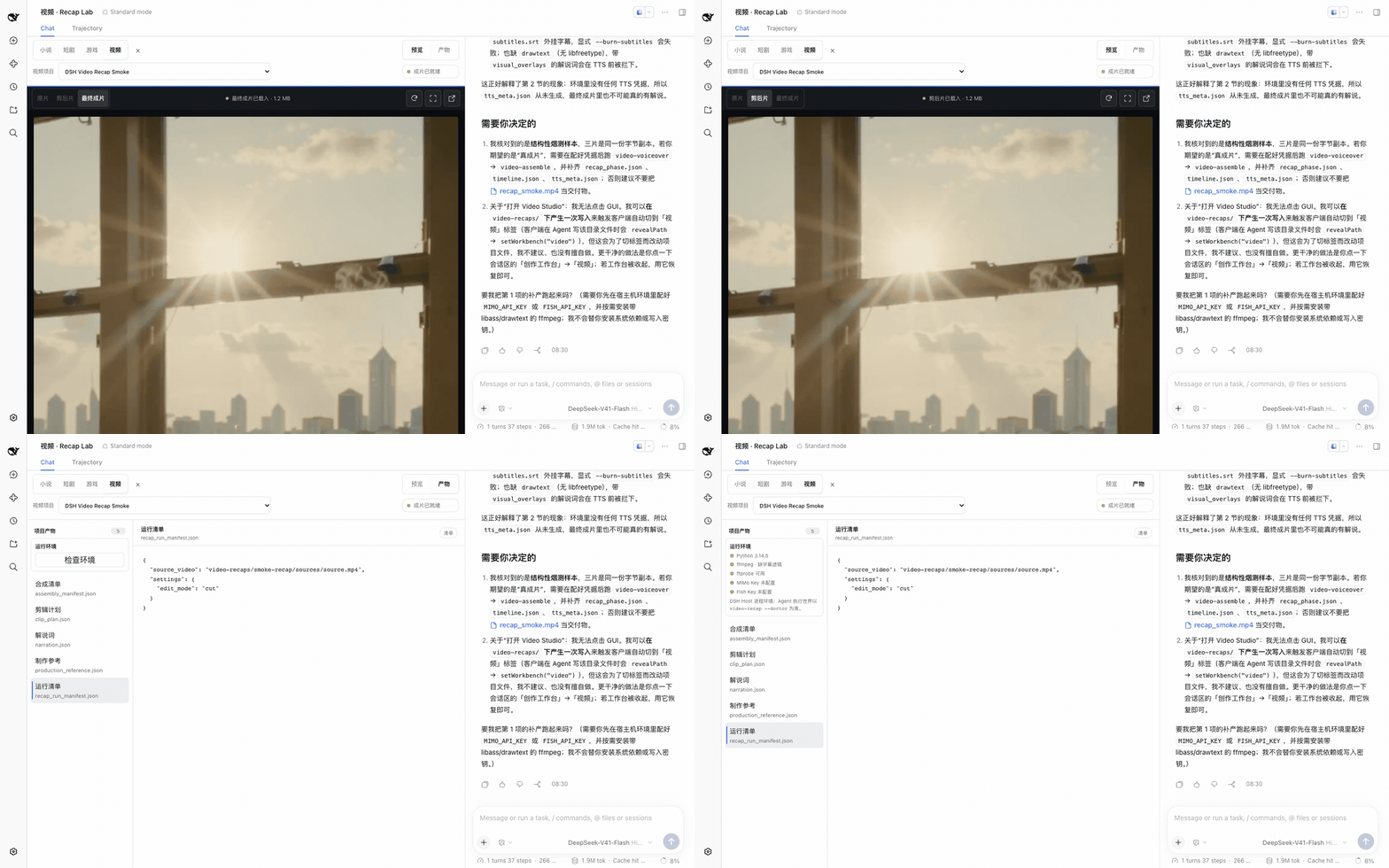
Preview on the left, Chat on the right. Projects live in video-recaps/<project>/: source footage in sources/, working files in work/, deliverables in outputs/. Switch between source, rough cut and final, and inspect stage hints, the run checklist and QC artifacts; video streams over HTTP Range. Before any video project exists, the empty state lists the runtime check: whether Python 3.10+, ffmpeg/ffprobe and MIMO_API_KEY are ready.
Rules shared by all four
- Files are the creative truth: the workbench only projects the project's files and writes no parallel database; editing a file is editing that layer of the decision. Unsaved manual edits are never overwritten by a concurrent agent write.
- Confirm media production first: short-drama media jobs show exact content and preflight results in Chat and run after you confirm that job. Media keys stay in host environment variables; the plugin reports only whether they are configured.
- It stays out of other sessions: the layout is taken over only when the current workspace actually contains a creative project; it can be collapsed at any time, returning the session to native DSH, and the choice is remembered per workspace.
Boundaries and protocols for each workbench are in the architecture notes.
Installation
Requires Node.js 24+. The install command provides pnpm temporarily, so a machine with only Node.js can run it:
npx -y --package pnpm@11.7.0 --package @deepseek-ai/dsh@0.2.1-rc.5 dsh plugin --profile web add @oh-story/dsh@0.1.21 &&
npx -y @deepseek-ai/dsh@0.2.1-rc.5 web
Keep the terminal running; the browser opens automatically by default. If it does not, copy the full http://127.0.0.1:3080/?token=... link printed in the terminal — first-time authentication needs the token in the link. Closing the terminal stops the service. Use the same dsh version for install and start. The commands on this page pin 0.2.1-rc.5, the npm latest and next. The plugin accepts >=0.2.0-rc.2 <0.2.1-0, >=0.2.1-alpha.1 <0.2.2-0 and >=0.2.2-alpha.2 <0.2.3-0. If you stay on 0.2.0-rc.2, or want to try 0.2.2-alpha.2 (which needs Node.js 24.9+), use that same version in both the install and start commands; do not mix host versions. DSH checks compatibility while adding and loading the plugin and reports mismatches (dsh plugin allow-version overrides it at your own risk).
Before creating with AI, add a Provider and API key under DSH's Settings → Models, or set the DEEPSEEK_API_KEY environment variable before starting. To only browse existing work, choose "Configure later" in the first-run guide.
The prebuilt package in the GitHub Release passes the same test suite:
npx -y --package pnpm@11.7.0 --package @deepseek-ai/dsh@0.2.1-rc.5 dsh plugin --profile web add https://github.com/zenstory-ai/oh-story-dsh/releases/download/v0.1.21/oh-story-dsh-0.1.21.tgz &&
npx -y @deepseek-ai/dsh@0.2.1-rc.5 web
The video pipeline additionally needs Python 3.10+ and ffmpeg/ffprobe on the host (Debian/Ubuntu sudo apt install ffmpeg). With the libass subtitles filter it burns subtitles in; without that filter it delivers an external SRT, or you can install a libass-enabled build. Video recaps use MIMO_API_KEY (Fish Audio TTS additionally needs FISH_API_KEY). Set keys and PATH in the terminal that starts DSH; they take effect after DSH restarts.
DeepSeek writes the screenplay, storyboard and prompts; image, video, speech and music generation is handed by short-drama Production to the short-drama-produce Skill, which calls the vendor APIs below. The production and check scripts need Python 3.9+ on the host. Set the keys as host environment variables before starting DSH:
| Capability | Vendor | Required variables | Optional |
|---|---|---|---|
| Images | GPT Image 2 | OPENAI_API_KEY |
OPENAI_BASE_URL |
| Video | Seedance (Volcengine Ark) | ARK_API_KEY, SEEDANCE_MODEL |
SEEDANCE_BASE_URL, SEEDANCE_ALLOWED_RATIOS, SEEDANCE_MIN_DURATION/SEEDANCE_MAX_DURATION |
| Video | MiniMax H3 | MINIMAX_API_KEY, MINIMAX_VIDEO_MODEL, MINIMAX_VIDEO_RESOLUTIONS, MINIMAX_VIDEO_MIN_DURATION/MINIMAX_VIDEO_MAX_DURATION |
MINIMAX_VIDEO_BASE_URL, MINIMAX_VIDEO_RATIOS |
| Speech | MiniMax Speech | MINIMAX_API_KEY |
MINIMAX_BASE_URL |
| Music | MiniMax Music | MINIMAX_API_KEY |
MINIMAX_BASE_URL |
export OPENAI_API_KEY=...            # images
export ARK_API_KEY=... SEEDANCE_MODEL=...   # video; use the model / endpoint ID enabled on your account
npx -y @deepseek-ai/dsh@0.2.1-rc.5 web
Configure only what you use: without a video key you can still write storyboards and generate keyframe images. The top of the Production view shows whether each vendor is configured and which variable is missing. At startup the plugin registers the five built-in adapters in a credential-free config file (by default under oh-story-dsh-<uid>/ in the system temp directory, readable and writable only by the current user; the "generation environment" bar shows the full path), and the agent references it directly when running production_tool.py run. To use your own adapter or change timeouts, point OH_STORY_DRAMA_ADAPTER_CONFIG at your own file. Each vendor's parameters, resolutions and duration limits are documented in the bundled short-drama-produce/references/providers/. Novel covers use whichever image-generation tool is visible in the current Preset.
Voice references require an explicit capability declaration: generated generic profiles omit reference_audio because an environment-selected model may not support it. After verifying the exact model, declare reference_roles including reference_audio in a creator-owned adapter config outside the project and point OH_STORY_DRAMA_ADAPTER_CONFIG at it. Without that declaration the job is rejected before paid submission, never silently stripped of its voice binding.
Whichever profile the plugin is installed into, every Session of that profile loads the creation Skills. To keep the stock web profile clean, install into a separate profile:
npx -y --package pnpm@11.7.0 --package @deepseek-ai/dsh@0.2.1-rc.5 dsh plugin --profile story add @oh-story/dsh@0.1.21
A new profile has no UI by default. Edit ~/.dsh/profiles/story/package.json and set dsh.profile.bundles to:
"bundles": [
  "@deepseek-ai/dsh-base",
  "@deepseek-ai/dsh-web-app",
  "@oh-story/dsh"
]
@deepseek-ai/dsh-web-app is DSH's own Web UI package and must load before the creation plugin. The two profiles can then run at the same time on different ports; models, credentials, workspaces and session history are stored centrally by DSH:
npx -y @deepseek-ai/dsh@0.2.1-rc.5 web                          # stock DSH
npx -y @deepseek-ai/dsh@0.2.1-rc.5 --profile story --port 3081  # creation workbench
Start creating
On first start DSH creates a Default workspace under your Documents folder (deepseek-harness/default-workspace) and opens a blank session in it, with the Oh Story guide on the session page. To work in your own folder, click Add workspace next to Workspaces on the left, pick the folder that holds your work, then select it under Choose workspace; creative files are written into the workspace the current session belongs to. If the folder already contains creative projects, the four workbench tabs "小说 / 短剧 / 游戏 / 视频" (novel / short drama / game / video) appear. An empty folder keeps DSH's native Chat: type /story, /short-drama, /novel-to-game quick or /video-recap to begin, and the workbench appears once the agent writes the first creative file.
The requests below can be copied and adapted; replace the bracketed parts before sending.
Start a new book:
I want to start a new [genre] novel. First separate settled facts from open questions in the material I provide; plan only a bounded opening, delivering the core conflict, viewpoint limits, the changes across the first three chapters and the open items. Do not draft prose automatically; leave genre trade-offs, character motivation and long-term direction for me to confirm.
Existing manuscript — discuss the continuation first:
I want to plan the next scene of this novel, which I own or am licensed to adapt. Read only the [chapter files] and [setting files] I name in the current workspace. [Final fragment] is unfinished; do not count it as a complete chapter. First list facts relevant to the next scene, what the viewpoint character currently knows, and any missing or conflicting information. Then propose two directions, each explaining the character's want, the obstacle and the visible change caused by their action. Do not reveal [secret] yet; stop at [scene boundary]. Reply only in Chat this turn; do not create, move or edit files.
Short drama, game, video recap — state the goal directly:
用 /short-drama 初始化一个都市打脸题材的短剧项目,竖屏 9:16,只写第 1 集,先不生成任何媒体。
用 /novel-to-game quick 把 [小说文件] 改编成可玩游戏,平台、类型和引擎由你推荐,首个构建控制在 15 分钟以内。
给 /path/to/video.mp4 做一个 3 分钟中文解说成片,保留关键原声,字幕烧进画面。
(“Use /short-drama to set up a vertical 9:16 urban face-slap short-drama project; write only episode 1 and generate no media yet.” / “Use /novel-to-game quick to adapt [novel file] into a playable game; recommend platform, genre and engine, and keep the first build to about 15 minutes.” / “Make a 3-minute Chinese narrated recap of /path/to/video.mp4, keep key original audio, burn subtitles into the picture.”)
See what it produces
Excerpts from the bundled sample projects (synchronized from the oh-story-claudecode demo and the drama-skills public sample); omissions are marked "……".
Use tracking files to locate the continuation
Before chapter 21 is written, 追踪/上下文.md (the tracking context) records the current position and risks. Use it to locate the continuation, then read the chapter outline, relevant settings and necessary source text required by the writing workflow:
## 当前位置
- 当前章:第20章
- 场景:火箭军文工团,钟嘉嘉送来老兵书法礼后
……
## 活跃伏笔
- F016|钟嘉嘉并非普通军报实习生,她的军方家庭背景仍未完全公开|埋第7章|回收章未定|高
……
## 连贯性风险
- 第21章尚无细纲,不能直接写正文。
(Current position: chapter 20 … Active foreshadowing: F016, Zhong Jiajia is no ordinary intern … Continuity risk: chapter 21 has no outline yet; do not write prose directly.) The last line is a hard gate. Prose written without an outline is refused by DSH's tools/pre-execute hook:
Oh Story 阻止写入第 21 章:未找到对应的 大纲/细纲_第021章*.md。先按 story-long-write 单章流程补建细纲再写正文。
(“Oh Story blocked writing chapter 21: no matching outline file 大纲/细纲_第021章*.md was found. Write the outline through the story-long-write chapter flow first.”)
One shot owns one layer in each of the five short-drama documents
视觉设定.md (visual bible) locks a look that must survive across shots, with a lock face that pastes into a prompt verbatim; 分镜.md (storyboard) writes only start, the one action, end and basis; 视频提示词.md (video prompt) turns the motion between them into English a model can execute:
- 连续性锁:LOCK-JIANGCHEN-DRESS《江晨松枝绿常服》(镜头:SHOT-EP001-002、SHOT-EP001-003、SHOT-EP001-007……;图片提示词项:IMG-JIANGCHEN-SHEET)· 锁面:pine-green lapel service jacket
## SHOT-EP001-002 · 四个号,四个粉
- 来源:EP001-SC001
- 时长:4s
- 起点:周薄森面对笔记本坐得笔直,右手搭在茶杯旁;江晨双手掌心朝下撑在玻璃桌沿,眼神涣散。
- 唯一动作:哄笑声滚过来,周薄森下颌收紧、腰背又挺直一分;江晨眨了一下眼,眼神猛地聚拢。
- 终点:画面停在周薄森绷紧的脸与屏幕冷光;江晨仍撑着桌沿,留在画右边缘。
- 视觉依据:《视觉设定.md》·人物「江晨」……;道具「玻璃泡茶杯」(控制:双层玻璃杯身、沉底茶叶)。
## MOTION-EP001-002 · 四个号,四个粉
> …… The seated officer's jaw tightens and his back straightens a little more.
> The young man blinks once and his eyes snap into focus. ……
(Storyboard: source scene EP001-SC001, 4 s; start: Zhou sits bolt upright at the laptop while Jiang leans dazed on the desk edge; the one action: laughter rolls in, Zhou's jaw tightens and Jiang's eyes snap into focus; end: on Zhou's tight face in the screen glow, Jiang at the right edge; visual basis: the two characters and the glass tea tumbler from the bible.) Sources: 剧本.md · 视觉设定.md · 分镜.md · 图片提示词.md · 视频提示词.md.
Mistakes are pointed out
Break the sample episode in three places (a source pointing at a scene that does not exist, a video prompt pointing at a non-existent shot, a duplicated image-prompt ID) and the Production view reports the cause and the line:
SHOT-EP001-002 的来源 EP001-SC009 在剧本中不存在。            分镜.md:25
MOTION-EP001-003 指向不存在的 SHOT-EP001-030。                 视频提示词.md:33
IMG-JIANGCHEN-SHEET 在当前集内重复,后出现的条目会遮蔽前一条。   图片提示词.md:3
(“Source EP001-SC009 does not exist in the screenplay.” / “Points at the non-existent SHOT-EP001-030.” / “Duplicated within this episode; the later entry shadows the earlier one.”)
The bundled game's QA record
See the complete qa/verification.json for Jin Ping Mei. The simplified example below retains the six statuses and an experience limitation; its limitation wording is not a verbatim quote of the current record:
"checks": { "launch": "PASS", "render": "PASS", "input": "PASS", "coreLoop": "PASS", "outcome": "PASS", "restart": "PASS" },
"limitations": [ ……
  { "scope": "体验判断", "reason": "自动化只证明当前候选可启动、渲染、输入、走到结果并重开,不判断主观吸引力、长期平衡或其他浏览器。" }
]
(Scope “experience judgement”: the automation proves only that the current candidate launches, renders, accepts input, reaches an outcome and restarts; it does not judge subjective appeal, long-term balance or other browsers.)
FAQ
Do I need a plugin to write fiction with DeepSeek?
For a synopsis discussion or a revision of supplied text, ordinary model chat is enough — copy the result back into your manuscript. Install DSH plus this plugin when the work should continue around a local writing folder and you want to see the files in a workbench. For an account-based browser project, use the hosted ZenStory workbench; see the writing-environment comparison.
I use Claude Code or Codex. Should I install this?
No. The four pipelines are standalone skill repositories that install directly into the coding agent you already use: oh-story-claudecode, drama-skills, novel-to-game and video-recap-skills. This plugin is the packaging of those four Skill sets for DeepSeek Harness, plus the four workbenches that exist only in DSH Web.
Do I need an API key to browse existing work?
No. Choose "Configure later" in the first-run guide and open your work folder to browse the files; configure a model when you start creating with AI.
How much does it cost in tokens?
The plugin does not call a model itself; DSH shows usage under each reply. Usage depends on the Skills, references, project content and Roles read or invoked for the task. Each Role is a separate sub-agent call. Every Session in the profile can discover the creative Skills; their full instructions are read when used. Install into a separate profile to keep that catalog out of ordinary coding sessions.
Does DeepSeek generate images and video itself? What can I do without a video key?
No. DeepSeek only writes the screenplay, storyboard and prompts; media is generated by short-drama-produce through GPT Image 2, Seedance, MiniMax H3, MiniMax Speech or MiniMax Music, with keys set as host environment variables before DSH starts, and only for the vendors you use. Without a video key you can still finish all five documents and generate keyframe images.
The storyboard or game design is written — where do the film and the playable build come from?
The short-drama final cut is rendered by /short-drama-edit from 剪辑单.md; it needs the media-generation APIs configured and per-shot footage produced first. The game build is produced by /game-build and appears in the game workbench's project list once build/app/index.html is ready.
After installing, did my ordinary coding sessions also turn into three panes?
The layout is taken over only when the current workspace really contains a creative project; otherwise the plugin does not appear in the UI at all. The "collapse creation workbench" control in the workbench title bar hides it at any time, and the choice is remembered per workspace.
A long reply in the right-hand Chat is hidden behind the input box?
Update the plugin using Installation and restart DSH. If the current version still reproduces it, open an issue with the plugin version, DSH version, window width and steps. Historical reports are #3 and #26.
The workbench is blank after installing — no panel and no "创作工作台" button?
Check the plugin and DSH versions, then follow Installation using one supported host line: 0.2.1-rc.5 by default, or the earlier 0.2.0-rc.2, or the trial 0.2.2-alpha.2. Use that version for both installation and startup, and check that the plugin is loaded in the same profile. If the workbench is still blank, report the versions and terminal error. The historical Queue failure is recorded in #50.
I also installed Oh Story for Codex or OpenCode — which copy does DSH use?
DSH also reads ~/.agents/skills and prefers a same-named copy there over the plugin's bundled, DSH-adapted version, so when the two differ, the ~/.agents copy wins. To make DSH use only the plugin's Skills, point DSH_AGENTS_HOME at another directory before starting (for example DSH_AGENTS_HOME=~/.dsh-agents npx -y @deepseek-ai/dsh@0.2.1-rc.5 web), or move the same-named folders out of ~/.agents/skills.
Install reports pnpm not found on PATH?
DSH's plugin add needs pnpm internally, and running npx @deepseek-ai/dsh ... plugin add on its own will not supply it. Rerun the full install command above that includes --package pnpm@11.7.0, confirm it succeeds, then start.
The browser did not open, or asks for authentication?
Open the full link with ?token=... printed in the terminal; first-time authentication needs that token. If the port is taken, use web --port 3081 and open the newly printed link.
I do not see the four tabs "小说 / 短剧 / 游戏 / 视频"?
Add a work directory and open a session first. In an empty directory, run a creation command in Chat; the workbench appears once the agent has written the first creative file. A collapsed workbench can be restored with the "creation workbench" button in the session area. If existing work still does not show, check that install and start used the same profile, restart DSH and refresh the page. A standalone story profile that has no web UI needs @deepseek-ai/dsh-web-app added, as described in the collapsed section under Installation.
Does it work on Windows?
Yes. The type, asset, unit-test and build gate runs on both macOS and Windows in CI on every change; the integration test that packages the plugin into the official DSH Web runs on Linux. The video pipeline needs Python 3.10+ and ffmpeg/ffprobe on every platform, burning subtitles with libass or delivering an external SRT without it; long-form analysis, import and long-form tracking also need Python 3 on the host, the short-drama check and production scripts need Python 3.9+, and short-drama assembly needs ffmpeg/ffprobe, with libass for the default burned-in subtitles and Node.js (Remotion) whenever the cut list has on-screen text; the long-form chapter check needs Node.js 18+.
What do I do after upgrading?
Rerun the install command with the target version after @oh-story/dsh@, then restart DSH. Use the same host version for installation and startup; see Installation for the supported range. Skills and Roles ship with the plugin and need no redeployment into projects.
Version 0.1.21 includes Oh Story 0.9.2 and Drama Skills 0.10.0, and the default host is now DSH 0.2.1-rc.5; it needs no migration, only a reinstall and restart. Fiction gains /story-publish, which turns your existing settings and outline into 番茄小说 listing material (title, blurb, tags) saved as 发布资料-番茄小说.md in the book folder; it writes only what you confirm and never signs in to the author backend or publishes for you. /story-cover can deliver just the cover prompt. Short drama storyboards fight scenes round by round and lets edits land reactions over the line; when a project has no reference images yet, the storyboard writes PLAN-... image plans and video prompts are still delivered, though real images are still needed before production. English dialogue is timed by words.
Version 0.1.20 lets the plugin load on the DSH 0.2.2 prerelease line (verified on 0.2.2-alpha.2); the default host and the upstream Skills are unchanged, so it needs no migration, only a reinstall and restart.
Version 0.1.19 includes Oh Story 0.9.1, Drama Skills 0.9.2 and NovelToGame 0.6.1, and the default host is now DSH 0.2.1-rc.4; it needs no migration, only a reinstall and restart. Oh Story's continuation status card now lists up to 20 active characters (previously 6). Short drama can check just the documents written so far after each one, multi-shot containers can be written as GROUP-... entries, and rendered cuts no longer drop audio at cut points; the legacy JSON checkers are no longer bundled, and creator_markdown_check.py is the one structural check.
Version 0.1.18 finishes the interface findings from the 0.1.17 new-user audit (the bundled-example entry, the video runtime check, the game preview status, Python 3.9+ for short drama); it needs no migration, only a reinstall and restart.
Version 0.1.17 includes Oh Story 0.9.0: each Skill's references are reorganized around the writing step they serve; manuscripts, settings, tracking and author memory need no migration, and in DSH the Skills and Roles update with the plugin, so /story-setup does not need to run again. For a long book imported earlier, have /story-long-write rewrite that volume's old plot units (剧情单元) as unit cards (单元卡) before continuing. The short-fiction platform is now called 知乎盐言; the old names 盐选 and 番茄短篇 are still recognized. NovelToGame 0.6.0 reviews scope against budget after the whitebox playtest and again halfway through production, and director mode pauses on visual-target candidates for your pick. The default host is now DSH 0.2.1-rc.2.
Check the actions relevant to your project:
- Novel author memory: entries labelled “本书:” left in the workspace before Oh Story 0.8.0 need
author_memory_commit.py migrate --workspace {workspace} --book-root {book dir}once per book. Both arguments name the workspace in a single-book layout; you can also ask the Agent to “整理作者记忆”. Already migrated memory needs no repeat migration. Reports name habits that do not fit the writer's context; consolidate similar entries when needed. - Chapter outlines: complete the chapter's outline before prose. An outline with fewer than 30 characters after removing
#and whitespace is blocked. - Short-drama projects: v0.5 structured projects cannot be migrated in place to creator-first projects. Start a new root and keep only the creative documents needed now. Preserve each shot's real source scene and visual basis, declare the purpose of
REF-*, and account for unusedMOTION-*before the first## CUT-in剪辑单.md. On-screen text needs Remotion; when upgrading from before Drama Skills 0.8, rerunnpm installin~/.cache/short-drama-edit/remotion. To disable automatic same-scene cut matching, put- 接镜匹配:无in the delivery specification. - Character voice references: bind audio to the character and validate
reference_roles, identity and negative controls. Audio stays outside the image picker. - Bundled game: the current Jin Ping Mei ADV does not share saves with the former ledger game; start the example again after upgrading.
- Video projects: an older incomplete work directory may need rebuilding from the first stage; an old PASS is not a new result. Dub clones the original speaker's voice and requires confirmed audio rights and speaker consent before adding
--confirm-voice-rights, including to older resume commands. Without libass, deliver an external SRT.
See CHANGELOG.md and Validation for release history and recorded evidence.
Further reading
- Writing fiction with DeepSeek: choose the writing folder, configure the host's model, then specify genre, viewpoint and this turn's stopping point.
- Import and continue: distinguish finished chapters from unfinished fragments, settings to preserve, and the next passage's bounds.
- Short-drama character consistency: separate identity, look and per-shot state.
- Meaningful game choices: connect action costs, visible changes and later consequences.
- Original sound versus narration: identify essential dialogue, picture evidence and gaps that need explanation.
- Writing-environment comparison: when plain chat, the DSH plugin or the hosted workbench fits.
- Architecture: what DSH owns, what the plugin owns, and the protocol boundary of each workbench.
- Validation: what each test layer covers and which evidence stays out of Pull Request CI.
Contributing and support
- GitHub Issues: bugs, output-quality cases, feature requests; include the plugin version, DSH version and reproduction steps.
- Read CONTRIBUTING.md before changing code:
pnpm verifyis the quality gate for every Pull Request, andpnpm test:dshpackages the plugin and runs it inside an isolated official DSH Web.
Acknowledgements
- DeepSeek Harness: the native plugin runtime, agents, sessions, permission approvals and Web workbench foundation.
- LINUX DO: thanks to the community for discussion, feedback and open-source support.
Changelog · Contributing · Architecture · Security policy
Part of ZenStory AI
Oh Story DSH is maintained by ZenStory AI — open-source, agent-native tools for creating, adapting and producing stories (GitHub org: zenstory-ai). Sibling projects:
| Project | What it does |
|---|---|
| oh-story-claudecode | Web-fiction writing skill pack: chart scanning, deconstruction, drafting, de-AI-flavor, covers |
| drama-skills | AI short-drama / motion-comic suite: scripts, assets, storyboards, image & video prompts, review |
| novel-to-game | Agent skills for source-grounded novel adaptation, target-runtime builds, and evidence-based QA |
| video-recap-skills | Create Chinese-narration recaps from supported video files, with optional editable JianYing/CapCut draft export |
| oh-story-dsh | Community DeepSeek Harness plugin with novel, short-drama, game and video-recap workbenches (this repo) |
| zenstory | Chat-to-create AI novel-writing workbench (app.zenstory.ai) |
Related plugins
Distilly(原 colleague-skill)
 titanwings
/colleague-skill
Distilly(原 Colleague Skill):把同事、亲友或名人的经验、判断与表达蒸馏成可复用的人物 Profile Skill。DSH 经 skills 目录原生发现(/distilly 调用),非插件加载。
mkdir -p ~/.dsh/skills && git clone https://github.com/titanwings/distilly ~/.dsh/skills/distillyskillhub-iflytek
 iflytek
/skillhub/plugins/dsh
Native SkillHub browsing and local skill management for DeepSeek Harness
dsh plugin --profile web add '@astron-team/skillhub-dsh@0.6.1'vibe-skills
 foryourhealth111-pixel
/vibe-skills
vibe 编码技能合集(含快速开始、CI 证明、发布说明与文档)
dsh plugin --profile web add github:foryourhealth111-pixel/vibe-skillsJ-Space-Cognition-Suite-V3.6
 Tiger3807861189
/J-Space-Cognition-Suite-V3.6
A model-agnostic inference-time control suite for deep reasoning, long-horizon work, tool use, verification, and recovery. 面向深度推理、长程任务、工具调用、验证与恢复的模型不可知推理时控制套件。
dsh plugin --profile web add github:Tiger3807861189/J-Space-Cognition-Suite-V3.6Aegis
 GanyuanRan
/Aegis
面向编码 Agent 的软件工程方法包,提供基线优先规划、系统化调试、提示词卫生、完成前验证,以及修复/退役双轨跟踪技能。
dsh plugin --profile web add github:GanyuanRan/Aegisex-skill
titanwingstitanwings/ex-skill
「分手了,可对方的打字方式还刻在你脑子里。每个语气、每次停顿都记得——只是再也收不到下一条了。」
dsh plugin --profile web add github:titanwings/ex-skill