
UI Enhancements
dsh-hover-approve
wydddddcool/dsh-hover-approve · ★ 2
 wydddddcool
Anchors an approve/answer bubble to each DSH Web sidebar session row — one-click handling of authorization, questions, plan reviews and blocked goals without opening the conversation.
安装
dsh plugin --profile web add github:wydddddcool/dsh-hover-approveGitHub 源码安装:首次需按提示配置 allowBuilds 构建授权后重试
For install and environment setup, plus plugin development tutorials, see DSH community docs ↗
README
Why
DSH conversations regularly need you to stop and act: approve a file write, answer a question, confirm a plan, check why a goal got blocked. The built-in panel makes you open the conversation and scroll to act — switching back and forth breaks your flow.
This plugin keeps the interaction at the session's list row: a bubble pops up anchored to the row, a tail line and dot point at which session is waiting, and you approve / reject / answer right in the bubble — no need to open the conversation.
Features
In action
Real DSH Web UI (bubble anchored to the session row, tail line + dot pointing at the session):
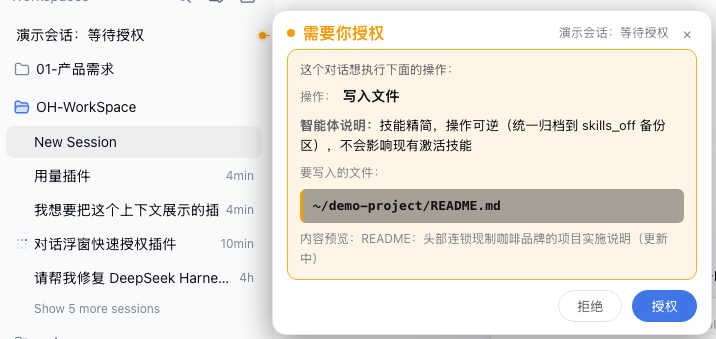
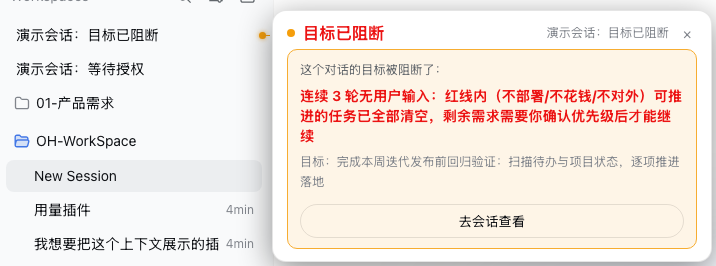
- Auto-appears, no hover needed: anchored to the session row — you always know which session is waiting;
- Complete information: plain-language action labels (bash → "run terminal command", write → "write file"), highlighted file path, command collapsed to one line (click to expand), agent note shown prominently;
- Dismiss by clicking outside: click anywhere outside (or the ×) — it stays closed for this round and reappears on the next interaction;
- Follows the list: bubble and tail track the row on scroll / re-render; concurrent interactions anchor to their own rows, offset horizontally;
- Archived sessions stay quiet: archived conversations never get a bubble; archiving / unarchiving takes effect immediately (already-shown bubbles close at once).
Install
Quick install (recommended):
dsh plugin --profile web add https://github.com/wydddddcool/dsh-hover-approve
One command installs the dependency and registers the bundle (applies cordis.patch.yml automatically); restart dsh web afterwards.
You can also install manually in your profile (e.g. ~/.dsh/profiles/web):
# 1. Add to package.json dependencies:
#    "dsh-hover-approve": "https://github.com/wydddddcool/dsh-hover-approve"
# 2. Add "dsh-hover-approve" to dsh.profile.bundles (applies cordis.patch.yml)
pnpm install
# 3. Restart dsh web
Local development can use a file: path dependency; note pnpm copies file: deps, so re-sync after editing:
cp <src>/lib/client.js ~/.dsh/profiles/web/node_modules/dsh-hover-approve/lib/client.js
Relationship with DSH
This is a community plugin (not an official product) for DeepSeek Harness Web. It reads session state through the official client injection (ctx.sessions / ctx.workspaces / ctx.locale) and answers through the official PendingWait.respond() channel — the same server-side path and audit trail as the in-conversation panel. Responses are bound to the approvalId captured at display time: if the request is replaced or already handled, sending is refused, so you can never approve something you didn't see. Tested against dsh 0.1.0-rc.6 (uses pendingInteraction / projectionValues / sessions.open / PendingWait).
Testing
npm install   # first time: installs jsdom
npm test      # 16 cases: four modes, archive filtering, answer encoding, state switching, retry, viewport clamping, teardown
CI (GitHub Actions) runs the tests on every push.
Limitations
- The command line only shows when a running call matches
callId(bash-like tools); other tools show only the action type and note — same as the built-in panel. - Row→session mapping matches by title scoring (exact match first); heavily duplicated titles could mis-anchor in rare cases.
- The bubble depends on the built-in list DOM structure (
[role="treeitem"]). If DSH changes that structure, the bubble may silently stop working (no errors) until adapted.
License
MIT License. DeepSeek is a trademark of DeepSeek AI; this is an independent community project, not affiliated with or endorsed by DeepSeek.
Related plugins
dsh-web(原 dsh-web-ui)
 zhu1090093659
/dsh-web-ui
dsh-web(原 dsh-web-ui):任务看板、git 图、右侧面板、远程移动端 UI、桌宠、实时 token 统计与皮肤中心的全家桶。仓库已更名 zhu1090093659/dsh-web,根目录声明 dsh.bundle.patch,支持根 Git 入口安装。
dsh plugin --profile web add github:zhu1090093659/dsh-webdsh-web-all 聚合包(原 dsh-web-ui-all)
zhu1090093659zhu1090093659/dsh-web-ui/packages/dsh-web-ui-all
旧整包路径 packages/dsh-web-ui-all 已随仓库更名 dsh-web 迁移:现聚合目录为 packages/dsh-web-all,npm 聚合包 @linxin666/dsh-web-all。与总仓根 Git 入口是同一产品的两种整包方式,不重复计数。
dsh plugin --profile web add @linxin666/dsh-web-all@latestdsh-TUI
 ccch1mneyyy
/dsh-TUI
Claude Code 风格全屏终端 UI:像素鲸鱼顶栏、实时工作状态行、思考流式展开。
dsh plugin --profile web add github:ccch1mneyyy/dsh-TUIdsh-cc-tui
ccch1mneyyyccch1mneyyy/dsh-cc-tui
一个美观且实用的 Claude Code 风格 TUI 插件:像素鲸鱼顶栏、双流光大字、实时工作状态行、思考流式展开、双击 Esc 时间回溯、蓝白上下文进度条 + TPS 仪表。 零核心改动,纯插件挂载。安装插件即可启用,卸载后不会留下核心补丁。 献给钟爱tui的各位极客们 A beautiful, practical Claude…
dsh plugin --profile web add github:ccch1mneyyy/dsh-cc-tuideepseek-balance-whale-widget
 meteornox
/deepseek-balance-whale-widget
DSH 小鲸鱼余额挂件(DeepSeek Balance Whale Widget)
dsh plugin --profile web add github:meteornox/deepseek-balance-whale-widgetDSH-better-sidebar
 omdsh-dev
/DSH-better-sidebar
侧边栏完整工作台:内置文件渲染编辑、终端、Git 与子代理,支持三方插件注册新 Tab。
dsh plugin --profile web add github:omdsh-dev/DSH-better-sidebar