
Sessions & Messages
dsh-session-actions
xingyingyuzhui/dsh-session-actions · ★ 4
 xingyingyuzhuiCurated
Session row menu extras for DeepSeek Harness: pin sessions, copy session id, export structured Markdown, and permanently delete sessions.
README body is shown in Chinese.
Manifest details
安装
dsh plugin --profile web add github:xingyingyuzhui/dsh-session-actionsGitHub 源码安装:首次需按提示配置 allowBuilds 构建授权后重试
For install and environment setup, plus plugin development tutorials, see DSH community docs ↗
README
DeepSeek Harness Web 插件:在会话行「⋯」菜单末尾加上复制 ID、置顶、导出 Markdown、永久删除。侧栏所有工作区上方可以出现「置顶」分组。不改官方组件。
English UI follows the DSH locale.
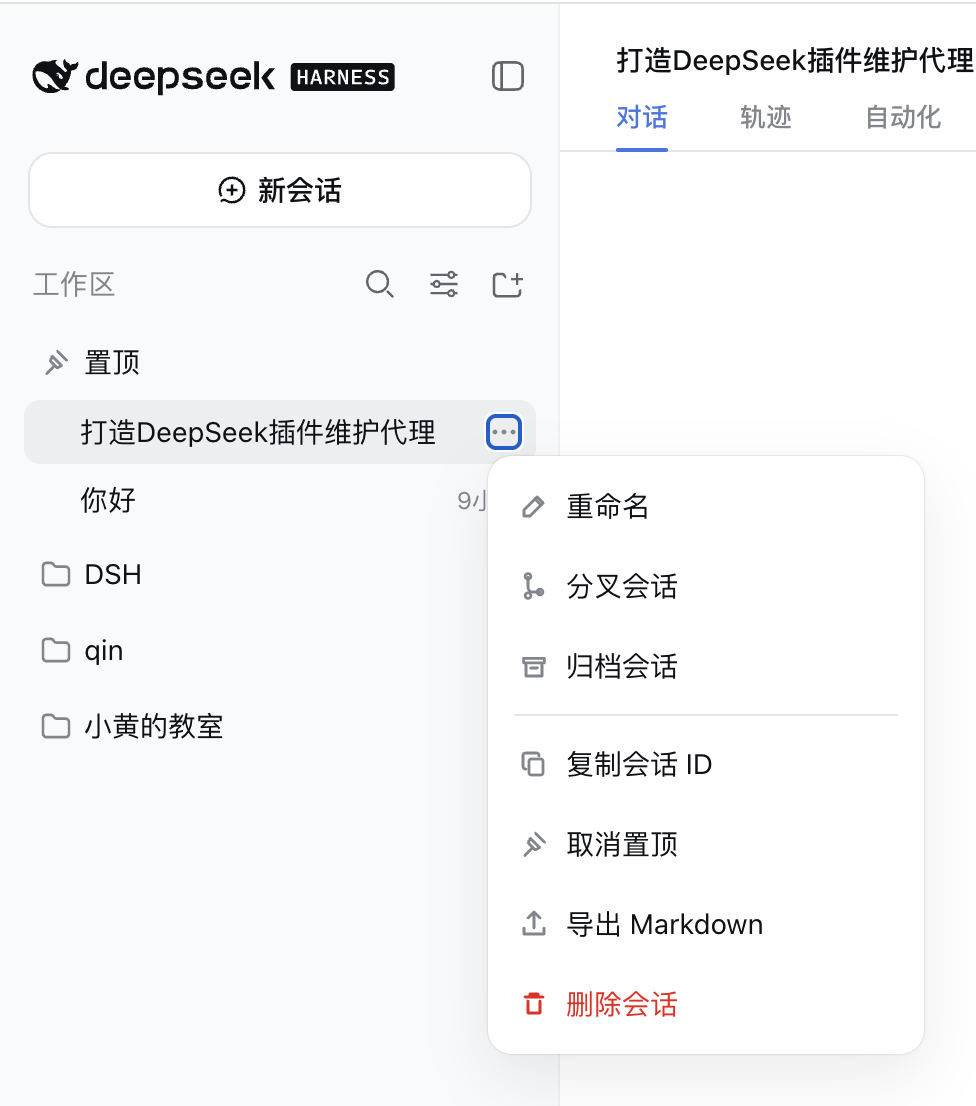
菜单在官方「重命名 / 分叉 / 归档」下面追加:
| 项 | 作用 |
|---|---|
| 复制会话 ID | 把 session-… 写进剪贴板 |
| 置顶会话 | 钉到侧栏最上方的「置顶」分组;原工作区里仍保留 |
| 导出 Markdown | 导出结构化记录(思考、工具调用、用户/助手正文) |
| 删除会话 | 确认后永久删除该会话目录(不是归档;归档仍用官方菜单) |
置顶分组:默认可折叠(图钉 / 悬停实心三角),行上显示相对时间,悬停出 ⋯。置顶行可在组内拖动排序。置顶名单落在 ~/.dsh/dsh-session-actions/pins.json。
安装
前置:本机已能运行 dsh web。
dsh plugin --profile web add github:xingyingyuzhui/dsh-session-actions
装完重启 dsh web。
本地开发:
dsh plugin --profile web add link:/abs/path/to/dsh-session-actions
卸载
dsh plugin --profile web remove dsh-session-actions
开发
Client 源码在 session-*.mjs。改完后生成 client.js,不要手改那份产物:
npm run build
npm test
License
MIT
Related plugins
archify
 tt-a1i
/archify
架构图生成 Skill 总仓(多宿主):可校验的自包含架构图、工作流图、时序图、数据流图与生命周期图。DSH 安装不走本仓根——根目录不是 DSH bundle,请用适配包 @tt-a1i/archify-dsh(见 DSH 集成条目)。
dsh plugin --profile web add @tt-a1i/archify-dsh@1.0.0DeepSeek-Bot
 Fei2411
/DS-Bot/ds-bot
DS Bot: a team of long-lived Bots for DeepSeek Harness, with Main Bots, Bot-to-Bot messages and group chats
dsh plugin --profile web add 'ds-bot@0.2.4'Study-Mate
 Miaotofu01
/Study-Mate
StudyMate learning skills and lesson engine for DeepSeek Harness, Google Antigravity, Codex and ChatGPT Work.
dsh plugin --profile web add 'github:Miaotofu01/Study-Mate#d8114f38363272852b339d6788b2f8f007243b43'dsh-plugin-subscriptions
 V1ki
V1ki/dsh-plugin-subscriptions
把 ChatGPT(Codex)、Claude 与 Grok(X Premium)订阅用作 DeepSeek Harness 的 LLM provider——Web UI OAuth 登录,无需 API key
dsh plugin --profile web add github:V1ki/dsh-plugin-subscriptionsRabiRoute
 vb2250158
/RabiRoute/plugins/rabi-dsh-context
Connect DSH lifecycle events and conversation context to Rabi Manager.
dsh plugin --profile web add 'github:vb2250158/RabiRoute#e483f87e68cef2c8f5112b101e333b1a9577a9f7&path:/plugins/rabi-dsh-context'dsh-deepseek-web-login
 cv-superding
/dsh-deepseek-web-login
Unofficial DSH plugin: use chat.deepseek.com web models as a DSH LLM provider (browser login capture + PoW solving + SSE streaming + prompting-based tool calls), provider route deepseek-web
dsh plugin --profile web add 'dsh-deepseek-web-login@1.0.3'