
UI Enhancements
dsh-opencode-go-usage-dock
xv-chang/dsh-opencode-go-usage-dock · ★ 0
 xv-chang
DeepSeek Harness plugin: OpenCode Go plan usage readout docked under the composer, aligned with the input bar width
Manifest details
安装
dsh plugin --profile web add github:xv-chang/dsh-opencode-go-usage-dockGitHub 源码安装:首次需按提示配置 allowBuilds 构建授权后重试
For install and environment setup, plus plugin development tutorials, see DSH community docs ↗
README
Table of contents

English | 中文
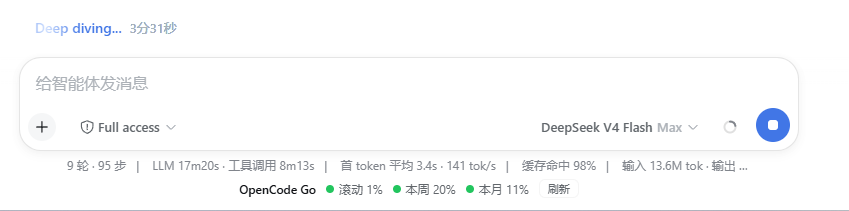
A DeepSeek Harness web-GUI plugin that shows your OpenCode Go plan usage in a compact readout docked under the composer, aligned with the input bar's width — the same seat the shipped stats line lives in. No settings page, no sidebar entries, nothing to click through: the three usage windows (5-hour rolling / weekly / monthly) are always visible while you chat.
Features
- Composer dock readout — one compact line under the input bar, perfectly aligned with it (
conversation.composer.dock, order 10, beside the shipped stats line) - Three usage windows — 5-hour rolling / weekly / monthly, with percent used and reset time
- Health-colored dots — green < 60%, amber 60–85%, red ≥ 85%
- Hover for details — tooltip shows window name, spend limit and reset time
- Manual refresh — a small refresh button re-queries the official endpoint on demand
- Silent fallback — when opencode-go is not configured, the dock renders nothing: no error noise, no placeholder; only real failures (network / HTTP / parse) surface an error line with retry
- i18n — Chinese and English dictionaries (follows the DSH UI language)
Prerequisites
- Node.js + DeepSeek Harness with the standard
dsh webprofile (theapi-gatewayclient Remote and theconversation.composer.dockslot are part of the default composition) - An OpenCode Go subscription, with the
opencode-gomodel configured in Settings → Models - An OpenCode Go API key (
sk-opencode-…) — see API key configuration
Install
Via GitHub
dsh plugin --profile web add github:xv-chang/dsh-opencode-go-usage-dock
Via npm
dsh plugin --profile web add npm:dsh-opencode-go-usage-dock
Profile activation
Since 0.1.2 the package declares a dsh.bundle profile patch, so dsh plugin add registers it as a profile layer automatically — no manual cordis.patch.yml editing needed.
Then restart dsh web so the host half and the served client bundle pick up the plugin.
Installing a version before 0.1.2? Add the row manually to
$DSH_HOME/profiles/web/cordis.patch.yml:- insert: - id: opencode-go-usage-dock name: 'dsh-opencode-go-usage-dock'
Configuration
Host-side tunables live on the plugin row in cordis.yml:
- id: opencode-go-usage-dock
  name: dsh-opencode-go-usage-dock
  config:
    baseUrl: https://opencode.ai/zen/go/v1/usage   # default
    timeoutMs: 15000                               # default
| Key | Default | Meaning |
|---|---|---|
baseUrl |
https://opencode.ai/zen/go/v1/usage |
The usage endpoint. |
timeoutMs |
15000 |
Fetch timeout in milliseconds. |
API key configuration
The plugin resolves the key from the DSH credentials seam only:
OPENCODE_GO_API_KEYin$DSH_HOME/.credentials.yaml(or as an environment variable).
No OpenCode CLI files are consulted — this plugin is a DSH feature and does not depend on an opencode installation.
Behavior
| State | Dock renders |
|---|---|
| opencode-go not in Settings → Models | nothing (silent) |
| No API key found | nothing (silent) |
| Request failed (network / HTTP / parse) | red error line + retry button |
| Success | OpenCode Go ● 滚动 1% ● 本周 20% ● 本月 11% [刷新] |
How it works
A dual-face plugin. The Host publishes the opencodeUsage Typert Remote service; the Client mounts it, registers the conversation.composer.dock slot, and renders the readout. Communication rides the harness /api RPC carrier.
| File | Role |
|---|---|
index.js |
Host half — OpencodeUsageGateway (TypertRemoteService, service key opencodeUsage) |
typert.host.js |
Hand-written Typert host manifest, registered via exports["./typert"] |
client.js |
Browser bundle in window.__ModuleLoader__.load format — mounts the Remote, registers the dock slot, renders the readout |
package.json |
Dual-face declaration: main + exports["./client"] + exports["./typert"] + dsh.client + dsh.bundle |
The usage endpoint
GET https://opencode.ai/zen/go/v1/usage
Authorization: Bearer <API_KEY>
Returns (community-verified shape; not yet in OpenCode's public docs, so parsing is defensive):
{
  "usage": {
    "rolling": { "status": "ok", "percent": 9,  "resetsAt": "2026-08-14T07:20:04.810Z" },
    "weekly":  { "status": "ok", "percent": 12, "resetsAt": "2026-08-17T00:00:00.810Z" },
    "monthly": { "status": "ok", "percent": 6,  "resetsAt": "2026-09-09T00:41:03.810Z" }
  }
}
percent is 0–100; resetsAt is ISO-8601.
FAQ
pnpm reports "missing peer react / @deepseek-ai/..." during install — is that normal?
Yes, safe to ignore. Those dependencies are provided by the DSH runtime: DSH resolves bundles two-anchor (installation first, profile second) and maintains a flat fallback directory at $DSH_HOME/profiles/node_modules so the plugin resolves the installation's built-in @deepseek-ai/* and react through ordinary Node parent-walk. pnpm only warns because the peers are not part of the profile dependency tree at install time; loading is unaffected. If you also see declares no dsh.bundle, upgrade to 0.1.2+ (it then registers itself as a profile layer automatically).
The dock does not appear. The slot is session-scoped: open any conversation. Then check, in order: (1) opencode-go is present in Settings → Models; (2) an API key resolves (see above); (3) the plugin row is in the profile patch layer and dsh web was restarted.
I see "API Key 无效或已过期 (401)". Your key is wrong or expired — re-issue it in the OpenCode dashboard and update the credentials seam.
Quota limits shown in tooltips ($12/$30/$60) drift. They follow the OpenCode Go plan and are displayed for context only; the endpoint response does not include them.
License
MIT
Related plugins
dsh-web(原 dsh-web-ui)
 zhu1090093659
/dsh-web-ui
dsh-web(原 dsh-web-ui):任务看板、git 图、右侧面板、远程移动端 UI、桌宠、实时 token 统计与皮肤中心的全家桶。仓库已更名 zhu1090093659/dsh-web,根目录声明 dsh.bundle.patch,支持根 Git 入口安装。
dsh plugin --profile web add github:zhu1090093659/dsh-webdsh-web-all 聚合包(原 dsh-web-ui-all)
zhu1090093659zhu1090093659/dsh-web-ui/packages/dsh-web-ui-all
旧整包路径 packages/dsh-web-ui-all 已随仓库更名 dsh-web 迁移:现聚合目录为 packages/dsh-web-all,npm 聚合包 @linxin666/dsh-web-all。与总仓根 Git 入口是同一产品的两种整包方式,不重复计数。
dsh plugin --profile web add @linxin666/dsh-web-all@latestdsh-TUI
 ccch1mneyyy
/dsh-TUI
Claude Code 风格全屏终端 UI:像素鲸鱼顶栏、实时工作状态行、思考流式展开。
dsh plugin --profile web add github:ccch1mneyyy/dsh-TUIdsh-cc-tui
ccch1mneyyyccch1mneyyy/dsh-cc-tui
一个美观且实用的 Claude Code 风格 TUI 插件:像素鲸鱼顶栏、双流光大字、实时工作状态行、思考流式展开、双击 Esc 时间回溯、蓝白上下文进度条 + TPS 仪表。 零核心改动,纯插件挂载。安装插件即可启用,卸载后不会留下核心补丁。 献给钟爱tui的各位极客们 A beautiful, practical Claude…
dsh plugin --profile web add github:ccch1mneyyy/dsh-cc-tuideepseek-balance-whale-widget
 meteornox
/deepseek-balance-whale-widget
DSH 小鲸鱼余额挂件(DeepSeek Balance Whale Widget)
dsh plugin --profile web add github:meteornox/deepseek-balance-whale-widgetDSH-better-sidebar
 omdsh-dev
/DSH-better-sidebar
侧边栏完整工作台:内置文件渲染编辑、终端、Git 与子代理,支持三方插件注册新 Tab。
dsh plugin --profile web add github:omdsh-dev/DSH-better-sidebar