
Sessions & Messages
dsh-archive-manager
z953218350/dsh-archive-manager · ★ 12
 z953218350
Codex-style archived session manager for DSH Web UI — view, search, restore, and delete archived sessions from the settings page
Manifest details
安装
dsh plugin --profile web add github:z953218350/dsh-archive-managerGitHub 源码安装:首次需按提示配置 allowBuilds 构建授权后重试
For install and environment setup, plus plugin development tutorials, see DSH community docs ↗
README
Table of contents
中文 | English


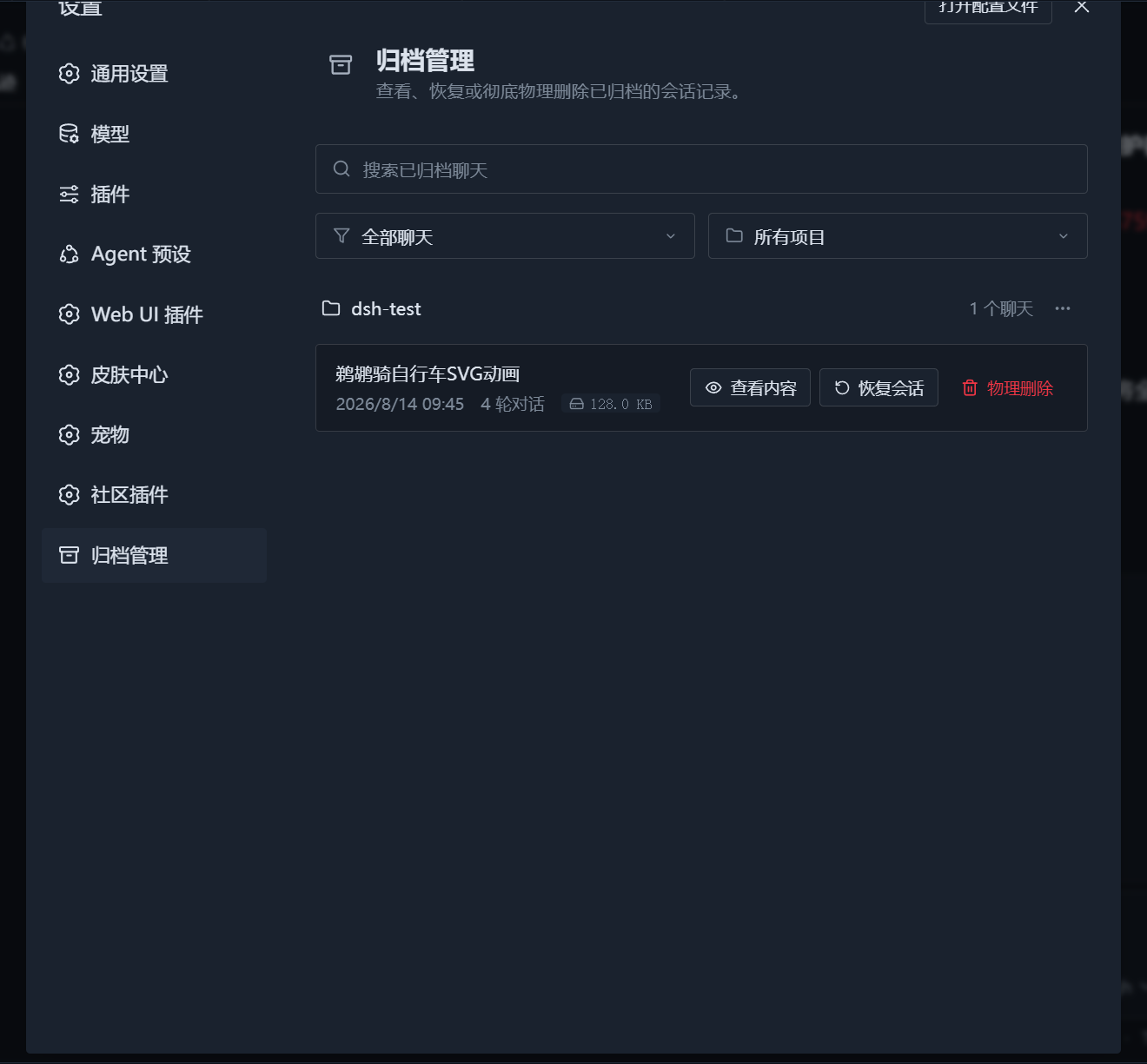
DSH Archive Manager is a DeepSeek Harness (DSH) Web UI plugin that adds a Codex-style archived session manager to the settings page. It lets you view, search, filter, preview conversation history, restore, and permanently delete archived sessions, with live synchronization to the sidebar.
The current release requires DSH >=0.1.2-alpha.2 and supports the DSH_HOME environment variable for selecting the DSH data directory.
Features
- Codex 1:1 look and interaction
- The card follows the DSH official card style (dark background, 12px rounded corners, rotating chevron), loaded under Settings -> Plugins.
- Includes a top search bar (
Search archived chats), sort/filter controls (All chats/Earliest first), and project filters (All projects/ individual projects).
- Group by project with batch management
- Sessions are grouped by workspace/project automatically, with folder icons and conversation counts.
- Each project group has a
···menu with one-click delete all contents in this project.
- Real content parsing, preview and restore
- Parses the underlying session stream to show accurate titles, creation time, turn count and disk size, with Codex-style dates (e.g.
August 15, 2026, 1:34). - Conversation preview: click View to browse the latest 50 user/assistant messages in a modal (system-injected text is stripped automatically) — no need to restore first.
- Unarchive: restores a session back to its original workspace list immediately, with SSE real-time sidebar sync.
- Permanent delete: removes the session metadata and disk data files to free storage.
- Parses the underlying session stream to show accurate titles, creation time, turn count and disk size, with Codex-style dates (e.g.
- Zero-dependency decompression engine
- Built-in zstd multi-frame decompressor based on Node
zlib; reads bothsession.jsonl.zstdand plainsession.jsonl— no externalzstdCLI required.
- Built-in zstd multi-frame decompressor based on Node
- Live two-way sync
- When the card is open, it listens for sidebar archive changes and updates the archive list automatically when sessions are archived or restored.
Installation
DSH uses the Cordis modular microkernel architecture. You can install the plugin in either of the following ways.
Requirements
- DSH
>=0.1.2-alpha.2 - The Web Profile
- Node.js built-in
zlib(no externalzstdCLI is required)
Option 1: Install from npm (recommended)
1. Use the DSH CLI
dsh plugin --profile web add -w @mlgbnb/dsh-archive-manager
To pin the current release:
dsh plugin --profile web add -w "@mlgbnb/dsh-archive-manager@1.0.10"
2. Or install it in the web profile directory
# When DSH_HOME is set
cd "$DSH_HOME/profiles/web"
# When DSH_HOME is unset
cd ~/.dsh/profiles/web
npm i @mlgbnb/dsh-archive-manager
# or with pnpm
pnpm add -w @mlgbnb/dsh-archive-manager
After installation, make sure $DSH_HOME/profiles/web/package.json (~/.dsh/profiles/web/package.json when DSH_HOME is unset) contains @mlgbnb/dsh-archive-manager in its dsh.profile.bundles array:
{
  "name": "dsh-profile-web",
  "private": true,
  "dependencies": {
    "@mlgbnb/dsh-archive-manager": "^1.0.10"
  },
  "dsh": {
    "profile": {
      "bundles": [
        "@deepseek-ai/dsh-base",
        "@deepseek-ai/dsh-web-app",
        "@mlgbnb/dsh-archive-manager"
      ]
    }
  }
}
Option 2: Install from a local source directory (link)
dsh plugin --profile web add -w "link:/path/to/dsh/plugin/dsh-archive-manager"
If startup reports duplicate sub-package declarations after
add, check thedsh.profile.bundlesarray in$DSH_HOME/profiles/web/package.json(~/.dsh/profiles/web/package.jsonwhenDSH_HOMEis unset) to ensure it only contains root packages (such as@mlgbnb/dsh-archive-manager,@linxin666/dsh-web-ui-all, etc.).
Usage
Start the DSH web service:
dsh --profile web
# or
dsh web
Open http://127.0.0.1:3080/, click the gear icon at the bottom of the sidebar, and enter Settings -> Plugins. The "Archive Manager" card will appear there.
Project Structure
dsh-archive-manager/
├── cordis.patch.yml   # Cordis plugin profile declaration patch
├── package.json       # Package manifest and dependency declarations
├── README.md          # Chinese documentation
├── README.en.md       # English documentation
├── docs/
│   └── images/        # Screenshots and preview images
├── lib/
│   ├── index.js       # Host (provides /api/dsh-archive-manager/* routes and workspaceRegistry interaction)
│   └── client.js      # Client (Codex-style card interaction, project grouping, search/filter, preview modal, delete and restore logic)
└── src/
    └── index.ts       # TypeScript companion source (type declarations and host entry notes)
At runtime, the plugin reads storages/workspace.json, storages/session_projcache.json, and the sessions/ directory under the DSH data root. The root is resolved using DSH's DSH_HOME rules and defaults to ~/.dsh.
License
MIT
Related plugins
archify
 tt-a1i
/archify
架构图生成 Skill 总仓(多宿主):可校验的自包含架构图、工作流图、时序图、数据流图与生命周期图。DSH 安装不走本仓根——根目录不是 DSH bundle,请用适配包 @tt-a1i/archify-dsh(见 DSH 集成条目)。
dsh plugin --profile web add @tt-a1i/archify-dsh@1.0.0DeepSeek-Bot
 Fei2411
/DS-Bot/ds-bot
DS Bot: a team of long-lived Bots for DeepSeek Harness, with Main Bots, Bot-to-Bot messages and group chats
dsh plugin --profile web add 'ds-bot@0.2.4'Study-Mate
 Miaotofu01
/Study-Mate
StudyMate learning skills and lesson engine for DeepSeek Harness, Google Antigravity, Codex and ChatGPT Work.
dsh plugin --profile web add 'github:Miaotofu01/Study-Mate#d8114f38363272852b339d6788b2f8f007243b43'dsh-plugin-subscriptions
 V1ki
V1ki/dsh-plugin-subscriptions
把 ChatGPT(Codex)、Claude 与 Grok(X Premium)订阅用作 DeepSeek Harness 的 LLM provider——Web UI OAuth 登录,无需 API key
dsh plugin --profile web add github:V1ki/dsh-plugin-subscriptionsRabiRoute
 vb2250158
/RabiRoute/plugins/rabi-dsh-context
Connect DSH lifecycle events and conversation context to Rabi Manager.
dsh plugin --profile web add 'github:vb2250158/RabiRoute#e483f87e68cef2c8f5112b101e333b1a9577a9f7&path:/plugins/rabi-dsh-context'dsh-deepseek-web-login
 cv-superding
/dsh-deepseek-web-login
Unofficial DSH plugin: use chat.deepseek.com web models as a DSH LLM provider (browser login capture + PoW solving + SSE streaming + prompting-based tool calls), provider route deepseek-web
dsh plugin --profile web add 'dsh-deepseek-web-login@1.0.3'