
Workflow & Automation
dsh-skills-manager
zhangzheng25/dsh-skills-manager · ★ 0
 zhangzheng25
DeepSeek Harness plugin: skill management settings page. Browse/search agent skills, view SKILL.md details, and copy content/path directly from Settings → Skill Manager.
Manifest details
安装
dsh plugin --profile web add github:zhangzheng25/dsh-skills-managerGitHub 源码安装:首次需按提示配置 allowBuilds 构建授权后重试
For install and environment setup, plus plugin development tutorials, see DSH community docs ↗
README
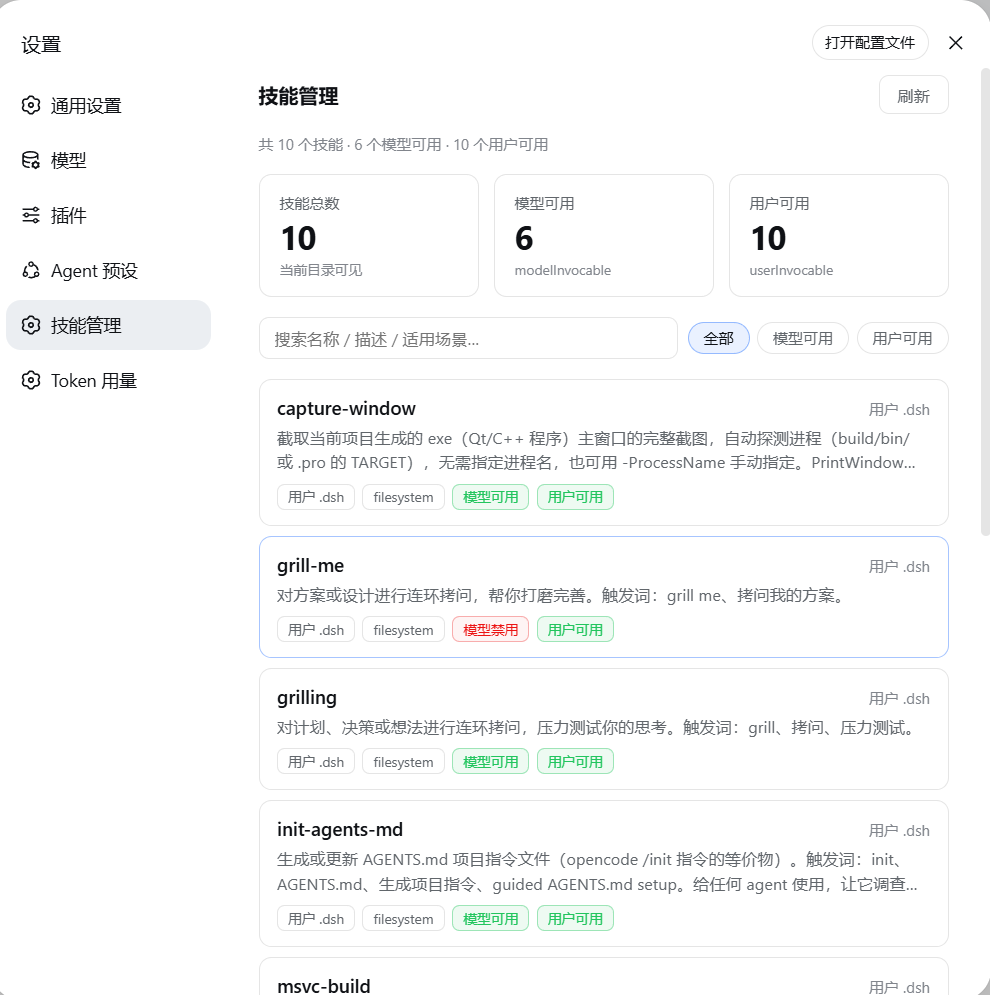
A DeepSeek Harness plugin: shows the current agent skill catalog on Settings → Skill Manager. It reads the host ctx.skills registry directly and merges skills from every agent preset scope, so there is no hand-maintained list.
Features
- 🧭 Skill catalog — lists all merged skills visible to the current environment: name, description, source (project
.dsh/ project.agents/ custom / user.dsh/ user.agents/ bundled / runtime), provider, model/user invocation policy, and the preset scopes where each skill appears. - 🔍 Search & filter — live search by name / description / when-to-use; filter by "all / model-invocable / user-invocable".
- 📄 Details — clicking a skill expands the detail panel directly below that card:
whenToUse, file path, resource directory, metadata, and the fullSKILL.mdbody. - 📋 Copy — one-click copy of the skill body or local path.
- 🔄 Auto refresh — polls every 30 seconds, plus a manual refresh button; shows a warning when skill discovery is incomplete.
- 🎨 Native DSH style — adapts to light/dark themes using
--dsw-alias-*tokens; flat cards, 1px hairline borders, 8–10px radii, no shadows.
Note: this is a read-only management surface. The DSH skill registry is owned by providers (mainly
dsh-skill-filesystem) and does not expose deletion/disable for existing skills; this plugin focuses on browsing, searching, viewing bodies, and locating files.
Install
From GitHub:
dsh plugin --profile web add github:zhangzheng25/dsh-skills-manager
Or from a local directory:
dsh plugin --profile web add E:\path\to\dsh-skills-manager
dsh plugin forwards installation to pnpm in the profile directory and reconciles dsh.profile.bundles; dsh.bundle.patch (cordis.patch.yml) inserts the plugin row into the host composition, and dsh.client.platform: "web" makes the web shell load client/bundle.js.
Restart DSH after installation, then open Settings → Skill Manager.
Architecture
┌────────────────────────── Host (Node.js) ──────────────────────────┐
│ src/index.js                                                       │
│  • ctx.get('skills')               ← read the DSH skill registry   │
│  • skills.snapshot({ cwd })        ← read the global layer          │
│  • skills.snapshot({ cwd, scope }) ← read and merge every preset    │
│      (cwd = process.cwd(), so the filesystem provider scans project│
│       roots; user/custom/bundled roots are always scanned)         │
│  • skills.get(name, { cwd, scope })← load full SKILL.md on demand  │
│  • webServer.register('/skills-manager/snapshot')                  │
│  • webServer.register('/skills-manager/skill?name=…')              │
└─────────────────────────────────────────────────────────────────────┘
                          │ fetch('/skills-manager/snapshot')
                          │ fetch('/skills-manager/skill?name=…')
                          ▼
┌────────────────────────── Client (browser) ────────────────────────┐
│ client/bundle.js — hand-written web bundle following the           │
│ client-modules protocol (window.__ModuleLoader__.load)             │
│  • slots.inject('settings.section') → "Skill Manager" settings page│
│  • metric cards + search + filters + skill list + inline details   │
│  • 30s polling, manual refresh, copy body/path                     │
└─────────────────────────────────────────────────────────────────────┘
Data sources
- Catalog:
ctx.skills.snapshot({ cwd })returns the global-layerSkillSummary[]plus acompleteflag; then each available agent preset is read withctx.skills.snapshot({ cwd, scope })and merged/deduplicated by skill name. - Details:
ctx.skills.get(name, { cwd })tries the global layer first, then each preset scope, returningSkillDefinition(content,path,metadata,resourceBase). - Project scope:
cwdis the host processprocess.cwd().dsh-skill-filesystemfinds the nearest.gitancestor and scans<projectRoot>/.dsh/skillsand<projectRoot>/.agents/skills, while always scanning user/custom/bundled roots. - Preset scopes:
ctx.agentPresets.standingKeyFor(preset.id)provides the standing scope key for each preset, soskill-filesystemmounted by an agent preset in the web profile is visible too.
Known limitations
- Read-only: this plugin cannot enable/disable/edit existing skills; it only views and copies.
- Settings nav icon: DSH's
settings.sectionregistration currently supports onlyid/order/label; the settings nav icon is hardcoded bydsh-client-ui-settings-general, and non-built-in ids fall back to the gear icon. Theconversation.viewmain-tab approach was investigated, but this version keeps only the settings entry while waiting for an official icon option or a better extension point.
Development
npm run check # node --check on both halves (syntax only, no tests)
The client bundle is hand-written to match the client-modules bundle protocol; there is no build step.
License
Related plugins
rea
 morluto
/rea
逆向工程 CLI/MCP 工具(rea-agents):用 agent 逆向应用行为到原生二进制。独立工具而非 DSH 插件——仓库根 package.json 无 dsh 字段,本条目仅作外部工具参考。
npx rea-agents@latest setupArchify DSH 集成
 tt-a1i
/archify/integrations/deepseek-harness
Archify 的 DeepSeek Harness 集成:经 @tt-a1i/archify-dsh 适配包安装,在 dsh 中生成经校验的自包含交互式架构图、流程图、时序图、数据流图与生命周期图。安装信息基于已发布的 1.0.0;候选 1.1.0 与未发布的源码修复不计入。
dsh plugin --profile web add @tt-a1i/archify-dsh@1.0.0dsh-plugin
 Q00
Q00/ouroboros/integrations/dsh-plugin
通过 DSH MCP 客户端挂载 Ouroboros 的纯配置包,在 DSH 中提供 36 个涵盖需求访谈、Seed、执行、评估与演化流程的工具。
dsh plugin --profile web add github:Q00/ouroboros#path:/integrations/dsh-pluginanswer-me-with-html
 QingYunA
/answer-me-with-html
Answer hard questions with a one-page HTML: the model writes a short Markdown draft; the bundled CLI handles templates, SVG auto-layout and an STE controlled-writing check.
dsh plugin --profile web add 'github:QingYunA/answer-me-with-html#aab9ea19f50f038054eeb60475bbb7ea26f149e3'dashi-taskboard
 chuspeeism
/dashi-taskboard/integrations/deepseek-harness
现代化可灵活嵌入的任务面板,支持 Codex、DeepSeek Harness
dsh plugin --profile web add 'github:chuspeeism/dashi-taskboard#9aa1f4e7936d841748ed4e0fc7781b57ae6ae6cc&path:/integrations/deepseek-harness'dsh-agent-teams
 NanmiCoder
/dsh-agent-teams
AgentTeams 多智能体团队。
dsh plugin --profile web add github:NanmiCoder/dsh-agent-teams