Tools & Capabilities
Deepseek-Harness-EAC
zouyuxuan122/Deepseek-Harness-EAC · ★ 2,325
 zouyuxuan122
Wraps the official deepseek-ai/deepseek-harness (@deepseek-ai/dsh, the everything-is-a-plugin agent harness) into an out-of-the-box Windows / Linux desktop client, and embraces the community ecosystem on top: skins, plugins, tools, memory — anything you can think of, one click to install.
安装
dsh plugin --profile web add github:zouyuxuan122/Deepseek-Harness-EACGitHub 源码安装:首次需按提示配置 allowBuilds 构建授权后重试
For install and environment setup, plus plugin development tutorials, see DSH community docs ↗
README
Table of contents
- Contents
- Capabilities
- Quick start
- Download and launch
- Architecture
- From launch to execution
- Keep complexity within explicit boundaries
- Plugins and appearance
- Desktop companion capabilities
- Extension distribution
- Skin contracts
- Data and environments
- Development
- Repository map
- Documentation and community
- Community and support
- Contributors and acknowledgements
- License and acknowledgements
- Star history
EAC = Embracing All Creation(揽尽万象)




Download · Quick start · Architecture · Community
Turn agent capabilities into a desktop built for real work.
Deepseek Harness EAC is an open-source desktop workspace built on DeepSeek Harness. It brings conversations, project files, tool execution and extensions together, with native windows, separate runtime environments and bundled dependencies to get you from installation to work.
EAC · Embracing All Creation. Open capabilities, clear boundaries: the shell owns the desktop experience, the service layer owns orchestration, Harness owns the agent, and extension packages open up new possibilities.
Contents
Capabilities
| From intent to action | What EAC provides |
|---|---|
| Start working | Bundled Node.js, npm and dsh resources launch the local Web UI without a separate Node installation |
| Collaborate around a project | Run tasks in a workspace, inspect session file changes, and review or restore edits through the file view |
| Manage long conversations | Request-path context compaction and bounded overflow recovery manage context space |
| Shape your workflow | Quick-setup controls for vision models and persona-related settings |
| Keep extensions manageable | Aggregated catalogs, installation and activation controls, plus protection-center snapshots, health checks and rollback |
| Separate environments | DPX manages environment identity, default data paths and runtime variables by release channel |
| Work as a desktop app | Tauri native windows, tray, single-instance behavior and exit policies with managed service lifecycles |
| Customize appearance | User skins arrive through market packages and integrate through explicit host contracts |
Model requests use your configured provider. Activation, compatibility and additional dependencies depend on the distribution package and extension configuration.
Quick start
Download and launch
EAC Launcher (standalone multi-instance / multi-kernel manager, installs alongside the desktop app):
EAC-Launcher v0.1.0 for Windows x64
ships its own Node 24.22.1 runtime, so no separate Node install is needed. See
launcher/README.md for usage.
Latest stable Windows release: v6.0.0. Other platforms link to the most recent published package for each listed format.
| Platform | Version | Download | Updated (UTC+8) |
|---|---|---|---|
| Windows x64 | v6.0.0 | Full Setup | 2026-10-05 02:23 |
| Windows x64 | v6.0.0 | Full Portable | 2026-10-05 02:23 |
| Windows x64 | v6.0.0 | Lite Setup | 2026-10-05 00:49 |
| Windows x64 | v6.0.0 | Lite Portable | 2026-10-05 00:49 |
| Linux x64 | v5.3.6 | AppImage | 2026-09-03 19:30 |
| Linux x64 | v5.3.6 | deb | 2026-09-03 19:30 |
| Linux x64 | v4.4.0-linux | rpm | 2026-08-19 19:13 |
| macOS arm64 | v5.1.0 | dmg | 2026-08-27 15:12 |
| macOS arm64 | v5.1.0 | app.zip | 2026-08-27 15:12 |
Release notes · SHA256SUMS.txt
Update times are GitHub asset update timestamps. Platform packages may belong to different release generations; consult their release notes before installation. Windows uses WebView2; cloud models require network access and provider credentials.
- Launch the application and wait for the local dsh service and Web UI.
- Configure your model, including provider and API key.
- Select a workspace, describe a task, and let the agent work in project context.
- Review the result through conversation output and file-change views.
- Extend as needed with plugins suited to your workflow.
Compute the file hash in PowerShell and compare it with the checksum manifest from the same release:
Get-FileHash -LiteralPath '<downloaded-file-path>' -Algorithm SHA256
Architecture
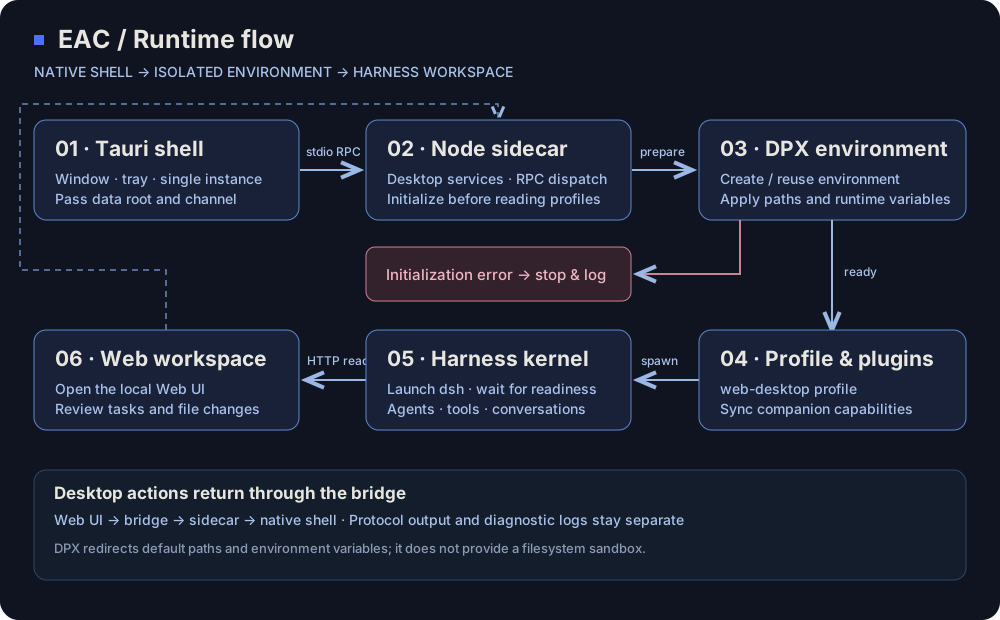
One desktop entry point. Three distinct responsibilities. EAC separates operating-system integration, runtime orchestration and the agent kernel so that desktop experience and extensions can evolve independently.
| Layer | Responsibility | Entry point |
|---|---|---|
| L1 · Native desktop | Windows, tray, single instance, exit policy and native integration | Rust shell |
| L2 · Orchestration | Environment initialization, profiles, process startup, desktop RPC, plugin synchronization and management | Node sidecar, desktop services |
| L3 · Harness kernel | Agent execution, conversations, tools, Cordis plugin tree and Web UI | Kernel dependencies |
| DPX · Environment infrastructure | Registration, directory layout, default paths and runtime variables | Environment adapter, dsh-dpx |
From launch to execution
- The shell locates resources and starts the sidecar, passing the product data root and channel.
- DPX creates or reuses an environment, applying runtime variables before user configuration and plugin modules are read.
- The service layer prepares the profile and companion plugins, launches dsh, and waits for readiness.
- The main window opens the Web UI. Harness handles conversations and tool execution; desktop operations reach the host through the bridge.
Rust and Node communicate over stdio JSON-RPC, keeping protocol output separate from diagnostics. Environment initialization failures stop startup and report the error instead of continuing under the wrong data root.
Keep complexity within explicit boundaries
- Separate native integration from business services. Native capabilities belong in L1, orchestration in L2, and extensions connect through plugin contracts.
- Reuse established environment management. DPX owns registry state, identity and default paths; EAC calls it through an adapter instead of maintaining a second rule set.
- Make distribution explicit. Plugin directories, synchronization manifests and dependency artifacts define the package, exposing missing resources during staging.
- Pin interface resources. UI skin manager and default-shell artifacts are locked and checked with SHA-256 during assembly.
Read the decisions on layering, environment isolation, and core scope.
Plugins and appearance
Desktop companion capabilities
Companion plugins use Harness host/client contracts. The staging script assembles these modules:
| Area | Plugins | Purpose |
|---|---|---|
| File collaboration | dsh-file-changes, dsh-client-file-changes |
Session change projection, file-change views and restore controls |
| Context management | dsh-compact |
Request-path compaction and bounded overflow recovery |
| Quick setup | dsh-easy-setup |
Vision-model, persona and related configuration |
| Discovery | dsh-unified-market |
Aggregated catalogs and installation management |
| Protection | dsh-plugin-shield |
Snapshots, health checks and rollback controls |
| Localization | dsh-eac-locale-compat |
English UI compatibility for companion and community plugins |
| UI stability | dsh-viewport-lock, dsh-settings-scroll-fix |
Viewport constraints and settings-panel wheel/overflow fixes |
| Boot animation | dsh-boot-animation |
Full-frame intro animation on launch / pinned-session entry (clips embedded) |
| WeChat channel | dsh-wechat-plugin |
Drive local sessions from WeChat; no OpenClaw or public IP needed |
| Remote access | ds-harness-remote |
End-to-end encrypted, P2P-first remote access from PC / Android / Web |
Extension distribution
Plugins are classified as builtin / recommended / external. Assembly manifests define bundled capabilities; package metadata defines recommended collections and external extensions. Choose extensions for their functionality, and manage them by source, version constraints and license.
Explore the distribution specification, plugin ledger, and source records.
Skin contracts
User Web UI skins are installed through market packages; without an activated skin, the host uses its native appearance. The shell's UI skin manager and system.default resources are pinned by the artifact lock. Regions, slots and exposed capabilities are defined in the host profile.
Skins own presentation; the host owns capabilities and window boundaries. Explicit contracts reduce coupling between visual customization and business logic.
Data and environments
EAC organizes desktop data in separate DPX environments, using the web-desktop profile. Environments are named eac-<channel>: the same channel reuses its environment, while different channels have separate storage.
<product-data-root>/
└── dpx/dsh-environments/eac-<channel>/
    ├── .dpx-environment.json      # environment identity
    ├── dsh-home/                 # profiles, sessions, skills and configuration
    ├── home/                     # environment user directory
    ├── appdata/                  # application data
    ├── localappdata/             # local application data
    ├── tmp/                      # temporary files
    └── workspace/                # environment workspace
Windows defaults to %LOCALAPPDATA%\Deepseek Harness EAC; other platforms derive their system data directory. Host ~/.dsh is detected and reported, not automatically migrated, deleted or overwritten.
Quit the application before backing up the actual product data root and separate project directories. Portable describes the application distribution format; environment configuration determines where data lives.
DPX redirects default paths and environment variables; it does not provide filesystem sandboxing. Operating-system permissions still govern access to explicit absolute paths. See environment.ts.
Development
Repository map
tauri-shell/       Rust shell, sidecar, bridge, resource staging and packaging
dsh-desktop/       TypeScript services, companion plugins, build scripts and tests
third_party/       External dependencies pinned to commits
.sync/             Plugin source, distribution and synchronization ledgers
docs/adr/          Architecture decisions and module boundaries
The packaging matrix covers Windows/Linux x64 and arm64; the repository also includes macOS platform configuration. Get binaries from Releases and consult the installer workflow for source builds.
Use Git, Node.js 24, pnpm 11.7.0 and Rust stable. Windows needs C++ build tools for the Rust target; Linux needs Tauri/WebKitGTK dependencies.
git clone --recurse-submodules https://github.com/says693/Deepseek-Harness-EAC.git
cd Deepseek-Harness-EAC
git submodule update --init --recursive
node tauri-shell/check-dpx-pin.mjs
npm install --global pnpm@11.7.0

cd dsh-desktop
node scripts/fetch-kernel.js
npm run ci:install
npm run typecheck
npm run build
npm run fetch-runtime
npm test
cd ..
Kernel dependencies use local vendor/kernel artifacts. Fetch the pinned kernel before installing dependencies. Building downloads dependencies from the network.
For Windows, from the repository root:
node tauri-shell/stage-resources.mjs --target=win32 --skip-npm
node dsh-desktop/scripts/verify-staged-runtime.mjs
cd tauri-shell
cargo fetch --locked
npx -y @tauri-apps/cli@2 build --verbose
For Linux, use --target=linux and set APPIMAGE_EXTRACT_AND_RUN=1 during the build. Ubuntu build dependencies:
sudo apt-get update
sudo apt-get install -y libwebkit2gtk-4.1-dev libappindicator3-dev librsvg2-dev patchelf libfuse2 rpm
For portable archives, see make-portable.mjs.
Run type checks, tests and ledger checks from dsh-desktop:
npm run typecheck
npm test
node scripts/plugin-ledger.mjs
node scripts/plugin-sync.mjs validate
Startup, bridge, environment and packaging changes also require relevant runtime validation. Choose checks using the development guide and follow CONTRIBUTING.md.
Documentation and community
- Architecture decisions: layering, isolation, skins and plugin distribution.
- Issues: reproducible bugs, feature proposals and feedback.
- Contribute: code, extension compatibility, platform support and documentation.
- Contributors: the people building EAC.
- Ecosystem credits: plugin authors, skin sources and license records.
Include the application version, operating system, package format, reproduction steps and redacted logs in bug reports to help trace environment and runtime behavior.
Community and support
Discuss workflows, plugins and troubleshooting with the community.
| Discord | Issue tracker | |
|---|---|---|
| 1083832019 | DSH-EAC | GitHub Issues |
Contributors and acknowledgements
Thank you to the developers who contribute code, platform support, plugins and documentation to EAC.
Ebony-Vinyl · metaone01 · jing-hy · zixin947 · says693 · dtyg123 · lanyun077 · BAIKAI23333 · nishantpurohit04 · ViscaOwO · jiang8297 · Luoye-hb · look-back-lysj · T-Auto · maliang233 · lbn2011
Special thanks to @Nuomi9 for the macOS port (PR #234). Plugin and skin authors are recorded in ecosystem credits.
License and acknowledgements
EAC uses the MIT License. Thanks to DeepSeek Harness, dsh-dpx, Tauri, and every plugin, skin, platform and documentation contributor.
Third-party components retain their own copyrights and licenses. Skin sources include CC BY-NC-SA 4.0 material; usage and redistribution must follow the relevant component terms.
Star history
Related plugins
dsh-weknora
 Tencent
/WeKnora/packages/dsh-weknora
把 WeKnora 知识库接入 dsh 的四个只读工具:列出知识库、混合检索原文片段、按顺序还原单篇文档,以及直接取用 WeKnora 自己带引用的 RAG 或 ReAct agent 回答(含可续聊的 session id)。
Added:
dsh plugin --profile web add @wxg-prc-cpg/dsh-weknoratreg
 superdesigndev
/treg
给 Agent 的工具目录:按「要做的事」检索约 2,600 个外部接口(SEO 与 SERP、外链、社交、人物与公司信息补全、广告库、抓取),查看参数与单次调用价格后直接调用,凭据由服务端注入。附带技能,MCP 行在未设置 TREG_TOKEN 前保持禁用。
Added:
dsh plugin --profile web add github:superdesigndev/tregdsh-anchored-standard
 xiaobright
/dsh-anchored-standard
两阶段 DeepSeek Harness 预设:先 Minimal 对齐的 bootstrap,再切完整 Standard 工具(Project2 98/99)
Added:
dsh plugin --profile web add github:xiaobright/dsh-anchored-standardDSHA-dshapp
 DSH-APP
/DSHA/app/src/main/assets/app-integration
DSHA 后台任务、网页返回和草稿恢复适配
Added:
dsh plugin --profile web add 'github:DSH-APP/DSHA#a6d4de140acc7a085d6afd4b9d413404e004b939&path:/app/src/main/assets/app-integration'AI-Novel-Writer
 EthanYoQ
/AI-Novel-Writer
本地优先 AI 小说创作工作台,提供 Windows/macOS 桌面版与 DeepSeek Harness 插件开发预览,支持角色、大纲、章节蓝图、审稿修稿和本地模型。
Added:
dsh plugin --profile web add github:EthanYoQ/AI-Novel-Writerdeepseek-design
 Devin-AXIS
/deepseek-design
DeepSeek Harness 可编辑设计系统:AI 生成、可视化编辑、模板市场与 PPT|Native Design & PPT Studio for DeepSeek Harness.
Added:
dsh plugin --profile web add github:Devin-AXIS/deepseek-design