
UI Enhancements
dsh-desktop
zsyu9779/dsh-desktop · ★ 12
 zsyu9779
Unofficial cross-platform desktop app for DeepSeek Harness. Native Wails shell for the DSH Web UI on macOS, Windows, and Linux.
Manifest details
安装
dsh plugin --profile web add github:zsyu9779/dsh-desktopGitHub 源码安装:首次需按提示配置 allowBuilds 构建授权后重试
For install and environment setup, plus plugin development tutorials, see DSH community docs ↗
README
Table of contents
DeepSeek Harness Desktop
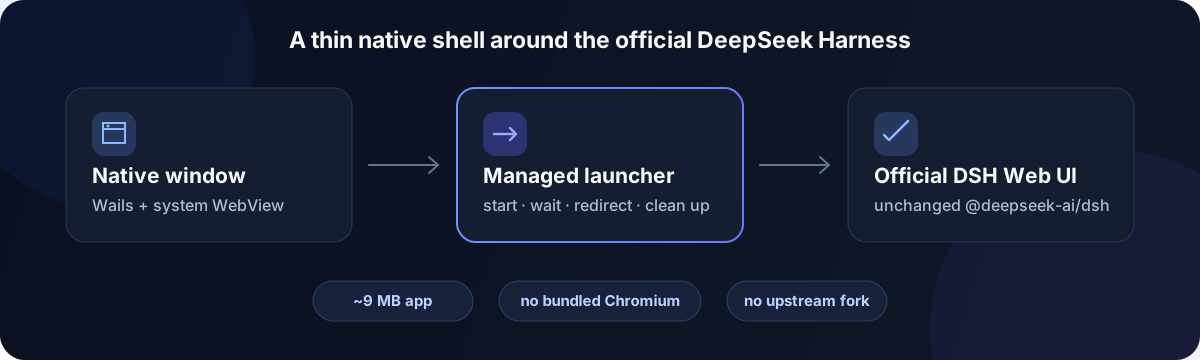
An Electron-free desktop shell for DeepSeek Harness: a native, Codex-style desktop app built with Wails (Go) + the system's native WebView, wrapping the official
@deepseek-ai/dshWeb UI.
The same functionality, an order of magnitude smaller. ~9MB on disk, no bundled Chromium, no upstream fork, no vaporware.
⚠️ This is a community project with no affiliation with DeepSeek / DeepSeek AI. DeepSeek Harness itself is still in developer preview (v0.1) and its interfaces may change at any time.
Why this one
Most DeepSeek Harness desktop shells are built on Electron. This project takes a different path:
| Typical Electron shell | This project | |
|---|---|---|
| Stack | Electron (bundles Chromium + Node) | Wails (Go) + system native WebView |
| App size | ~100MB+ | ~9MB |
| Runtime | Carries a full Chromium baseline of memory/processes | Reuses the system WebView (macOS WKWebView / Windows WebView2) |
| Upstream | Forks source + patches + pins a submodule | Runs the official npm package; upgrade = one version string |
| Roadmap | Homepage full of "coming soon" | Only promises what works after install |
How it works
- On launch, uses
npm execto bootstrappnpm@11.7.0, then starts@deepseek-ai/dsh@0.2.1-rc.2 web --no-openon a managed port (prefers3080, falls back to a random port if taken) - Polls the local Web UI until ready, then redirects the window to that address
- Cleans up the entire process tree on exit (npm → pnpm → node → dsh); if the service exits unexpectedly, shows a native dialog and quits
All sessions, models, plugins, and settings are provided by upstream DeepSeek Harness — this project does not modify or re-implement its UI.
Features
- Native window / Dock icon / app menu
- Launch splash: status, retry, open in browser, view logs
- LAN phone remote: scan a QR code on the same Wi-Fi to control the current DeepSeek Harness from a mobile browser
- Preinstalled plugins: ships open-editor, diff-review, account-login, webview-compat and webview-links into the DSH profile at launch, version-tracked and upgradeable; the file-changes, subagent-max and agent-preset-compat plugins an earlier release installed are removed on upgrade
- Auto-installs and pins the DeepSeek Harness version
- Logs to
~/.dsh-desktop/logs/dsh.log
Phone remote (LAN)
Connect the computer and phone to the same trusted Wi-Fi, click Enable in the launch panel, and scan the QR code to open the current DeepSeek Harness on the phone. No account or cloud relay is required; tasks, sessions, and files remain on the computer.
- Pairs a Device through a QR code containing a one-time code, then stores a Device credential in an HttpOnly cookie
- Regenerating the pairing code only replaces an unused code; revoke an already paired Device from the Device list
- Disabling phone remote stops the LAN proxy and clears the pending pairing code while retaining paired Device records
The current release uses self-signed HTTPS on a trusted LAN and displays the certificate fingerprint for verification. It is not public-internet remote access; do not expose it directly to the internet.
Download / Install
Get the installer for your platform from Releases:
- macOS:
dsh-desktop-darwin-universal.dmg(universal, Intel + Apple Silicon) - Windows:
dsh-desktop.exe(portable, amd64) - Linux:
dsh-desktop-linux-amd64.tar.gz
macOS packages have been signed with a Developer ID certificate and notarized since v0.1.9; if Gatekeeper still blocks the app, right-click it and choose "Open" to allow it, or run
xattr -d com.apple.quarantine "/Applications/dsh-desktop.app".
Requirements
- Go 1.23+
- Node.js 22.19+ on the 22.x line, or Node.js 24.2+ on the 24.x line
- Wails v2:
go install github.com/wailsapp/wails/v2/cmd/wails@latest
Build
wails build
# output at build/bin/dsh-desktop.app
Develop
wails dev
Release
Push a v* tag to trigger GitHub Actions to build and publish macOS / Windows / Linux installers to Releases:
git tag v0.1.7
git push origin v0.1.7
Configuration (environment variables)
| Variable | Purpose |
|---|---|
DSH_COMMAND |
Override the launch command, e.g. DSH_COMMAND="pnpm dsh" or a local source path |
DSH_WORKSPACE |
dsh working directory (defaults to the home directory) |
DSH_HOME |
Passed through to dsh; controls where profiles are stored |
Updating the DeepSeek Harness version
Edit the dshPackage constant in dsh.go.
Clear boundaries
- Not an official DeepSeek product, and doesn't pretend to be.
- Not a fork or patched DeepSeek Harness — it runs the official npm package and follows upstream releases.
- Phone remote currently supports trusted-LAN access only; there is no public relay, account sync, or push notification service.
- No "coming soon" feature list. Everything written in this README works right after install.
License
MIT. DeepSeek Harness itself is MIT licensed.
Related plugins
dsh-web(原 dsh-web-ui)
 zhu1090093659
/dsh-web-ui
dsh-web(原 dsh-web-ui):任务看板、git 图、右侧面板、远程移动端 UI、桌宠、实时 token 统计与皮肤中心的全家桶。仓库已更名 zhu1090093659/dsh-web,根目录声明 dsh.bundle.patch,支持根 Git 入口安装。
dsh plugin --profile web add github:zhu1090093659/dsh-webdsh-web-all 聚合包(原 dsh-web-ui-all)
zhu1090093659zhu1090093659/dsh-web-ui/packages/dsh-web-ui-all
旧整包路径 packages/dsh-web-ui-all 已随仓库更名 dsh-web 迁移:现聚合目录为 packages/dsh-web-all,npm 聚合包 @linxin666/dsh-web-all。与总仓根 Git 入口是同一产品的两种整包方式,不重复计数。
dsh plugin --profile web add @linxin666/dsh-web-all@latestdsh-TUI
 ccch1mneyyy
/dsh-TUI
Claude Code 风格全屏终端 UI:像素鲸鱼顶栏、实时工作状态行、思考流式展开。
dsh plugin --profile web add github:ccch1mneyyy/dsh-TUIdsh-cc-tui
ccch1mneyyyccch1mneyyy/dsh-cc-tui
一个美观且实用的 Claude Code 风格 TUI 插件:像素鲸鱼顶栏、双流光大字、实时工作状态行、思考流式展开、双击 Esc 时间回溯、蓝白上下文进度条 + TPS 仪表。 零核心改动,纯插件挂载。安装插件即可启用,卸载后不会留下核心补丁。 献给钟爱tui的各位极客们 A beautiful, practical Claude…
dsh plugin --profile web add github:ccch1mneyyy/dsh-cc-tuideepseek-balance-whale-widget
 meteornox
/deepseek-balance-whale-widget
DSH 小鲸鱼余额挂件(DeepSeek Balance Whale Widget)
dsh plugin --profile web add github:meteornox/deepseek-balance-whale-widgetDSH-better-sidebar
 omdsh-dev
/DSH-better-sidebar
侧边栏完整工作台:内置文件渲染编辑、终端、Git 与子代理,支持三方插件注册新 Tab。
dsh plugin --profile web add github:omdsh-dev/DSH-better-sidebar