
Tools & Capabilities
dsh-tui-mcp-manager
0N3-0/dsh-tui-mcp-manager · ★ 0
 0N3-0
Native file-backed MCP server manager for dsh-TUI
Manifest details
安装
dsh plugin --profile web add 'dsh-tui-mcp-manager@0.1.6'从 npm 安装预构建包
For install and environment setup, plus plugin development tutorials, see DSH community docs ↗
README
Table of contents


English | 中文
Manage MCP servers, Sets, tools, and runtime state inside dsh-TUI.
Run /mcp-manager to open the full-screen interface without leaving the terminal.
Install
Requires Node.js ^22.19 || >=24, dsh 0.2.1-rc.2, and dsh-TUI >=0.16.1 <0.17.0.
npm install -g @deepseek-harness-tui/dsh-tui@0.16.1
dsh plugin --profile dsh-tui add dsh-tui-mcp-manager
dsh-tui
Run /mcp-manager inside the TUI. The interface follows dsh-TUI's language setting; use /lang zh or /lang en to switch.
dsh-TUI 0.16.1 admits this plugin through its Loader. /mcp-manager uses host-mediated registration with plugin attribution and commands.invoke grants; failed admission leaves the command unregistered. Language preferences support the new ~/.dsh-tui/settings.json.
Start with dsh-tui (or dst); the launcher uses the dsh-tui profile by default, with no --profile argument. Integration checks cover its composition order, command invocation and cleanup with dsh 0.2.1-rc.2 and TUI 0.16.1. The older dsh --profile dsh-tui entry can leave commands unregistered due to TUI 0.16.1 admission ordering; this plugin does not bypass admission or grants.
Upgrade dsh with npm install -g @deepseek-ai/dsh@0.2.1-rc.2. TUI 0.16.1 declares support for this version and can be installed directly:
dsh plugin --profile dsh-tui add @deepseek-harness-tui/dsh-tui@0.16.1
Preview
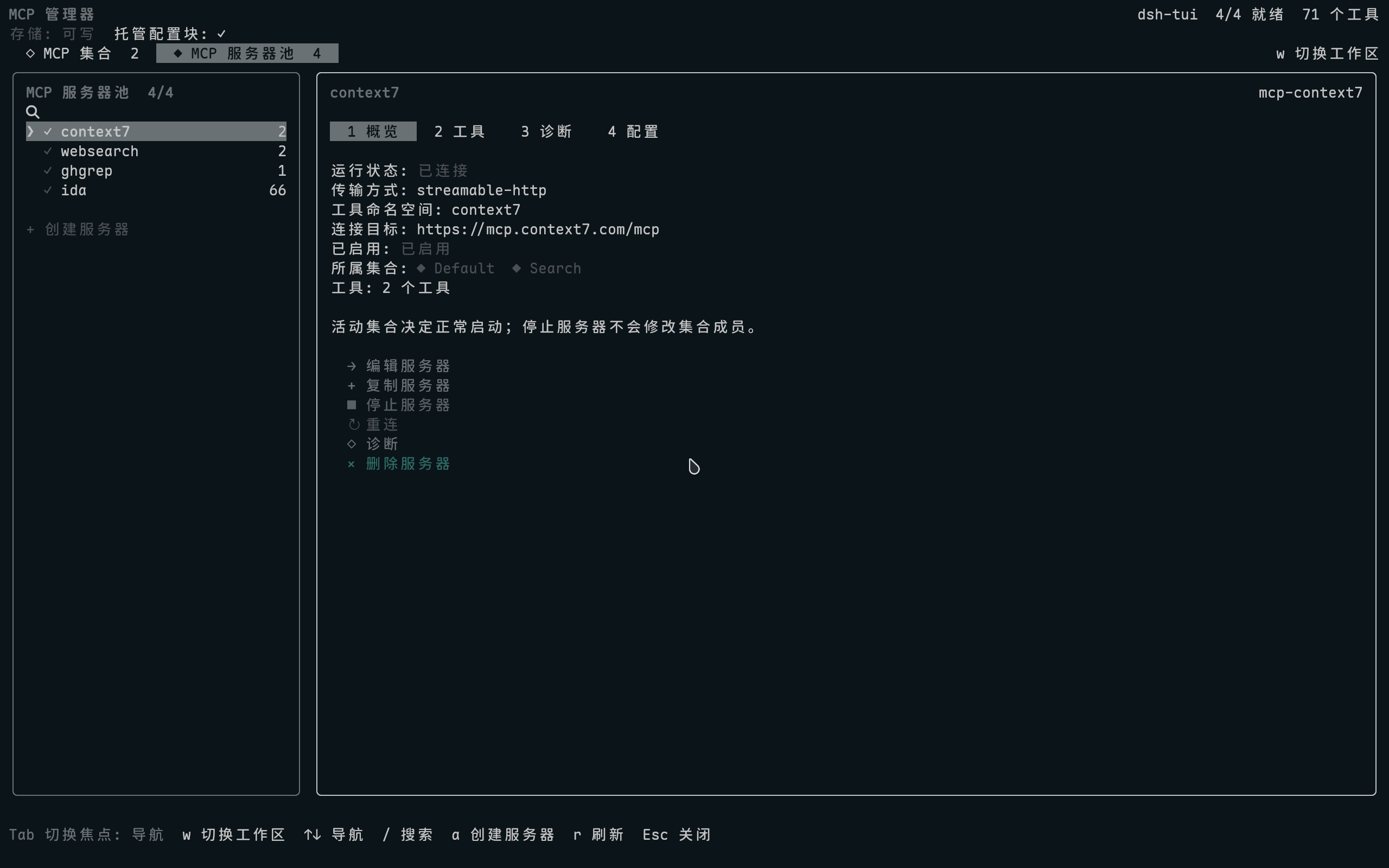
Set management · Tools and schemas · Create a Set · Create a server
Highlights
| Area | Capabilities |
|---|---|
| Server pool | Create, duplicate, edit, stop, reconnect, and globally delete servers |
| MCP Sets | Organize members, control runtime and startup state, and deduplicate shared servers |
| Tools | Inspect descriptions and input schemas; search by name or description |
| Diagnostics | Automatically check configuration, connectivity, runtime state, and tools |
| Credentials | Reference sensitive environment variables and headers through DSH credentials |
The server editor exposes dsh 0.2's maxInstructionBytes limit for UTF-8 server instructions in the system prompt (default: 32,768). DSH's shared resource tools read MCP resources on demand.
Server, Set, and tool lists all support / search. Server overviews list every containing Set: ◆ is active and ◇ is inactive.
How Sets work
The effective server list is the union of all active Sets. Shared members start only once:
Set A: context7, websearch
Set B: websearch, ghgrep
Run:   context7, websearch, ghgrep
On first use, a Default Set is created from existing MCP servers; after saving, it is an ordinary Set. Stopping a server affects only the current process and never changes Set membership. Resume it in place at any time.
Controls
| Key | Action |
|---|---|
Tab |
Switch focus between navigation and details |
↑ / ↓ |
Select a node, action, field, or tool |
← / → |
Switch detail tabs or move the input cursor |
Enter |
Open, edit, or confirm |
/ |
Search the current list |
w |
Switch between Sets and the server pool |
Esc |
Go back or cancel |
Configuration and Safety
- Server configuration is read from and written to the active profile's
cordis.patch.yml; there is no second database. - Sets live in
mcp-manager.sets.ymlbeside the patch and contain only Set metadata and server IDs. - The complete read/modify/write cycle shares the DSH profile configuration lock, preventing concurrent windows or processes from overwriting each other; content outside the managed block is preserved.
- Related server and Set changes commit together using
fsync, atomic rename and an undo journal. Failed saves roll back; the next access recovers interrupted commits. Later manual edits are preserved and reported as conflicts. - Globally deleting a server also removes its references from every Set.
- Sensitive values go only to the credentials provider; configuration stores references.
- When upgrading from older dsh releases, a profile without a managed block imports its legacy MCP configuration once from
settings.yamlorsettings.yaml.imported.
The Diagnostics tab checks Loader/Fiber state, executable or URL, working directory, credentials, connectivity, and tool count. A server outside the active Set union temporarily enables its existing Loader configuration for the handshake, reads its state, and restores the disabled state afterward without changing Sets or files.
Switching servers, leaving Diagnostics or closing the scene cancels diagnosis and cleans up temporary activation. Lists and other servers remain usable during diagnosis. Background polls, manual refreshes and state events share a refresh queue, and unchanged views retain their snapshot identity.
Stop server also disables only the in-memory Loader row. A configuration or profile reload clears that temporary state.
The plugin modifies only the block between these markers in cordis.patch.yml. Legacy markers, row prefixes, and metadata keys remain compatible.
# >>> dsh-mcp-manager: managed MCP server rows >>>
# managed MCP server rows
# <<< dsh-mcp-manager: managed MCP server rows <<<
Sensitive fields leave only a reference in the patch:
secretHeaders:
  api-key:
    ref: MY_CONTEXT7_KEY
    prefix: ''
Values never appear in server summaries, profile patches, or RPC snapshots.
The journal makes multi-file commits recoverable; external file watchers may briefly observe sequential file replacements. The owner-only recovery journal is .mcp-manager.transaction.json inside the profile. Keep it intact while recovery is pending.
Update and Uninstall
Run the install command again to update. To uninstall:
dsh plugin --profile dsh-tui remove dsh-tui-mcp-manager
git clone https://github.com/0N3-0/dsh-tui-mcp-manager.git
cd dsh-tui-mcp-manager
pnpm install --frozen-lockfile
pnpm check
dsh plugin --profile dsh-tui add .
Common release checks:
pnpm check
npm pack --dry-run
pnpm smoke:package
pnpm check includes type checking, builds, real MCP tests, cross-process writes and crash recovery, diagnostic cancellation, real React lifecycle checks, and TUI Loader admission and command grants. Tests use temporary profiles and local fixtures. The host integration script alone enables Node --expose-internals for Cordis Loader’s built-in module-resolution fallback.
Local add . is only for development. Regular users do not need to clone or build the repository.
Compatibility
dsh-TUI 0.16.1 with dsh 0.2.1-rc.2 is the current build and runtime baseline. The package is pure ESM, MIT licensed, and published through GitHub Actions OIDC Trusted Publishing.
The plugin runs in the host process. Manifest permissions are audit and policy declarations, not an operating-system sandbox.
License
MIT © 2026 0N3-0
Related plugins
dsh-weknora
 Tencent
/WeKnora/packages/dsh-weknora
把 WeKnora 知识库接入 dsh 的四个只读工具:列出知识库、混合检索原文片段、按顺序还原单篇文档,以及直接取用 WeKnora 自己带引用的 RAG 或 ReAct agent 回答(含可续聊的 session id)。
dsh plugin --profile web add @wxg-prc-cpg/dsh-weknoratreg
 superdesigndev
/treg
给 Agent 的工具目录:按「要做的事」检索约 2,600 个外部接口(SEO 与 SERP、外链、社交、人物与公司信息补全、广告库、抓取),查看参数与单次调用价格后直接调用,凭据由服务端注入。附带技能,MCP 行在未设置 TREG_TOKEN 前保持禁用。
dsh plugin --profile web add github:superdesigndev/tregdsh-anchored-standard
 xiaobright
/dsh-anchored-standard
两阶段 DeepSeek Harness 预设:先 Minimal 对齐的 bootstrap,再切完整 Standard 工具(Project2 98/99)
dsh plugin --profile web add github:xiaobright/dsh-anchored-standardDeepseek-Harness-EAC
 zouyuxuan122
/Deepseek-Harness-EAC
把官方 deepseek-ai/deepseek-harness(@deepseek-ai/dsh,一切皆插件的 agent harness) 封装为开箱即用的 Windows / Linux 桌面客户端,并在其上拥抱社区万象:皮肤、插件、工具、记忆——你所能想到的,一键皆可装。
dsh plugin --profile web add github:zouyuxuan122/Deepseek-Harness-EACDSHA-dshapp
 DSH-APP
/DSHA/app/src/main/assets/app-integration
DSHA 后台任务、网页返回和草稿恢复适配
dsh plugin --profile web add 'github:DSH-APP/DSHA#a6d4de140acc7a085d6afd4b9d413404e004b939&path:/app/src/main/assets/app-integration'deepseek-harness-remote
 liguobao
/deepseek-harness-remote
基于 DeepSeek Harness 插件机制的多端远程访问方案,让桌面端与 Android 端安全连接并操作远程 Harness。(A multi-device remote access solution built on the DeepSeek Harness plugin system, enabling desktop and Android clients to securely connect to and operate a remote Harness.)
dsh plugin --profile web add github:liguobao/deepseek-harness-remote