
Tools & Capabilities
dsh-status-flair
AkotaP/dsh-status-flair · ★ 2
 AkotaP
DSH web plugin: event-driven running status with custom event groups, live output phases, independent look/text rotation, and DSH-native defaults.
Manifest details
安装
dsh plugin --profile web add 'github:AkotaP/dsh-status-flair#cbc45bee815817c424728d43071654f8cd85a1ee'GitHub 源码安装:首次需按提示配置 allowBuilds 构建授权后重试
For install and environment setup, plus plugin development tutorials, see DSH community docs ↗
README
Table of contents
中文 | English
Plugin version: 0.4.0 — not released.
Version 0.4.0 moves large configuration into a plugin-owned file and adds import and backup. Actual profiles are not automatically migrated; see migration notes (Chinese).
A DeepSeek Harness (DSH) web plugin for restyling the chat's running status row.
Turn "Deep diving for 7s ···" into whatever you like: copy, colour, size, icon and shimmer speed.
No chat component is rewritten and the DSH installation directory is untouched: the look comes from injected CSS, the copy from one wrapper around LocaleRuntime#translate.
What it changes
| Layer | Official source (DSH 0.2.1-rc.2) | What this plugin does |
|---|---|---|
| Copy | chat.deepDiving / chat.deepDivingFor from @deepseek-ai/dsh-client-ui-chat |
Wraps locale.translate and intercepts only those two keys |
| Colour | .running → color: var(--dsw-alias-label-deep-diving) |
Re-sets the colour and --dsw-alias-label-shimmer on [data-chat-running] |
| Size | .running → font-size: calc(var(--dsh-content-font-size) - 2px) |
Overrides font-size; the icon size follows it |
| Icon | 60-frame APNG used as a mask (3 s loop) plus a static SVG fallback |
Hides both layers and paints the preset icon with a mask on the container (built-in SVG / official APNG / custom SVG·PNG) |
| Shimmer | _dsh-row-shimmer-* keyframes from TextShimmer (1.5 s, steps(48), .3 s delay) |
Overrides animation-duration / play-state; 0 ms turns it off |
Selectors use stable hooks only: [data-chat-running], [data-shimmer], :has(> [data-shimmer]). Build-time hashed class names (xz4KEq_, _1rdzk_) are never used.
Two layers
- Look preset: colour, size, icon, shimmer. It never stores "is it random".
- Text preset: a named group of candidate lines. It never stores a selection strategy either.
- Selection:
- Look: one fixed preset, or a random draw from the candidates;
- Copy: first fix or randomly draw a group, then take one line inside it by "always the first / random / rotate in order".
The look, text group and line within the group are selected independently, so random looks and random copy can be combined.
Switch timing: global triggers are configured separately for looks and copy. Each layer draws once per turn by default; optional fixed/random time intervals or every-N-step triggers can re-draw it during a turn. Disabling a layer’s per-turn trigger keeps its previous selection until another trigger fires. When event policies are enabled, matching rules can also change the active selection strategy.
Default means "take DSH's own"
Looks and copy each have a default entry (shown as "Default (DSH)" in the UI).
- With the default look, the plugin sets no CSS variable and removes its
<html>marker, so DSH renders the running row itself. - With the default copy,
translatepasses through and DSH's ownchat.deepDivingForis shown. - This id is not a stored preset; the plugin never copies the official colour/size/whale/copy, so DSH upgrades flow through automatically.
- The settings preview reads
--dsw-alias-label-deep-diving,--dsh-content-font-sizeand the official locale strings live; the default look preview also pulls the official whale mask (APNG data URL) out of the stylesheets DSH injected, animation included. - The shipped configuration contains the three look presets only, no text groups: on first run the copy comes from DSH's official running row. Create a text group when you want custom copy.
Event policies (0.3.0)
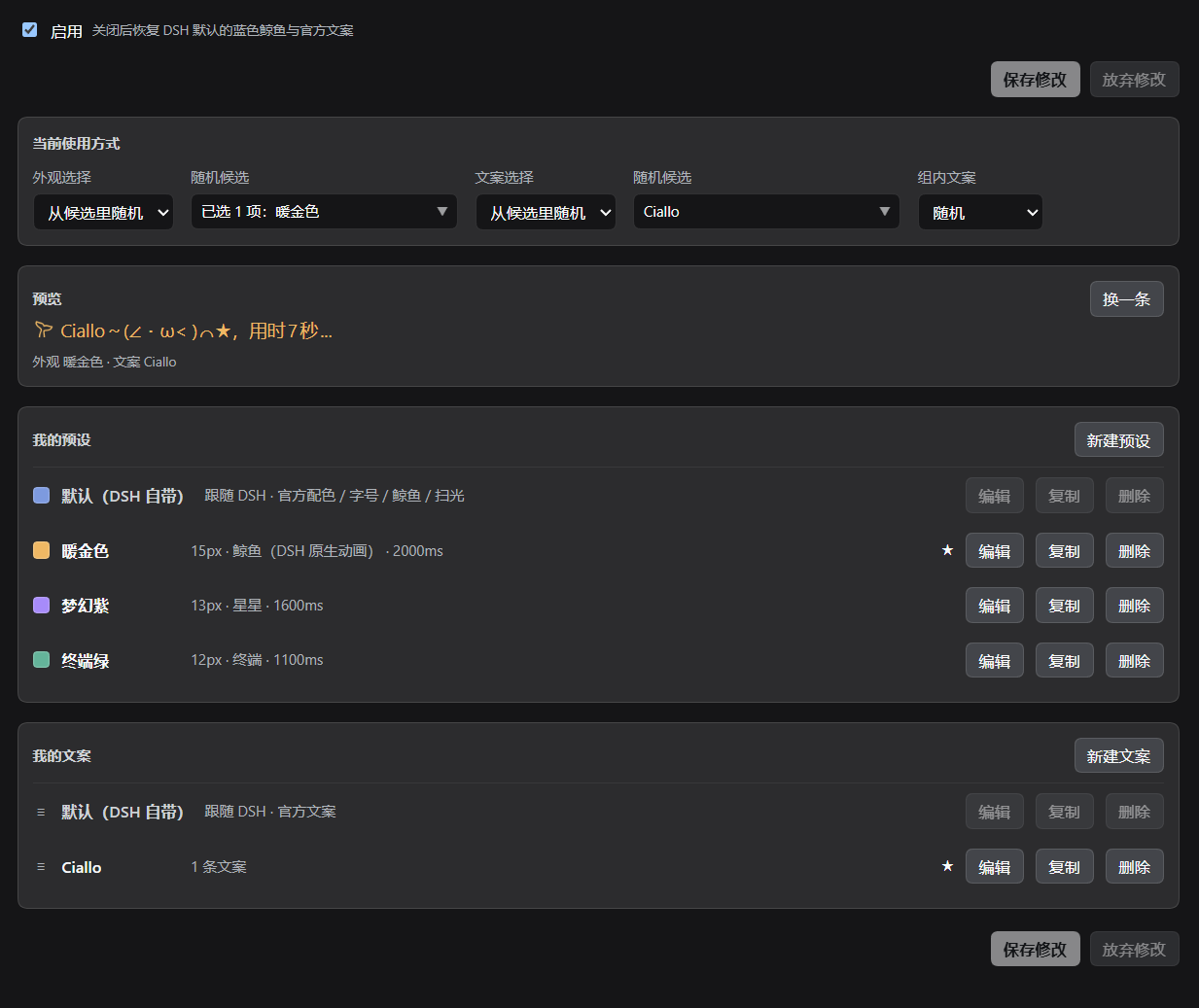
Version 0.3.0 adds event rules, custom groups and live output phases. The existing screenshot illustrates the older layout, not the new sibling tabs and rule controls.
Groups
- Activity (
activity) follows DSH’s 14 native activity categories:thinking,read,readImage,search,write,edit,commands,code,webSearch,webFetch,subagents,plan,questionsandtools. - Pulse (
pulse) represents a tool result:tool-errorortool-success. - Built-in groups are virtual client-side entries: activity IDs are
builtin:<activity-kind>; result IDs arebuiltin:tool-errorandbuiltin:tool-success. They are not stored ineventGroups. - A custom group contains
id,name,kind,activityKinds,toolNamesandevents. An activity group matches a native category or a specific tool name; tool names use exact matching. A pulse group matches a result type, optionally restricted to its listed tool names. - A rule and its groups must have the same
kind; activity and result groups cannot be mixed. Unknown extension tools generally fall undertools. A custom group with specific tool names distinguishes them without assuming automatic mapping to native categories.
Tool activity comes from the current Chat snapshot’s legacy.runningCalls, recursively including running PTC subcalls. The editor shows Detected tool activities to distinguish missing activity, rule-order overrides and ungrouped plugin tools. Outer code execution and inner file reads can coexist; the first matching rule still wins, and very short subcalls may be coalesced by the minimum refresh interval. Plugin tool names are not hardcoded as native capabilities; use exact-name custom groups.
Output phases
While a turn is open and no tool is running, three built-in groups are available:
builtin:waiting: no current output evidence, or the output block, attempt or step has ended.builtin:thinking: nonblank explicit reasoning deltas from the current attempt; hidden reasoning is never inferred.builtin:responding: nonblank visible text deltas from the current attempt, including commentary rather than necessarily the final answer.
Phases use live deltas from the existing main-session source, never historical text or the tail of partial.blocks. Block ends, finish, settlement, retries and session changes clear evidence. Initial attachment and reconnect recovery wait for fresh signals. No extra timeout guesses the phase during token gaps. Running tools continue to match tool categories.
Custom activity groups may also include waiting and responding in activityKinds. thinking no longer means every tool-free state; select all three groups in a rule to cover every tool-free state.
Rules and switching
Rules are evaluated in list order; only the first enabled, valid matching rule applies, without combining rules. Multiple groups referenced by one rule use OR matching. With no matching rule, the global selection applies.
Each rule contains id, name, enabled (default true), kind, groupIds, holdMs (default 2000ms) and a complete selection:
- Look:
presetMode,fixedPresetId,presetIds; - Text group:
textPresetMode,fixedTextPresetId,textPresetIds; - Line within the group:
textMode(first/random/sequential).
Rules reuse existing look and text presets, including the official default sentinel, without copying official assets. Rules inherit global triggers rather than defining their own. holdMs sets the pulse matching window; minRefreshMs sets the minimum interval between event-driven refreshes, defaulting to 3000ms (3 seconds), not a periodic three-second switch. Explicitly saved intervals are preserved. List order determines priority: a result rule that must take precedence belongs before activity rules that could also match.
Within the same session turn, a temporary status-row unmount or remount does not reset rule timing or redraw copy. While the shared source reports an open turn, actual session events determine termination and cleanup; row disappearance is only a fallback when that source is unavailable.
Defaults and lifecycle
The top-level Default selection and Event rules and groups tabs are siblings, with Default selection open initially. Switching only changes visibility; it does not change enablement or discard drafts. Switch timing, previews and preset libraries remain shared. A collapsed rule still exposes its enable and move controls; expand it to edit the configuration.
Fresh configurations include four editable starter rules, with the master switch still off:
| Rule | Included activity |
|---|---|
| Thinking and interaction | Waiting, explicit reasoning, questions, todos and goals |
| Information gathering | File and image reads, search, web search and fetch |
| Execution and operations | Writes, edits, commands, code, subagents and other tools |
| Reply | Visible text output, including commentary |
Every initial or newly added starter selects DSH’s own look and copy (default), independently of the global selection. Existing rules and an explicit empty rules: [] remain untouched. Add starter rules fills only missing stable IDs: four when none exist, two when two starters exist, and no additions once all four are present. Custom rules are separate and preserved; renaming a starter does not cause a duplicate. Existing choices and the master switch stay unchanged. Shipped names follow the interface language until manually renamed.
The example below illustrates event fields inside the stored flair data, not the DSH main configuration or a complete internal storage document. Omitting rules supplies the four starters; existing configurations are not automatically enabled:
{
  "eventGroups": [],
  "eventRules": { "enabled": false, "minRefreshMs": 3000 }
}
Event processing uses only the current main session’s existing shared event source. It opens no new follow stream and adds no host-side session subscriptions. History loading and reconnect recovery do not replay tool-result pulses. If the source is unavailable, the original global strategy remains in use.
The plugin page adds Event rules and groups: add and reorder rules in Event rules, or copy built-ins and create groups in Manage groups. Enter exact tool names one per line; edits apply on blur. Remove rule references before deleting a group. Sampling a rule affects only its local preview, not the real sequence cursor.
tool-error / tool-success follow DSH’s structured tool error flag, not parsed command output; a nonzero command exit is not necessarily a tool error.
Groups and rules use the same in-page draft and explicit-save workflow: editing alone does not persist them; only Save changes writes configuration. Discarding or leaving the page reverts unsaved edits. The health route adds only the custom-group count and the rule count, enabled count and master switch, not group or rule contents.
Details
- Multi-select candidates: random candidates are a checkable dropdown (fixed-positioned, so cards cannot clip it) with an "All" summary and select-all; unchecking the last item is blocked so there is never a zero-candidate state.
- The ★ in the preview: ★ marks the row the current preview actually sampled (one for the look, one for the copy); it re-samples when the selection changes, so it no longer drifts from what is displayed. Fixed mode shows a separate "Fixed" badge.
- Custom icons: six built-in SVGs, plus paste
<svg>…</svg>or upload an SVG / transparent PNG. The icon is used as a mask (only its alpha shape is taken) and follows the preset colour; uploaded markup is stripped of scripts, event attributes and external references. - Whale icon: the icon dropdown includes "Whale (DSH animation)". Nothing is copied: at runtime the plugin pulls the official APNG mask out of the stylesheets DSH injected. Colour and size follow the preset and the text shimmer stays under "Shimmer". The whale's own swing speed is baked into the APNG and cannot be changed by CSS; upload your own APNG (named
.png) or an SVG to change the animation. - In-page draft: every adjustment lands in a draft and applies live to the running row and preview; only Save changes writes the configuration. Discard changes, or leaving the page, reverts an unsaved draft. Save buttons sit at the top and the bottom, and the status line has a fixed slot, so the page never jumps.
- Default rows keep disabled buttons: the three buttons on a default row are shown but greyed out, which keeps the ★ and badges aligned with the custom rows.
Placeholders
Inside copy you can use DSH's native template syntax:
{duration}— replaced with the elapsed time DSH computed (7s/7秒, following the UI language);- any other
{name}is left as-is.
Example: Deep diving {duration} → "Deep diving 7s", updated every second.
Languages
The plugin ships both zh and en dictionaries and follows the DSH language setting. The shipped preset names (Warm gold / Violet dream / Terminal green), icon labels and the default line for a new text group are translated; names you rename yourself are kept exactly as typed and are never translated over.
Where to configure
Plugins → this plugin's page (Settings → Plugins → Status flair). The panel renders directly on the plugin page:
- enable switch, the two look/copy strategy layers (with multi-select candidates), live preview;
- create / edit / duplicate / delete for looks and text groups;
- Save changes / Discard changes at the top and the bottom.
The development version saves through an authenticated DSH plugin endpoint to <profile-dir>/dsh-status-flair/settings.json. The first save retains the original migration backup and installs a lightweight storage: file marker. Legacy flair remains read-compatible but is no longer volatile-writable. Removing the old main-config block requires explicit migration confirmation.
The data panel backs up the current configuration to a file and imports configuration shared by others. Migration prompts for a manual backup first. Import accepts only this plugin’s looks, copy and rules; the content becomes an in-page draft with a count summary and is persisted only by Save changes. Invalid JSON or another plugin’s document is rejected without touching the current draft. Custom icons are embedded as data:image/...;base64, so exported files carry the image bytes and contain no local file paths. Write failures or cross-page revision conflicts preserve the draft; corrupt files are never silently reset. Editing this repository does not execute a real migration. See migration notes.
Install
Installing changes the profile configuration under
%USERPROFILE%\.dshand requires restarting DSH (which interrupts running sessions). Please confirm first.
Repository: https://github.com/AkotaP/dsh-status-flair
From the Plugins page: sidebar Plugins → Add plugin, and enter the repository address https://github.com/AkotaP/dsh-status-flair (the same field also accepts an absolute local directory path or a tarball; once published to npm, the package name dsh-status-flair works too). DSH probes the repository with git ls-remote before handing it to pnpm; once installed, confirm it shows as enabled in the list.
One command (equivalent):
dsh plugin --profile desktop add https://github.com/AkotaP/dsh-status-flair
# Once published to npm, the package name works too:
# dsh plugin --profile desktop add dsh-status-flair
Let the agent install it (paste this into a DSH agent):
Install this repository into the current DSH
desktopprofile:https://github.com/AkotaP/dsh-status-flair. Use the sidebar Plugins page's Add plugin, ordsh plugin --profile desktop add https://github.com/AkotaP/dsh-status-flair. After installing, confirmdsh-status-flairis present in the profile'sdsh.profile.bundles, then ask me first before restarting DSH. After the restart, confirm the Status flair page opens its configuration panel.
Local development (link a checkout into a profile so source changes apply live): see Development below.
After installing, restart DSH; the Status flair plugin page shows the configuration panel. To uninstall: remove it from the Plugins page, or dsh plugin --profile desktop remove dsh-status-flair (and confirm the entry is gone from dsh.profile.bundles).
How it works
- The look is pure CSS overrides: the plugin never takes over rendering the running row. While enabled it marks
<html>and writes a few CSS variables; DSH's own component keeps working. With the default look, not even the marker is set. - The copy is one
translatewrapper: it intercepts onlychat.deepDiving/chat.deepDivingForand passes every other namespace/key through; with the default copy it simply passes through. - Independent persistence: profile-scoped JSON is saved through an authenticated owner-only endpoint, with same-host revision checks protecting edits from multiple pages. Legacy configuration is read-compatible and cleanup requires confirmation. An older host can use the legacy form fallback without offering migration. Read-only
GET /status-flair/healthstill exposes summaries only. - Defaults copy nothing: the official colour/size come from CSS variables, the whale mask from stylesheets DSH injected, the official copy from the locale; DSH upgrades flow through.
- Icons are masks: built-in SVG, the official APNG whale and custom SVG/PNG all contribute only their alpha shape; colour comes from the preset, shimmer and size follow the row.
- Legacy migration: old
presets[].textsis migrated into independenttextPresetson first read; the golden preset's old name 暖金色思考 becomes 暖金色. - Boundary: the running row is not a slot and has no official replacement point, so this is a "seam" approach; after a DSH upgrade, run the tests and refresh the page first.
Development
# offline: fake DOM + fake ctx + mini React
node --test --test-isolation=none
Sandboxed environments must pass --test-isolation=none (the default per-file child process uses pipes, which the sandbox rejects).
Link a checkout into a profile for real-host debugging:
# in the profile directory
pnpm add link:<absolute repo path>
# then append "dsh-status-flair" to the profile package.json's dsh.profile.bundles
# and edit cordis.patch.yml content once to trigger a hot recompose (HMR compares content; touch does nothing).
Artifacts: lib/index.js (host half: Config schema + read-only health route), lib/client.js (browser bundle). Client-half edits hot-reload via client-hmr without a page refresh; host-half edits need one profile recompose.
Release history is in CHANGELOG.md.
Compatibility
- Node.js
>=20 - DSH
>=0.2.1-rc.2 @deepseek-ai/dsh-client-ui-settingsmust be installed
License
Related plugins
dsh-weknora
 Tencent
/WeKnora/packages/dsh-weknora
把 WeKnora 知识库接入 dsh 的四个只读工具:列出知识库、混合检索原文片段、按顺序还原单篇文档,以及直接取用 WeKnora 自己带引用的 RAG 或 ReAct agent 回答(含可续聊的 session id)。
dsh plugin --profile web add @wxg-prc-cpg/dsh-weknoratreg
 superdesigndev
/treg
给 Agent 的工具目录:按「要做的事」检索约 2,600 个外部接口(SEO 与 SERP、外链、社交、人物与公司信息补全、广告库、抓取),查看参数与单次调用价格后直接调用,凭据由服务端注入。附带技能,MCP 行在未设置 TREG_TOKEN 前保持禁用。
dsh plugin --profile web add github:superdesigndev/tregdsh-anchored-standard
 xiaobright
/dsh-anchored-standard
两阶段 DeepSeek Harness 预设:先 Minimal 对齐的 bootstrap,再切完整 Standard 工具(Project2 98/99)
dsh plugin --profile web add github:xiaobright/dsh-anchored-standardDeepseek-Harness-EAC
 zouyuxuan122
/Deepseek-Harness-EAC
把官方 deepseek-ai/deepseek-harness(@deepseek-ai/dsh,一切皆插件的 agent harness) 封装为开箱即用的 Windows / Linux 桌面客户端,并在其上拥抱社区万象:皮肤、插件、工具、记忆——你所能想到的,一键皆可装。
dsh plugin --profile web add github:zouyuxuan122/Deepseek-Harness-EACDSHA-dshapp
 DSH-APP
/DSHA/app/src/main/assets/app-integration
DSHA 后台任务、网页返回和草稿恢复适配
dsh plugin --profile web add 'github:DSH-APP/DSHA#a6d4de140acc7a085d6afd4b9d413404e004b939&path:/app/src/main/assets/app-integration'deepseek-harness-remote
 liguobao
/deepseek-harness-remote
基于 DeepSeek Harness 插件机制的多端远程访问方案,让桌面端与 Android 端安全连接并操作远程 Harness。(A multi-device remote access solution built on the DeepSeek Harness plugin system, enabling desktop and Android clients to securely connect to and operate a remote Harness.)
dsh plugin --profile web add github:liguobao/deepseek-harness-remote