
Tools & Capabilities
dsh-settings-hub
Amengclass/dsh-settings-hub · ★ 0
 Amengclass
Unify third-party plugin settings in DeepSeek Harness — auto-discover, group, and reorder plugin settings under one collapsible nav entry.
Manifest details
安装
dsh plugin --profile web add 'dsh-settings-hub@0.1.3'从 npm 安装预构建包
For install and environment setup, plus plugin development tutorials, see DSH community docs ↗
README
Table of contents
dsh-settings-hub
Unify third-party plugin settings in DeepSeek Harness





Highlights
- Unified entry — All third-party plugin settings automatically grouped under "扩展设置项", no more scattered across the sidebar
- Auto-discovery — Newly installed plugins appear automatically, no manual config needed
- Group by parent — Sub-settings grouped by their parent plugin via dependency analysis
- Drag reorder — Drag to reorder groups and items, order persisted to localStorage
- Ghost drag — Original item stays in place while a semi-transparent ghost follows the cursor
- Zero intrusion — No DSH source modifications; uses the official shadow mechanism on
sidebar.settings - Works on both fronts — Compatible with
dsh weband the DSH desktop app (DSH 0.1.x / 0.2.x)
How it works
┌─────────────────────────────────────────────┐
│              DeepSeek Harness               │
│  ┌──────────────┐  ┌──────────────────────┐ │
│  │  Native       │  │  扩展设置项 ▾        │ │
│  │  通用设置     │  │  ┌─ Plugin Group A ─┐│ │
│  │  模型        │  │  │  Sub-item 1      ││ │
│  │  插件        │  │  │  Sub-item 2      ││ │
│  │  Agent 预设  │  │  ├─ Plugin Group B ─┤│ │
│  │              │  │  │  Sub-item 1      ││ │
│  └──────────────┘  │  └──────────────────┘│ │
│                    └──────────────────────┘ │
└─────────────────────────────────────────────┘
Native settings (General/Models/Plugins/Agent Presets) stay untouched. Third-party plugin settings auto-collapse under "扩展设置项".
Screenshots
| Collapsed | Expanded |
|---|---|
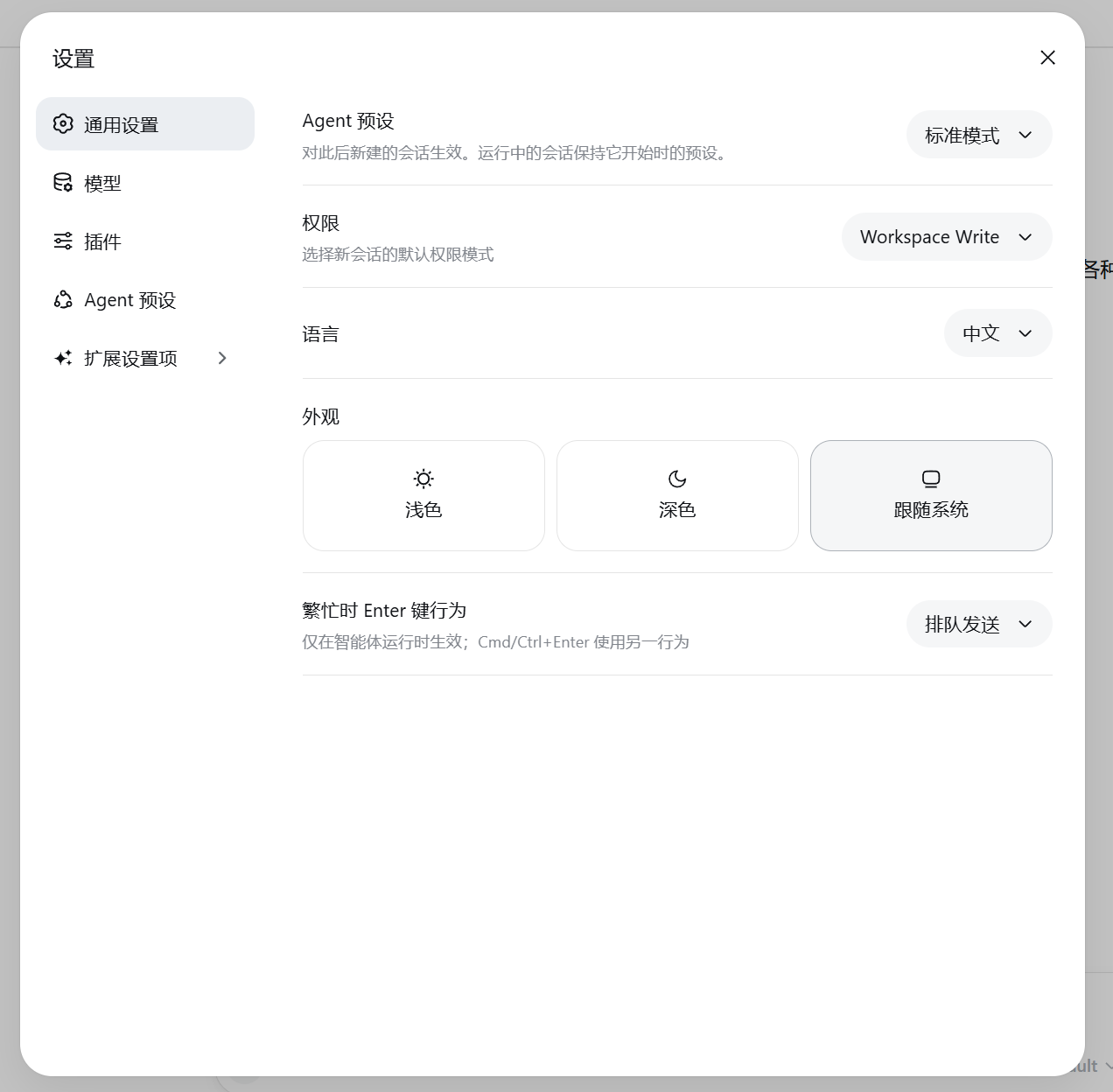 |
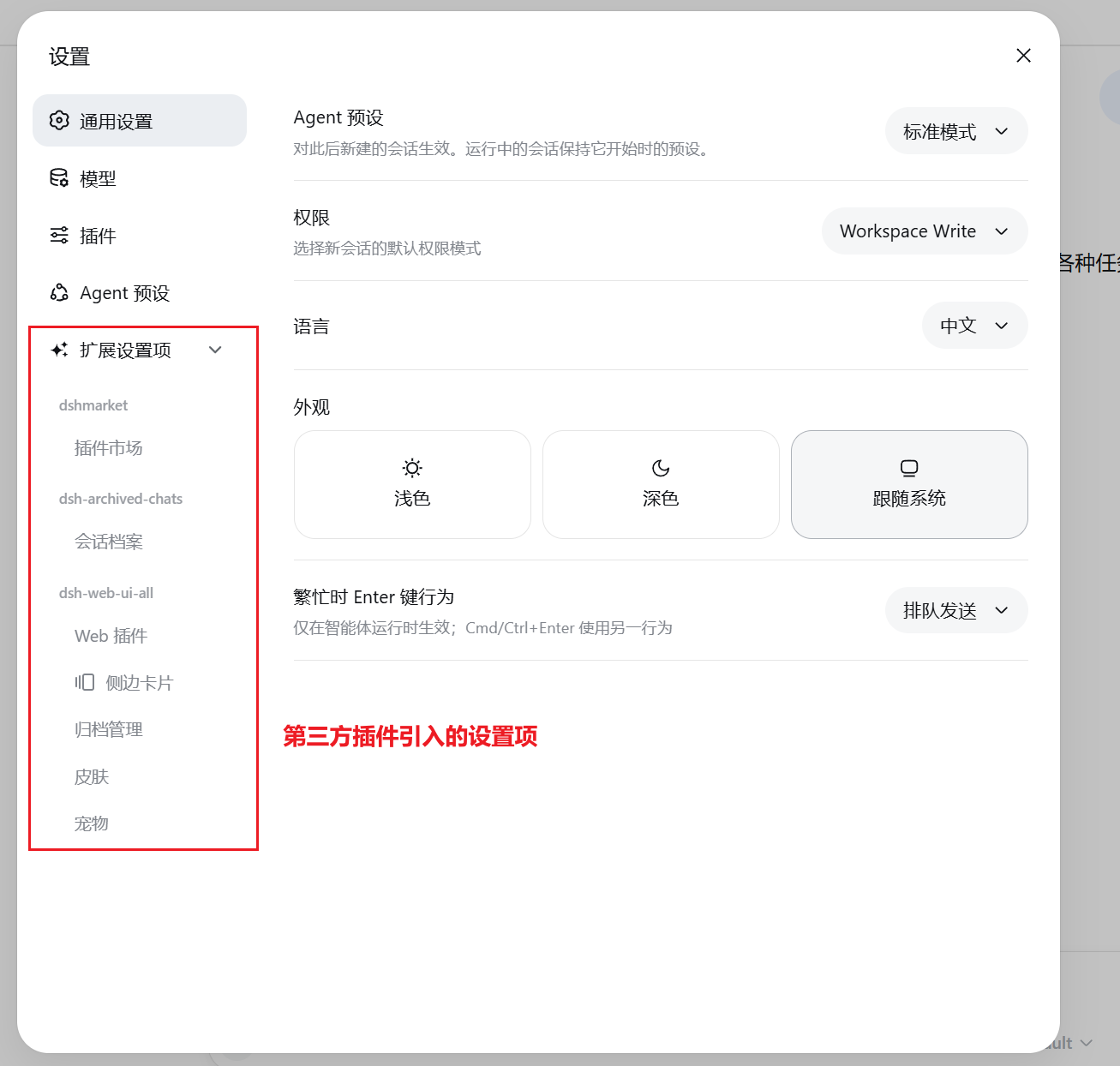 |
Quick Start
Prerequisites
- DeepSeek Harness installed
- Node.js 18+
Install
Option1: npm (recommended)
dsh plugin --profile web add dsh-settings-hub
pnpm 11 users: pnpm blocks packages published within 24 hours by default. If you get an older version, add to
~/.dsh/profiles/web/pnpm-workspace.yaml:minimumReleaseAgeExclude: - dsh-settings-hubThen reinstall.
Update:
dsh plugin --profile web update dsh-settings-hub@latest
Option 2: GitHub
dsh plugin --profile web add github:Amengclass/dsh-settings-hub
Option 3: From source
git clone https://github.com/Amengclass/dsh-settings-hub.git
cd ~/.dsh/profiles/web
npm link /path/to/dsh-settings-hub
Run
dsh web
Uninstall
dsh plugin --profile web remove dsh-settings-hub
Open http://127.0.0.1:3080 and click "设置" in the bottom-left corner.
Desktop app users: The DSH desktop app uses its own profile (
~/.dsh/profiles/desktop), so install this plugin from the desktop app's own plugin manager rather than runningdsh plugin --profile web add. The desktop app anddsh webare independent — each manages its own plugins.
Configuration
No configuration needed. Works out of the box:
| Behavior | Description |
|---|---|
| Auto-discovery | Scans installed plugins, dynamically registers settings groups |
| Drag reorder | Drag to adjust order, saved to localStorage |
| Group attribution | Auto-groups by node_modules dependency tree |
FAQ
- Verify:
ls node_modules/dsh-settings-hub - Restart DSH:
dsh web - Clear browser cache and refresh
Plugins must register settings.section to be discovered. Some plugins (e.g. dsh-vision-router) use alternative registration mechanisms and are not yet supported.
pnpm 11 blocks packages published within 24 hours by default. If you get an older version, add a whitelist entry in ~/.dsh/profiles/web/pnpm-workspace.yaml:
minimumReleaseAgeExclude:
  - dsh-settings-hub
Then reinstall.
Development
git clone https://github.com/Amengclass/dsh-settings-hub.git
cd dsh-settings-hub

cd ~/.dsh/profiles/web
npm link /path/to/dsh-settings-hub

dsh web
Project structure
dsh-settings-hub/
├── index.js              # Node: HTTP API + dependency scanning
├── lib/
│   └── client.js         # Browser: settings UI + drag & drop
├── cordis.patch.yml      # DSH bundle layer declaration
├── package.json
└── README.md
Contributing
Issues and PRs welcome!
- Fork the repo
- Create a feature branch:
git checkout -b feature/my-feature - Commit:
git commit -m 'feat: add my feature' - Push:
git push origin feature/my-feature - Open a Pull Request
License
Related plugins
dsh-weknora
 Tencent
/WeKnora/packages/dsh-weknora
把 WeKnora 知识库接入 dsh 的四个只读工具:列出知识库、混合检索原文片段、按顺序还原单篇文档,以及直接取用 WeKnora 自己带引用的 RAG 或 ReAct agent 回答(含可续聊的 session id)。
dsh plugin --profile web add @wxg-prc-cpg/dsh-weknoratreg
 superdesigndev
/treg
给 Agent 的工具目录:按「要做的事」检索约 2,600 个外部接口(SEO 与 SERP、外链、社交、人物与公司信息补全、广告库、抓取),查看参数与单次调用价格后直接调用,凭据由服务端注入。附带技能,MCP 行在未设置 TREG_TOKEN 前保持禁用。
dsh plugin --profile web add github:superdesigndev/tregdsh-anchored-standard
 xiaobright
/dsh-anchored-standard
两阶段 DeepSeek Harness 预设:先 Minimal 对齐的 bootstrap,再切完整 Standard 工具(Project2 98/99)
dsh plugin --profile web add github:xiaobright/dsh-anchored-standardDeepseek-Harness-EAC
 zouyuxuan122
/Deepseek-Harness-EAC
把官方 deepseek-ai/deepseek-harness(@deepseek-ai/dsh,一切皆插件的 agent harness) 封装为开箱即用的 Windows / Linux 桌面客户端,并在其上拥抱社区万象:皮肤、插件、工具、记忆——你所能想到的,一键皆可装。
dsh plugin --profile web add github:zouyuxuan122/Deepseek-Harness-EACDSHA-dshapp
 DSH-APP
/DSHA/app/src/main/assets/app-integration
DSHA 后台任务、网页返回和草稿恢复适配
dsh plugin --profile web add 'github:DSH-APP/DSHA#a6d4de140acc7a085d6afd4b9d413404e004b939&path:/app/src/main/assets/app-integration'deepseek-harness-remote
 liguobao
/deepseek-harness-remote
基于 DeepSeek Harness 插件机制的多端远程访问方案,让桌面端与 Android 端安全连接并操作远程 Harness。(A multi-device remote access solution built on the DeepSeek Harness plugin system, enabling desktop and Android clients to securely connect to and operate a remote Harness.)
dsh plugin --profile web add github:liguobao/deepseek-harness-remote