
Tools & Capabilities
dsh-zotero
Vncntvx/dsh-zotero · ★ 76
 VncntvxCurated
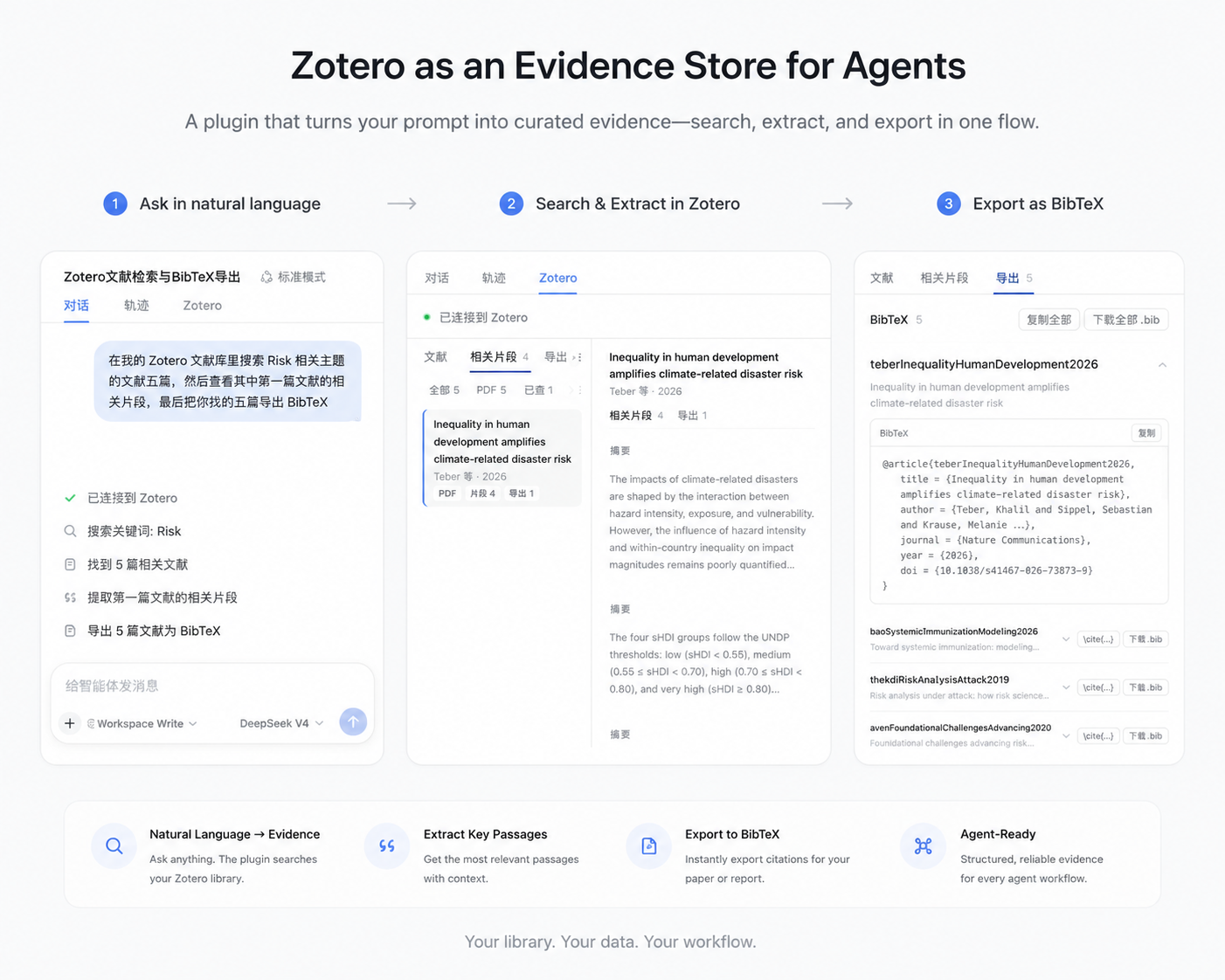
Let agents search, read, and cite your local Zotero library: find papers, view notes and annotations, pull evidence by question, open the source document, and generate citations.
Manifest details
安装
dsh plugin --profile web add github:Vncntvx/dsh-zoteroGitHub 源码安装:首次需按提示配置 allowBuilds 构建授权后重试
For install and environment setup, plus plugin development tutorials, see DSH community docs ↗
Screenshots

README
Table of contents
dsh-zotero
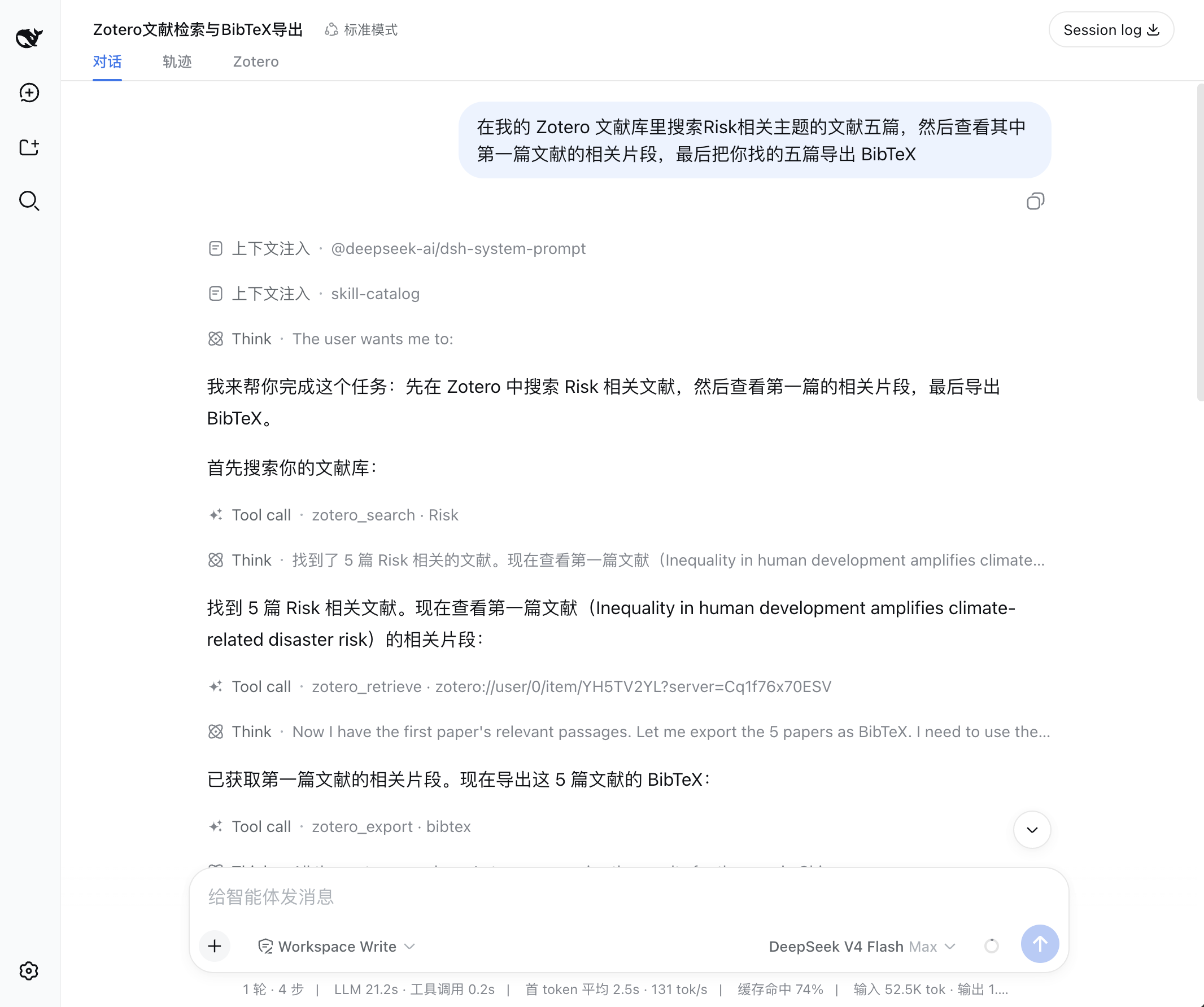
dsh-zotero is a local Zotero plugin for DeepSeek Harness. The agent searches, reads, cites, and (optionally) modifies the library in conversation; you browse the whole library and copy citations in the literature panel; the literature trail gathers the papers, passages, and exports from the session for verification.
All operations interact with Zotero through its local API (127.0.0.1:23119). Reads need no API key.
Features
- Conversation & Retrieval
- Search & reading: Search papers by title, author, year, or full text, and read bibliographic metadata, notes, and local PDF full text.
- Passage extraction: Locate relevant passages across full text, notes, and annotations for specific research questions, with original page numbers preserved on PDF annotations.
- Citation & export: Generate in-text citations or bibliographies in specified CSL styles, and export BibTeX, RIS, or CSL-JSON.
- Writing & extensions (optional): With write access enabled, create notes and update tags or collections (each write requires approval); with the scholarly component enabled, search across seven external indexes and verify references.
- Literature Trail
- Search history: The session header shows query terms, scopes, filter conditions, and hit counts for every tool call on the first screen.
- Passage review: Review extracted passages and annotations grouped by paper, complete with source tags and page numbers for easy verification.
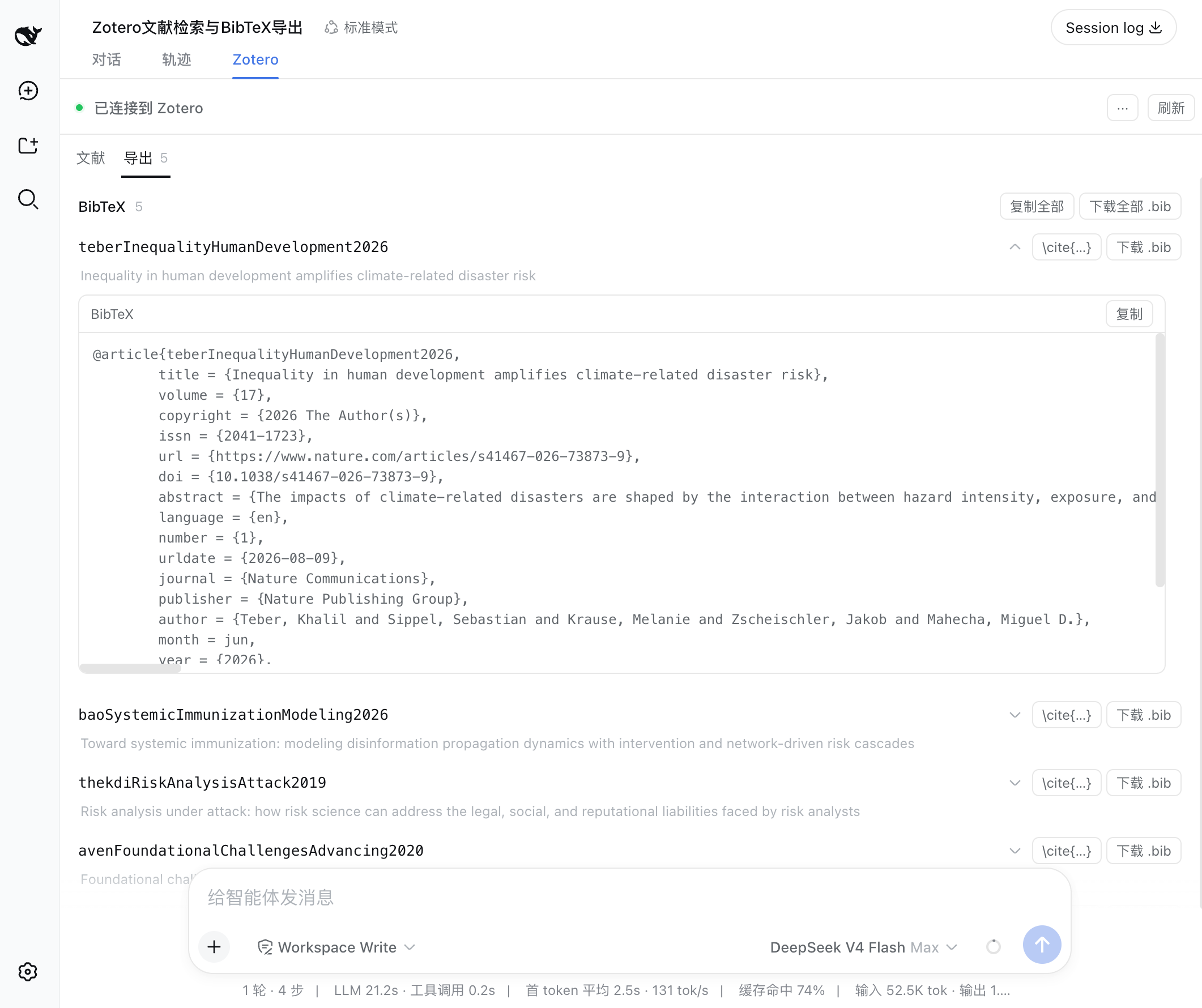
- Export collection: Review all citations and BibTeX entries generated in the conversation, deduplicated across items and ready to copy or download.
- Literature Panel
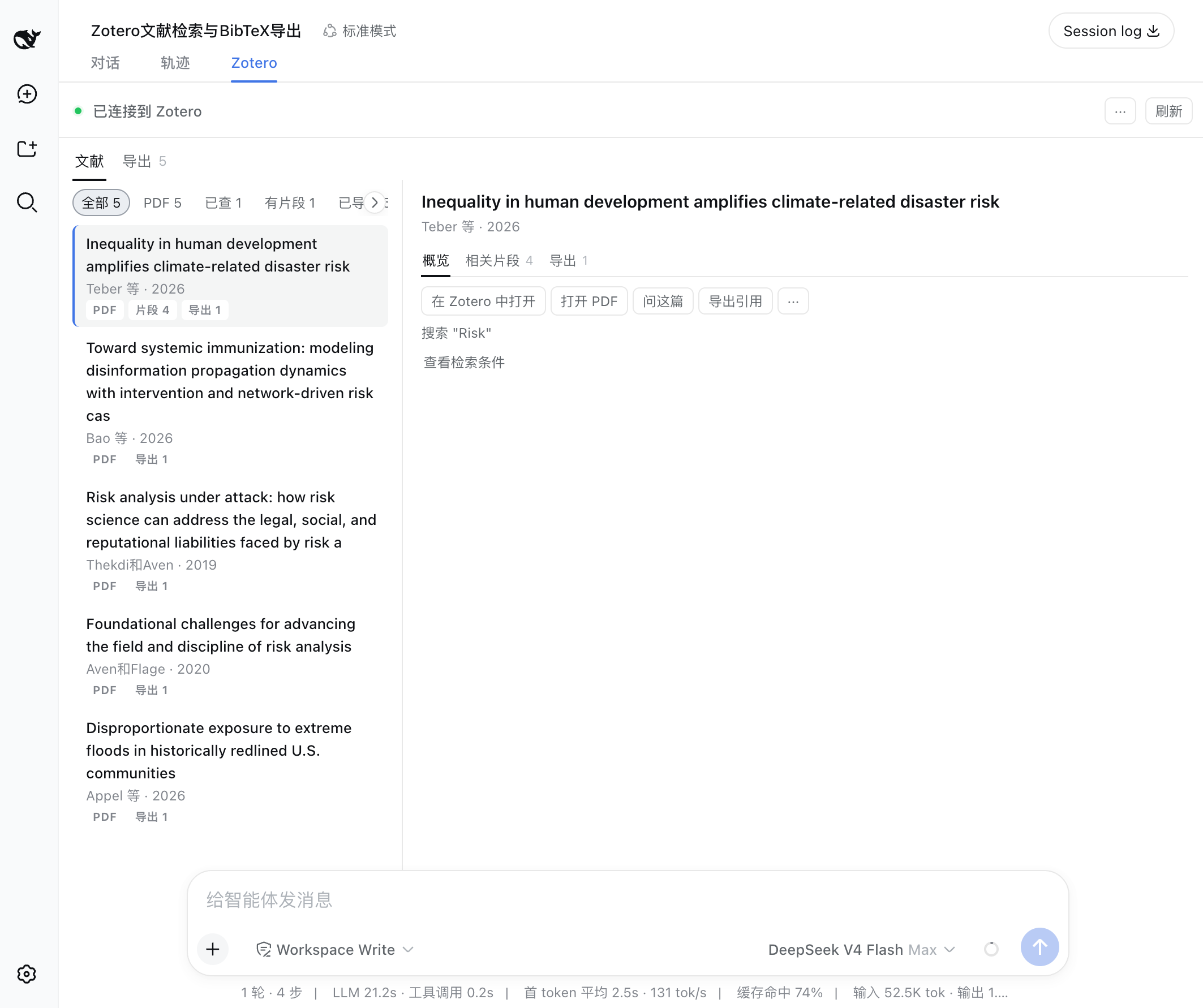
- Library browsing: Browse collection trees, tags, saved searches, and the Trash in the right sidebar, with multi-field filtering.
- Details & reading: Inspect metadata, notes, and attachment lists, and open local PDFs directly in the reading pane.
- Citations & handoff: Copy BibTeX entries, CSL citations, or item details directly from the action row, or send selected items into the chat draft with one click.
For details on interaction patterns, UI roles, and runtime boundaries, see the product model.
Install
Desktop app (Plugin Manager)
In the DeepSeek Harness desktop app, open Plugins in the sidebar, click Add Plugin, and enter the package identifier:
- Latest version (recommended):
dsh-zotero - Specific version:
dsh-zotero@0.14.1 - GitHub prebuilt branch:
github:Vncntvx/dsh-zotero#release
Command line
# Install latest from npm (recommended)
dsh plugin --profile <name> add dsh-zotero

# Install a specific version
dsh plugin --profile <name> add dsh-zotero@<version>

# Install from GitHub prebuilt branch
dsh plugin --profile <name> add github:Vncntvx/dsh-zotero#release
Start a new session after installation. Open the dsh-zotero detail page in the plugin manager; its configuration section carries the full configuration form.
Note: Installing directly from the
mainsource branch needs a local build. pnpm blocks dependency builds by default, so use the#releasebranch to skip build configuration and install directly.
Prerequisites
- Zotero 7 or newer desktop app installed (writes require Zotero 10).
- Enable the local API in Zotero: Settings → Advanced → check "Allow other applications on this computer to communicate with Zotero".
Usage examples
1. Research and trace citations in conversation
Ask questions about your research topics directly in chat. The agent automatically retrieves items from your local Zotero library, reads full texts, and extracts passages with original page numbers:
- Literature search & QA: Ask the agent about a research direction; the agent searches your local library and synthesizes answers using abstracts and metadata.
Agent → zotero_search(query: "Risk", itemTypes: ["journalArticle"]) - Locate original passages: Ask deeper questions about paper details; the agent extracts relevant passages from local PDF full text and annotations, with original page numbers attached.
Agent → zotero_retrieve(ref: "zotero://user/0/item/ABCD1234", query: "methodology", sources: ["annotation", "fulltext"]) - Generate formatted citations: Ask for formatted outputs; the agent generates BibTeX entries or CSL citations in your requested style.
Agent → zotero_export(refs: ["zotero://user/0/item/ABCD1234"], format: "bibtex")
2. Verify sources and export in the literature trail
After a conversation, click the Literature Trail tab at the top of the session to inspect and verify all references used in that session:
- Review search criteria: The overview screen displays every query term, search scope (whole library, collection, or saved search), filter conditions, and hit count invoked during the session.
- Inspect sources item by item: Check extracted passages against original page numbers and annotations in the item inspector to ensure every cited point is grounded in the source.
- Deduplicated export aggregation: Review all citations and BibTeX entries produced during the session in the Export view, automatically deduplicated across items and ready for one-click copying or downloading.
3. Browse, read, and cite in the literature panel
When writing papers or organizing literature independently, use the Literature Panel in the right sidebar without going through chat:
- Independent browsing & filtering: Browse the collection tree, tag system, saved searches, and Trash, with combined filtering by publication year and item type.
- Inspect details & read PDFs: Click any item to inspect metadata and associated notes, or open the local PDF directly in the reading pane.
- Instant citations & chat handoff: Click "Copy BibTeX" or "Copy citation" in the action row to paste directly into your manuscript; click "Ask" or "Add to chat" to send selected references into the chat draft for targeted discussions.
Tools
The plugin provides eight read tools and fifteen write tools. Write tools are off by default; turn on writeEnabled in configuration to enable them.
| Tool | Purpose |
|---|---|
zotero_search |
Search papers by title, author, year, tag, or full text, with collection and tag filters |
zotero_browse |
Browse the library structure, including the collection tree, tag list, and saved searches |
zotero_get |
Read the metadata detail, abstract, attachments, and note list of a single paper |
zotero_children |
View the child items associated with a paper, including standalone notes, PDF attachments, and reading annotations |
zotero_retrieve |
Find passages relevant to a question in full text, notes, and annotations (annotations keep page numbers) |
zotero_changes |
Check recent additions, modifications, and deletions in the library |
zotero_attachment |
Get the local PDF file path associated with a paper |
zotero_export |
Generate formatted citations or a bibliography, or export BibTeX, RIS, or CSL JSON |
The fifteen write tools (notes, tags and collection membership, collections, items, saved searches, Trash restore, library-wide tags, and batch operations) are off by default. Once enabled they write only to the personal library, and every write needs approval. See the tool reference for the full contract of all 23 tools.
Documentation
Usage
| Document | Covers |
|---|---|
| Getting started | Installation, connection verification, and the first task |
| Product model | Two entry points, two UI surfaces, component division, and system boundaries |
| Features | Conversation capabilities, the literature trail, the literature panel, writes, and scholarly retrieval |
| Troubleshooting | Common issues, diagnostic steps, and remedies |
Maintenance
| Document | Covers |
|---|---|
| Architecture | Data flow, layer responsibilities, component boundaries, and design boundaries |
| Tool reference | Parameters, return values, and error codes for the 23 local tools and 7 scholarly tools |
| Configuration reference | Fields, defaults, and hot-reload behavior of each settings namespace |
| Development guide | Build, test, debug, and release workflow |
License
This project is licensed under the MIT License.
Related plugins
dsh-weknora
 Tencent
/WeKnora/packages/dsh-weknora
把 WeKnora 知识库接入 dsh 的四个只读工具:列出知识库、混合检索原文片段、按顺序还原单篇文档,以及直接取用 WeKnora 自己带引用的 RAG 或 ReAct agent 回答(含可续聊的 session id)。
dsh plugin --profile web add @wxg-prc-cpg/dsh-weknoratreg
 superdesigndev
/treg
给 Agent 的工具目录:按「要做的事」检索约 2,600 个外部接口(SEO 与 SERP、外链、社交、人物与公司信息补全、广告库、抓取),查看参数与单次调用价格后直接调用,凭据由服务端注入。附带技能,MCP 行在未设置 TREG_TOKEN 前保持禁用。
dsh plugin --profile web add github:superdesigndev/tregdsh-anchored-standard
 xiaobright
/dsh-anchored-standard
两阶段 DeepSeek Harness 预设:先 Minimal 对齐的 bootstrap,再切完整 Standard 工具(Project2 98/99)
dsh plugin --profile web add github:xiaobright/dsh-anchored-standardDeepseek-Harness-EAC
 zouyuxuan122
/Deepseek-Harness-EAC
把官方 deepseek-ai/deepseek-harness(@deepseek-ai/dsh,一切皆插件的 agent harness) 封装为开箱即用的 Windows / Linux 桌面客户端,并在其上拥抱社区万象:皮肤、插件、工具、记忆——你所能想到的,一键皆可装。
dsh plugin --profile web add github:zouyuxuan122/Deepseek-Harness-EACDSHA-dshapp
 DSH-APP
/DSHA/app/src/main/assets/app-integration
DSHA 后台任务、网页返回和草稿恢复适配
dsh plugin --profile web add 'github:DSH-APP/DSHA#a6d4de140acc7a085d6afd4b9d413404e004b939&path:/app/src/main/assets/app-integration'deepseek-harness-remote
 liguobao
/deepseek-harness-remote
基于 DeepSeek Harness 插件机制的多端远程访问方案,让桌面端与 Android 端安全连接并操作远程 Harness。(A multi-device remote access solution built on the DeepSeek Harness plugin system, enabling desktop and Android clients to securely connect to and operate a remote Harness.)
dsh plugin --profile web add github:liguobao/deepseek-harness-remote