
Tools & Capabilities
dsh-token-plan-monitor
YOYOYOAKE/dsh-token-plan-monitor · ★ 0
 YOYOYOAKE
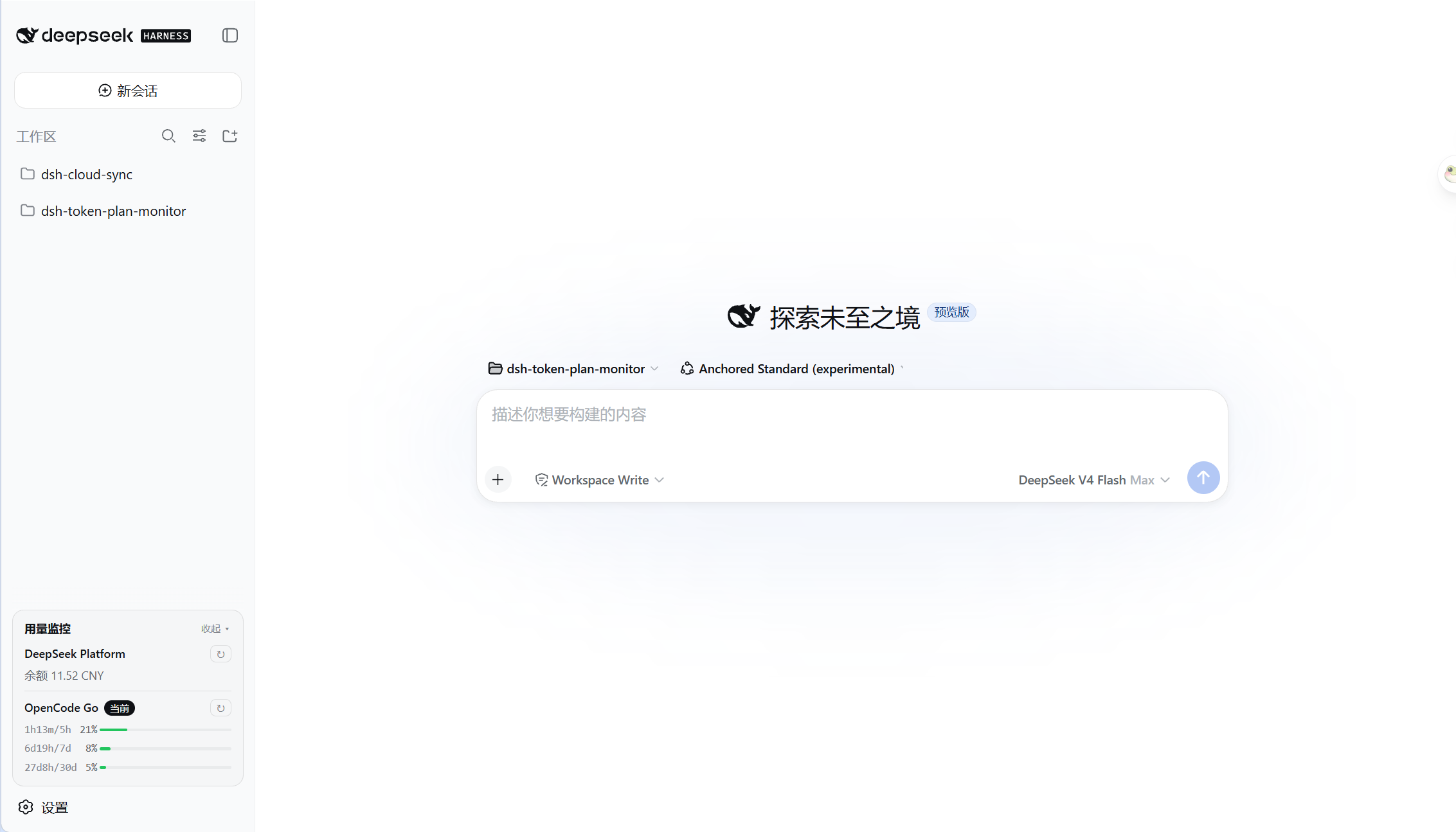
DeepSeek Harness plugin that shows API balance or Token Plan usage at the bottom of the sidebar.
README body is shown in Chinese.
Repository is no longer available (checked 2026-11-15). This entry is retained for tracking and cannot be installed.
Manifest details
README
Table of contents
DeepSeek Harness 插件,用于在侧边栏底部 API 余额或 Token Plan 用量。
目前支持:
- DeepSeek Platform 余额
- OpenCode Go
安装
dsh plugin --profile web add @yoyoyoake/dsh-token-plan-monitor
使用
DeepSeek Platform
自动读取 DeepSeek API Key 查询余额。
OpenCode Go
需要在 DeepSeek Harness 设置中额外配置用量查询参数:
WorkSpace ID:从 URL 中复制;Cookie:从 DevTools 中获取。
开发
项目结构
├── package.json            # 插件 manifest:dsh.bundle / dsh.client;prepare 会自动构建 lib/
├── cordis.patch.yml        # 组合补丁层,声明插件行
├── tsconfig.host.json      # 宿主端 ESM 构建配置
├── tsconfig.client.json    # 客户端 CommonJS 构建配置
├── build.mjs               # 将编译后的客户端包装成浏览器 module-loader bundle
├── lib/                    # 构建产物,由 prepare 自动生成
├── docs/                   # 文档
└── src/
    ├── index.ts            # 宿主端:settings 持久化、自动检测、缓存、HTTP 端点
    ├── client.ts           # 客户端:侧边栏用量卡片 + 设置页
    ├── types.ts            # UsageProvider 契约与 wire 类型
    ├── shims.d.ts          # @deepseek-ai/dsh-settings 环境类型
    └── providers/          # 每个供应商一个文件
        ├── deepseek.ts     # DeepSeek Platform 余额查询
        └── opencode.ts     # OpenCode Go Token Plan 用量查询
添加新的提供商
- 新建
src/providers/my-vendor.ts - 实现
UsageProvider<T>:id/name/descriptionconfigFields:设置页需要填写的特殊参数credentialRefs:候选凭据名usageConfigFields:哪些参数填好后才能发起查询matchesModel():判断是否对应 DSH 中的某个 providerfetchUsage():调用供应商 APIrenderLines():把结果渲染成卡片行
- 在
src/index.ts的PROVIDERS数组中追加一行 - 重新构建并安装:
npm run build
dsh plugin --profile web add .
常用开发命令
npm install          # 安装编译期依赖,并触发 prepare 构建 lib/
npm run typecheck    # 类型检查
npm run build        # 构建宿主端 + 客户端 bundle
开发时修改源码后重新执行 npm run build,刷新浏览器即可看到效果;cordis.patch.yml 会被 profile 的补丁监视器热重载。
License
MIT.
Related plugins
dsh-weknora
 Tencent
/WeKnora/packages/dsh-weknora
把 WeKnora 知识库接入 dsh 的四个只读工具:列出知识库、混合检索原文片段、按顺序还原单篇文档,以及直接取用 WeKnora 自己带引用的 RAG 或 ReAct agent 回答(含可续聊的 session id)。
dsh plugin --profile web add @wxg-prc-cpg/dsh-weknoratreg
 superdesigndev
/treg
给 Agent 的工具目录:按「要做的事」检索约 2,600 个外部接口(SEO 与 SERP、外链、社交、人物与公司信息补全、广告库、抓取),查看参数与单次调用价格后直接调用,凭据由服务端注入。附带技能,MCP 行在未设置 TREG_TOKEN 前保持禁用。
dsh plugin --profile web add github:superdesigndev/tregdsh-anchored-standard
 xiaobright
/dsh-anchored-standard
两阶段 DeepSeek Harness 预设:先 Minimal 对齐的 bootstrap,再切完整 Standard 工具(Project2 98/99)
dsh plugin --profile web add github:xiaobright/dsh-anchored-standardDeepseek-Harness-EAC
 zouyuxuan122
/Deepseek-Harness-EAC
把官方 deepseek-ai/deepseek-harness(@deepseek-ai/dsh,一切皆插件的 agent harness) 封装为开箱即用的 Windows / Linux 桌面客户端,并在其上拥抱社区万象:皮肤、插件、工具、记忆——你所能想到的,一键皆可装。
dsh plugin --profile web add github:zouyuxuan122/Deepseek-Harness-EACDSHA-dshapp
 DSH-APP
/DSHA/app/src/main/assets/app-integration
DSHA 后台任务、网页返回和草稿恢复适配
dsh plugin --profile web add 'github:DSH-APP/DSHA#a6d4de140acc7a085d6afd4b9d413404e004b939&path:/app/src/main/assets/app-integration'deepseek-harness-remote
 liguobao
/deepseek-harness-remote
基于 DeepSeek Harness 插件机制的多端远程访问方案,让桌面端与 Android 端安全连接并操作远程 Harness。(A multi-device remote access solution built on the DeepSeek Harness plugin system, enabling desktop and Android clients to securely connect to and operate a remote Harness.)
dsh plugin --profile web add github:liguobao/deepseek-harness-remote