Development & Runtime
dsh-cuadrive-mac
aa2246740/dsh-cuadrive-mac · ★ 0
 aa2246740
macOS-only DeepSeek Harness bundle for a private Cua Driver computer-use runtime.
An English summary is not available; the Chinese summary is shown.
安装
dsh plugin --profile web add 'dsh-cua-drive@0.2.1'从 npm 安装预构建包
For install and environment setup, plus plugin development tutorials, see DSH community docs ↗
README
Table of contents
中文 · English
dsh-cua-drive
dsh plugin --profile web add github:aa2246740/dsh-cuadrive-mac
pnpm must be on PATH. Then restart that Host and reload the page.
If dsh is not on PATH:
npx @deepseek-ai/dsh plugin --profile web add github:aa2246740/dsh-cuadrive-mac
Official dsh plugin add runs pnpm in $DSH_HOME/profiles/web. This package declares dsh.bundle.patch, so it joins dsh.profile.bundles. The repo ships built lib/; a GitHub install does not run prepare. dsh plugin add writes the profile only. It does not hot-load a running Host.
macOS only. After install, the in-host agent uses a private, lock-pinned cua-driver 0.20.0 (runtime-lock.json) to click windows, read the screen, and drive apps. It runs on this plugin's own socket and does not stop, change, or hijack a Cua install already on the machine.
First launch asks the process that started dsh for Accessibility and Screen Recording. DSH.app: grant DSH. CLI dsh web: grant Terminal / iTerm / Cursor / VS Code. Windows and Linux only load cua_status and say this is macOS-only. They do not download a driver or start computer-use.
The package name is dsh-cua-drive. The repo is still dsh-cuadrive-mac, so existing downloads, permissions, sockets, and sessions do not move.
A local clone uses the same official CLI:
git clone https://github.com/aa2246740/dsh-cuadrive-mac.git
dsh plugin --profile web add ./dsh-cuadrive-mac
Then restart that Host and reload the page.
dsh plugin --profile web remove dsh-cua-drive
DSH.app's Plugin Manager accepts npm package specs only, not github:. Desktop users should install into the web profile with dsh web.
If an older profile cordis.patch.yml already has a dsh-cuadrive-mac row, delete that row first. The bundle now owns the Loader. Two copies fail boot with a duplicate id.
First launch on a Mac
| How you run dsh | Grant in System Settings |
|---|---|
| DSH.app | DSH |
CLI dsh web with no app pack |
Terminal / iTerm / Cursor / VS Code, the parent app |
Do not run cua-driver permissions grant. That pulls /Applications/CuaDriver.app. Grant the name in cua_status.hostPermissions.hostLabel.
The first Mac start needs network once, to pull the pinned darwin-universal tarball into $DSH_HOME/dsh-cuadrive-mac/vendor/. If that fails, set HTTPS_PROXY / ALL_PROXY / plugin config proxy, or drop the same tarball at runtime.manualCachePath. Do not run cua-driver update.
Progress is the cua_status card title, or $DSH_HOME/dsh-cuadrive-mac/status.json and download.log.
Windows / Linux only load the status tool:
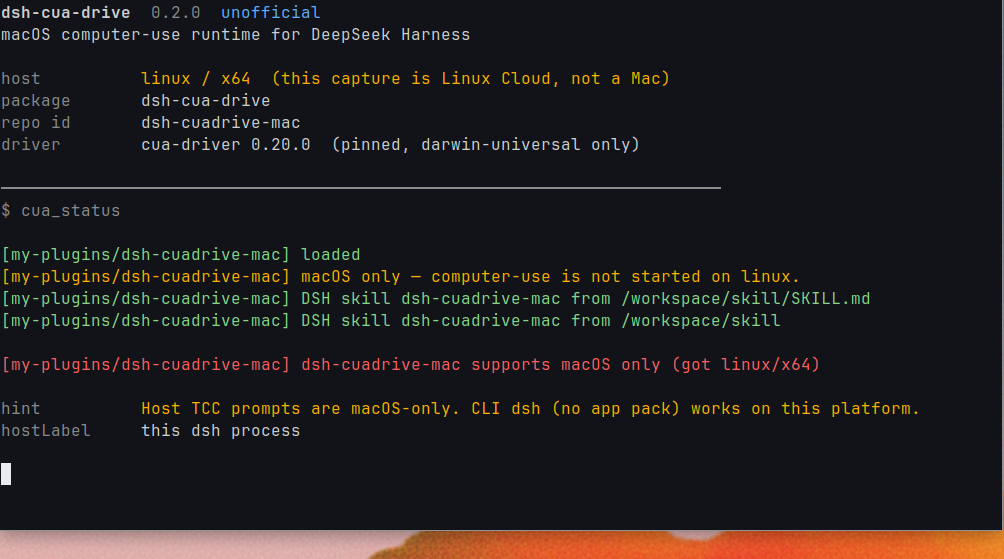
Private runtime lives under $DSH_HOME/dsh-cuadrive-mac/. Closing DSH stops only run/driver.sock. Tools exposed to the model stay named cua_*.
Config
| key | default | meaning |
|---|---|---|
binary |
empty | Absolute override. Empty uses the plugin vendor dir |
ownDaemon |
true |
Private DSH socket |
socketPath |
$DSH_HOME/dsh-cuadrive-mac/run/driver.sock |
Serve for DSH only |
autoStart |
true |
Download and serve --embedded if the socket is down |
proxy |
empty | HTTP(S) proxy for GitHub downloads |
promptPermissions |
true |
Ask the host that launched dsh on first use |
timeoutMs |
90000 |
Per-call timeout |
sessionId |
dsh |
Hosted session on the private daemon |
Local development
Clone this repo on its own, then mount it with official dsh plugin add:
npm ci
npm test
npm run typecheck
npm run build
dsh plugin --profile web add .
Restart that Host and reload the page after a rebuild.
MIT.
Related plugins
DSH-better-sidebar
 dsh-external
/DSH-better-sidebar
右侧侧边栏增强:文件预览/终端/Git,可拖拽自定义位置
Added:
dsh plugin --profile web add github:dsh-external/DSH-better-sidebarmirage#dsh
 strukto-ai
/mirage/typescript/packages/dsh
把文件系统与 bash 提供者换成 mirage 虚拟工作区:文件工具与 shell 命令作用于挂载的资源(RAM、S3、Redis、Slack、Gmail、Notion、Postgres)而非宿主磁盘,支持按挂载点设置读/写/执行模式、按命令选择沙箱(进程内 monty、pyodide、quickjs;远程 docker、e2b、daytona),并可在虚拟终端中安装 CLI(git、gh、slack、linear、ntn、gws,或自行注册的程序树)作为命令头词。
Added:
dsh plugin --profile web add github:strukto-ai/mirage#path:/typescript/packages/dshdeepseek-harness-desktop
 hairyf
/deepseek-harness-desktop
DeepSeek Harness Tauri 桌面版 | Only 5mb installer, zero environment setup. Windows / macOS / Linux.
Added:
dsh plugin --profile web add github:hairyf/deepseek-harness-desktopcc-safety-net
 kenryu42
/cc-safety-net
A coding agent CLI hook - block destructive commands and secret file access
Added:
dsh plugin --profile web add 'github:kenryu42/cc-safety-net#ae8af0330308ad0bc24b5389709060c7a07a6b8d'hol-guard
 hashgraph-online
/hol-guard
开源AI代理防病毒:运行时拦截风险工具、秘密访问、提示注入、恶意软件包、MCP服务器、插件和技能。
Added:
dsh plugin --profile web add github:hashgraph-online/hol-guarddsh_desktop
 myYangyunfan
/dsh_desktop
把 DeepSeek Harness 装进 Windows 桌面的开箱即用客户端 内置完整 dsh 运行时与全部官方插件,免装 Node.js,双击即用
Added:
dsh plugin --profile web add github:myYangyunfan/dsh_desktop