Tools & Capabilities
dsh-resume-aa224674
aa2246740/dsh-resume · ★ 9
 aa2246740
Continue Codex, Claude Code, Cursor, Grok, and Pi work in DeepSeek Harness.
安装
dsh plugin --profile web add 'github:aa2246740/dsh-resume#470e21f8d97215f70166991fe6a0607915516b3a'GitHub 源码安装:首次需按提示配置 allowBuilds 构建授权后重试
For install and environment setup, plus plugin development tutorials, see DSH community docs ↗
README
Bring local Codex, Claude Code, Cursor, Grok, Pi, and ZCode session context into DeepSeek Harness to continue unfinished work.
Install
Version 0.2.5 is verified against DeepSeek Harness 0.2.0-rc.2. Both the package and repository contain compiled plugin files; no Harness source checkout or local build is required. Python 3 is required to read history. Compressed Codex rollouts additionally require zstd.
Official Desktop app
- Open Plugins → Add plugin (under Settings in some versions).
- Enter
github:aa2246740/dsh-resume#v0.2.5in Package name or address, then install and enable it. - Follow the installer's activation instructions. Type
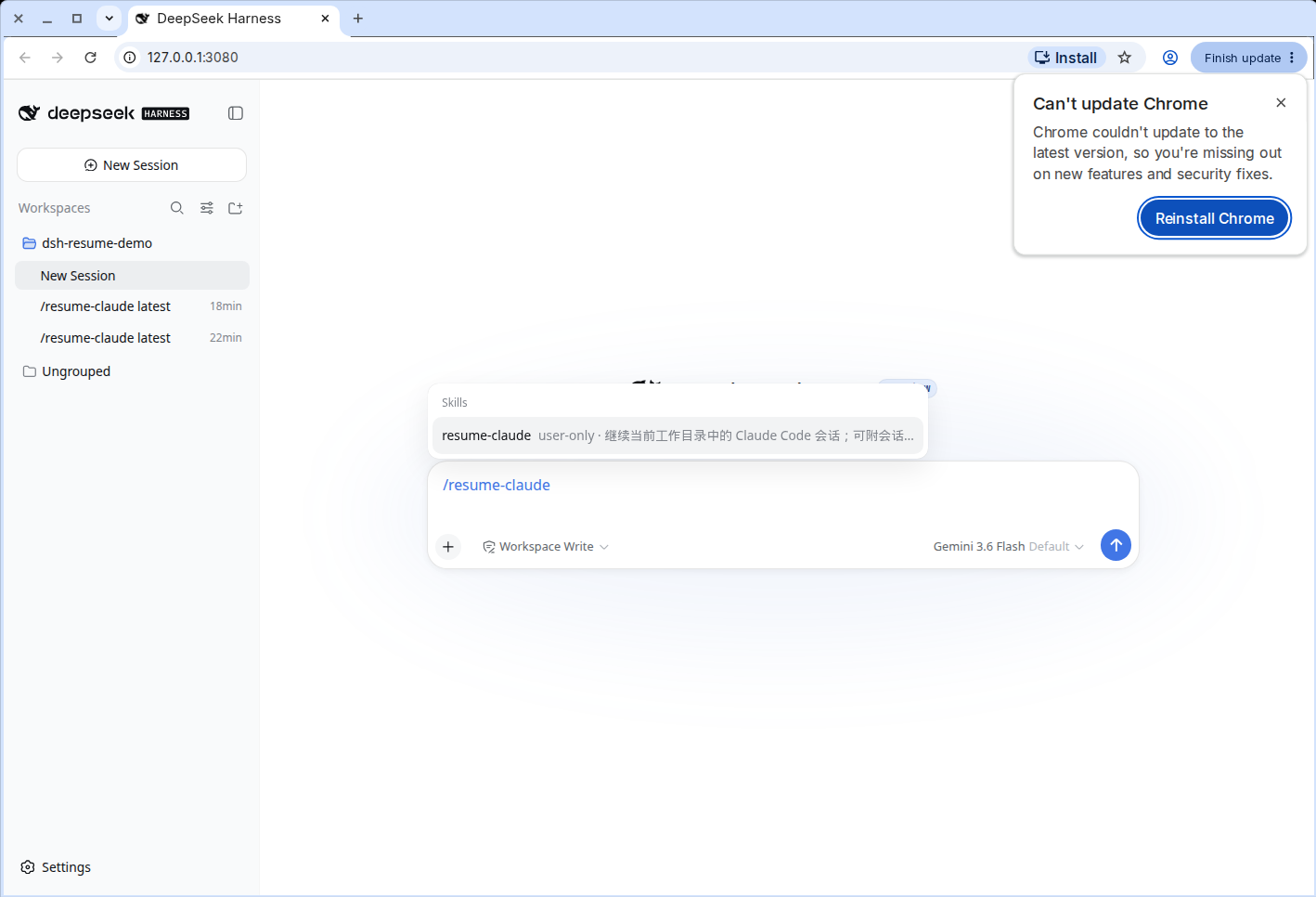
/resume-in the composer and check that all six commands below appear.
Alternatively, download dsh-resume-0.2.5.tgz from the v0.2.5 Release and enter its absolute path in the same installer. Desktop uses its own profile; do not use Web Host commands to install into Desktop.
Web Host
Use the official CLI:
dsh plugin --profile web add github:aa2246740/dsh-resume#v0.2.5
Or, from the downloaded archive's directory:
dsh plugin --profile web add ./dsh-resume-0.2.5.tgz
The official dsh command and pnpm must be available. Node.js must be ^22.19.0 or >=24.0.0. Use the existing Web Host's DSH_HOME. This only installs into the Web profile, not Desktop. Follow the official installer's activation result. If it requests a restart, exit and reopen the original Host normally; do not start another Host alongside it.
Upgrade and remove
Repeat the matching installation steps to upgrade. If migrating from a manual mount, disable the old duplicate entry and retain only the package's dsh-resume instance.
Remove through the Desktop plugin manager, or for Web:
dsh plugin --profile web remove dsh-resume
Usage
Type /resume-claude, or the matching command for the other five. The plugin reads that local session, pulls context that can still be handed off, and writes a card into the current DSH chat. It does not restart the old process or rewrite anyone else's session files.
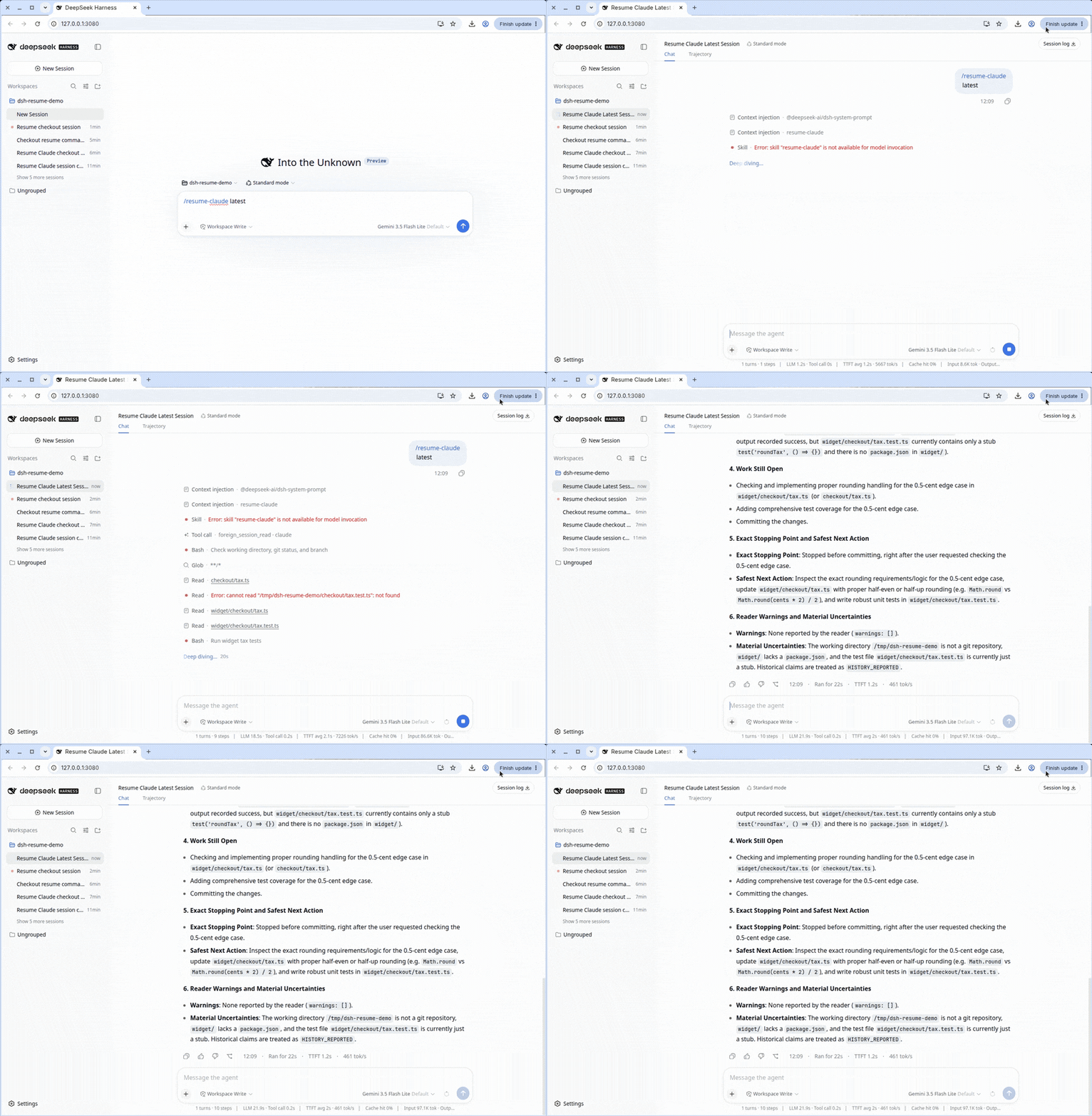
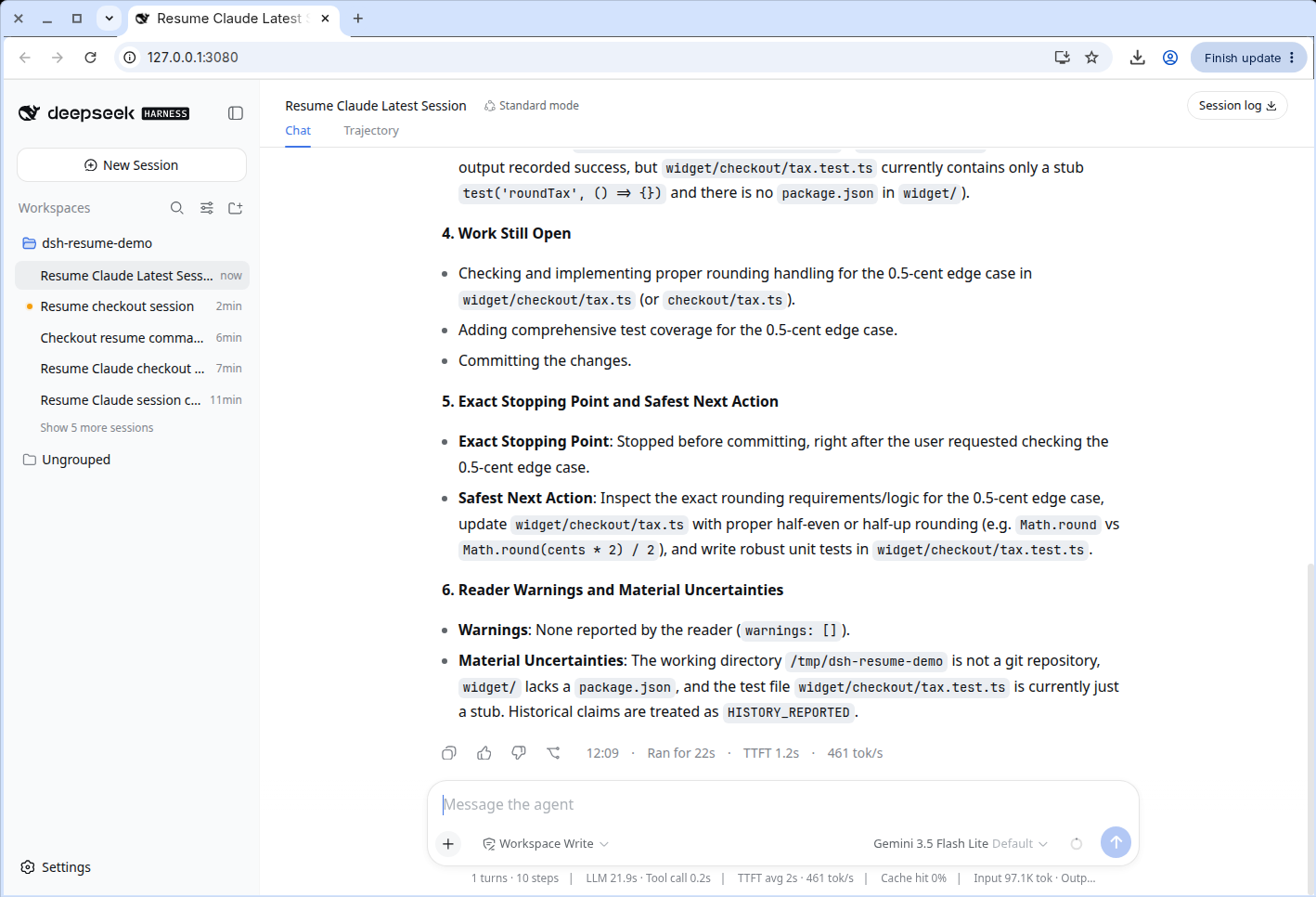
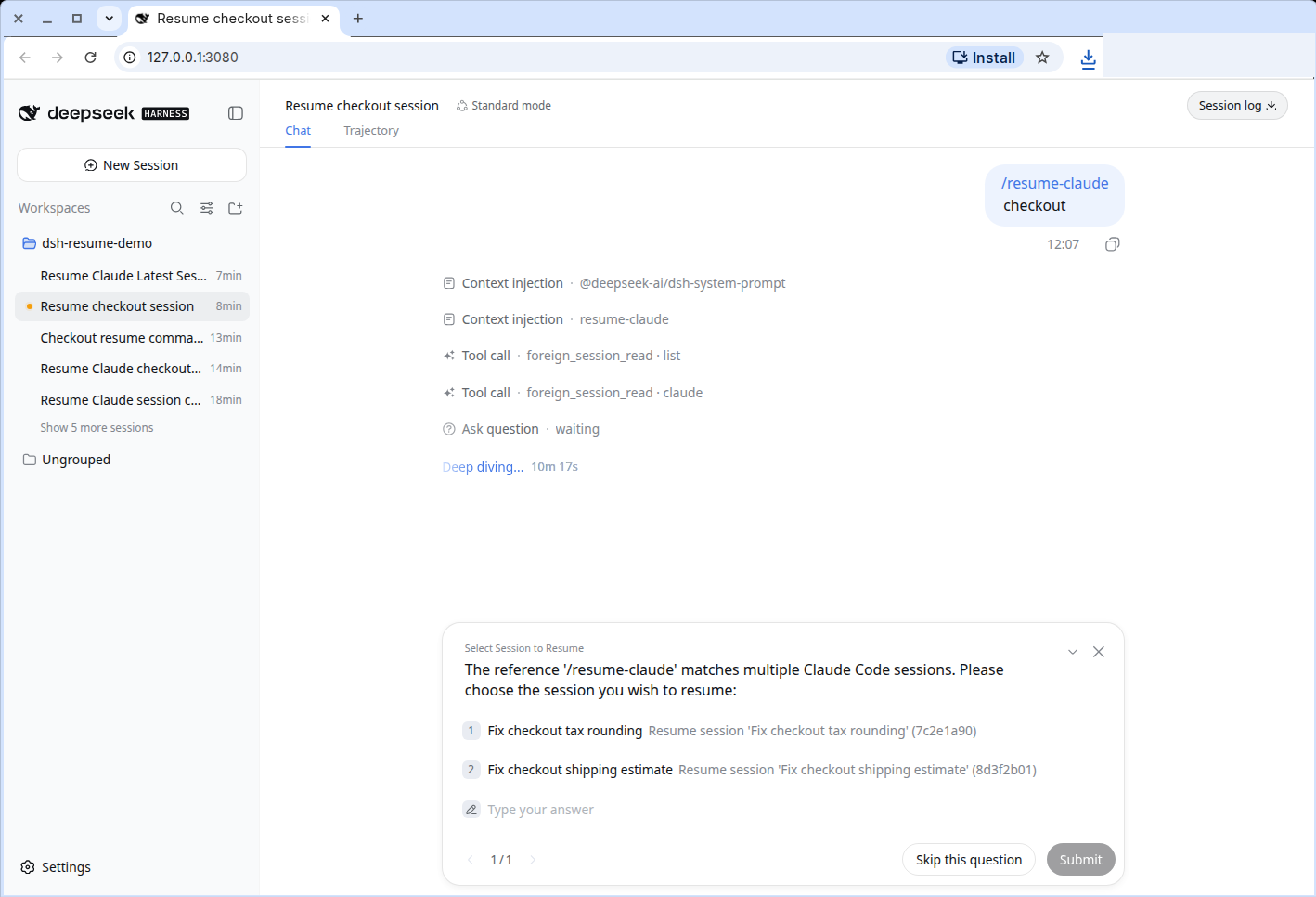
The six sections are objective, files, done, remaining, stopped at, and reader warnings. If a title is ambiguous it lists candidates instead of guessing.
Commands
Read-only. Foreign session stores are not modified. System prompts, hidden reasoning, encrypted or corrupt records are dropped or marked unavailable. History conclusions start as HISTORY_REPORTED. Only facts checked in the current workspace this turn are CURRENT_OBSERVED. Grok reads visible updates.jsonl only. Pi follows the current branch only. ZCode reads cli/db/db.sqlite only and does not replay calls or revive the CLI. Compaction is a warning; older rows still in the database are kept. Abandoned v2/sessions and cli/rollout JSONL are not the primary store. Projects JSONL is a warned fallback only when sqlite is absent.
| Command | Source |
|---|---|
/resume-codex [latest | session id | path | title] |
Codex CLI / app |
/resume-claude [latest | session id | path | title] |
Claude Code |
/resume-cursor [latest | session id | path | title] |
Cursor |
/resume-grok [latest | session id | path | title] |
Grok |
/resume-pi [latest | session id | path | title] |
Pi |
/resume-zcode [latest | session id | path | title] |
ZCode |
Develop
corepack pnpm install
pnpm check
License
Related plugins
dsh-weknora
 Tencent
/WeKnora/packages/dsh-weknora
把 WeKnora 知识库接入 dsh 的四个只读工具:列出知识库、混合检索原文片段、按顺序还原单篇文档,以及直接取用 WeKnora 自己带引用的 RAG 或 ReAct agent 回答(含可续聊的 session id)。
Added:
dsh plugin --profile web add @wxg-prc-cpg/dsh-weknoratreg
 superdesigndev
/treg
给 Agent 的工具目录:按「要做的事」检索约 2,600 个外部接口(SEO 与 SERP、外链、社交、人物与公司信息补全、广告库、抓取),查看参数与单次调用价格后直接调用,凭据由服务端注入。附带技能,MCP 行在未设置 TREG_TOKEN 前保持禁用。
Added:
dsh plugin --profile web add github:superdesigndev/tregdsh-anchored-standard
 xiaobright
/dsh-anchored-standard
两阶段 DeepSeek Harness 预设:先 Minimal 对齐的 bootstrap,再切完整 Standard 工具(Project2 98/99)
Added:
dsh plugin --profile web add github:xiaobright/dsh-anchored-standardDSHA-dshapp
 DSH-APP
/DSHA/app/src/main/assets/app-integration
DSHA 后台任务、网页返回和草稿恢复适配
Added:
dsh plugin --profile web add 'github:DSH-APP/DSHA#a6d4de140acc7a085d6afd4b9d413404e004b939&path:/app/src/main/assets/app-integration'Deepseek-Harness-EAC
 zouyuxuan122
/Deepseek-Harness-EAC
把官方 deepseek-ai/deepseek-harness(@deepseek-ai/dsh,一切皆插件的 agent harness) 封装为开箱即用的 Windows / Linux 桌面客户端,并在其上拥抱社区万象:皮肤、插件、工具、记忆——你所能想到的,一键皆可装。
Added:
dsh plugin --profile web add github:zouyuxuan122/Deepseek-Harness-EACAI-Novel-Writer
 EthanYoQ
/AI-Novel-Writer
本地优先 AI 小说创作工作台,提供 Windows/macOS 桌面版与 DeepSeek Harness 插件开发预览,支持角色、大纲、章节蓝图、审稿修稿和本地模型。
Added:
dsh plugin --profile web add github:EthanYoQ/AI-Novel-Writer