
Tools & Capabilities
dsh-ssh-remote
crazyshout/dsh-ssh-remote · ★ 20
 crazyshout
SSH remote workspaces for DeepSeek Harness: browse/read/write remote files, run
安装
dsh plugin --profile web add github:crazyshout/dsh-ssh-remoteGitHub 源码安装:首次需按提示配置 allowBuilds 构建授权后重试
For install and environment setup, plus plugin development tutorials, see DSH community docs ↗
README
Table of contents
中文 · Download 0.13.3 · Changelog · Troubleshooting
Open an SSH workspace inside DeepSeek Harness. Browse files and run commands in its native panels, with remote editing, @ references, port forwarding and file transfers. Reuse ~/.ssh/config; no full DSH installation is needed on the server.
Install: copy, install, connect
Already have working DSH and an SSH alias? Start here. Desktop includes its runtime; you do not need to install Node separately.
Desktop / Web
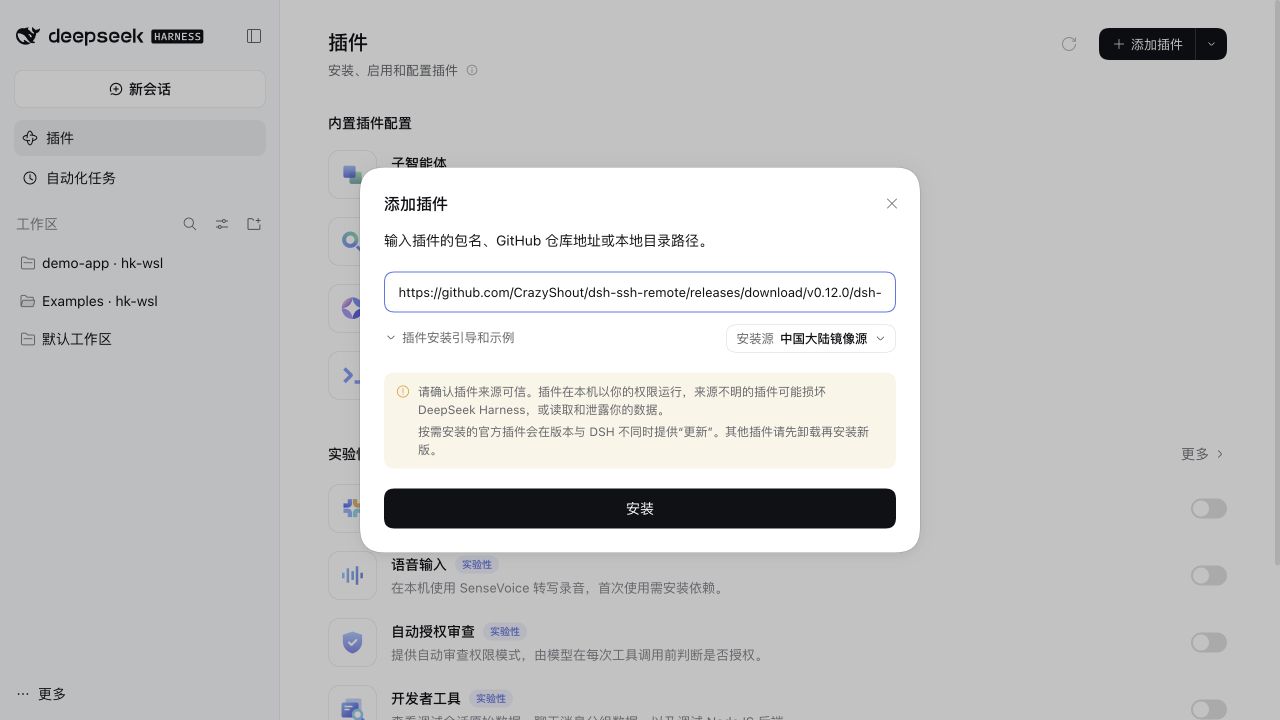
- Open Plugins → Add plugin in the sidebar and paste the full address below.
- Choose Install → Enable now. Save your work and fully restart DSH after the first install or an upgrade from 0.11.x; follow the reported outcome for later updates.
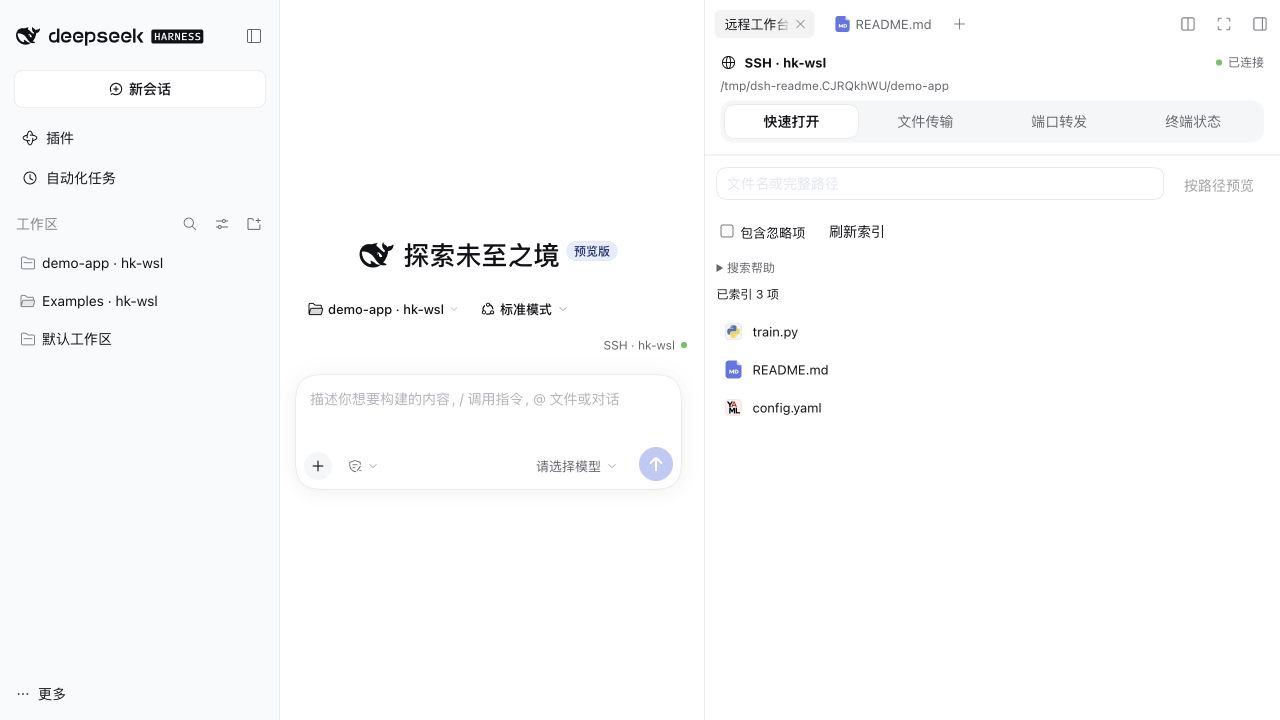
- Choose Add workspace, select your SSH host and folder, then use native Workspace files and New terminal.
https://github.com/CrazyShout/dsh-ssh-remote/releases/download/v0.13.3/dsh-ssh-remote-0.13.3.tgz
No clone, build or manual plugin-directory copying. The installer still downloads runtime dependencies.
Expand Getting started in the official plugin details for connection steps. The UI follows DSH's Chinese/English preference, without another language switch. Existing 0.12.0 users can check for updates directly in plugin details.
Use the full address. The npm package named
dsh-ssh-remotebelongs to another project. Desktop and Web have separate profiles and need separate installation.
CLI / Web: one install command
dsh plugin --profile web add 'https://github.com/CrazyShout/dsh-ssh-remote/releases/download/v0.13.3/dsh-ssh-remote-0.13.3.tgz'
Restart dsh web afterwards; stop an existing server with Ctrl-C in its terminal first. For Desktop, use the application's own Plugins page.
Fixed Git tag (requires local Git):
dsh plugin --profile web add 'github:CrazyShout/dsh-ssh-remote#v0.13.3'
You can also download the release .tgz and enter its absolute path in Plugins. Verify downloads with SHA256SUMS. Review dependency-script prompts in the official installer, without globally allowing unknown scripts. Version 0.11.0 removed the ssh2 / cpu-features native-build dependencies.
Your everyday workflow
| Task | Entry point |
|---|---|
| Browse and preview files | Native Workspace files / 工作区文件 |
| Edit and save text | File-tab menu 编辑远程文本, or 编辑 in quick open |
| Find and reference code | SSH · host → 快速打开, or native @ |
| Run commands | Native New terminal / 新建终端 |
| See cwd, exit status and context | Terminal-tab menu 查看 SSH 终端状态 |
| Access TensorBoard, Jupyter or a dev website | 远程工作台 → 端口转发 |
| Upload/download files and folders | 远程工作台 → 文件传输 |
| Use remote skills | Native / skill menu in a remote Session |
The SSH · host badge opens the unified workbench; blank Sessions show it above the composer. Local Sessions retain their original file and terminal behavior.
Connection dots: green = SSH/helper connected; amber = connecting or limited; hollow gray = disconnected or unknown; red = connection error. Hover or keyboard-focus for the full path and explanation. Green does not certify every remote feature.
New to SSH?
Install DSH using the official instructions, then configure a concrete local OpenSSH alias:
Host devbox
  HostName your-server.example.com
  User your-user
Run ssh devbox, verify the host fingerprint on first login, then exit. The plugin uses non-interactive authentication, so also check:
ssh -o BatchMode=yes devbox true
Follow the three installation steps above and run pwd in a native terminal to verify the remote directory. No model message is needed. The first connection deploys the matching Python helper; host diagnostics are in Settings → Built-in plugins → SSH Remote. Keep custom Port, IdentityFile and ProxyJump settings in OpenSSH, without duplicating them in the plugin.
Requirements and limits
Compatibility coverage: 0.2.0-rc.2 / 0.2.1-rc.2 / 0.2.1-rc.3. See each Release's acceptance record; the plugin does not switch your DSH update channel.
| Purpose | Requirement |
|---|---|
| Desktop | Official DSH Desktop, with its bundled Node and package manager |
| CLI / Web | Node 22+, dsh and pnpm on PATH |
| Basic remote connection | Local OpenSSH and non-interactive authentication; remote Python 3.8+ |
Search and @ completion |
Remote ripgrep; Git workspace discovery also needs Git |
| Restricted model commands | Remote Linux and bubblewrap; not required for browsing or human terminals |
Remote run_code / PTC |
Remote Node 22.13+ with stripTypeScriptTypes; restricted execution still requires bubblewrap. Desktop's bundled Node does not install Node on the remote host |
- Editing: complete UTF-8 files, 256 KiB maximum. Save drafts before restarting.
- Transfers: 1 TiB per file/batch; small real samples and simulated boundaries tested, not TB-scale throughput. Restart recovery requires source/destination reauthorization.
- Forwarding: currently validated on macOS / Linux hosts. Windows has no full Desktop/SSH acceptance.
- Skills: project and user
.dsh/skills/.agents/skillsby default, without following symlinks or automatically running scripts. - DSH's Finder / local-application actions remain local; use preview and remote editing for SSH files.
See the technical reference for detailed boundaries. Old SFTP/plugin-host configurations have a migration guide. Existing OpenSSH aliases need no migration; upgrades never automatically rewrite SSH configuration.
Update, roll back and remove
In-app updates: open Plugins → dsh-ssh-remote → 检查更新 (Check for updates). Select 更新到… → 确认更新 to install a newer stable release without visiting this repository or copying another link. Automatic checks run every six hours while the page is visible; switch them off on the same page without losing manual checks. A new-version notice appears once and never starts installation by itself.
After a failed check, visible automatic checks resume in about five minutes. Expand troubleshooting for the failed stage and sanitized error code. No proxy switch, certificate bypass or repeated installation is performed.
Package installation uses DSH's official service, including dependency approvals and compatibility checks. Installed and running versions are shown separately. Save drafts and pause transfers first: reloading the SSH plugin may end its terminals and port forwards. It never automatically restarts DSH. If a response is lost, choose 重新确认结果 to reconcile the result instead of automatically reinstalling.
Check for updates also refreshes local installation facts. When the old request is no longer active in this DSH host and the current version has been read again, Dismiss this notice clears only the notice, not an installation. A new update still needs your confirmation. Short diagnostics and the official log path are available in Details; full logs are not stored in browser recovery records.
Source link: / local-directory installs show version information only and must be synchronized with Git; archives never replace them automatically. Version 0.11.2 and earlier need one manual installation of the current release to gain this feature. Releases remain available for manual selection. If DSH refuses to replace a source directly, follow its plugin-page guidance; this feature does not remove the old package first. Web CLI users can still repeat add in the same profile.
Roll back to 0.13.2: install the previous official release in Plugins, or run:
dsh plugin --profile web add 'https://github.com/CrazyShout/dsh-ssh-remote/releases/download/v0.13.2/dsh-ssh-remote-0.13.2.tgz'
Restart when requested; migrated OpenSSH settings remain. Version 0.13.0 and earlier lack this release's control-connection authentication fix. Rollback is for isolated diagnostics, not a security-equivalent long-term alternative.
Disable / remove: use the application's Plugins page. For Web, you can also stop the server and run:
dsh plugin --profile web remove dsh-ssh-remote
Removal does not delete remote projects, local conversations or SSH configuration. Remote workspaces need the plugin to work; reinstalling reuses saved mappings.
Help and development
Troubleshooting · Report an issue · Technical reference · Roadmap · Release procedure · Changelog
Include plugin / DSH versions, Desktop or Web, installation source and the first actual error. Do not include credentials.
MIT License.
Related plugins
dsh-weknora
 Tencent
/WeKnora/packages/dsh-weknora
把 WeKnora 知识库接入 dsh 的四个只读工具:列出知识库、混合检索原文片段、按顺序还原单篇文档,以及直接取用 WeKnora 自己带引用的 RAG 或 ReAct agent 回答(含可续聊的 session id)。
dsh plugin --profile web add @wxg-prc-cpg/dsh-weknoratreg
 superdesigndev
/treg
给 Agent 的工具目录:按「要做的事」检索约 2,600 个外部接口(SEO 与 SERP、外链、社交、人物与公司信息补全、广告库、抓取),查看参数与单次调用价格后直接调用,凭据由服务端注入。附带技能,MCP 行在未设置 TREG_TOKEN 前保持禁用。
dsh plugin --profile web add github:superdesigndev/tregdsh-anchored-standard
 xiaobright
/dsh-anchored-standard
两阶段 DeepSeek Harness 预设:先 Minimal 对齐的 bootstrap,再切完整 Standard 工具(Project2 98/99)
dsh plugin --profile web add github:xiaobright/dsh-anchored-standardDeepseek-Harness-EAC
 zouyuxuan122
/Deepseek-Harness-EAC
把官方 deepseek-ai/deepseek-harness(@deepseek-ai/dsh,一切皆插件的 agent harness) 封装为开箱即用的 Windows / Linux 桌面客户端,并在其上拥抱社区万象:皮肤、插件、工具、记忆——你所能想到的,一键皆可装。
dsh plugin --profile web add github:zouyuxuan122/Deepseek-Harness-EACDSHA-dshapp
 DSH-APP
/DSHA/app/src/main/assets/app-integration
DSHA 后台任务、网页返回和草稿恢复适配
dsh plugin --profile web add 'github:DSH-APP/DSHA#a6d4de140acc7a085d6afd4b9d413404e004b939&path:/app/src/main/assets/app-integration'deepseek-harness-remote
 liguobao
/deepseek-harness-remote
基于 DeepSeek Harness 插件机制的多端远程访问方案,让桌面端与 Android 端安全连接并操作远程 Harness。(A multi-device remote access solution built on the DeepSeek Harness plugin system, enabling desktop and Android clients to securely connect to and operate a remote Harness.)
dsh plugin --profile web add github:liguobao/deepseek-harness-remote