Themes & Appearance
open-sea-skin
d-dev0101/open-sea-skin · ★ 385
 d-dev0101Curated
WebGPU ocean skin for DeepSeek Harness, Chrome and Edge — native plugin, static installer, and new-tab extension.
安装
dsh plugin --profile web add github:d-dev0101/open-sea-skinGitHub 源码安装:首次需按提示配置 allowBuilds 构建授权后重试
For install and environment setup, plus plugin development tutorials, see DSH community docs ↗
Screenshots


README
Table of contents
- 🌊 See the ocean in motion
- 🚀 Official Desktop in three steps
- ✨ Your workspace, your sea
- 🎬 Open Sea inside DeepSeek Harness
- 🌙 Dark mode · an ocean behind your conversation
- ☀️ Light mode · a brighter workspace
- 🌊 Wave control · calm water to high sea
- 🌅 Sunlight control · midday to sunset
- 📦 Choose one installation path
- 1. 🖥️ Official Desktop · Windows / Mac — recommended
- 2. 🌐 Harness Web
- 3. 🧩 Chrome / Edge extension
- 4. 🔧 Static frontend installer · advanced fallback
- 5. 🛠️ Harness source integration · developers
- 💡 Before you install
- 🔒 Permissions and privacy
- 🛠️ Built for an open ecosystem
- 🤝 Community & license
🌊 See the ocean in motion
🎬 Original Harness recording · 40% glass opacity · Light mode, waves & sunset · Try the interactive website
🚀 Official Desktop in three steps
🖥️ Using Official Desktop? Install the Harness plugin directly. The same steps work on Windows and Mac. No terminal or browser extension required.
- 🧩 Open Plugins → Add plugin in the sidebar.
- 📋 Paste the package name below and click Install.
- ✅ Choose Enable now, then restart if prompted.
open-sea-skin@1.2.6
🇨🇳 The mainland China mirror is optional; switch to the official npm registry if the version is not available.
🌐 Using Harness Web? Go to Web installation. Need help? Read the plugin guide.
💡 Choose one integration. The Harness plugin and browser extension are alternatives. Do not install both in the same Harness instance.
Search for Open Sea / open-sea-skin, verify the repository is d-dev0101/open-sea-skin, and check the version.
If the listing is outdated, use Official Desktop's Add plugin instead. Installing a community market is not required.
Open Sea Skin is an open-source ocean theme and appearance plugin for DeepSeek Harness (DSH). It adds a real-time WebGPU animated background, adjustable waves, daylight-to-sunset lighting, and a translucent glass interface. Use it as a DSH plugin, a Harness-only Chrome/Edge extension, or a static frontend integration.
Community-made, not an official DeepSeek product. This skin targets DeepSeek Harness, not the DeepSeek chat website. It is unrelated to the OpenSea NFT marketplace.
✨ Your workspace, your sea
| Feature | What you can do |
|---|---|
| 🌊 Real-time ocean | Watch animated waves and reflections, rather than a looping wallpaper video. |
| 🌅 Daylight & sunset | Set your own light or enable the twelve-minute day/night cycle. |
| 🫧 Transparent interface | Adjust glass opacity from 40% to 90% in light or dark Harness layouts. |
| 🎛️ Quick controls | Change sea state, sunlight and opacity from the lower-left skin settings panel. |
| 🏠 Your homepage stays yours | The extension does not replace new tabs or change your browser homepage. |
| 🔒 Local assets | Ocean scripts, three.js and fonts ship with the skin; no skin analytics or runtime CDN requests. |
| ⌨️ Thoughtful controls | Chinese/English UI, keyboard navigation, Escape to close, and reduced-motion support. |
🎬 Open Sea inside DeepSeek Harness
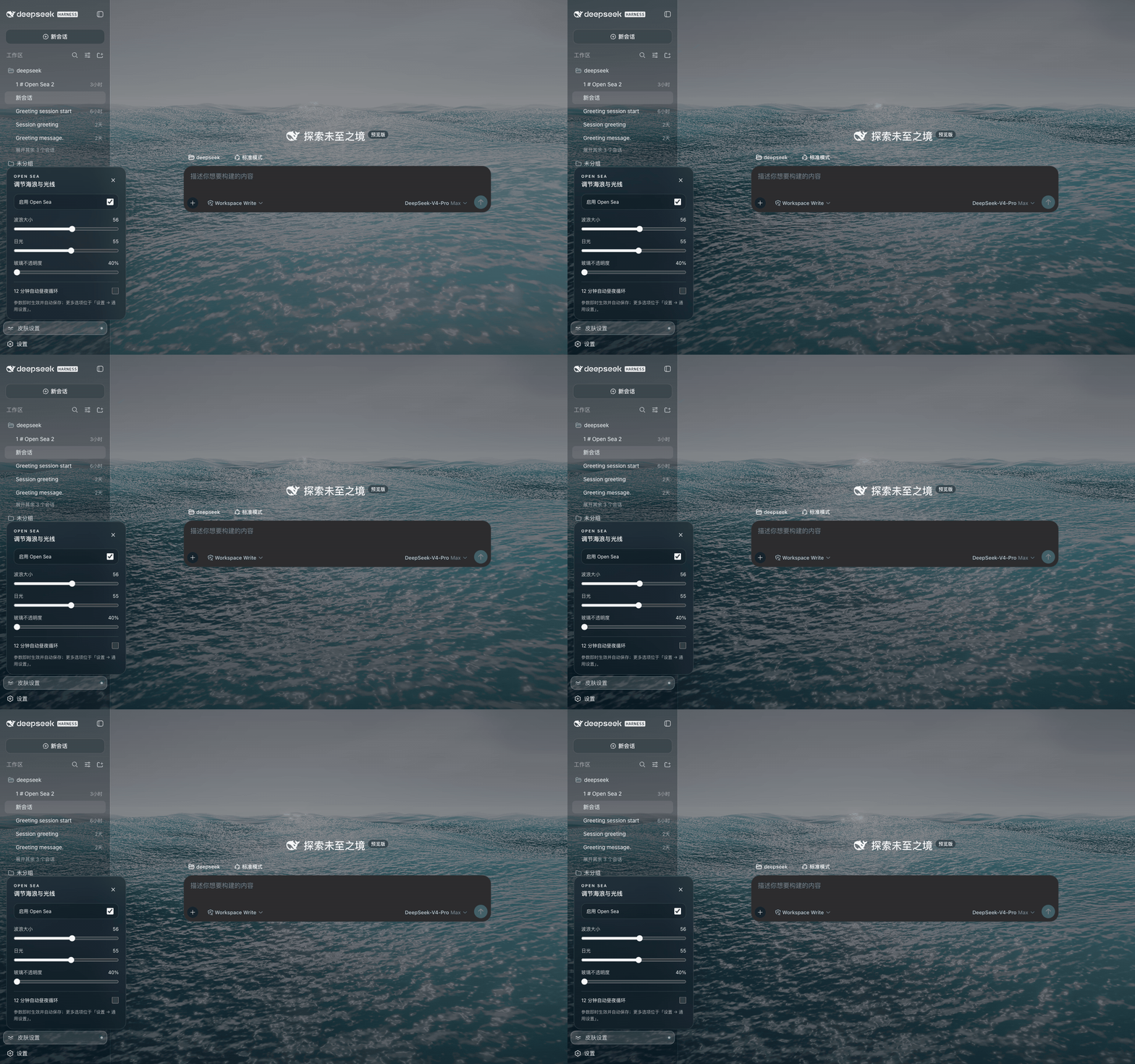
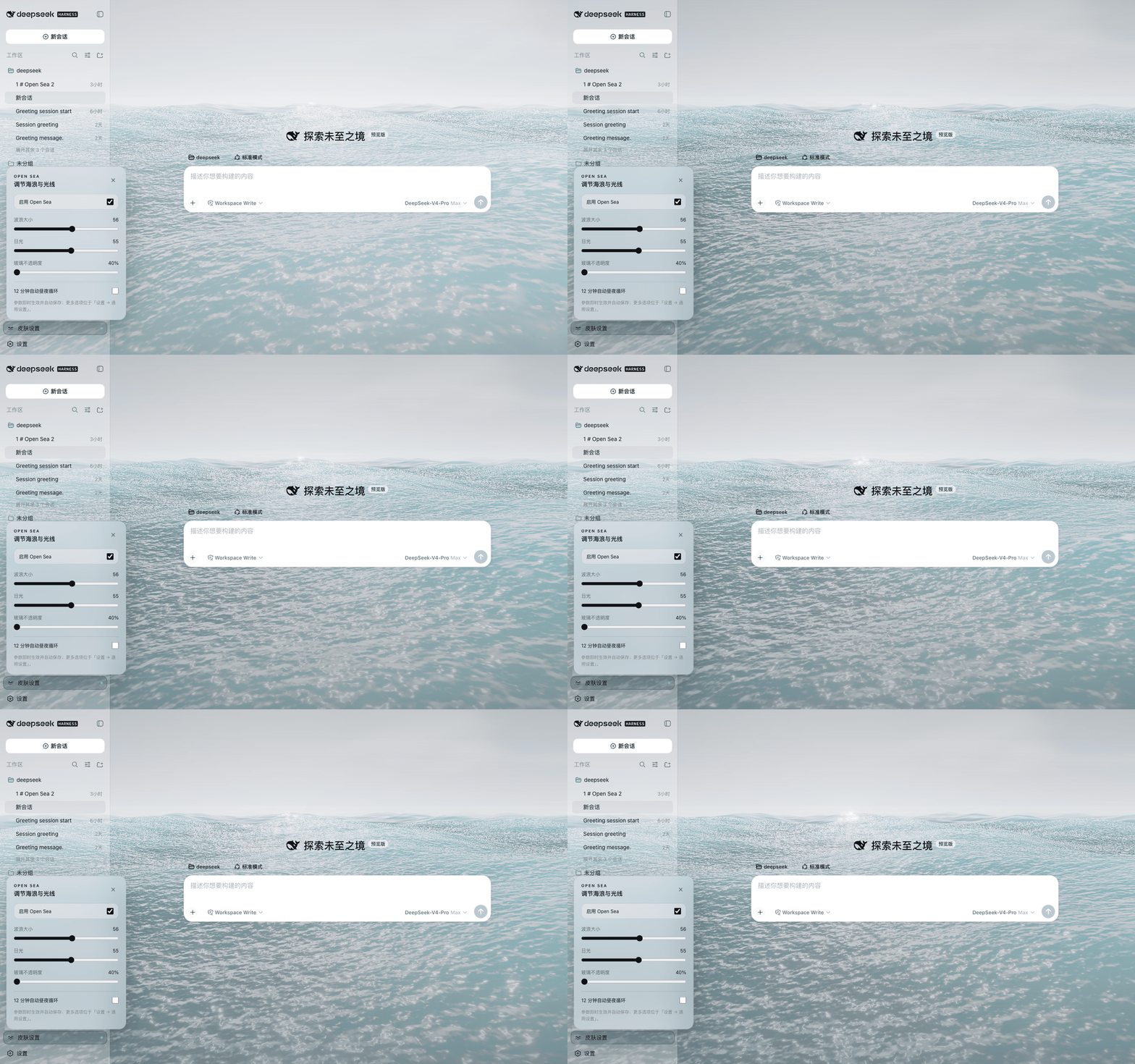
These recordings show the native Harness integration at 40% glass opacity. Overview settings: wave size 56, daylight Afternoon (55). The interactive website lets you try the controls before installing.
🌙 Dark mode · an ocean behind your conversation
☀️ Light mode · a brighter workspace
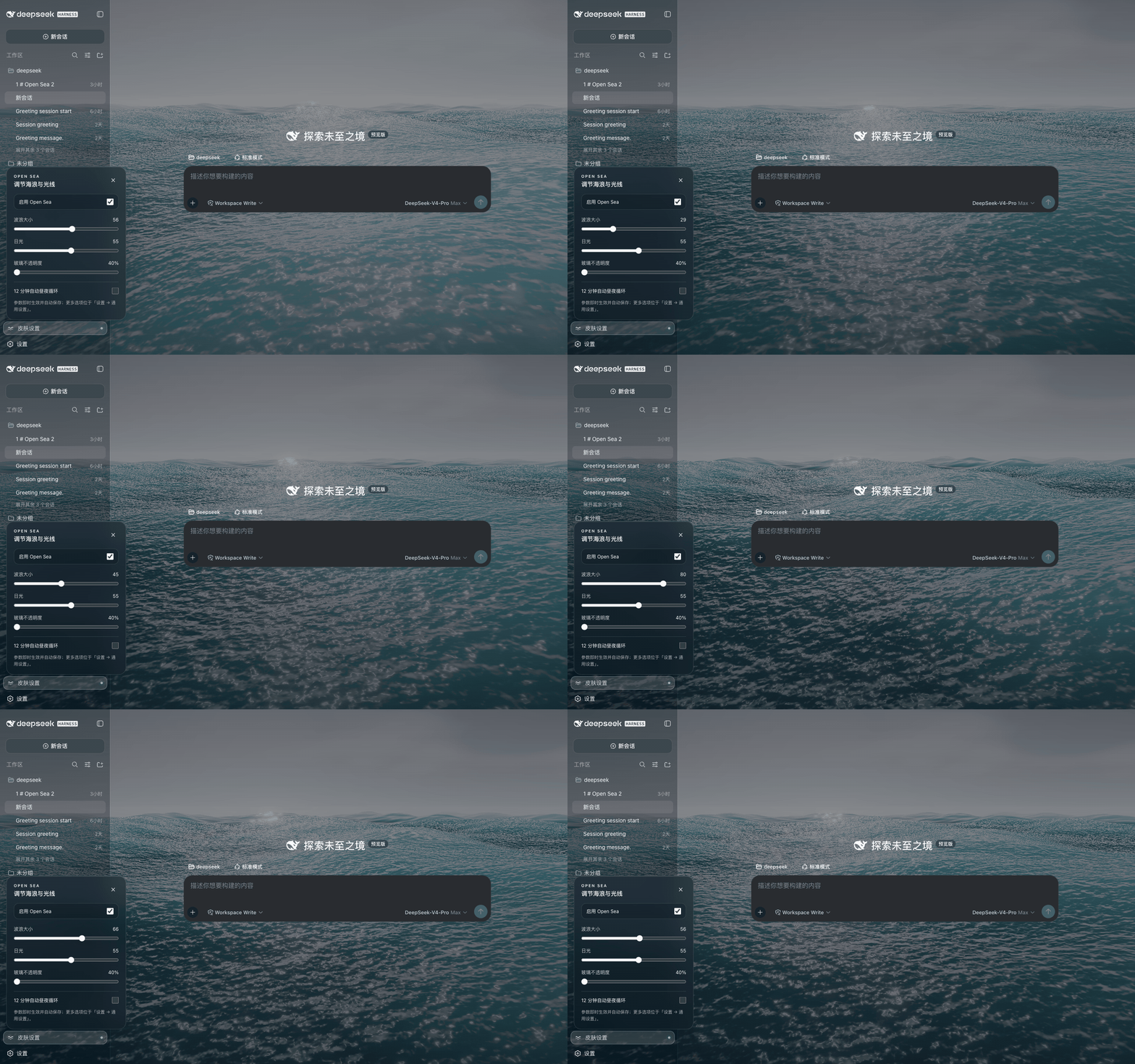
🌊 Wave control · calm water to high sea
Daylight stays at Afternoon while wave size changes, then returns to 56.
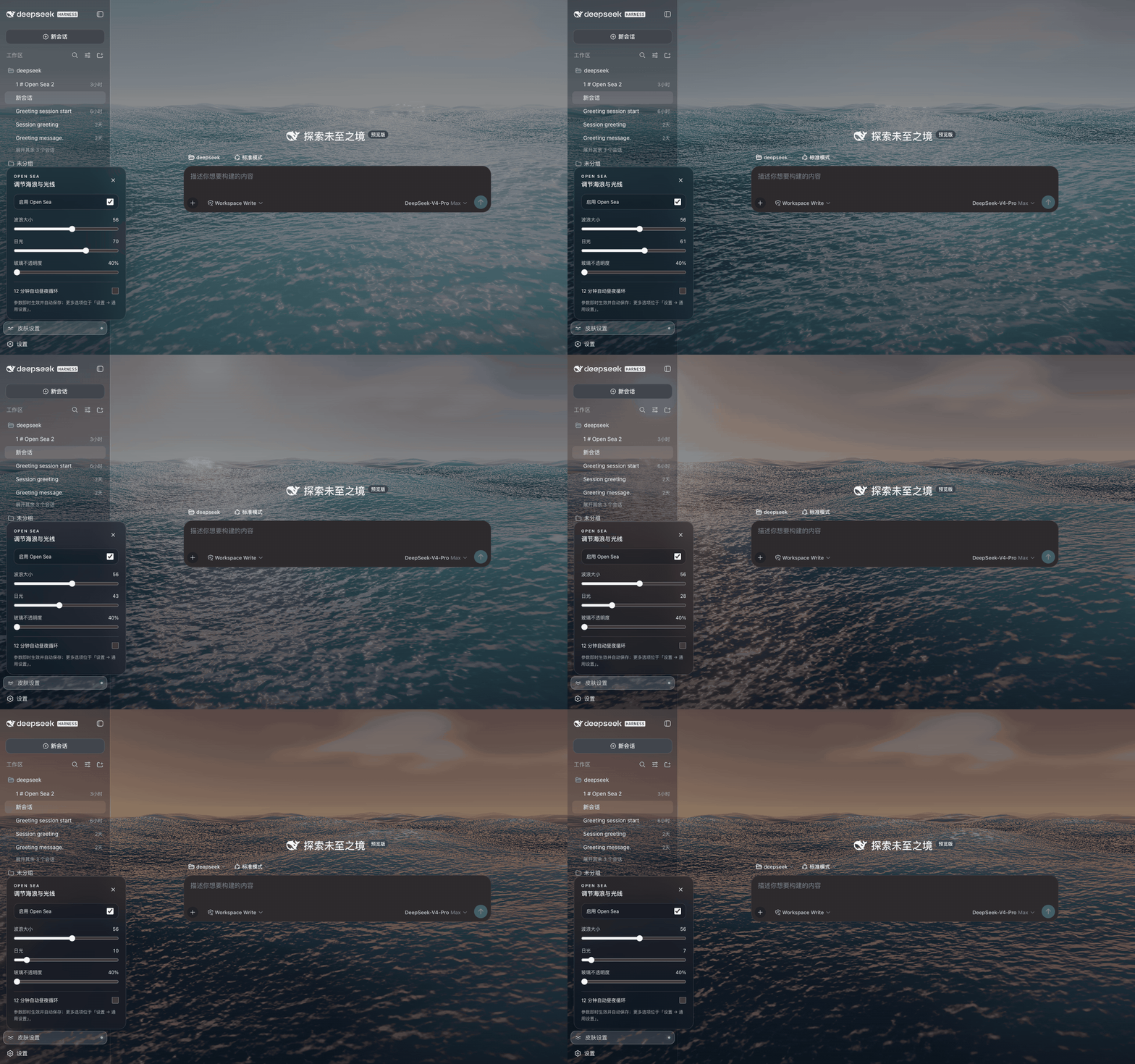
🌅 Sunlight control · midday to sunset
Wave size stays at 56 while the light moves from Midday to Dusk.
📦 Choose one installation path
| # | Your setup | Start here |
|---|---|---|
| 1 🖥️ Recommended | Official Desktop · Windows / Mac | Install inside the app |
| 2 🌐 | Harness Web | One CLI command |
| 3 🧩 | Local Harness in Chrome / Edge | Browser extension |
| 4 🔧 Advanced | Built frontend without plugin support | Static installer |
| 5 🛠️ Developer | A Harness source checkout | Source integration |
1. 🖥️ Official Desktop · Windows / Mac — recommended
The same UI steps apply on Windows and Mac. No terminal or separate Node.js installation is required.
Open Plugins in the sidebar, then Add plugin.
Paste this exact package name and version:
open-sea-skin@1.2.6Choose the official npm registry, or the mainland China mirror if that works better on your network.
Select Install, review the package details, then Enable now. Restart if the app requests it.
Open the lower-left Skin settings control and try 40% glass opacity.
💡 Use the sidebar's Plugins page, not Settings → Built-in plugins. Enter the package name rather than a GitHub repository or remote tarball URL.
Update: uninstall the older Open Sea version in Plugins, then install the version above. The reviewed official installer does not update third-party bundles in place. Disable: turn off the ocean in the skin controls, or disable Open Sea in Plugins. Uninstall: remove Open Sea from Plugins. Web-profile commands do not remove Desktop plugins.
📖 Detailed guide and troubleshooting · Official Desktop downloads
2. 🌐 Harness Web
Run this on the machine that runs dsh web. The command is the same in Windows PowerShell and the macOS terminal:
dsh plugin --profile web add open-sea-skin@1.2.6
Restart your running dsh web process and reload the browser. This installs into the Web profile, not Official Desktop.
📖 Web installation and troubleshooting
3. 🧩 Chrome / Edge extension
For local Harness pages in a browser, on Windows or Mac.
- Download the extension ZIP and unzip it.
- Open
chrome://extensionsoredge://extensions; enable Developer mode. - Choose Load unpacked and select the extracted folder containing
manifest.json. - Reload your Harness page on
127.0.0.1orlocalhost.
🏠 Your homepage and new-tab extension stay unchanged. This extension does not install into the desktop app.
4. 🔧 Static frontend installer · advanced fallback
This changes frontend files. Stop Harness, review the script, and run in Bash on macOS / Linux:
curl -fsSL https://raw.githubusercontent.com/d-dev0101/open-sea-skin/main/install.sh | bash
Restart dsh web. Reapply with bash -s -- --update after a Harness frontend upgrade.
This is not a Windows PowerShell command or a way to patch Official Desktop's installation folder.
5. 🛠️ Harness source integration · developers
Integrates with Harness settings and slots; requires building the frontend and backend.
The tested source baseline is 0.1.2-alpha.3, not every newer Harness version.
💡 Before you install
No. The extension targets a verified local DeepSeek Harness page. It does not replace your browser homepage or skin chat.deepseek.com.
For Official Desktop, disable or uninstall Open Sea in the sidebar Plugins page.
For Harness Web, turn off the ocean in the quick-controls panel, or remove the plugin with:
dsh plugin --profile web remove open-sea-skin
Restart Harness. Remove the browser extension through the browser's extensions page. For a static installation, stop Harness and run:
curl -fsSL https://raw.githubusercontent.com/d-dev0101/open-sea-skin/main/install.sh | bash -s -- --uninstall
Then restart Harness. The static installer removes its own marked loader/assets, not your sessions. See the recovery guide if a page fails to load.
No blanket compatibility claim. Native source integration was verified against Harness 0.1.2-alpha.3, commit dd6322d60 (August 31, 2026). Official macOS Desktop 0.2.0-rc.2 was installed and visually verified with v1.2.5 in an isolated profile. The community DSH Desktop Beta 2.0.5-beta.1 shell has 24 fixture combinations; the official 0.2.x macOS/Windows shell has additional browser regression coverage. Native Windows Desktop is not yet E2E tested.
If an update breaks the skin, report your Harness version, installation method and a redacted screenshot/log.
The renderer uses adaptive resolution, hidden-tab pause and reduced-motion handling. Animated 3D rendering still uses GPU resources; try the demo on your device first.
The skin does not collect or transmit chat data. Extension permissions are limited to storage and the local Harness hosts. This statement describes Open Sea, not the host application's own behavior. Privacy & permissions →
🔒 Permissions and privacy
The skin has no chat-upload or analytics feature. Installed ocean assets and fonts ship locally. The extension reads page markers to recognize Harness and changes its DOM/styles. Visual preferences use browser sync storage and may sync across devices when browser sync is enabled. The archived site/ demo uses jsDelivr and is not the installed skin or current website. Full privacy statement
🛠️ Built for an open ecosystem
The renderer uses WebGPU, three.js and TSL, with five Gerstner waves, reflections, foam and sky lighting. The canonical runtime lives in shared/; generated plugin, extension and static-loader copies stay synchronized. site/ preserves the original showcase.
With Node.js 20+:
npm ci
npm run build
npm run check
npx playwright install chromium
npm run test:browser
npm run test:desktop
npm run test:website
| Resource | Purpose |
|---|---|
| Architecture | Renderer, shared controller and installation adapters |
| Native source integration | Harness settings/slots integration and pinned compatibility |
| Release guide | Packaging and publishing |
| Changelog | Fixes and version history |
| Contributing through Issues / PRs | Bug reports, ideas and improvements |
| DSH plugin topic | Explore the wider community ecosystem |
🤝 Community & license
Made for people who want a more personal DeepSeek Harness workspace. Feedback, bug reports and contributions are welcome. Please never post passwords, tokens or private conversations in an Issue.
Project code is MIT licensed. third-party code and fonts retain their own licenses; see Third-party notices.
Related plugins
dsh-web-ui
 dsh-external
/dsh-web-ui
DSH Web UI 皮肤集合(skins/qq98、ths,热插拔客户端插件包)
Added:
dsh plugin --profile web add github:dsh-external/dsh-web-uidsh-wallpaper-engine
 elysia395
/dsh-wallpaper-engine
DSH 网页界面壁纸:把本机 Wallpaper Engine 的 Video/Web 壁纸实时播放到聊天界面后方,Scene 壁纸提取主纹理作为静态帧,支持内容分级/类型过滤、自定义壁纸上传与 iOS 液态玻璃设置窗口。
Added:
dsh plugin --profile web add github:elysia395/dsh-wallpaper-enginedsh-deep-whale
 Small-tailqwq
/dsh-deep-whale
DSH Web 鲸鱼娘皮肤系列(深海女仆工坊 maid-atelier)。
Added:
dsh plugin --profile web add github:Small-tailqwq/dsh-deep-whalemaid-atelier
Small-tailqwqSmall-tailqwq/dsh-deep-whale/maid-atelier
DSH Web 鲸鱼娘皮肤系列(深海女仆工坊 maid-atelier)。
Added:
dsh plugin --profile web add github:Small-tailqwq/dsh-deep-whale#path:/maid-atelierdeepseek-harness-desktop
 ningbainb
/deepseek-harness-desktop
开源Windows桌面客户端和GUI——DeepSeek Harness——零配置安装器,包含Codex、插件、技能、SSH、移动远程访问和11种皮肤。
Added:
dsh plugin --profile web add github:ningbainb/deepseek-harness-desktopdsh-liang-skin
 kingOfSoySauce
/dsh-liang-skin
DeepSeek Harness 滑动变阻器皮肤
Added:
dsh plugin --profile web add github:kingOfSoySauce/dsh-liang-skin