
Tools & Capabilities
deepseek-harness-desktop-windows
easyhoov/deepseek-harness-desktop-windows · ★ 3
 easyhoov
Unofficial Windows desktop package for DeepSeek Harness that requires no Node.js or command line and preserves the official Web UI and plugin ecosystem.
安装
dsh plugin --profile web add github:easyhoov/deepseek-harness-desktop-windowsGitHub 源码安装:首次需按提示配置 allowBuilds 构建授权后重试
For install and environment setup, plus plugin development tutorials, see DSH community docs ↗
README
Table of contents




DeepSeek Harness for the Windows desktop: no Node.js install, no commands — double-click to run, with the official DSH web UI and plugin ecosystem fully preserved.
⚠️ Unofficial. This project is not affiliated with, endorsed by, or published by DeepSeek. It packages the open-source
@deepseek-ai/dshdistribution as-is. The whale mark is the official DeepSeek Harness favicon used for visual consistency only, and remains a DeepSeek trademark.
中文 · English
Why another desktop wrapper?
Most community wrappers spawn the dsh web CLI and point a browser window at 127.0.0.1:3080. This one is different: the whole shipped composition runs inside the Electron main process (in-process integration), the frontend loads locally, and every /api request plus event downlink crosses an IPC bridge — zero ports, zero child processes, no local HTTP server. Sessions, goals, background jobs, and plugins are first-class local state: closing the window (to the tray) keeps them running.
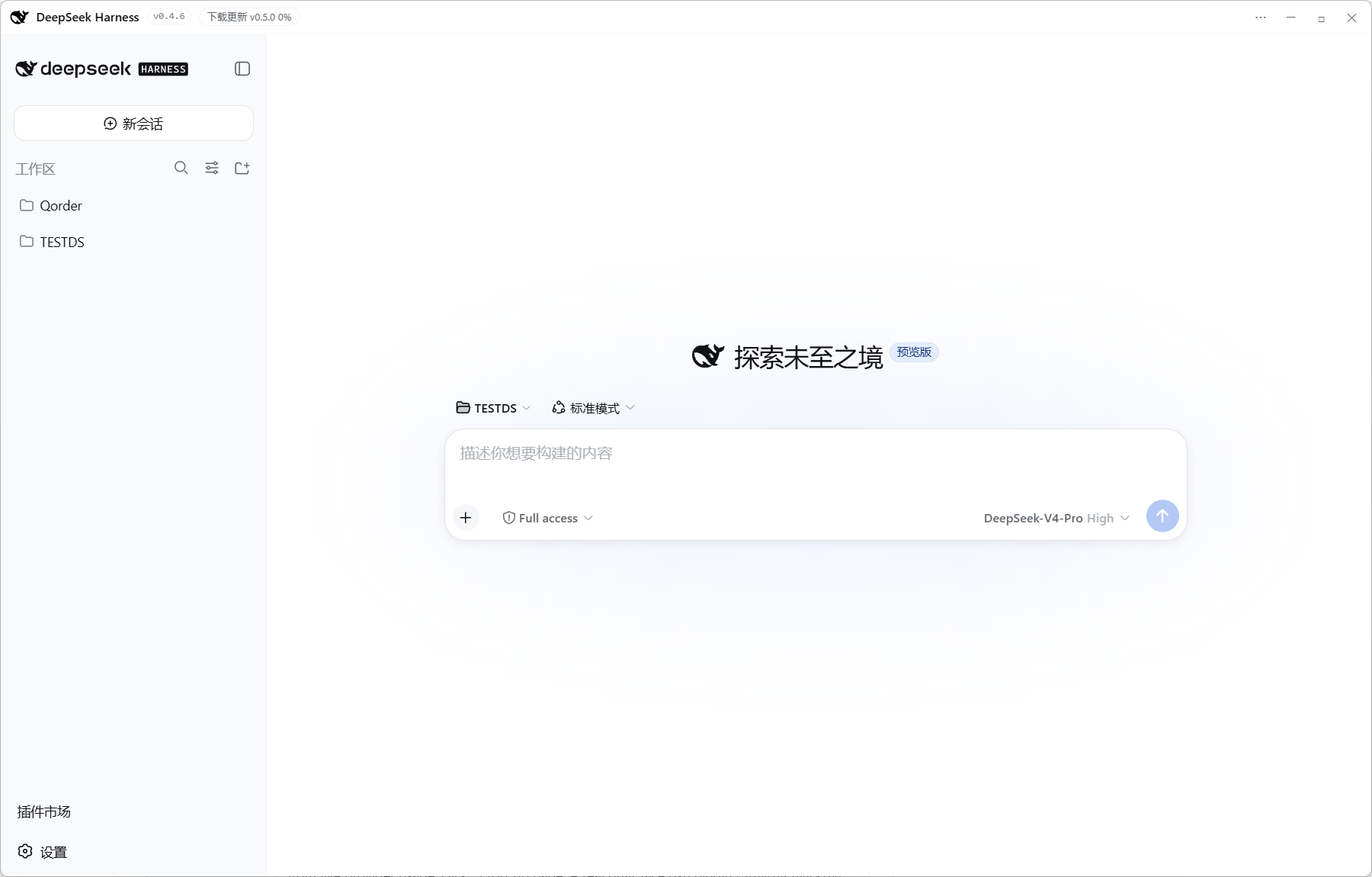
Features
| 🧬 In-process host | Boots the official web profile with dsh-app-boot inside Electron's main process; no child process, no port, no HTTP server |
| 🔌 IPC transport | fetch / WebSocket shims in preload carry all RPC over Electron IPC; official client plugins run unmodified |
| 🪟 Frameless glass chrome | Custom 36px glass title bar (whale icon, version badge, ⋯ menu, min/max/close), Win11 rounded corners, startup splash — themed by the DSH UI's own CSS variables |
| 🛍️ Plugin store | The community store (ZASENJC) is built in: /store or Settings → Plugins → Plugin Store to browse, search, install and uninstall with one click; installs run the official dsh plugin add (npm / GitHub / monorepo subdirectories / tarballs) with the bundled pnpm — no console window, live progress, restart to apply |
| 💰 Session balance | Live balance and per-turn cost under the composer, click to top up |
| 📝 File changes + one-click restore | The "文件" button in the session header lists every write/edit the agent made (with +/− line stats) and restores them one-by-one or all at once — guarded by a hard fence (session-cwd/workspace roots only, dangerous extensions refused, snippet verification) |
| 🗂️ Sidebar workbench | Built-in better-sidebar: file explorer / editor & preview / real terminal / Git panel / sandboxed browser / subagent topology, isolated per session; title-bar compat mode is on by default — the sidebar buttons and tab bar are pushed down clear of the top chrome (strip height tunable in Settings → Side card) |
| ⬆️ Dual-channel updates | Channel 1: electron-updater self-updates from GitHub Releases (live download progress + visible installer); Channel 2: ⋯ menu "更新 dsh" installs a newer official @deepseek-ai/dsh and boots from it, with one-click rollback to the bundled copy |
| 🪟 Tray residency | Closing the window keeps sessions running; tray menu shows/hides, checks updates, quits |
| 🔔 Native notifications | Driven by the host's own event streams: approvals, questions, agent errors, dynamic-plugin run requests; reply-completion only while the window is in the background |
| 🏠 First-run home wizard | Pick a private data directory or reuse ~/.dsh; a live dsh web instance on the shared home triggers a conflict warning |
| 🛡️ Crash recovery | Renderer crash rebuilds the window and reloads the site; the host state survives (3 strikes per minute → give up) |
| 📦 Session export | In-process with taskbar progress, native save dialog, completion notification |
| 🐋 Official whale icon | The DeepSeek Harness favicon (black whale) rasterized to PNG, shipped with the app |
| 🧰 Log repair tool | scripts/repair-log.mjs fixes the upstream interruption-flush seq-reorder corruption |
Plugin ecosystem
DeepSeek Harness is built on Cordis with an "everything is a plugin" architecture: model adapters, tools, sessions, and the agent loop all run as plugins; external plugins plug in through profiles and bundles.
This app's own desktop features are standard DSH plugins (bundles + declarative patches), composed with the profile and recognized by dsh web too. CLI installs (shared profile):
dsh plugin --profile web add <package>
dsh plugin --profile web add github:<repo>
Download
| Artifact | Notes |
|---|---|
DeepSeek-Harness-Desktop-Setup-<version>.exe |
NSIS installer (choose install dir); used by the auto-updater |
DeepSeek-Harness-Desktop-Portable-<version>.exe |
Portable |
latest.yml |
Auto-update metadata, published beside the installers on every Release |
Get the latest builds from GitHub Releases (Windows 10/11, x64; built by GitHub Actions on every v* tag). Not code-signed — SmartScreen will ask; signing is wired via CSC_LINK / CSC_KEY_PASSWORD.
Quick start
- Launch the app; on first run pick a data directory (private by default, or share
~/.dsh) - Open Settings → Models and enter a DeepSeek API key (or a custom OpenAI-compatible endpoint); applies live, no restart
- Pick a workspace directory (native OS dialog) and start a session
This mirrors the official Quickstart — the desktop app boots the same web profile composition the CLI does, so models, workspaces, approvals, and plugin development behave identically.
One deliberate deviation: the CLI uses the invoking directory as the default workspace; the desktop app boots from the user home (override with DSH_DESKTOP_CWD), with workspace selection in the UI.
Build from source
Requires Node.js ≥ 20:
npm ci
npm start       # run in development
npm run dist    # build installers (output in release/)
More
Related plugins
dsh-weknora
 Tencent
/WeKnora/packages/dsh-weknora
把 WeKnora 知识库接入 dsh 的四个只读工具:列出知识库、混合检索原文片段、按顺序还原单篇文档,以及直接取用 WeKnora 自己带引用的 RAG 或 ReAct agent 回答(含可续聊的 session id)。
dsh plugin --profile web add @wxg-prc-cpg/dsh-weknoratreg
 superdesigndev
/treg
给 Agent 的工具目录:按「要做的事」检索约 2,600 个外部接口(SEO 与 SERP、外链、社交、人物与公司信息补全、广告库、抓取),查看参数与单次调用价格后直接调用,凭据由服务端注入。附带技能,MCP 行在未设置 TREG_TOKEN 前保持禁用。
dsh plugin --profile web add github:superdesigndev/tregdsh-anchored-standard
 xiaobright
/dsh-anchored-standard
两阶段 DeepSeek Harness 预设:先 Minimal 对齐的 bootstrap,再切完整 Standard 工具(Project2 98/99)
dsh plugin --profile web add github:xiaobright/dsh-anchored-standardDeepseek-Harness-EAC
 zouyuxuan122
/Deepseek-Harness-EAC
把官方 deepseek-ai/deepseek-harness(@deepseek-ai/dsh,一切皆插件的 agent harness) 封装为开箱即用的 Windows / Linux 桌面客户端,并在其上拥抱社区万象:皮肤、插件、工具、记忆——你所能想到的,一键皆可装。
dsh plugin --profile web add github:zouyuxuan122/Deepseek-Harness-EACDSHA-dshapp
 DSH-APP
/DSHA/app/src/main/assets/app-integration
DSHA 后台任务、网页返回和草稿恢复适配
dsh plugin --profile web add 'github:DSH-APP/DSHA#a6d4de140acc7a085d6afd4b9d413404e004b939&path:/app/src/main/assets/app-integration'deepseek-harness-remote
 liguobao
/deepseek-harness-remote
基于 DeepSeek Harness 插件机制的多端远程访问方案,让桌面端与 Android 端安全连接并操作远程 Harness。(A multi-device remote access solution built on the DeepSeek Harness plugin system, enabling desktop and Android clients to securely connect to and operate a remote Harness.)
dsh plugin --profile web add github:liguobao/deepseek-harness-remote