Development & Runtime
dsh-remote
flymysql/dsh-remote · ★ 217
 flymysqlCurated
Multi-machine remote workspace: manage many SSH hosts, pick a local or remote workspace in the native Add-workspace flow (system folder chooser / local path / remote dir browse), mirror a remote workspace to a real local folder, and operate it with rw_* tools.
安装
dsh plugin --profile web add github:flymysql/dsh-remoteGitHub 源码安装:首次需按提示配置 allowBuilds 构建授权后重试
For install and environment setup, plus plugin development tutorials, see DSH community docs ↗
README
Table of contents
- dsh-remote
- Screen previews
- Features
- Install
- DSH version compatibility
- Official Desktop compatibility (experimental)
- Published Web bundle
- Quick start
- Open a remote machine's DSH Web UI locally
- Cannot connect? Install dsh on the remote yourself
- CLI defaults (optional)
- CLI quick reference
- Development (sandbox, not product)
- Configuration
- FAQ / troubleshooting
- Safety
- License
- Contributing
- Changelog
English · 中文
dsh-remote





Maintained by @flymysql · Homepage · Usage stats · Blog · Discussions · Issues · 中文说明
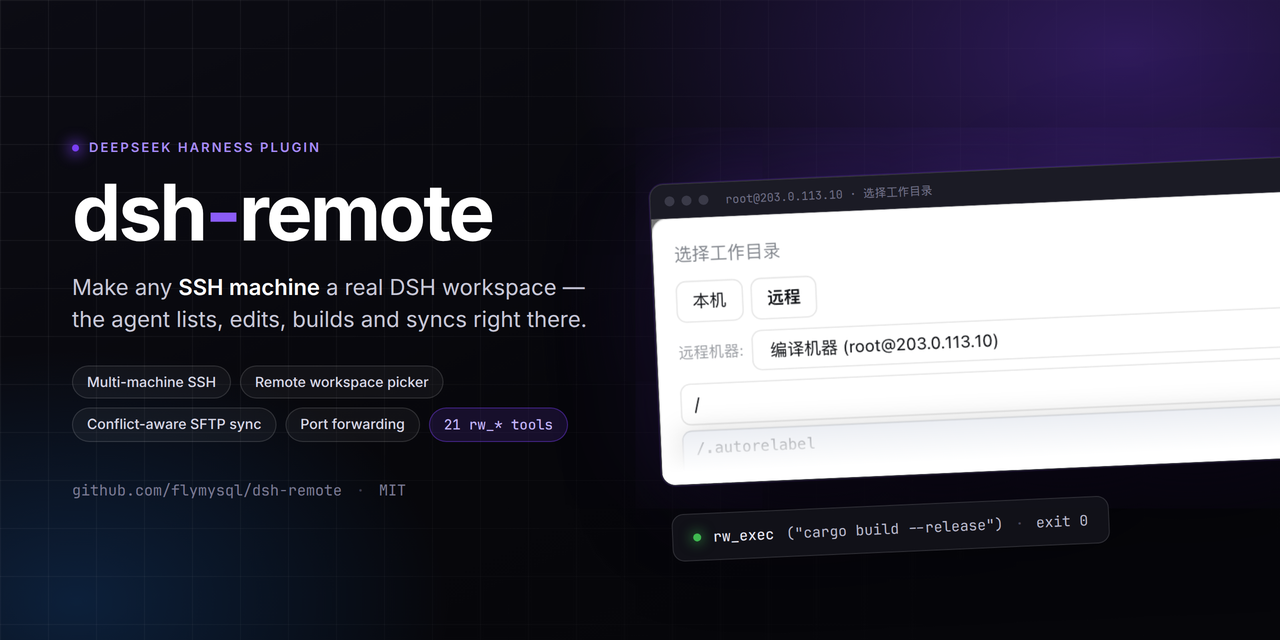
Remote-work assistant for DeepSeek Harness (DSH).
Manage several SSH machines, then pick a remote workspace (or a local one) and let the agent operate right there without leaving the harness — listing files, reading code, running builds & commands over the remote host, and keeping that remote directory mirrored into a real local workspace object.
The harness Web UI intentionally binds 127.0.0.1 (the CLI rejects --host 0.0.0.0 for safety). This plugin goes the other way: you connect out to the machines you maintain, pick a workspace, and work in it through the normal DSH workspace + agent fs flows — no changes to dsh-workspace or the harness core.
It works the other way too: you can open the remote machine's own DSH Web UI as a page in your local browser — again without exposing any port on the remote. The remote dsh must be installed by you (the plugin no longer installs it).
Screen previews
Settings → 远程工作区 — hosts from ~/.ssh/config, advanced config (key / jump host / agent), remote DSH Web UI, port forwarding, audit log, update:
The native "Add workspace" flow — a centered modal with two tabs, opening on Local; here switched to Remote:
- The path field autocompletes live; on Windows hosts the root shows a multi-drive view; the floating browser fills the field without committing.
- On confirm a real local mirror is created and adopted by the harness, kept in sync over SFTP; the choice persists on the machine.
Features
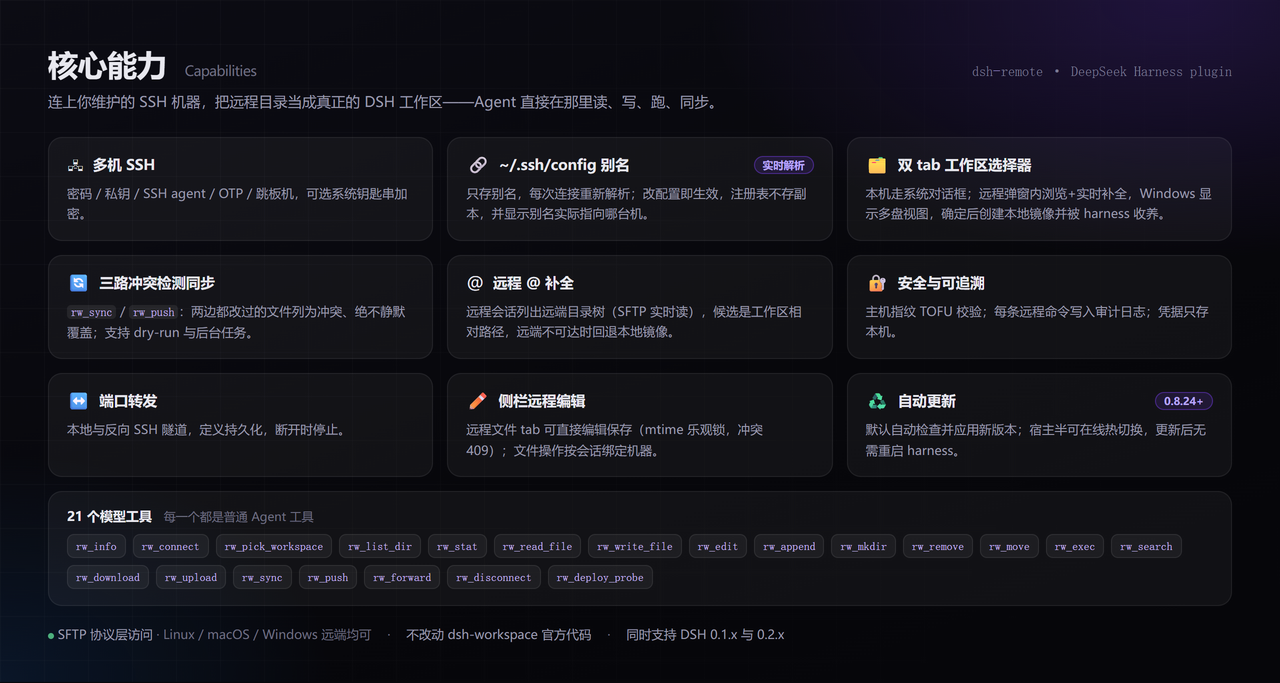
The image above is the overview. What follows is only what the image does not make obvious.
Workspace picker (fills the native "Add workspace" flow) — Local uses the system folder chooser; Remote browses inside the modal:
- The path field autocompletes live; on Windows hosts the root shows a multi-drive view; the floating browser fills the field without committing.
- On confirm a real local mirror is created and adopted by the harness, kept in sync over SFTP; the choice persists on the machine.
Settings (hosts from ~/.ssh/config, port forwarding, audit log, update mode):
The rest:
- 21 model tools (listed so they can be copied or searched):
rw_info,rw_connect,rw_machines,rw_pick_workspace,rw_list_dir,rw_stat,rw_read_file,rw_write_file,rw_edit,rw_append,rw_mkdir,rw_remove,rw_move,rw_exec,rw_search,rw_download,rw_upload,rw_sync,rw_push,rw_forward,rw_disconnect. - Tell local and remote Sessions apart in the sidebar (
0.8.43+) — a remote Session row carries a green dot and its hover card namesuser@host:portplus the remote path; opening it also shows a host chip in the conversation header (a local Session shows neither). A Session counts as remote only when its cwd sits inside a$DSH_HOME/remote-workspaces/…mirror, so a machine that is merely saved never labels a local Session. - Open a remote machine's DSH Web UI locally (
0.8.36+) — nothing has to be exposed on the remote: the plugin SSHes out, starts adsh webthere that binds127.0.0.1only, and tunnels its port back to a loopback port on this machine. The URL carries a one-time login token, consumed once by a redirect. - The audit log opens locally — preview recent entries in the panel, or use 「打开日志文件」/「在文件夹中显示」 to open the log with a local program (the log lives on the DSH host, so a browser cannot open it).
- Cross-platform remotes — all file access is SFTP-protocol-level (no POSIX shell), so Linux/macOS/Windows remotes all work.
- Windows remotes — the platform is auto-detected and commands go through
bash -sover stdin, so quoting and backslash escaping are never an issue (config.shellcan pin a path ornativedisables wrapping);C:\Users\devand/c/Users/devare both accepted. - Async long tasks —
rw_sync/rw_pushwithasync: truereturn ataskIdwith progress/result/cancel. - Data lives under the harness home — machines and mirrors follow
$DSH_HOME; pre-0.6 data migrates automatically on first run. - No
dsh-workspacecore changes — everything ships as a normal plugin.
Install
DSH version compatibility
Runs on both the 0.1.x and 0.2.x DSH lines. DSH validates every @deepseek-ai/dsh-* peer range before importing a bundle and drops the whole bundle when any range does not match (no settings panel, no rw_* tools):
dsh: skipping profile bundle "dsh-remote": Error: Plugin dsh-remote@… is incompatible …
A caret on 0.x is locked to that minor line (^0.1.x cannot admit 0.2.x, and vice versa), so since 0.8.29 the ranges are cross-line intervals: >=0.1.0-rc.6 <0.3.0. If you are below 0.8.29, upgrade the plugin before you upgrade DSH.
Official Desktop compatibility (experimental)
A compatibility path for the official DeepSeek Harness Desktop, tested against the 0.1.5-rc.2 Host transport; it does not replace the harness core or require a listening Web server:
- SSH settings and the directory picker use
/api/dsh-remote/*over the Desktop'sdsh-app:carrier (registered onctx.connection.fetch). - A native Remote Files entry uses
sidebarRightTabs, giving remote files session-scoped resource addresses instead of sending remote paths to the local Files viewer. dsh-better-sidebaris not bundled; official Desktop uses the native right sidebar.
Verified: host startup, IPC requests, real SSH read-only connect/list/read, and per-session routing (sidebar /ls /read /write /fs with sessionId). The native file-tab GUI, failed/cancelled dialogs and non-macOS hosts remain experimental. The Desktop installer may need an explicit policy for the optional ssh2 / cpu-features build scripts.
Published Web bundle
dsh plugin add dsh-remote
Since v0.8.18 it installs and mounts only itself; the Web sidebar (dsh-better-sidebar) is optional. Install it separately if you want the Web remote file explorer/editor — without it the rw_* tools, settings UI, sync, audit log and port forwarding all still work.
Upgrading from 0.7.2–0.8.17: the embedded sidebar goes away; any old profile override for
id: dsh-remote-sidebarcan be removed.
(or npm install dsh-remote + add - id: dsh-remote / name: dsh-remote in cordis.patch.yml).
Quick start
- Connect a machine — Settings → 远程工作区: the page lists the hosts from your
~/.ssh/config(like VSCode Remote-SSH). Click Connect — it adopts the host, makes it current and probes it, with the result shown on that row. A machine that is not in your ssh config is added by Open config (edit a Host block, then Refresh). Edit on a saved machine is only for what ssh config cannot store (a password, the OpenSSH backend, the remote dsh command).Saved ≠ active: a saved machine is only a standby connection; only Connect (or the agent's
rw_connect) puts it into the session's remote context. - Open a workspace — the folder picker opens right after a successful connect (or click 选目录 on any saved machine):
- Remote → browse to a remote directory (or type
/path) → "设为远程工作区" ⇒ a local mirror workspace is created and adopted. - Local → system folder chooser (or type a path) → local workspace. Falls back to the in-app browser when no OS dialog exists.
- Remote → browse to a remote directory (or type
- Work with the agent — treat it like any workspace:
rw_read_file/rw_write_file/rw_edit/rw_exec/rw_search/rw_sync/rw_push/rw_forward(full list above).
Remote context is session-scoped: the "Remote workspace" system-prompt section appears only when the current session's workspace is a remote mirror; local sessions are unaffected and the model will not call
rw_*on its own.
Open a remote machine's DSH Web UI locally
The dsh web running on a remote machine can also be opened as a page on this machine (issue #46). The direction stays "this machine dials out":
The remote opens no port. DSH deliberately refuses
--host 0.0.0.0(it would put remote code execution on the network), so the correct shape is: SSH out, start adsh webon the remote that listens on 127.0.0.1 only, and carry its port back over the SSH connection to a loopback port here.
Usage: Settings → Remote workspaces → "Remote DSH Web UI" → pick a machine → Connect & open. A new tab opens showing that remote machine's full DSH interface (chat, tool tree, settings).
- The URL looks like
http://127.0.0.1:3088/?token=…. That token is a one-time credential the remote process prints at startup and is used once, on this machine, by that redirect: DSH exchanges it for a 30-day signed cookie and lands on a clean/. Do not share that tokenized URL. - "Disconnect" only closes the tunnel and deliberately does not kill the remote process (it may be an instance you use elsewhere). "Disconnect & stop remote" also ends the process — but only one this plugin started.
- If the remote already runs an interface (for example one you started in a terminal), pick the machine
and paste its
http://127.0.0.1:<port>/?token=…into the field, then "Attach to running instance" — no second instance will be started. - When the remote
dshis not on the SSH login PATH, pointwebAttachCommandat its absolute path; to keep an attached instance out of the remote user's own sessions and settings, pointwebAttachDshHomeat a scratch directory. This is per machine: Settings → Remote workspace → the machine card → expand "Advanced" → "Remote dsh command" (e.g./home/you/.nvm/versions/node/v22.19.0/bin/node /home/you/.dsh-remote/dsh/node_modules/@deepseek-ai/dsh/lib/bin.js). Empty falls back to the globalwebAttachCommand. - The tunnel follows the SSH connection: when it drops, the UI shows "Disconnected" and the local DSH process is not affected. After the pool reconnects the plugin re-resolves the remote port (restarting the remote process it started, if that one died), so hitting "Reconnect" is enough to carry on.
- The remote node must be ≥ 20.12 (booting dsh needs
parseEnvfromnode:util, which only exists from 20.12). On an older node npm only warns (EBADENGINE) and installs anyway, and the crash arrives later asdoes not provide an export named 'parseEnv'— check the version before you install.
Cannot connect? Install dsh on the remote yourself
A failed connect is usually not the plugin's fault: the remote dsh is missing or too old.
The classic case: dsh 0.1.0-rc.6 depends on node-pty@1.1.0, whose published package ships
no linux-x64 prebuild, so dsh web cannot start on Linux at all.
The plugin no longer installs or health-checks dsh for you. Install it on the remote the way you
install anything else, then point the plugin at it: Settings → Remote workspaces → the machine row →
Edit → Advanced → remote dsh command (or the global webAttachCommand).
CLI defaults (optional)
Provide a default machine in cordis.patch.yml:
# Example only — use values for your own machine.
- id: dsh-remote
  name: dsh-remote
  config:
    host: 203.0.113.10   # or your real host / hostname
    port: 22
    username: dev
    privateKeyPath: ~/.ssh/id_rsa
    # or password: '…'
    workspace: ~/project
If host is empty the plugin starts disconnected and you configure machines in the UI.
CLI quick reference
Installing and driving DSH may live in different shells, so both the dsh binary and the npx form are shown. Always tell DSH which profile to use with --profile <name> (usually web).
# install the bundle into a profile (npm is pulled by pnpm; recommended)
dsh plugin --profile web add dsh-remote
# same but when `dsh` is not on PATH (e.g. Windows PowerShell inside a repo)
npx --yes @deepseek-ai/dsh plugin --profile web add dsh-remote

# confirm it is installed wire
dsh plugin --profile web list
npx --yes @deepseek-ai/dsh plugin --profile web list

# start the web surface (reload profile; the plugin activates on boot)
dsh --profile web
npx --yes @deepseek-ai/dsh --profile web   # http://127.0.0.1:3080

# use a local checkout instead of the npm version (dev iteration)
npx --yes @deepseek-ai/dsh plugin --profile web add /path/to/dsh-remote
npx --yes @deepseek-ai/dsh plugin --profile web remove dsh-remote   # back to release
After a successful start, Settings → 远程工作区 appears and the "Add workspace" flow gains the 本机 / 远程 tabs (screenshots above).
Development (sandbox, not product)
Iterate in the sandbox — hand-editing a product profile is reverted by the plugin manager on reinstall:
scripts/dev-run.sh --restart   # start / restart the isolated sandbox
scripts/dev-run.sh --stop      # stop it
scripts/dev-run.sh --status    # is it running?
- The sandbox runs its own DSH instance (
dev-harness/harness), serving onhttp://127.0.0.1:50599. - Host-half (
lib/index.js) changes need--restart; client-half (lib/client.js) changes need only a page refresh. - The script hardlink-copies
lib/into the sandbox rather than symlinking — a symlink breaks@deepseek-ai/*resolution. - Before committing:
node check.mjs(framework-constraint gate) andnpm test;scripts/boot-smoke.shproves the plugin still starts. - Full rules live in
scripts/dev-standards.md.
Deploying to a product profile is a separate, explicit action (./sync.sh) for releases only.
Configuration
| Key | Type | Default | Meaning |
|---|---|---|---|
host |
string | '' |
default SSH host (else start disconnected) |
port |
int | 22 |
default SSH port |
username |
string | '' |
default SSH user |
password |
string | '' |
default SSH password (non-empty overrides key) |
privateKeyPath |
string | '' |
private key path (used only when explicitly provided) |
passphrase |
string | '' |
passphrase for an encrypted private key |
workspace |
string | '' |
default remote workspace path |
shell |
string | '' |
remote command terminal strategy: ''=auto-detect (Git Bash on Windows remotes), 'git-bash'=prefer Git Bash, 'native'=never wrap, anything else=explicit bash.exe path (e.g. C:\Program Files\Git\bin\bash.exe) |
commandTimeoutMs |
int | 20000 | per remote command timeout |
connectTimeoutMs |
int | 15000 | SSH connect timeout |
maxOutputChars |
int | 200000 | cap on captured stdout/stderr per remote command |
maxFileBytes |
int | 52428800 | skip mirroring/reading files larger than this (0 = no cap) |
hostKeyMode |
string | accept-new |
host-key policy: accept-new (TOFU), verify (reject unknown hosts), off (skip) |
useAgent |
bool | false |
authenticate via the OpenSSH agent (SSH_AUTH_SOCK) |
keyboardInteractive |
bool | false |
allow keyboard-interactive auth (OTP/MFA) with the configured password |
backend |
string | native |
SSH transport backend (issue #51). native = the built-in ssh2 client (password / private key / agent / OTP); openssh = drive the local ssh command, which is the only way to reach hosts whose sole authentication method is GSSAPI/Kerberos (log in once with kinit), and which also honours ProxyCommand, PKCS11Provider, Match blocks and the rest of ~/.ssh/config. Settable per machine. The cost is a fresh connection per command (slower than native); SFTP still reuses one session. The host name is handed to ssh verbatim (so ~/.ssh/config stays the single source of truth) and host keys are checked by ssh against your own known_hosts |
sshBinary |
string | '' |
the ssh executable the openssh backend drives (empty = the ssh on PATH) |
proxy |
object | — | jump host: { host, port?, username?, password?, privateKeyPath? }; it means "reach the target host:port from the bastion", which is also what reaches a docker container's sshd on the bastion (see the issue #56 entry in the FAQ) |
autoPush |
bool | false |
auto-push edited mirror files back to the remote (watcher, debounced) |
auditLog |
bool | true |
append executed commands to $DSH_HOME/remote-workspaces/audit.log |
encoding |
string | utf-8 |
text encoding for remote file reads/writes (e.g. gbk) |
fileReference |
bool | true |
remote @ completion: in a remote session @ lists the remote tree over SFTP (issue #39); off → only the local mirror |
fileReferenceMaxResults |
int | 20 |
max @ candidates rendered for one query |
fileReferenceMaxEntries |
int | 3000 |
max entries retained in one remote workspace's @ index |
fileReferenceExcludedDirectories |
string[] | [.git, node_modules, dist, build, out, coverage, target, .next, .nuxt, .turbo, .venv, __pycache__, .pytest_cache, .mypy_cache, .gradle] |
directory basenames the remote @ traversal skips |
fileReferenceTimeoutMs |
int | 4000 |
wall-clock budget for one remote @ index pass (on expiry the partial index answers rather than making the caret wait) |
searchTimeoutMs |
int | 60000 |
Cooperative budget (ms) for rw_search: declared as the tool's timeoutMs for DSH's timeout policy and used as the search's own wall-clock cap; on expiry it returns partial results marked TRUNCATED (issue #44). |
searchMaxEntries |
int | 50000 |
Max files rw_search scans before returning partial results. |
updateMode |
string | auto |
self-update behaviour: auto checks npm on load and every 6h and applies a newer release; manual only checks when asked; off disables checks. Default changed to auto in 0.8.27 — safe because 0.8.24 added the host-half hot swap |
updateCheckIntervalMs |
int | 21600000 (6h) | how often auto mode checks npm (floor 60000) |
updateAutoReload |
bool | true |
hot-swap the host half after an update lands; false defers it to the next process start and the panel reports pendingReload |
webAttachPortStart |
int | 3088 |
first local port for the "Remote DSH Web UI" tunnel (later ports are tried when taken; loopback only) |
webAttachCommand |
string | dsh |
command used to start dsh web on the remote; change it when the remote dsh is not on the SSH login PATH (also settable per machine under "Advanced" in the settings page, which wins over this default) |
webAttachDshHome |
string | '' |
DSH_HOME exported on the remote when attaching; empty reuses the remote user's own harness home |
webAttachWaitSeconds |
int | 45 |
how long to wait for a freshly started remote dsh web to print its launch token |
localTools |
string | bootstrap |
which rw_* tools a LOCAL session (cwd outside every remote mirror) sees (issue #63): bootstrap keeps only the configuration loop rw_machines/rw_connect/rw_pick_workspace (the other 19 refuse a local session with "this session is LOCAL", so exposing them just wastes schema budget); none hides all rw_* (remote setup happens via the settings page only); all restores the legacy full surface. REMOTE sessions (cwd inside a mirror) always see everything; an invalid value degrades to bootstrap |
remoteSandbox |
string | inherit |
which sandbox semantics remote operations follow (0.8.54+): inherit reads the mode the local ctx.sandboxPolicy resolved (read-only refuses remote writes/commands/forwards, workspace-write fences remote writes to the workspace root, danger-full-access allows everything); off disables the fence (legacy behaviour); an explicit mode name is also accepted. This is containment, not a security boundary — deploy hard boundaries on the remote side |
credentialFallback |
string | refuse |
what to do when the OS secure store refuses a password (0.8.54+): refuse saves no password (the machine is still saved, the UI reports why, and nothing is written to machines.json in plaintext); plain restores the legacy plaintext fallback (with a warning). Turning encryption off explicitly (backend: plain) is unaffected |
The authoritative list is the
Configschema inlib/index.js; this table mirrors it.
FAQ / troubleshooting
@ lists remote files but the built-in read tool cannot open them — the harness's own file tools see the local mirror, which stays empty until rw_sync downloads it. Read remote files with rw_read_file or the sidebar remote tab.
A file link in a remote Session does not open (issue #55) — fixed. When a link is clicked the harness turns it into dsh-resource://file/session/<session>/<path> and hands it to the built-in text preview, which reads the local filesystem; a remote Session's cwd is a local mirror directory (empty until rw_sync), so the open simply failed. The plugin now registers a higher-priority handler for that address and opens it over SFTP through the same editor as the sidebar "Remote Files" tab. The safety rule is deliberately conservative: it takes over only when the Session's cwd is provably inside a mirror and the mirror registry has loaded, so local Sessions — and the instant right after a page load — keep the built-in preview and no local file is ever mistaken for a remote one. The two cases that still cannot be mapped say so instead of showing a blank page: an address with no mirror mapping, and a Session whose workspace is not a remote mirror directory.
.md/.markdown links in a remote session take the same SFTP path and preview in the tab (issue #74). They used to be handed back to the built-in Markdown renderer (issue #64), which reads the local mirror and fails with ENOENT until rw_sync. The preview is now the remote bytes, rendered with the host Markdown component; builds without that component show the source. Local sessions still use the built-in preview. Images render inline in the sidebar remote tree for png/jpg/gif/webp/svg/bmp (issue #66; files over 2MB fall back to the download button).
One SFTP timeout wedged every SFTP tool on that machine (issue #65) — fixed (0.8.52+). A single operation hitting the 20s timeout used to poison the whole process for that machine (every later SFTP call paid its own 20s, while rw_exec stayed fine) until a disconnect/reconnect. Now a timeout kills the channel so later requests fail fast; the native backend tears the connection down and re-handshakes after two consecutive timeouts, and the openssh backend rebuilds its sftp child — a transient network blip no longer ends with "disconnect and reconnect". As a bonus, rw_edit now writes atomically (temp file + rename), so an interrupted write can no longer truncate the remote file to zero bytes, and the original permission bits are preserved.
Are remote operations subject to the local sandbox? (0.8.54+) — yes. They were not before: a local session has ctx.sandboxPolicy (read-only / workspace-write / danger-full-access), while every rw_* tool ran remote operations with NO policy at all — so a read-only session could still mutate any file on any reachable host. The sandbox was not bypassed; it simply had no say over a different machine. The plugin now applies the same resolved mode at the TOOL boundary:
read-onlyrefuses remote writes, refuses running commands, refuses opening port forwards (reads and connections stay available, or the machine could not even be inspected);workspace-writerequires remote writes to land inside the workspace root (a path fence) and allows commands and forwards;danger-full-accessallows everything.
Why a tool-layer fence rather than ctx.sandbox.confine(): the latter wraps argv for a spawn on THIS machine, while our process runs on the far side of an SSH channel — the core docs say so themselves ("remote execution replaces the surrounding capability seam"). A denial therefore carries the OFFICIAL FS_SANDBOX_DENIED shape (with the [sandbox: …] marker and the escalation hint), so the model's escalation path still works.
The threat model, stated plainly: this is CONTAINMENT, not a security boundary (the same wording the official dsh-fs-sandbox header uses). Paths are compared lexically, so symlinks and TOCTOU inside the remote host can escape, and once bash runs it holds that user's own privileges. What it does buy: a confined session can no longer change remote files outside its workspace BY ACCIDENT, and a read-only session cannot quietly run commands. Deployments needing a hard boundary must confine on the REMOTE side (containers, per-user accounts, filesystem ACLs). Set remoteSandbox: 'off' to disable the fence.
Does a password land in plaintext when the keychain fails? (0.8.54+) — by default, no. Previously a failed secure-store write (locked keychain / missing secret-tool / Windows DPAPI without the assembly) fell back to PLAINTEXT in machines.json with a warning — you asked for encryption and got something less safe than if you had not asked, and a broken keychain is exactly when nobody notices. The default is now credentialFallback: 'refuse': the password is NOT saved, the machine is still saved without a credential, and the UI reports the store failure. Set credentialFallback: 'plain' for the legacy behaviour. Turning encryption off explicitly (backend: 'plain') is unaffected.
How do I stop picking the wrong machine once I have many? (0.8.54+) — give machines GROUP LABELS: environment (prod/staging…), location (shanghai/gpu-lab…), description, and tags (free-form). They are pure labels and change no connection behaviour. rw_machines filters on them (AND across dimensions, OR within a tag list): rw_machines(environment="prod", tags="gpu"). An empty result lists the groups that DO exist, so you never have to guess a spelling. The settings page edits them too. Past a dozen machines, "pick the right host" stops being a memory problem.
What about multi-level bastions? (0.8.54+) — multi-hop chains are supported (OpenSSH ProxyJump a,b,c semantics): a bastion may carry its own proxy, and the chain is built from the FARTHEST hop inward, each hop dialed through the already-open connection to the previous one. Two constraints matter: credentials do NOT inherit across hops (the target's private key is never presented to an intermediate host — it is usually not authorized there, and handing it over would leak a secret that host should never see), and a chain deeper than 8 hops is reported as an error, which turns a config CYCLE into a clear message instead of unbounded recursion. Each hop may carry its own privateKeyPath / useAgent / hostKeyMode.
Can I open a remote terminal inside DSH? (0.8.54+) — yes: an embedded PTY terminal. rw_exec runs one command and closes — no PTY, no stdin once the writer returns — so vim, top, a sudo prompt or any full-screen TUI is impossible. pool.shell() now opens a PERSISTENT PTY channel, and terminal sessions are host-owned: closing the browser does not kill the remote shell (a half-finished vim survives a reload), each session is reclaimed after 30 idle minutes, at most 8 live per process (so a UI cannot exhaust the remote MaxSessions), and unloading the plugin hangs up every one of them.
The transport is deliberately boring: the remote session lives on the HOST and the browser POLLS for output deltas (input is a separate request written immediately, so typing never waits for the poll cadence). That avoids depending on whether the host exposes a WebSocket upgrade path. The routes are /dsh-remote/term/{open,input,output,resize,close,list}, and each resolves the binding from the SESSION first — a terminal opened on host A can be neither seen nor driven by a request bound to host B.
The machine's IP / username changed — must every workspace be recreated? (issue #67) — no (0.8.52+). Edit the machine's new address on the settings page and save, or call rw_connect(machineId=…, host=…, username=…, port=…) with the new address: every workspace mirror bound to that machine is rebound in place (its .dsh-remote-meta.json is rewritten) — local content is kept, no re-sync needed, and the save response says how many mirrors were rebound. The mirror directory name does not follow (live Sessions hold cwd paths inside it); the name is a display label only and does not affect connectivity.
Remote Sessions could not see the workspace AGENTS.md (issue #68) — fixed (0.8.52+). The core instruction loader only knows the local filesystem, and a remote Session's cwd is the local mirror, so the remote repo's AGENTS.md never reached the model's context. Now, when rw_pick_workspace succeeds, the remote workspace gets a shallow scan (root + at most two levels down, matching AGENTS.md/CLAUDE.md only); the found files are synced into the local mirror under a three-way guard (root-level copies thus enter the core's own injection path, exactly like a local Session), and an index of paths + headings is rendered into the system prompt, telling the model to read nested instruction files with rw_read_file before editing. Full-tree recursion and plugin-side full-text injection are deliberately not done (the former would scan through multi-project roots; the latter would run a second injection pipeline in parallel with the core's).
Does reading a file in a remote subdirectory pull that subdirectory's AGENTS.md into context? (issue #71) — yes (0.8.53+). #68 fixed only the static half (workspace shallow scan + index line); the dynamic half was still broken, because the core's incremental injection recognizes only read/write/edit with a file_path argument — rw_read_file matches on neither name nor argument — and it expands scopes using LOCAL paths, so a remote absolute path maps onto no mirror cwd. Any one of those three gaps was enough to stop the injection from ever happening. The plugin now hooks rw_* file touches itself on tools/result, takes the WHOLE ancestor chain from the touched directory up to the workspace root (not just the deepest level, matching local Sessions: reading a/b/c.ts brings in both a/AGENTS.md and a/b/AGENTS.md), stats each level, and injects the current contents as ONE user message. Boundaries that matter: the cwd's own level is not re-scanned (the core baseline covers it, so reading a file directly in the workspace root triggers no extra scan); delivery is deduplicated per session by content digest, so the same content is injected once; a remote edit is re-injected on the next touch; a previously injected file that disappears produces a "removed" notice; one batch has a 16 KB budget; and an offline machine degrades silently — it hangs neither the tool call nor the prompt assembly. The message carries the plugin's own source.kind (dsh-remote-instructions), while the core's state machine claims only its own agent-instructions, so the two injection paths cannot fight.
Can rw_exec take a per-call timeout, be cancelled, and move to the background like the built-in shell? (issue #70) — yes (0.8.53+). The transport (pool.exec) already supported timeoutMs and AbortSignal; what was missing was the wiring, and all three pieces are now in place: (1) a timeoutMs argument (clamped to 1000-600000, defaulting to commandTimeoutMs) whose timeout message prints the value ACTUALLY APPLIED rather than the config value; (2) exec.signal is forwarded, so pressing "stop" really SIGTERMs the remote process and returns at once instead of waiting out the timeout; (3) run_in_background: true returns a job id immediately (read with the existing job_output, stop with job_kill), and a command that outlives its timeout is PROMOTED to a background job instead of being killed (promoteOnTimeout, on by default). Background execution and promotion need the core jobs service; a composition without it (minimal embedding, test double) degrades to foreground-only execution — the 0.8.52 behaviour — rather than failing to load.
The terminal in a remote Session is still the local one (issue #55) — that is by design, and a plugin cannot change it, but there is an equivalent: DSH's sidebar terminal is core, its PTY comes from the context-global subprocess service, and its cwd is the Session's own workspace directory (the local mirror for a remote Session). A plugin can neither replace that service nor retarget the core terminal onto SSH. For a genuine remote terminal use the "Remote DSH Web UI" (above): it opens the remote machine's own DSH in this browser, and that interface's terminal runs on the remote host, with no extra configuration. To run a single remote command instead, use rw_exec (add pty: true for an interactive PTY).
Host key changed — /remote forget-key (or Settings → machine → trust again).
"Authentication failed" — check the username/password/key path; fill in the passphrase for an encrypted key; enable keyboard-interactive when the host requires OTP.
Cannot reach an internal machine — set a jump host (or add the bastion as its own machine first).
The host only allows GSSAPI/Kerberos (ssh works after kinit, the plugin does not) — in Settings → 远程工作区 → Advanced, switch Backend to openssh (drive the local ssh) and tick "use a ~/.ssh/config alias", with Host set to the alias in ~/.ssh/config (not the IP). The login is then performed by your local ssh with your Kerberos ticket, and ProxyCommand, GSSAPIAuthentication etc. all apply per ~/.ssh/config — one source of truth for the configuration (issues #50/#51). Command-line equivalent: rw_connect(host="<alias>", useSshConfig=true, backend="openssh").
Can a docker container on the remote host be the workspace? (issue #56) — Yes, and no plugin change is needed. There is no container-specific code anywhere in the plugin, yet the two configurations below already cover the request. Pick by whether the container publishes a port:
- A: the container maps its sshd (e.g.
docker run -p 127.0.0.1:2222:22 …) — a plain "jump host" configuration: Host127.0.0.1, Port2222, the container's user/key, and the remote host as the jump host. Why the files really land in the container:proxymeans "connect to<host>:<port>as resolved by the bastion" (lib/pool.js:pclient.forwardOut(...this.config.host, this.config.port...)), and the resulting channel becomes the main connection's own transport (opts.sock), so SFTP rides the container's sshd —rw_list_dir/rw_read_file/rw_write_file/rw_syncall read and write container files. Command-line equivalent:rw_connect(host="127.0.0.1", port=2222, username="<container user>", privateKeyPath="<key>"). RequiresAllowTcpForwardingon the remote sshd (the default). - B: the container publishes nothing — pure
~/.ssh/configplus the system-OpenSSH backend, on your machine:
Host devbox
    HostName devbox.invalid
    User dev
    IdentityFile ~/.ssh/id_ed25519
    ProxyCommand ssh <remote-host> docker exec -i <container> sh -c 'exec socat - TCP:127.0.0.1:22'
then rw_connect(host="devbox", useSshConfig=true, backend="openssh"). Why both commands and file operations reach the container: the openssh backend hands the alias to ssh verbatim and deliberately never emits its own ProxyCommand (lib/openssh.js omits it so that ~/.ssh/config decides), while ssh -s <dest> sftp and ssh -- <dest> <cmd> travel the same stream. Requires an sshd inside the container plus socat (or an nc that speaks stdio).
⚠️ A Windows caveat: POSIX OpenSSH shell-expands ProxyCommand, but Windows' own OpenSSH 9.5 does not (measured: it passes the whole string through as literal argv). So on a Windows host either keep the ProxyCommand a single command with no shell metacharacters, or point "ssh path" at Git Bash's ssh.exe. (Also: whether docker exec -i carries binary data byte-for-byte is unverified here — no docker on this machine — so try a small file with B first.)
rw_sync/rw_push reports conflicts — files changed on both sides are skipped and listed (never silently overwritten); merge manually and retry, or pass force=true.
Windows remotes — everything goes over SFTP, no POSIX shell needed; read Chinese files with encoding=gbk.
A directory is missing from the mirror — the default ignore rules skip .git/node_modules and similar; adjust $DSH_HOME/remote-workspaces/.dsh-remote-ignore (gitignore syntax).
Saving a remote file returns 409 — the remote file changed after you opened it; re-read and edit again.
How are passwords stored? — tick "encrypt password": macOS Keychain / Windows DPAPI / Linux secret-tool (libsecret); falls back to plaintext when unavailable.
Why is the password box empty (where are the stars)? — No secret is ever sent back to the browser, so the input stays empty; when a password IS saved its placeholder reads
•••••••• (saved — leave blank to keep) with a hint underneath. Saving with an empty box keeps the stored password; typing a new value replaces it. Same for the private-key
passphrase and the jump-host password. The password badge in the machine row means exactly this (a keychain-stored password counts as saved).
Which password does "Test connection" use? — The form in front of you, but a blank password / key / passphrase falls back to the value saved for that machine, so "edit a machine that already connects → click test" now works (the success line says the saved password was used). After saving, the form stays bound to that machine so you can test immediately; press "Cancel edit" to start over.
"No credentials" even though you filled it in — the password never actually landed on disk: when "encrypt password" is ticked and the OS store is unavailable the plugin
refuses to write plaintext and reports a warning (credentialFallback defaults to refuse). Look for the red warning after saving, fix the store and save again, or use
"Test connection" to verify on the spot. A machine with no password / key / agent is flagged in amber right inside the form.
"SSH agent unavailable" — the machine has "use SSH agent" ticked but the DSH host process has no SSH_AUTH_SOCK (Windows has no agent service by default). Start an agent
(and export SSH_AUTH_SOCK, or use Pageant) before launching DSH — or untick it and save a password / private key instead.
The plugin vanished after a DSH upgrade — DSH's compatibility check dropped the bundle; upgrade to 0.8.29+ (see "DSH version compatibility" above).
"Remote DSH Web UI" will not connect / spins forever — first check that dsh web starts on that
machine at all. Two known traps (the plugin names them in its error):
- dsh 0.1.0-rc.6 cannot start the web surface on Linux — the
node-pty@1.1.0it depends on ships macOS/Windows prebuilds but nolinux-x64, so it fails withFailed to load native module: pty.node. Upgrade to 0.1.5-rc.2+ (itsnode-pty@1.2.0-beta.15ships the Linux build). - dsh 0.1.0-rc.6 does not know
--no-open(the flag came later); the plugin drops it and retries once automatically, so there is nothing to do. If the remotedshis not on the SSH login PATH (a private prefix, say), pointwebAttachCommandat its absolute path.
Safety
Giving the plugin a machine's credentials lets the agent run shell commands as your user on that host — only add machines you trust. Passwords live in a local file (or the OS keychain); treat them as sensitive. With auditLog on, every command is recorded.
License
MIT
Contributing
Contributions are welcome — see CONTRIBUTING.md. Questions, setups and "is this supported?" go to Discussions; reproducible bugs go to Issues.
Thanks to everyone who has landed a change here (merged PRs in parentheses):
@dahaipeng (#31) · @YiHui-Liu (#28) · @nekomona (#24) · FoolishWiser (#17) · @jace1cch (#16) · @Minggle (#10) · 4FMTWRV (#6) · glzhangzhi (per-session SSH pool fix)
Changelog
See CHANGELOG.md.
Related plugins
DSH-better-sidebar
 dsh-external
/DSH-better-sidebar
右侧侧边栏增强:文件预览/终端/Git,可拖拽自定义位置
Added:
dsh plugin --profile web add github:dsh-external/DSH-better-sidebarmirage#dsh
 strukto-ai
/mirage/typescript/packages/dsh
把文件系统与 bash 提供者换成 mirage 虚拟工作区:文件工具与 shell 命令作用于挂载的资源(RAM、S3、Redis、Slack、Gmail、Notion、Postgres)而非宿主磁盘,支持按挂载点设置读/写/执行模式、按命令选择沙箱(进程内 monty、pyodide、quickjs;远程 docker、e2b、daytona),并可在虚拟终端中安装 CLI(git、gh、slack、linear、ntn、gws,或自行注册的程序树)作为命令头词。
Added:
dsh plugin --profile web add github:strukto-ai/mirage#path:/typescript/packages/dshdeepseek-harness-desktop
 hairyf
/deepseek-harness-desktop
DeepSeek Harness Tauri 桌面版 | Only 5mb installer, zero environment setup. Windows / macOS / Linux.
Added:
dsh plugin --profile web add github:hairyf/deepseek-harness-desktopcc-safety-net
 kenryu42
/cc-safety-net
A coding agent CLI hook - block destructive commands and secret file access
Added:
dsh plugin --profile web add 'github:kenryu42/cc-safety-net#ae8af0330308ad0bc24b5389709060c7a07a6b8d'hol-guard
 hashgraph-online
/hol-guard
开源AI代理防病毒:运行时拦截风险工具、秘密访问、提示注入、恶意软件包、MCP服务器、插件和技能。
Added:
dsh plugin --profile web add github:hashgraph-online/hol-guarddsh_desktop
 myYangyunfan
/dsh_desktop
把 DeepSeek Harness 装进 Windows 桌面的开箱即用客户端 内置完整 dsh 运行时与全部官方插件,免装 Node.js,双击即用
Added:
dsh plugin --profile web add github:myYangyunfan/dsh_desktop