
Tools & Capabilities
dsh-companion
gjnzsu/dsh-companion · ★ 1
 gjnzsu
A friendly status and context-pressure companion for DeepSeek Harness Web
Manifest details
安装
dsh plugin --profile web add github:gjnzsu/dsh-companionGitHub 源码安装:首次需按提示配置 allowBuilds 构建授权后重试
For install and environment setup, plus plugin development tutorials, see DSH community docs ↗
README
Table of contents
- The idea in one minute
- Design principles
- Status first, usage on demand
- Ambient, not demanding
- Friendly, not gamified
- Honest about data
- Native to DSH
- Observational and privacy-first
- Architecture at a glance
- State model
- Activity
- Context pressure
- Interaction
- Metrics
- Install
- Privacy
- Compatibility
- Development and testing
- MVP limitations
- License
English | 简体中文
A lightweight Agent Companion for DeepSeek Harness Web. It turns the selected session's activity, context pressure, and optional usage metrics into a glanceable Living Data Orb.
Status first, usage on demand; friendly without becoming distracting.
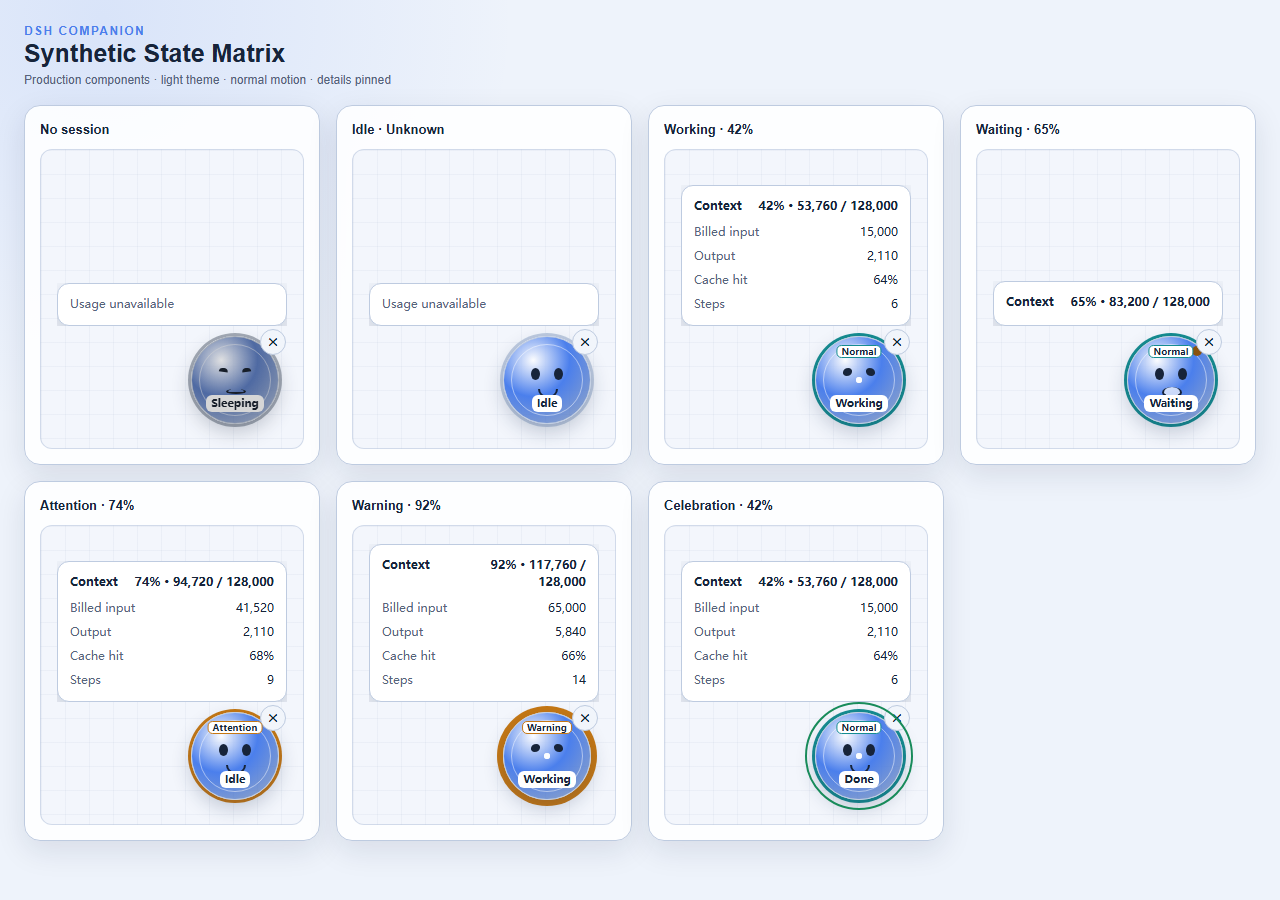
This image is a visual-regression baseline rendered from production components and synthetic states. It covers no session, idle, working, waiting, context attention, context warning, and the completion response.
The idea in one minute
DSH Companion communicates two independent signals:
- Activity — whether the agent is sleeping, idle, working, or waiting for you.
- Context pressure — how much of the model context window the next request is projected to occupy.
Context, billed input, output, cache hit, and step metrics appear only when you hover, focus, or pin the detail panel.
| Visual layer | Question answered | Presentation |
|---|---|---|
| Expression and status label | What is the agent doing? | Sleeping, Idle, Working, Waiting, Done |
| Pressure ring and text label | Does context need attention? | Normal, Attention, Warning, Unknown |
| Usage panel | What resources has this session used? | Only metrics already available from DSH |
Design principles
Status first, usage on demand
Activity and context pressure are the default experience. Detailed numbers stay secondary until the user asks for them.
Ambient, not demanding
The companion can communicate work, required interaction, and completion without flashing, covering the page, or demanding continuous reading. It can be moved or collapsed into a recoverable edge tab.
Friendly, not gamified
The Living Data Orb uses expression and restrained motion to improve comprehension. The MVP deliberately avoids feeding, leveling, rewards, collections, cosmetics, and multi-pet mechanics.
Honest about data
Missing projections remain unknown or absent. The companion never fabricates zero usage, pricing, balances, or streaming estimates.
Native to DSH
The plugin mounts additively in shell.overlay, follows the selected session, consumes existing projections, and respects the host lifecycle, semantic styling, and accessibility patterns.
Observational and privacy-first
The companion does not modify prompts, tools, model requests, or session events. It does not inspect conversation content, reasoning, tool input/output, files, credentials, or provider accounts, and it has no telemetry or remote service.
Architecture at a glance
flowchart LR
    DSH["DeepSeek Harness"] -->|"selected SessionSummary"| Adapter["DSH client adapter"]
    Adapter -->|"status + numeric projections"| Derive["Pure state derivation"]
    Derive --> ViewModel["CompanionViewModel"]
    ViewModel --> Orb["Living Data Orb"]
    ViewModel --> Panel["Usage panel"]
    Preferences["Browser-local position and collapse state"] --> Orb
DSH owns the event log and projection folds. Companion starts at the selected summary already exposed to the Web client; it does not scan the log, poll a backend, or duplicate upstream accounting.
Detailed design documents:
State model
Activity
| State | Meaning |
|---|---|
| Sleeping | No session is selected |
| Idle | The selected session is ready and not running |
| Working | The agent is executing |
| Waiting | The session needs an answer, approval, or another user interaction |
| Celebration / Done | A brief response after the same session moves from Working to Idle |
Waiting takes priority over working because required user action is the more important signal.
Context pressure
| Band | Projected occupancy | Meaning |
|---|---|---|
| Unknown | Cannot be derived reliably | Required projection data is absent or invalid |
| Normal | < 70% |
No action suggested |
| Attention | 70% – < 85% |
Context is growing and worth noticing |
| Warning | ≥ 85% |
Consider finishing, compacting, or starting a fresh session |
Pressure uses visible text, ring weight, and color together, so color is never the only signal.
Interaction
- Hover or keyboard focus previews usage.
- Click pins or unpins the panel.
- Escape or an outside click closes a pinned panel.
- Drag moves the companion and saves its browser-local position.
- Collapse replaces the orb with a reachable edge tab.
- Restore returns the orb to its saved position.
The surrounding overlay is click-through. Only the orb, panel, and recovery tab receive pointer input.
Metrics
| Metric | Definition |
|---|---|
| Context | Projected token use divided by the model context window |
| Billed input | Uncached input + cache reads + cache writes |
| Output | The accumulated provider-reported output-token count |
| Cache hit | Cache-read tokens divided by billed input, rounded to a whole percentage |
| Steps | Completed session steps |
Unavailable metrics are omitted instead of estimated.
Install
Install from npm into the DSH Web profile:
dsh plugin --profile web add dsh-companion
dsh web
You can also build a local tarball from source:
git clone https://github.com/gjnzsu/dsh-companion.git
cd dsh-companion
pnpm install --frozen-lockfile
pnpm build
pnpm pack --pack-destination .
dsh plugin --profile web add ./dsh-companion-0.1.1.tgz
dsh web
Remove it with:
dsh plugin --profile web remove dsh-companion
Privacy
The companion reads only status and numeric projections already delivered for the selected session, plus browser-local placement preferences. It has no telemetry, remote service, cloud synchronization, conversation-content inspection, tool-output inspection, credential access, or provider-account access.
Compatibility
dsh-companion@0.1.1 targets DeepSeek Harness 0.1.0-rc.5 exactly. Harness is in developer preview, so later release candidates may require a Companion update.
Development and testing
Development requires Node.js ^22.19.0 || >=24.0.0 and pnpm 11.15.1.
pnpm install --frozen-lockfile
pnpm test
pnpm typecheck
pnpm build
pnpm gallery
pnpm test:visual
pnpm pack:check
Run the keyless real-Web smoke against a Harness source checkout from PowerShell:
$env:DSH_REPO='C:\SourceCode\deepseek-harness'
pnpm test:smoke
The test strategy has two layers:
- Synthetic state tests cover state combinations, pressure boundaries, themes, compact viewports, reduced motion, and interactions.
- Real Web smoke proves that the packed plugin installs into DSH and follows the actual selected session.
MVP limitations
Version 0.1.0 supports DSH Web and the selected session only. It does not provide streaming estimates, pricing or cost calculations, history, growth mechanics, multiple companions, prompt/tool-content analysis, or cloud synchronization.
License
Related plugins
dsh-weknora
 Tencent
/WeKnora/packages/dsh-weknora
把 WeKnora 知识库接入 dsh 的四个只读工具:列出知识库、混合检索原文片段、按顺序还原单篇文档,以及直接取用 WeKnora 自己带引用的 RAG 或 ReAct agent 回答(含可续聊的 session id)。
dsh plugin --profile web add @wxg-prc-cpg/dsh-weknoratreg
 superdesigndev
/treg
给 Agent 的工具目录:按「要做的事」检索约 2,600 个外部接口(SEO 与 SERP、外链、社交、人物与公司信息补全、广告库、抓取),查看参数与单次调用价格后直接调用,凭据由服务端注入。附带技能,MCP 行在未设置 TREG_TOKEN 前保持禁用。
dsh plugin --profile web add github:superdesigndev/tregdsh-anchored-standard
 xiaobright
/dsh-anchored-standard
两阶段 DeepSeek Harness 预设:先 Minimal 对齐的 bootstrap,再切完整 Standard 工具(Project2 98/99)
dsh plugin --profile web add github:xiaobright/dsh-anchored-standardDeepseek-Harness-EAC
 zouyuxuan122
/Deepseek-Harness-EAC
把官方 deepseek-ai/deepseek-harness(@deepseek-ai/dsh,一切皆插件的 agent harness) 封装为开箱即用的 Windows / Linux 桌面客户端,并在其上拥抱社区万象:皮肤、插件、工具、记忆——你所能想到的,一键皆可装。
dsh plugin --profile web add github:zouyuxuan122/Deepseek-Harness-EACDSHA-dshapp
 DSH-APP
/DSHA/app/src/main/assets/app-integration
DSHA 后台任务、网页返回和草稿恢复适配
dsh plugin --profile web add 'github:DSH-APP/DSHA#a6d4de140acc7a085d6afd4b9d413404e004b939&path:/app/src/main/assets/app-integration'deepseek-harness-remote
 liguobao
/deepseek-harness-remote
基于 DeepSeek Harness 插件机制的多端远程访问方案,让桌面端与 Android 端安全连接并操作远程 Harness。(A multi-device remote access solution built on the DeepSeek Harness plugin system, enabling desktop and Android clients to securely connect to and operate a remote Harness.)
dsh plugin --profile web add github:liguobao/deepseek-harness-remote