
Tools & Capabilities
deepseek-harness-desktop
haoyueqin/deepseek-harness-desktop · ★ 6
 haoyueqin
A desktop shell for DeepSeek Harness — the pluggable AI agent harness from DeepSeek. Wrap the official dsh web UI into a native-feeling, always-on desktop app, reusing the dsh…
安装
dsh plugin --profile web add github:haoyueqin/deepseek-harness-desktopGitHub 源码安装:首次需按提示配置 allowBuilds 构建授权后重试
For install and environment setup, plus plugin development tutorials, see DSH community docs ↗
README
Table of contents
- DeepSeek Harness Desktop
- Features
- Recovery Center — when an update breaks the backend
- Backend (dsh) integration
- Desktop experience
- Screenshots
- dsh version support
- Relationship with the official Desktop app
- Install
- Prerequisites
- Download
- First launch
- Everyday use
- Development
- Packaging
- Data & logs
- Project layout
- Known limitations (v1.x)
- Feedback
- Activity
- License
DeepSeek Harness Desktop
English | 简体中文
[!WARNING] Maintenance mode. As of 2026-09-29 this project is no longer developed: no new features, and no tracking of upstream dsh releases. The official DeepSeek Harness desktop app (https://www.deepseek.com/download/) is the recommended replacement on Windows x64 and Apple-silicon macOS. The last shell release, v1.3.2, and every earlier build stay available on the Releases page indefinitely, and the MIT license means you are free to fork it.
Still accepted: on Linux or Intel macOS — platforms the official app does not ship yet — if an upstream change makes this shell unusable, open an issue with
dsh --versionand the log. Adaptation fixes only: no timeline, no feature requests.






A desktop shell for DeepSeek Harness — the pluggable AI agent harness from DeepSeek. Wrap the official dsh web UI into a native-feeling, always-on desktop app, reusing the dsh CLI you already have.
Features
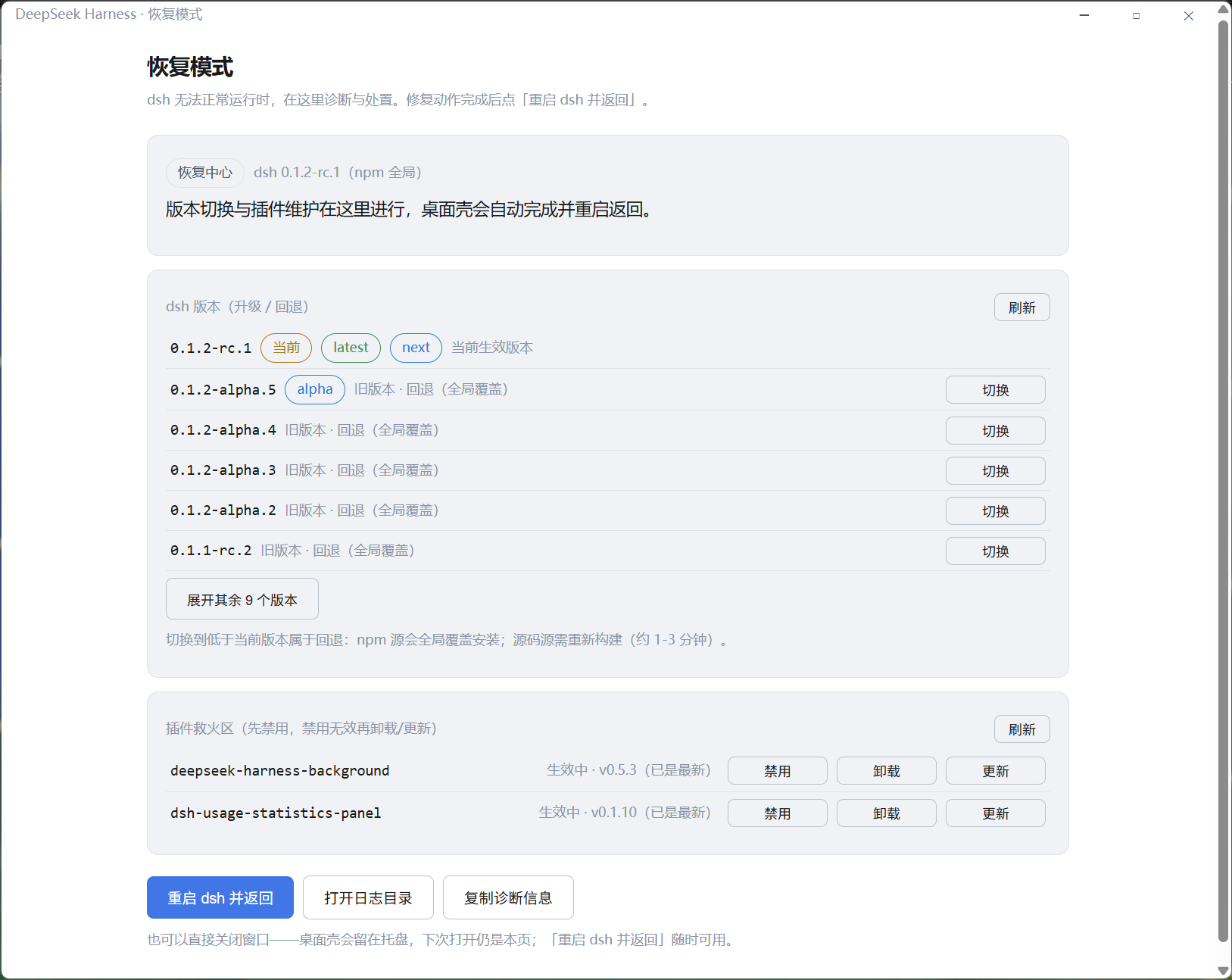
Recovery Center — when an update breaks the backend
dsh moves fast and occasionally ships breaking changes, and plugins often lag behind — so a dsh update can leave the backend unable to boot, and a plugin that used to work can suddenly take the whole harness down with it. Until now, all the shell told you was a dead-end "backend exited unexpectedly" dialog: no plugin name, no error detail, no way to fix anything in place.
The Recovery Center is the shell's answer — a native page that turns a broken backend into a few clicks:
- Automatic on failure — when dsh crashes or fails to boot, the shell switches to the Recovery Center by itself: a rolling output snapshot (token-redacted) plus an automatic diagnosis that pinpoints the failing plugin when dsh names one, falling back to a plain "here's the log" when it can't
- Plugin rescue — disable/enable writes the profile patch layer with whole-file validation and atomic replacement (it will never corrupt your hand-edited lines or leave the backend unbootable); uninstall/update runs the
dsh pluginCLI with live logs. Host-critical modules are protected and refuse to be touched - Version switching, unified — upgrade and rollback share one list (npm global and git source, channel badges, current version pinned on top), with live progress and an automatic restart back to the normal page when done
- Single entry — version maintenance lives here even when everything is fine: Settings → Desktop checks for updates, and confirming an update hands off to the Recovery Center (no scary diagnostics, just progress) — no terminal needed, ever
Backend (dsh) integration
- Dual backend sources — run the
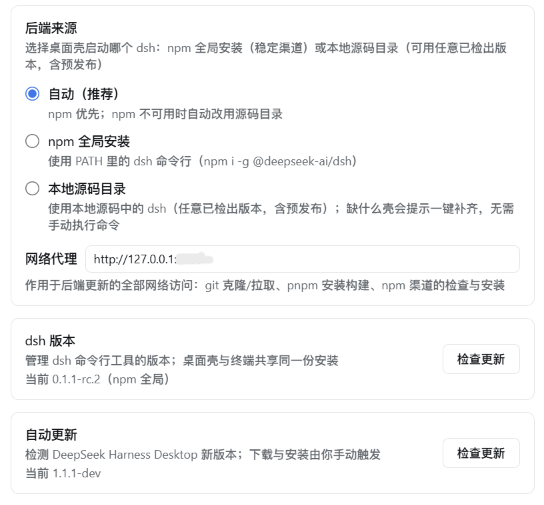
dshfrom your npm global install (stable channel) or from a local git checkout (any version, including pre-releases), switchable in Settings.Automode prefers npm and falls back to the source directory; if the chosen source breaks, the shell falls back to the other one and tells you why - Zero-intrusion wrapper — spawns the chosen
dshas a child process (dsh web), loads its localhost UI; the harness source is never modified. One dsh shared by terminal and desktop — plugins, settings, credentials, sessions and versions always match (DSH_HOME, default~/.dsh) - Source mode without terminals — pick a folder and the shell drives everything: clone the official repo, run
pnpm install+pnpm buildwith live logs, validate the result, then boot. The only prerequisites aregitandpnpmon PATH - Source-mode updates without terminals either — the shell checks the upstream tags, then one click checks out the chosen version, reinstalls, rebuilds and restarts the backend — the same pipeline the Recovery Center drives, just reached from Settings. Dirty worktrees are refused with a clear message
- One proxy for every update channel — a single proxy setting covers git (clone/fetch), pnpm (install/build) and npm (check/upgrade); git uses per-invocation config, never touching your global gitconfig
- First-run setup page — no dsh detected? The app offers a copyable install command, a one-click in-app install, or the source-mode path (clone + prepare), then boots automatically
Desktop experience
- Frameless immersive window — no native title bar; the custom window controls (minimize / maximize / close) blend into the page with DeepSeek brand-blue hover and follow the light/dark theme
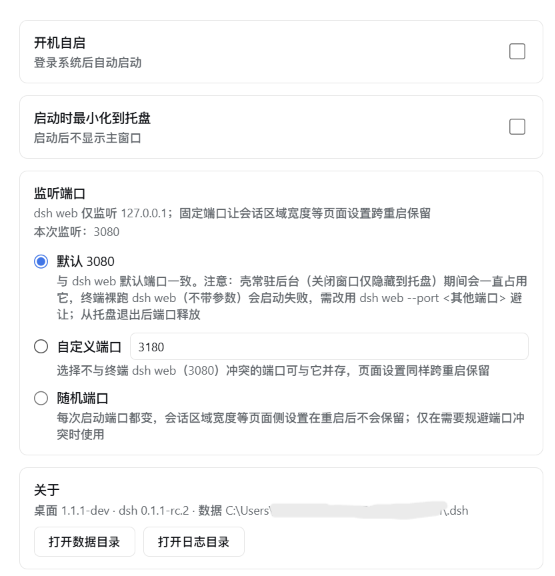
- Always-on tray — closing the window hides to the system tray instead of quitting; the backend keeps running for instant resume
- Auto-start at login — toggle in the tray menu (Windows/macOS native; Linux via XDG autostart)
- Configurable port policy — fixed
3080by default (same asdsh web, giving a stable page origin so browser-side preferences survive restarts), switchable to a custom port or random in Settings; falls back to a random port with a notice when the fixed port is taken. Note: while the shell lives in the tray it holds the port — rundsh web --port <other>in a terminal to coexist - Single instance — launching again focuses the existing window
- Full plugin freedom — dynamic plugins (
cordis_define/cordis_run),$DSH_HOME/cordis.patch.yml, and the npm plugin ecosystem all work exactly as in the web edition - Desktop settings section — the app's Settings page gains a "Desktop" tab (styled to match the harness UI): backend source card (mode, directory validation, clone/prepare, proxy), dsh version card (source-aware check → hands updates to the Recovery Center), shell self-update check, auto-start toggle, launch-minimized toggle, port policy, About card
- Conversation width, natively — the upstream drag handles do the job on supported dsh versions; the shell injects nothing
- Shell self-update (two-step) — checks silently 15s after launch (detection only, never auto-downloads): a "Download update" button appears in Settings, switching to "Install update" once downloaded — every step is triggered by you. Windows installs by quitting and running the installer (unsigned builds can't install silently); Linux AppImage replaces itself automatically; macOS excluded (needs signing)
Screenshots
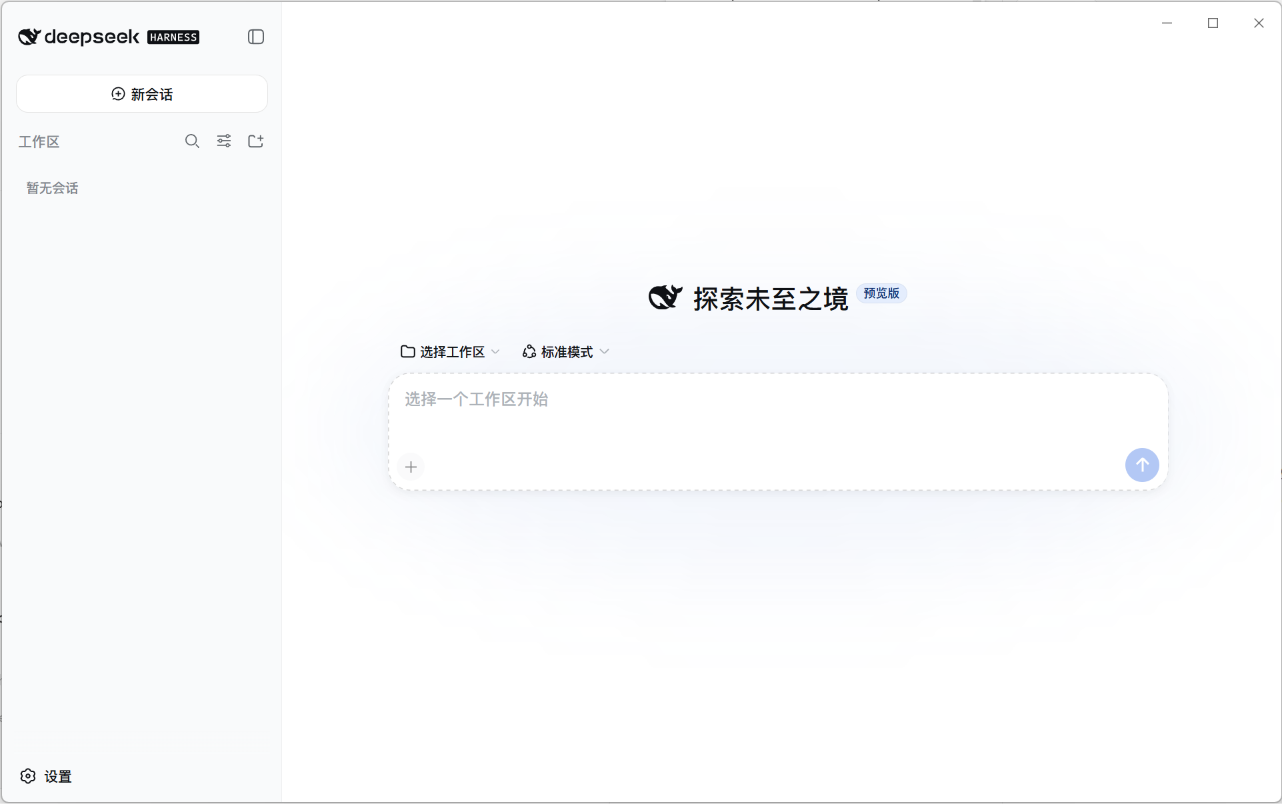
| General desktop options | Backend source, proxy and updates |
|---|---|
 |
 |
dsh version support
| dsh version | use |
|---|---|
| ≥ 0.1.5-rc.1 (verified through 0.1.6-alpha.2) | this shell release |
| anything older (0.1.0 through 0.1.5-alpha.2) | an older shell release — download it from the Releases page |
This shell no longer adapts to dsh versions before 0.1.5-rc.1. Check your backend with
dsh --version; if it is too old, either update dsh (npm i -g @deepseek-ai/dsh
— the latest npm channel is already past the 0.1.5-rc.1 floor — or press "Check for updates" in
Settings → Desktop from a supported shell) or download the matching older shell release.
Note on 0.1.6-alpha.2: dsh changed the default profile module-resolution mode from link
to runtime, so a bare plugin name must resolve from the profile's own node_modules
closure. This shell sidesteps that entirely — its --patch row uses a name that is a
path relative to the patch file, which dsh anchors to a file: URL. That mechanism
behaves the same on every dsh version from 0.1.5-rc.1 on, independent of the resolution
mode.
Relationship with the official Desktop app
Since dsh 0.1.5, upstream ships its own official Electron app alongside the CLI. That app is now the recommended replacement for Windows x64 and Apple-silicon macOS (https://www.deepseek.com/download/) — this shell is in maintenance mode. There is no official build for Linux or Intel macOS; on those platforms, stay on shell release v1.3.2 or fork it. The two take different routes:
| This shell | Official Desktop app | |
|---|---|---|
| Profile | always web; never touches the official exclusive desktop profile (the CLI rejects --profile desktop, and the Recovery Center refuses to list or modify it) |
exclusively owns $DSH_HOME/profiles/desktop |
| Transport | listens on localhost (fixed 3080 by default, configurable, random fallback) — terminal and desktop share one backend |
opens no port (dsh-app:// + private pipes) |
| Versions | tracks a dsh version range (≥ 0.1.5-rc.1): npm latest or any source tag, switched from Settings / Recovery Center |
pins one exact Electron+dsh combination per release |
Coexistence: both can live under one DSH_HOME (sessions, settings and credentials are shared product data), but never drive the same profile at the same time — and this shell will always refuse to touch profiles/desktop. Quit this shell before starting the official app.
Install
Prerequisites
- npm channel (default): Node.js ≥ 22 and the
dshCLI (npm i -g @deepseek-ai/dsh) — if missing, the app shows a setup page with a copyable command or a one-click in-app install - Source channel (optional): additionally requires
gitandpnpmon PATH; the shell clones the repo and runspnpm install+pnpm buildfor you — supported dsh versions (≥ 0.1.5-rc.1) use the prebuiltnode-addon-system, so no C++ build toolchain is needed (historical 0.1.3.x compiledfs-extand is outside the supported range)
Download
Download the installer for your platform from the Releases page:
| Platform | Package | Notes |
|---|---|---|
| Windows | deepseek-harness-desktop-<ver>-setup.exe |
NSIS installer, x64 |
| macOS | .dmg (Apple Silicon / Intel) |
unsigned — first run: right-click → Open |
| Linux | .AppImage + .deb |
x64 |
First launch
- Start the app — it resolves your backend (npm by default), boots
dsh webin the background and opens the UI at its ready state (no dsh? you'll see the setup page first) - Dismiss the 预览版 / preview notice
- Open Settings → Models and configure your LLM provider (API key, model, base URL) — same as the web edition
- Pick a workspace and start chatting
Everyday use
- Close window → app hides to the tray, backend keeps running (a DeepSeek whale icon appears near the system clock)
- Tray menu (right-click the icon): reopen the window, toggle auto-start at login, or quit — quitting fully stops the backend
- Quit via tray is the only way to exit the app; closing the window never does
Development
npm install        # installs electron 43 + toolchain
npm run dev        # dev mode: system Node + your chosen backend (npm or source dir)
electron binary download stuck? (you see
Downloading Electron binary...forever) GitHub-hosted binaries can be slow from some networks. Manually fetchhttps://npmmirror.com/mirrors/electron/<version>/electron-v<version>-win32-x64.zipinto%LOCALAPPDATA%\electron\Cache\electron-v<version>-win32-x64\, then:printf "electron.exe" > node_modules/electron/path.txt # and unzip the archive into node_modules/electron/dist/
Packaging
npm run build:runtime     # generates resources/icon.png (+ build/icon.png) from the upstream favicon
npm run dist:win          # Windows NSIS installer → release/
# npm run dist:mac        # macOS dmg (requires macOS; CI builds it)
# npm run dist:linux      # Linux AppImage + deb
The CI workflow (.github/workflows/release.yml) builds all three platforms on every v* tag and publishes the artifacts to a GitHub Release.
Data & logs
- Data (
DSH_HOME): defaults to~/.dsh(honors the$DSH_HOMEenvironment variable) — profiles, sessions, storage; shared by both backend sources - Logs:
<userData>/logs/main.log - dsh: the shell runs the backend from your chosen source — npm global (located via PATH +
npm root -g, upgradable from Settings → Desktop) or a local checkout (validated before launch: manifest,node_modules/tsx, built web dist, plus anfs-exthint for pre-floor 0.1.3.x directories)
Project layout
src/
  main.ts               app lifecycle: single-instance lock, window, tray, backend resolution, recovery IPC, setup page
  paths.ts              dev/prod resource resolution (icon, preload, desktop plugin patch, recovery page)
  dsh-locator.ts        locate the npm-global dsh CLI (PATH check + npm root -g) + semver compare
  dsh-versions.ts       backend version listing (npm versions × dist-tags → sorted, channel-tagged)
  dsh-update-target.ts  npm dist-tags → update target (semver whitelist, prerelease-aware)
  dsh-source.ts         git-checkout source: validation (manifest/tsx/web dist, incl. the 0.1.3.x fs-ext gate), tag parsing, entry args
  dsh-source-updater.ts source-channel updates: fetch tags → clean tree → checkout → pnpm install/build → restart
  dsh-updater.ts        npm-channel backend: check latest / install any version (upgrade or rollback)
  dsh/spawn.ts          spawn dsh web --port <policy port> --patch; parse stdout URL line; output ring buffer; graceful stop
  dsh/ready.ts          HTTP readiness probe (any status — the URL may carry a process token since 0.1.2-alpha.1)
  recovery/             Recovery Center core: crash diagnosis, profile patch layer, plugin inventory & toggles, recovery state, theme matching, IPC origin guard
  kill-tree.ts          subprocess-tree termination for timed-out maintenance commands
  settings.ts           shell settings (userData/settings.json — backend source, source dir, proxy, port policy)
  updater.ts            electron-updater (Windows guided / Linux AppImage auto)
  tray.ts               tray menu (open / auto-start / quit) + autostart sync
  autostart.ts          auto-start (native on win/mac; XDG file on linux)
  preload.ts            contextBridge bridge (window controls + desktop IPC; compiled to CJS)
scripts/
  recovery-*.test.mjs   recovery test suite (8 suites, node --test on dist)
  install-runtime.mjs   generates resources/icon.png at build time (from upstream favicon)
  smoke.mjs             headless smoke test: spawn dsh, assert URL line + HTTP response
resources/
  recovery.html         Recovery Center page (vanilla, dual theme)
  desktop-integration/  settings "Desktop" section plugin (dsh browser half)
  desktop-patch.yml     shell-injected patch mounting the plugin
assets/
  wordmark.svg          project wordmark
Known limitations (v1.x)
- Requires Node.js ≥ 22 and dsh ≥ 0.1.5-rc.1; the npm channel needs a globally-installed
dshCLI (the setup page offers one-click install), the source channel needsgit+pnpm— the shell bundles no runtime either way, so the installer stays small. Older dsh versions need an older shell release (see the dsh version support table above) - macOS builds are unsigned — Gatekeeper requires right-click → Open on first run; macOS has no auto-update (needs a signing certificate)
- Windows auto-update is guided (downloads then runs the installer) rather than silent, due to the unsigned build
- The source channel checks out release tags in detached HEAD — switch your branch back manually if you develop in the same clone
- Known unfixed issue: if the shell exits abnormally, the
dshchild it spawned can survive as an orphan and keep holding the fixed port, so the next launch falls back to a random port. Workaround: stop the leftoverdsh webprocess (Windows:taskkill /F /PID <pid>), then relaunch — the port returns to3080.
Feedback
The project is in maintenance mode (see the notice at the top). Issues are accepted for one case only: an upstream change that makes this shell unusable on Linux or Intel macOS. Include dsh --version, your platform and the relevant log. Feature requests and general usage questions are out of scope, and no timeline is promised.
- Open an issue (English or 中文, either is fine)
- Harness-level problems belong upstream: deepseek-harness discussions
Activity

License
Related plugins
dsh-weknora
 Tencent
/WeKnora/packages/dsh-weknora
把 WeKnora 知识库接入 dsh 的四个只读工具:列出知识库、混合检索原文片段、按顺序还原单篇文档,以及直接取用 WeKnora 自己带引用的 RAG 或 ReAct agent 回答(含可续聊的 session id)。
dsh plugin --profile web add @wxg-prc-cpg/dsh-weknoratreg
 superdesigndev
/treg
给 Agent 的工具目录:按「要做的事」检索约 2,600 个外部接口(SEO 与 SERP、外链、社交、人物与公司信息补全、广告库、抓取),查看参数与单次调用价格后直接调用,凭据由服务端注入。附带技能,MCP 行在未设置 TREG_TOKEN 前保持禁用。
dsh plugin --profile web add github:superdesigndev/tregdsh-anchored-standard
 xiaobright
/dsh-anchored-standard
两阶段 DeepSeek Harness 预设:先 Minimal 对齐的 bootstrap,再切完整 Standard 工具(Project2 98/99)
dsh plugin --profile web add github:xiaobright/dsh-anchored-standardDeepseek-Harness-EAC
 zouyuxuan122
/Deepseek-Harness-EAC
把官方 deepseek-ai/deepseek-harness(@deepseek-ai/dsh,一切皆插件的 agent harness) 封装为开箱即用的 Windows / Linux 桌面客户端,并在其上拥抱社区万象:皮肤、插件、工具、记忆——你所能想到的,一键皆可装。
dsh plugin --profile web add github:zouyuxuan122/Deepseek-Harness-EACDSHA-dshapp
 DSH-APP
/DSHA/app/src/main/assets/app-integration
DSHA 后台任务、网页返回和草稿恢复适配
dsh plugin --profile web add 'github:DSH-APP/DSHA#a6d4de140acc7a085d6afd4b9d413404e004b939&path:/app/src/main/assets/app-integration'deepseek-harness-remote
 liguobao
/deepseek-harness-remote
基于 DeepSeek Harness 插件机制的多端远程访问方案,让桌面端与 Android 端安全连接并操作远程 Harness。(A multi-device remote access solution built on the DeepSeek Harness plugin system, enabling desktop and Android clients to securely connect to and operate a remote Harness.)
dsh plugin --profile web add github:liguobao/deepseek-harness-remote