
Tools & Capabilities
dsh-excel-chat
hccccc01333/dsh-excel-chat · ★ 13
 hccccc01333
Talk to Excel in DeepSeek Harness: create, edit, repair, and verify spreadsheets by conversation, with automatic formula health checks after every edit.
Manifest details
安装
dsh plugin --profile web add github:hccccc01333/dsh-excel-chat#path:/bundleGitHub 源码安装:首次需按提示配置 allowBuilds 构建授权后重试
For install and environment setup, plus plugin development tutorials, see DSH community docs ↗
README
Table of contents
简体中文 | English





A DeepSeek Harness plugin for working
on Excel in plain language. Say "add a margin formula in column D, bold the header, freeze
the first row, add a filter" and the agent calls excel_operate to do it. Every edit is
followed by an automatic formula check, and you can also ask it to "find what's wrong
with this sheet" and have it repaired deterministically. It all happens in the
conversation — no Excel UI to learn.
Two things that set it apart
1. It checks the formulas after every edit, instead of declaring victory.
The annoying part of Excel is not writing a formula — it is a formula being silently
broken: a fill handle that shortens a range, a row insert that shifts references, a
failed lookup returning #N/A. Excel reports nothing; the numbers just start being wrong.
This plugin runs a formula check after every excel_operate / excel_task (column
pattern consistency, hardcoded cells, empty gaps, circular references, error values), can
repair what it finds with a deterministic fixer, and shows you the before/after diff.
excel_undo rolls an entire edit back from the audit log.
2. The core capabilities do not need Excel installed. Formula checking and repair, reading and writing, styling, subtotals, merges, mail merge and image embedding are implemented at the XML layer, so they run on macOS, Linux and Windows alike. Only chart creation and editing, native pivot tables, chart PNG export, visual review and PDF export need Windows with a local Excel install (via COM).
Install
Requires DeepSeek Harness (the dsh CLI or the desktop app).
dsh plugin --profile demo add dsh-excel-chat
dsh web --profile demo
Installing from source or a local directory also works (prepare builds it for you):
dsh plugin --profile demo add ./bundle
Slash commands
| Command | What it does |
|---|---|
/excel-set |
Set one cell directly, bypassing the planner — the fastest path |
/excel-undo |
Roll back the last excel_operate edit from its audit log |
/excel-doctor |
Self-check: is the plugin loaded, how many tools registered, is the bundle compatible with this dsh |
If the tools never show up, run the self-check first — it separates "the plugin was never loaded" from "it loaded but registration failed":
dsh-excel-chat-doctor                                    # when installed globally / via npx
~/.dsh/profiles/demo/node_modules/.bin/dsh-excel-chat-doctor
Switching language
Output is Chinese by default. Every message a person reads follows this switch: health
reports, data insights, the capability menu, repair summaries, operation warnings, formula
explanations, verification results, planner salvage/validation notes, failure attribution,
doctor output, and the three slash-command descriptions. Add an override to your profile's
cordis.patch.yml to switch it to English:
- id: vera
  config:
    language: en        # zh (default) | en
Data inside the workbook is never translated. Subtotal labels (总计), generated sheet
names (-汇总) and preset names are artifacts written into the file, and code keys off
them — patterns.ts identifies and skips summary rows by matching 总计/小计 — so
translating them would silently change behaviour. Your own sheet names, column names and
cell contents are of course left exactly as they are.
Things you can say
- "Turn report.xlsx into a report: margin in column D, totals in column E, bold the header, freeze the first row, add a filter"
- "Check whether the formulas in sales.xlsx are wrong and fix them"
- "Build a pivot table by region and a bar chart"
- "What's wrong with this sheet?" — runs data insight plus the formula check first, then suggests next steps
- "Show me this file first" — column types, missing values, uniques, samples and a suggested read range
Reliability
A self-built evaluation corpus of 100 workplace tasks (ExcelBench lite: editing / analysis / formulas / multi-step workflows). In goal mode with glm-5.3-flash the measured task success rate is 86% (DeepSeek baseline 52%). The per-run results table is generated from raw run output and anyone can add a row; the failure attribution, the re-test method and the known limitations are all written up in the evaluation document. 423 unit tests pass.
Tools (25)
Understanding a file
excel_read— exact cell state (value / formula / type / format / merges / data validation)excel_profile— quick look at a big sheet: headers, per-column type / missing / uniques / range / samples, plus a suggested read rangeexcel_semantic_profile— semantic profile: column roles (time / dimension / measure / identifier), granularity, cross-sheet join keysexcel_menu— can't describe what you want? Get a menu: a one-line summary plus options for cleaning, reports, pivots, charts and moreexcel_insight— data insight: summary plus checks for missing values, duplicates, outliers, negatives, stray whitespace, and next-step suggestionsexcel_preview— table preview: a Markdown table inline in the conversation, plus an HTML preview file
Formulas
excel_validate_formulas— silent formula errors (column pattern, hardcode, empty gaps, circular references, error values)excel_compile_formula— Formula IR → a deterministic Excel formulaexcel_explain_formula— plain-language explanation of a formula (functions, referenced ranges, cross-sheet references)excel_trace— dependency chain: precedents (what it reads) and dependents (what reads it), with a configurable depthexcel_find_errors— every error-value cell, with the formula that produced it and a count per error codeexcel_repair_formulas— deterministic repair plus optional LLM repair, writing.repaired.xlsxand re-validating (withautoTableto detect the header row)excel_autofix— one-call self-healing: check → repair → re-check → plain-language report, with a hidden health-report sheetexcel_health_report— writes the health check into the workbook itself (hidden sheet: score plus anomaly list)
Operations and tasks
excel_operate— workplace-grade Excel operations: set values (with type inference), fill / series, insert and delete rows and columns, copy / move / transpose, format painter, formula-to-value, sorting (multi-key, by colour, custom list), thereportone-shot template, subtotals, dynamic pivot-style summaries, crosstabs, two-table keyed backfill, advanced filters, styling, data validation, conditional formatting, autofilter, structured tables, image embedding, CSV import/export (export guards against formula injection by default, import reverses it), page setup, headers and footers, defined names, frozen panes, hidden rows and columns, row and column grouping, hyperlinks, comments, sparklines, find and replace, sheet protection, mail merge, data cleaning (dedupe / fill blanks / split columns / case / fullwidth-to-halfwidth) and fuzzy matching; formulas are re-validated afterwards and an audit log is writtenexcel_task— multi-step orchestration (each step is checked and repaired) plus a goal loop (LLM plans → executes → verifies → replans when the goal is not met)excel_undo— rolls back anexcel_operateedit from the audit log (restoring cell types as well as values)excel_diff_workbook— cell-level diff between two workbooks
Charts and export
excel_validate_charts— chart structure validationexcel_validate_charts_visual— Excel PNG export plus a visual LLM review (Windows)excel_create_chart/excel_modify_chart— create and modify charts with local Excel (type, title, legend, axes; Windows)excel_create_pivot— native pivot table (multiple row/column fields, filters and value fields; Windows)excel_export_charts— export charts to PNG with local Excel (Windows)excel_export_pdf— export a workbook or a single sheet to PDF with local Excel (Windows)
In action
| Formula check + auto-repair: the diff at a glance | Data insight: problems found for you |
|---|---|
 |
 |
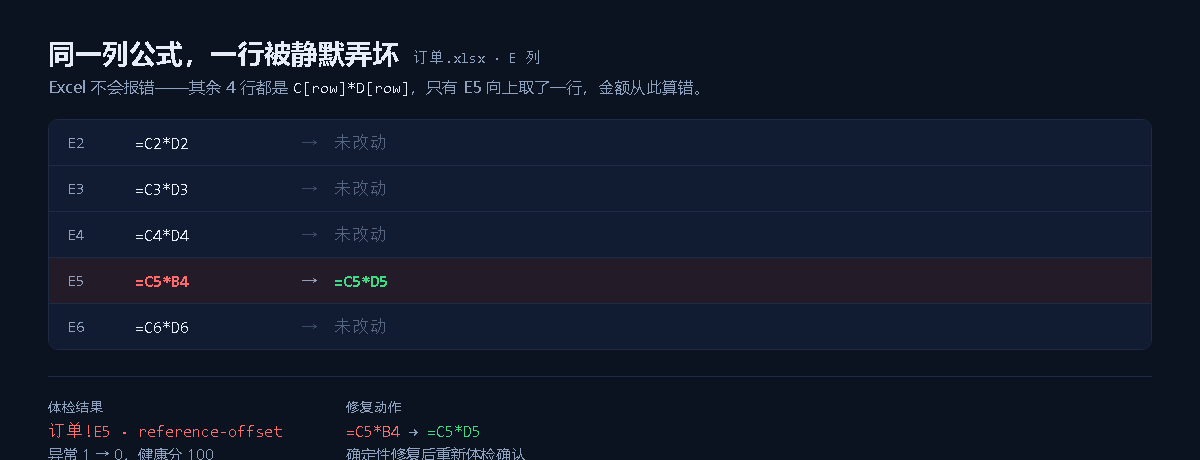
Both screenshots come from a real model calling the tools inside DeepSeek Harness Web and the result being rendered inline in the message stream. More screenshots, a demo animation and the architecture notes are on the GitHub repository.
Documentation
- Full usage guide (scenarios, parameters, platform limits, FAQ)
- Evaluation method and results
- Changelog
Development
npm run build      # runs automatically via prepare when installing from source
node --test tests/*.test.ts
License: MIT
Related plugins
dsh-weknora
 Tencent
/WeKnora/packages/dsh-weknora
把 WeKnora 知识库接入 dsh 的四个只读工具:列出知识库、混合检索原文片段、按顺序还原单篇文档,以及直接取用 WeKnora 自己带引用的 RAG 或 ReAct agent 回答(含可续聊的 session id)。
dsh plugin --profile web add @wxg-prc-cpg/dsh-weknoratreg
 superdesigndev
/treg
给 Agent 的工具目录:按「要做的事」检索约 2,600 个外部接口(SEO 与 SERP、外链、社交、人物与公司信息补全、广告库、抓取),查看参数与单次调用价格后直接调用,凭据由服务端注入。附带技能,MCP 行在未设置 TREG_TOKEN 前保持禁用。
dsh plugin --profile web add github:superdesigndev/tregdsh-anchored-standard
 xiaobright
/dsh-anchored-standard
两阶段 DeepSeek Harness 预设:先 Minimal 对齐的 bootstrap,再切完整 Standard 工具(Project2 98/99)
dsh plugin --profile web add github:xiaobright/dsh-anchored-standardDeepseek-Harness-EAC
 zouyuxuan122
/Deepseek-Harness-EAC
把官方 deepseek-ai/deepseek-harness(@deepseek-ai/dsh,一切皆插件的 agent harness) 封装为开箱即用的 Windows / Linux 桌面客户端,并在其上拥抱社区万象:皮肤、插件、工具、记忆——你所能想到的,一键皆可装。
dsh plugin --profile web add github:zouyuxuan122/Deepseek-Harness-EACDSHA-dshapp
 DSH-APP
/DSHA/app/src/main/assets/app-integration
DSHA 后台任务、网页返回和草稿恢复适配
dsh plugin --profile web add 'github:DSH-APP/DSHA#a6d4de140acc7a085d6afd4b9d413404e004b939&path:/app/src/main/assets/app-integration'deepseek-harness-remote
 liguobao
/deepseek-harness-remote
基于 DeepSeek Harness 插件机制的多端远程访问方案,让桌面端与 Android 端安全连接并操作远程 Harness。(A multi-device remote access solution built on the DeepSeek Harness plugin system, enabling desktop and Android clients to securely connect to and operate a remote Harness.)
dsh plugin --profile web add github:liguobao/deepseek-harness-remote