
Tools & Capabilities
rss
hyzyn/dsh-plugin-kit/packages/rss · ★ 67
 hyzyn
Daily RSS/Atom news digest for DSH: built-in channels plus a curated awesome-rsshub-routes catalog and custom feeds (validated on save), aggregated into one "今日值得读" Markdown digest each day and injected into the system prompt; Web GUI settings card and sidebar reader.
安装
dsh plugin --profile web add github:hyzyn/dsh-plugin-kit#path:/packages/rssGitHub 源码安装:首次需按提示配置 allowBuilds 构建授权后重试
For install and environment setup, plus plugin development tutorials, see DSH community docs ↗
Screenshots


README
Table of contents
中文 | English
An RSS / news aggregation plugin for DSH: subscribe to multiple RSS / Atom feeds, get one automatically compiled “Today's Worth Reading” digest every day, and have the result injected into the systemPrompt so the model can cite it directly.
Features
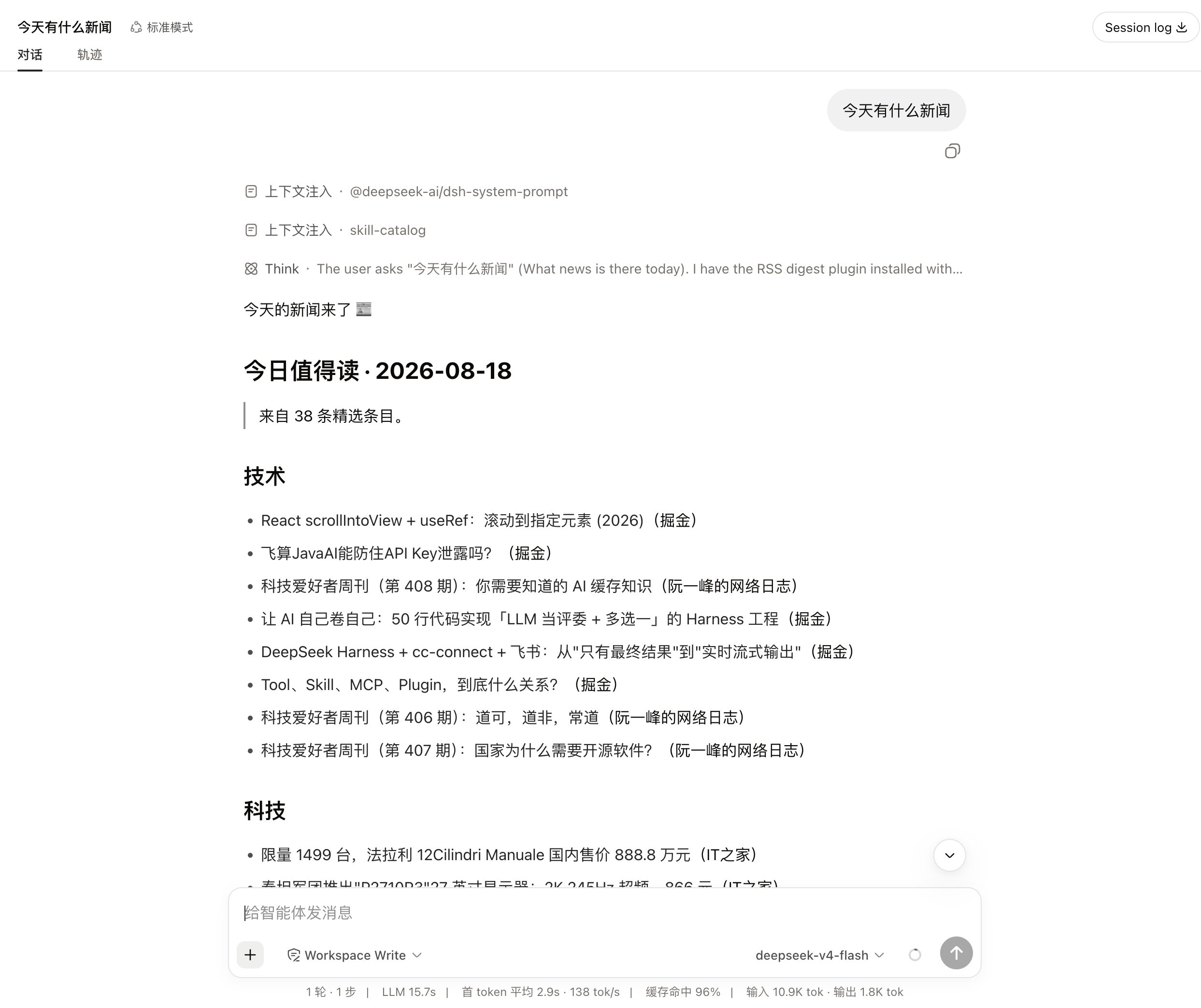
- The digest is injected as a systemPrompt section: the model can cite the day's items directly, so asking "what's worth reading today" returns real content. The switch (
announceToAgent) is hot — saving takes effect (shown or withdrawn) without a restart; the section lists at most the first 8 items (indigest.itemsorder, category headings kept) and points to that day's digest file for the rest, so every request does not carry an over-long list. - Scheduled fetching, aggregation by category: generated daily; the modal lets you search, filter by category, and copy the Markdown.
- Feeds maintained inside the panel: built-in channels + custom sources, one-click add from the curated RSSHub catalog, and OPML import/export.
- A failed source degrades in place: when an individual source is down only that source is flagged and the rest still render; the optional AI summary falls back to the original excerpt and explains why.
Transition layer while refreshing
When the “Today's Worth Reading” modal and the settings card refresh, they show a hint in the same visual language as dsh-docker's "target switch transition": a 2px indeterminate shimmer progress bar at the top of the content area, and a blue pill (⟳ Refreshing feeds · current data generated at 14:29, full explanation in title); the bar sits on the lower edge of the category row and the pill rides it, centred — absolutely positioned, no layout shift. It only appears on slow refreshes (the existing 180ms debounce), so millisecond requests never flash; when data lands the body does an 8px slide-up + fade-in, respecting prefers-reduced-motion.
During refresh the body stays dimmed as before (opacity:.55) and the old content remains readable; stale-while-revalidate, the skeleton debounce, and the post-refresh focus/caret and scroll restoration are all retained. The modal's slow path deliberately does not re-render the whole tree, so the transition layer injects two absolutely-positioned nodes instead — miss that path and the overlay never appears.
Implementation notes (the accent-token trap, why absolute positioning is mandatory, the 6 regression assertions) are in ROADMAP § completed (Chinese).
Capabilities
- Built-in channel library (Ruanyifeng's blog, sspai, Solidot, Hacker News, Juejin, ITHome, 36Kr) — just tick the channels you want to show in the settings; 36Kr's official feed is blocked by anti-scraping, so the built-in address is a third-party RSSHub mirror;
- Custom channels are supported: enter your own RSS / Atom URL; on save it is really fetched for validation, and an address that returns no content is reported and not saved; supports OPML import / export (import subscriptions from any RSS reader or website) and bulk import by pasting a URL list (one address per line, or "name, address"), automatically skipping items already subscribed, and after importing you can save and validate them all with one click;
- Feed catalog (multiple sources): the catalog can come from several sources — the built-in curated awesome-rsshub-routes list (official RSS and RSSHub routes, snapshot + silent refresh every 12 hours) + any number of custom OPML catalogs (add OPML addresses in the “Feed catalog” section of the settings card; name / URL are both configurable); results from all sources are merged together, labeled "from xxx" and filterable by source, with search / category filtering / multi-select followed by bulk add (select all / clear / add selected with one click) and live "subscribed / selected" counters; a single failing catalog source does not affect reading the rest of the catalog;
- Parses RSS 2.0 and Atom with zero dependencies, deduplicates by link / id / title, and generates Markdown in reverse chronological order;
- Optional AI summaries: when enabled, the host LLM is called to generate a one-sentence Chinese summary for each item, shown in the digest / modal and appended to the systemPrompt; summaries are cached per entry for 30 days (up to 500 entries,
ai-cache.json), and repeated entries are not requested again; a single failure (timeout / non-stop finish / empty output) falls back to the original excerpt only and does not affect other items, while a missing route skips AI summaries for that whole run and records the reason in the digest; - Generates the day's digest automatically at
08:00by default; if the day's digest does not exist at plugin startup it is also generated to fill the gap; - Injects the day's digest into
systemPrompt, so the model can cite it directly when the user asks about “Today's Worth Reading”; - Provides a Web GUI card “RSS / News Aggregation” for managing built-in channel toggles / custom channels / news categories / aggregation settings, with the day's digest refreshed automatically after saving; custom channels support filtering and counting by name / URL, with an inline warning for duplicate URLs; the top of the card previews today's digest directly (item count / source count / generation time / failure warnings) and offers one-click view list, refresh, and copy Markdown;
- The UI uses "block-scoped update" rendering: typing, catalog search, and adding/removing channels rebuild only the affected blocks, so focus / caret / scroll are not lost; unsaved changes are flagged with a badge;
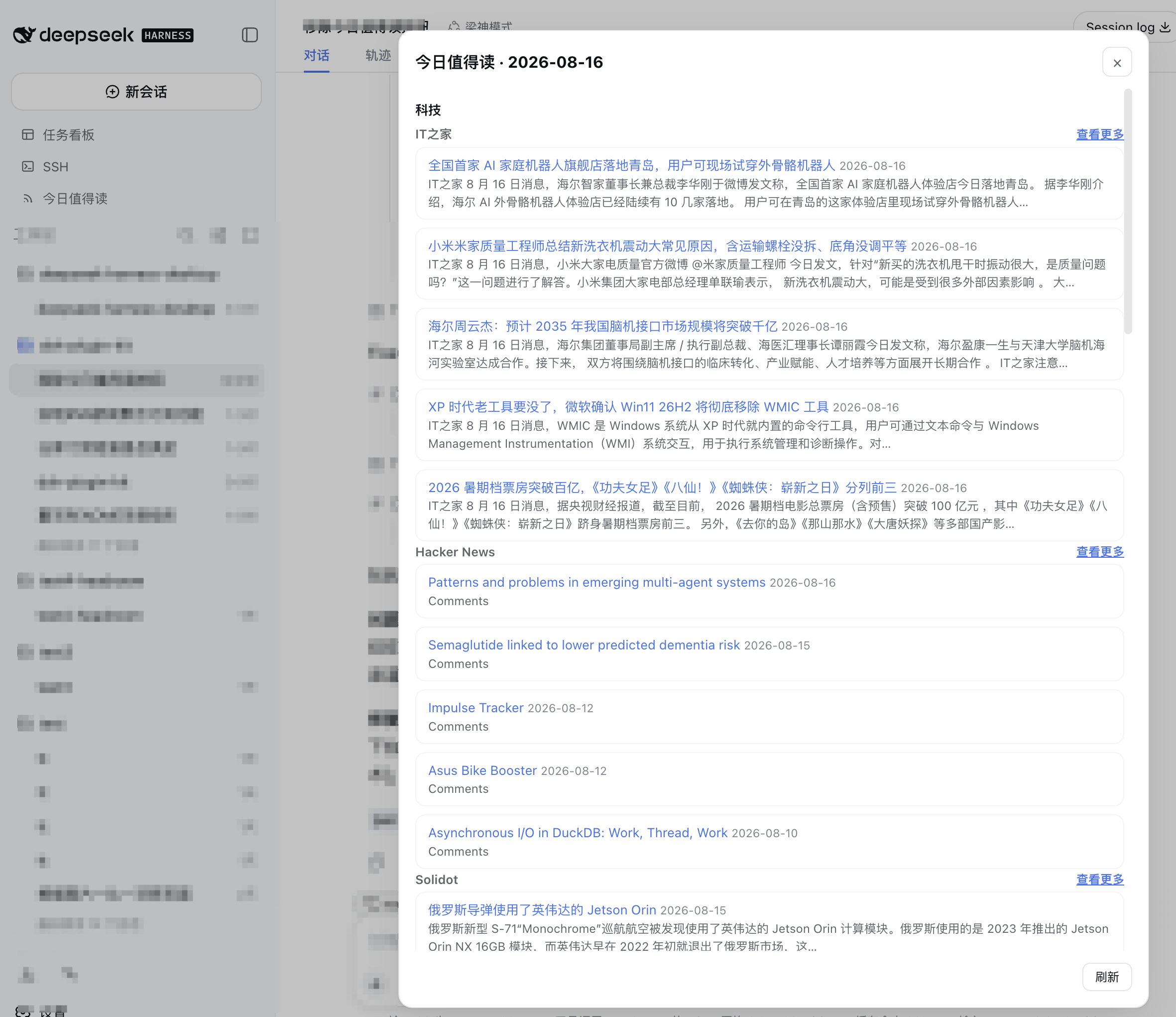
- Provides a “Today's Worth Reading” shortcut in the sidebar below "New Session" (near Task Board / SSH); clicking it opens a modal for reading the news directly; the modal supports search by title / summary / source, category filtering, a "visible / total" counter, and copy Markdown, plus Esc to close and focus trapping;
- The digest is displayed grouped by "category" (items without a category go under "Uncategorized"), and each item is labeled with its source and date; each source's "View more" links straight to its website;
- Manage built-in channel toggles, custom channels (RSS/Atom URL, category, item limit), and news categories on the UI's "Settings" page; a channel's category is chosen from the "News categories" list, and categories in use are merged into that list automatically on save;
- The generated Markdown is stored at
~/.dsh/rss-digest/YYYY-MM-DD.md, together withlatest.jsonfor external readers.
Screenshots
“RSS / News Aggregation” card (built-in channel toggles + custom channels + news categories):
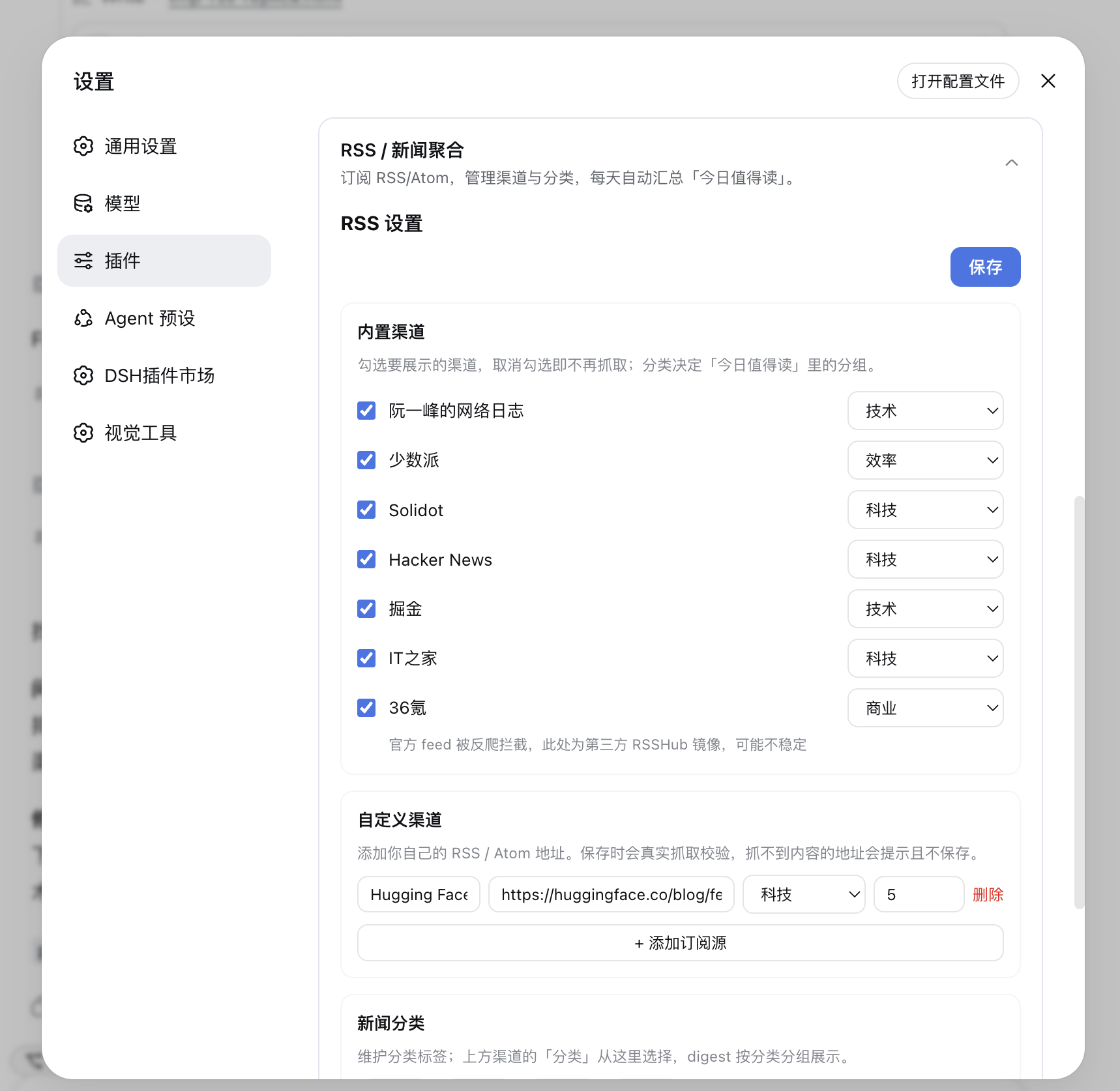
Where the settings surface lives depends on the DSH version, but it is always the same form: from
0.2.0-rc.1 it is registered as plugins.bundle.config — inline on the plugin detail page, directly
below the description, with no extra ">" step; older hosts (the 0.1.6 line) fall back to the row's ">"
sub-page under the Plugins sidebar.
Sidebar “Today's Worth Reading” modal (grouped by category, sources with "View more" linking straight to their websites, manual refresh at the bottom):
Asking the model about the day's news cites the day's digest directly (no need to open the modal):
Configuration example
Pass Config in DSH's plugin configuration:
{
  sources: [
    { name: 'Ruanyifeng blog', url: 'https://www.ruanyifeng.com/blog/atom.xml', category: 'Tech' },
    { name: 'sspai', url: 'https://sspai.com/feed', category: 'Productivity' },
  ],
  maxItemsPerSource: 5,
  maxTotalItems: 30,
  dailyTime: '08:00',
  digestDir: '~/.dsh/rss-digest',
}
When
sourcesis omitted, all built-in channels are enabled by default; whensourcesis passed, all built-in channels are disabled and only that list is used.
Common configuration options:
| Field | Description | Default |
|---|---|---|
enabled |
Whether to enable the plugin | true |
announceToAgent |
Whether to inject the digest into systemPrompt (hot: shown or withdrawn on save, no restart) | true |
includeCatalog |
Whether to expose the feed catalog (/api/dsh-rss/catalog) | true |
sources |
Custom feed list; when passed it replaces all built-in channels | 7 built-in channels |
maxItemsPerSource |
Maximum number of items taken per source | 5 |
maxTotalItems |
Maximum number of items aggregated per day | 30 |
dailyTime |
Daily auto-generation time (HH:mm) | 08:00 |
autoGenerateOnMount |
Whether to generate the day's digest on startup if it does not exist | true |
digestDir |
Output directory | ~/.dsh/rss-digest |
requestTimeoutMs |
Single request timeout | 10000 |
AI summaries (optional)
AI summaries are off by default, and are configured only through the ai field of the editable store ~/.dsh/rss.json (editable in the "AI summaries" section of the settings card; no new Config field is added):
{
  "ai": {
    "enabled": true,
    "provider": "deepseek",
    "model": "deepseek-chat",
    "maxItems": 20,
    "concurrency": 3,
    "timeoutMs": 20000
  }
}
| Field | Description | Default |
|---|---|---|
enabled |
Whether to enable AI summaries | false |
provider / model |
Model route, must be filled in as a pair; if both are left empty it follows the host default model (agentDefaultModel / agent-default-model in settings; if neither can be resolved, AI summaries are skipped for that run) |
Left empty |
maxItems |
Maximum number of items summarized per digest (the first N items in the list), clamped to 1..50 | 20 |
concurrency |
Number of concurrent requests, clamped to 1..6 | 3 |
timeoutMs |
Per-request timeout in milliseconds, clamped to 5000..60000 | 20000 |
If only one of provider / model is filled in, the whole ai config is ignored and a warning is returned in the save response. Summary results are written to ai-cache.json in the digest directory ({ version: 1, entries: { <sha1(link|id|title)>: { text, model, at } } }); a hit that has not expired (30 days) is reused as-is, and beyond 500 entries the oldest are evicted by write time.
Two easy pitfalls (both measured on real runs):
maxTokensis hard-coded in the plugin (currently 4096), and reasoning models need room for their reasoning budget: reasoning tokens and the final answer share this cap, so too small a value makes the model burn the budget on reasoning before it writes any prose, the finish reason becomesmax-tokens, and that item's summary is marked failed. Measured (commandcode/deepseek/deepseek-v4.1-flash, 20 items): 200 → 7 succeed, 1024 → 12, 4096 → all 20 succeed (48 s for the whole run, ~7 s each, still insidetimeoutMs). If a heavier reasoning model hits the cap again, the failure reason names the currentmaxTokensvalue.- Failure reasons are surfaced: on partial failure,
aiSummary.failuresgives the distribution of reasons (up to 3 kinds, with counts), and the Markdown “fetch failed” section states them too (e.g.原因:终止原因 max-tokens(…)×8). Previously there was only a bare “N failed”, which made it impossible to tell a timeout from rate limiting from a provider error — or to judge whether the plugin was at fault at all.
Development
pnpm --filter @hyzyn/dsh-rss build
pnpm --filter @hyzyn/dsh-rss typecheck
Installing into DSH
dsh plugin --profile web add link:$(pwd)
Or from the repository root:
dsh plugin --profile web add link:$(pwd)/packages/rss
Files
| File | Description |
|---|---|
package.json |
dsh.bundle.patch points to cordis.patch.yml; main / exports["."] point to lib/index.js |
cordis.patch.yml |
bundle patch: insert: { id: rss-digest, name: '@hyzyn/dsh-rss' } inserts this plugin's row into the profile roster |
src/index.ts |
plugin host half: RSS/Atom parsing, fetching, digest generation, AI summaries, scheduling, HTTP API, systemPrompt injection |
client.js |
browser half: the “RSS / News Aggregation” card |
test/ai-summary.test.ts |
regression tests for AI summaries (message construction / sanitization, cache TTL·LRU, route resolution, store allowlist, rendering, LLM termination branches, generation fallback paths) |
tsconfig.json |
extends the root tsconfig.base.json; tsc emits lib/ |
Related plugins
dsh-weknora
 Tencent
/WeKnora/packages/dsh-weknora
把 WeKnora 知识库接入 dsh 的四个只读工具:列出知识库、混合检索原文片段、按顺序还原单篇文档,以及直接取用 WeKnora 自己带引用的 RAG 或 ReAct agent 回答(含可续聊的 session id)。
dsh plugin --profile web add @wxg-prc-cpg/dsh-weknoratreg
 superdesigndev
/treg
给 Agent 的工具目录:按「要做的事」检索约 2,600 个外部接口(SEO 与 SERP、外链、社交、人物与公司信息补全、广告库、抓取),查看参数与单次调用价格后直接调用,凭据由服务端注入。附带技能,MCP 行在未设置 TREG_TOKEN 前保持禁用。
dsh plugin --profile web add github:superdesigndev/tregdsh-anchored-standard
 xiaobright
/dsh-anchored-standard
两阶段 DeepSeek Harness 预设:先 Minimal 对齐的 bootstrap,再切完整 Standard 工具(Project2 98/99)
dsh plugin --profile web add github:xiaobright/dsh-anchored-standardDeepseek-Harness-EAC
 zouyuxuan122
/Deepseek-Harness-EAC
把官方 deepseek-ai/deepseek-harness(@deepseek-ai/dsh,一切皆插件的 agent harness) 封装为开箱即用的 Windows / Linux 桌面客户端,并在其上拥抱社区万象:皮肤、插件、工具、记忆——你所能想到的,一键皆可装。
dsh plugin --profile web add github:zouyuxuan122/Deepseek-Harness-EACDSHA-dshapp
 DSH-APP
/DSHA/app/src/main/assets/app-integration
DSHA 后台任务、网页返回和草稿恢复适配
dsh plugin --profile web add 'github:DSH-APP/DSHA#a6d4de140acc7a085d6afd4b9d413404e004b939&path:/app/src/main/assets/app-integration'deepseek-harness-remote
 liguobao
/deepseek-harness-remote
基于 DeepSeek Harness 插件机制的多端远程访问方案,让桌面端与 Android 端安全连接并操作远程 Harness。(A multi-device remote access solution built on the DeepSeek Harness plugin system, enabling desktop and Android clients to securely connect to and operate a remote Harness.)
dsh plugin --profile web add github:liguobao/deepseek-harness-remote