
Tools & Capabilities
dsh-ui-workbench
loftytao/dsh-ui-workbench · ★ 1
 loftytao
A WebUI plugin for DeepSeek Harness: adds a right-side panel with the session workspace's file tree, a numbered file viewer and Git review.
安装
dsh plugin --profile web add github:loftytao/dsh-ui-workbenchGitHub 源码安装:首次需按提示配置 allowBuilds 构建授权后重试
For install and environment setup, plus plugin development tutorials, see DSH community docs ↗
README
Table of contents
Overview
A DeepSeek Harness WebUI plugin. It adds a right-side panel to the conversation page with a file tree, line-numbered file viewer, and Git review for the current session workspace.
DSH metadata
| Field | Value |
|---|---|
| Family | DSH UI |
| Category | Client |
| Role | Client |
| Capability | Workspace file browsing and Git review |
| Provides | Host /sidebar/api/* routes and a browser Workbench panel |
| Injects | Host: webServer, sessions; Client: slots, sessions, @deepseek-ai/dsh-client-runtime, @deepseek-ai/dsh-client-ui-slots |
| Config | Host Config is an empty object; panel width stays in browser state, while theme reads the optional DSH theme service and observes the DSH DOM theme marker, and language follows the DSH document state |
| Credential Boundary | Stores no credentials; accesses files and Git state through the session-scoped DSH host workspace |
| Model Experience | Visible workspace review panel on the conversation page |
| Dependency | DSH 0.1.0-rc.6, Node >=22.19, pnpm@11.21.0, React 18, Client Runtime |
| Status | Experimental |
| Scope | web profile, DSH Web Client, current session workspace |
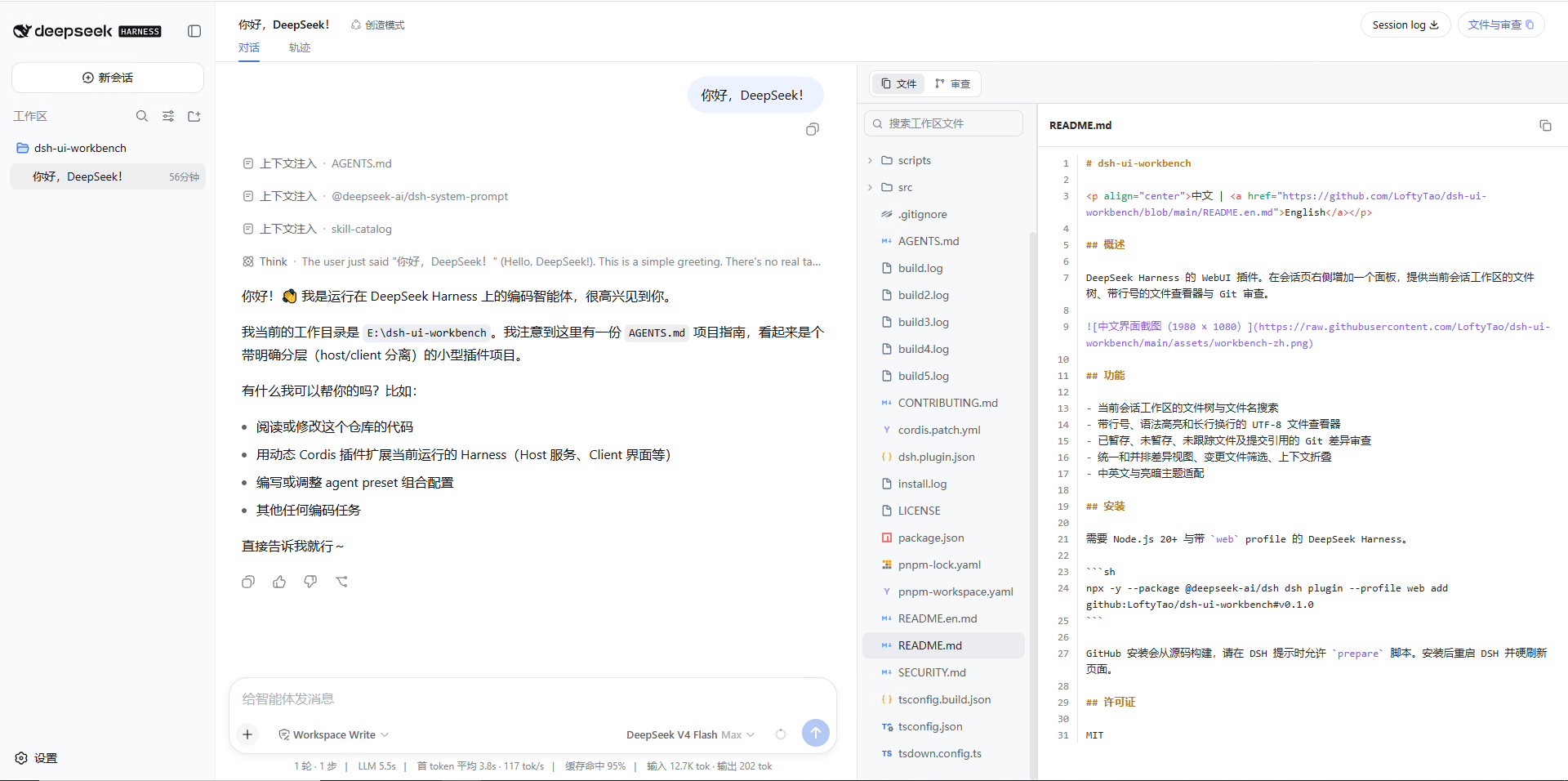
Capabilities
- File tree and file-name search for the current session workspace
- UTF-8 file viewer with line numbers, syntax highlighting, and long-line wrapping
- Git review for staged, unstaged, untracked, and commit-reference changes
- Git status abbreviations
M,A,D,R,C,T, andU; untracked files useU - Unified and split diff views, changed-file filtering, and context folding
- Diff views keep file syntax highlighting, use theme-aware base/strong background layers for line and inline changes, align inline ranges to the replaced characters, keep pure additions and deletions at line-background level, hide Git patch metadata, and label folded spans as
<count> unmodified lines - Chinese/English support with live light/dark theme synchronization from DSH Appearance settings
- Tinymist-style rich SVG preview for
.typfiles with white pages, a transparent selectable text layer, and whole-page dragging disabled; compilation errors preserve the last successful preview
The host owns session-scoped paths, file reads, Typst compilation, and Git operations. The browser owns the file tree, change tree, file viewer, Typst preview, and diff view. Both trees use one path hierarchy so folders and nested changes remain aligned. Workbench colors reuse the DSH --dsw-* semantic tokens and code-highlight variables, so the panel follows the Appearance setting without a second palette. Git review refreshes on initial load, explicit action, session or ref changes, and visible-window return events; fixed polling remains disabled.
Typst preview requires typst on the Harness Host's PATH. Set DSH_TYPST_BIN to an absolute executable path when needed. While a .typ file is selected and the page is visible, the preview checks Typst's reported dependencies and recompiles only when source, imports, or resources actually change. Compilation uses the current session workspace as --root, so imports and resource access cannot escape the workspace. The plugin bundles and prioritizes LXGW Neo XiHei Screen Full and no longer discovers /mnt/c/Windows/Fonts automatically. Additional font directories can still be supplied explicitly through Typst's standard TYPST_FONT_PATHS environment variable.
Hot Reload
The Browser entry uses a global runtime owner for the React root, slot contribution, event listeners, observers, and style tag. A replacement bundle claims the owner in the same Web process, disposes the previous instance, and rebinds the Host context. Panel visibility, width, current file, Git selection, filtering, and diff layout live in cross-module reload state. Theme adaptation connects both theme/change and the DOM observation seam, so bundle HMR, Appearance changes, and theme-service reloads stay live without a restart. The development profile must include plugins/client/dsh-ui-workbench/lib in its HMR watch roots so each build reaches the same Browser aggregate immediately.
Install
Requires Node.js 22.19+ and DeepSeek Harness with the web profile.
npx -y --package @deepseek-ai/dsh dsh plugin --profile web add github:LoftyTao/dsh-ui-workbench#v0.3.0
Use the v0.3.0 tag to install Typst live preview, hot reload, Git review, and light/dark theme features from this release. GitHub installs build from source; allow the prepare script when DSH prompts. After adding the package to the web profile, source builds are claimed by HMR in the same Web process; the theme integration adds no restart step, and one page load creates the initial Browser aggregate.
License
MIT
Related plugins
dsh-weknora
 Tencent
/WeKnora/packages/dsh-weknora
把 WeKnora 知识库接入 dsh 的四个只读工具:列出知识库、混合检索原文片段、按顺序还原单篇文档,以及直接取用 WeKnora 自己带引用的 RAG 或 ReAct agent 回答(含可续聊的 session id)。
dsh plugin --profile web add @wxg-prc-cpg/dsh-weknoratreg
 superdesigndev
/treg
给 Agent 的工具目录:按「要做的事」检索约 2,600 个外部接口(SEO 与 SERP、外链、社交、人物与公司信息补全、广告库、抓取),查看参数与单次调用价格后直接调用,凭据由服务端注入。附带技能,MCP 行在未设置 TREG_TOKEN 前保持禁用。
dsh plugin --profile web add github:superdesigndev/tregdsh-anchored-standard
 xiaobright
/dsh-anchored-standard
两阶段 DeepSeek Harness 预设:先 Minimal 对齐的 bootstrap,再切完整 Standard 工具(Project2 98/99)
dsh plugin --profile web add github:xiaobright/dsh-anchored-standardDeepseek-Harness-EAC
 zouyuxuan122
/Deepseek-Harness-EAC
把官方 deepseek-ai/deepseek-harness(@deepseek-ai/dsh,一切皆插件的 agent harness) 封装为开箱即用的 Windows / Linux 桌面客户端,并在其上拥抱社区万象:皮肤、插件、工具、记忆——你所能想到的,一键皆可装。
dsh plugin --profile web add github:zouyuxuan122/Deepseek-Harness-EACDSHA-dshapp
 DSH-APP
/DSHA/app/src/main/assets/app-integration
DSHA 后台任务、网页返回和草稿恢复适配
dsh plugin --profile web add 'github:DSH-APP/DSHA#a6d4de140acc7a085d6afd4b9d413404e004b939&path:/app/src/main/assets/app-integration'deepseek-harness-remote
 liguobao
/deepseek-harness-remote
基于 DeepSeek Harness 插件机制的多端远程访问方案,让桌面端与 Android 端安全连接并操作远程 Harness。(A multi-device remote access solution built on the DeepSeek Harness plugin system, enabling desktop and Android clients to securely connect to and operate a remote Harness.)
dsh plugin --profile web add github:liguobao/deepseek-harness-remote