
Tools & Capabilities
dsh-lan
mrmu666/dsh-lan · ★ 15
 mrmu666
A password-protected LAN access plugin for the DeepSeek Harness Web GUI, with mobile UI optimization for portrait screens and touch gestures.
安装
dsh plugin --profile web add github:mrmu666/dsh-lanGitHub 源码安装:首次需按提示配置 allowBuilds 构建授权后重试
For install and environment setup, plus plugin development tutorials, see DSH community docs ↗
README
Table of contents
- ⚠️ Security notes
- What LAN clients can do (important)
- Mobile (portrait phones/tablets)
- Mobile interaction details
- Installation
- Option 1 — the in-app Plugins page (recommended, one click)
- Option 2 — the CLI (local directory / path / tarball)
- After installation (same for both options)
- Firewall notes
- Upgrading (1.4.x → 1.5.0, important)
- What changed in 1.5.0
- Upgrading (1.3.x → 1.4.0)
- Uninstall
- How multi-device consistency works
- Credits
- License
⚠️ Version requirement (deliberately pinned since 1.6.0):
1.6.1supports@deepseek-ai/dsh0.2.1-rc.5only (desktop 0.2.1-rc.5).engines.dshnames exactly that release: installing or enabling the plugin on any other DSH version is refused asincompatible-version— deliberately, because the plugin rewrites internalconnection/webServerbehaviour and promises no cross-version compatibility. Users still on 0.2.1-rc.3 should stay ondsh-lan-tool@1.6.0; after the next DSH upgrade, wait for the matching plugin release.🔧 1.5.0 changed how LAN access is implemented (read this before upgrading): since 0.2.1 DSH refuses to bind a wildcard address (
0.0.0.0), while the desktop shell requires DSH itself to stay on127.0.0.1. So the plugin no longer touches any DSH binding: DSH keeps its official loopback-only listener and the plugin's own built-in reverse proxy serves your machine's LAN addresses, reusing the same port number. Your LAN URL and workflow are unchanged — but the override older versions left in the profile patch makes 0.2.1 refuse to start, so read the Upgrading section first.
🚀 Pair it with DSH-Launcher and dsh-app for a better experience.
📦 This package is a standard DSH plugin bundle (it declares
dsh.bundle.patch), installed through the official plugin mechanism. There are no install scripts, the on/off switch lives in Settings, and nothing asks for a password at install time.
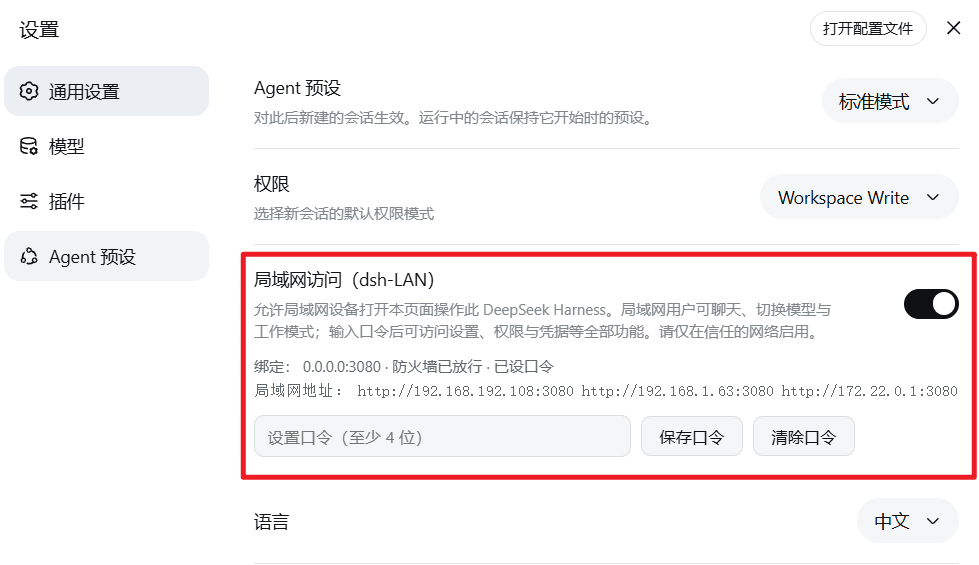
Once installed, flip "LAN access" on in Settings and the GUI becomes reachable from the LAN (Windows opens the firewall automatically for Domain + Private; Linux tries firewalld / ufw / iptables in order and treats a missing firewall tool as "no rule needed"):
- ✅ Off by default: the bundle writes no
webserveroverride at all, so the GUI keeps the official default (loopback-only, gzip intact) - ✅ The switch takes effect live: it opens/closes the plugin's own LAN reverse proxy (listening on this machine's LAN addresses and forwarding to DSH's loopback port). It never touches DSH's binding and needs no restart; turning it off stops the external listener immediately
- ✅ Still the same port: the LAN URL stays
http://<host-ip>:<DSH-port>. The proxy forwards theHostheader unchanged, so credentials behave exactly like the official path - ✅ LAN devices must enter a password before seeing any page: a device on the network (desktop or phone/tablet) opening
http://<host-ip>:<port>gets the password page first; the address bar never shows a token (the plugin completes the official token→cookie exchange in the background) - ✅ The host machine never needs a password: opening the GUI on the host itself (desktop app or browser — via
127.0.0.1,localhost,[::1], the machine name or the host's own LAN address) goes straight in, with no password page. The test is the TCP peer address (loopback or one of this machine's own addresses), not the hostname the page used — which is why the desktop app can never be locked out by its own gate (the bug fixed in 1.4.1). - ✅ Remember password (per device): checking "Remember password" stores it in that browser's localStorage; otherwise it is kept only in the current tab (sessionStorage)
- ✅ "LAN access" card in Settings → General: toggle + password set/clear + bind/firewall/password status
- ✅ No silent exposure without a password: the switch refuses to turn on until a password exists, and if the GUI is somehow exposed without one the card says so (LAN devices cannot get in)
- ✅ Every browser sees the exact same conversation: a single service process holds all session state server-side and pushes identical events to every connected browser
⚠️ Security notes
- The password gate is enforced server-side: a request from another machine (i.e. the TCP peer is neither loopback nor one of the host's own addresses) must carry the password (
x-dsh-lan-keyheader or session cookie) or it is refused — privileged methods (settings/permissions/credentials) rely on that same gate. Requests from the host machine itself are always admitted, whatever hostname they use; that is deliberate, so the desktop app can never be locked out. - That gate is the whole security boundary. No password means the LAN is simply unusable (it never degrades into "open without a password"). Anyone who knows the password can read and write all of this DSH's data — enable it only on trusted networks and pick a strong password.
- In 1.5.0 the LAN entry point binds only this machine's current LAN interface addresses — never a wildcard (upstream disabled wildcards precisely because "binding every interface would expose remote code execution to the network"). The gate is enforced by that entry point: DSH only ever sees connections from the host's own loopback, so the outward-facing layer is entirely the plugin's — which is also why turning the switch off disconnects immediately.
- Use only on trusted networks (home/office intranet). Turn the switch off on public networks.
What LAN clients can do (important)
DSH deliberately withholds the settings scope from non-loopback browsers (persistence in dsh-client-ui-settings is fixed at page load from isLoopback; dsh-client-locale and dsh-client-ui-chat document this as intentional). Therefore, on a LAN device:
| Capability | LAN device |
|---|---|
| Chat, model & work-mode switching, workspaces & sessions, history, tasks, approvals, terminal | ✅ available |
| Settings / permission presets / credentials / preset management pages | ❌ host-only (change them on the host machine) |
| Workspace directory picker | ✅ the plugin's own dialog (drive dropdown, path jump) |
Mobile (portrait phones/tablets)
- Mobile reuses the official desktop UI: when a phone opens
http://<host-ip>:<port>in portrait, the plugin injects a touch adaptation over the official interface (compact sidebar rail, ≥44px touch targets, 16px input font to prevent iOS focus zoom, safe-area padding); landscape/wide viewports revert automatically. - Every available capability is identical to desktop (see the table above): sessions/workspaces/history/live chat/model & mode switching/todo list/approvals & questions/permission switching, all synced with the host in real time.
Mobile interaction details
- Sidebar: hidden while collapsed — the whale button at the top-left of the header is the entry point (fixed in the title row; it no longer drags). Tapping a session row, tapping anywhere else, or swiping left collapses it; in the conversation view swiping right expands the sidebar directly.
- Keyboard: the input method appears only when you tap a text field — tapping the whale, a session row, toggling the sidebar or closing a dialog no longer pops it (and it is never taken away while you are typing); Enter inserts a newline instead of sending (sending goes through the send button; Enter while an IME candidate list is open still commits the candidate).
- UI details: lingering official Tooltip bubbles are hidden; the
ask_user_questioncard is fully adapted to narrow screens (42px option touch targets); the permission/model two-line layout and the bottom stats bar stay aligned with the composer. - No password-page flicker: if the browser cannot keep the login credential (e.g. the page is embedded in a cross-site iframe/WebView, where a
SameSite=Strictcookie is dropped), the password page stops auto-redirecting after 2 hops and explains the problem instead of looping forever.
Installation
Option 1 — the in-app Plugins page (recommended, one click)
Open the DSH sidebar Plugins page and install the package name dsh-lan-tool. dsh.profile.bundles is updated automatically.
⚠️ After installing (or updating) the plugin, fully quit and reopen the desktop app once. The plugin's node half (the password gate, the switch and every
/dsh-lan/*route) is imported once per app run: reinstalling or upgrading inside a running app leaves the node half on the old code, while the browser half does hot-reload — a mixed pair. Since 1.4.2 the client reports that mismatch in the settings card and the console (in older versions it showed up as an unexplained password page).⚠️ A brand-new release may not install (pnpm's minimum release age): pnpm refuses packages published too recently, and the plugin manager only exempts the versions it has actually installed before — so typing the package name can silently resolve to the previous version (the new features and fixes never appear). Ask for the version explicitly (e.g.
dsh-lan-tool@1.6.1), or add it tominimumReleaseAgeExcludein<DSH_HOME>/profiles/<profile>/pnpm-workspace.yamlfirst.This requires the package to be published on npm. If it is not published yet (or you want to install this local checkout), use option 2.
Option 2 — the CLI (local directory / path / tarball)
# the local development directory (absolute path)
dsh plugin --profile desktop add D:\DeepSeek\dsh-LAN
# or link: / file: / tarball / git forms
dsh plugin --profile desktop add link:D:\DeepSeek\dsh-LAN
# once published, the plain package name works too
dsh plugin --profile desktop add dsh-lan-tool
Quit the desktop app before running the CLI (dsh-desktop-host says so in its message; it really only checks that the profile was initialized once, but rewriting node_modules while the app runs is easily blocked on Windows).
After installation (same for both options)
- Open DSH → Settings → General → "LAN access";
- Set an access password (at least 4 characters);
- Then flip the switch — the plugin opens a reverse proxy on this machine's LAN addresses and the card lists the usable URLs within a few seconds;
- Open the
http://<host-ip>:<port>URL shown in the card from a LAN device and enter the password.
The port is chosen by DSH itself (the 0.2.1 desktop launcher passes
--port 0, so the OS picks one and it can differ on every start; plaindsh webdefaults to3080). Trust the address the card displays.📌 Want a stable LAN address? Type a "LAN port" (1024–65535) in the card and press "Apply port"; leave it empty to keep following DSH. You are pinning the plugin's own entry point, not DSH's port — DSH's cannot be pinned safely (a
webserveroverride with a taken port stops the whole app from starting, whereas a taken port here only costs you LAN access while the app starts fine). Once pinned, open pages, bookmarks and QR codes survive a DSH restart. Unpinned, every restart moves the port, so a LAN page left open keeps reconnecting to the old one (it shows "reconnecting" while the session list still renders), and a page reload fixes it.
⚠️ No card in Settings after a reinstall or upgrade? The profile patch probably still carries a stale disable row —
dsh-plugin-managerwrites it when a plugin is disabled or removed, and reinstalling does not clear it; the patch layer outranks the bundle layer, so it overrides the freshly installed package:# %USERPROFILE%\.dsh\profiles\<profile>\cordis.patch.yml (at the end) - id: dsh-lan-tool disabled: trueDelete those two lines and save — DSH hot-reloads, and a page refresh brings the card back. (The same failure shows up as: no card in Settings,
http://127.0.0.1:<port>/dsh-lan/statusanswering 404, and unreachable LAN URLs.)
⚠️ Moved out of the enabled list after a DSH upgrade? The profile may keep
dsh-lan-toolonly independencieswhiledsh.profile.bundlesno longer lists it (the same symptoms: no card in Settings,/dsh-lan/statusanswering 404). Updating an existing dependency does not re-add it to the bundles. After installingdsh-lan-tool@1.6.1, re-enable it on the Plugins page, then fully quit and reopen the desktop app. If there is no enable control, quit DSH and append"dsh-lan-tool"todsh.profile.bundlesinprofiles/<profile>/package.json, then start it again.
Firewall notes
- Windows: a Windows Defender Firewall allow rule named
dsh-lan-tool (auto)(Domain + Private) is maintained automatically. Without an elevated shell the first enable triggers the OS "allow access" prompt once — click Allow and Windows creates its own rule; the card picks that system rule up automatically (within seconds it reports "firewall open" with the rule's name) — no admin rights and no restart needed. "firewall blocked (needs admin)" is only reported when neither our rule nor any OS rule admits the port. - Linux: an allow rule is maintained via firewalld → ufw → iptables (first available). When no supported firewall tool is found the card reports "firewall not managed", which normally means the port is already reachable.
- The few seconds around a toggle: the switch opens/closes the plugin's LAN listener, so requests may fail briefly; the card says "applying…" and retries by itself — no red error, and rule names in the status line are decoded as UTF-8 (no mojibake).
- Turning the "LAN access" toggle off immediately stops the plugin's LAN listener (DSH itself is loopback-only at all times) — that is the primary security switch.
- The listener binds only this machine's current LAN interface addresses, never a wildcard. When interfaces change (switching Wi-Fi, VPN up/down, a new DHCP lease) the plugin re-checks every 10 seconds and adds/removes listeners, and the card's addresses follow.
Upgrading (1.4.x → 1.5.0, important)
If you upgraded DSH to 0.2.1 while "LAN access" was on, DSH will not start. You get the "DeepSeek Harness is unavailable" dialog and the log (%APPDATA%\@deepseek-ai\dsh-desktop\logs\crash-*-host.log) says something like:
webserver (required)
  Error: host "0.0.0.0" is an unspecified (wildcard) address, which is not supported: …
Why: 0.2.1's webserver row no longer accepts a wildcard bind address (upstream deliberately removed that exposure), and the row is required — so config validation fails and the whole app refuses to boot. Older versions (≤1.4.7) wrote exactly such an override (host: '0.0.0.0') into the profile patch when you flipped the switch on, and an upgrade does not remove it, so every start fails. Your configuration is not corrupt and this is not a DSH bug; since 1.5.0 the plugin writes no override at all.
Two ways out — pick either:
A. Use DSH's own button (fastest): in the startup-failure dialog, click the third button — "disable third-party plugins, back up the profile patch and restart". It backs the patch up, drops third-party bundles and starts normally. Then upgrade this plugin to 1.5.0 and re-enable it (1.5.0 cleans up the leftover override by itself).
B. Delete the block by hand:
- Quit DSH completely;
- Open
%USERPROFILE%\.dsh\profiles\desktop\cordis.patch.yml; - Delete everything from
# --- dsh-lan-tool LAN block (managed - do not edit) ---through# --- end dsh-lan-tool LAN block ---inclusive (touch nothing else in the file); - Save, start DSH, then upgrade the plugin to 1.5.0.
Once 1.5.0 is active it also strips any leftover managed block on activation. But on a machine that is already stuck, the plugin never loads at all — hence A or B first, which is exactly why this section exists.
⚠️ 1.5.0 itself has a defect — use 1.5.1 or newer. 0.2.1 moved API admission into the trust funnel inside
connection.admit()(isTrusted), while 1.5.0's password fence still replaced only the oldrequestRejection— so a LAN device could open the GUI but every API call answered 403 (visible, unusable). 1.5.1 fixes it (the fence now owns the trust funnel too) and adds an end-to-end assertion that the local and LAN answers must match, so it cannot come back silently.
What changed in 1.5.0
| 1.4.x | 1.5.0 | |
|---|---|---|
| DSH's own listener | switched to 0.0.0.0 while on |
always 127.0.0.1 (official default; the plugin no longer touches it) |
| LAN entry point | DSH listening on the LAN itself | the plugin's built-in reverse proxy, forwarding to DSH |
| Port | the same | the same (the proxy reuses DSH's port number) |
| Where the switch lives | a managed override in the profile patch | plugin state (lanEnabled in dsh-lan.json) |
| Turning it off | delete the override, wait for a hot reload | stop the external listener immediately |
| Password / landing page / firewall | — | unchanged |
Upgrading (1.3.x → 1.4.0)
The package was renamed (dsh-LAN → dsh-lan-tool). Machines that used the old installer scripts are migrated automatically on first activation:
- Legacy managed blocks are stripped from
profiles/<profile>/cordis.patch.yml(dsh-LAN install block,dsh-LAN toggle block). The profile patch layer outranks every bundle layer, so leaving them would keep overriding the new composition — that is exactly how "card says off, socket still on 0.0.0.0" happened. After migration the LAN is off again; re-enable it from the settings card. - Legacy firewall rules are removed (
dsh-LAN (auto),DSH LAN Access (auto)). The rule name is nowdsh-lan-tool (auto), and no code could reach the old names any more — they would have kept the port open invisibly forever. - The password is kept: it still lives in
%USERPROFILE%\.dsh\dsh-lan.json(the filename is unchanged so no password is lost). No need to set it again. - The old
profiles/node_modules/dsh-LANdirectory can be deleted by hand.
Manual fallback (if the migration never ran): delete both managed blocks from profiles/<profile>/cordis.patch.yml and toggle LAN off/on once in the settings card.
Uninstall
Remove the plugin from the Plugins page, or:
dsh plugin --profile desktop remove dsh-lan-tool
On deactivation the LAN listener is closed immediately (it is the plugin's own listener and the gate lives inside it, so it cannot wait), while the firewall rule and any leftover managed block in the profile patch are cleaned up about 8 seconds later. That window exists to tell a hot reload (which immediately re-applies the plugin and cancels the cleanup) apart from a real removal, so a normal uninstall returns the GUI to off.
Two cases need a manual check (the cleanup never ran):
- DSH was quit immediately after the uninstall, or the package directory was deleted by hand;
- you also want the password gone.
Manual cleanup in three steps: delete %USERPROFILE%\.dsh\dsh-lan.json; make sure profiles/<profile>/cordis.patch.yml no longer contains a dsh-lan-tool LAN block section (delete the whole section if it is there); and confirm netsh advfirewall firewall show rule name="dsh-lan-tool (auto)" matches nothing (if it does, netsh advfirewall firewall delete rule name="dsh-lan-tool (auto)").
How multi-device consistency works
A single DSH service process holds all state: sessions (jsonl persistence + in-memory projections), workspaces, targets, and subagents. Every browser is just a client of the same service: it reads/writes the same state through /api RPC and receives the same server-side event pushes over the WebSocket downlink. Desktop and mobile connect to the same state, so any action on either end is visible in real time on all other ends.
Credits
Early mobile work referenced dsh-remote-web-ui from dsh-web-ui (standalone lightweight remote UI + token gate); since v48 mobile reuses the official desktop UI with an injected portrait adaptation, keeping the same password model.
License
Released under the MIT License (Copyright © 2026 MrMu666).
Related plugins
dsh-weknora
 Tencent
/WeKnora/packages/dsh-weknora
把 WeKnora 知识库接入 dsh 的四个只读工具:列出知识库、混合检索原文片段、按顺序还原单篇文档,以及直接取用 WeKnora 自己带引用的 RAG 或 ReAct agent 回答(含可续聊的 session id)。
dsh plugin --profile web add @wxg-prc-cpg/dsh-weknoratreg
 superdesigndev
/treg
给 Agent 的工具目录:按「要做的事」检索约 2,600 个外部接口(SEO 与 SERP、外链、社交、人物与公司信息补全、广告库、抓取),查看参数与单次调用价格后直接调用,凭据由服务端注入。附带技能,MCP 行在未设置 TREG_TOKEN 前保持禁用。
dsh plugin --profile web add github:superdesigndev/tregdsh-anchored-standard
 xiaobright
/dsh-anchored-standard
两阶段 DeepSeek Harness 预设:先 Minimal 对齐的 bootstrap,再切完整 Standard 工具(Project2 98/99)
dsh plugin --profile web add github:xiaobright/dsh-anchored-standardDeepseek-Harness-EAC
 zouyuxuan122
/Deepseek-Harness-EAC
把官方 deepseek-ai/deepseek-harness(@deepseek-ai/dsh,一切皆插件的 agent harness) 封装为开箱即用的 Windows / Linux 桌面客户端,并在其上拥抱社区万象:皮肤、插件、工具、记忆——你所能想到的,一键皆可装。
dsh plugin --profile web add github:zouyuxuan122/Deepseek-Harness-EACDSHA-dshapp
 DSH-APP
/DSHA/app/src/main/assets/app-integration
DSHA 后台任务、网页返回和草稿恢复适配
dsh plugin --profile web add 'github:DSH-APP/DSHA#a6d4de140acc7a085d6afd4b9d413404e004b939&path:/app/src/main/assets/app-integration'deepseek-harness-remote
 liguobao
/deepseek-harness-remote
基于 DeepSeek Harness 插件机制的多端远程访问方案,让桌面端与 Android 端安全连接并操作远程 Harness。(A multi-device remote access solution built on the DeepSeek Harness plugin system, enabling desktop and Android clients to securely connect to and operate a remote Harness.)
dsh plugin --profile web add github:liguobao/deepseek-harness-remote