
Tools & Capabilities
dsh-obsidian
wozoulesky/dsh-obsidian · ★ 7
 wozoulesky
Embed your locally running DeepSeek Harness (DSH) into Obsidian as an AI collaborator: your vault becomes its working directory, and DSH can read, write, and search your notes…
Manifest details
安装
dsh plugin --profile web add github:wozoulesky/dsh-obsidianGitHub 源码安装:首次需按提示配置 allowBuilds 构建授权后重试
For install and environment setup, plus plugin development tutorials, see DSH community docs ↗
README
Table of contents
Embed your locally running DeepSeek Harness (DSH) into Obsidian as an AI collaborator: your vault becomes its working directory, and DSH can read, write, and search your notes directly.
Why this plugin
Most Obsidian ↔ agent bridges wrap a web UI or shell out to a CLI. This one is a native client: it speaks DSH's own RPC and event stream, then renders everything with Obsidian's own UI.
- Native, not embedded — chat, tool cards, approvals and plan mode are real Obsidian UI: your theme, your fonts, your hotkeys.
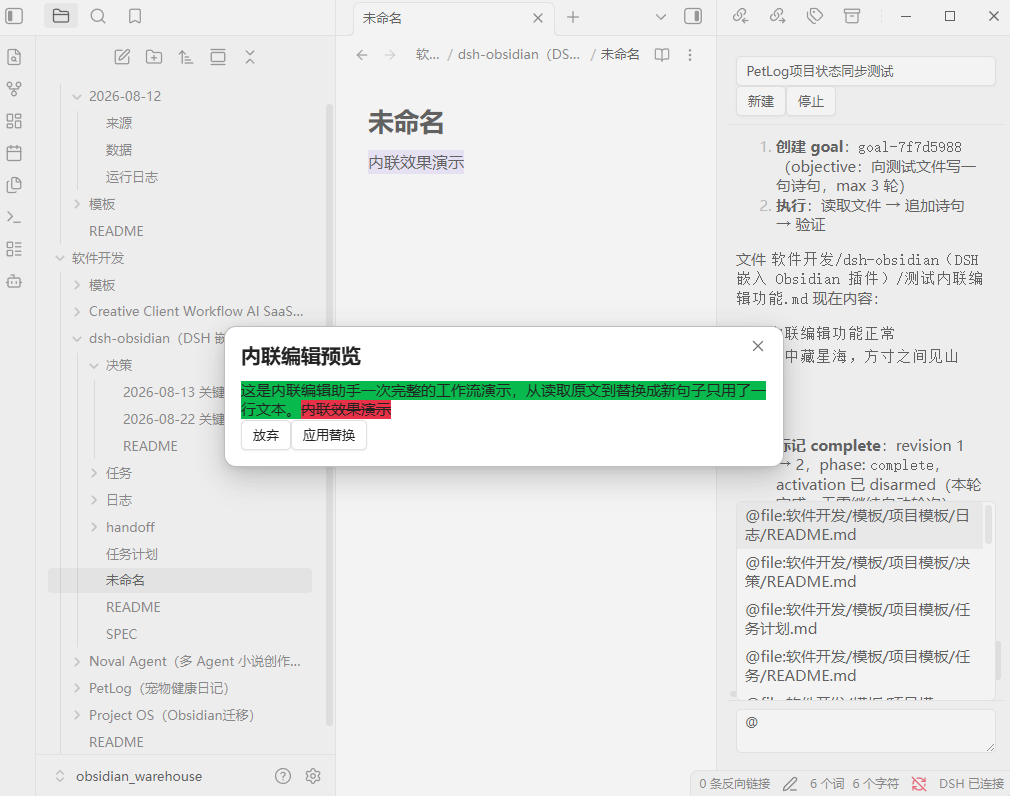
- Inline edit with a word-level diff — select text, give an instruction, review the diff, apply;
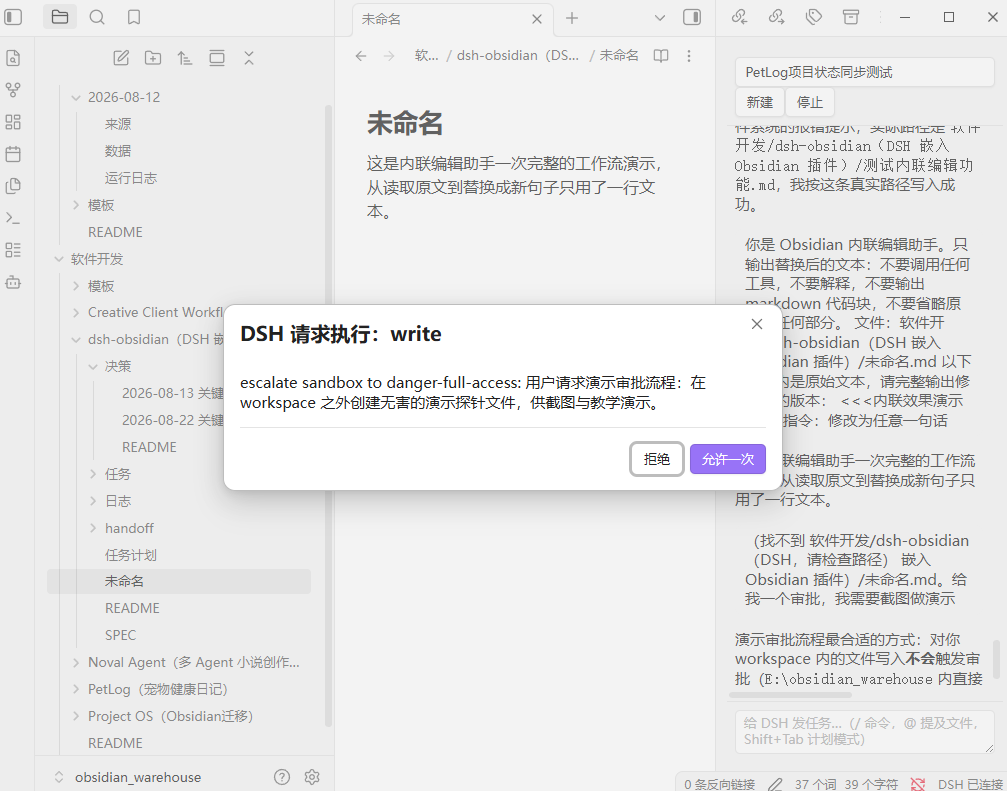
Cmd+Zundoes it. - Approvals land where you are — DSH's write/exec confirmations and its questions appear inside the panel, no window switching, and they survive a reconnect.
- Connection diagnosis —
401/404/ connection-refused are translated into an actionable conclusion (Settings → Diagnose connection). - Engineered to last — 550+ unit tests, strict TypeScript build, byte-reproducible artifacts, listed in the community directory.
The plugin is a client, not a runtime: it needs a local DSH to talk to (see Prerequisites). If something looks wrong, the diagnose button will tell you which of the two it is.
Prerequisites
- A running DSH instance on your machine. Don't worry about the port: since DSH 0.2.1 the desktop app is assigned a random port on each launch (it used to pin
19387), and thedsh webcommand defaults to3080. The plugin auto-discovers the real port on startup — it tries the static candidates first, then reverse-resolves the Cookie store that the DSH desktop app writes, to locate the random port — and saves it back to settings — you normally don't need to type an address. It also re-discovers while running: restart DSH without touching Obsidian and the plugin notices the connection repeatedly failing, finds the new port, and switches over on its own (typically ~4s) — no reload needed - Your vault must be inside DSH's accessible directory scope (decided by DSH's sandbox / workspace config)
- Obsidian ≥ 1.7.2, desktop build only. These are two different constraints:
1.7.2is an Obsidian version requirement (sidebarrevealLeafand related APIs). Upgrade Obsidian if you are below it.- "Desktop build" is an Obsidian client-form requirement, unrelated to the version: the plugin signs its auth cookie with the secret in
~/.dsh/.credentials.yaml, and mobile has no Node filesystem access, so it cannot sign one. HenceisDesktopOnly: true. - This does not constrain how you run DSH: auth uses the same
client-connection/browser-sessionsecret in~/.dsh/.credentials.yaml, regardless of whether DSH runs as the desktop app or viadsh web;3080(thedsh webdefault) is already a built-in static candidate. The desktop app is fully verified on real hardware;dsh webfollows the same auth and protocol path but has not been separately end-to-end tested (see the compatibility table below).
Features
Conversation
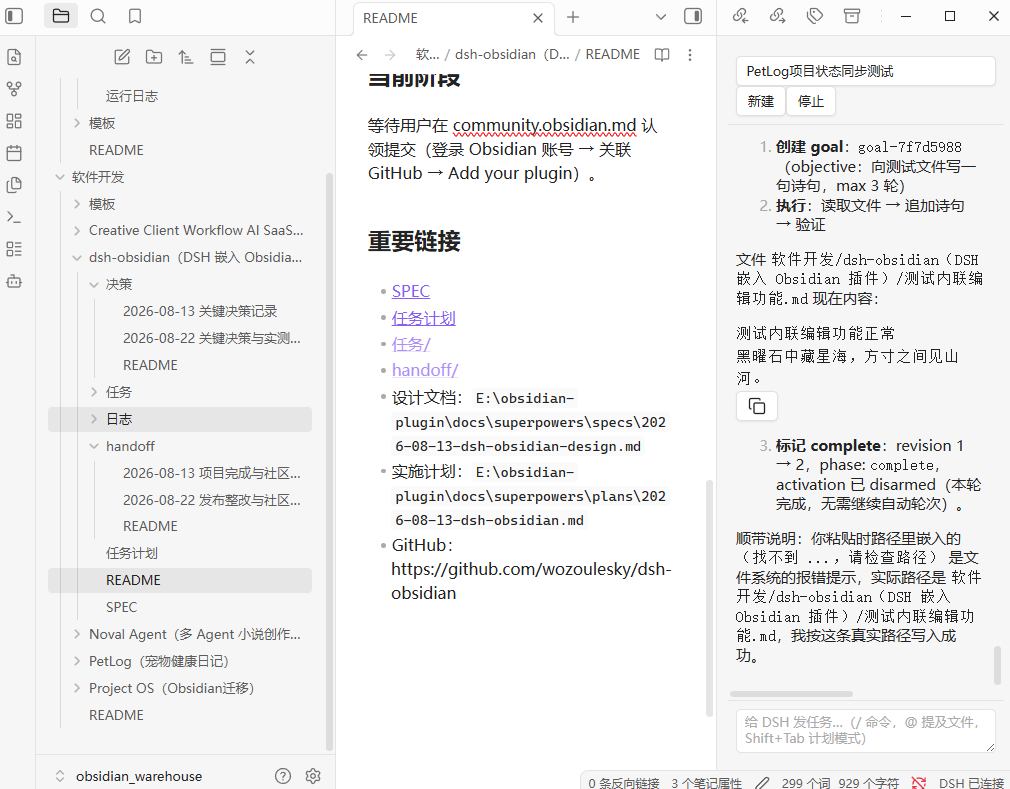
- Chat sidebar — streamed responses, tool-call cards, session switching and creation, "load older" pagination, and automatic re-sync after reconnects
- Approval & question popups — retryable, grouped per session, replayed after a reconnect
- Thinking process — collapsible reasoning block above each reply, streamed live and folded once the turn completes
- Image attachments — attach images from your vault to a prompt; the agent reads them directly
Editing your notes
- Inline edit — select text + hotkey → instruction → word-level diff preview → apply (editor selection is re-validated before applying; large selections degrade to a plain confirm dialog)
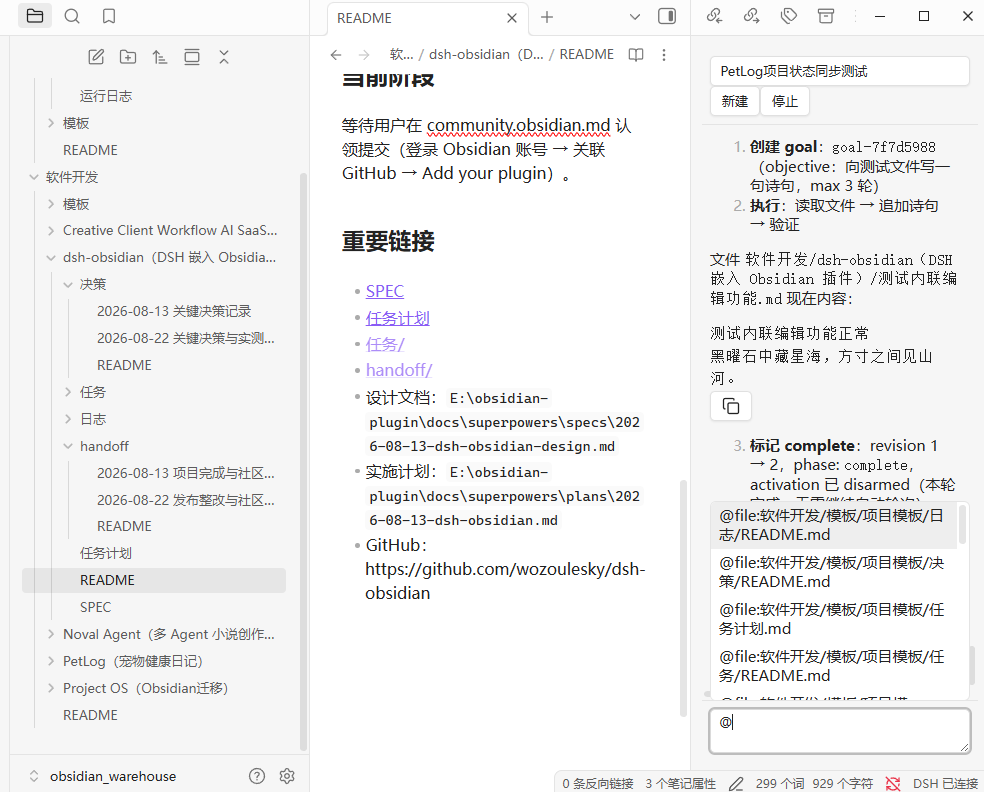
- @mentions — type
@to pick vault files (@file:path, content injected) or folders (@folder:path, directory tree injected), with truncation and missing-file notices - Slash commands & plan mode — commands come from the running DSH (so the list always matches your install), plus the local
/clear;Shift+Tabtoggles plan mode with a status banner
Context & control
- Model & reasoning effort — pick provider/model and reasoning effort from the panel; the list is grouped from your DSH model catalog
- Context usage — a status line showing projected tokens against the context window, plus output tokens
- Todo list — the agent's live todo list with pending / in-progress / completed states
- Goal panel — view and control a long-running goal (create / pause / resume / complete / clear)
Long sessions stay bounded: when DSH compacts history, replaced messages collapse into the summary instead of piling up.
Screenshots
| Chat sidebar | @ Mention picker |
|---|---|
 |
 |
| Inline edit diff preview | Approval popup |
|---|---|
 |
 |
| Thinking process & context usage | Todos & goal |
|---|---|
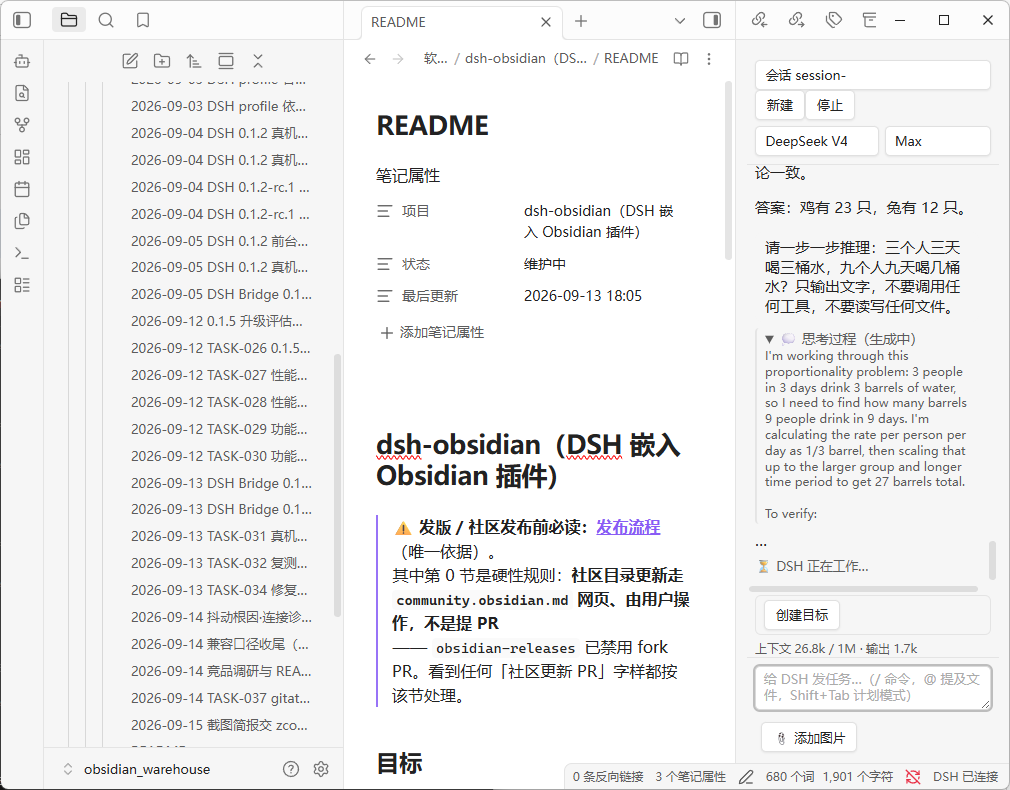 |
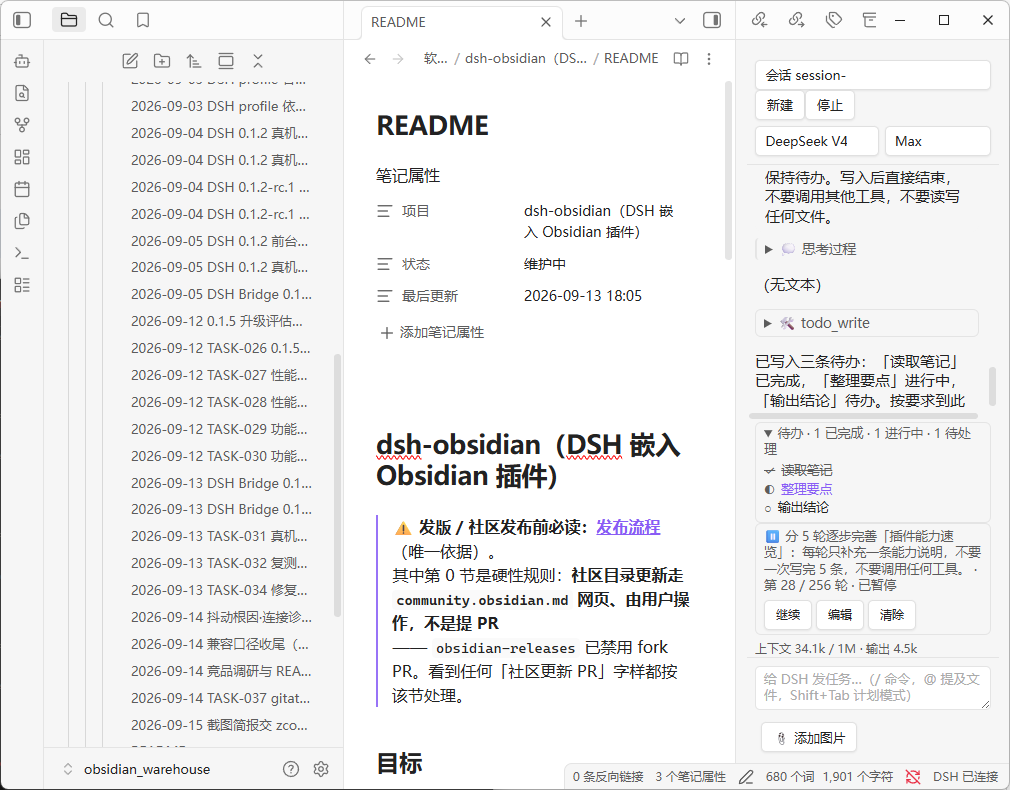 |
| Model & reasoning effort | Connection diagnosis |
|---|---|
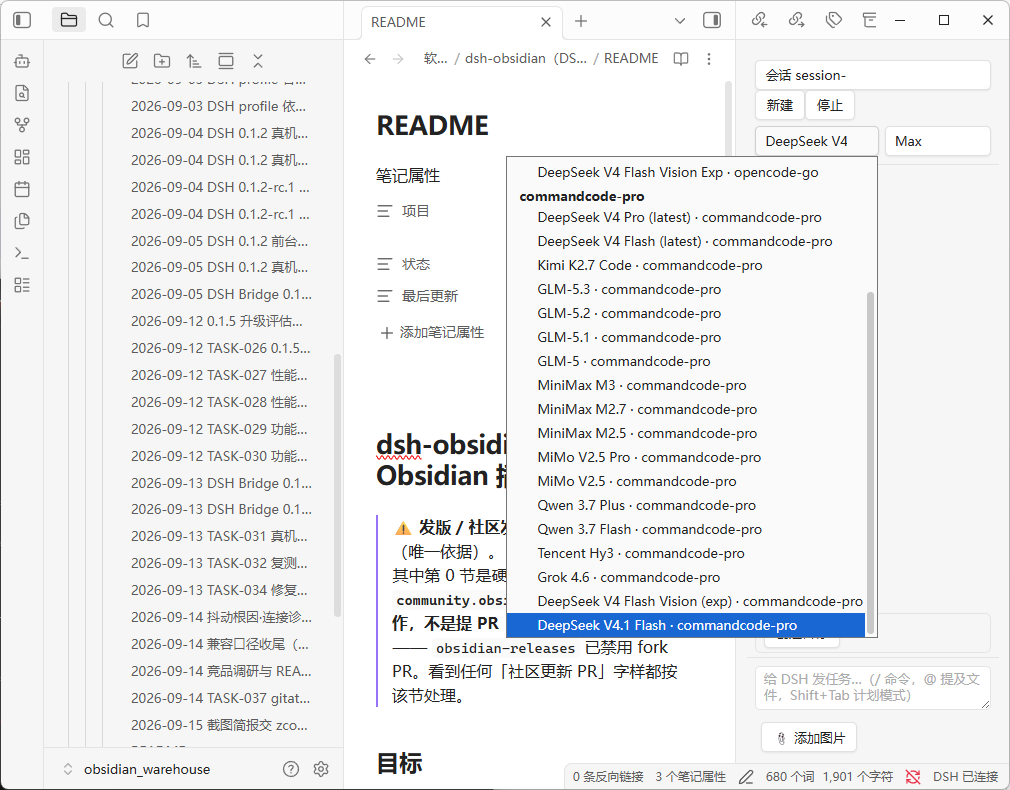 |
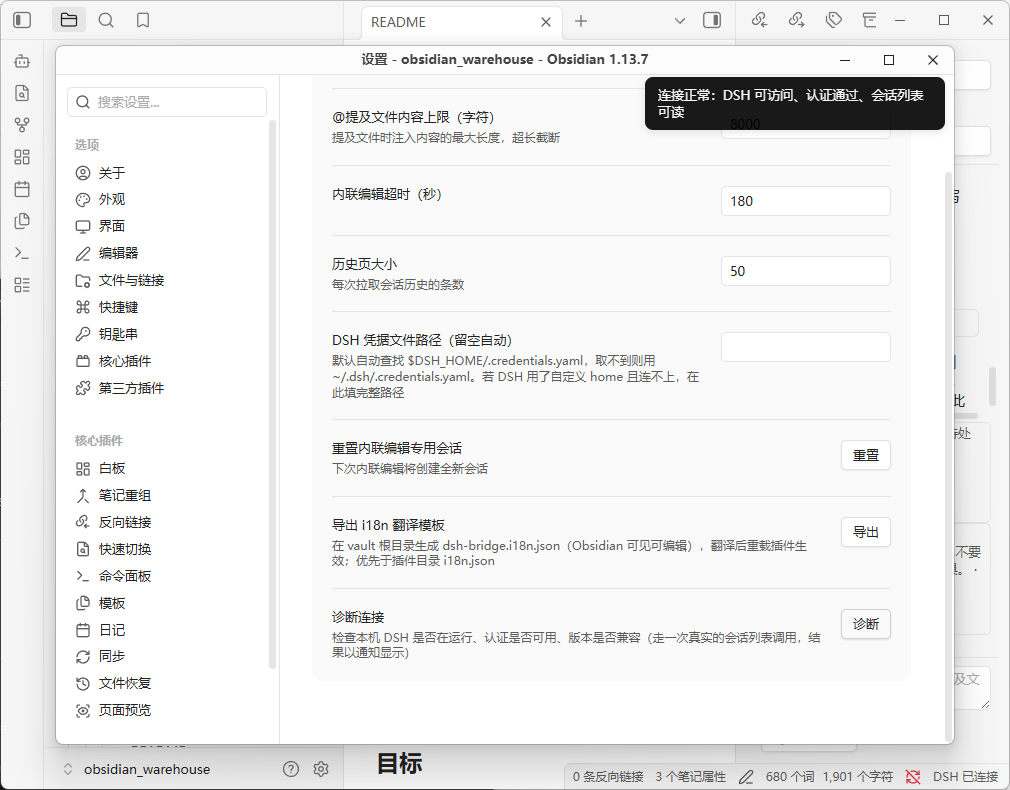 |
Installation (Community Plugins)
- Settings → Third-party plugins → Browse → search DSH Bridge → Install → Enable (desktop only)
- Just make sure DSH is running — no address to fill in: the plugin auto-discovers the real port and saves it back to settings. If DSH starts later — or restarts on a new port — the plugin re-discovers and reconnects by itself; click Diagnose in the plugin settings only if it still can't connect
The UI language follows your Obsidian language setting automatically (Chinese in Chinese locales, English elsewhere) — no manual switching.
Prefer a manual install? Grab the latest artifacts from the GitHub releases page and extract them into vault/.obsidian/plugins/dsh-bridge/.
Installation (local / dev)
npm install && npm run build- Copy
main.js,manifest.json, andstyles.cssintovault/.obsidian/plugins/dsh-bridge/ - Settings → Community plugins → enable "DSH Bridge"
Privacy
All data flows through your local DSH to its configured model providers, using the same policy as the DSH Web GUI. The plugin sends no telemetry.
Translations / Localization
The plugin ships with all UI strings in a key-value table (built-in default: Chinese). To switch the UI to another language:
- In the plugin settings tab, click Export i18n template — this creates
dsh-bridge.i18n.jsonat the root of your vault (visible in Obsidian's file explorer). - Replace the values with your translations (or hand the file to your local DSH / any translator).
- Reload Obsidian (or disable/enable the plugin) to apply — repeatable.
The vault-root file takes priority; a legacy i18n.json inside the plugin directory (.obsidian/plugins/dsh-bridge/) is still read as a fallback. Missing keys or invalid JSON silently fall back to the built-in defaults. In v0.1.x, model-facing instructions (inline-edit prompt, @mention expansion) intentionally remain in Chinese; the UI-only string table is safe to translate.
Development
npm install
npm run dev    # watch build
npm test       # unit tests
Architecture
Transport: unary RPC over Node http (POST /api/<namespace>/<method> with {args} payload + self-signed browser-session cookie); live streams over a bundled ws WebSocket (/api/remote.mux — session/follow, session/control, $events). A core layer folds session events into view models; a UI layer renders the sidebar and modals.
DSH compatibility
| DSH version line | Plugin version | Status |
|---|---|---|
0.2 line (verified on 0.2.0-rc.2) |
0.1.8+ (current) | ✅ Protocol-layer verification and in-Obsidian UI acceptance both pass (2026-10-01): the plugin's own code connected to a live 0.2.0-rc.2 over real HTTP + WebSocket — authentication, all 18 RPC endpoints, and the $events / session/control / session/follow streams pass; and a real Obsidian 1.13.7 accepted @-mentions, streaming output, approval-gated file writes, inline-edit diff, and port auto-detection. 0.2 did not change auth, the RPC envelope, or the WS frame protocol, so no upgrade work is needed. The one gotcha is the port: the desktop app used to pin 19387 but since 0.2.1 it is assigned a random port on each launch (dsh web still defaults to 3080) — the plugin auto-discovers it (static candidates first, then reverse-resolving the desktop app's Cookie store), so you normally don't set it by hand. Per-item record and verification boundaries: docs/dsh-0.2-compat-audit-2026-10-01.md (see its expiry note for the port claim) |
0.1.5 line (verified on 0.1.5-rc.1) |
0.1.6+ (incl. 0.1.7) | ✅ Verified end to end on a real vault (2026-09-13): streamed output, approvals, inline-edit diff, reconnect |
dsh web launch mode (defaults to port 3080) |
0.2.0+ | ⚠️ not separately end-to-end tested. Auth, RPC envelope, and WS frame protocol are identical to the desktop app (same client-connection/browser-session secret in ~/.dsh/.credentials.yaml), and 3080 is already the first built-in static candidate, so it is expected to work; but as of 0.2.0 it has not been run through full acceptance on a real dsh web instance. Please open an issue if you hit problems. |
0.1.2 line (0.1.2-rc.1, 0.1.2) |
0.1.5+ | ✅ Supported — the contract this plugin was built against. 0.1.6+ keeps it working through capability probing: the 0.1.5 streaming channel is requested field by field and dropped automatically if the server rejects it. Verified on a real machine at plugin 0.1.5, covered by unit tests since |
before 0.1.2 (e.g. 0.1.0-rc.6) |
≤ 0.1.4 | ❌ Not supported — returns 401/404. Upgrade DSH, or stay on plugin 0.1.4 |
| newer than 0.2 (0.3+) | latest plugin | ⚠️ Unverified — DSH ships often and has already changed this plugin's contract twice (0.1.2 → 0.1.5). If the panel breaks after a DSH upgrade, check for a plugin update first |
Direct filesystem access (disclosed for community review): DSH's browser-session authentication requires reading the signing secret from ~/.dsh/.credentials.yaml (the DSH process's credentials store, outside the vault). The plugin reads this file read-only — it never writes, never logs its contents, and only uses the secret to sign the per-request cookie required by DSH's browser-session API (0.1.2-rc.1 onwards). The vault API cannot reach this path (it is outside the vault root), so Node fs is required for this one purpose.
Related
- obsidian-project-management — the Obsidian-based project management skill that governs this plugin's development workflow (project records are tracked in a local Obsidian vault).
Related plugins
dsh-weknora
 Tencent
/WeKnora/packages/dsh-weknora
把 WeKnora 知识库接入 dsh 的四个只读工具:列出知识库、混合检索原文片段、按顺序还原单篇文档,以及直接取用 WeKnora 自己带引用的 RAG 或 ReAct agent 回答(含可续聊的 session id)。
dsh plugin --profile web add @wxg-prc-cpg/dsh-weknoratreg
 superdesigndev
/treg
给 Agent 的工具目录:按「要做的事」检索约 2,600 个外部接口(SEO 与 SERP、外链、社交、人物与公司信息补全、广告库、抓取),查看参数与单次调用价格后直接调用,凭据由服务端注入。附带技能,MCP 行在未设置 TREG_TOKEN 前保持禁用。
dsh plugin --profile web add github:superdesigndev/tregdsh-anchored-standard
 xiaobright
/dsh-anchored-standard
两阶段 DeepSeek Harness 预设:先 Minimal 对齐的 bootstrap,再切完整 Standard 工具(Project2 98/99)
dsh plugin --profile web add github:xiaobright/dsh-anchored-standardDeepseek-Harness-EAC
 zouyuxuan122
/Deepseek-Harness-EAC
把官方 deepseek-ai/deepseek-harness(@deepseek-ai/dsh,一切皆插件的 agent harness) 封装为开箱即用的 Windows / Linux 桌面客户端,并在其上拥抱社区万象:皮肤、插件、工具、记忆——你所能想到的,一键皆可装。
dsh plugin --profile web add github:zouyuxuan122/Deepseek-Harness-EACDSHA-dshapp
 DSH-APP
/DSHA/app/src/main/assets/app-integration
DSHA 后台任务、网页返回和草稿恢复适配
dsh plugin --profile web add 'github:DSH-APP/DSHA#a6d4de140acc7a085d6afd4b9d413404e004b939&path:/app/src/main/assets/app-integration'deepseek-harness-remote
 liguobao
/deepseek-harness-remote
基于 DeepSeek Harness 插件机制的多端远程访问方案,让桌面端与 Android 端安全连接并操作远程 Harness。(A multi-device remote access solution built on the DeepSeek Harness plugin system, enabling desktop and Android clients to securely connect to and operate a remote Harness.)
dsh plugin --profile web add github:liguobao/deepseek-harness-remote