
Themes & Appearance
dsh-theme-minecraft
10086ggqq/dsh_theme_Minecraft · ★ 3
 10086ggqq
把 DeepSeek Harness 变成 Minecraft Java Edition 风格——WebGL 旋转全景主菜单、存档式会话选择、四种游戏模式对应 Agent 预设、世界内 HUD 聊天台、像素风工具卡片与审批面板、AI 思考时触发跑酷小游戏、8-bit 合成音效与自定义背景音乐、五类互动桌宠与红石粒子特效。零侵入 DSH 核心源码,经典界面一键切回。
Manifest details
安装
dsh plugin --profile web add 'github:10086ggqq/dsh_theme_Minecraft#5284f45d87b47c533c7899e82beac8134b43d205'GitHub 源码安装:首次需按提示配置 allowBuilds 构建授权后重试
For install and environment setup, plus plugin development tutorials, see DSH community docs ↗
README
Table of contents


dsh-theme-minecraft
A Minecraft Java Edition theme for the DeepSeek Harness web UI — run dsh web and land on the title screen, where the world is your codebase and the villager is a coding agent.



How it works: this is a stock DSH bundle plugin that touches nothing in the DeepSeek Harness core. Sessions, message streams, tool calls, approvals, presets, workspaces, and credentials all run over the existing DSH JSON-RPC / WebSocket API — every state on screen comes from real data, never mocked.
Features
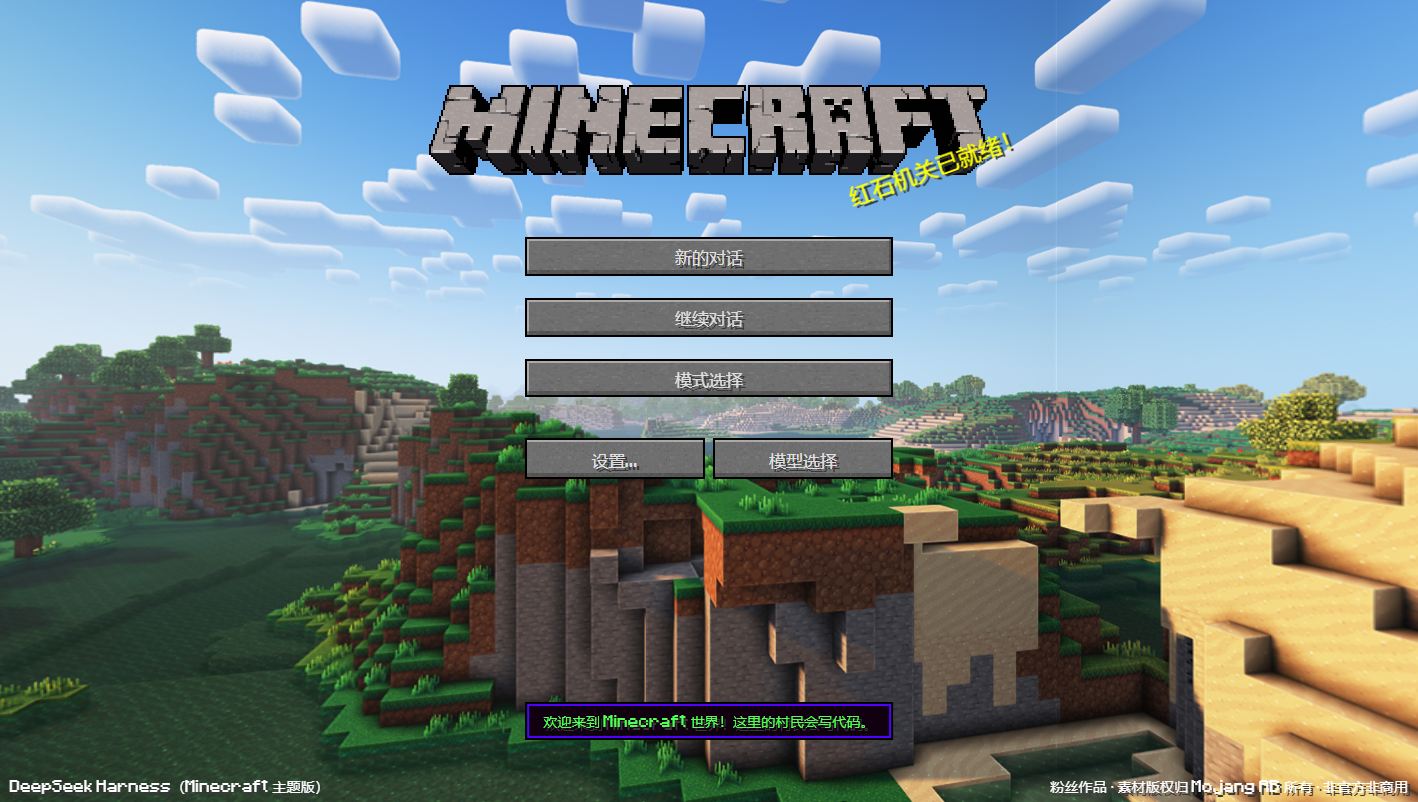
- The actual title screen — rotating WebGL panorama, pixel logo, yellow splash text, stone buttons; the URL printed by
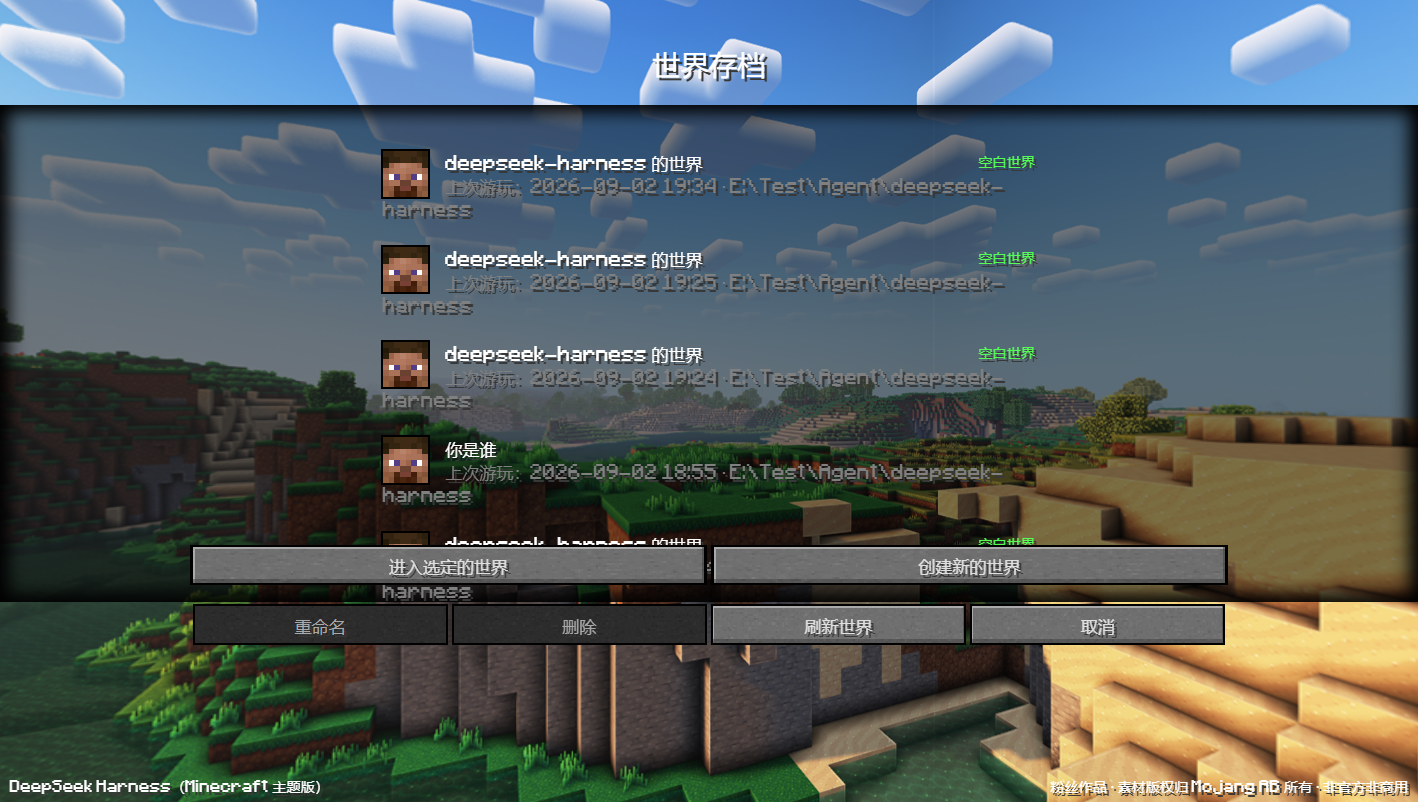
dsh webis the menu - Sessions as world saves — past conversations appear on a save-slot screen; entering, renaming, and archiving all map to real
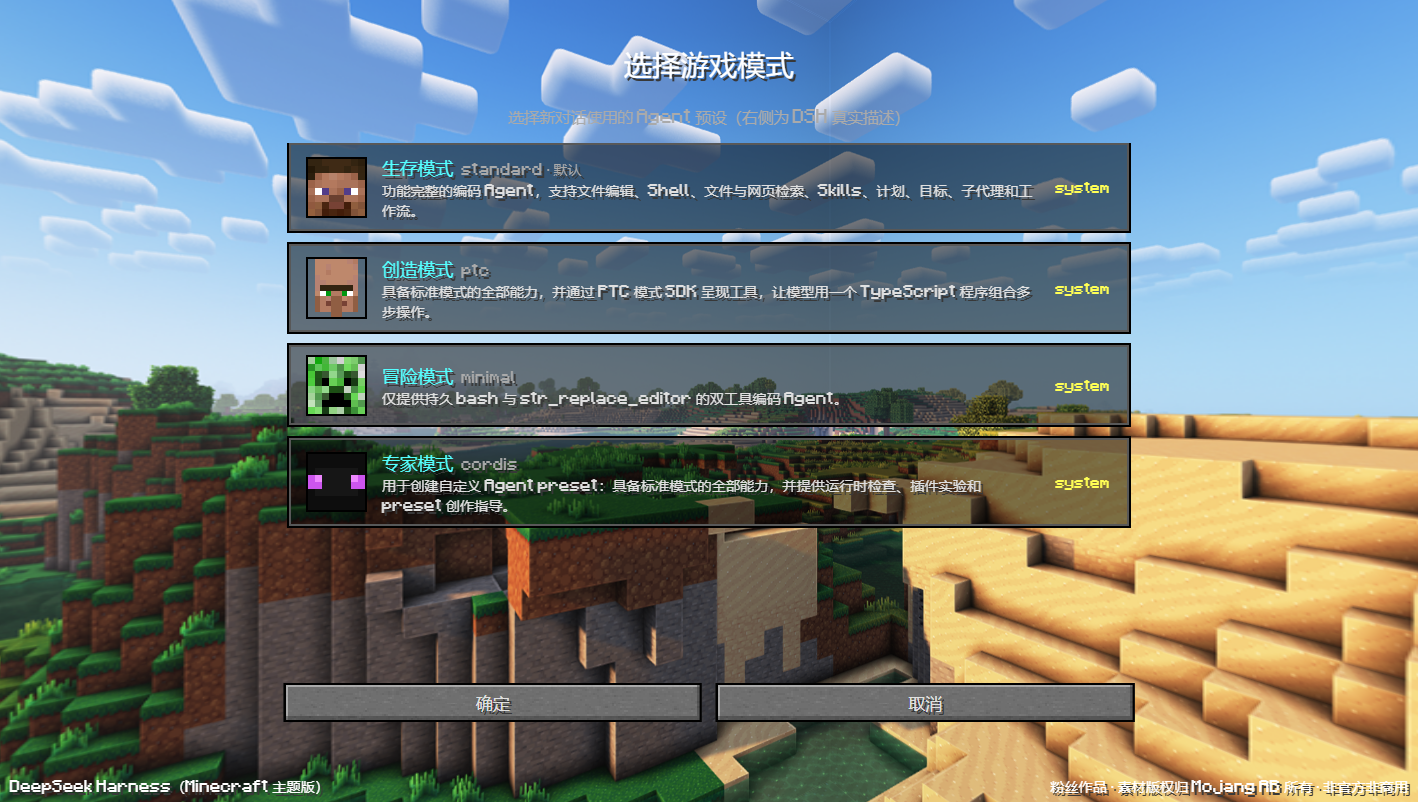
session/*calls - Game modes = agent presets — Survival / Creative / Adventure / Expert skins over DSH's standard / ptc / minimal / cordis presets
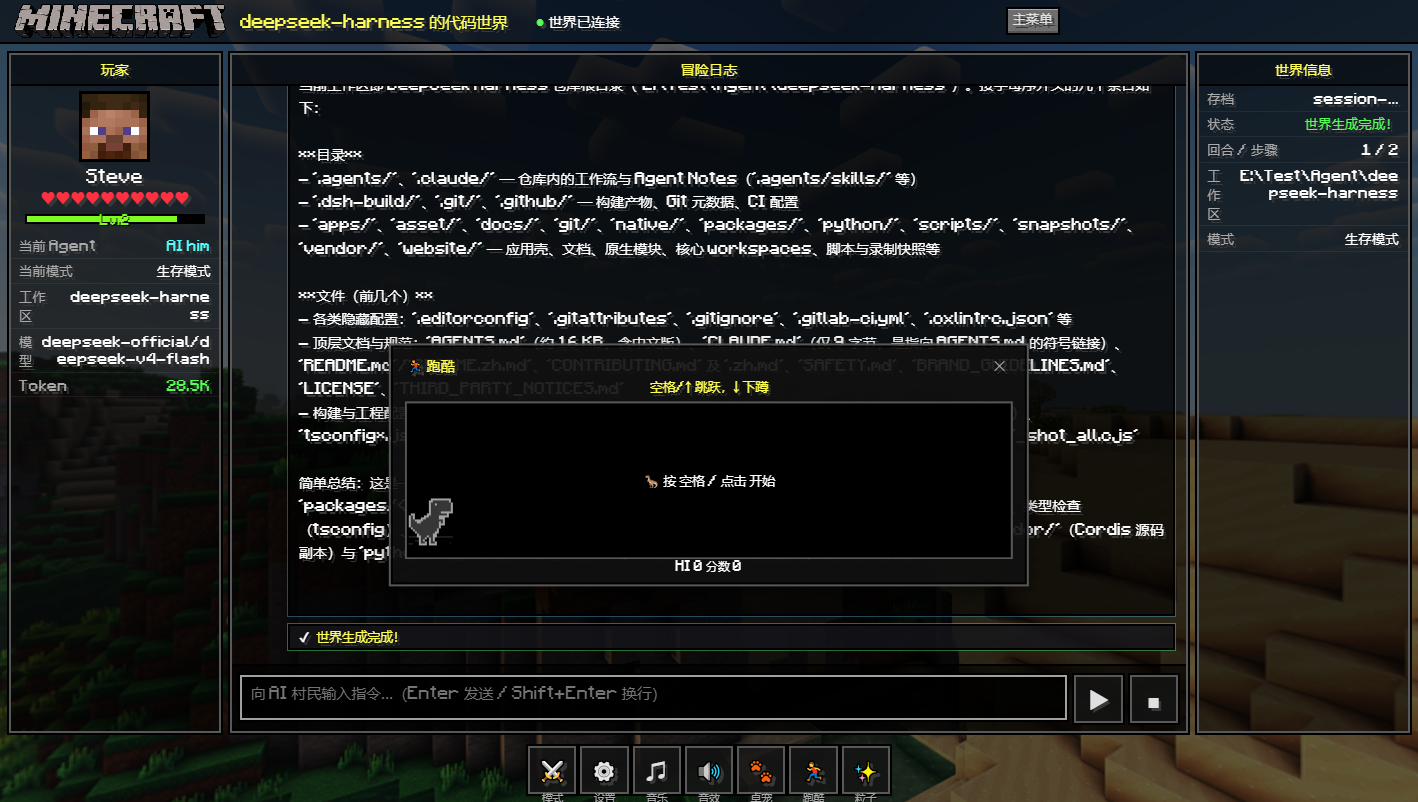
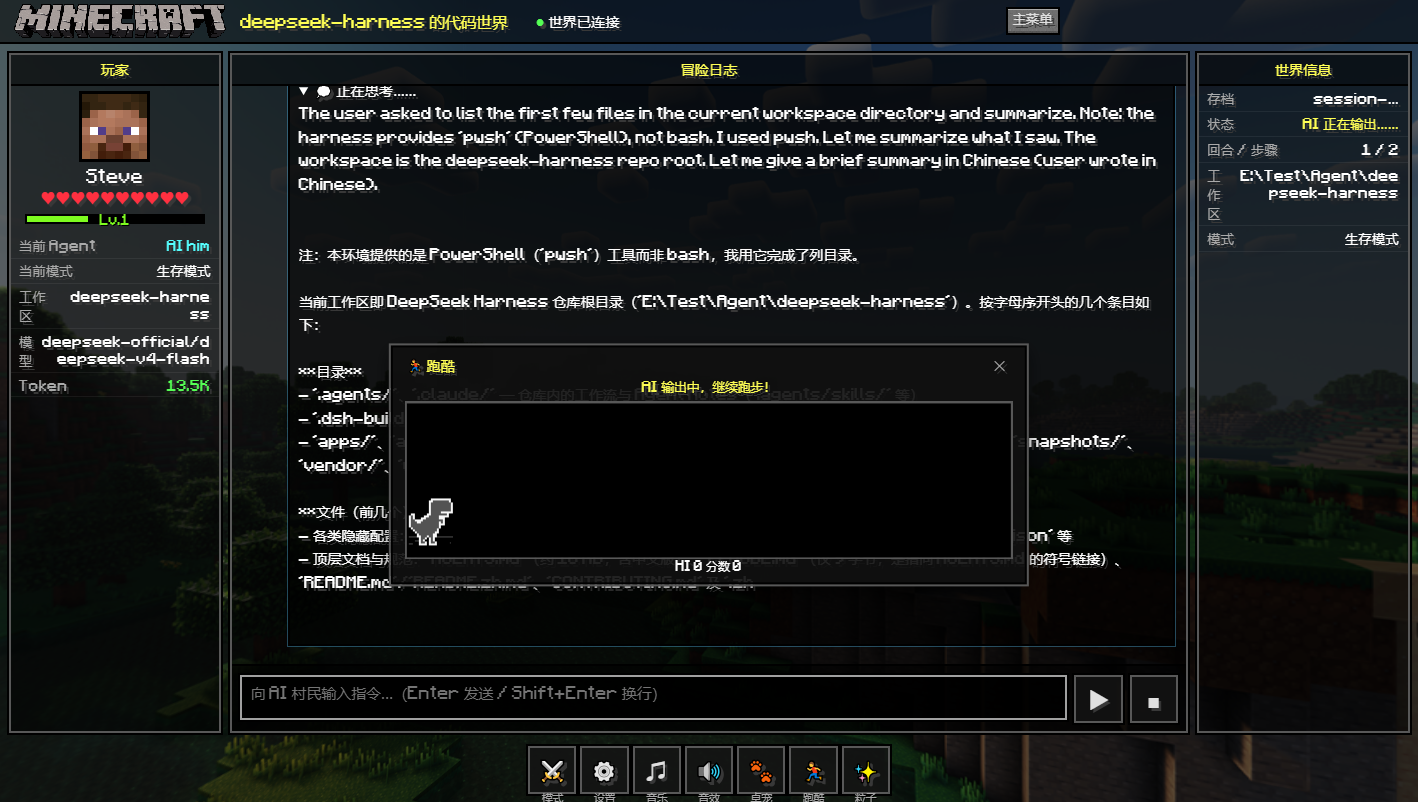
- In-world chat console — talk to "AI him" with streaming replies, collapsible reasoning, and a live world-info panel (model, tokens, workspace)
- Minecraft-flavored tool cards — opening a book, wiring redstone, mining a block: every real
tool/callandtool/resultgets a pixel-art card - Approvals without breaking immersion — a pending approval pauses the parkour mini-game until you allow or deny it
- Villager small talk — the AI's clarifying questions show up as villager dialogue; answers flow straight back to DSH
- A parkour mini-game that only runs when the AI does — Chrome's offline T-Rex Runner (Chromium BSD license), driven strictly by real THINKING / STREAMING / TOOL_CALLING states, never faked while idle
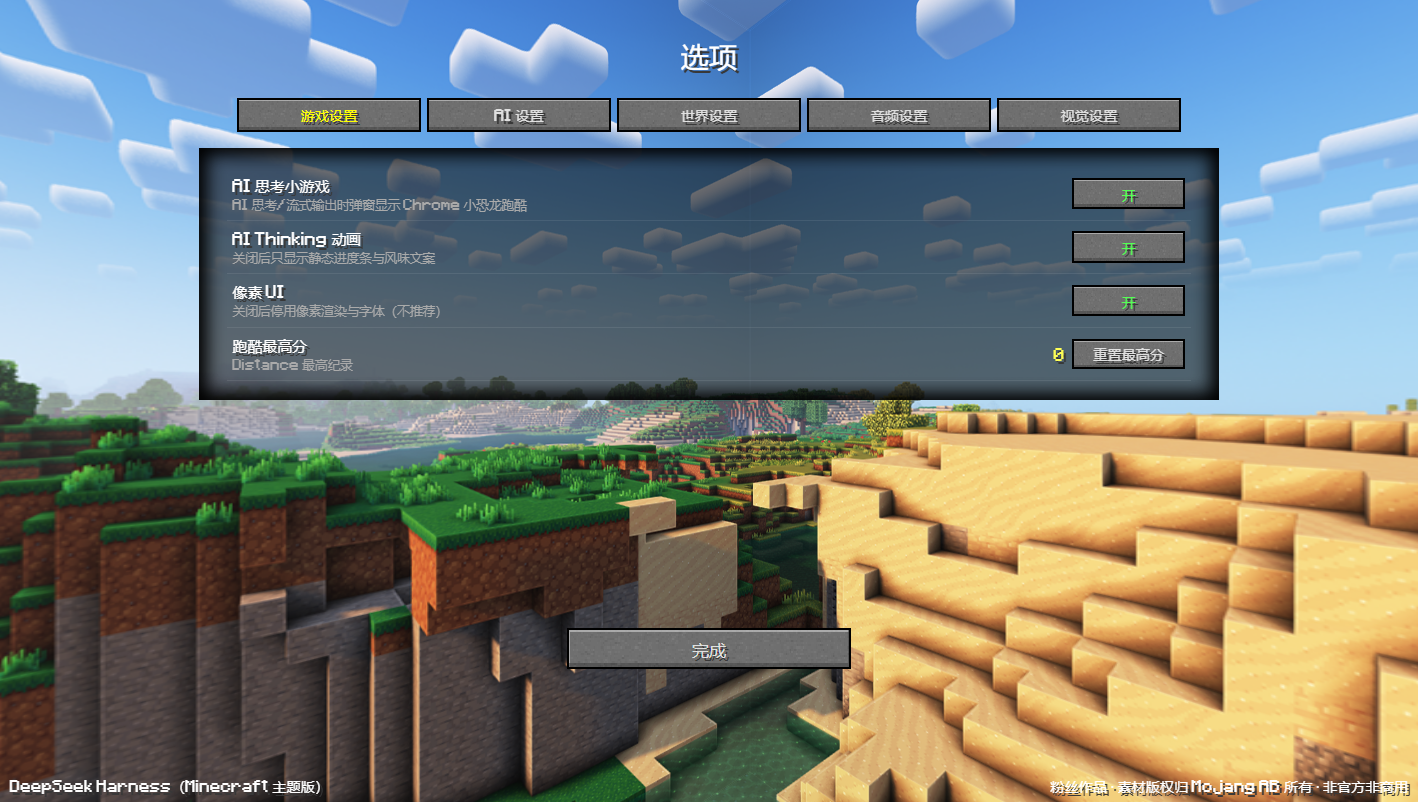
- Five-tab settings — game / AI / world / audio / visuals: preferences in localStorage, music in IndexedDB, API key in DSH's credential store
- Synthesized 8-bit audio — WebAudio sound effects plus your own background tracks (MP3 / WAV / OGG / FLAC / M4A / AAC / OPUS)
- Desktop pets & particles — an interactive companion (axolotl / cat / wolf / creeper / ghast with feeding, affinity, and an in-app gallery) plus XP / redstone particles (capped at 80); each toggleable
- Zero lock-in — the classic DSH web UI stays untouched, one click away at
/index.html
Getting Started
1. Prerequisites
| Requirement | Details |
|---|---|
| Node.js | ^22.19 or >=24 (DeepSeek Harness runtime) |
| DeepSeek Harness | Installed, with the dsh command on your PATH |
| Browser | Any modern browser with WebGL and WebSocket support |
| DEEPSEEK_API_KEY | Required for real conversations (see Configure) |
2. Install
Option A — install into the web profile (recommended)
dsh plugin --profile web add dsh-theme-minecraft    # once published to npm
dsh plugin --profile web add ./dsh-theme-minecraft  # or from a local checkout
The plugin lands in ~/.dsh/profiles/web and mounts automatically on the next dsh web.
Option B — run from source (development)
From the DeepSeek Harness repository root:
pnpm dsh web --patch ./dsh-theme-minecraft/cordis.source.patch.yml --no-open
# then open http://127.0.0.1:3080/
3. Configure
- Sign in with the
?token=URL printed bydsh web(same signed-cookie flow as the stock UI — the theme reusesconnection.authorizeIndexand bypasses nothing). - Provide an API key, either way works:
- In the theme: main menu → Options… → AI Settings → save (writes through
credentials/setinto DSH's credential store; values only ever go in); - In the environment: put
DEEPSEEK_API_KEYin your.env.
- In the theme: main menu → Options… → AI Settings → save (writes through
4. Run
dsh web
Open the printed URL and you are on the Minecraft main menu. The classic interface
remains available at http://<host>:<port>/index.html — the theme's "Quit Game"
button leads there too.
Tech Stack
| Technology | Role | Version / Compatibility |
|---|---|---|
| JavaScript (ESM) | All plugin and frontend logic, zero runtime deps | ES2022+ |
| Node.js | Host runtime | ^22.19 or >=24 |
| Cordis plugin system | Plugin lifecycle and dependency injection | >=0.x (peer dependency) |
| WebSocket + JSON-RPC | All real communication with DSH (RPC / streams) | Built into DSH |
| WebGL | Cubemap panorama on the main menu | Native, no three.js |
| Canvas 2D | Parkour mini-game rendering (T-Rex in iframe) | Native |
| Web Audio API | 8-bit sound synthesis and music playback | Native |
| IndexedDB / localStorage | Settings and music persistence | Native |
Project Layout
dsh-theme-minecraft/
├── .github/
│   └── workflows/
│       └── static.yml             # Auto-deploys demo/ (the panorama demo site) to GitHub Pages
├── demo/                          # Minecraft-Panorama demo site (GitHub Pages)
│   ├── index.html                 # Main-menu demo (three.js panorama background)
│   ├── 404.html                   # Pages 404 page
│   ├── asset/                     # Six cubemap faces + UI textures
│   ├── css/                       # Demo-site styles and pixel fonts
│   ├── figure/                    # Character faces (Steve / villager / creeper)
│   ├── loading/                   # Loading-screen demo page
│   └── worlds/                    # World-select demo page
├── docs/
│   └── 开发文档.md                # Design & development notes (Chinese)
├── screenshots/                   # Screenshots used in this README
├── web/                           # The theme itself (single-page app)
│   ├── index.html                 # SPA shell
│   ├── manifest.webmanifest       # PWA manifest
│   ├── css/
│   │   ├── minecraft.css          # Main menu / saves / options visuals
│   │   └── hud.css                # In-world HUD
│   ├── fonts/                     # Minecraft-style pixel fonts (ttf / woff)
│   ├── assets/                    # Official art: panorama, GUI, faces
│   ├── js/
│   │   ├── rpc.js                 # Browser protocol client (unary RPC + streams + $events)
│   │   ├── panorama.js            # Native WebGL cubemap panorama
│   │   ├── menu.js                # Main menu / saves / modes / options
│   │   ├── world.js               # In-world HUD, AI state machine, approval & question panels
│   │   ├── store.js               # localStorage settings + IndexedDB music
│   │   ├── audio.js               # WebAudio synth SFX + background music
│   │   ├── particles.js           # XP / redstone particles (capped at 80)
│   │   ├── pet.js                 # Desktop pet (iframe hosting web/pet/pet.html)
│   │   ├── ui.js                  # Dialogs / toasts / splash library / mode flavor
│   │   └── main.js                # Routing and startup
│   ├── pet/                       # Pet app itself (pet.html + picture/ assets)
│   └── mini-games/
│       ├── dino-runner.js         # Parkour wrapper (T-Rex iframe adapter, createDinoGame factory)
│       └── t-rex/                 # Chrome offline T-Rex Runner (Chromium BSD license)
├── index.js                       # Host plugin: mounts the / and /minecraft routes
├── cordis.patch.yml               # Bundle-layer mount declaration (DSH plugin marker)
├── cordis.source.patch.yml        # In-repo source debugging layer
├── package.json                   # dsh.bundle.patch declaration (bundle form)
├── LICENSE                        # MIT
├── .gitignore
├── README.md
└── README_EN.md
Screenshots
Main menu — the Nether panorama spins behind the logo, and yes, that splash text is a warning:
World saves — past sessions rendered as save slots; enter, rename, or refresh:
Game-mode picker — four modes, four agent presets, with DSH's real descriptions on the right:
In the world — chatting with "AI him"; the T-Rex parkour game pops up while the AI thinks:
Tools & reasoning — tool cards, collapsible thinking, XP particles on completion:
Options — five tabs: game / AI / world / audio / visuals:
The repo also ships a standalone three.js panorama demo site (the
demo/directory, the Minecraft-Panorama demo, auto-deployed to GitHub Pages on every push to main). The theme itself does not use three.js — its panorama is raw WebGL.
License
Released under the MIT license.
⚠️ Asset notice: the name Minecraft and all official assets shipped here (panoramas, GUI textures, character faces, pixel fonts) are © Mojang AB / Microsoft. This project is a non-commercial fan theme, not affiliated with or endorsed by Mojang or Microsoft. Do not use it in commercial products; Mojang may request removal at any time.
Contributing
Issues and pull requests are welcome. A few conventions keep things moving.
Filing an issue
- Bug reports should include:
- Environment: OS, browser and version, Node.js version, DeepSeek Harness version;
- Steps to reproduce (starting from which command), expected vs. actual behavior;
- Browser console output and
dsh webterminal logs.
- Feature requests should describe: the scenario you want to solve, how it should feel in Minecraft terms, and the DSH capability it maps to (if known).
Opening a pull request
1. Fork the repository
2. Create a branch   git checkout -b feat/your-feature   # or fix/your-fix
3. Commit            git commit -m "feat: add xyz"        # Conventional Commits
4. Push & open a PR  Push to your fork, open a PR against main
5. Review            Address feedback; a maintainer merges once approved
Please attach before/after screenshots for UI changes, and keep PRs free of modifications to the DeepSeek Harness core — theme capabilities should only ever go through DSH's existing plugin mechanism and APIs.
Related plugins
dsh-web-ui
 dsh-external
/dsh-web-ui
DSH Web UI 皮肤集合(skins/qq98、ths,热插拔客户端插件包)
dsh plugin --profile web add github:dsh-external/dsh-web-uidsh-wallpaper-engine
 elysia395
/dsh-wallpaper-engine
DSH 网页界面壁纸:把本机 Wallpaper Engine 的 Video/Web 壁纸实时播放到聊天界面后方,Scene 壁纸提取主纹理作为静态帧,支持内容分级/类型过滤、自定义壁纸上传与 iOS 液态玻璃设置窗口。
dsh plugin --profile web add github:elysia395/dsh-wallpaper-enginedsh-deep-whale
 Small-tailqwq
/dsh-deep-whale
DSH Web 鲸鱼娘皮肤系列(深海女仆工坊 maid-atelier)。
dsh plugin --profile web add github:Small-tailqwq/dsh-deep-whalemaid-atelier
Small-tailqwqSmall-tailqwq/dsh-deep-whale/maid-atelier
DSH Web 鲸鱼娘皮肤系列(深海女仆工坊 maid-atelier)。
dsh plugin --profile web add github:Small-tailqwq/dsh-deep-whale#path:/maid-atelierdeepseek-harness-desktop
 ningbainb
/deepseek-harness-desktop
开源Windows桌面客户端和GUI——DeepSeek Harness——零配置安装器,包含Codex、插件、技能、SSH、移动远程访问和11种皮肤。
dsh plugin --profile web add github:ningbainb/deepseek-harness-desktopopen-sea-skin
 d-dev0101
/open-sea-skin
Interactive website · 中文 · Architecture · Release guide
dsh plugin --profile web add github:d-dev0101/open-sea-skin